
May 10
Learning Power Bi without Structure?
I got you covered
PowerBI-Learning-Roadmap/
│
├── 01_Foundation_of_BI/
│ ├── What_is_Business_Intelligence
│ ├── Data_vs_Information_vs_Insights
│ ├── KPI_and_Metrics
│ ├── Reporting_vs_Analytics
│ ├── OLTP_vs_OLAP
│ └── Data_Driven_Decision_Making
│
├── 02_PowerBI_Introduction/
│ ├── PowerBI_Desktop
│ ├── PowerBI_Service
│ ├── PowerBI_Mobile
│ ├── PowerBI_Gateway
│ ├── Licensing_Concepts
│ └── PowerBI_Ecosystem
│
├── 03_Data_Sources_and_Connections/
│ ├── Excel
│ ├── CSV_and_Text
│ ├── SQL_Server
│ ├── APIs
│ ├── SharePoint
│ ├── Azure_Sources
│ ├── Folder_Connections
│ └── Web_Data
│
├── 04_Power_Query_ETL/
│ ├── Query_Editor
│ ├── Data_Cleaning
│ ├── Remove_Duplicates
│ ├── Merge_Queries
│ ├── Append_Queries
│ ├── Pivot_and_Unpivot
│ ├── Conditional_Columns
│ ├── Custom_Columns
│ ├── Parameters
│ ├── Data_Types
│ ├── Error_Handling
│ └── M_Language_Basics
│
├── 05_Data_Modeling/
│ ├── Tables_and_Relationships
│ ├── Primary_and_Foreign_Keys
│ ├── Cardinality
│ ├── Filter_Direction
│ ├── Star_Schema
│ ├── Snowflake_Schema
│ ├── Fact_and_Dimension_Tables
│ ├── Data_Granularity
│ ├── Bridge_Tables
│ ├── Calendar_Table
│ └── Model_Optimization
│
├── 06_DAX_Fundamentals/
│ ├── Calculated_Columns
│ ├── Measures
│ ├── Aggregation_Functions
│ ├── IF_and_SWITCH
│ ├── Variables
│ ├── Filter_Context
│ ├── Row_Context
│ ├── CALCULATE_Function
│ ├── RELATED_and_LOOKUPVALUE
│ └── Time_Intelligence_Basics
│
├── 07_Intermediate_DAX/
│ ├── Advanced_CALCULATE
│ ├── ALL_and_ALLEXCEPT
│ ├── FILTER_Function
│ ├── Iterators_SUMX_AVERAGEX
│ ├── Ranking_Functions
│ ├── Dynamic_Measures
│ ├── Running_Totals
│ ├── Year_to_Date
│ ├── Month_to_Date
│ ├── Previous_Period_Analysis
│ └── KPI_Calculations
│
├── 08_Data_Visualization/
│ ├── Charts_and_Graphs
│ ├── Tables_and_Matrix
│ ├── Cards_and_KPIs
│ ├── Maps
│ ├── Slicers
│ ├── Drillthrough
│ ├── Tooltips
│ ├── Conditional_Formatting
│ ├── Bookmarks
│ ├── Buttons_and_Navigation
│ └── Dashboard_Design_Principles
│
├── 09_Report_Design_and_UX/
│ ├── Storytelling_with_Data
│ ├── Color_Theory
│ ├── Layout_Design
│ ├── Executive_Dashboard_Design
│ ├── Mobile_Layout
│ ├── User_Experience
│ ├── Accessibility
│ └── Performance_Friendly_Design
│
├── 10_Advanced_Modeling_and_Performance/
│ ├── Query_Performance
│ ├── DAX_Optimization
│ ├── Incremental_Refresh
│ ├── Aggregation_Tables
│ ├── Composite_Models
│ ├── DirectQuery
│ ├── Import_Mode
│ ├── Hybrid_Model
│ └── Performance_Analyzer
│
├── 11_PowerBI_Service_and_Deployment/
│ ├── Publishing_Reports
│ ├── Workspaces
│ ├── Apps
│ ├── Dashboards
│ ├── Scheduled_Refresh
│ ├── Data_Gateway
│ ├── Sharing_and_Permissions
│ ├── Row_Level_Security
│ ├── Deployment_Pipelines
│ └── Governance
│
├── 12_Real_Time_and_AI_Features/
│ ├── Streaming_Datasets
│ ├── Real_Time_Dashboards
│ ├── AI_Visuals
│ ├── Forecasting
│ ├── Key_Influencers
│ ├── Decomposition_Tree
│ ├── Python_in_PowerBI
│ ├── R_in_PowerBI
│ └── Copilot_Features
│
├── 13_Fabric_and_Modern_Data_Platform/
│ ├── Microsoft_Fabric_Overview
│ ├── Lakehouse
│ ├── Warehouse
│ ├── Dataflows_Gen2
│ ├── Notebooks
│ ├── Pipelines
│ ├── OneLake
│ ├── Real_Time_Intelligence
│ └── Fabric_with_PowerBI
2
35
125
4,465

Feb 9
Complete JavaScript Roadmap 😎
|-- JavaScript_Basics
| |-- Variables (var, let, const)
| |-- Data_Types
| |-- Operators
| |-- Type_Coercion
| |-- Console.log_Engineering
| └─ Hoisting (Surprise_Test)
|
|-- Control_Flow
| |-- if_else
| |-- switch
| |-- Loops
| | |-- for
| | |-- while
| | └─ forEach_but_cant_break
| |
| └─ Ternary_Operator
|
|-- Functions
| |-- Function_Declaration
| |-- Function_Expression
| |-- Arrow_Functions
| |-- IIFE
| └─ Callback_Hell
|
|-- Arrays_and_Objects
| |-- Array_Methods
| | |-- map
| | |-- filter
| | |-- reduce (Black_Magic)
| | |-- some_every
| | └─ sort_without_logic
| |
| |-- Object_Methods
| |-- Destructuring
| |-- Spread_and_Rest
| └─ JSON.parse_without_try_catch
|
|-- Advanced_Concepts
| |-- Scope
| |-- Closures
| |-- this_keyword
| |-- Prototypes
| |-- Event_Loop
| |-- Call_Stack
| └─ Memory_Leaks_you_dont_notice
|
|-- Asynchronous_JavaScript
| |-- setTimeout_confusion
| |-- Promises
| |-- async_await
| |-- Promise.all
| └─ Why_is_this_not_waiting
|
|-- DOM_Manipulation
| |-- querySelector_vs_getElementById
| |-- Event_Listeners
| |-- Event_Delegation
| |-- Forms_and_Validation
| └─ InnerHTML_Destruction
|
|-- ES6_and_Beyond
| |-- Modules
| |-- Template_Literals
| |-- Optional_Chaining
| |-- Nullish_Coalescing
| └─ Top_Level_Await
|
|-- Error_Handling
| |-- try_catch
| |-- Custom_Errors
| └─ Debugging_2AM
|
|-- Browser_APIs
| |-- LocalStorage
| |-- Fetch_API
| |-- IntersectionObserver
| └─ Geolocation_permission_denied
|
|-- Tooling
| |-- NPM
| |-- Package.json_Depression
| |-- Webpack_or_Vite
| |-- Babel
| └─ Why_node_modules_is_2GB
|
|-- Frameworks_and_Libraries
| |-- React
| |-- Next.js
| |-- Vue
| |-- Angular
| └─ Switching_Framework_Every_6_Months
|
|-- Testing
| |-- Unit_Testing
| |-- Jest
| |-- Testing_Library
| └─ It_works_on_my_machine
|
|-- Performance_Optimization
| |-- Debounce
| |-- Throttle
| |-- Code_Splitting
| └─ Lighthouse_Score_Flex
|
|-- Bonus_Level
| |-- TypeScript
| |-- Design_Patterns
| |-- Clean_Code
| └─ Reading_Documentation_Finally
|
Repost and Follow for support 🚀
Drop a like too
All the best JS warrior 😎🔥
2
3
20
689


3 Dec 2024
1. To identify unique event logs, Use a combination of contract_address called and topics[0]
2. Topics[0] = keccak hash ( event_name(data_types))
1
2
27


1 Sep 2024
Day 2 - #100DaysOfCode Challenge
Today I learnt about data_types, typecasting, mathematical operations, PEMDASLR, rounding off floating numbers, TypeError and f-Strings in Python programming language.
Built a small 'Tip Calculator' integrating these concepts.


2
11
218

1 Jul 2024
#30DaysOfRust #Rust #day_01
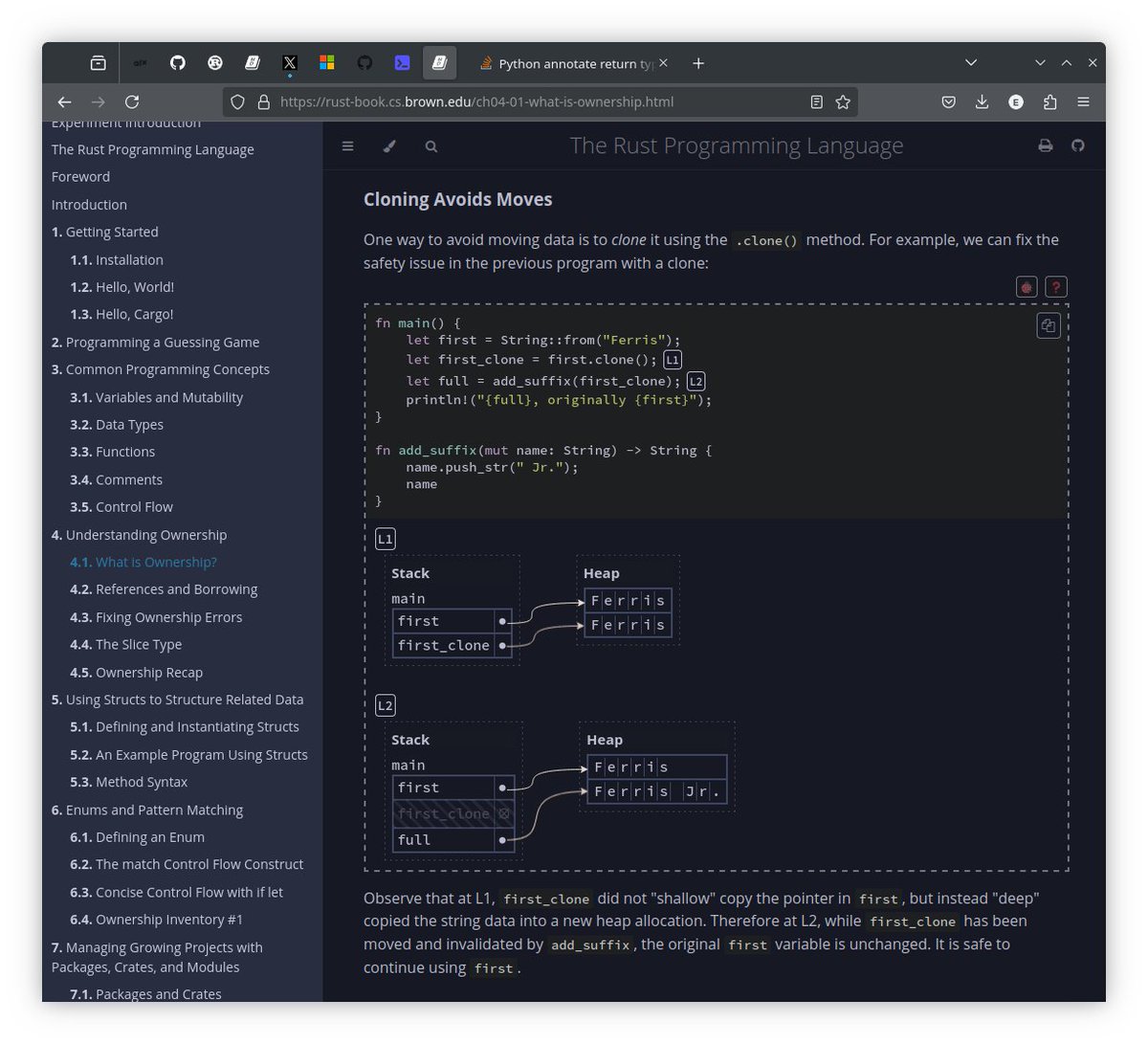
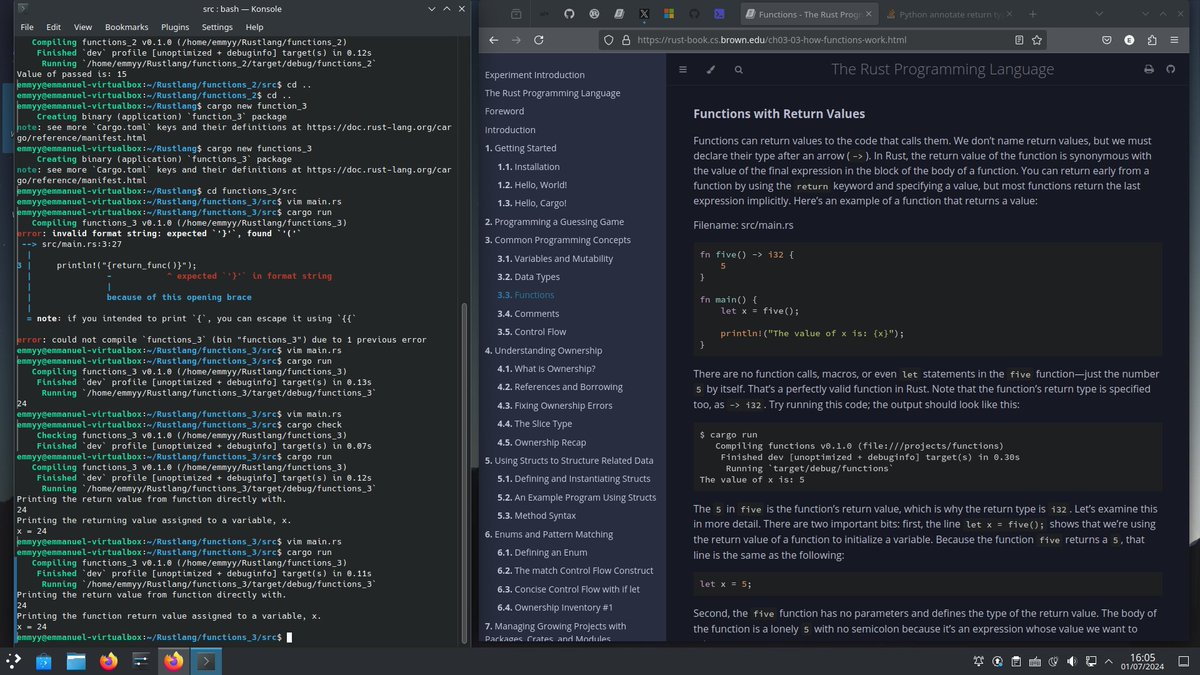
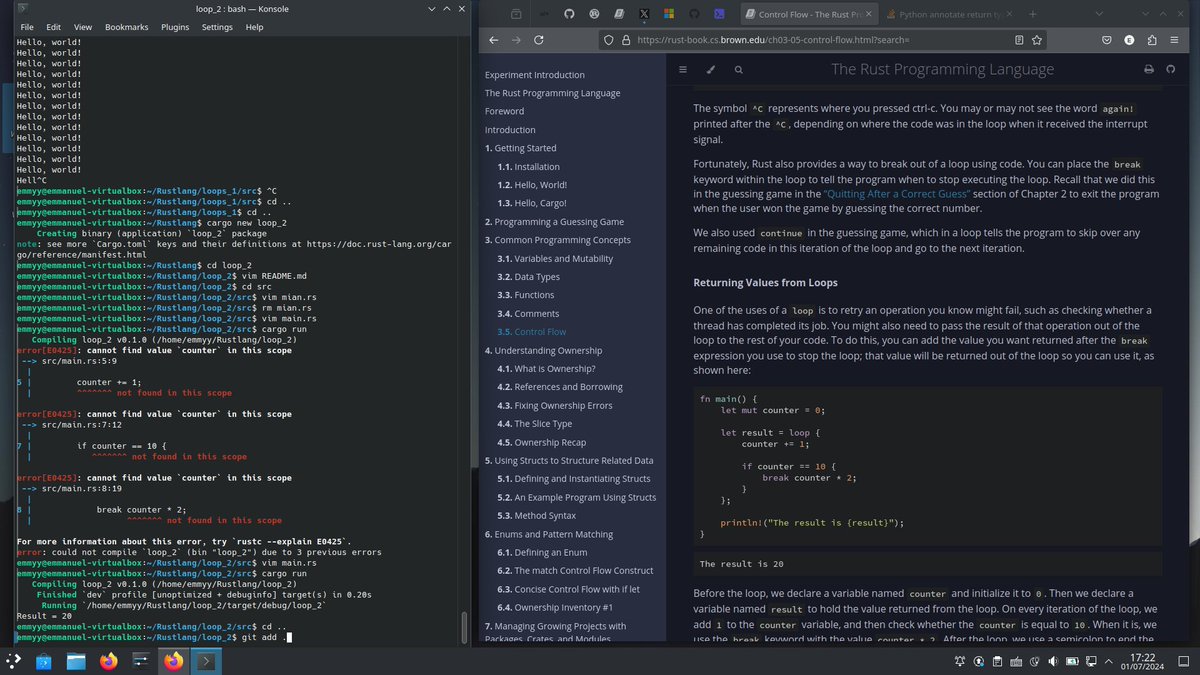
Learning with the rust doc, i got to have a deeper knowledge on some of the inner workings of the rustlang from its applications to, syntactic structure, data_types, variables, functions, control flow statements, ownership, referencing and borrowin :)
1
4
41

23 Feb 2024
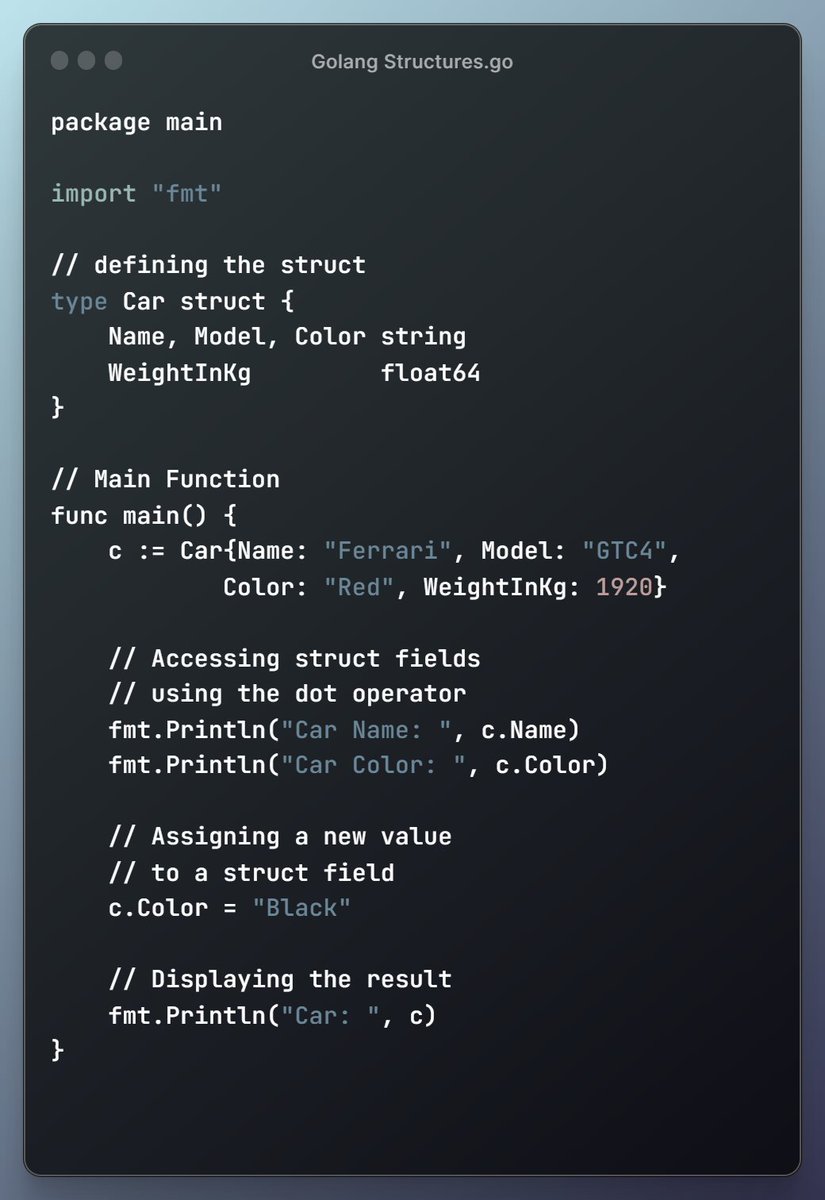
Struct Fundamentals in Golang: Building Custom Data Types
#golang
#programming
#coding
#developer
#webdev
#appdev
#learncoding
#beginner
#structs
#data_types
#cloudcomputing
#bigdata
#blockchain
#devops
#programmingforbeginners
#codingtutorials
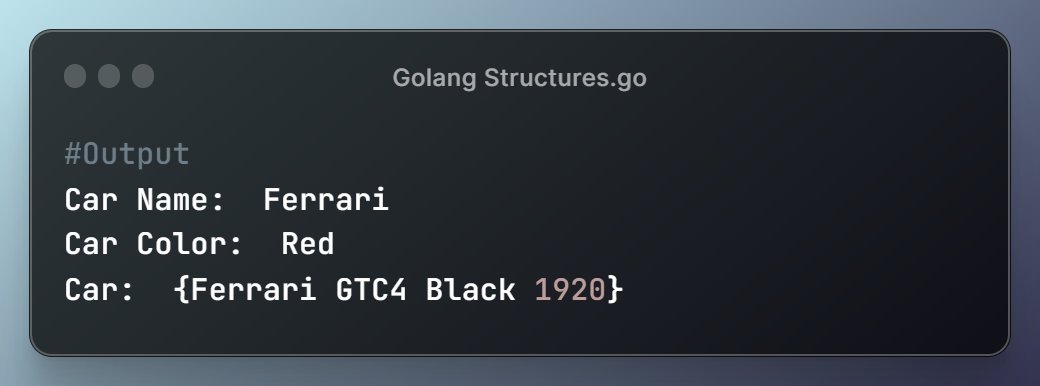
1
36

19 Feb 2024
I also use a lot of "lining" up of Python terms to help students see pattern recognition at the most basic level. .method() function() data_types
Students can see how different parts of code are used and I write everything out on the "Board of Knowledge! teachingpython.fm/121
2
39

17 Jan 2024
Which casing do y'all use when coding ?
I don't know why I do it but I use snake casing lol
JSYK :
DataTypes - Pascal casing
dataTypes - Camel casing
data_types - Snake casing 😂
#coding #pythonprogramming #codinglife
1
42

2 Oct 2023
🚀 Day 22 of #100DaysOfCairo #Data_types
#Cairo ownership & variable scope:
Every value in a program is owned by a single variable. Only one variable can "own" a value at any given time. If another variable takes ownership, the original variable can no longer access that value.
29 Sep 2023

🚀 Day 21 of #100DaysOfCairo #Data_types
#Cairo Squashing Dictionary:
To make sure a program that uses Felt252Dict<T> is correct, we need to check that the dictionary hasn't been tampered with illegally during runtime by "squashing the dictionary." This basically means
2
3
10
406
29 Sep 2023
🚀 Day 21 of #100DaysOfCairo #Data_types
#Cairo Squashing Dictionary:
To make sure a program that uses Felt252Dict<T> is correct, we need to check that the dictionary hasn't been tampered with illegally during runtime by "squashing the dictionary." This basically means
28 Sep 2023
🚀 Day 20 of #100DaysOfCairo #Data_types
#Cairo Felt252Dict Entries:
Let's take Felt252Dict<T> as a list of records, and each record has three pieces of information:
1. Key: This is a label for the value in the dictionary, like a word in a real dictionary.
1
6
479
28 Sep 2023
🚀 Day 20 of #100DaysOfCairo #Data_types
#Cairo Felt252Dict Entries:
Let's take Felt252Dict<T> as a list of records, and each record has three pieces of information:
1. Key: This is a label for the value in the dictionary, like a word in a real dictionary.
26 Sep 2023
🚀 Day 19 of #100DaysOfCairo #Data_types
#Cairo Dictionaries.
Cairo provides a special kind of data structure called "Felt252Dict<T>)," which is like a map in other programming languages. It involves having a collection of pairs, where each pair has a unique key and
1
2
11
310
26 Sep 2023
🚀 Day 19 of #100DaysOfCairo #Data_types
#Cairo Dictionaries.
Cairo provides a special kind of data structure called "Felt252Dict<T>)," which is like a map in other programming languages. It involves having a collection of pairs, where each pair has a unique key and
25 Sep 2023
🚀 Day 18 of #100DaysOfCairo #Data_types
How to read an array in Cairo.
An array is like a list of items and we can use two methods to read this list.
1. get(): This method checks if an element is in the list at a specific position. It returns the element if it does exist;
1
1
8
259
25 Sep 2023
🚀 Day 18 of #100DaysOfCairo #Data_types
How to read an array in Cairo.
An array is like a list of items and we can use two methods to read this list.
1. get(): This method checks if an element is in the list at a specific position. It returns the element if it does exist;
24 Sep 2023
🚀 Day 17 of #100DaysOfCairo #Data_types
#Cairo Arrays.
An array is like a one-way street where we can only add new things at the end and remove things from the front. Also once something is placed in the array, it cannot be changed but can read what's stored in it.
1
1
7
202
24 Sep 2023
🚀 Day 17 of #100DaysOfCairo #Data_types
#Cairo Arrays.
An array is like a one-way street where we can only add new things at the end and remove things from the front. Also once something is placed in the array, it cannot be changed but can read what's stored in it.
23 Sep 2023
🚀 Day 16 of #100DaysOfCairo #Data_types
#Cairo ControlFLow(Loops) Controlling Loop Execution:
The 'continue' statement is used to skip the rest of the code in an iteration and move to the next one. i.e, we can skip printing when a certain condition is met.
1
7
239
23 Sep 2023
🚀 Day 16 of #100DaysOfCairo #Data_types
#Cairo ControlFLow(Loops) Controlling Loop Execution:
The 'continue' statement is used to skip the rest of the code in an iteration and move to the next one. i.e, we can skip printing when a certain condition is met.
5 Sep 2023
🚀Hey Everyone! 🚀
I'm thrilled to announce the kickoff of my "100 Days of StarkNet Cairo Learning" challenge! 💡
Over the next 100 days, I'll be diving deep into #StarkNet Cairo, exploring its potential, and sharing my journey right here on X.
1
3
8
531
21 Sep 2023
🚀 Day 14 of #100DaysOfCairo #Data_types
#Cairo ControlFLow(If,Else).
Two basic tools for control flow are "if" expressions and loops.
An "if" expression helps make decisions in cairo, "If this condition is true, do this; otherwise, do something else."
1
4
24
15 Sep 2023
🚀 Day 10 of #100DaysOfCairo #Data_types
#Cairo tuple and unit type
A tuple is like a bag that can hold different types of things in #Cairo. you make a tuple by putting values inside parentheses, separated by commas. They have a fixed size i.e can't get bigger or smaller once you
1
4
36
13 Sep 2023
🚀 Day 8 of #100DaysOfCairo #Data_types #Cairo short strings
In #Cairo, there isn't a type just for words or sentences (strings) like we have in some other programming languages. Instead, Cairo uses something called a "short string."
1
4
39