
Jun 11
Here's a quick clip of Kath Pay's recent appearance at Inbox Expo!
#EmailMarketing #EmailEvents
<iframe src="bit.ly/4e2y236" height="877" width="504" frameborder="0" allowfullscreen="" title="Embedded post"></iframe>
7

May 29
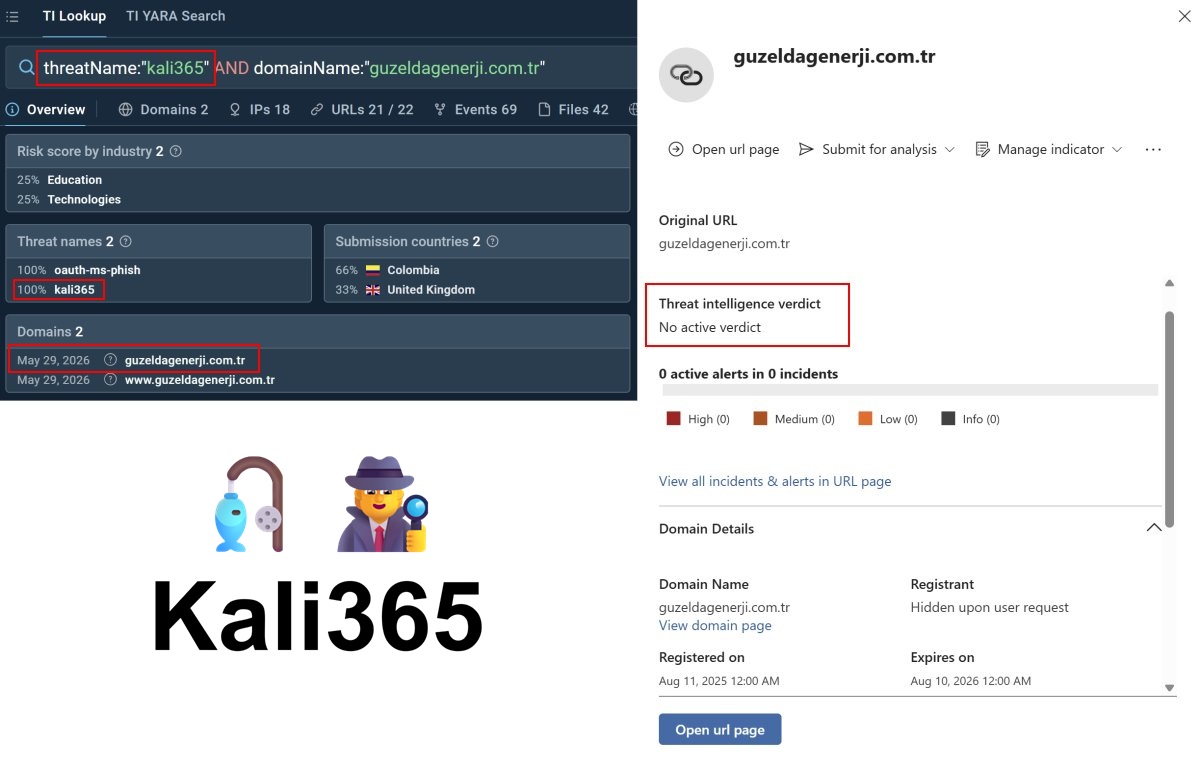
Hunt for the day 😉
EmailUrlInfo
| where Timestamp > ago(3d)
| where UrlDomain has "guzeldagenerji.com.tr"
| join EmailEvents on NetworkMessageId
Did you catch any fresh🎣 ? Let me know ...
#Cybersecurity #DefenderXDR #CatchOfTheDay
3
9
33
3,049
Mar 22
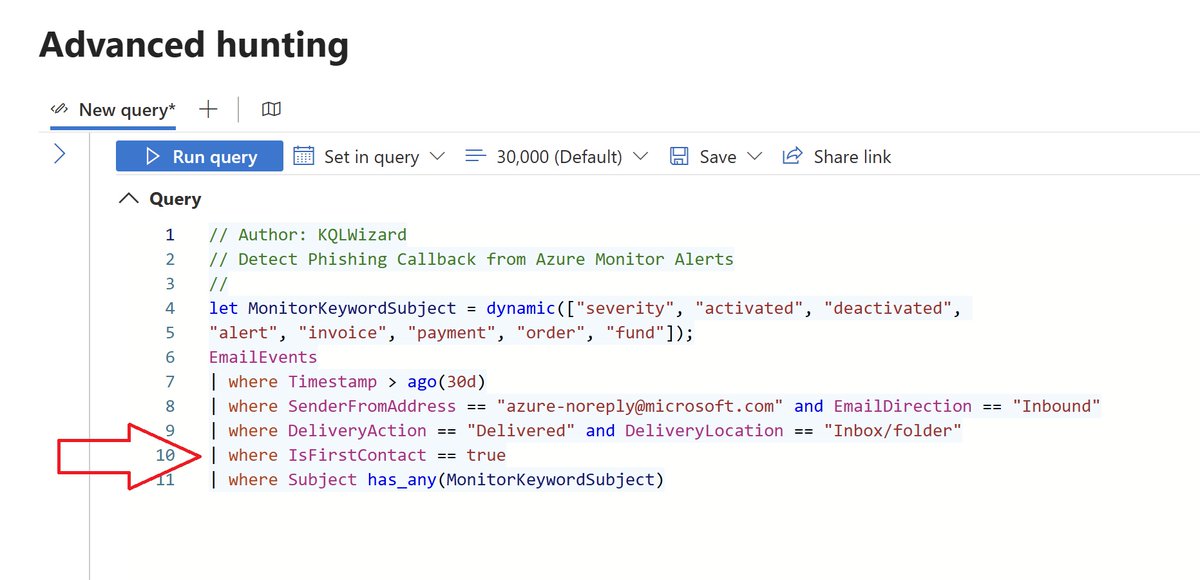
☁️ Azure Monitor Alerts Weaponized for 🎣 Callback Phishing
Threat actors are exploiting Microsoft Azure Monitor alerts to send phishing emails that look like legitimate Microsoft notifications. Because these alerts originate from azure-noreply@microsoft.com and pass SPF/DKIM/DMARC checks, they easily bypass traditional email defenses. The lure? Fake billing alerts urging recipients to call fraudulent support numbers—leading to credential theft or remote access compromise.
bleepingcomputer.com/news/se…
To counter this, I’ve built a high-fidelity KQL detection leveraging the EmailEvents schema and the IsFirstContact field. For most enterprise users, receiving a first-contact email from azure-noreply@microsoft.com (without being Azure portal users) is a strong indicator of phishing callback attempts.
👉 Defenders: deploy this KQL to monitor inbound emails and flag suspicious Azure Monitor alert abuse.
KQL Code:
github.com/SlimKQL/Detection…
#Cybersecurity #AzureMonitor #Phishing #DetectionEngineering
3
16
109
8,082
Jan 14
Tool Profile: RedVDS
The recent phishing activity attributed to RedVDS has had a significant impact. If you have access to the Defender XDR Threat Analytics portal, review the latest report titled “Tool Profile: RedVDS.”
Cross‑reference the IP-based IOCs associated with phishing campaigns observed between December 4 and December 19, 2025 against your EmailEvents SenderIPv4 data. This correlation will help you quantify the scope and severity of the activity within your environment.
microsoft.com/en-us/security…
security.microsoft.com/threa…
#Cybersecurity #Phishing #RedVDS #BEC #DefenderXDR
4
23
1,975

9 Dec 2025
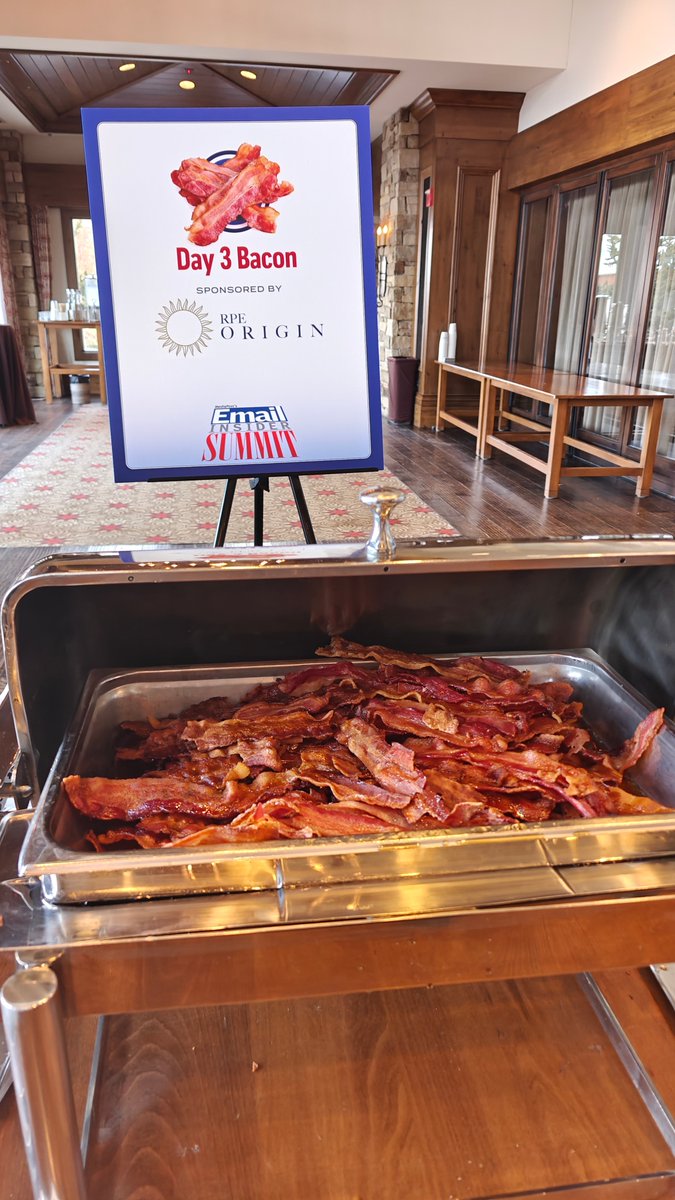
Some traditions just deserve to be upheld.
Breakfast bacon for example.
Just one more great reason I'm glad to be part of this ongoing Email Insider Summit.
#EmailMarketing #EmailEvents #BaconIsTheAnswer
3
56
5 Dec 2025
I'm packing my bags to hit the snowy slopes at the Email Insider Summit!
Looking especially forward to the welcome drinks RPE Origin is sponsoring from 6:30 PM in the Valhalla and Odin rooms of the Stien Eriksson lodge!
If you're going, come say hi!
#EmailInsider #EmailEvents
1
2
42
28 Nov 2025
RPE Origin is sponsoring the day-one happy hour at Email Insider Summit this December 7-10.
I'll be there and am eagerly looking forward -don't be afraid to come say hi when you see me on site!
bit.ly/3Kct73l
#EmailInsiderSummit #EmailEvents #EmailMarketing

1
3
44

12 Nov 2025
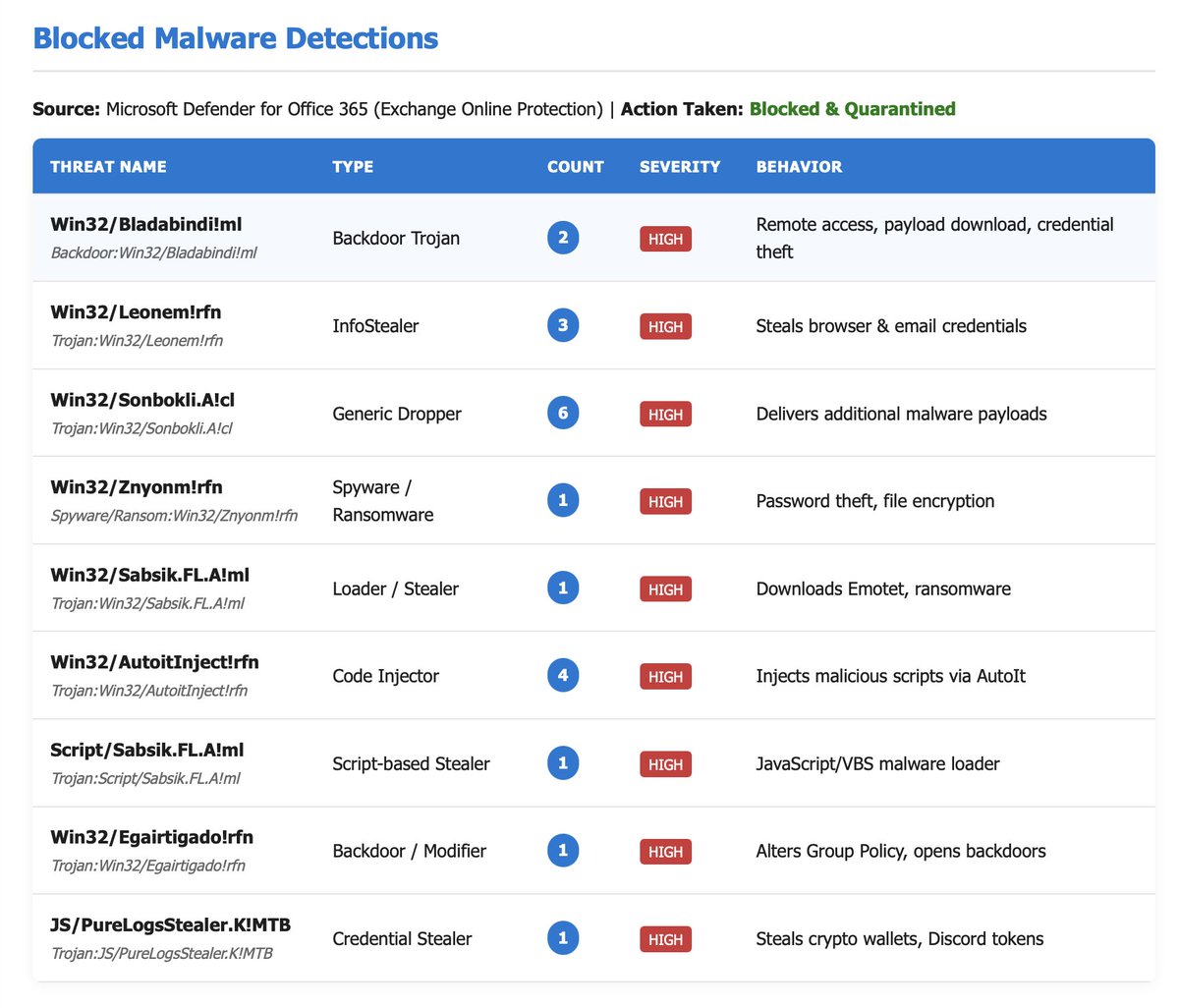
What threats do you see in email?
EmailEvents
| where TimeGenerated > ago(90d)
| where ThreatNames != ''
| sort by TimeGenerated desc
| summarize count() by ThreatNames, DeliveryAction
| sort by count_ desc
3
944
15 Oct 2025
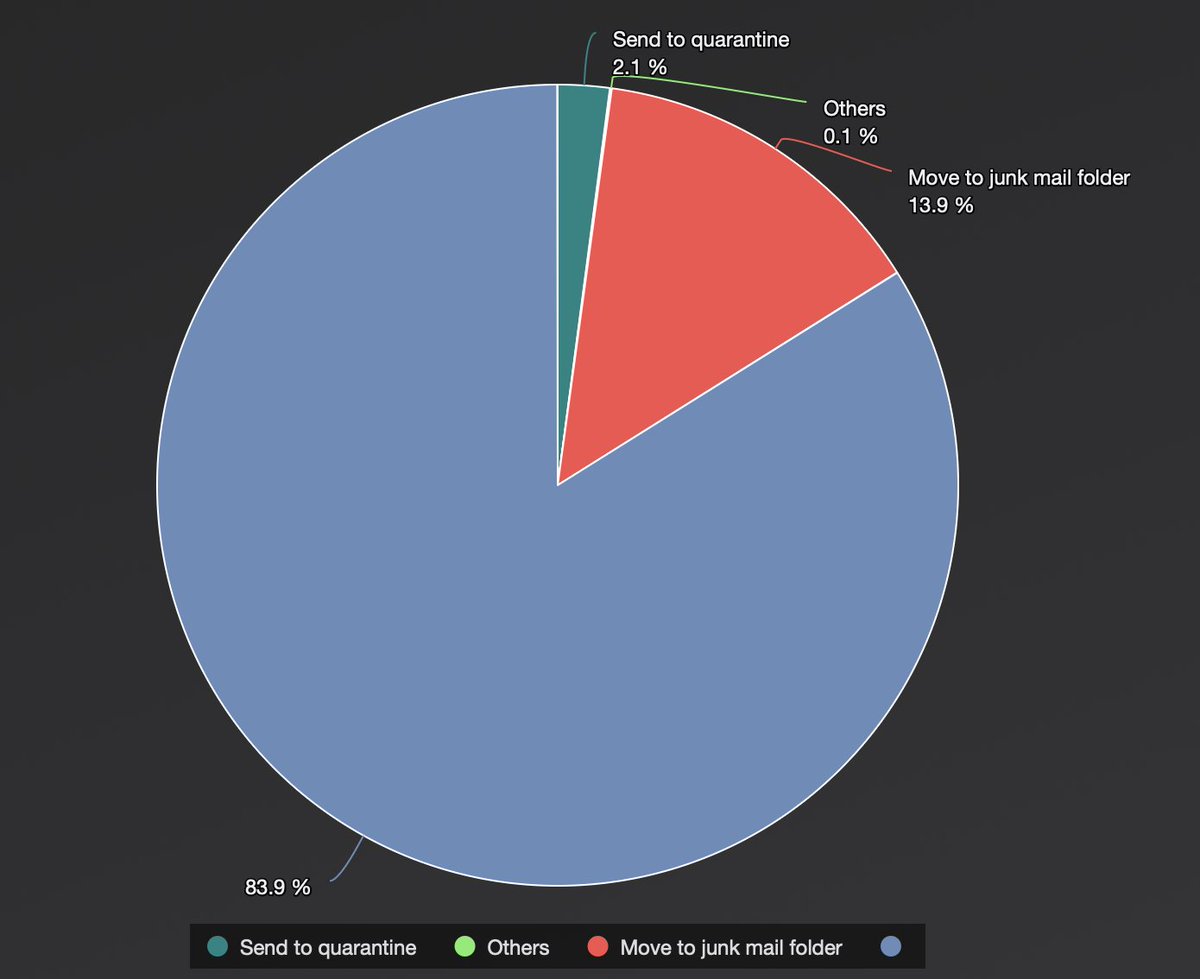
EmailEvents
| summarize count() by EmailAction
| render piechart
(I do not understand the config where people don't just want everything going to quarantine... this just leaves two places to have to check but oh well....)
4
1
3
3,061

14 Oct 2025
MC1150118 - Microsoft Defender for Office 365: New records in Streaming API and Sentinel EmailEvents table - "will store both current and historical email verdicts and locations" dlvr.it/TNgZcs #cyber #threathunting #infosec
2
719
13 Oct 2025
so we have to think about:
internet facing assets!
we also need to think about email.. and devices etc.
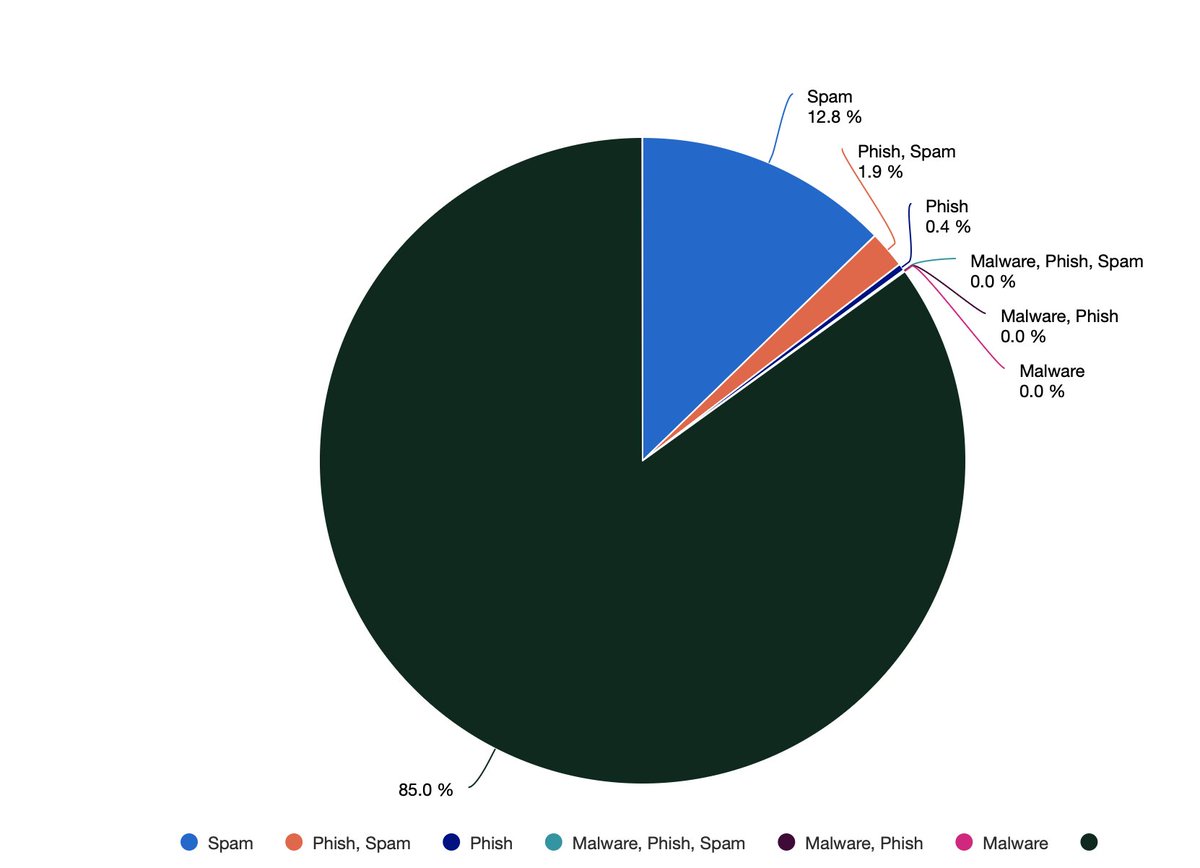
so let's look at another angle, email!
now this might vary loads:
EmailEvents
| where Timestamp > ago(30d)
| summarize count() by ThreatTypes
| render piechart
3
898
9 Sep 2025
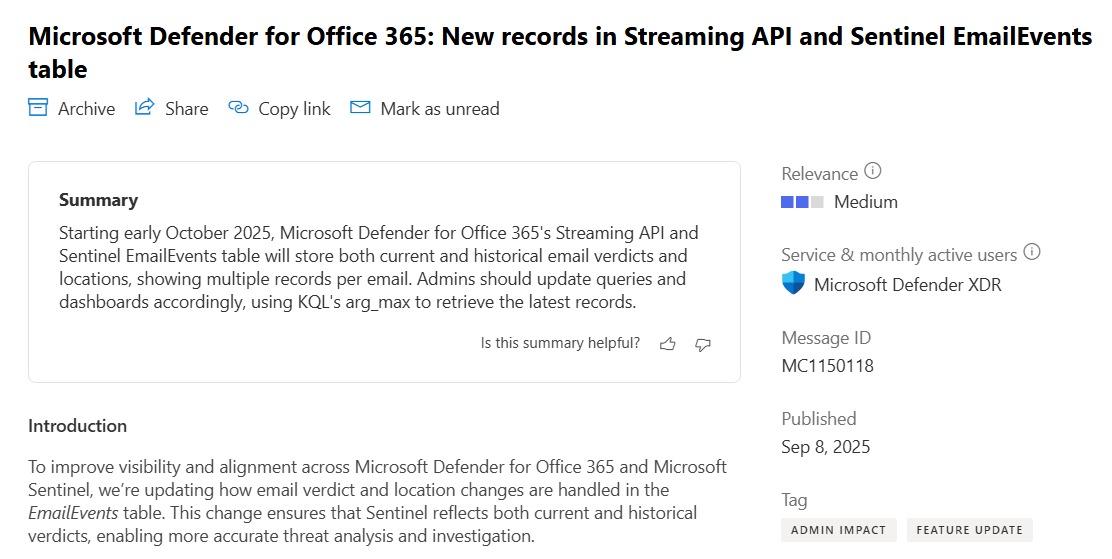
🚨 MC1150118: Starting Oct 2025: Microsoft Defender for Office 365 & Sentinel EmailEvents will track historical email verdicts & locations — expect multiple records per email.
🔄 Use arg_max() in KQL to get the latest:
summarize arg_max(Timestamp, *) by NetworkMessageId, RecipientEmailAddress
#Cybersecurity #DefenderXDR #Sentinel #EmailEvents
2
14
80
5,003
8 Sep 2025
Just over a week away now until @martechismktg Agenda!
I'm looking forward to sharing a panel with Mike, Colleen and John where we expose the useful data you might have right under your nose right now!
bit.ly/4fPriVw
#emailmarketing #emailevents #martech
1
2
280

1 Sep 2025
Even though Microsoft provided a PowerShell command in April 2025 to disable the SMTP DirectSend feature in Exchange Online, we are still seeing attackers successfully reach the inbox for organizations that do not have their DMARC DNS Record set to Reject or Quarantine. According to public DNS, 30% of the Fortune 500 are vulnerable. Small to Medium orgs are even more likely to be exposed.
It is recommended to perform threat hunting to identify these emails.
Here is KQL we used to successfully detect DirectSend Phishing in Microsoft Defender XDR or Microsoft Sentinel (security.microsoft.com)
EmailEvents
|where Timestamp > ago(30d)
| where EmailDirection == “Inbound”
| extend LeftPartSender = substring(SenderFromAddress, 0, indexof(SenderFromAddress, “@”))
| extend LeftPartRecipient = substring(RecipientEmailAddress, 0, indexof(RecipientEmailAddress, “@”))
| where LeftPartSender == LeftPartRecipient
| where isempty(Connectors) // not coming in on a connector
| where DeliveryLocation == “Inbox/folder”
| where parse_json(AuthenticationDetails) contains “fail”
| project Timestamp, RecipientEmailAddress, SenderFromAddress, Subject, NetworkMessageId, EmailDirection, Connectors, SenderIPv4
Threat hunting on the EmailEvents table requires the Microsoft Defender for Office P2 license. Otherwise, follow the MSFT reference links below for syntax on Historical Message Trace.
One of the easiest ways to detect DirectSend is when the sender and recipient are identical (which is typically unusual). We have observed cases where using an exact match of sender and recipient domain name does not detect all results. In some cases the sender domain is a MOERA domain (alias@tenant.mail.onmicrosoft.com) and they use a different alias on the same mailbox for the recipient address (such as the primary SMTP alias). We suspect this was done to evade the exact == comparison, so we updated the query above to look for the alias matching instead of domain matching (this resulted in finding additional results).
If you get too many results, try adding this where clause before the last project statement to reduce results:
| where Subject has_any (
'Pay Raise',
'Strategic Organizational Restructuring',
'Bonus Disbursement',
'Bonus Distribution',
'Merit-Based Pay',
'Compensation Bonus',
'Compensation Review',
'Wage Increase',
'Wages Increase',
'Incentive')
References:
thecloudtechnologist.com/202…
techcommunity.microsoft.com/…
techcommunity.microsoft.com/…
If you don't have a valid use of DirectSend you can disable it with this Exchange Online PowerShell cmdlet:
Set-OrganizationConfig -RejectDirectSend $true
14
75
353
31,666
25 Aug 2025
🚨 Phishing alert: Over 115,000 emails exploited Google Classroom to target 13,500 orgs in just one week. Attackers used fake invites & WhatsApp lures to bypass filters via trusted infrastructure.
blog.checkpoint.com/email-se…
KQL Check:
EmailEvents
| where Timestamp > ago(30d)
| where SenderFromAddress == "no-reply@classroom.google.com"
| where Subject has "WhatsApp"
| where EmailDirection == "Inbound" and DeliveryAction != "Blocked"
#Cybersecurity #GoogleClassroom #Phishing
1
6
26
1,416
18 Jun 2025
I'm honoured to be presenting the awards with Jose Cebrian at the ANA Email Excellence Conference this year!
I'll be there, live on July 17th 2025 in Newport Beach California!
So get your nominations in and I hope to see you there!
bit.ly/4dYXPaF
#emailevents
3
36
13 Jun 2025
I mentioned yesterday the nominations for the EEC awards upcoming.
The winner is going to be announced during a live in person ANA event free to ANA Members!
Here's the details: bit.ly/4dYXPaF
#emailmarketing #emailevents #marketing
1
2
30
24 May 2025
//KQL for BEC (MDE)
// created by mrr3b00t
// use at own risk, there might be a better way for this...
let EmailCloudAppLogs = CloudAppEvents
| where time generated > ago(30d)
| where IPAddress == "8.8.8.8"
| where ActionType == "MailItemsAccessed"
| extend MessageIds = extract_all('\\"InternetMessageId\\":\\"(\\<[^>] >)\\"', tostring(RawEventData))
| mv-expand MessageIds
| extend InternetMessageId = tostring(MessageIds)
| where isnotempty(InternetMessageId)
| distinct InternetMessageId;
// Step 2: Search EmailEvents for matching InternetMessageId
EmailEvents
| where InternetMessageId in (EmailCloudAppLogs)
| project Timestamp, InternetMessageId, Subject, SenderFromAddress, RecipientEmailAddress, ThreatTypes, DeliveryAction, DeliveryLocation
| sort by Timestamp desc
@NathanMcNulty @DebugPrivilege @reprise_99
3
3
53
6,691

23 Apr 2025
All three will allow a far more better overview in Microsoft Teams as an attack vector, allowing detection and hunting opportunities. This development isn't far from the schema of tables for Emails (EmailEvents, EmailPostDeliveryEvents and EmailUrlInfo).
Up until now, detection opportunities for urls in Microsoft Teams lied on the 𝐒𝐚𝐟𝐞 𝐋𝐢𝐧𝐤𝐬 capacity, but this development will allow further competencies including analytics with 𝐭𝐡𝐫𝐞𝐚𝐭 𝐢𝐧𝐭𝐞𝐥𝐥𝐢𝐠𝐞𝐧𝐜𝐞, and far more better 𝐟𝐨𝐫𝐞𝐧𝐬𝐢𝐜𝐬 capabilities for MS Teams messages.
🔗 More information: learn.microsoft.com/en-us/de…
[2/2]
3
316
8 Apr 2025
Going to Inbox Expo next month? Maybe I'll see you there!
May 21st to 23rd. Hope to catch some of you in person!
#emailmarketing #emailtips #emailevents

1
2
56