
Jun 7
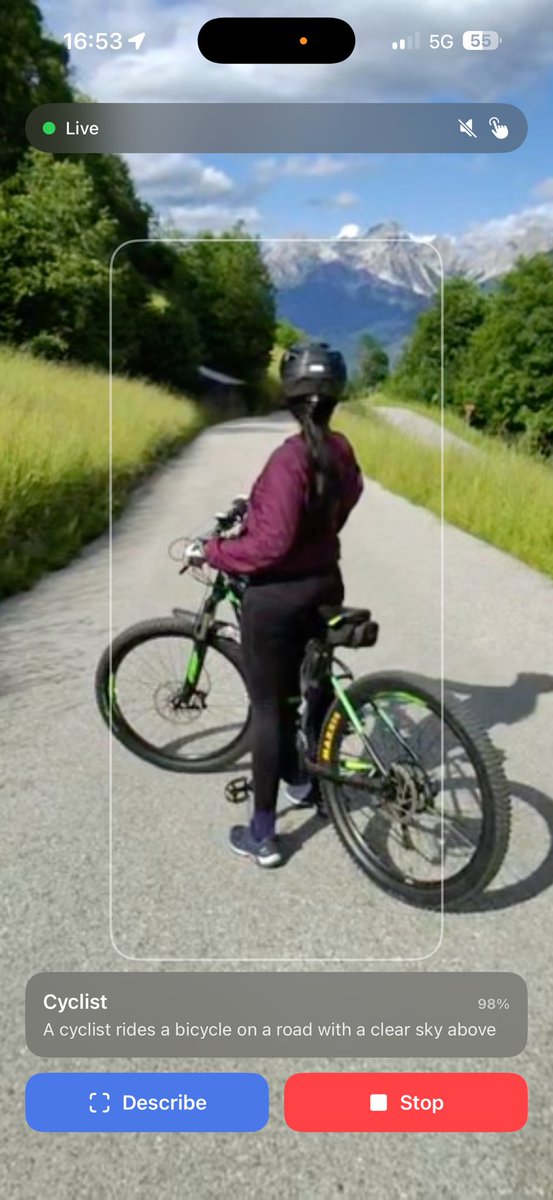
Biking in the Dolomites this weekend. My Ray-Ban Meta glasses described everything I saw, out loud, in real time. No internet, no cloud, no API key. All on my iPhone, running Apple's FastVLM Kokoro TTS locally. Wild how far on-device AI has come.
47

Apr 19
We built Lore.
An agent harness with a memory system designed for learning. It creates nodes and connections as you use it, which is where the name comes from. Knowledge through experience.
A lot of the memory design came from @karpathy's LLM wiki posts. Lore's memory is essentially a local wiki that scales and compounds the more you use it. The system learns you while you learn with it. (gist.github.com/karpathy/442…)
The UX angle came from @FarzaTV's Clicky launch. Seeing Cursor companion helped us figure out how to fit an agent harness into something you'd actually use every day, and have less friction. We already had the agentic backend from building Talking Books (still building that). We just needed the right perspective on the use case to port it locally. Thanks Farza.
Running a voice assistant usually means TTS costs stack up fast. So we run a local TTS model on Mac, plus local OCR and Apple's FastVLM for vision. Better accuracy, lower first-token latency, no cloud bill.
And you can also enable Local inference through just running @ollama and it will autodetect the model and use that instead. So you can technically use Lore without wifi.
In this demo we're reading some amazing work from @googleresearch on TurboQuant. I love this paper @demishassabis @OfficialLoganK.
1. Tutor
2. Research
3. Learn
4. Reading
5. Agent (computer use OpenClaw self-healing local memory)
6. Transcribe (basically Wispr Flow, because why not)
Next up is persistent long-term memory. @garrytan's Gbrain is helping us get there. That OS is epic.
This feels like a new way to learn, read, and do. A lot of dots had to connect to get here, and more are still connecting. Excited to put this in people's hands.
14
5
21
2,427

Feb 26
🚀 Real-time visual understanding image generation, fully on iPhone - no internet req, no data leaves device, open-source.
Fast (3s gen / 0.4s und), outperforms (6×–11× faster) larger unified models from industry (Apple: FastVLM, DeepSeek: JanusFlow, ByteDance: ShowO).
1/4
3
10
268

Feb 23
何ヶ月かけて、少し余裕ができて、今日少し頑張って、pluginのやり方として、lerobotのMeta-WorldでFTしてた。5K step初回の保存がこういう感じ
FastVLM → FastVLA
plugin?つまり、export PYTHONPATH=/home/<you>/VLA-from-FastVLM/src:${PYTHONPATH}
そこからLerobot trainのコマンドで回してる
31 Aug 2025

fastvlm良さげですね。osxでVLA動けばお手軽に試せる
1
2
11
4,510

Feb 16
Gürültü yapanlar şov peşinde, Apple ise sessizce oyunun kurallarını değiştiriyor! 🤫🍎
Apple yeni FastVLM ve MobileCLIP2 modellerini yayınladı. Sunucu yok, gecikme yok, veri sızıntısı sıfır!
• 🚀 85 kata kadar daha hızlı
• 📉 3.4 kat daha küçük boyut
• 🎬 0 yerel video altyazılama
Yapay zekayı buluttan indirip tamamen cihazlarımıza, yani cebimize hapsediyorlar. Gizlilik odaklı devrim budur.
4
16
157
20,911

Feb 4
heise | Vision Language Model: Wie FastVLM hochauflösende Bilder im Browser analysiert heise.de/hintergrund/Vision-… #KünstlicheIntelligenz
1
2
159

Jan 29
Apple just dropped something massive while everyone was distracted by AI hype.
FastVLM MobileCLIP2 = 85x faster AI that runs right in your browser.
• 3.4x smaller
• 100% local processing
• Live video captioning without servers
• Zero data leaks
This is Apple at their finest. While others hype, they ship. While others chase scale, they optimize for utility.
Private. Efficient. Ready for everything from iPhone to Vision Pro.
Jan 29

Open source or closed source doesn't matter. AI must solve the task with a proper level of quality.

1
4
99

31 Dec 2025
2025 had 261 work days. in that time i shipped 116 integrations for fiftyone.
66 datasets
38 models
12 plugins
that's not to mention the various workshops, virtual events, and in-person meetups held around the world in places like ann arbor, boston, chicago, munich, berlin, dusseldorf, paris (where i got to meet @mervenoyann, @reach_vb, and others from hf) amsterdam (where i got to meet @tuanacelik) , brussells (where i got to meet @NielsRogge), stuttgart, saarlands, and more places that i probably forgot
here's a quick summary of what i focused on:
--gui agents--
this was the year gui agents took off.
i built the data infrastructure to support it—17 GUI grounding datasets, 6 visual agent models (GUI Actor, ShowUI, UI-TARS, OS-Atlas, MiMo-VL), plus tooling to collect, synthesize, and evaluate gui data inside fiftyone
if you're training agents that see and click, you need to debug what they see.
--document visual ai--
enterprise wants multimodal RAG that works on real documents.
i integrated ColPali, ColQwen, Jina v4, the ModernVBERT variants—alongside ocr models and document datasets spanning forms, receipts, and scanned text.
fiftyone now handles visual document retrieval end-to-end.
--plugins--
datasets and models are useless without workflows.
i built a gui dataset collector for capturing and annotating screen interactions in coco format.
a lerobot importer that preserves multi-camera views and trajectory metadata.
a wandb plugin for tracking training data and model predictions with full lineage.
text evaluation metrics (ANLS, CER, WER) for benchmarking OCR.
NVIDIA NeMo Retriever Parse for extracting structured text with bounding boxes.
the plugins close the loop between data curation, model evaluation, and experiment tracking.
--vision language models--
the vlm landscape moves fast.
I kept fiftyone current: Qwen2.5-VL, Florence2, Kimi-VL, PaliGemma2, MedGemma, Nemotron Nano, FastVLM, MiniCPM-V, Moondream3, Qwen3VL.
each one integrated into the remote model zoo so you can run inference on your data in a few lines.
whatever vlm you're using, it should work with your data tooling.
--physical ai--
early investment in physical AI.
built a lerobot dataset importer and started exploring how fiftyone can support policy evaluation and failure analysis for robotic manipulation tasks.
The importer handles multi-camera views, episode grouping, and full trajectory metadata—joint states, actions, velocities, efforts.
where things are heading in 2026? and how can i make fiftyone useful for where visual AI is actually going?
i have a hunch that vision language action models is the next wave
2
10
641

3 Dec 2025
If you stop by the Apple booth tomorrow from 9 to 11, I’ll be demoing FastVLM for you all! Good chance to learn more about the work we do at Apple :)
1 Dec 2025

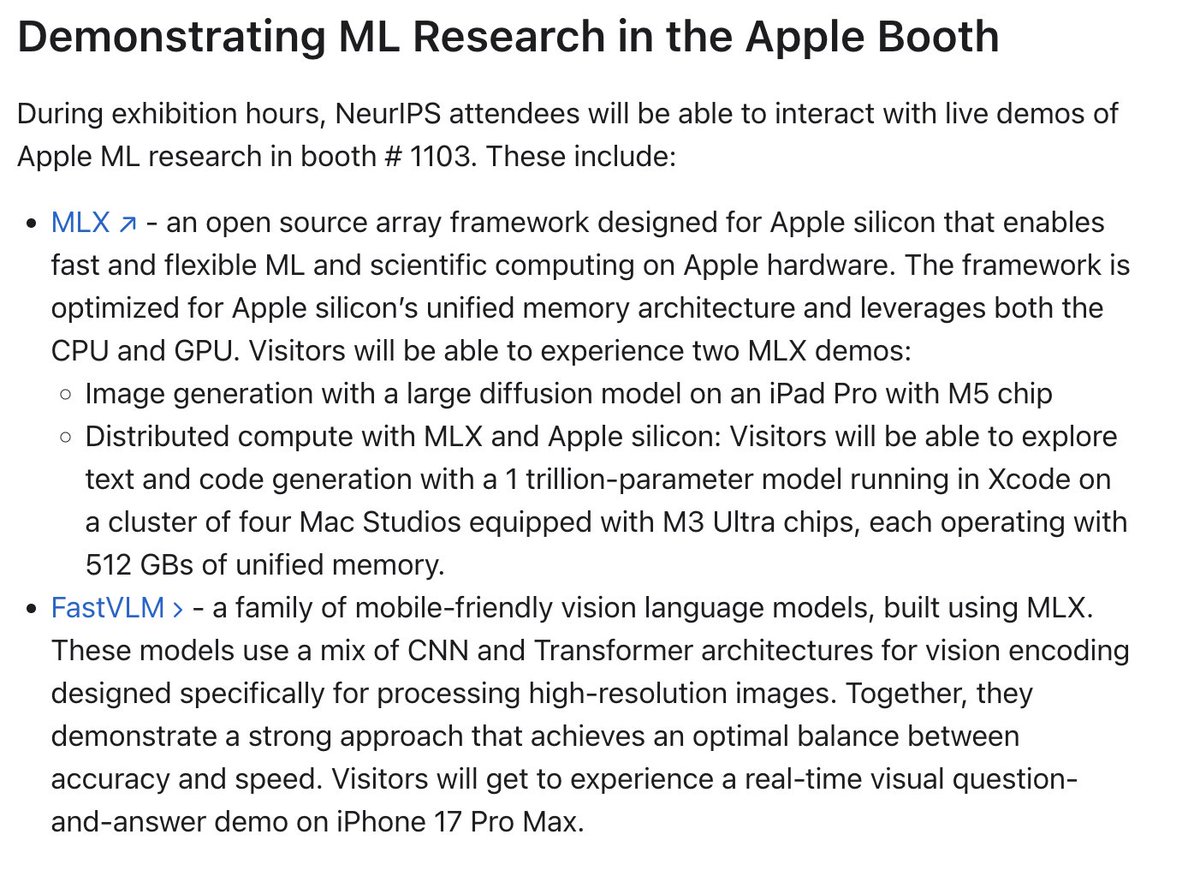
I won't be at NeurIPS, but there will be some fun MLX demos at the Apple booth:
- Image generation on M5 iPad
- Fast, distributed text generation on multiple M3 Ultras
- FastVLM real-time on an iPhone
6
660

1 Dec 2025
I won't be at NeurIPS, but there will be some fun MLX demos at the Apple booth:
- Image generation on M5 iPad
- Fast, distributed text generation on multiple M3 Ultras
- FastVLM real-time on an iPhone
6
17
221
190,000

27 Nov 2025
Cursor for video editing doesn't exist for a reason.
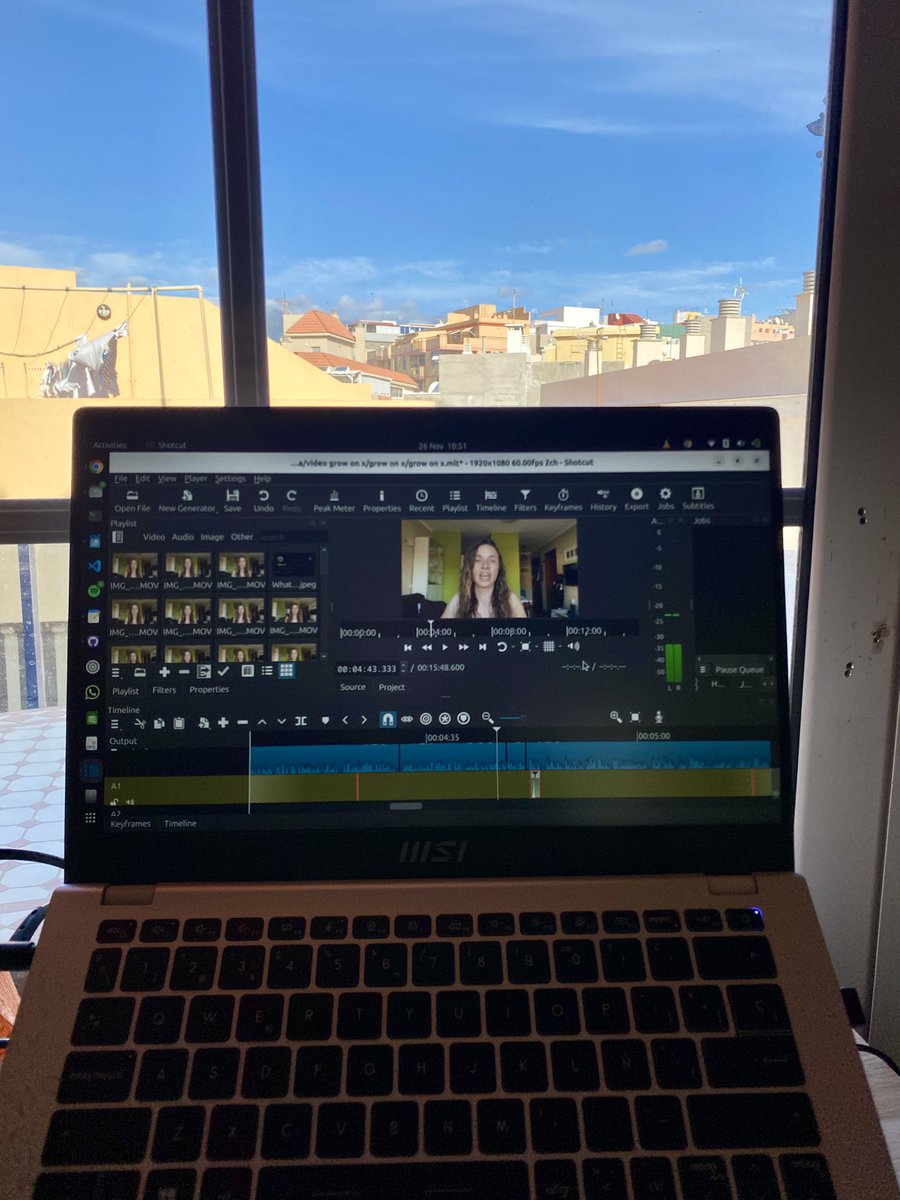
Since I've been tagged under this post multiple times and we have first-mover advantage in the space, I felt obligated to share our findings and explain why video editing isn’t on the same level as code editing (yet):
- There is no "VS Code for video editing." There's no open source professional video editing UI that fits this use case, so you first need to build an AI friendly editor before anything else. Adding AI on top of that is the easy part.
- Building NLEs is VERY VERY hard. If you're building one from scratch you'll spend at least 2-3 years (full time) on table-stake features, and there are very few ways to make money before that. On top of that you have to operate in one of the hardest problem spaces in software engineering. I've seen countless video editing startups fail due to technical complexity since I started this company in 2023.
- You'll have to master delayed gratification. With 2-3 years just to build the foundation, you'll have to say no to a lot of temptations, like building a VS Code fork instead that can generate serious revenue in a few months. And once it becomes plausible that you can succeed at building a competitive NLE, you'll get a flood of job offers from well funded startups and corporations that you need to resist. You have to genuinely care about video processing and be intrinsically motivated by something other than "I want to make money fast."
- There is no StackOverflow or GitHub for video editing. You have to teach LLMs a lot of custom constructs, whereas they already have billions of lines of general code in their training data.
- Multimodal requirements are a huge challenge. A coding agent only deals with text in and text out. A video editing agent needs to handle audio, video and images at the same time, which is far harder to process and much more expensive.
- Chat is not the best UX for video editing. Often it’s faster to just make cuts on the timeline than type instructions into a chat box and wait for the result, especially when the LLM makes lots of mistakes that you then have to fix. Our view is that it’s better to have AI actions you can trigger with a button than to describe everything in a prompt.
- Videos require far more bandwidth than text. Uploading footage to the cloud can take hours, while text is instantly accessible anywhere. We experimented with local models (FastVLM), but that path is a dead end due to context window limits. You’re better off with an upload flow.
At Diffusion we don’t see a chat sidebar as our core advantage, but as a helpful feature in specific situations. We’d rather invest the majority of our time into building the best NLE UX than trying to automate everything.

259
207
3,686
1,359,938

26 Nov 2025
¡Esto de Apple es brutal! Un modelo abierto de IA que describe en tiempo real el contenido que ve.
Se llama FastVLM. Funciona 100% en local en tu navegador. Mira la demostración y alucina ↓
24
179
1,772
95,912

21 Nov 2025
Appleは来月のNeurIPS 2025カンファレンスで複数の研究とAIデモを発表する予定。前に119Macで紹介したFastVLMの体験もできるようだ。行ってみたいものだな。
9to5mac.com/2025/11/21/apple…
2
146

17 Nov 2025
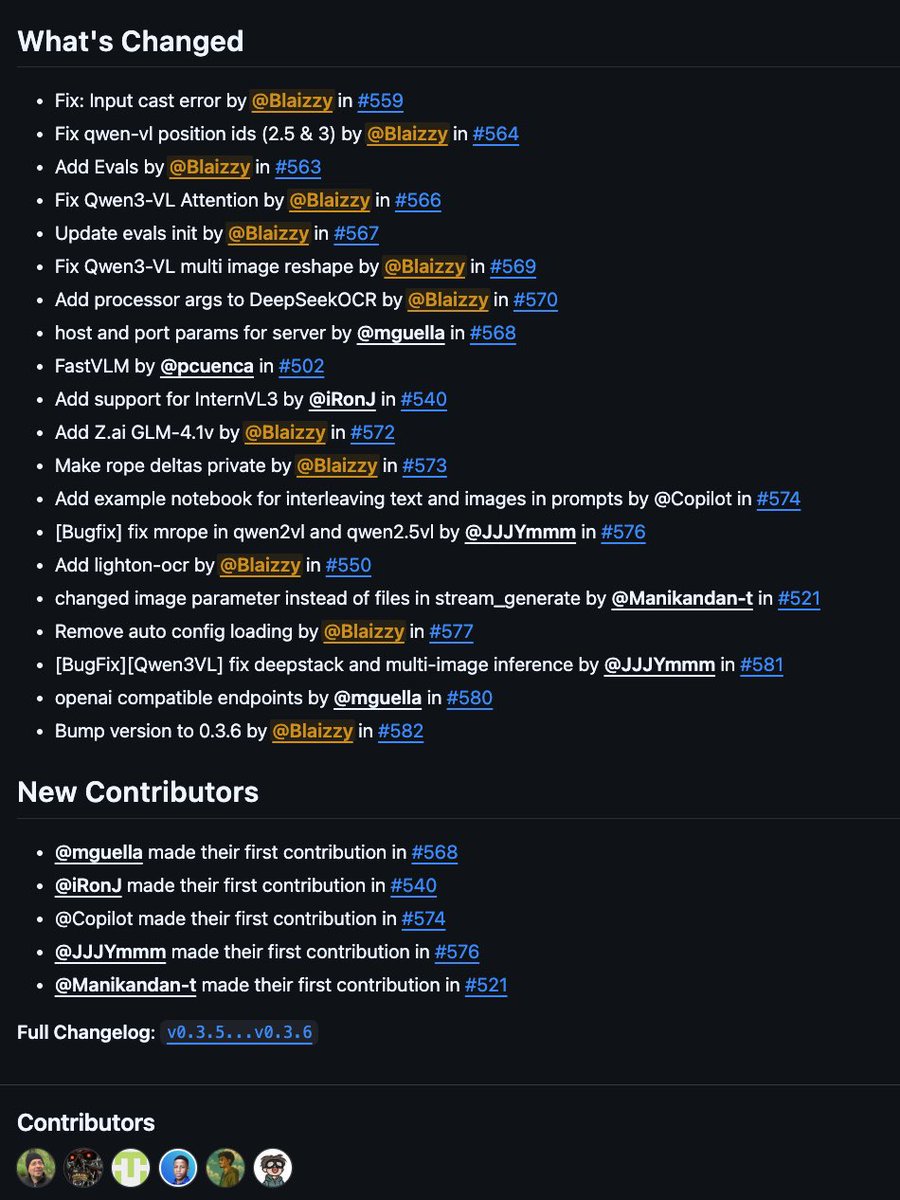
mlx-vlm v0.3.7 is here 🚀
What’s new:
- @Zai_org GLM-4.1v
- @LightOnIO OCR
- @Apple FastVLM
- Added evals (MMStar, Math-Vista, OCRBench, MMMU)
- Interleaved input cookbook
Fixes:
- Qwen2/2.5/3 VL to match source
Special thanks to @pcuenq, @JJJYmmm2002, Ron Jailall, Manikandan and Mattia for their awesome contributions ❤️
1
17
128
7,547



2 Oct 2025
まいどです。
本日と先日の生成AIニュース テクノロジー情報です。
note.com/toshia_fuji/n/n24f4…
『Sora2』『Wan2.2-Lightning』『Visual Jigsaw』『PHA』『AnimeGen』『Claude Slack』『Google Home』『Kandinsky 5.0』『Office Agent』『Browser』『LucidFlux』『Vision-Zero』『GLM-4.6』『DC-Gen』『Qwen-Image-Edit-Pruning』『DA²』『dParallel』『ComfyUI-AutoNotes』『ComfyUI Apple FastVLM Node』『Vi』『Reachy Mini』『Meta Ray-Ban Display』
5
624

25 Sep 2025
Here’s a minimal Chrome extension server example that hides tweets containing “Bounty” chocolate images using a self‑hosted FastVLM classifier.
Folder structure:
extension/
manifest.json
content.js
background.js
server/
app.py
requirements.txt
manifest.json:
{
"manifest_version": 3,
"name": "Mute Bounty Images on X",
"version": "1.0.0",
"permissions": ["scripting", "activeTab"],
"host_permissions": ["x.com/*", "twitter.com/*", "http://localhost:8000/*"],
"background": { "service_worker": "background.js" },
"content_scripts": [
{
"matches": ["x.com/*", "twitter.com/*"],
"js": ["content.js"],
"run_at": "document_idle"
}
]
}
background.js:
chrome.runtime.onMessage.addListener(async (msg, _sender, sendResponse) => {
if (msg.type "CLASSIFY_URLS") {
try {
const res = await fetch("http://localhost:8000/classify", {
method: "POST",
headers: { "Content-Type": "application/json" },
body: JSON.stringify({ urls: msg.urls })
});
const data = await res.json();
sendResponse({ ok: true, result: data });
} catch (e) {
sendResponse({ ok: false, error: String(e) });
}
return true; // keep channel open
}
});
content.js:
const seen = new WeakSet();
function extractImageUrls(tweet) {
// X uses <img src="...name=smalllargeorig">; prefer src
return [...tweet.querySelectorAll('img[src*="twimg.com/media/"]')].map(img => img.src);
}
// Batch classify unique URLs to reduce calls
let queue = new Set();
let pending = false;
async function flush() {
if (pending queue.size 0) return;
pending = true;
const urls = [...queue];
queue.clear();
chrome.runtime.sendMessage({ type: "CLASSIFY_URLS", urls }, (resp) => {
pending = false;
if (!resp?.ok) return;
const verdicts = resp.result; // { [url]: {is_bounty:boolean, score:number} }
document.querySelectorAll('article[data-testid="tweet"]').forEach(t => {
if (seen.has(t)) return;
const imgs = extractImageUrls(t);
if (imgs.some(u => verdicts[u]?.is_bounty)) {
t.style.display = "none"; // remove from DOM
}
seen.add(t);
});
// in case more arrived during call
flush();
});
}
const observer = new MutationObserver(() => {
const tweets = document.querySelectorAll('article[data-testid="tweet"]');
tweets.forEach(t => {
if (seen.has(t)) return;
const urls = extractImageUrls(t);
urls.forEach(u => queue.add(u));
});
flush();
});
observer.observe(document.body, { subtree: true, childList: true });
Server (self-hosted FastVLM, Python FastAPI example):
server/requirements.txt:
fastapi
uvicorn
torch
Pillow
transformers
server/app.py:
from fastapi import FastAPI
from pydantic import BaseModel
import requests
from io import BytesIO
from PIL import Image
import torch
class DummyModel:
def init(self):
pass
def score(self, image: Image.Image) -> float:
# return pseudo score; in real use, run FastVLM and produce a probability
return 0.0
model = DummyModel()
app = FastAPI()
class Req(BaseModel):
urls: list[str]
@app.post("/classify")
def classify(req: Req):
out = {}
for url in req.urls:
try:
img = Image.open(BytesIO(requests.get(url, timeout=10).content)).convert("RGB")
score = model.score(img)
out[url] = {"is_bounty": score > 0.5, "score": float(score)}
except Exception:
out[url] = {"is_bounty": False, "score": 0.0}
return out
Run the server: pip install -r requirements.txt && uvicorn app:app --host 0.0.0.0 --port 8000, then load the extension in Chrome (Developer Mode > Load unpacked > select extension folder).
2
89
