
May 26
Time-travel your app configs ⏳✨
🕒 Retrieve past key-values instantly
🔄 Restore configs to a specific point
📜 Track changes with revision history
Simplify rollbacks with #Azure App Configuration 🚀 #DevOps #FeatureManagement
Start here 👉 msft.it/6019vpQkb
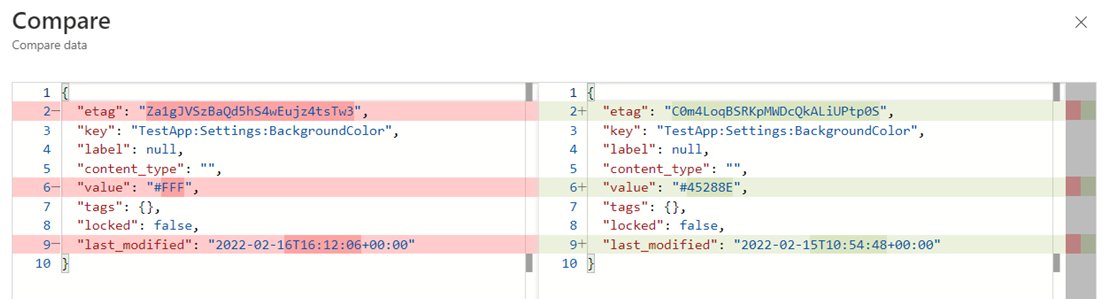
ALT Screenshot of the Azure portal with compared keys-values
1
7
19
3,132

May 16
I might just copy over FeatureManagement from my old install and hope that works
7
1,515

Apr 7
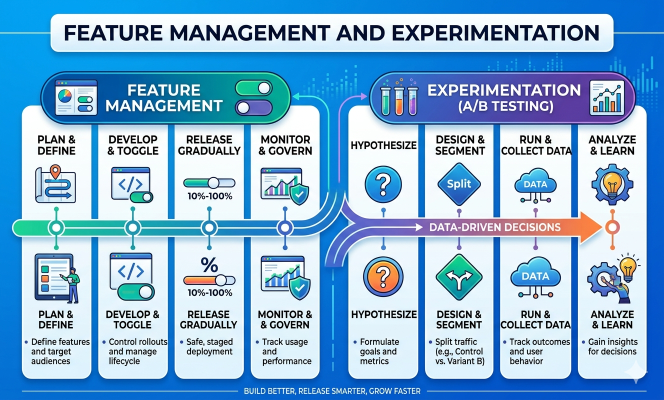
The Growing Importance of Feature Management & Experimentation in Modern Software Development
quadrantknowledge.blogspot.c…
qksgroup.com/market-research…
#FeatureManagement #ExperimentationPlatforms
#ABTesting #ProductDevelopment
2
10

Mar 24
Windows 11で非公式にNVMe性能を引き上げていたレジストリ設定が最新Insiderビルドで無効化され、最大80%超の性能向上が見込まれていた手法が使えなくなったことが判明した。
問題の手法はWindows Server 2025のネイティブNVMeドライバを有効化するもので、従来のSCSI経由処理を置き換え、ランダム書き込み性能やIOPSを大幅に改善するとされていた。しかし最新ビルドでは該当のFeatureManagementキーが機能しなくなり、強制有効化が不可能となった。一方でViVeToolを用いれば引き続き機能を有効化できる可能性があるが、BitLockerの回復要求やSSD管理ツール非対応などの互換性問題は残る。Microsoftは正式提供時期を明らかにしていないが、今後の標準実装に向けた調整段階とみられる。
tomshardware.com/software/wi…
89
191
37,623

Most features are launched on a "gut feeling" and a prayer.
In 2026, shipping without data isn't "moving fast", it's driving blindfolded. The elite teams aren't just building; they are experimenting.
What @statsig is doing isn't just A/B testing; it’s giving founders a "truth machine" for their product roadmap. If you aren't using feature flags to de-risk your growth, you're leaving your MRR to chance.
#ProductGrowth #DataScience #Statsig #FeatureManagement

1
2
69

NVMeネイティブドライバはまだ何が起こるかわからんのでメイン機ではおすすめしないけど、お兄さん同様やらないと気が済まないチェレンジャーは以下をコマンドプロンプトで実行し再起動。
reg add "HKEY_LOCAL_MACHINE\SYSTEM\CurrentControlSet\Policies\Microsoft\FeatureManagement\Overrides" /v 735209102 /t REG_DWORD /d 1 /f reg add "HKEY_LOCAL_MACHINE\SYSTEM\CurrentControlSet\Policies\Microsoft\FeatureManagement\Overrides" /v 1853569164 /t REG_DWORD /d 1 /f reg add "HKEY_LOCAL_MACHINE\SYSTEM\CurrentControlSet\Policies\Microsoft\FeatureManagement\Overrides" /v 156965516 /t REG_DWORD /d 1 /f
元に戻す場合は以下を実行。
reg delete "HKEY_LOCAL_MACHINE\SYSTEM\CurrentControlSet\Policies\Microsoft\FeatureManagement\Overrides" /v 735209102 /f reg delete "HKEY_LOCAL_MACHINE\SYSTEM\CurrentControlSet\Policies\Microsoft\FeatureManagement\Overrides" /v 1853569164 /f reg delete "HKEY_LOCAL_MACHINE\SYSTEM\CurrentControlSet\Policies\Microsoft\FeatureManagement\Overrides" /v 156965516 /f
Jan 9

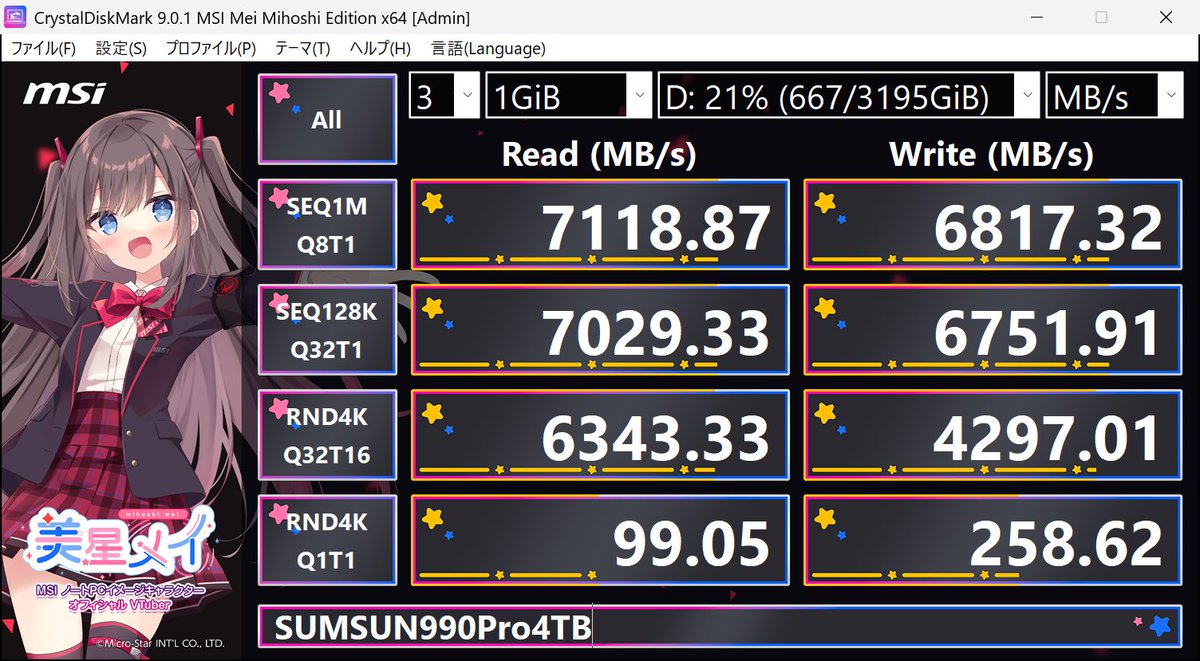
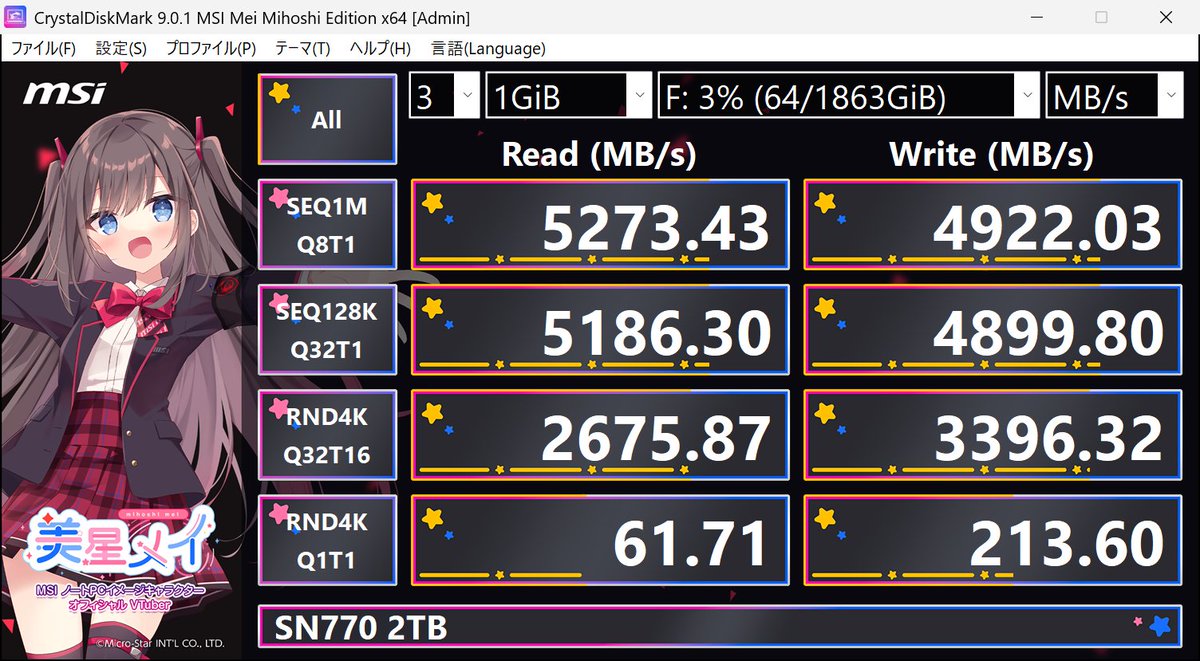
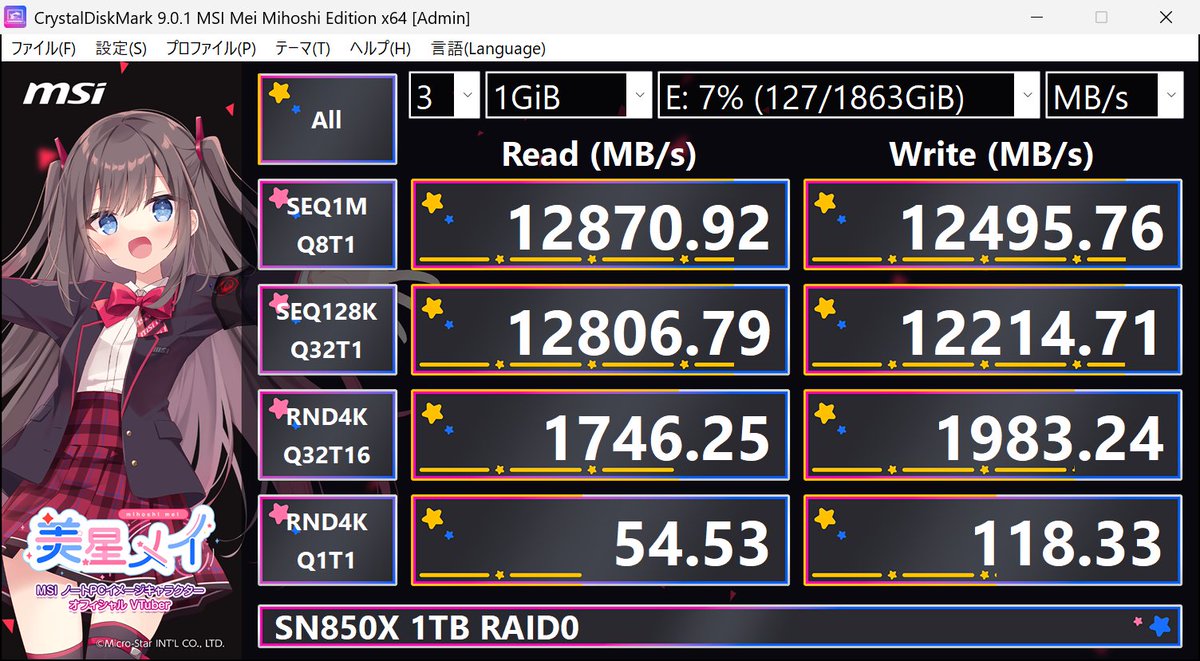
Win1125H2では従来のStorNVMe.sysドライバーとは別に「本来のNVMeらしい」ドライバー が導入されていて、有効化することでパフォーマンスが向上する可能性があるとのことなので
3つのDWORD値(156965516、1853569164、735209102)を追加して再起動する
添付は、実行前のデータ
1
4
340

FREE NVMe speed boost on Windows 11 (25H2)
Windows has a new native NVMe driver that can make your SSD faster and use less CPU.
NVMe 25H2 ONLY.
Run in Terminal (Admin):
reg add HKEY_LOCAL_MACHINE\SYSTEM\CurrentControlSet\Policies\Microsoft\FeatureManagement\Overrides /v 156965516 /t REG_DWORD /d 1 /f
reg add HKEY_LOCAL_MACHINE\SYSTEM\CurrentControlSet\Policies\Microsoft\FeatureManagement\Overrides /v 1853569164 /t REG_DWORD /d 1 /f
reg add HKEY_LOCAL_MACHINE\SYSTEM\CurrentControlSet\Policies\Microsoft\FeatureManagement\Overrides /v 735209102 /t REG_DWORD /d 1 /f
Reboot.
⚠️ NVMe only
⚠️ 25H2 only
14
52
1,369
182,436

31 Dec 2025
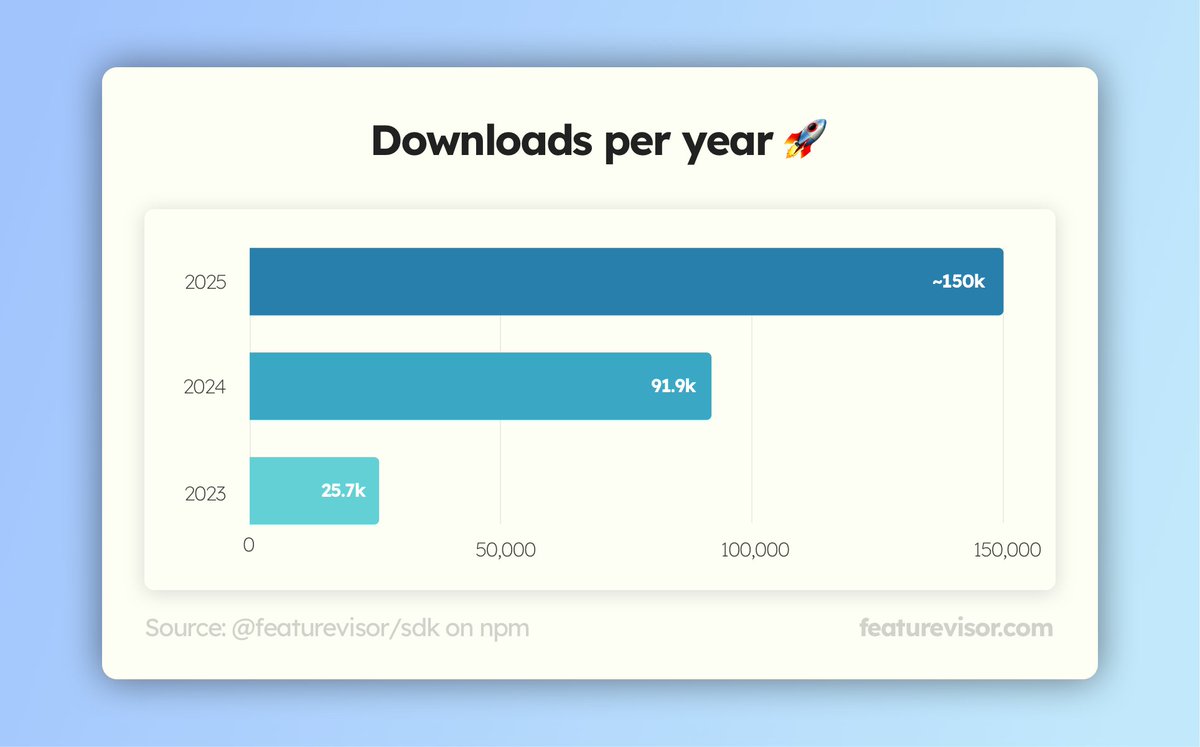
✨usage of @featurevisor continues to grow quietly year over year.
thanks to those helping spread the word offline 🫡
#featuremanagement #featureflags
1
1
3
101

27 Dec 2025
Pour celles & ceux que ça intéresse, il faut :
0. Créer un point de restauration
1. Ouvrir Powershell en mode administrateur
2. Copier/coller les commandes suivantes :
"reg add HKEY_LOCAL_MACHINE\SYSTEM\CurrentControlSet\Policies\Microsoft\FeatureManagement\Overrides /v 735209102 /t REG_DWORD /d 1 /f"
"reg add HKEY_LOCAL_MACHINE\SYSTEM\CurrentControlSet\Policies\Microsoft\FeatureManagement\Overrides /v 156965516 /t REG_DWORD /d 1 /f"
"reg add HKEY_LOCAL_MACHINE\SYSTEM\CurrentControlSet\Policies\Microsoft\FeatureManagement\Overrides /v 1853569164 /t REG_DWORD /d 1 /f"
3. Redémarrez votre ordinateur pour que les modifs soient prises en compte !
Prenez bien en compte que ces modifications sont EXPERIMENTALES, si Microsoft ne les a pas encore mis à disposition publiquement c'est qu'il y a une raison !
2
129

23 Dec 2025
I don’t have this path specifically
Microsoft\FeatureManagement\Overrides
1
7
3,516

22 Dec 2025
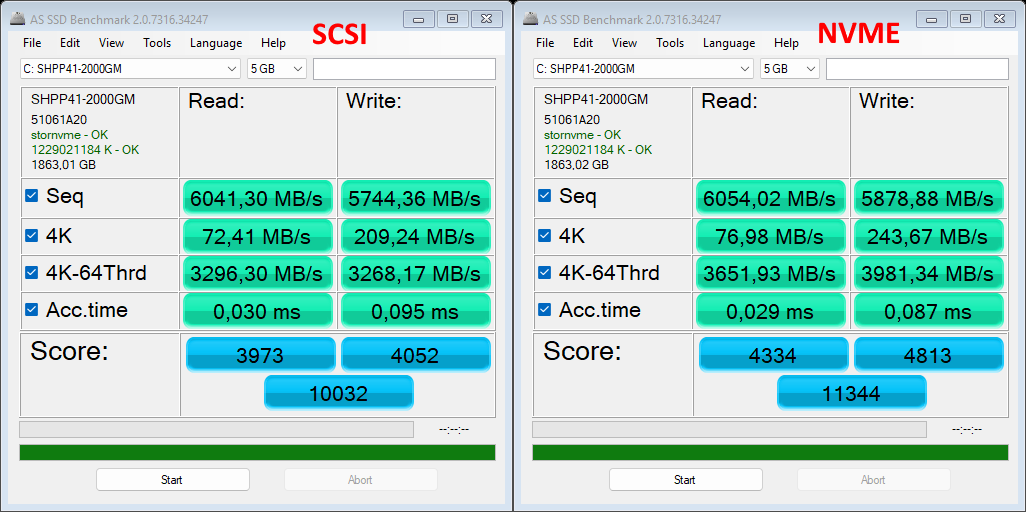
Enabling NVME native drivers in Win 11 (tried on 25H2)
Works pretty good.
Just open regedit.
Go to : HKEY_LOCAL_MACHINE\SYSTEM\CurrentControlSet\Policies\Microsoft\FeatureManagement\Overrides
Add DWORD 32 Bits:
“735209102”=dword:00000001
“1853569164”=dword:00000001
“156965516”=dword:00000001
46
170
1,564
107,675

18 Dec 2025
Power shell como administrador
Cola isso, enter e reinicia:
reg add HKEY_LOCAL_MACHINE\SYSTEM\CurrentControlSet\Policies\Microsoft\FeatureManagement\Overrides /v 1176759950 /t REG_DWORD /d 1 /f
3
421


17 Dec 2025
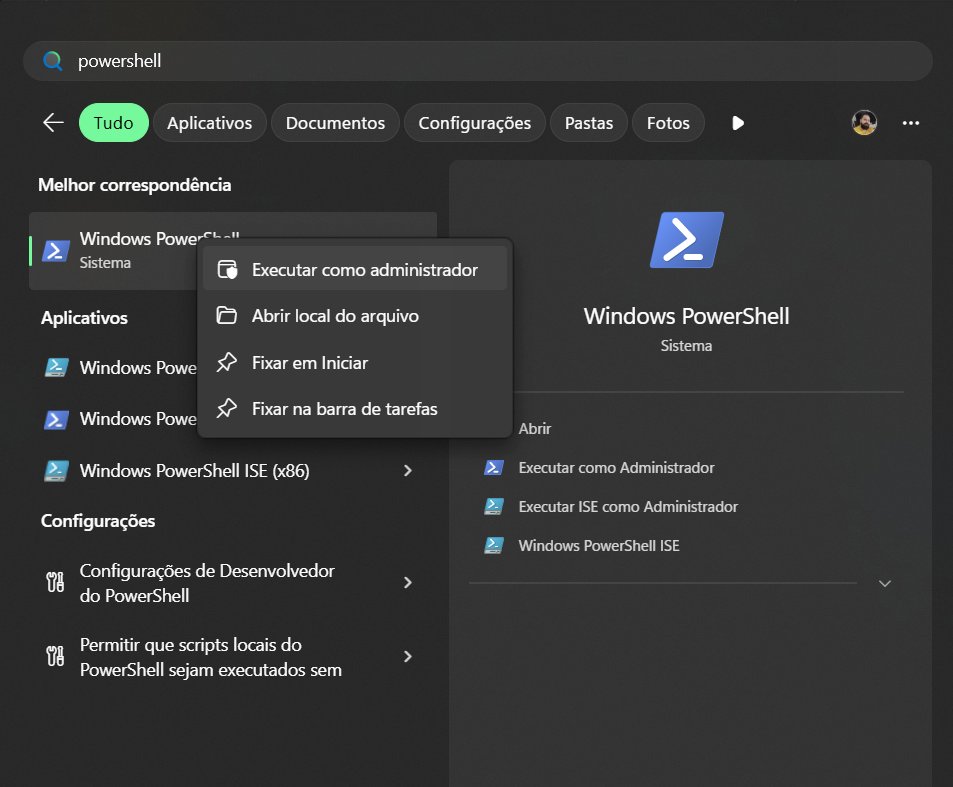
abra o Powershell no pesquisa do iniciar do windows, execute como Administrador, copie e cole esse comando: reg add HKEY_LOCAL_MACHINE\SYSTEM\CurrentControlSet\Policies\Microsoft\FeatureManagement\Overrides /v 1176759950 /t REG_DWORD /d 1 /f
e de um enter, depois reinicie o PC.
3
2
53
2,742

17 Dec 2025
terminal como admin
reg add HKEY_LOCAL_MACHINE\SYSTEM\CurrentControlSet\Policies\Microsoft\FeatureManagement\Overrides /v 1176759950 /t REG_DWORD /d 1 /f
11
1,243

17 Dec 2025
Tu abre o Power Shell com administrador e coloca esse comando.
reg add HKEY_LOCAL_MACHINE\SYSTEM\CurrentControlSet\Policies\Microsoft\FeatureManagement\Overrides /v 1176759950 /t REG_DWORD /d 1 /f
É oficial da Microsoft
1
2
248

16 Dec 2025
reg add HKEY_LOCAL_MACHINE\SYSTEM\CurrentControlSet\Policies\Microsoft\FeatureManagement\Overrides /v 1176759950 /t REG_DWORD /d 1 /f
Joga o comando no POWER SHELL em modo administrador e reinicia a maquina
3
3
116
9,614

16 Dec 2025
Outra maneira de ativar é por registro, sem necessidade da ferramenta, só executar pelo terminal do windows
reg add HKEY_LOCAL_MACHINE\SYSTEM\CurrentControlSet\Policies\Microsoft\FeatureManagement\Overrides /v 1176759950 /t REG_DWORD /d 1 /f
1
16
2,233

16 Dec 2025
reg add HKEY_LOCAL_MACHINE\SYSTEM\CurrentControlSet\Policies\Microsoft\FeatureManagement\Overrides /v 1176759950 /t REG_DWORD /d 1 /f
17
16
554
40,608

16 Dec 2025
Literalmente é rodar o comando no powershell:
reg add HKEY_LOCAL_MACHINE\SYSTEM\CurrentControlSet\Policies\Microsoft\FeatureManagement\Overrides /v 1176759950 /t REG_DWORD /d 1 /f
O mesmo comando está no site indicado e no blog da Microsoft
10
7
230
12,967