
30 Dec 2025
Excited to be in the WebDev Cohort! 🚀 Just published Part 1 of my 3-blog series on Git and its powerhouse functions.
📝 Dive in, share your thoughts, and stay tuned for Part 2 soon! 🤗
dev.to/6116hayat/why-version…
#Git #WebDevelopment #WebDev #GitTutorial #Blogging #CodingTips
28 Dec 2025

dev.to/6116hayat/why-version…
Check out, my new Blog guys!!!
1
6
173

15 Dec 2025
Git, GitHub, GitLab: Zero To Hero In One Map.
Git is the version control engine on your machine. GitHub and GitLab are online platforms that sit on top of Git and add collaboration, automation, and DevOps features. This post explains each one separately in plain language, then shows how they fit together in a real workflow so you can leave with a clear mental model and a practical path forward.
🔗Tap below to dive deep into it👇
bytebrief.vercel.app/blog/gi…
#Git #GitHub #GitLab #VersionControl #DevOps #Programming #SoftwareDevelopment #CI_CD #OpenSource #TechTutorial #Coding #GitTutorial
3
4

8 Dec 2025
Day 15: 𝐆𝐢𝐭 𝐀𝐥𝐢𝐚𝐬𝐞𝐬
📝 How to Create and Use Git Aliases to Streamline Your Workflow
⚙️ What Are Git Aliases?
Git aliases are custom shortcuts for Git commands. Instead of typing long commands repeatedly, you can create short aliases that do the same job.
Aliases can simplify complex commands, save time, and reduce typing errors, especially for frequently used or long commands.
🛠️ Examples of Useful Aliases for Common Git Commands
🔧 Creating Git Aliases:
To create a Git alias, use the git config command with the --global option (to make it available in all repositories):
𝒈𝒊𝒕 𝒄𝒐𝒏𝒇𝒊𝒈 --𝒈𝒍𝒐𝒃𝒂𝒍 𝒂𝒍𝒊𝒂𝒔.<𝒂𝒍𝒊𝒂𝒔-𝒏𝒂𝒎𝒆> '<𝒈𝒊𝒕-𝒄𝒐𝒎𝒎𝒂𝒏𝒅>'
For example, to create an alias co for git checkout:
𝒈𝒊𝒕 𝒄𝒐𝒏𝒇𝒊𝒈 --𝒈𝒍𝒐𝒃𝒂𝒍 𝒂𝒍𝒊𝒂𝒔.𝒄𝒐 '𝒄𝒉𝒆𝒄𝒌𝒐𝒖𝒕'
After setting this alias, you can switch branches with:
𝒈𝒊𝒕 𝒄𝒐 <𝒃𝒓𝒂𝒏𝒄𝒉-𝒏𝒂𝒎𝒆>
📋 Useful Git Aliases:
Here are some common and useful aliases to improve productivity:
st for status:
Quickly check the status of your repository:
𝒈𝒊𝒕 𝒄𝒐𝒏𝒇𝒊𝒈 --𝒈𝒍𝒐𝒃𝒂𝒍 𝒂𝒍𝒊𝒂𝒔.𝒔𝒕 '𝒔𝒕𝒂𝒕𝒖𝒔'
Now, simply run:
𝒈𝒊𝒕 𝒔𝒕
ci for commit:
Create a shorter command for committing changes:
𝒈𝒊𝒕 𝒄𝒐𝒏𝒇𝒊𝒈 --𝒈𝒍𝒐𝒃𝒂𝒍 𝒂𝒍𝒊𝒂𝒔.𝒄𝒊 '𝒄𝒐𝒎𝒎𝒊𝒕'
Use it like this:
𝒈𝒊𝒕 𝒄𝒊 -𝒎 "𝒀𝒐𝒖𝒓 𝒄𝒐𝒎𝒎𝒊𝒕 𝒎𝒆𝒔𝒔𝒂𝒈𝒆"
br for branch:
Simplify branch management:
𝒈𝒊𝒕 𝒄𝒐𝒏𝒇𝒊𝒈 --𝒈𝒍𝒐𝒃𝒂𝒍 𝒂𝒍𝒊𝒂𝒔.𝒃𝒓 '𝒃𝒓𝒂𝒏𝒄𝒉'
Quickly list or manage branches:
𝒈𝒊𝒕 𝒃𝒓
lg for a custom log format:
A graphical and concise log view:
𝒈𝒊𝒕 𝒄𝒐𝒏𝒇𝒊𝒈 --𝒈𝒍𝒐𝒃𝒂𝒍 𝒂𝒍𝒊𝒂𝒔.𝒍𝒈 "𝒍𝒐𝒈 --𝒐𝒏𝒆𝒍𝒊𝒏𝒆 --𝒈𝒓𝒂𝒑𝒉 --𝒂𝒍𝒍 --𝒅𝒆𝒄𝒐𝒓𝒂𝒕𝒆"
Use git lg to see a visual representation of your commit history.
unstage for reset HEAD --:
Easily unstage files:
𝒈𝒊𝒕 𝒄𝒐𝒏𝒇𝒊𝒈 --𝒈𝒍𝒐𝒃𝒂𝒍 𝒂𝒍𝒊𝒂𝒔.𝒖𝒏𝒔𝒕𝒂𝒈𝒆 '𝒓𝒆𝒔𝒆𝒕 𝑯𝑬𝑨𝑫 --'
To unstage a file:
𝒈𝒊𝒕 𝒖𝒏𝒔𝒕𝒂𝒈𝒆 <𝒇𝒊𝒍𝒆>
last for viewing the last commit:
Quickly view details of the last commit:
𝒈𝒊𝒕 𝒄𝒐𝒏𝒇𝒊𝒈 --𝒈𝒍𝒐𝒃𝒂𝒍 𝒂𝒍𝒊𝒂𝒔.𝒍𝒂𝒔𝒕 '𝒍𝒐𝒈 -1 𝑯𝑬𝑨𝑫'
Use it to see the most recent commit:
𝒈𝒊𝒕 𝒍𝒂𝒔𝒕
💡 Pro Tip: Git aliases can be powerful when tailored to your workflow. Think about the commands you use most often and create aliases that save you time and effort!
#Git #GitAliases #GitCommands #GitTutorial
2
2,033

18 Nov 2025
🧵Git Essentials for DevOps Engineers & Developers 🚀
Whether you're just starting your dev journey or need a refresher, here's everything you need to know about Git! 👇
1️⃣ WHAT IS GIT?
Git is a distributed version control system that tracks changes in your code over time. Think of it as a "time machine" for your projects - you can save snapshots of your work and go back to any previous version whenever needed.
Created by Linus Torvalds in 2005, Git is now the industry standard for version control used by millions of developers worldwide.
2️⃣ WHY USE GIT?
✅ Track Changes: See who changed what, when, and why
✅ Collaboration: Multiple developers can work on the same project without conflicts
✅ Backup & Recovery: Never lose your work - every change is saved
✅ Branching: Experiment with new features without affecting the main codebase
✅ Code Review: Review changes before merging them into production
✅ Industry Standard: Required skill for almost every development job
3️⃣ HOW TO DOWNLOAD & CONFIGURE
📥 Download Git:
• Windows: git-scm.com/download/win
• Mac: brew install git (or download from git-scm.com)
• Linux: sudo apt-get install git (Ubuntu/Debian) or sudo yum install git (CentOS/RHEL)
⚙️ Initial Configuration:
Set your identity (this will appear in your commits):
----------
git config --global user.name "Your Name"
git config --global user.email "your.email@example.com"
----------
Verify installation:
git --version
4️⃣ ESSENTIAL GIT COMMANDS
🔹 Starting a Project:
git init - Initialize a new Git repository
git clone <url> - Clone an existing repository
🔹 Basic Workflow:
git status - Check what files have changed
git add <file> - Stage a specific file
git add . - Stage all changes
git commit -m "message" - Commit staged changes
git log - View commit history
🔹 Working with Branches:
git branch - List all branches
git branch <name> - Create new branch
git checkout <branch> - Switch to a branch
git checkout -b <branch> - Create and switch to new branch
git merge <branch> - Merge branch into current branch
🔹 Working with Remote:
git remote add origin <url> - Connect to remote repository
git push origin <branch> - Push changes to remote
git pull - Fetch and merge changes from remote
git fetch - Download changes without merging
🔹 Undoing Changes:
git restore <file> - Discard changes in working directory
git reset HEAD <file> - Unstage a file
git revert <commit> - Create new commit that undoes changes
💡 PRO TIPS:
• Commit often with meaningful messages
• Always pull before you push
• Use branches for new features
• Never commit sensitive data (API keys, passwords)
• Use .gitignore to exclude files
📚 Remember: Git has a learning curve, but once you get it, you'll wonder how you ever coded without it!
What's your favorite Git command or workflow? Drop it in the comments! 👇
Comment "Git" and I'll send you the repo to make you first open-source contribution.
🔁 Repost so that others can also learn.
See you in the next Git Advanced concept.
#Git #DevOps #Developer #VersionControl #GitTutorial #DevOpsEngineer #CodingTips
GIF Credit: @bytebytego
2
60

25 Aug 2025
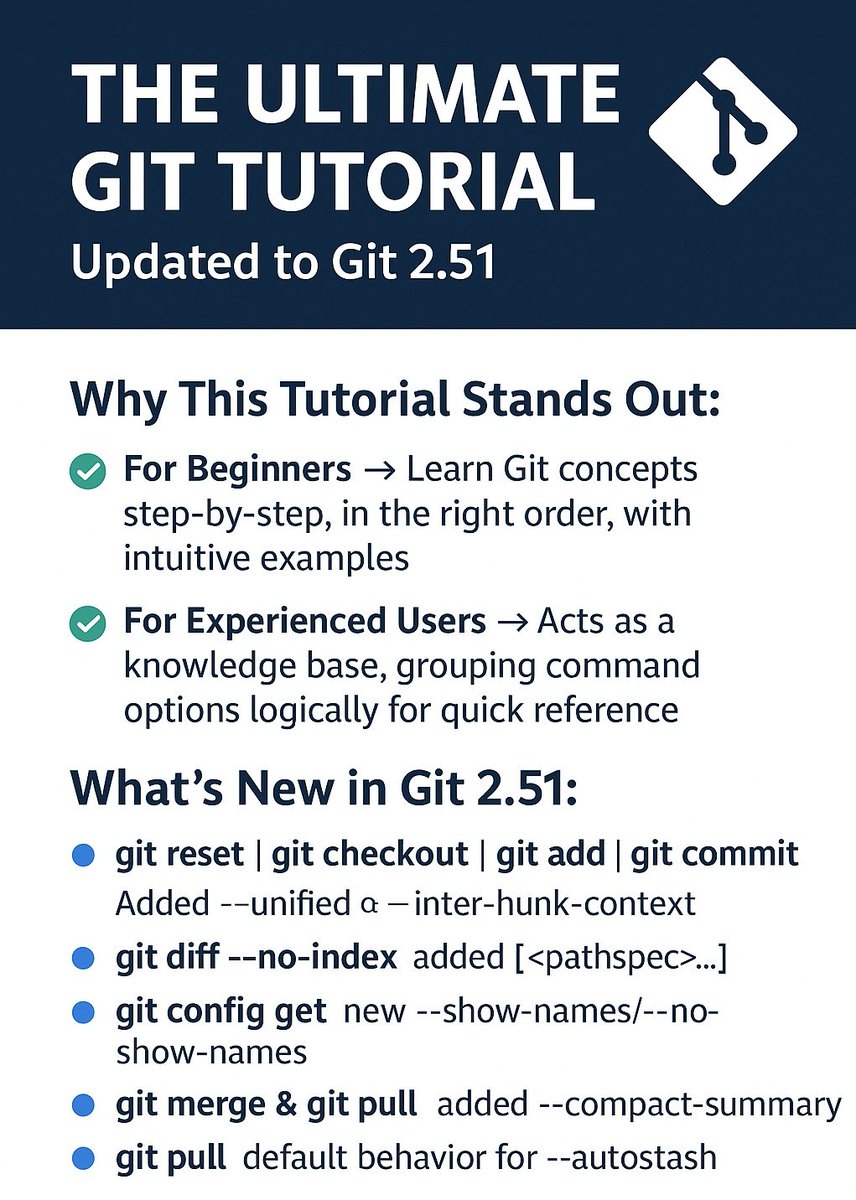
🚀 The Ultimate Git Tutorial — Updated to Git 2.51 🔄
The Ultimate Git Tutorial has been upgraded from Git 2.50 → Git 2.51, making it even more powerful and comprehensive for beginners and experienced developers alike.
🌟 Why This Tutorial Stands Out:
✅ For Beginners → Learn Git concepts step-by-step, in the right order, with intuitive examples.
✅ For Experienced Users → Acts as a knowledge base, grouping command options logically for quick reference.
✅ Practical Learning → Understand how and why commands work, not just what to type.
🆕 What's New in Git 2.51:
🔹 Improved command builder for:
• git reset | git checkout | git add | git commit → Added --unified & --inter-hunk-context
• git diff --no-index → Added [<pathspec>...] support
• git config get → New --show-names / --no-show-names options
• git merge & git pull → Added --compact-summary
• git pull → Default behavior updated for --autostash
📚 Additional Resources:
For cheatsheets and quick references:
🔗 Pro Git Book git-scm.com/book/en/v2
Whether you're just starting with Git or want to master advanced workflows, this tutorial is your one-stop solution. 🛠️
🔗 Read the Full Tutorial Here: jhcarl0814.github.io/ClosedA…
#Git #GitTutorial #VersionControl #DevTools #Programming #Developers #OpenSource
11
868

1 Aug 2025
حاب تتعلم كيف Git بساعدك في إدارة ملفاتك ومشاريعك بكل سلاسة؟
الشرح راح يفيد كل مبتدئ أو أي شخص حاب يفهم Git بشكل عملي وبسيط
youtu.be/_ArprtNuXGU
#Git #برمجة #تعلم #تقنية #GitTutorial
5
374

13 Apr 2025
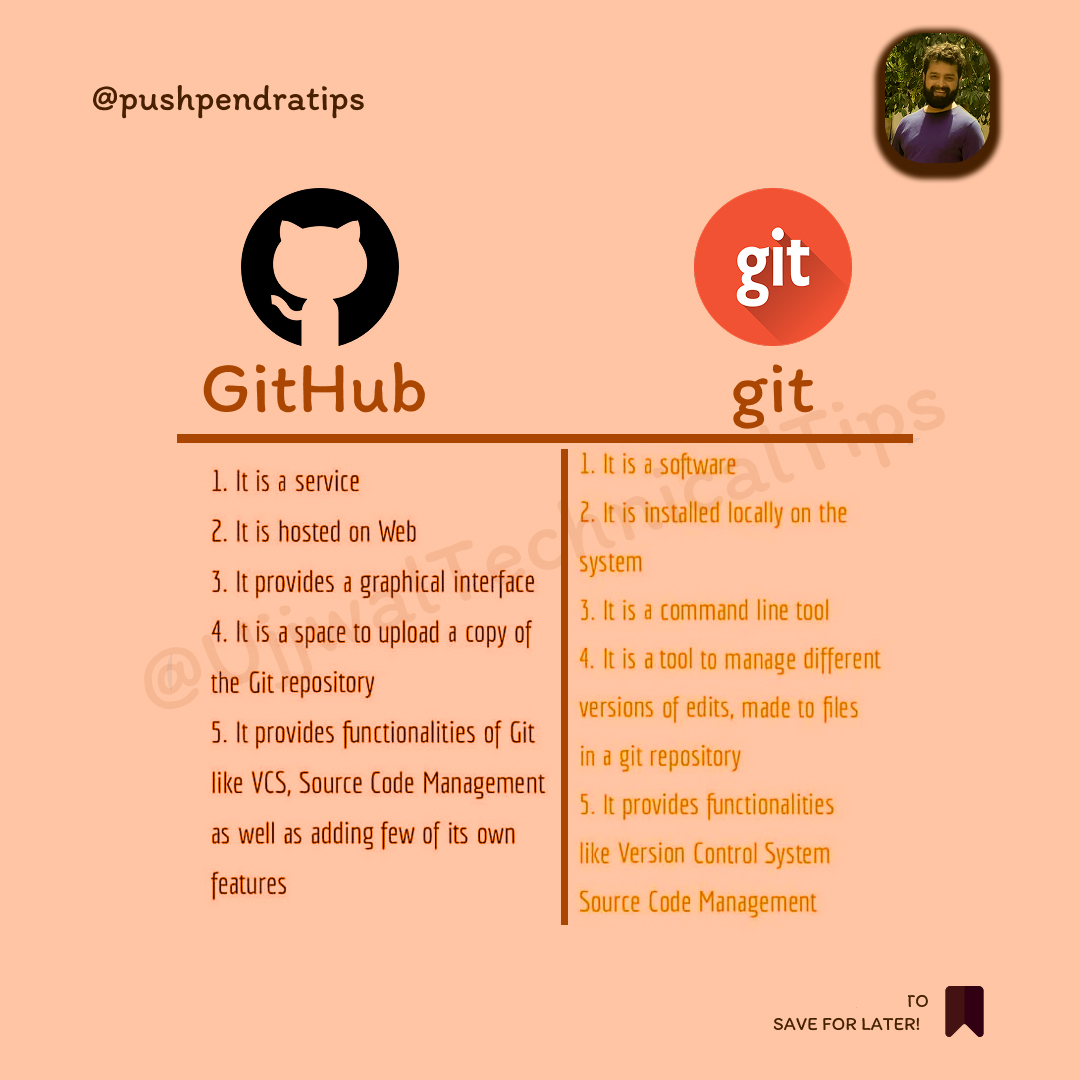
🚀 Difference Between Git and GitHub
A thread 🧵 👇🏻
#Git #GitHub #GitVsGitHub #VersionControl #GitTutorial #GitHubTutorial #LearnGit #Coding #DeveloperTools #CodeWithMe #ProgrammingBasics #SoftwareDevelopment #OpenSource #TechTips #WebDevelopment
26
13
66
4,352
28 Feb 2025
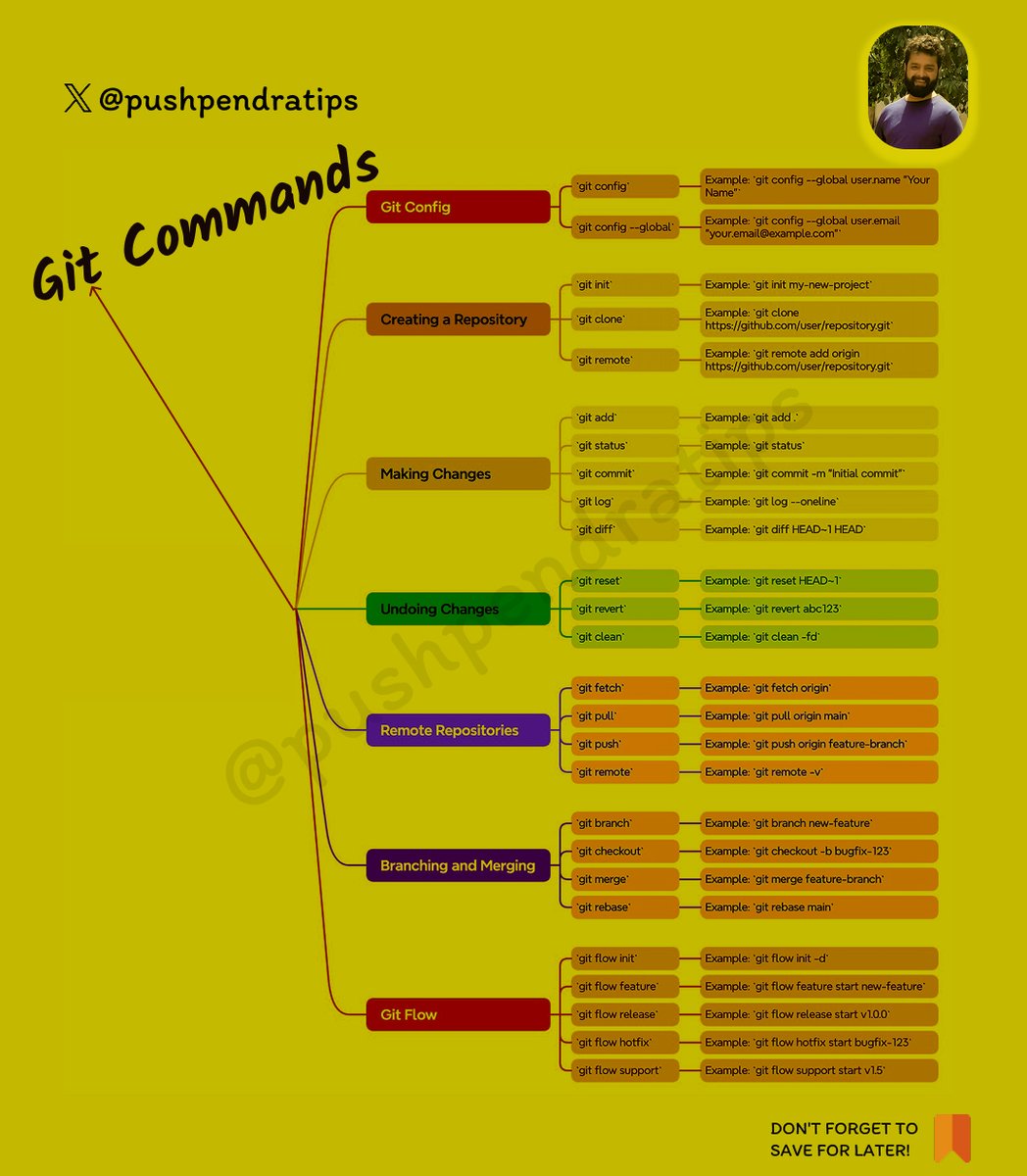
🔥 Essential Git Commands for Developers 🚀
Here's a quick cheat sheet for Git commands 🔥 — from basics to advanced!
✅ Basic Commands
git init
Initialize a new Git repository
---------------------------------
git clone <repo_url>
Clone existing repository
---------------------------------
git status
Check current changes
---------------------------------
git add <file>
Add specific file to staging
---------------------------------
git add .
Add all files to staging
---------------------------------
git commit -m "message"
Commit staged changes with a message
---------------------------------
git log
Show commit history
---------------------------------
git branch
List all branches
---------------------------------
git checkout <branch>
Switch branch
---------------------------------
git checkout -b <branch>
Create and switch to a new branch
---------------------------------
🔄 Remote Repository Commands
git remote add origin <url>
Link local repo to remote repo
---------------------------------
git push origin <branch>
Push changes to remote branch
---------------------------------
git pull origin <branch>
Pull latest changes
---------------------------------
git fetch
Fetch all branches without merging
---------------------------------
git clone <url>
Clone repository
---------------------------------
🔥 Branching
git branch
List branches
---------------------------------
git branch <branch-name>
Create branch
---------------------------------
git checkout <branch-name>
Switch branch
---------------------------------
git checkout -b <branch>
Create & Switch
---------------------------------
git merge <branch>
Merge branch
---------------------------------
git branch -d <branch>
Delete branch
---------------------------------
🔁 Undo Changes
git reset <file>
Unstage file
---------------------------------
git checkout -- <file>
Discard changes in file
---------------------------------
git revert <commit>
Revert a commit
---------------------------------
git reset --hard
Reset everything to last commit
---------------------------------
🔥 Stash (Temporary Save)
git stash
Save changes temporarily
---------------------------------
git stash pop
Apply last stash
---------------------------------
git stash list
Show stash list
---------------------------------
git stash drop
Delete last stash
---------------------------------
✍️ Tagging
git tag <name>
Create tag
---------------------------------
git tag
List tags
---------------------------------
git show <tag>
Show tag details
---------------------------------
git push origin <tag>
Push tag to remote
---------------------------------
🔥 Follow for More @pushpendratips Dev Tips & Tricks 🚀
#GitCommands #GitTutorial #GitForBeginners #LearnGit #GitBasics #GitHubTutorial #VersionControl #GitProTips #GitCommandsInHindi #GitCourse #GitBranching #GitMerge #GitReset #GitRevert
#GitStash #GitAdvanced #WebDevelopment #CodingTips #DeveloperLife #TechTutorial #FrontendDeveloper #ReactJS #JavaScriptTutorial #LearnCoding #ProgrammingTutorial #SoftwareDevelopment
#CodingForBeginners #GitHubCommands #TechEducation #GitMasterClass #GitHindiTutorial #GitIn2025 #VersionControlSystem #GitWorkflow #pushpendratips
29
14
70
2,919

21 Feb 2025
Does the tree scream if I delete it in the git woods?
Source: devhubby.com/thread/how-to-d…
#SoftwareEngineer #WebDev #GitTutorial #GitHelp #historylover #delete

4
24

8 Feb 2025
3
93
31 Jan 2025
2
75
1 Jan 2025
2
2
111
21 Dec 2024
1
3
95
12 Dec 2024
2
120
8 Dec 2024
1
2
150
19 Nov 2024
3
217