
Jan 14
JAVASCRIPT ARROW GAME - CODING TUTORIAL
youtube.com/watch?v=0DutUCom…
#JavaScriptArrowGame #JavaScriptGame #JavaScriptTutorial
1
4
36
Jan 13
JAVASCRIPT SCIENTIFIC CALCULATOR - CODING TUTORIAL
youtube.com/watch?v=n2pZRrop…
#JavaScriptScientificCalculator #CodingTutorial #JavaScript #Calculator #JavaScriptCalculator #ScientificCalculator #Coding #Tutorial #JavaScriptTutorial
2
45

13 Dec 2025
🤯 Even Experienced React Devs find it difficult to answer this simple Question - I Generally Asked in React Interviews 👇👇
🚀 Question is
Let's say you have to 20 different states in a complex component - which strategy you will prefer and why
1. Dedicated State to manage the specific state
2. Use an object to manage the state
3. useReducer to manager the state
Checkout the answer
1️⃣ Dedicated useState for each state
Pros:
✅ Simple and easy to understand
✅ Fine for very small components
Cons:
❌ Becomes noisy and hard to read
❌ State logic is scattered
❌ Difficult to update or reset multiple states together
Verdict:
❌ Not suitable for managing 20 states.
2️⃣ Single Object State
const [form, setForm] = useState({ name: "", email: "" });
Pros:
✅ Centralized state
✅ Easier bulk updates and resets
Cons:
⚠️ Manual state merging required
⚠️ Easy to introduce bugs with incorrect spreads
⚠️ No clear action semantics
Verdict:
⚠️ Better than multiple useState, but not ideal at scale.
3️⃣ useReducer (Preferred Approach)
Pros:
✅ Centralized and predictable state updates
✅ Clear actions improve readability
✅ Scales well as complexity grows
✅ Easier debugging and testing
Verdict:
✅ Best choice for managing 20 related states.
Hope you find this helpful - Share in your network to reach to more frontend folks
---
✅ Check out FrontendGeek.com to Ace Frontend Interview
✅ "AI SaaS Starter" - Projects for Resume & Side hustle 50% OFF "FIRST50" lnkd.in/gNhKpZit
#javascripttutorial #interview #FrontEnd

1
4
3,490
6 Nov 2025
JAVASCRIPT SNAKE GAME - CODING TUTORIAL
youtube.com/watch?v=1Z8o_fmX…
#JavaScriptSnakeGame #JavascriptGame #JavascriptTutorial #CodingTutorial #JavascriptSnake #SnakeGame #GameTutorial #Javascript #Snake #Game #Coding #Tutorial
2
136

14 Jun 2025
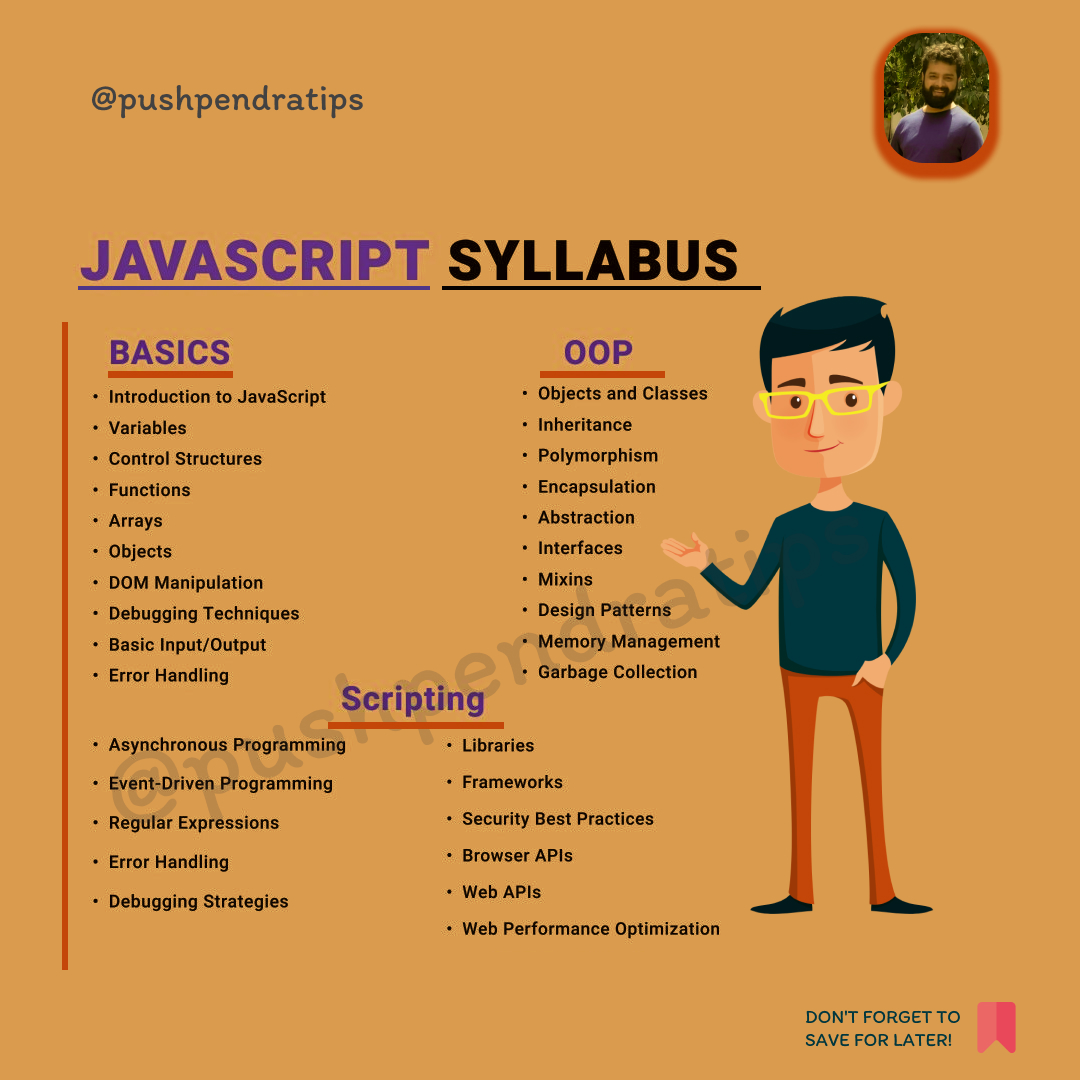
🎯JavaScript syllabus
#JavaScript #JavaScriptTutorial #LearnJavaScript #JavaScriptCourse #JavaScriptSyllabus #coding #JavaScriptRoadmap #JavaScriptForBeginners #JavaScriptLearning #JavaScriptFullCourse #FrontendDevelopment #WebDevelopment
#CodingSkills #JavaScriptDeveloper #coder #ProgrammingForBeginners #100DaysOfCode #CodeWithMe #TechYouTube #CodeNewbie
42
17
57
1,441
15 Apr 2025
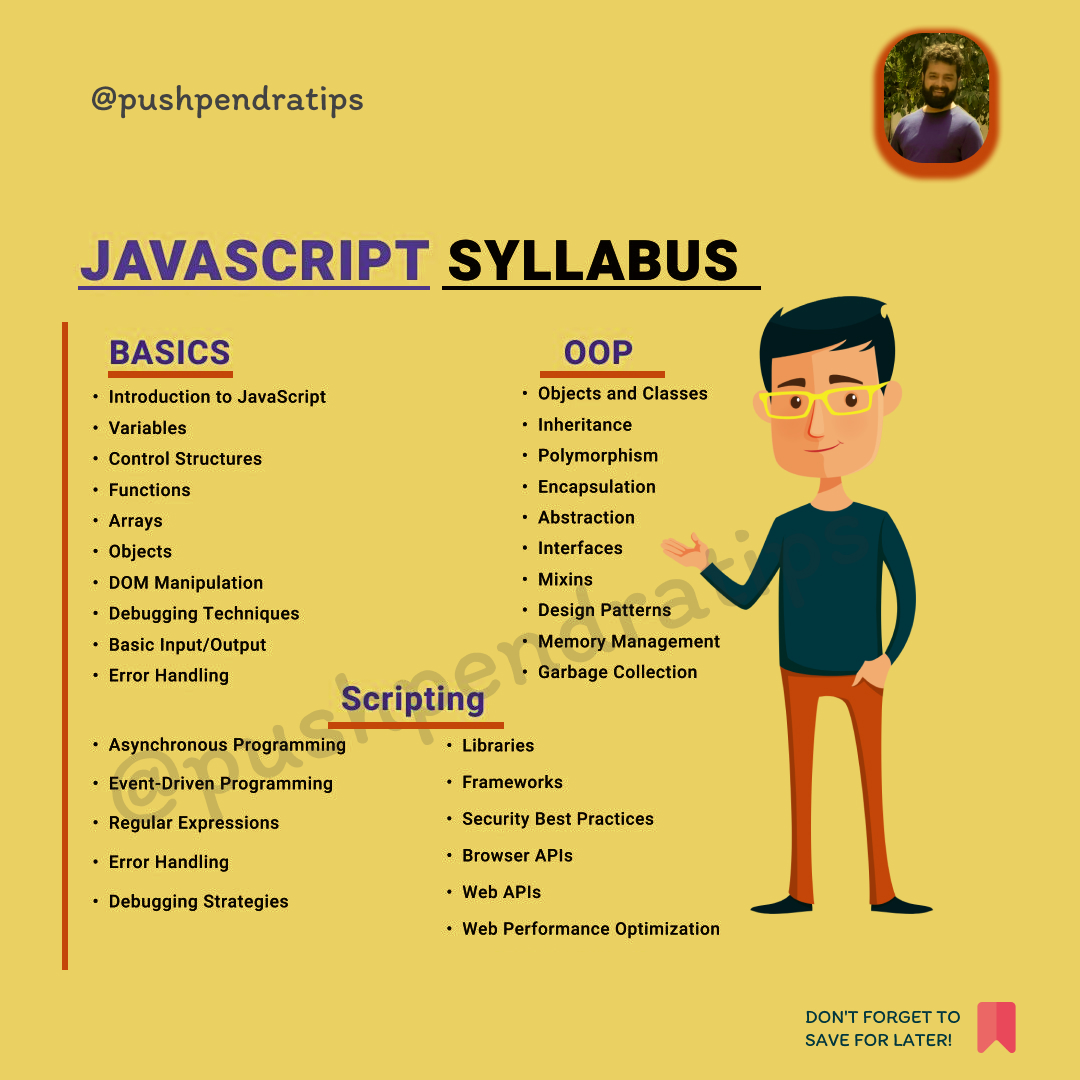
🎯JavaScript syllabus
#JavaScript #JavaScriptTutorial #LearnJavaScript #JavaScriptCourse #JavaScriptSyllabus #coding #JavaScriptRoadmap #JavaScriptForBeginners #JavaScriptLearning #JavaScriptFullCourse #FrontendDevelopment #WebDevelopment
#CodingSkills #JavaScriptDeveloper #coder #ProgrammingForBeginners #100DaysOfCode #CodeWithMe #TechYouTube #CodeNewbie
25
22
139
5,214

8 Apr 2025
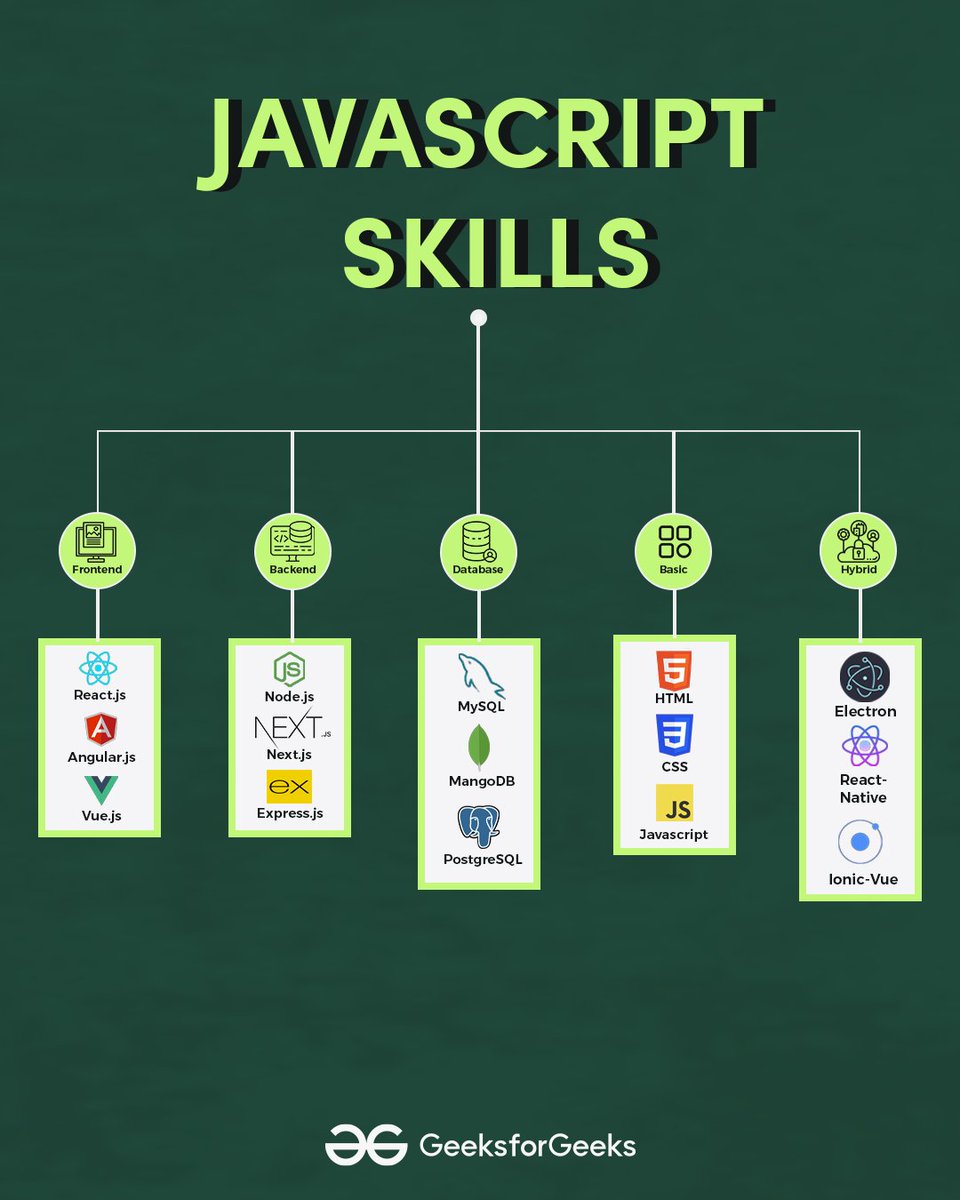
Thoughtful tuesday- Why JavaScript is Important for Web Development?
Learn more now: geeksforgeeks.org/javascript…
Explore all GeeksforGeeks content: geeksforgeeks.org/
.
.
#gfg #geeksforgeeks #javascript #javascripttutorial #webdevelopment #webdev
ALT javascript
2
23
2,057
2 Apr 2025
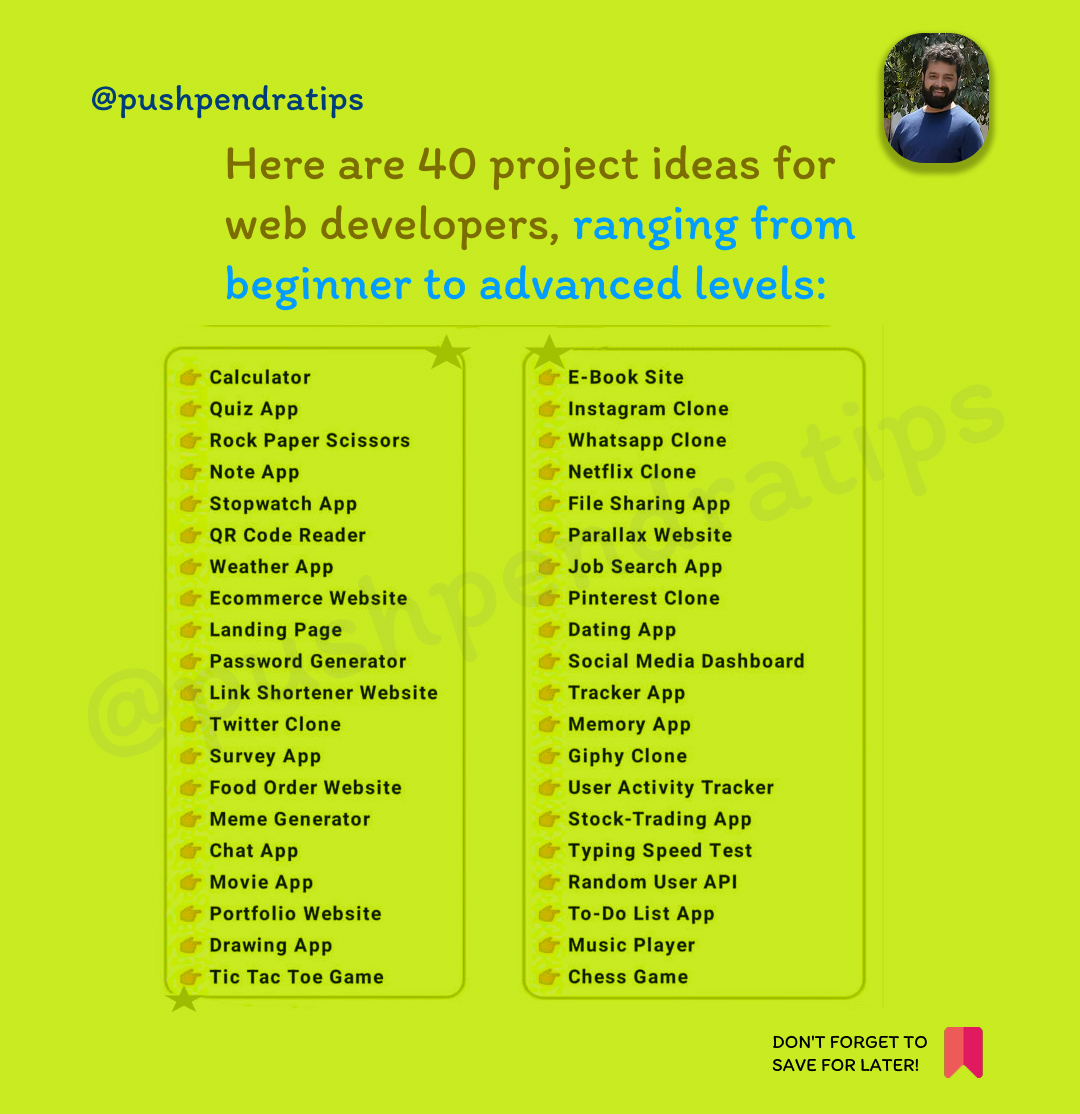
🚀Here are 40 project ideas for web developers, ranging from beginner to advanced levels:
𝙋𝙡𝙚𝙖𝙨𝙚 𝙎𝙪𝙗𝙨𝙘𝙧𝙞𝙗𝙚 𝙩𝙤 𝙈𝙮 𝘾𝙝𝙖𝙣𝙣𝙚𝙡! 🚀
youtube.com/ujjwaltechnicalt…
🔔 Don’t forget to LIKE 👍, SHARE 🔄 & SUBSCRIBE 🔥 for more JavaScript tips!
A thread 🧵 👇🏻
#JavaScript #StringMethods #JavaScriptTutorial #JSForBeginners #JavaScriptProgramming #code #StringManipulation #LearnJavaScript #Coding
30
11
52
1,454
30 Mar 2025
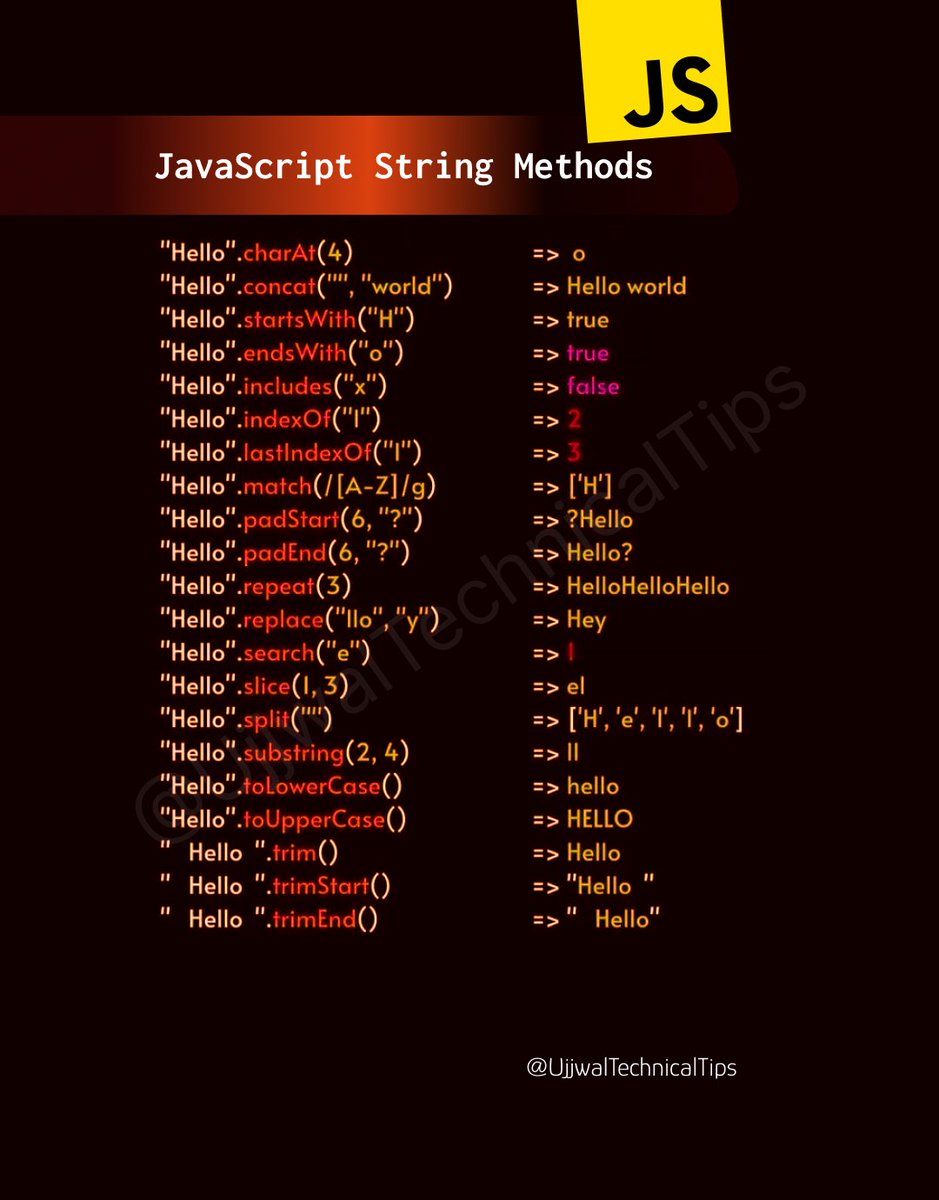
🚀 𝐌𝐚𝐬𝐭𝐞𝐫 𝐉𝐚𝐯𝐚𝐒𝐜𝐫𝐢𝐩𝐭 𝐒𝐭𝐫𝐢𝐧𝐠 𝐌𝐞𝐭𝐡𝐨𝐝𝐬
In this video, we'll explore essential JavaScript string methods that every developer must know. Whether you're a beginner or an experienced coder, these methods will help you manipulate and transform strings efficiently.
🔹 Topics Covered:
✅ length – Find the length of a string
✅ toUpperCase() & toLowerCase() – Change letter cases
✅ trim() – Remove extra spaces
✅ slice(), substring(), substr() – Extract parts of a string
✅ replace() & replaceAll() – Modify text easily
✅ split() – Convert a string into an array
✅ includes(), indexOf(), startsWith(), endsWith() – Search inside a string
✅ concat() & – Merge strings
💡 By the end of this video, you'll be able to manipulate strings like a pro!
𝙋𝙡𝙚𝙖𝙨𝙚 𝙎𝙪𝙗𝙨𝙘𝙧𝙞𝙗𝙚 𝙩𝙤 𝙈𝙮 𝘾𝙝𝙖𝙣𝙣𝙚𝙡! 🚀
youtube.com/ujjwaltechnicalt…
🔔 Don’t forget to LIKE 👍, SHARE 🔄 & SUBSCRIBE 🔥 for more JavaScript tips!
#JavaScript #StringMethods #JavaScriptTutorial #JSForBeginners #JavaScriptProgramming #StringManipulation #LearnJavaScript #Coding
24
18
82
4,253
10 Mar 2025
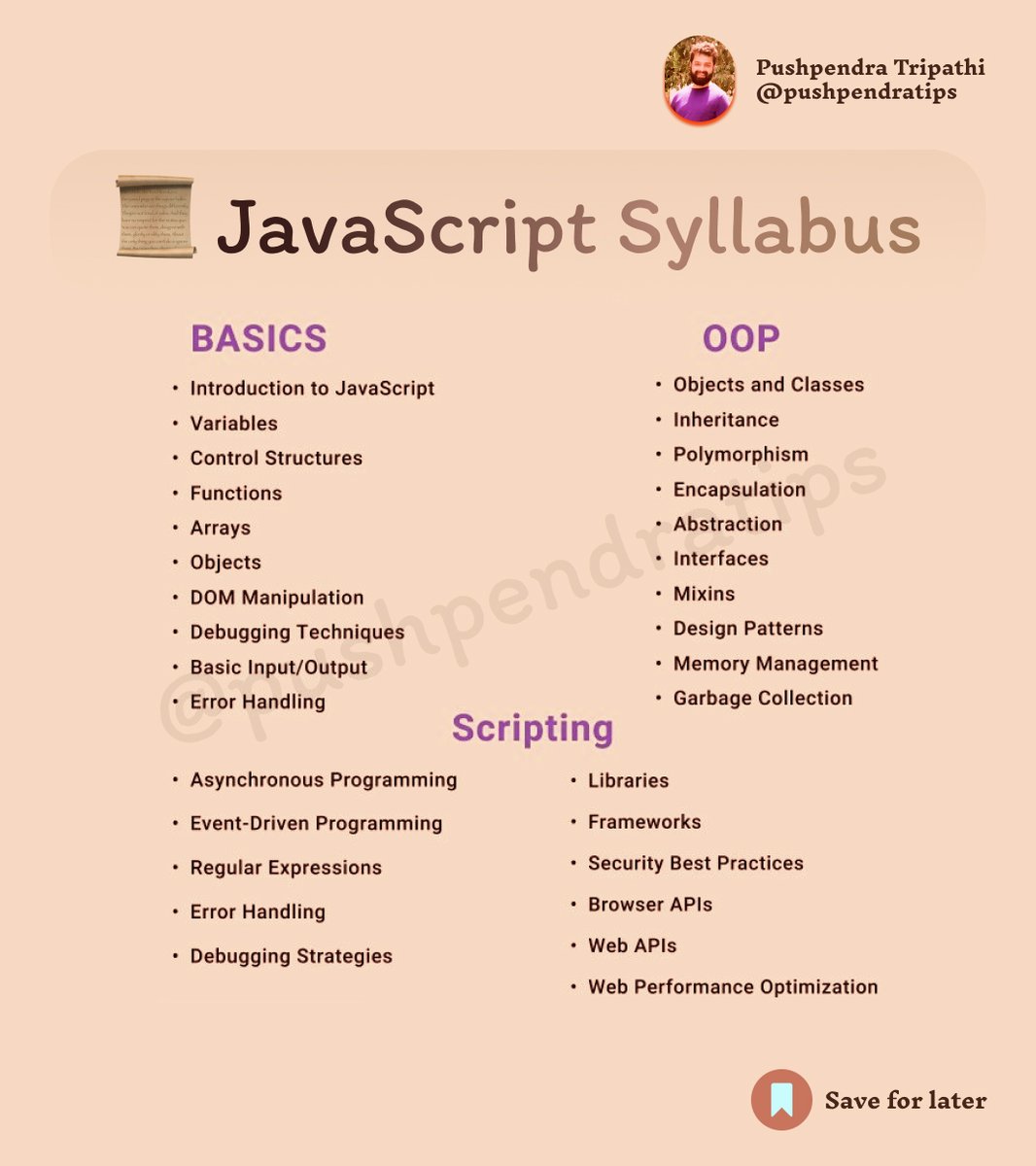
📜 JavaScript Syllabus
A thread 🧵👇🏻👇🏻
#JavaScript #JS #LearnJavaScript #JavaScriptTutorial #JavaScriptForBeginners #JavaScriptTips #JavaScriptDevelopment #ReactJS #ReactNative #ReactDeveloper #ReactTips #ReactHooks #pushpendratips #coder #coding #fullstack
#WebDevelopment #FrontendDevelopment #FullStackDeveloper #MERNStack #Coding #TechTutorial #ProgrammingTips #LearnToCode #100DaysOfCode #CodeNewbie
27
36
181
9,042
6 Mar 2025
📌 Latest & Advanced JavaScript Interview
Questions & Answers (2025)
A thread 🧵👇🏻👇🏻
#JavaScript #LearnJavaScript #JavaScriptTips #JavaScriptTutorial #JavaScriptTricks
#ReactJS #ReactTips #Nextjs #NextjsTutorial #ReactDeveloper #JavaScriptHacks
#JavaScriptSecrets #ES6 #AsyncAwait #WebDevelopment #CodeTips #FrontendTips
#WebDevTricks #CleanCode #100DaysOfCode #JSSecrets #CodingLife #WebDevJourney
#CodingTips #react #web #developer
29
23
94
3,976

28 Feb 2025
AI Tools Transforming Web Development 📦
• sourcegraph.com
• anthropic.com
• pieces.app
• cursor.com
• phind.com
#programmer #html #webdev #css #javascripttutorial #coder #programming
2
19
28 Feb 2025
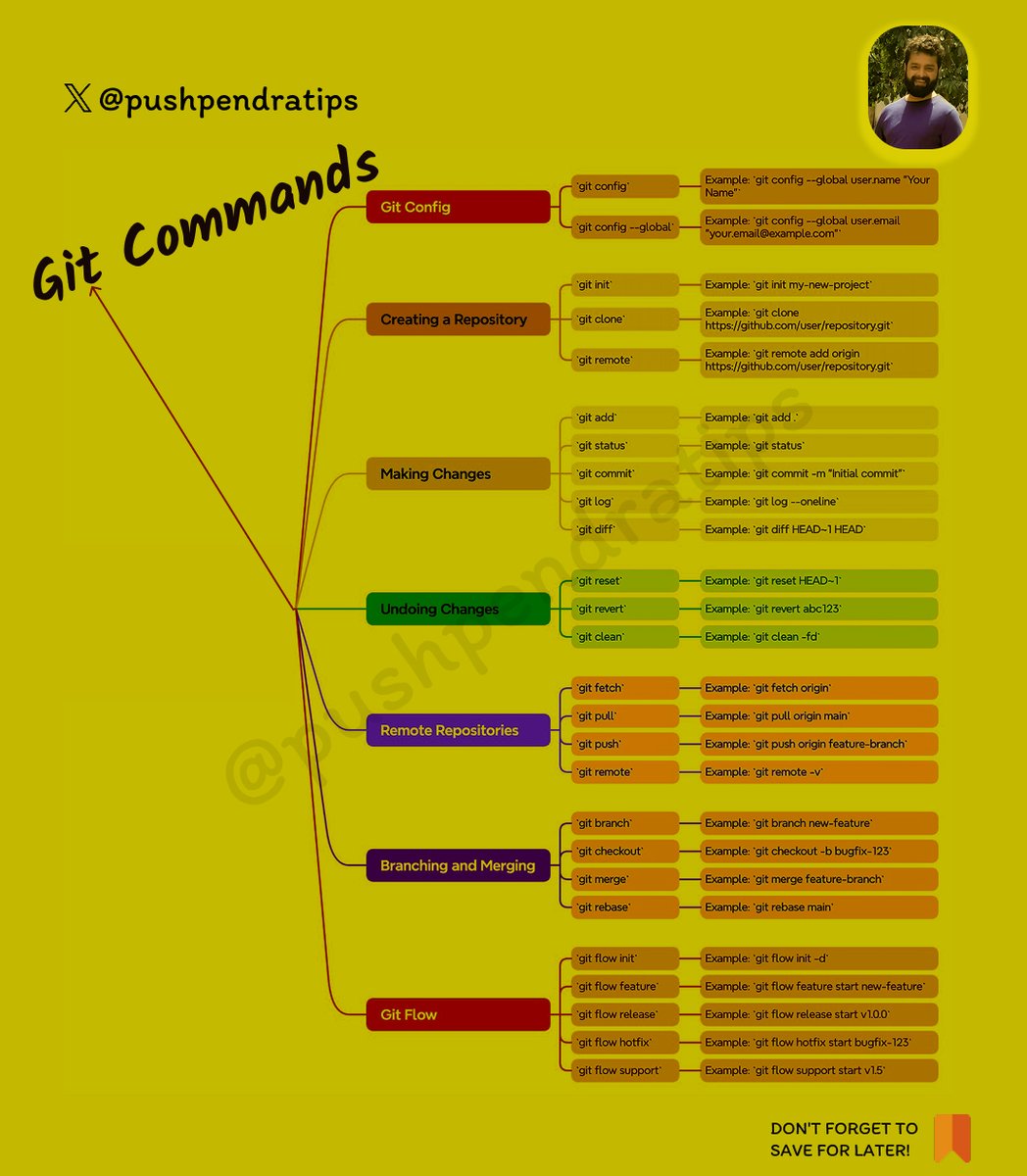
🔥 Essential Git Commands for Developers 🚀
Here's a quick cheat sheet for Git commands 🔥 — from basics to advanced!
✅ Basic Commands
git init
Initialize a new Git repository
---------------------------------
git clone <repo_url>
Clone existing repository
---------------------------------
git status
Check current changes
---------------------------------
git add <file>
Add specific file to staging
---------------------------------
git add .
Add all files to staging
---------------------------------
git commit -m "message"
Commit staged changes with a message
---------------------------------
git log
Show commit history
---------------------------------
git branch
List all branches
---------------------------------
git checkout <branch>
Switch branch
---------------------------------
git checkout -b <branch>
Create and switch to a new branch
---------------------------------
🔄 Remote Repository Commands
git remote add origin <url>
Link local repo to remote repo
---------------------------------
git push origin <branch>
Push changes to remote branch
---------------------------------
git pull origin <branch>
Pull latest changes
---------------------------------
git fetch
Fetch all branches without merging
---------------------------------
git clone <url>
Clone repository
---------------------------------
🔥 Branching
git branch
List branches
---------------------------------
git branch <branch-name>
Create branch
---------------------------------
git checkout <branch-name>
Switch branch
---------------------------------
git checkout -b <branch>
Create & Switch
---------------------------------
git merge <branch>
Merge branch
---------------------------------
git branch -d <branch>
Delete branch
---------------------------------
🔁 Undo Changes
git reset <file>
Unstage file
---------------------------------
git checkout -- <file>
Discard changes in file
---------------------------------
git revert <commit>
Revert a commit
---------------------------------
git reset --hard
Reset everything to last commit
---------------------------------
🔥 Stash (Temporary Save)
git stash
Save changes temporarily
---------------------------------
git stash pop
Apply last stash
---------------------------------
git stash list
Show stash list
---------------------------------
git stash drop
Delete last stash
---------------------------------
✍️ Tagging
git tag <name>
Create tag
---------------------------------
git tag
List tags
---------------------------------
git show <tag>
Show tag details
---------------------------------
git push origin <tag>
Push tag to remote
---------------------------------
🔥 Follow for More @pushpendratips Dev Tips & Tricks 🚀
#GitCommands #GitTutorial #GitForBeginners #LearnGit #GitBasics #GitHubTutorial #VersionControl #GitProTips #GitCommandsInHindi #GitCourse #GitBranching #GitMerge #GitReset #GitRevert
#GitStash #GitAdvanced #WebDevelopment #CodingTips #DeveloperLife #TechTutorial #FrontendDeveloper #ReactJS #JavaScriptTutorial #LearnCoding #ProgrammingTutorial #SoftwareDevelopment
#CodingForBeginners #GitHubCommands #TechEducation #GitMasterClass #GitHindiTutorial #GitIn2025 #VersionControlSystem #GitWorkflow #pushpendratips
29
14
70
2,919
28 Feb 2025
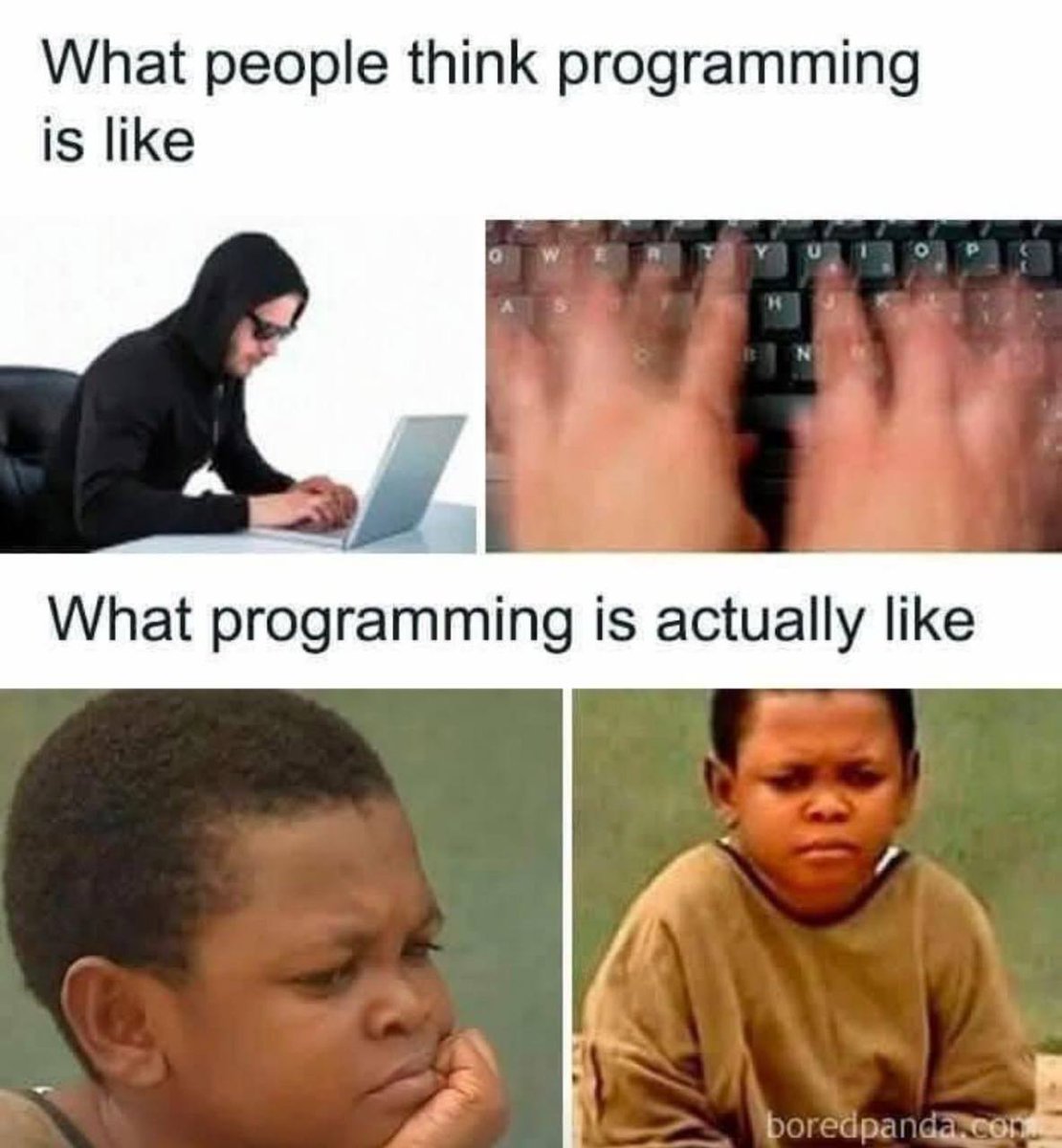
Friday Mood 😅💥
#javascript #react #reactjs #learn #typescript #nodejs #frontend #softwareengineering #webdeveloper #developer #programming #programmer #html #webdev #css #javascripttutorial #coder
3
34
22 Feb 2025
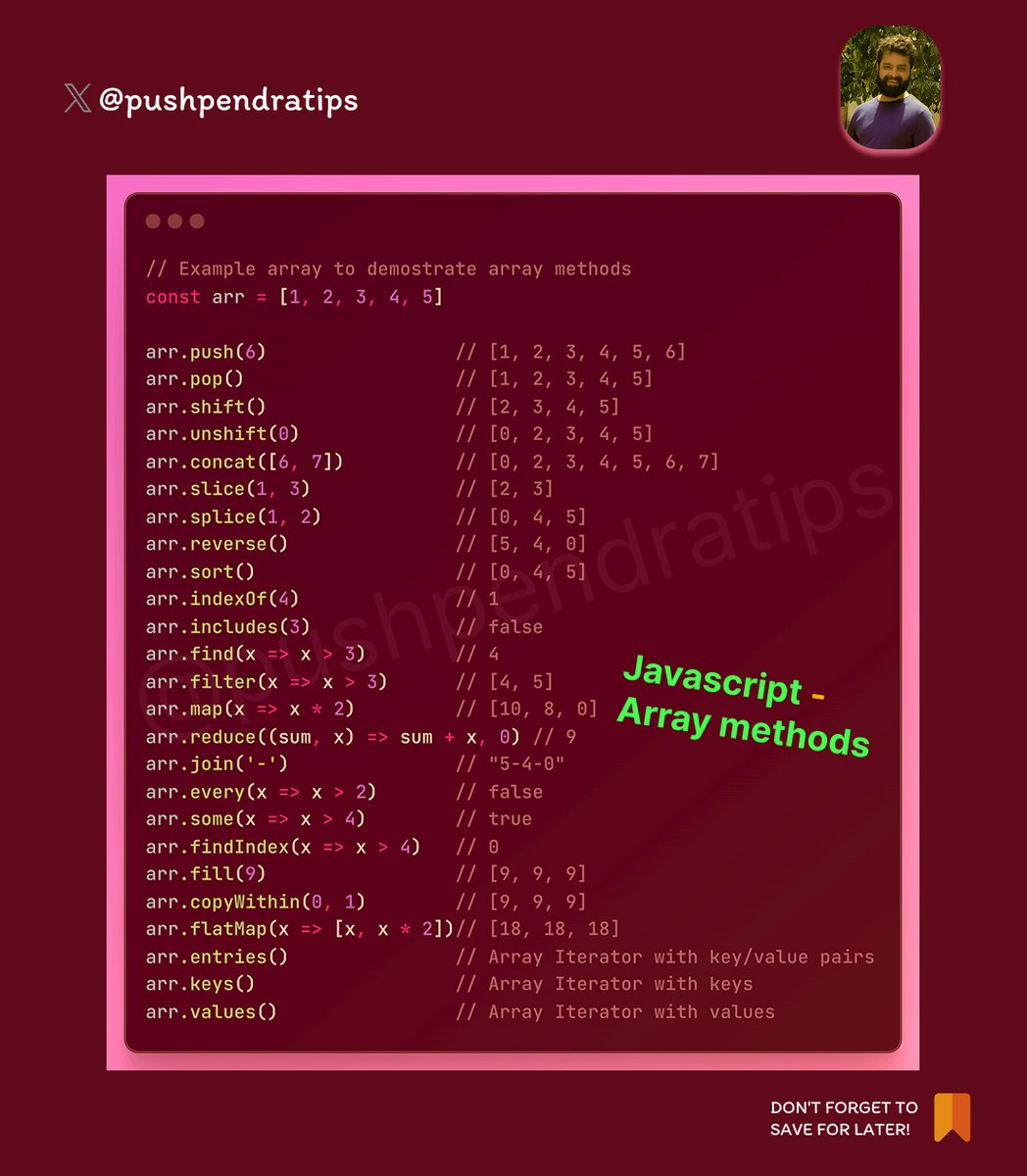
JavaScript array methods 🚀🔥
1. Adding & Removing Elements
push(item) → Adds an item at the end of the array.
pop() → Removes the last item from the array.
unshift(item) → Adds an item at the beginning of the array.
shift() → Removes the first item from the array.
-----------------------------------------------------
2. Searching in an Array
indexOf(item) → Returns the index of the first occurrence of an item (or -1 if not found).
lastIndexOf(item) → Returns the index of the last occurrence of an item.
includes(item) → Returns true if the item exists in the array, otherwise false.
find(callback) → Returns the first matching element based on a condition.
findIndex(callback) → Returns the index of the first matching element based on a condition.
-----------------------------------------------------
3. Modifying or Transforming Arrays
map(callback) → Creates a new array by modifying each item.
filter(callback) → Creates a new array with only the items that match a condition.
reduce(callback, initialValue) → Reduces the array to a single value (e.g., sum of all numbers).
forEach(callback) → Runs a function for each item (but doesn’t create a new array).
some(callback) → Returns true if at least one item matches a condition.
every(callback) → Returns true if all items match a condition.
-----------------------------------------------------
4. Sorting & Reversing
sort(compareFunction) → Sorts the array (default is ascending, but can be customized).
reverse() → Reverses the order of the elements in the array.
-----------------------------------------------------
5. Extracting & Combining Arrays
slice(start, end) → Extracts a portion of an array (without modifying the original).
splice(start, deleteCount, item1, item2, …) → Changes the array by adding/removing elements.
concat(array2, array3, …) → Joins two or more arrays into a new array.
flat(depth) → Flattens nested arrays into a single array (default depth is 1).
join(separator) → Converts an array to a string, with elements separated by a given character.
-----------------------------------------------------
6. Converting & Checking Arrays
toString() → Converts an array to a string.
Array.isArray(value) → Checks if a value is an array (true or false).
#JavaScript #JSDeveloper #LearnJavaScript #JavaScriptTutorial #Coding #JavaScriptArrays
#ArrayMethods #JSArrayTips #CodingWithJS #JavaScriptTricks #WebDevelopment #coder
#CodeNewbie #FrontendDeveloper #coding #ProgrammingTips #100DaysOfCode #react
25
7
39
2,876
19 Feb 2025
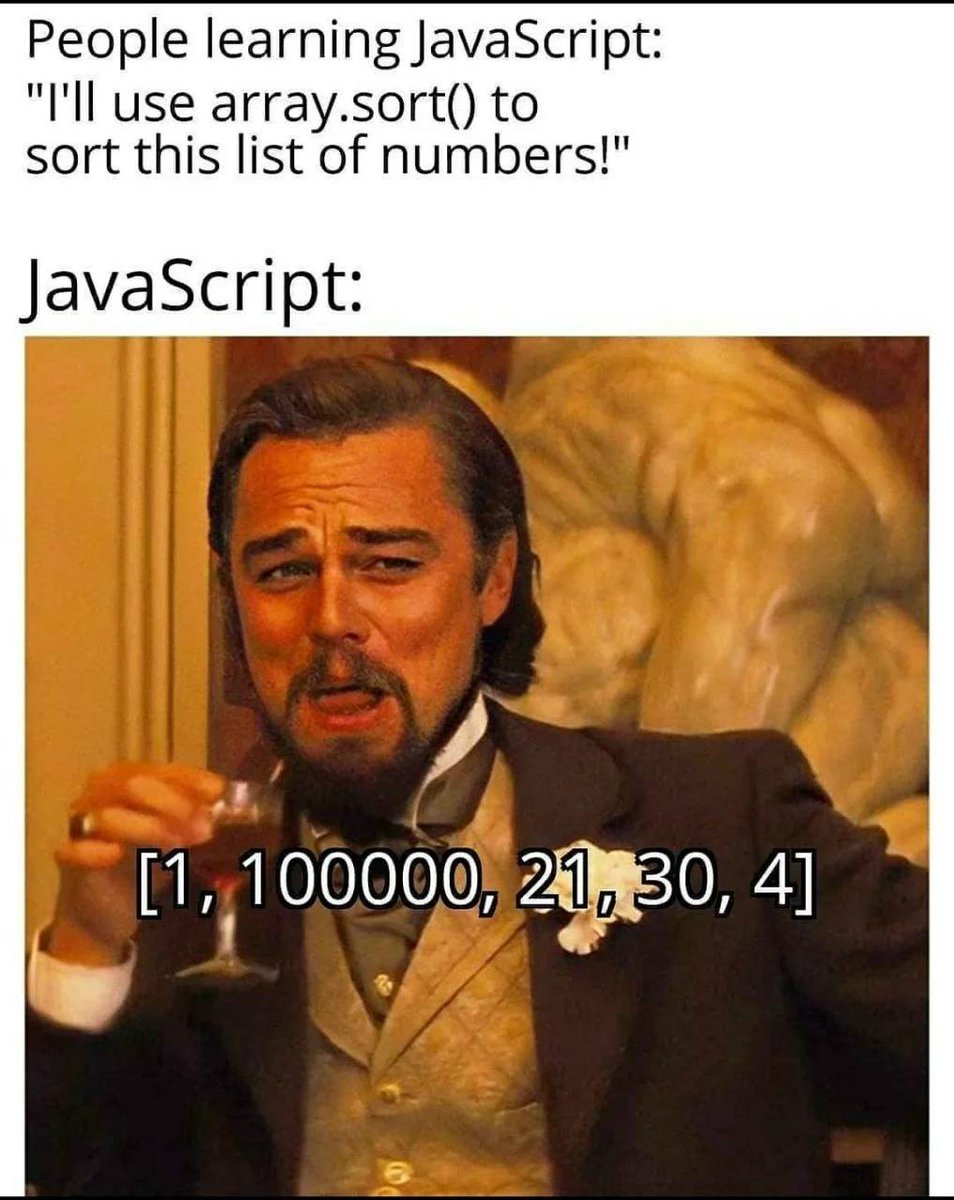
JavaScript magic 😂
#javascript #react #reactjs #learn #typescript #nodejs #frontend #softwareengineering #webdeveloper #developer #programming #programmer #html #webdev #css #javascripttutorial #coder #fullstack #technology #backend #learntocode #web #code #webdevelopment
5
198
17 Feb 2025
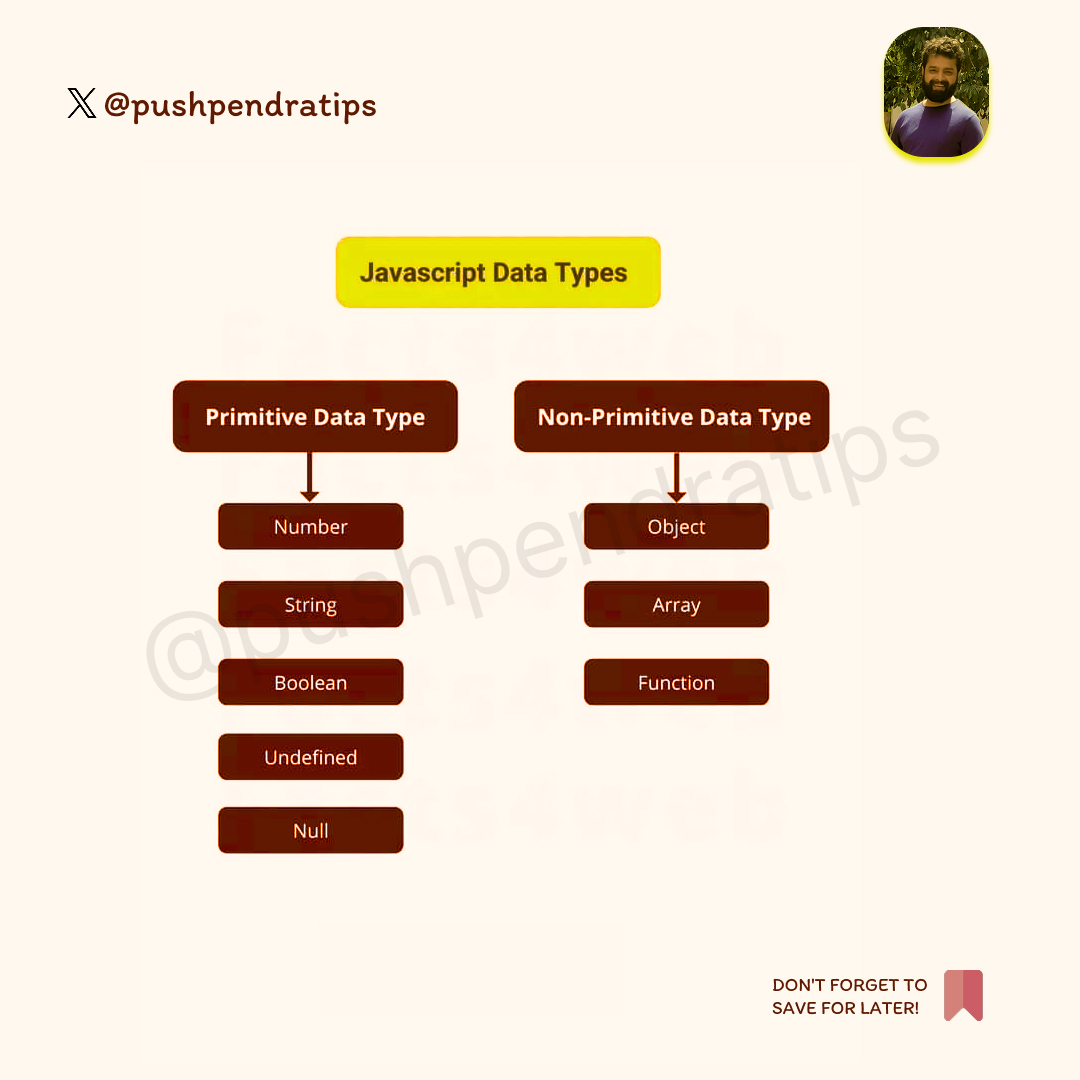
JavaScript has eight fundamental data types, which can be categorized into primitive and non-primitive (reference) types.🎉🚀
🔹Primitive Data Types (Immutable)
1. Number → Represents numeric values (integers and floating-point numbers).
let num = 42;
let price = 99.99;
---------------------------------------
2. BigInt → Used for very large integers beyond Number.MAX_SAFE_INTEGER
let bigNum = 9007199254740991n;
---------------------------------------
3. String → Represents text data
let name = "John Doe";
---------------------------------------
4. Boolean → Represents true or false
let isLoggedIn = true;
---------------------------------------
5. Undefined → A variable that has been declared but not assigned a value.
let x;
console.log(x); // undefined
---------------------------------------
6. Null → Represents an intentional absence of value.
let emptyValue = null;
---------------------------------------
7. Symbol → Represents a unique and immutable identifier (used for object properties).
let sym = Symbol("unique");
---------------------------------------
🔹Non-Primitive Data Type (Mutable, Reference Type)
8. Object → A collection of key-value pairs (arrays, functions, and other objects fall under this).
let person = { name: "Alice", age: 25 };
let arr = [1, 2, 3];
let func = function () { console.log("Hello"); };
---------------------------------------
Special Cases
Arrays ([]) → Special type of object for ordered lists.
Functions (function) → Objects with executable code.
Date, RegExp, Map, Set, WeakMap, WeakSet → Specialized objects.
#JavaScript #LearnJavaScript #JavaScriptTutorial #JSDataTypes #JSBasics #WebDevelopment #CodingTips #FrontendDevelopment #react #FullStackDeveloper #coder #coding #react
#ProgrammingForBeginners #CodeNewbie #100DaysOfCode #TechEducation #tips #SoftwareEngineering #CodingLife #javascript
31
7
39
1,498
16 Feb 2025
🚀 JavaScript Array Methods & Their Explanations
📌 1. push()
Adds one or more elements to the end of an array and returns the new length.
let arr = [1, 2];
arr.push(3); // [1, 2, 3]
---------------------------------
🔙 2. pop()
Removes the last element from an array and returns it.
let arr = [1, 2, 3];
arr.pop(); // 3 (arr becomes [1, 2])
---------------------------------
🔝 3. unshift()
Adds elements to the beginning of an array and returns the new length.
let arr = [2, 3];
arr.unshift(1); // [1, 2, 3]
---------------------------------
🔽 4. shift()
Removes the first element from an array and returns it.
let arr = [1, 2, 3];
arr.shift(); // 1 (arr becomes [2, 3])
---------------------------------
🔍 5. indexOf()
Finds the first index of a specified element, or returns -1 if not found.
let arr = [10, 20, 30, 40];
arr.indexOf(30); // 2
---------------------------------
🔄 6. reverse()
Reverses the order of elements in place.
let arr = [1, 2, 3];
arr.reverse(); // [3, 2, 1]
---------------------------------
🏗️ 7. concat()
Merges two or more arrays without modifying the original arrays.
let arr1 = [1, 2];
let arr2 = [3, 4];
let result = arr1.concat(arr2); // [1, 2, 3, 4]
---------------------------------
✂️ 8. slice()
Returns a shallow copy of a portion of an array.
let arr = [10, 20, 30, 40];
arr.slice(1, 3); // [20, 30]
---------------------------------
🛠️ 9. splice()
Adds/removes elements from an array at a specific index.
let arr = [1, 2, 3, 4];
arr.splice(1, 2, 99); // Removes 2 and 3, adds 99 → [1, 99, 4]
---------------------------------
🎭 10. map()
Creates a new array by applying a function to each element.
let arr = [1, 2, 3];
let doubled = arr.map(x => x * 2); // [2, 4, 6]
---------------------------------
🎯 11. filter()
Creates a new array with elements that pass a test.
let arr = [10, 20, 30, 40];
let filtered = arr.filter(x => x > 20); // [30, 40]
---------------------------------
🔢 12. reduce()
Reduces the array to a single value by applying a function.
let arr = [1, 2, 3, 4];
let sum = arr.reduce((acc, curr) => acc curr, 0); // 10
---------------------------------
🔎 13. find()
Returns the first element that passes a test.
let arr = [5, 10, 15];
let found = arr.find(x => x > 6); // 10
---------------------------------
🔢 14. findIndex()
Returns the index of the first element that matches a condition.
let arr = [3, 6, 9];
arr.findIndex(x => x > 5); // 1
---------------------------------
⚖ 15. every()
Checks if all elements pass a test, returns true or false.
let arr = [2, 4, 6];
arr.every(x => x % 2 === 0); // true
---------------------------------
✅ 16. some()
Checks if at least one element passes a test.
let arr = [1, 3, 5, 8];
arr.some(x => x % 2 === 0); // true
---------------------------------
🔤 17. join()
Joins array elements into a string using a separator.
let arr = ['Hello', 'World'];
arr.join(' '); // "Hello World"
---------------------------------
🔀 18. sort()
Sorts an array in place (default: lexicographical).
let arr = [40, 100, 1, 5];
arr.sort((a, b) => a - b); // [1, 5, 40, 100]
---------------------------------
🔄 19. forEach()
Executes a function for each array element.
let arr = [1, 2, 3];
arr.forEach(x => console.log(x * 2)); // 2, 4, 6
---------------------------------
🔁 20. flat()
Flattens nested arrays into a single-level array.
let arr = [1, [2, 3], [4, 5]];
arr.flat(); // [1, 2, 3, 4, 5]
---------------------------------
#JavaScript #ArrayMethods #LearnJavaScript #WebDevelopment #JSArrays #coder #coding #FrontendDevelopment #fullstack #react #developer
#JavaScriptTutorial #CodingForBeginners #JSForBeginners #JavaScriptTips #WebDevTips #CodeWithMe #tips #ai #ui #ux #designer
#JSMapMethod #JSFilterMethod #JSReduceMethod #JSSliceMethod #JSArrayTricks
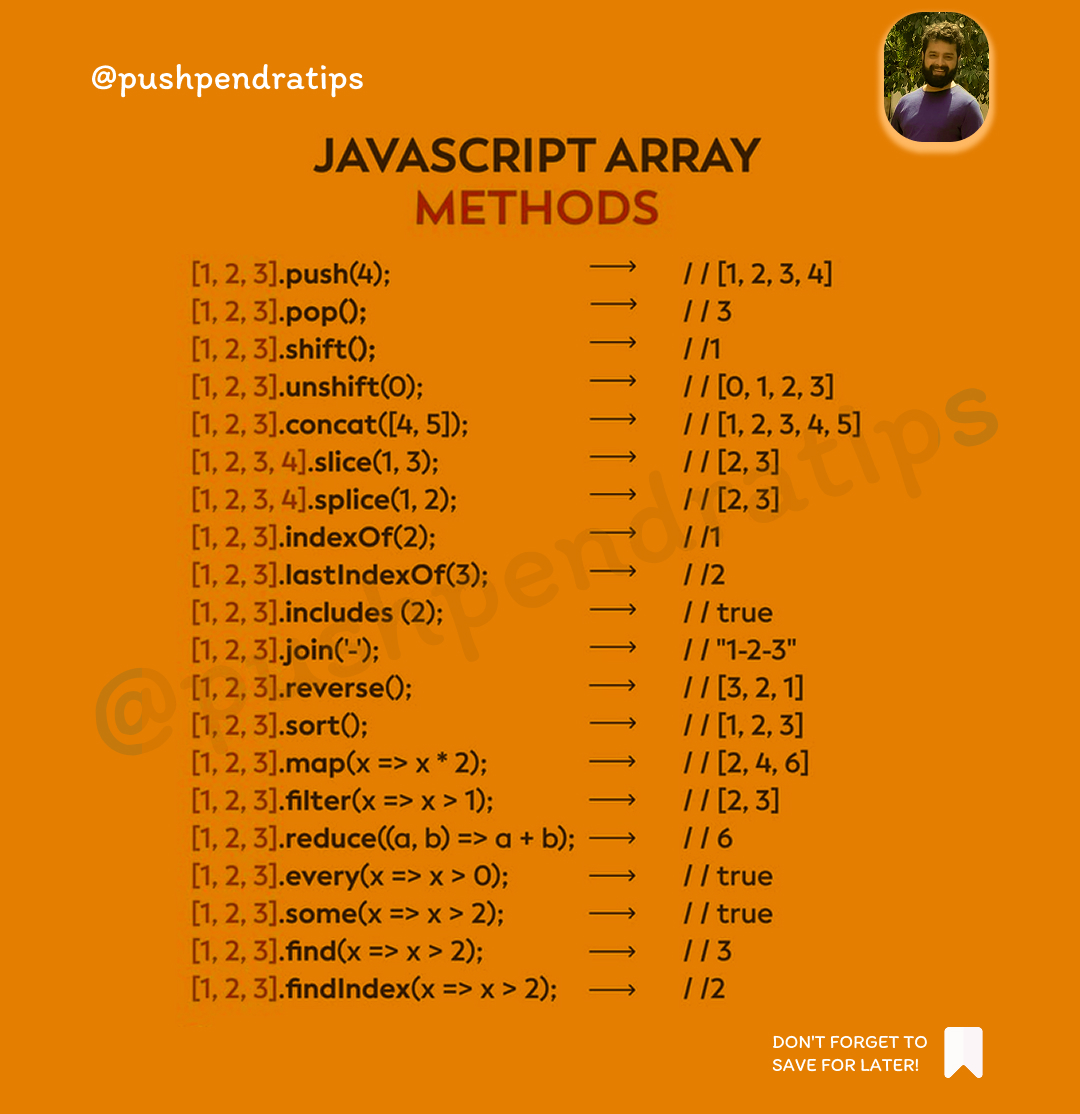
25
5
32
1,161
28 Jan 2025
📌TypeScript Introduction
-------------
That's a wrap!
I hope you enjoyed this thread.
Follow
@pushpendratips
for more amazing content.
💬 Share/like if you found it helpful! 💖
📌 Save this for later or you'll miss out! 😉
#JavaScript #LearnJavaScript #JavaScriptTutorial
34
6
31
1,140
27 Jan 2025
🚀 JavaScript Variables
-------------
That's a wrap!
I hope you enjoyed this thread.
Follow
@pushpendratips
for more amazing content.
💬 Share/like if you found it helpful! 💖
📌 Save this for later or you'll miss out! 😉
#JavaScript #LearnJavaScript #JavaScriptTutorial
19
5
25
879