
Mar 24
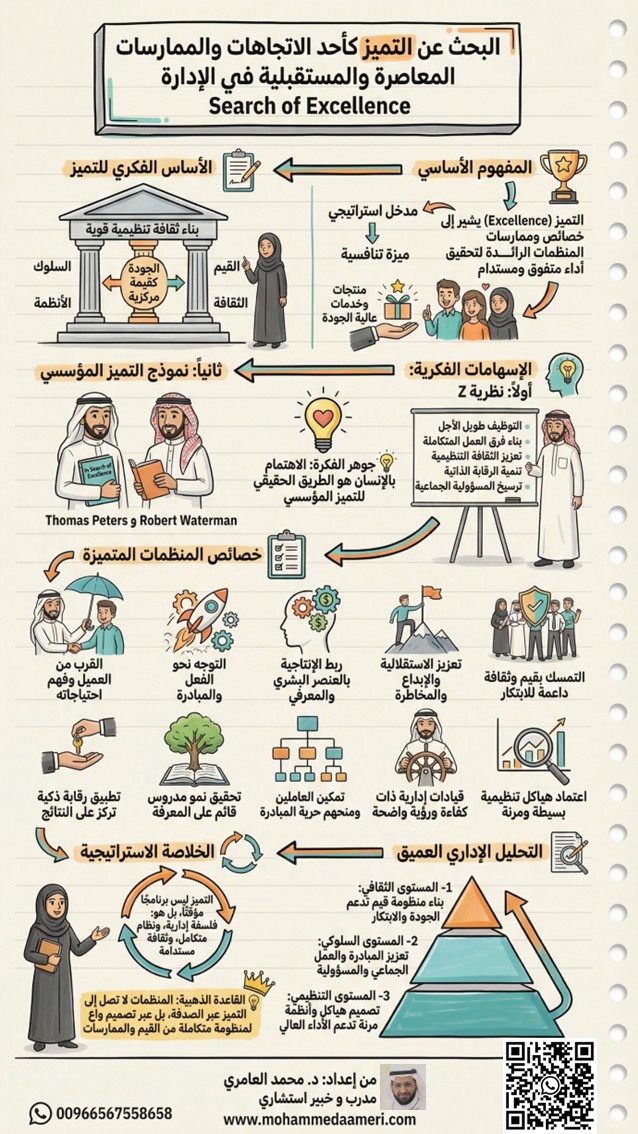
🚀 البحث عن التميز كأحد الاتجاهات والممارسات المعاصرة والمستقبلية في الإدارة
Search of Excellence
🎯 المفهوم الأساسي (Core Concept)
يشير التميز (Excellence) إلى مجموعة الخصائص والممارسات التي تنفرد بها المنظمات الرائدة، والتي تمكّنها من تحقيق أداء متفوق ومستدام مقارنة بغيرها من المنظمات.
وفي بيئة الأعمال المعاصرة، لم يعد التميز خيارًا تجميليًا، بل أصبح ضرورة استراتيجية لبقاء المنظمة ونموها، حيث يسهم في تقديم منتجات وخدمات عالية الجودة تتجاوز توقعات العملاء وتبني ولاءً طويل الأمد.
💡 الفكرة المحورية:
التميز ليس ما تحققه المنظمة… بل ما تصبح عليه.
🧠 الأساس الفكري للتميز (The Intellectual Foundation)
يرتكز التميز المؤسسي على بناء ثقافة تنظيمية تجعل الجودة قيمة جوهرية، وتحوّلها من شعار إلى ممارسة يومية متجذرة في كل مستوى من مستويات المنظمة.
ولا يتحقق التميز عبر الإجراءات فقط، بل من خلال تكامل أربعة أبعاد رئيسية:
• القيم (Values)
• الثقافة (Culture)
• السلوك (Behavior)
• الأنظمة (Systems)
💡 المعنى العميق:
أي خلل في أحد هذه الأبعاد… ينعكس مباشرة على مستوى التميز.
📚 الإسهامات الفكرية في التميز
أولًا: نظرية Z
Theory Z – William Ouchi
قدّم وليم أوجي تصورًا متقدمًا للتميز يرتكز على البعد الإنساني والثقافي داخل المنظمة.
مرتكزات النظرية:
• التوظيف طويل الأجل
• بناء فرق عمل متماسكة
• تعزيز الثقافة التنظيمية
• الرقابة الذاتية بدل الرقابة المفروضة
• المسؤولية الجماعية
💡 جوهر الفكرة:
المنظمة التي تستثمر في الإنسان… تتفوق على المنظمة التي تركز على النظام فقط.
ثانيًا: نموذج التميز المؤسسي
In Search of Excellence – Peters & Waterman
قدّم توماس بيترز وروبرت ووترمان إطارًا عمليًا لخصائص المنظمات المتفوقة، بناءً على دراسة ميدانية لأفضل الشركات أداءً.
⭐ خصائص المنظمات المتميزة (Characteristics of Excellence)
• القرب من العميل وفهم احتياجاته بعمق
• التوجه نحو الفعل والمبادرة بدل الجمود
• ربط الإنتاجية برأس المال البشري والمعرفي
• تعزيز الاستقلالية والإبداع والمخاطرة المحسوبة
• التمسك بثقافة تنظيمية قوية داعمة للابتكار
• اعتماد هياكل تنظيمية بسيطة ومرنة
• وجود قيادات إدارية ذات كفاءة ورؤية استراتيجية
• تحقيق نمو محسوب قائم على المعرفة
• تمكين العاملين ومنحهم حرية المبادرة
• تطبيق رقابة ذكية تركز على النتائج لا الإجراءات
💡 ملاحظة استراتيجية:
المنظمات المتميزة لا تكتفي بتحقيق الأداء… بل تعيد تعريف معايير الأداء نفسها.
🔍 التحليل الإداري العميق (Deep Managerial Analysis)
يمكن فهم التميز المؤسسي عبر ثلاثة مستويات مترابطة:
1- المستوى الثقافي
• بناء منظومة قيم تدعم الجودة والابتكار
• تعزيز الانتماء المؤسسي
2- المستوى السلوكي
• تشجيع المبادرة والمسؤولية
• تعزيز العمل الجماعي
• دعم التفكير الإبداعي
3- المستوى التنظيمي
• تصميم هياكل مرنة
• تطوير أنظمة داعمة للأداء العالي
• تقليل البيروقراطية وتعزيز الكفاءة
💡 القاعدة التحليلية:
الثقافة تصنع السلوك… والسلوك يصنع الأداء… والأداء يصنع التميز.
🧭 التحول نحو التميز (Path to Excellence)
المنظمات التي تسعى للتميز تحتاج إلى الانتقال من:
❌ إدارة تقليدية → ✔ إدارة قائمة على القيمة
❌ رقابة صارمة → ✔ رقابة ذكية
❌ تنفيذ الأوامر → ✔ تمكين العاملين
❌ التركيز على الإجراءات → ✔ التركيز على النتائج
🎯 الخلاصة الاستراتيجية (Strategic Conclusion)
• التميز ليس مشروعًا مؤقتًا… بل فلسفة مستدامة
• التميز ليس مبادرة… بل نظام متكامل
• التميز ليس هدفًا… بل رحلة مستمرة
💡 القاعدة الذهبية:
المنظمات لا تصل إلى التميز بالصدفة…
بل عبر تصميم واعٍ لمنظومة متكاملة من القيم والممارسات.
👨🏫 من إعداد:
المدرب والخبير الاستشاري د. محمد العامري
🌐 الموقع الإلكتروني
mohammedaameri.com/
🏢 مركز الإتقان الدولي للتدريب والاستشارات
itqancsa.com/
📲 قناة الواتساب الرسمية
whatsapp.com/channel/0029Vb6…
شاكرين لكم دعمكم ونشر هذا المحتوى المعرفي… فالمعرفة حين تُنشر… تُثمر.
#د_محمد_العامري #مهارات_النجاح #التميز_المؤسسي #Search_of_Excellence #Business_Excellence #Organizational_Excellence #Theory_Z #William_Ouchi #In_Search_of_Excellence #Leadership_Excellence #Strategic_Management #Quality_Culture #Innovation_Management #High_Performance #Organizational_Development #Competitive_Advantage #Management_Excellence #Excellence_Model #Future_of_Management #Business_Strategy
1
1
11
363

Spectacular reentry of Crew-11 capsule, but the real challenge remains in the reentry integration for large vehicles like Starship, which are in a completely different league compared to smaller capsules like Dragon. While @SpaceX has made remarkable progress with smaller capsule reentry (like Dragon 2), Starship faces a much more complex problem due to its large size and the much higher speeds at which it will reenter the atmosphere.
Challenges for Starship Reentry:
Extreme friction and heat: At reentry speeds of Mach 25, Starship will face temperatures exceeding 2,500°C. Current solutions like carbon-carbon thermal tiles and advanced thermal protection technologies will need to be optimized to withstand this intense friction and protect the vehicle’s structure.
Orientation control:
- Unlike smaller capsules that can use traditional methods for controlling atmospheric drag to stabilize their trajectory, Starship will need to actively control its entire reentry process to ensure a stable aerodynamically guided descent and precise landing.
Gradual deceleration:
- Unlike parachute capsules, which deploy to decelerate, Starship will need to decelerate efficiently using an active flight control system, possibly supplemented by decelerating thrusters to mitigate the high deceleration forces experienced during reentry.
What Role Could NMSI-NSE Operators Play in This Context?
Within the NMSI (New Subquantum Informational Mechanics) framework, particularly with NSE (New Subquantum Engineering), there is the potential to model and simulate the reentry processes using informational flow optimization algorithms and subquantum material interaction models. These informational flow models could revolutionize how reentry trajectories and material behaviors are calculated under extreme conditions.
NSE and informational flow control: NMSI-NSE models could calculate not only the reentry trajectories but also the informational energy fluxes involved in the reentry process. These fluxes could help stabilize the matter in electromagnetic and subquantum fields, optimizing the performance of materials that form the vehicle's structure.
Optimization models for reentry: NMSI could contribute to the development of precise models that would allow greater durability of materials against extreme heat and reduce structural stress during reentry. These adaptive informational algorithms could adjust the trajectory in real-time based on feedback from the vehicle’s sensors, preventing structural deformation and ensuring stable material behavior under extreme conditions.
Solving the Reentry Challenges:
Using NMSI and NSE approaches could optimize both the reentry trajectory and the adaptation of material behavior in extreme friction conditions. Through integrating a subquantum model of matter, it would be possible to better manage the energy and gravitational interactions at the time of reentry, making Starship more robust and efficient.
Thus, applying NMSI principles in combination with new aerodynamic control technologies could reduce risks associated with reentry, enhancing the safety and efficiency of missions and improving technological performance.
The NMSI-NSE framework
- will have a significant impact on solving Starship's reentry problems, offering innovative solutions for space exploration and improving the safety and efficacy of vehicles operating under extreme conditions. This approach may pave the way for next-gen space vehicles that are not only more robust but also optimized for high-performance operations in the harshest environments.
For more info:
gsjournal.net/Science-Journa…
#Starship #Crew11 #3IATLAS
#high_performance #SpaceX #NMSI
1
2
390


23 Jun 2025
warto przeczytać nie zawsze i ze wszystkim się zgadzając:
Jak chiński DeepSeek na nowo definiuje globalną sztuczną inteligencję – sygnał alarmowy dla branży
Autor: Cary Springfield, bankier międzynarodowy
Tak jak prezydent Donald Trump rozpoczął swoją drugą kadencję z wielkimi wizjami inwestycji w sztuczną inteligencję o wartości 500 miliardów dolarów za pośrednictwem projektu Stargate, mało znany chiński start-up o nazwie hasztag#DeepSeek po cichu hasztag#rewrote globalnego podręcznika sztucznej inteligencji. Dzięki DeepSeek-R1, dużemu modelowi językowemu (LLM), który osiąga możliwości rozumowania na wysokim poziomie – wyszkolonemu tylko na ułamku zasobów wykorzystywanych przez gigantów technologicznych – DeepSeek wywołał sejsmiczną hasztag#shock w świecie sztucznej inteligencji.
Co sprawia, że DeepSeek jest rewolucyjny?
hasztag#efficiency Korzystając z zaledwie 2 000 procesorów graficznych Nvidia H800, podstawowy model V3 firmy DeepSeek dorównał lub przewyższył wiodące modele, takie jak GPT-4o, Claude 3.5 i Llama 3, które zostały przeszkolone na maksymalnie 16 000 procesorów graficznych H100. Kolejny model, R1, opierał się na tym sukcesie, wykorzystując algorytmy hasztag#smarter, zoptymalizowaną alokację procesorów graficznych i szkolenia Mix of Experts (MoE) — zmniejszając koszty przy jednoczesnym utrzymaniu wydajności.
hasztag#Cost szkolenia R1: 5,5 miliona dolarów (porównaj to z 100 milionami dolarów podobno wydanymi na GPT-4o)
Ten kamień milowy rodzi ważne pytanie dla inwestorów i strategów:
Co się stanie, gdy najnowocześniejsza sztuczna inteligencja nie będzie już wymagała najnowocześniejszych budżetów?
Wpływ był natychmiastowy. Prawie 1 bilion dolarów był hasztag#wiped niższy od wycen amerykańskich spółek technologicznych w styczniu, a sama Nvidia straciła 600 miliardów dolarów kapitalizacji rynkowej – to największy jednodniowy spadek w historii
DeepSeek nie tylko hasztag#beat przeciwności losu — hasztag#overcame amerykańskim restrykcjom dotyczącym chipów, hasztag#optimized słabszemu sprzętowi, a mimo to zapewniał najwyższą wydajność. To "chiński model" sztucznej inteligencji: hasztag#smarter, hasztag#leaner i więcej hasztag#accessible.
Wydajność DeepSeek hasztag#inspired fali małych modeli językowych (SLM) – kompaktowych, wyspecjalizowanych i opłacalnych systemów sztucznej inteligencji.
Chińskie sektory technologiczny i finansowy pędzą naprzód z adopcją, od firm takich jak Butterfly Effect po fundusze hedgingowe, takie jak Baiont Quant i Mingshi Investment Management. Ci gracze wykorzystują sztuczną inteligencję nie tylko do badań, ale także do #hasztag#actively_manage kapitału i realizacji strategii
Przyszłość: dwutorowy świat sztucznej inteligencji
Podczas gdy Zachód kontynuuje przesuwanie granic dzięki badaniom AGI na dużą skalę, Chiny są pionierem dwutorowego systemu:
• Kapitałochłonne, hasztag#high_performance modele (Zachód)
• Ekonomiczne, hasztag#optimized modele (Chiny)
Jak ujmuje to Morgan Stanley, globalny wyścig AI nie jest już jednopasmową autostradą. Obserwujemy hasztag#divergence i demokratyzację. Zarówno dla inwestorów z rynków wschodzących, jak i dla korporacji otwiera to nowy paradygmat:
Sztuczna inteligencja nie jest już tylko dla hasztag#few — jest dla hasztag#fast, elastycznych i skoncentrowanych.
Kluczowe wnioski:
• DeepSeek pokazuje, że hasztag#breakthroughs sztucznej inteligencji nie wymagają nieograniczonego kapitału.
• Wydajne projektowanie sztucznej inteligencji może hasztag#disrupt rynki warte biliony dolarów.
• Wchodzimy w świat "hasztag#thousands SLM", a nie tylko hasztag#few dominujących LLM-ów.
• Globalna mapa sztucznej inteligencji jest hasztag#redrawn, a Chiny piszą hasztag#new rozdział

1
1
1
1,777

19 Jun 2025
昨日の1DOREX動画見てるけど、
シンクロ率が凄すぎる!!!
どれだけの練習したら、こんな風になれるんだろう…
「一糸乱れぬ」って言葉があるけど、まさにコレ!
#1DOREX #High_performance
#ストイック過ぎてある意味変態w

6
370


1 May 2025
Jeremy Renner was in talks to return to Marvel in 'HAWKEYE' Season 2, but reveals he was offered half of his Season 1 salary.
[🎥: high_performance/tt]
1
1
17
2,548


8 Apr 2025
How Does It Function In It's Ecosystem?
Built on Berachain's high_performance chain,IVX:
✨Host derivatives primitives like options,perps synthetic assets .
✨ Supports protocol _to_protocol derivatives markets.
✨ Enables LPs to back assets via programmable vaults.
1
2
16

22 Mar 2025
The @0G_labs
network is a Layer-1 blockchain delivering 1 GigaTx/s throughput and sub-second finality. @OneGravityNFT
serves as an entry point, granting access to AI Alignment Nodes and decentralized governance within this high_performance ecosystem
2
4
59

10 Oct 2024
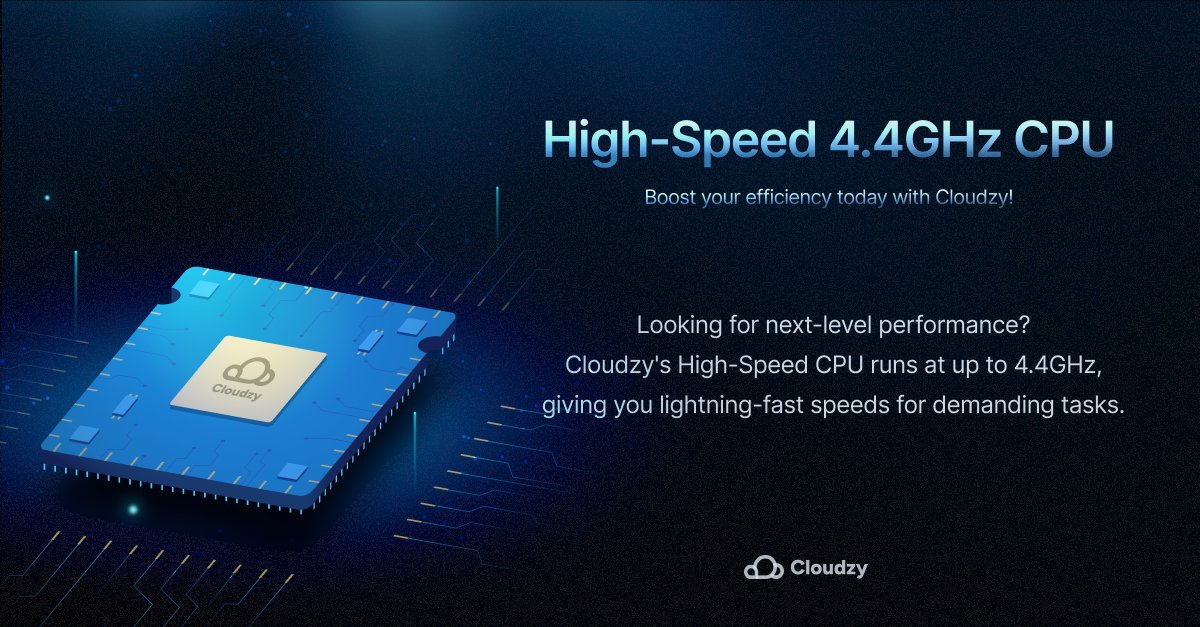
Unleash the Power with Cloudzy's High-Speed 4.4GHz CPU!
Looking for next-level performance? Cloudzy's High-Speed CPU delivers speeds of up to 4.4GHz, ensuring blazing-fast processing for all your compute-intensive tasks
#Cloudzy #High_Performance #CPUPower #CPUSpeed
1
3
169

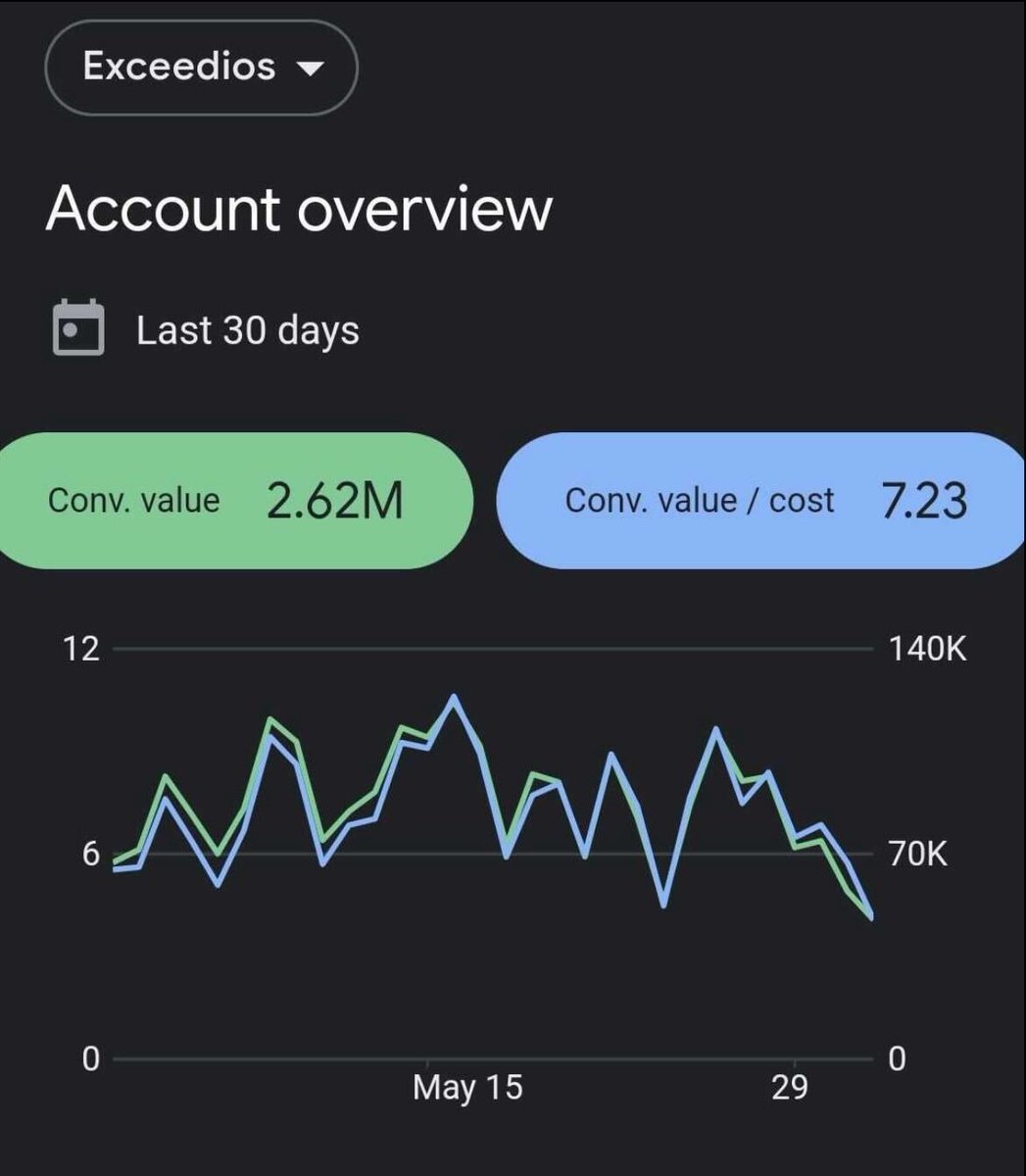
I scaled my client to $2M /mo
Steal my 10-Step Strategy to Optimize Your Standard Shopping Campaigns:
1/ Set Up Product Feed Correctly
Update your Product Feed.
Ensure all product data is accurate and complete.
Include details like:
• product title
• description
• price
• availability
• image URL
Use Google Sheets or a feed management tool to maintain a clean feed.
Next, optimize titles and descriptions.
Use relevant keywords in your product titles and descriptions.
e.g. instead of “Running Shoes,” use “Men’s Running Shoes – Lightweight and Durable.”
Keep titles under 150 characters.
Add High-Quality Images.
Images should be at least 600x600 pixels and no larger than 64MB.
e.g. use images with a minimum resolution of 800x800 pixels.
2/ Configure Campaign Settings
Create a New Campaign.
In your Google Ads account, go to Campaigns > New Campaign.
Select “Shopping” as the campaign type.
Choose the appropriate campaign subtype
(e.g., “Standard Shopping Campaign”).
Set Budgets and Bidding.
Start with a daily budget that aligns with your goals.
e.g. if you aim for a $20 CPA, set your budget accordingly.
Use manual CPC or Target ROAS bidding strategies.
If starting with manual CPC, set initial bids at $0.50 above your average CPC.
Select Target Locations.
Choose the geographic locations you want to target.
For instance, if you are focusing on the US market, select the US and adjust settings for specific states or regions based on performance data.
3/ Optimize Product Grouping
Organize by product categories.
Group your products into relevant categories.
e.g. create product groups for “Men’s Shoes,” “Women’s Shoes,” and “Accessories.”
Use the “Product Groups” section in Google Ads to set these categories.
Use Negative Keywords.
Add negative keywords to prevent your ads from showing on irrelevant searches.
For instance, add “cheap,” “free,” or “discount” as negative keywords to avoid traffic that won’t convert.
Check the Search Terms report weekly to refine your negative keyword list.
4/ Enhance Landing Page Creatives
Highlight your USP.
For example, “Shop the Best Men’s Running Shoes – Free Shipping & Returns!”
And use CTAs to highlight offers like “Free Shipping” or “30-Day Returns.”
5/ Monitor and Optimize Performance
Aim for a:
• CTR of 1.5-2%
• CVR of 1-3%,
• CPA target based on your profit margins.
6/ Leverage Google Merchant Center
Enable Merchant Promotions.
Use Merchant Promotions to highlight special offers directly in your Shopping ads.
For example, create a promotion for “10% off all orders over $50” and ensure it’s properly linked in the Merchant Center.
Optimize Product Data with Custom Labels.
Use custom labels to segment your products based on performance or other criteria such as seasonality or price range.
For example, label products with high ROAS as “high_performance” and seasonal items as “seasonal”.
Use Automated Feed Rules.
Set up automated rules to ensure your product data remains up-to-date.
For instance, create a rule to update prices or availability automatically from your store inventory system.
7/ Monitor and Address Disapproved Products
Regularly Check for Disapprovals.
Use the Google Merchant Center to monitor product disapprovals or warnings.
Regular checks ensure that no product is left out of your campaigns due to compliance issues.
Fix Disapproved Products Promptly.
Address issues such as missing required attributes, incorrect pricing, or policy violations immediately.
For example, if a product is disapproved due to image quality, upload a higher resolution image that meets Google’s standards.
Maintain Compliance.
Ensure your product listings adhere to Google’s Shopping Ads policies.
Regularly review the policies to stay compliant.
For instance, avoid using promotional text in product titles and ensure all products have clear return and refund policies.
8/ Implement Advanced Bid Adjustments
Use Device Bid Adjustments
Analyze performance data to adjust bids by device type.
For example, if mobile conversions are higher but CPC is lower, increase mobile bids by 20%.
Adjust Bids by Location.
Use geographic performance data to optimize bids.
If you notice that certain states or cities have higher conversion rates, increase bids for those areas.
For instance, raise bids by 15% for New York if it shows a high ROAS.
Time-Based Bid Adjustments.
Adjust bids based on the time of day or day of the week. If conversions peak during weekends, increase bids by 10-20% during those times.
9/ Enhance Audience Targeting
Create Remarketing Lists
Set up remarketing lists to target users who have previously visited your site but didn’t convert.
For example, create a list for users who viewed product pages but didn’t purchase.
Use Customer Match.
Upload your customer email list to target your existing customers with tailored ads.
For instance, show exclusive offers to repeat customers.
This can help in expanding your reach effectively.
10/ Regularly Analyze and Report Performance
Set Up Custom Reports.
Use Google Ads custom reports to track key performance metrics.
Create a report that tracks daily spend, conversions, CPA, and ROAS.
Schedule Weekly Performance Reviews.
Analyze campaign performance at least once a week.
Look for trends and anomalies, such as sudden spikes in CPC or drops in conversion rates.
Adjust Strategy Based on Data.
Use the insights gained from reports to make informed decisions.
For instance, if a particular product category is underperforming, consider adjusting bids, refining keywords, or improving product images and descriptions.
5
415

21 May 2024
🔎Discover @SuperBark_EU, BIORING sister @CBE_JU project
Can natural components in softwood bark be the base for #safe, #sustainable and #high_performance #adhesives and #coatings?
SuperBark answers developing new bio-based adhesives and coatings for industrial applications

3
20

14 Apr 2024
Blockchain Near is a scalable ,high_performance platform for decentralized applications ,emphasizing speed and low transaction fees
$BUBBLE
@SenderLabs
16
12
17
138

19 Apr 2023
Neue Teams. Lest hier die agile Definition von #High_Performance
🚀 Was war das für ein fulminanter Start in unsere Festvalwoche von Big & Growing New Work Festival Hamburg!
👉 Neben all den Inhalten und Erkenntnissen des ersten Tages, möchte ich euch…lnkd.in/dacNzrMW
1
2
40

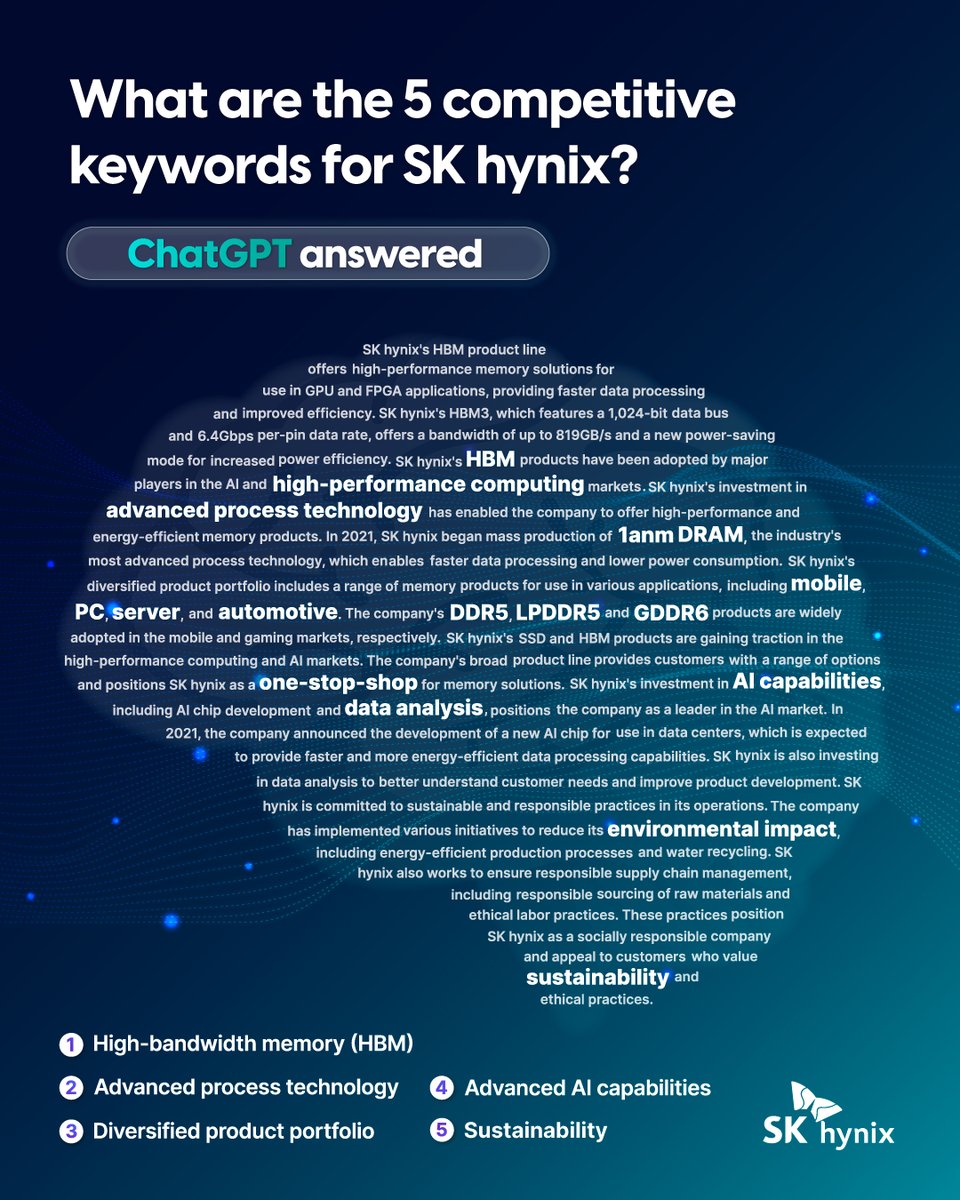
An #AI Technology will become a new "Killer Application" for the Semiconductor Demand, and @SKhynix is A Leading company of this trend.
Let's take a look at the #high_performance semiconductor strengths of @SKhynix drawn by #ChatGPT's keyword roadmap.
#HBM3 #HDSM #techonology
1
3
6
1,073

29 Aug 2022
"Innovating #High_Performance #Protective_Paints For #Construction #Equipment Manufacturers" says Mr. Ritesh Patel, MD, @kroma_paints
bit.ly/3dW8kQQ
#Innovating #Manufacturers #resins #binders #pigments #industrialpaint #durability
2

26 Aug 2022
#HPC plays an essential role in solving complex problems quickly. The high usage of #machine_learning & optimization and physical simulation in various #applications are augmenting the high growth of the #High_Performance Computing #Market in recent years: bit.ly/2T5mOUD

6
7
20 Jul 2022
#High_performance computing has evolved rapidly since its genesis in 1964. Since then, the amount of #data the world generates has exploded, and accordingly, the need for #HPC to process #data more rapidly and efficiently has become #paramount. Visit: bit.ly/3O07FKN

6
6