
25 Jan 2024
🚀 Linux Device Driver Commands Unveiled! 🐧
Ever wondered how to command the heart of your Linux system – the kernel? Here’s a handy guide to essential device driver commands. Let’s dive in! 💻🔧
1.List Modules: #lsmod
•Explore loaded kernel modules.
•Example: lsmod reveals modules like magic spells powering your system.
2.Module Probing: #modprobe
•Dynamically add or remove modules.
•Example: modprobe soundcore injects audio magic.
3.Remove Module: #rmmod
•Bid farewell to a loaded module.
•Example: rmmod usb_storage removes USB storage support.
4.Insert Module: #insmod
•Inject new capabilities into the kernel.
•Example: insmod hello.ko adds a friendly “hello” module.
5.Kernel Messages: #dmesg
•Peek into the kernel’s log.
•Example: dmesg | grep error fetches error adventures.
6.USB Exploration: #lsusb
•Discover connected USB devices.
•Example: lsusb unveils the USB wonders around.
7.PCI Expedition: #lspci
•Journey through PCI devices.
•Example: lspci -nn explores PCI with details.
8.Block Devices: #lsblk
•Navigate disks and partitions.
•Example: lsblk maps out your block device galaxy.
9.udevadm Mastery: #udevadm
•Command the device manager.
•Example: udevadm info -a -p /sys/class/usb dives into USB details.
10.Trigger Events: #udevadm_trigger
•Evoke events, apply rules dynamically.
•Example: udevadm trigger stirs the device magic.
Ready to unleash the power of Linux device drivers? ✨ Which command will you wield today? Share your Linux journey! 🚀🌐 #LinuxCommands #DeviceDrivers #KernelMagic #TechExploration
1
2
226
21 Jan 2024
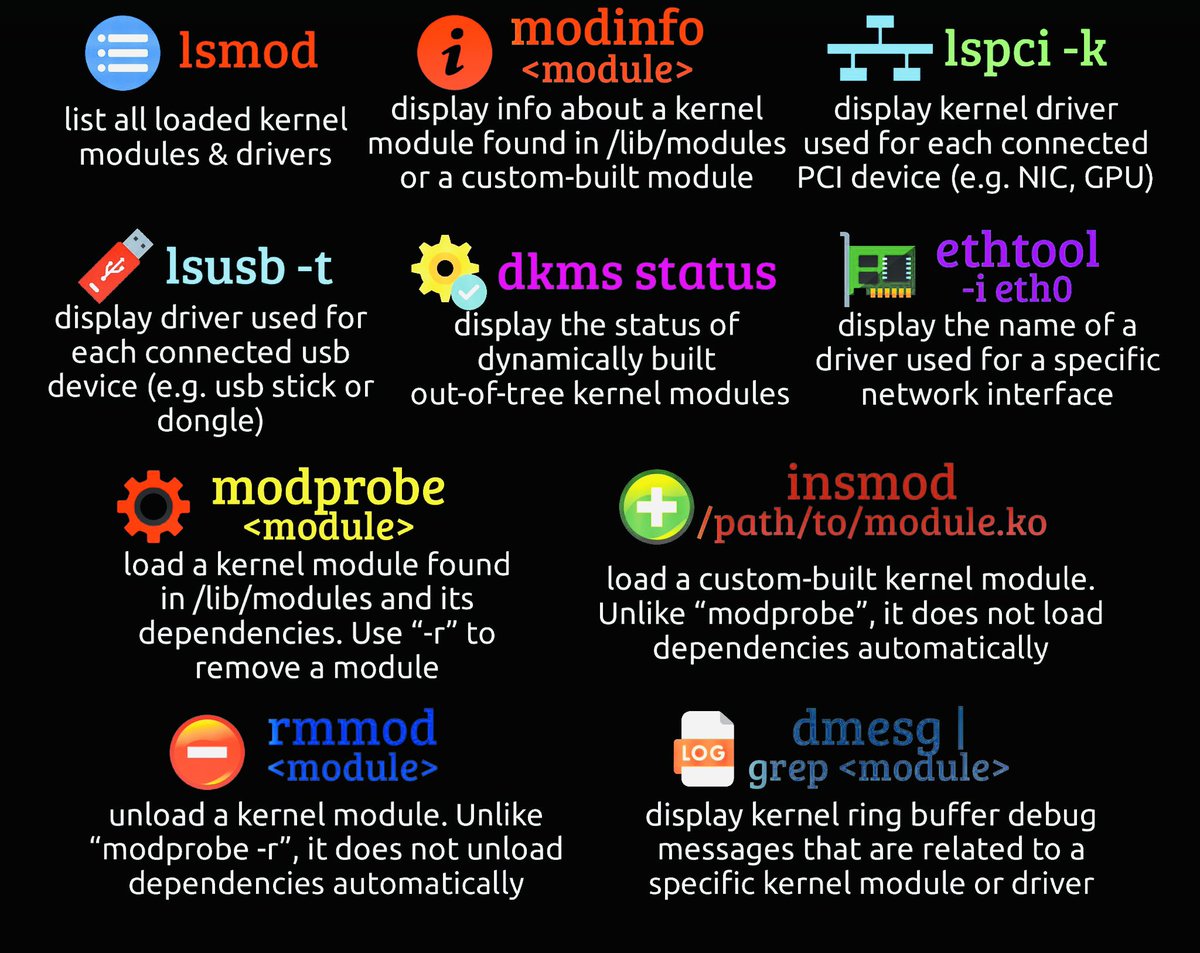
🐧 Exploring Linux Device Driver Commands 🚀
Dive into the world of Linux Device Drivers with these essential commands! 🛠️ Let’s unravel the magic of kernel modules and device management. 🧵👇
1.#lsmod: List loaded kernel modules. 🕵️♂️
lsmod - Uncover the modules powering your Linux system.
2.#modprobe: Add or remove modules dynamically. 🔧
modprobe <module_name> - Shape your kernel on the fly!
3.#rmmod: Say goodbye to a module. ✌️
rmmod <module_name> - Remove and make way for the new.
4.#insmod: Inject a module into the kernel. 💉
insmod <module_name> - Infuse fresh capabilities.
5.#dmesg: Peek into kernel messages. 📜
dmesg - The story of your kernel’s adventures.
6.#lsusb: Unveil USB wonders. 🚀
lsusb - Discover the USB realm.
7.#lspci: Journey through PCI devices. 🛣️
lspci - Explore the PCI landscape.
8.#lsblk: Navigate the block device galaxy. 🌌
lsblk - Your guide to disks and partitions.
9.#udevadm: Command the device manager. 🕹️
udevadm control --reload-rules - Rule the runtime behavior.
10.#udevadm_trigger: Evoke events, apply rules. ⚡
udevadm trigger - Stirring the device magic.
Embark on the Linux Device Driver adventure! 🚀💻 Which command is your favorite? Share your kernel wisdom! 🧠✨ #Linux #KernelMagic #DevOps #OpenSource #TechThread #ExploreLinux
1
2
246

21 Aug 2018
Sweet mother of app updates is coming out soon, get that RT fingers ready!
#kernelmagic
3
1
17