
Mar 4
Imagine if instead of just gradually removing support for various Views features e.g. the MotionLayout "Motion Editor", now the Custom View Preview, etc;
they would fix the pain points in Compose like, "no scrollbar in LazyColumn", no Hint attribute, confusing Gradient API, etc.
4
161

21 Oct 2025
Not bad! But I think the right approach is a MotionLayout on the Post screen. One of the ConstraintSets would be the WebView layout, another would be standard etc. At least, that's what I would try first if I made it 😝
1
3
838

2 Jul 2025
Absolutely, happy to break it down!
When developers get reports about laggy animations, they usually start by profiling the app using tools like Android Studio Profiler or Systrace to pinpoint exactly where the slowdown happens—this could be due to heavy computations on the main thread, inefficient rendering, or unoptimized image loading.
They’ll look at things like frame rendering times, memory usage, and CPU/GPU load to identify bottlenecks.
Common optimizations include moving heavy tasks off the main thread (using background threads or coroutines), reducing the number of views or layers in animations, compressing images, or switching to more efficient animation libraries like MotionLayout or Lottie.
After making changes, they test on multiple devices—especially ones similar to yours—to make sure the fix works and doesn’t break anything else.
Once everything looks good, they push an update to the Play Store and monitor if user feedback improves.
1
26
21 Mar 2025
It's kind of funny how despite all the claims about how Compose layouting is so much faster because of the single-measure-pass, they sure love to keep the multi-measure option available, but exclusively only for ConstraintLayout {} and MotionLayout {}
It's a big performance hit.
1
1
3
996
23 Feb 2025
Interestingly, ConstraintLayout in Jetpack Compose is a "multi-measure layout", allowing ConstraintLayout to measure multiple times. The same is also true of MotionLayout.
Apparently all you need to do is suppress deprecation, then you can create MultiMeasureLayout if you want.
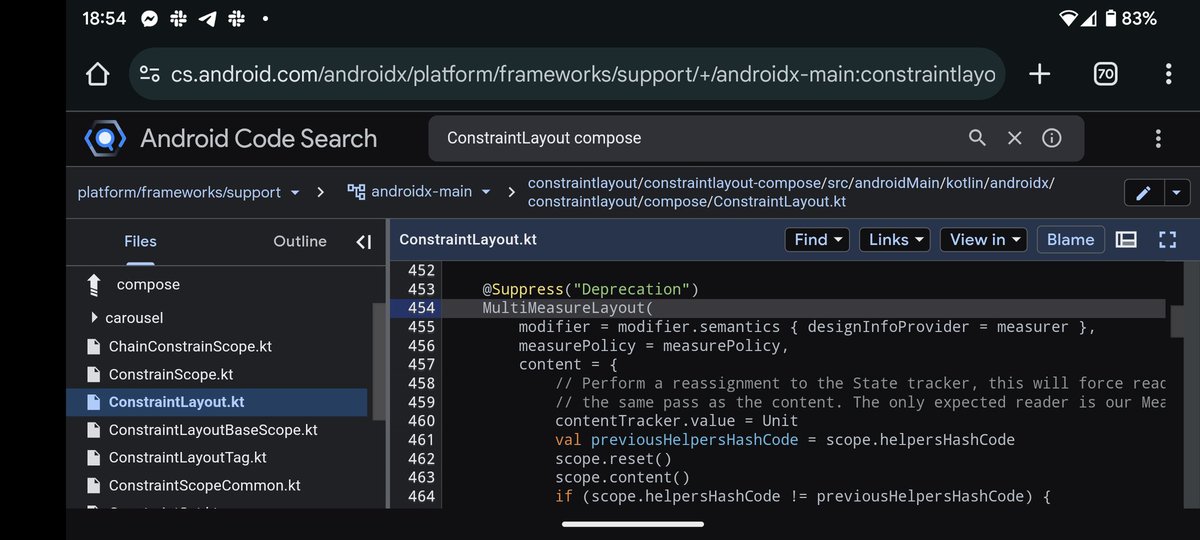
ALT https://cs.android.com/androidx/platform/frameworks/support/ /androidx-main:constraintlayout/constraintlayout-compose/src/androidMain/kotlin/androidx/constraintlayout/compose/ConstraintLayout.kt;l=454?q=ConstraintLayout compose
1
1
3
535

28 Oct 2024
Landed a PR last week where finally implemented this slick-looking animation using the #MotionLayout in #JetpackCompose.
It has been quite a challenge, to say the least.
github.com/mars885/gamedge/p…
#Android #androiddev
2
1
6
1,665
19 Oct 2024
ConstraintLayout in Jetpack Compose has always been the least trustworthy (read: most unstable) component, along with its friend MotionLayout.
They're both using on an otherwise deprecated feature of Compose, called "MultiMeasureLayout".
It'll inevitably cause issues later.
1
9
759

12 Apr 2024
I've been exploring 🔍 how to implement a search bar transition similar to the one in the AirBnB application. It seems that Jetpack Compose or XML can achieve this by using #MotionLayout and defining a motion scene.
#JetpackCompose #animation #Android
7
296

Compose使っているとConstraintLayout使うことないから気づいていなかったけど、ComposeのMotionLayoutでjsonではなくてDSLで書けるようになっていたのか👀
github.com/androidx/constrai…
3
10
1,282


🇺🇸/🇬🇧 Working with more than two ConstraintSets in MotionLayout. You can work with more scenes by adding to the start and end ConstraintSets that come by default in MotionLayout.
Source code: github.com/meetOzan/MotionIn…
1
16
424
🇬🇧/🇺🇸 Enter to MotionLayout. In this screen, where I use Constraints, KeyAttribute and KeyPosition concepts a lot, can be used as a sample project for those who will start MotionLayout.
Source Code 👇
github.com/meetOzan/MotionRo…
1
2
11
723


21 Aug 2023
As an #Android developer, you might have encountered the need for layout #animation, and sometimes even morphing-style layout animation. That’s where MotionLayout comes into the picture.
Creating interactive UIs with Motion Layout using Jetpack Compose. bit.ly/45igatV
7
110

20 Jul 2023
While MotionLayout has been around for some time, it’s fairly new in Jetpack Compose.
In this blog, you’ll learn about how to incorporate #MotionLayout in Jetpack Compose with an example of Collapsing toolbar. bit.ly/3DjAJd4
#JetpackCompose #androiddev
3
17
1,506

17 Jul 2023
1
10
1,287

22 May 2023
Flutter Animation ift.tt/U2armsc
in android there are motionlayout is there anything equivalent to this magic one?
@flutterdev #flutterdev
3
2,899
19 May 2023
8
13
176
8,501

LookaheadLayout, 新しいAPIだったんですね(知らんかかった...)。
MotionLayoutやMaterial Motionであの様な動きは作る物だとばかり思っていました!
betterprogramming.pub/introd…
#cybozu_mobile
3
477

29 Mar 2023
𝐀 𝐃𝐞𝐭𝐚𝐢𝐥𝐞𝐝 𝐓𝐮𝐭𝐨𝐫𝐢𝐚𝐥 𝐎𝐧 𝐇𝐨𝐰 𝐓𝐨 𝐔𝐬𝐞 𝐌𝐨𝐭𝐢𝐨𝐧𝐋𝐚𝐲𝐨𝐮𝐭 𝐈𝐧 𝐀𝐧𝐝𝐫𝐨𝐢𝐝
🔹 Benefits of Using MotionLayout in Android
🔹 Adding Animation to Your App Using Motion Layout Android
#android #motiondesign #MotionLayout #UI #UX #mobileappdevelopment
1
2
89