
One UI 8.5 feature you probably installed weeks ago and still haven't tried. Here's why you should.
The feature: Photo Assist with Object Transfer Text Prompts
Most users installed One UI 8.5, noticed the new UI, took a picture with a film filter, and moved on.
Very few tried this:
HOW TO ACCESS IT (takes 10 seconds):
▪ Open Gallery → tap any photo
▪ Tap the pencil edit icon
▪ Scroll down → tap "Photo Assist"
▪ OR: Apps screen → Creative Studio (new standalone app shortcut)
WHAT TO TRY FIRST:
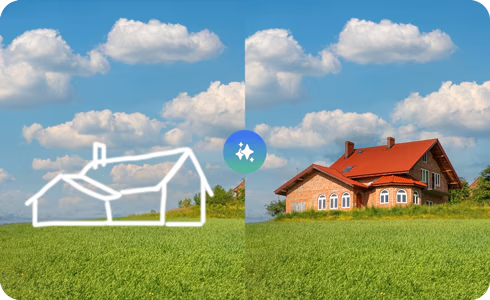
▪ Tap "Generate" → type "make the background a sunset"
▪ Watch Galaxy AI replace the background generatively in 4–6 seconds
▪ Try again: "remove the person in the background" → erases and fills
▪ Try: "transfer this person to another photo" → Object Transfer
After receiving One UI 8.5, you may have been waiting for the Android 17-based One UI 9, but you shouldn't miss trying an epic feature on your Samsung Galaxy. The feature is an AI-powered Photo Assist that upgraded the Creative Studio.
This is the feature that made iPhone users stop and say "wait, Android can do that?"
It's been on your Galaxy for weeks. Have you tried it yet? 📸
#OneUI85 #PhotoAssist #GalaxyAI #CreativeStudio #Samsung #ObjectTransfer
77