
Jun 13
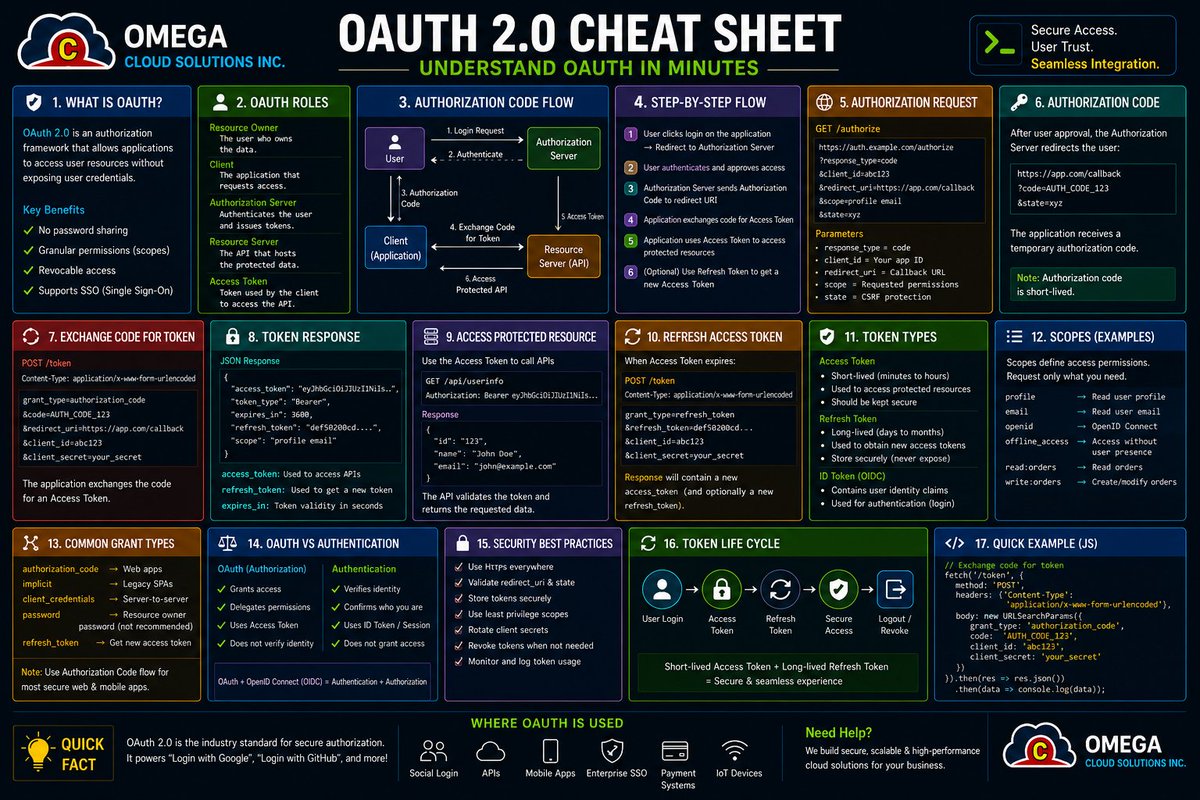
Opted for a passive migration so that the next token exchange for each active shop mints an expiring token refresh token automatically; the library persists refreshToken/refreshTokenExpires and auto-refreshes ~5 min before expiry in all authenticate.* and unauthenticated.admin(shop) calls.
29


Jun 9
Then it got interesting.
Same userId, different behavior:
RefreshToken → indexed (multi-session support)
VerificationToken → unique
PasswordResetToken → unique
Same foreign key. Different system rules.
3/3
19
Jun 9
I made one key design choice early:
No nullable token fields in the User table.
Instead of: refreshToken / verificationToken / passwordResetToken sitting as optional columns…
I moved each one into its own table
Cleaner model. Clear ownership. No dead fields.2/3
1
16


Jun 8
📚 Learning Notes: Why Refresh Tokens Should Be Persisted
While learning JWT authentication, I came across an interesting question:
🤔 If JWTs are stateless, why would we store refresh tokens in a database?
The answer comes down to one thing:
🔐 Control.
🔹 The Problem
Access tokens are usually short-lived.
⏱️ 15 minutes
⏱️ 30 minutes
⏱️ 1 hour
If an access token is stolen, the damage is limited.
Refresh tokens are different.
They often live for months or even a year.
If a refresh token is compromised, an attacker could continuously generate new access tokens.
That's a much bigger risk.
🔹 Why Persist Refresh Tokens?
Instead of treating refresh tokens as completely stateless, many systems store metadata about them.
Benefits:
✅ Token Revocation
Logout becomes meaningful.
Delete the refresh token record and the token can no longer be used.
✅ Device Management
Track how many active sessions a user has.
Example:
• Laptop
• Mobile
• Tablet
Each device can have its own refresh token record.
✅ Suspicious Activity Detection
Unexpected token usage can be identified and revoked.
✅ Token Rotation
Each refresh token can be used exactly once.
When exchanged:
Old Token ❌
New Token ✅
This dramatically reduces the value of stolen refresh tokens.
🔹 TDD Approach
Following the Red → Green → Refactor cycle:
🔴 Red
Write a failing test:
• Register a user
• Check if a refresh token record exists in the database
The test fails because no persistence mechanism exists yet.
🟢 Green
Create a RefreshToken entity:
RefreshToken
├─ id
├─ expiresAt
├─ userId
├─ createdAt
└─ updatedAt
Save a refresh token record whenever a user authenticates.
Run tests again → Pass ✅
🔹 User ↔ Refresh Token Relationship
A common design:
User (1)
│
│
▼
Refresh Tokens (Many)
This allows a single user to maintain multiple active sessions across devices.
TypeORM makes this easy using:
• OneToMany
• ManyToOne
relationships.
🔹 JWT ID (JTI)
One concept I found particularly interesting was using the JWT ID claim.
Instead of storing large amounts of data inside the refresh token:
JWT
├─ sub
├─ role
└─ jti
The jti references the database record.
Benefits:
✅ Smaller tokens
✅ Easy revocation
✅ Better auditing
✅ Simpler token rotation
🔹 Additional Security Opportunities
Once refresh tokens are persisted, we unlock features such as:
🛡️ Logout Everywhere
🛡️ Session Tracking
🛡️ Refresh Token Rotation
🛡️ Revocation Lists
🛡️ Expired Token Cleanup Jobs
These become difficult or impossible with fully stateless refresh tokens.
💡 Biggest takeaway
JWT authentication is often described as stateless.
But in practice, many production systems intentionally add state back to refresh tokens.
Why?
Because security isn't just about issuing tokens.
It's about being able to control them after they've been issued.
#JWT #Authentication #RefreshToken #NodeJS #TypeScript #BackendDevelopment #SoftwareEngineering #WebSecurity #LearningInPublic #PostgreSQL #TypeORM
Jun 3

📚 Day 3 of Building a Microservices-Based Project
Over the past few days, I've been working on the Authentication Service and learning more about how authentication and session management are handled in backend systems.
Today's focus was on stateless vs stateful authentication, JWTs, Access Tokens, Refresh Tokens, and token persistence.
Some of the things I explored:
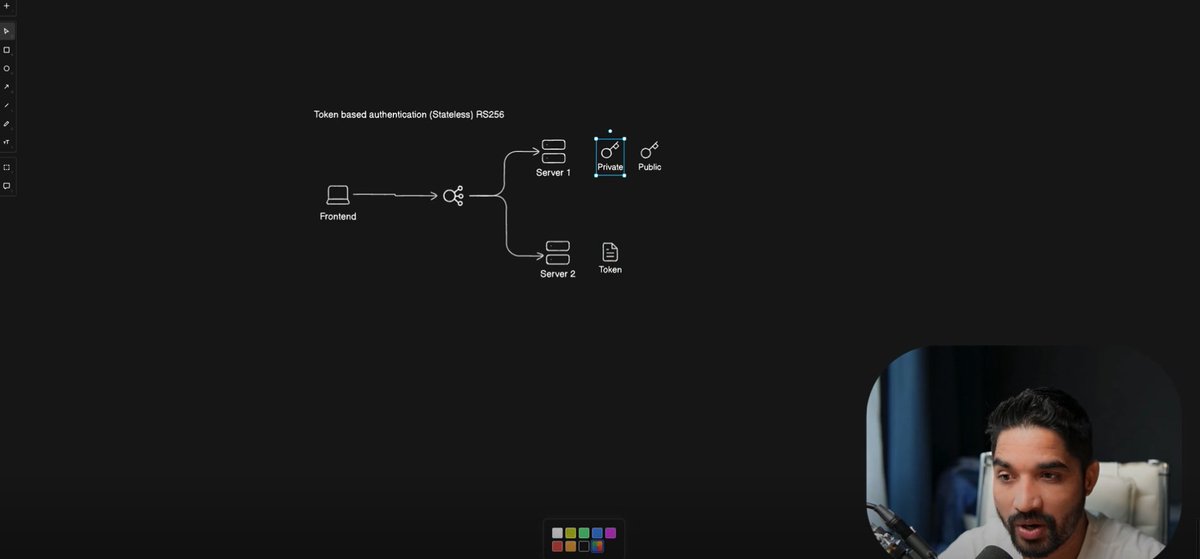
🔹 Understanding the difference between stateless and stateful authentication
🔹 Learning how JWT-based authentication enables stateless authorization
🔹 Understanding the difference between Access Tokens and Refresh Tokens
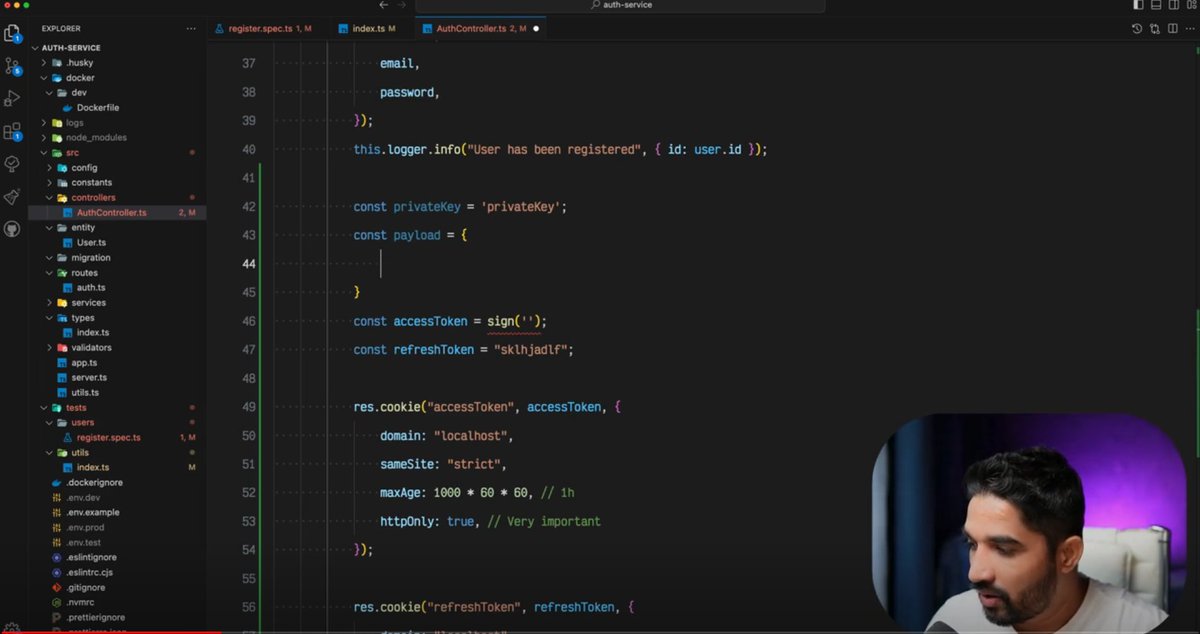
🔹 Generating JWTs and storing them securely in cookies
🔹 Creating a dedicated Refresh Token entity in PostgreSQL using TypeORM
🔹 Persisting refresh tokens in the database instead of relying solely on stateless JWTs
🔹 Learning how JWT IDs can be be used to link tokens with database records
🔹 Updating integration tests to verify refresh token persistence during user registration
One thing I found particularly interesting was the distinction between stateless and stateful authentication.
With stateless authentication, all the information needed to validate a user is contained within the token itself, allowing services to verify requests without querying a database. This can improve scalability and simplify distributed systems.
With stateful authentication, session information is stored on the server side, making it easier to manage active sessions, revoke access, and enforce security policies. By storing refresh tokens in the database, we introduce a stateful component that enables features such as session management, token revocation, and token rotation.
Another valuable lesson was seeing how quickly controllers can become overloaded with responsibilities and how moving logic into dedicated services makes the codebase easier to maintain and test.
Still learning a lot about authentication, security, and microservice architecture, but each step is helping me better understand how production-ready systems are designed.
@codersGyan
#Microservices #BackendDevelopment #NodeJS #TypeScript #JWT #Authentication #PostgreSQL #TypeORM #SoftwareEngineering #LearningInPublic #WebDevelopment
29
Jun 7
📚 Learning Notes: Why Refresh Tokens Exist
When I first learned JWT authentication, I wondered:
🤔 If we already have an access token, why do we need a refresh token?
Here's what I learned 👇
🔹 Access Tokens
✅ Used to access protected APIs
✅ Sent with every request
❌ If stolen, an attacker can impersonate the user
That's why access tokens should be short-lived.
Think:
⏱️ 15 minutes
⏱️ 30 minutes
⏱️ 1 hour
instead of days or months.
But there's a problem...
If access tokens expire quickly, users would need to log in constantly.
Terrible UX 😅
🔹 Refresh Tokens
A refresh token solves this problem.
Flow:
1️⃣ User logs in
2️⃣ Server issues:
• Access Token (short-lived)
• Refresh Token (long-lived)
3️⃣ Access token expires
4️⃣ Browser automatically sends refresh token
5️⃣ Auth service validates it
6️⃣ New access token is issued
7️⃣ User stays logged in
No manual login required 🎉
🔹 Security Design
Access Token
🔑 Short-lived
🌐 Sent to APIs
🔐 Signed using RS256
Refresh Token
🔑 Long-lived
🍪 Stored in HTTP-only Cookie
🔐 Signed using HS256
🚫 Never sent to other services
🔹 Why HTTP-Only Cookies?
Because JavaScript cannot read them.
This helps reduce the impact of XSS attacks.
Even if an attacker injects JavaScript, they can't directly access the refresh token.
💡 Biggest takeaway
Access tokens optimize performance.
Refresh tokens optimize user experience.
Using both gives a balance between:
✅ Security
✅ Scalability
✅ Convenience
Authentication isn't just about generating tokens - it's about managing their lifecycle securely.
#JWT #Authentication #RefreshToken #NodeJS #BackendDevelopment #SoftwareEngineering #WebSecurity #LearningInPublic #Microservices #TypeScript
Jun 3
📚 Day 3 of Building a Microservices-Based Project
Over the past few days, I've been working on the Authentication Service and learning more about how authentication and session management are handled in backend systems.
Today's focus was on stateless vs stateful authentication, JWTs, Access Tokens, Refresh Tokens, and token persistence.
Some of the things I explored:
🔹 Understanding the difference between stateless and stateful authentication
🔹 Learning how JWT-based authentication enables stateless authorization
🔹 Understanding the difference between Access Tokens and Refresh Tokens
🔹 Generating JWTs and storing them securely in cookies
🔹 Creating a dedicated Refresh Token entity in PostgreSQL using TypeORM
🔹 Persisting refresh tokens in the database instead of relying solely on stateless JWTs
🔹 Learning how JWT IDs can be be used to link tokens with database records
🔹 Updating integration tests to verify refresh token persistence during user registration
One thing I found particularly interesting was the distinction between stateless and stateful authentication.
With stateless authentication, all the information needed to validate a user is contained within the token itself, allowing services to verify requests without querying a database. This can improve scalability and simplify distributed systems.
With stateful authentication, session information is stored on the server side, making it easier to manage active sessions, revoke access, and enforce security policies. By storing refresh tokens in the database, we introduce a stateful component that enables features such as session management, token revocation, and token rotation.
Another valuable lesson was seeing how quickly controllers can become overloaded with responsibilities and how moving logic into dedicated services makes the codebase easier to maintain and test.
Still learning a lot about authentication, security, and microservice architecture, but each step is helping me better understand how production-ready systems are designed.
@codersGyan
#Microservices #BackendDevelopment #NodeJS #TypeScript #JWT #Authentication #PostgreSQL #TypeORM #SoftwareEngineering #LearningInPublic #WebDevelopment
1
94

May 28
例えばlocalStorageにrefreshTokenを置く仕様を「大きく変えられない」ケースでセキュリティ強化をする場合を考えてみた
httpOnlyなCookieも併用しトークンの検証に使うと外部に漏洩しても使えず、accessTokenの発行でCookieの値やrefreshTokenをローテーションすると良いかもと思った
1
5
468

May 27
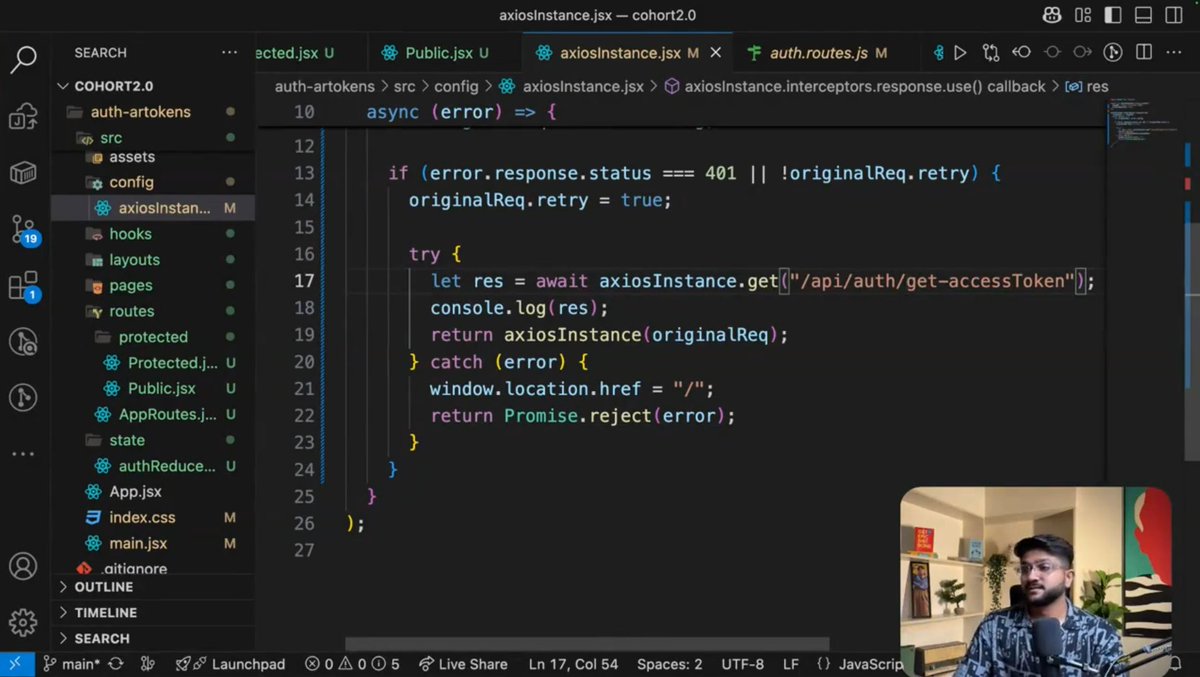
Day 214 🚀
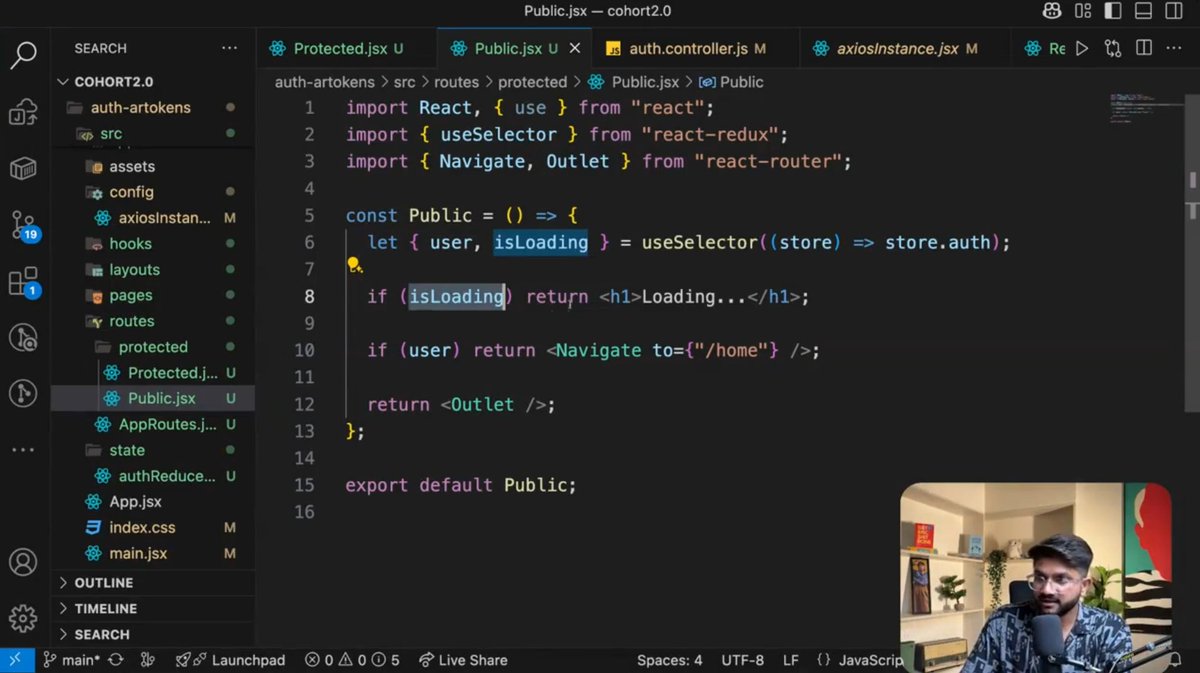
Integrated frontend using component-based architecture 💻
Tested AccessToken & RefreshToken workflow 🔐
#Frontend #Authentication #BuildInPublic #sheryiansh

4
79

May 6
Steady progress, nice!
Some tips to notes 30s access token is too short, typically it's 15m and refreshToken is 7d - 30d.
In your jwt payload, it's common to include the userId too, helps when you want to skip some db lookups by id later on.
1
5
249

AIコーディング環境「Cursor」で、実行コードを持つインストール済み拡張機能が追加の専用権限プロンプトなしに、認証関連情報を保存したローカルSQLite-DBを直接読み取れる設計上の問題が報告されています。Cursor側はこの問題を認識しているものの「信頼境界の設定はユーザー自身の責任範囲である」と回答し修正は行われていないとの主張。
VSCodeが機密情報向けに用意するSecretStorage-API(macOSのKeychain、WindowsのDPAPI、Linuxのsecret-store等のプラットフォーム依存保護)ではなくstate[.]vscdb上のItemTableに置かれており、宣言権限の有無やUI上の警告とは無関係に取得可能とのこと。
公開情報上はCVE未採番で、CVSS 8.2は発見者側の自評価。
【報告の要点】
・macOSはユーザー領域配下のCursor/User/globalStorage配下のstate[.]vscdb。Windowsは%APPDATA%配下の同等パス、Linuxは~配下の.config配下に同等のSQLite DBが置かれる構成と説明
・ItemTableに対しkeyが'%cursorAuth%'に一致する行をSELECTする程度のクエリでaccessToken/refreshToken/cachedEmail等が取り出せるとされる
・LayerX原文では「平文または保護不十分」との留保付き(CWE-312/CWE-522相当の保管)。別拡張cursor-statsのIssue ♯36でも手元の同DBから同種キーを文字列として取り出した実例が記録されており、第三者側でも構造が観測可能
・拡張機能ホストの一般権限の範囲で読めるため、宣言的パーミッションや専用の警告ダイアログを経由しない構造。なお純粋な宣言的テーマ拡張は実行エントリポイントを持たず、本攻撃の対象外
・実行コードを持つ拡張がテーマや補助ツールに見える形で配布されるシナリオが認証情報窃取の入口になり得る
・公開PoCの送信先はローカルホスト上の研究用受信サーバ。同じ読み取り経路が外部送信に悪用され得るとの説明
・自前APIキー(BYOK)で利用者が設定したOpenAI/Anthropic/Google等のAPIキーやCursor自身のアクセストークン/リフレッシュトークン等のセッション認証情報が対象範囲とされる。第三者の独立観察ではcursorAuth系のセッション認証情報が中心で、他社APIキーの直接平文保管はLayerX主張ベース
・ローカルファイルへアクセスできる拡張機能は他のローカルアプリと同じ信頼境界に属する、という趣旨で修正しない方針
・開示タイムライン:2026/02/01報告→02/05応答→04/28時点で修正なし
未修正方針が示されているため、未知ベンダーの拡張を入れない、棚卸しと最小化、APIキーは外部のシークレット管理から都度注入するといった運用面の対処が当面の現実解として案内されています。
詳細は以下を参照:
layerxsecurity.com/blog/curs…
3
17
1,422

Apr 27
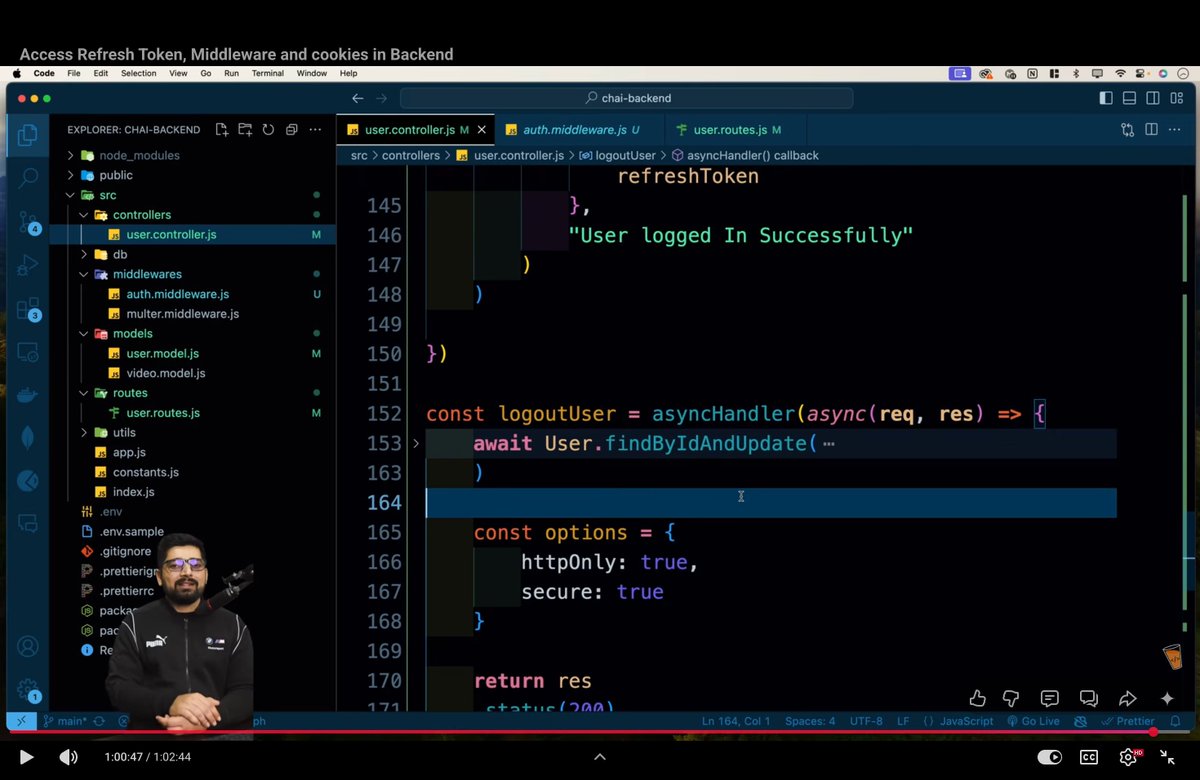
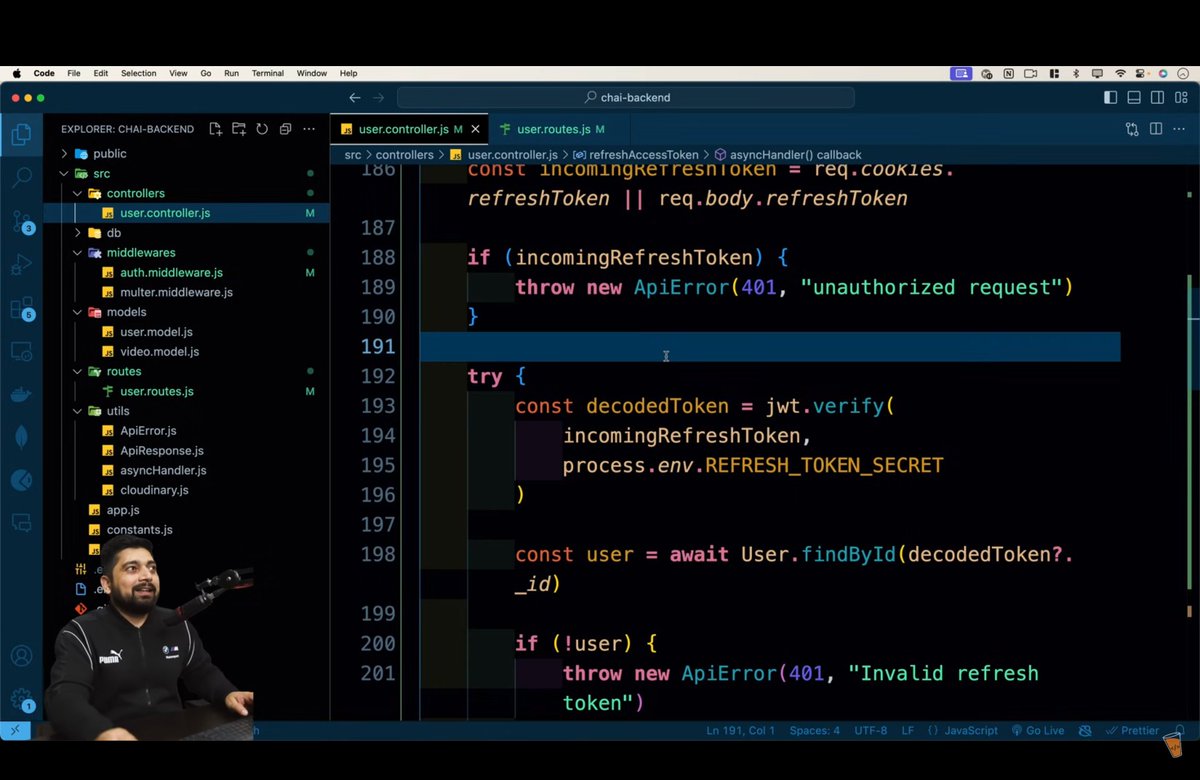
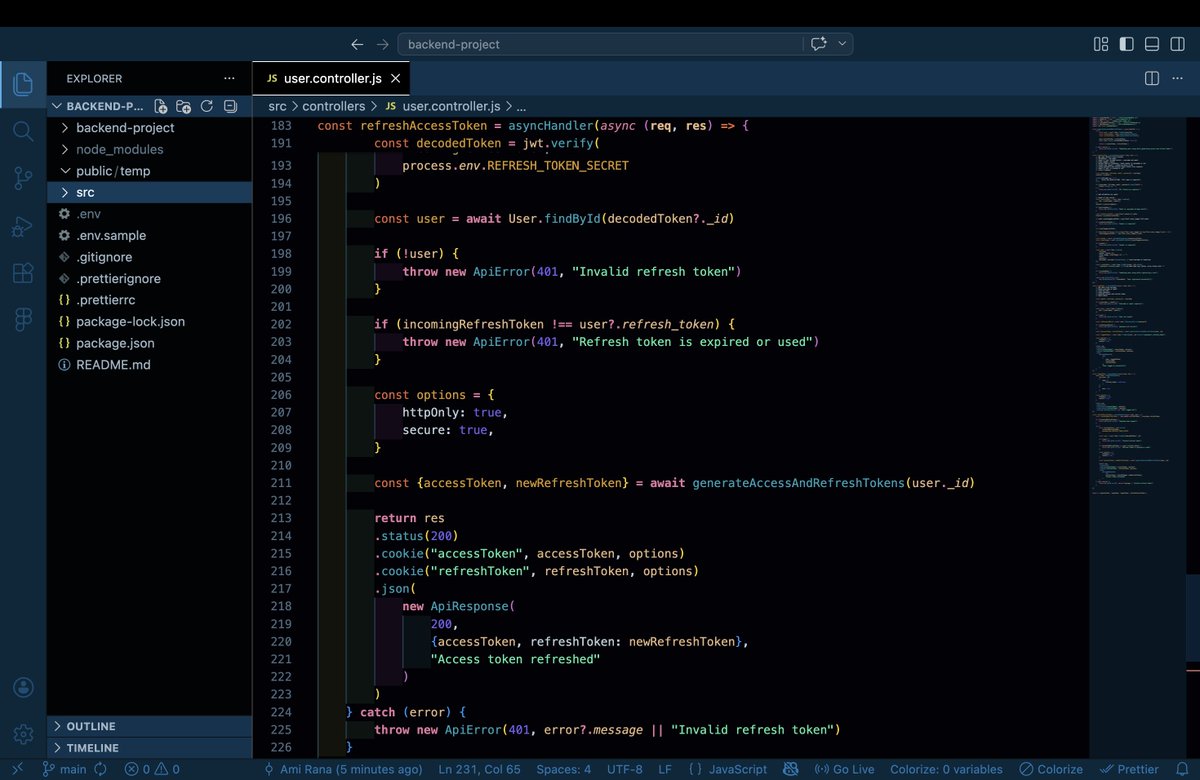
day 16 & 17: backend series
learnings:
- access token → short-lived
- refresh token → long-lived
- created middleware for logout route
- for logout: verify tokens, clear them in DB (findByIdAndUpdate), and delete cookies (accessToken, refreshToken)
1
19
157

Apr 26
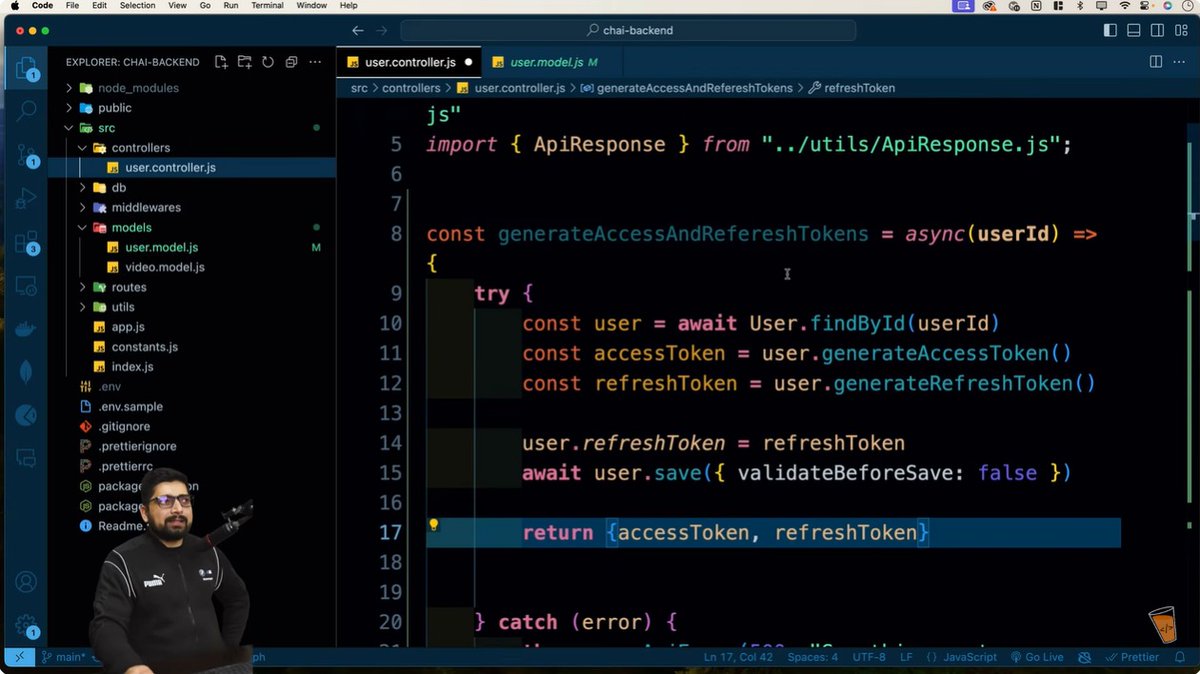
🚀 Day 16: Chai Aur Backend
• Login: get user, verify email/username & password
• Generate access, refresh tokens & send cookies
• Logout: auth middleware, Clear refreshToken
@Hiteshdotcom @piyushgarg_dev @devwithjay @yntpdotme @ChaiCodeHQ @surajtwt_ @nirudhuuu @BlazeisCoding
11
78

Apr 26
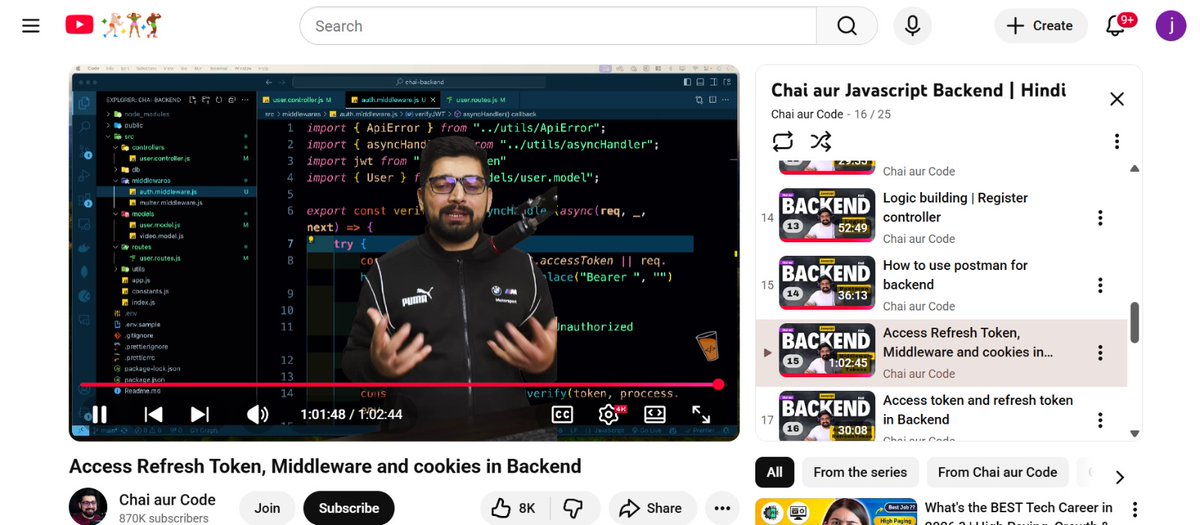
Day 16 - Chai Aur Backend ✅
1) Extract email/username & password from req.body.
2) Validate input, throw error if missing.
3) Find user via $or, return 404 if not found.
4) Verify password using bcrypt method.
5) Generate access & refresh tokens, save refreshToken in DB.
6) Send tokens via httpOnly, secure cookies.
7) Middleware reads token, verifies JWT, fetches user, attaches to req.user for protected routes.
@ChaiCodeHQ @Hiteshdotcom @piyushgarg_dev @nirudhuuu @yntpdotme @surajtwt_ @devwithjay
2
45
462

Apr 20
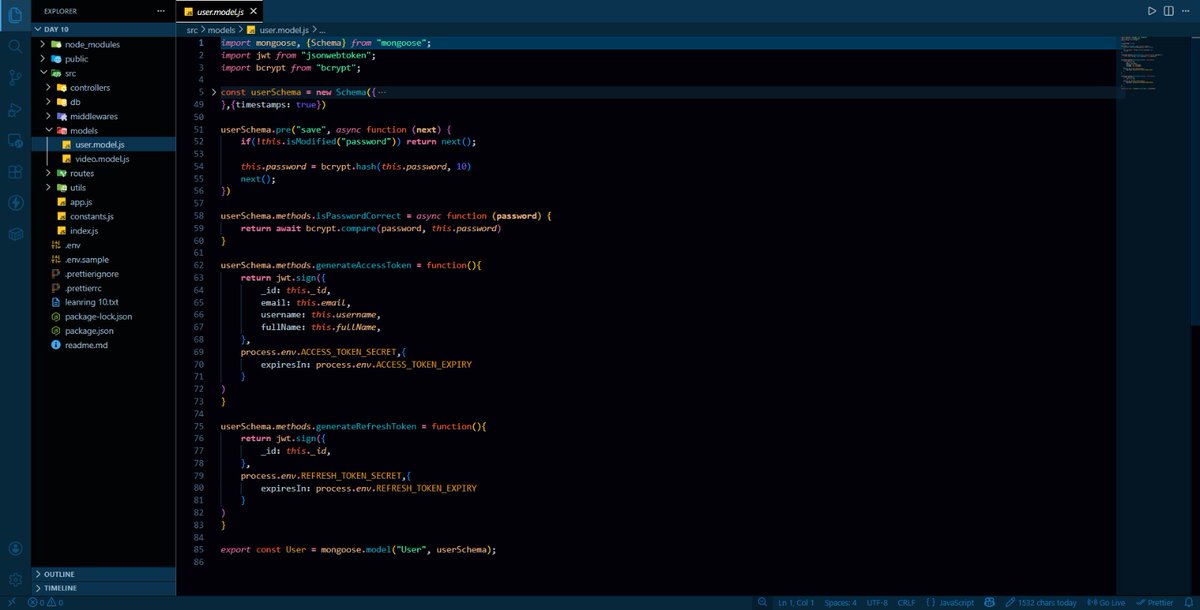
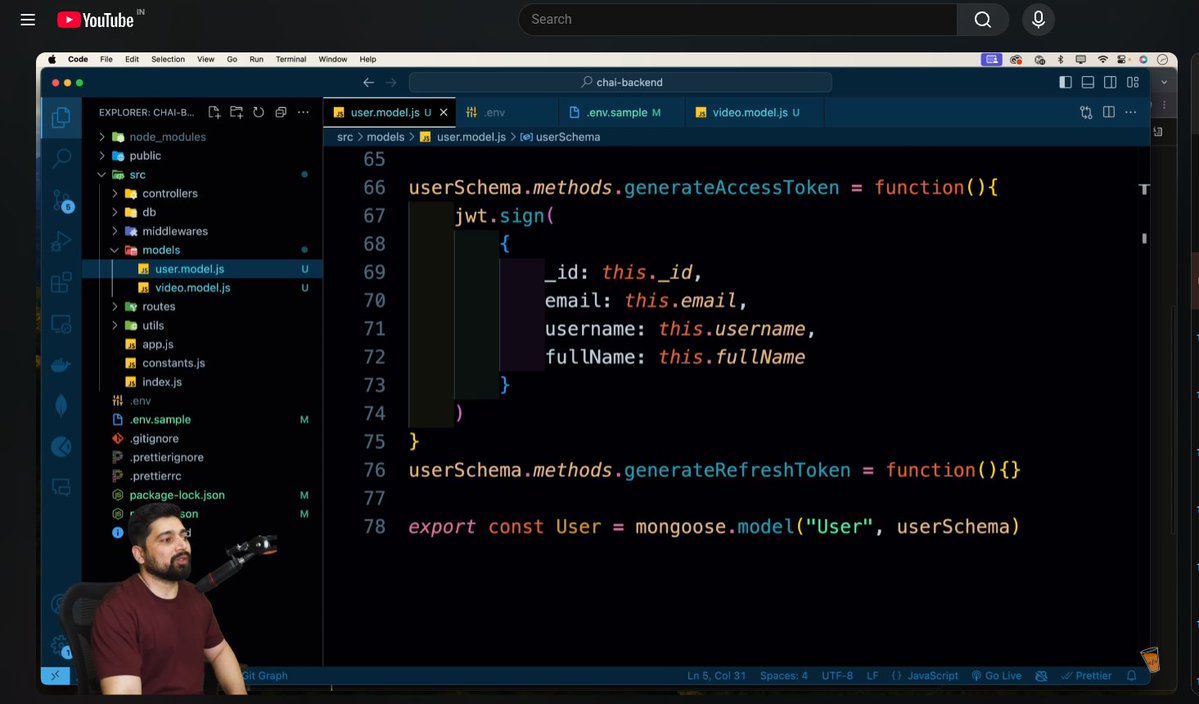
Masterji Challenge - Chai Aur Backend Day 10 Completed🚀
Learning:-
> Made user and video model from the ER diagram
> Understood how to deal with passwords
> Used bcrypt , jwt and then saw the functionality of accessToken and refreshToken
@Hiteshdotcom @ChaiCodeHQ
9
48

Apr 13
Day 6/20
-Learned about AccessToken and RefreshToken
-decided the flow for the project
-Ran 1.5 km after 1 months
-2 post went viral on X
#backend #buildinPublic
1
4
82


Apr 4
𝐂𝐥𝐞𝐚𝐧 𝐀𝐫𝐜𝐡𝐢𝐭𝐞𝐜𝐭𝐮𝐫𝐞 𝐦𝐞𝐞𝐭𝐬 𝐕𝐞𝐫𝐭𝐢𝐜𝐚𝐥 𝐒𝐥𝐢𝐜𝐞𝐬 — 𝐇𝐨𝐰 𝐈 𝐒𝐭𝐫𝐮𝐜𝐭𝐮𝐫𝐞 .𝐍𝐄𝐓 𝐀𝐩𝐩𝐬
Clean Architecture gives you clear boundaries.
Vertical Slice Architecture gives you clear features.
Here's how I structure it:
𝟏) 𝐃𝐨𝐦𝐚𝐢𝐧 — The Business Core
No EF Core. No HTTP. No external dependencies. Just pure business rules.
📁 Domain
├── 📁 Common
│ ├── AuditableEntity.cs
│ ├── BaseEntity.cs
│ ├── Error.cs
│ ├── PagedResult.cs
│ └── Result.cs
└── 📁 Entities
├── ApplicationUser.cs
└── TodoItem.cs
The Result pattern, base entities, and domain models — all framework-free.
𝟐) 𝐀𝐩𝐩𝐥𝐢𝐜𝐚𝐭𝐢𝐨𝐧 — This is where VSA shines
Instead of a "Services" folder with 20 files, every use case gets its own folder.
📁 Application
├── 📁 Abstractions
│ ├── 📁 Data
│ │ └── IAppDbContext.cs
│ ├── 📁 Identity
│ │ ├── ICurrentUser.cs
│ │ └── ITokenService.cs
│ └── 📁 Messaging
│ ├── ICommand.cs
│ ├── ICommandHandler.cs
│ ├── IQuery.cs
│ └── IQueryHandler.cs
├── 📁 Features
│ ├── 📁 Identity
│ │ ├── 📁 Login
│ │ ├── 📁 Register
│ │ └── 📁 RefreshToken
│ └── 📁 Todos
│ ├── 📁 Create
│ │ ├── CreateTodoCommand.cs
│ │ ├── CreateTodoCommandHandler.cs
│ │ └── CreateTodoValidator.cs
└── DependencyInjection.cs
✅ Each slice = Command/Query → Validator → Handler.
Want to understand "Create Todo"? Open one folder. That's it. No hunting across layers.
𝟑) 𝐈𝐧𝐟𝐫𝐚𝐬𝐭𝐫𝐮𝐜𝐭𝐮𝐫𝐞 — The "How Things Actually Work" Layer
Databases, EF Core, caching, identity — all the implementation details live here.
📁 Infrastructure
├── 📁 Persistence
│ ├── 📁 Configurations
│ │ ├── ApplicationUserConfiguration.cs
│ │ └── TodoItemConfiguration.cs
│ ├── 📁 Migrations
│ ├── AppDbContext.cs
│ └── AppDbSeeder.cs
├── 📁 Identity
├── 📁 Caching
└── DependencyInjection.cs
The Application layer defines what it needs (interfaces). Infrastructure provides the implementation. Clean dependency inversion.
𝟒) 𝐀𝐩𝐢 — Thin. No Business Logic.
This layer receives requests and returns responses. That's it.
📁 Api
├── 📁 Endpoints
│ ├── TodoEndpoints.cs
├── 📁 Extensions
│ ├── GlobalExceptionHandler.cs
│ ├── ResultExtensions.cs
│ └── ValidationFilter.cs
└── Program.cs
Minimal APIs with endpoint classes. Each endpoint just validates the request, sends it to the handler, and returns the result.
𝟓) 𝐓𝐞𝐬𝐭𝐬 — Guarding the Architecture
📁 tests
├── 📁 Application.UnitTests
│ └── 📁 Features/Todos
│ ├── CreateTodoCommandHandlerTests.cs
└── 📁 Architecture.Tests
└── ArchitectureTests.cs
Unit tests follow the same feature folder structure. Architecture tests enforce that dependencies always point inward — Domain never references Infrastructure, Application never references Api.
Here is the template: codewithmukesh.com/resources…
What architecture do you follow for your .NET apps? Let me know 👇

2
12
86
3,107

Mar 28
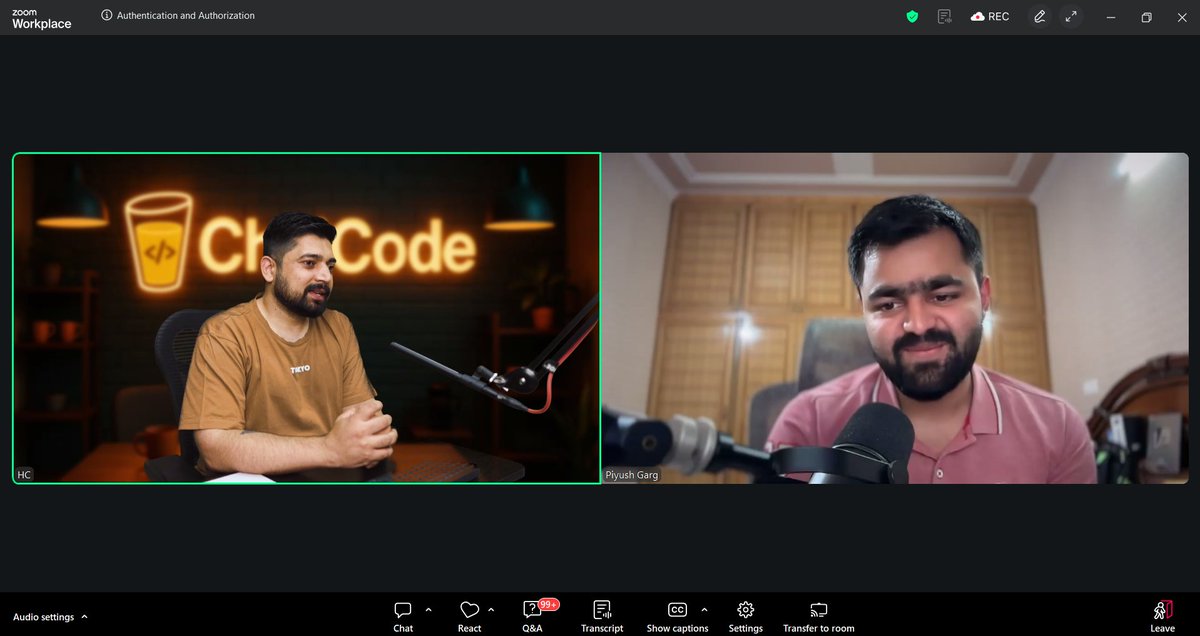
today i lern -
authentication and autherization flow
nodemailer for email
refreshtoken ,acesstoken in jwt for authentication
@ChaiCodeHQ @Hiteshdotcom @piyushgarg_dev
@nirudhuuu @yntpdotme
#chaiauthpromax #webdev #backend
1
19
140

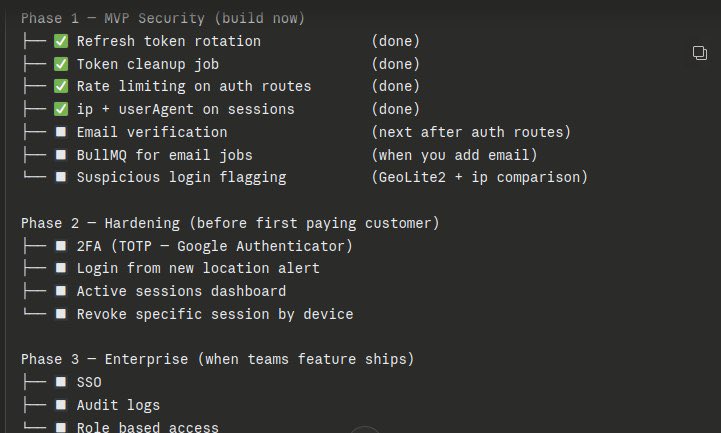
Day 8 of building @Pixoraclouds added jwt refreshToken and rotation for user login 🔐🚨
Security isn't a feature you add; it's a mindset you adopt. Make it a habit.
#pixora #BuildInPublic
3
33