
OSSA-2026-014,CVE-2026-49017: OpenStack Swift: Swift proxy-server DoS via truncated s3api chunked upload openwall.com/lists/oss-secur…
An authenticated user can send a truncated aws-chunked PUT request that causes a proxy-server worker to enter an infinite loop
1
1
4
791

May 15
One missing CLI flag. $8 million gone.
No hack. No breach. Just a public S3 bucket.
aws s3api create-bucket --bucket my-company-data
# forgot --acl private
The bucket sat exposed for 11 months.
Full breakdown ↓
3
1
3
151

Feb 18
El comando era algo así:
aws s3api remove-servers --count=5
Pero el flaco puso: --subsystem=billing
En vez de remover 5 servers, REMOVIÓ EL SUBSISTEMA ENTERO de billing y autenticación.
Cientos de servers. Offline. Instantáneamente.
1
2
22

Jan 16
AWS CLI Essentials 2026
(Top ~28 commands every cloud/DevOps engineer should have muscle memory for)
1. Config & Profile Basics
1. aws configure => set up default profile (access key, secret, region)
2. aws configure --profile prod => create named profile for multi-account work
3. aws sts get-caller-identity => who am I right now? (fast profile/identity check)
2. EC2 – Instances & Management
4. aws ec2 describe-instances => list all running instances (add --query --output table for sanity)
5. aws ec2 describe-instances --filters "Name=instance-state-name,Values=running" => only running ones
6. aws ec2 start-instances --instance-ids i-0123456789abcdef0
7. aws ec2 stop-instances --instance-ids i-0123456789abcdef0
8. aws ec2 terminate-instances --instance-ids i-0123456789abcdef0 => be very careful
9. aws ec2 describe-instance-status --instance-ids i-0123456789abcdef0 => health checks
3. S3 – Buckets & Objects (still the #1 cost driver)
10. aws s3 ls => list all buckets
11. aws s3 ls s3://my-bucket --recursive --human-readable --summarise => size file count
12. aws s3 cp localfile.txt s3://my-bucket/path/
13. aws s3 sync ./dist s3://my-bucket/website/ --delete => deploy static site safely
14. aws s3 rm s3://my-bucket/bigfile.zip
15. aws s3 rb s3://old-unused-bucket --force => remove bucket contents
16. aws s3api put-bucket-policy --bucket my-bucket --policy file://policy.json
4. Lambda – Serverless Power Moves
17. aws lambda list-functions => see all functions runtimes
18. aws lambda invoke --function-name my-function output.json => test invoke
19. aws lambda update-function-code --function-name my-function --zip-file fileb://function.zip
20. aws logs tail /aws/lambda/my-function --follow => live logs (gold for debugging)
21. aws lambda get-function-configuration --function-name my-function => env vars, memory, timeout
5. IAM – Security & Least Privilege
22. aws iam list-users / aws iam list-roles / aws iam list-policies
23. aws iam create-user --user-name dev-user
24. aws iam attach-user-policy --user-name dev-user --policy-arn arn:aws:iam::aws:policy/AmazonS3ReadOnlyAccess
25. aws iam create-access-key --user-name dev-user => generate keys (rotate often!)
26. aws iam simulate-principal-policy --policy-source-arn arn:aws:iam::123:user/dev-user --action-names s3:PutObject => test permissions
6. Billing & Cost Control (the commands people actually thank you for)
27. aws ce get-cost-and-usage --time-period Start=2026-01-01,End=2026-02-01 --granularity MONTHLY --metrics "UnblendedCost" --group-by Type=DIMENSION,Key=SERVICE => monthly cost by service
28. aws ce get-cost-forecast --time-period Start=2026-02-01,End=2026-03-01 --metric UnblendedCost --granularity MONTHLY => simple next-month prediction
Bonus muscle-memory ones worth adding if you want 30 :
- aws s3api list-objects-v2 --bucket my-bucket --query "Contents[?Size>1000000000]" → find huge files (>1GB)
- aws ec2 describe-volumes --filters "Name=status,Values=available" => orphaned EBS volumes eating money
- aws organizations list-accounts (if in Org)
Jan 15

30 Essential Git Commands Every Developer Should Know 📒
🔹 Setup & Config (3–5 commands)
1. `git config --global user.name "Your Name"`
2. `git config --global user.email "you@example.com"`
3. `git config --list`
4. `git config --global core.editor "code --wait"` (or vim/nano)
🔹 Starting & Cloning
5. `git init` - Start a new repo
6. `git clone <url>` - Copy remote repo
7. `git clone --depth 1 <url>` - Shallow clone (faster for large repos)
🔹 Daily Basics / Status & Diff
8. `git status`
9. `git status -s` (short format)
10. `git diff`
11. `git diff --staged`
12. `git diff <branch1> <branch2>`
🔹 Staging & Committing
13. `git add <file>`
14. `git add .` / `git add -A`
15. `git add -p` (interactive hunk staging)
16. `git commit -m "message"`
17. `git commit --amend`
18. `git commit -a -m "msg"` (stage commit tracked files)
🔹 Branching & Switching
19. `git branch`
20. `git branch new-feature`
21. `git checkout <branch>` or `git switch <branch>` (newer)
22. `git checkout -b new-branch`
23. `git switch -c new-branch`
🔹 Merging & Rebasing
24. `git merge <branch>`
25. `git rebase <branch>`
26. `git rebase -i HEAD~5` (interactive squash/edit)
🔹 Remote & Sync
27. `git remote -v`
28. `git fetch`
29. `git pull` (or `git pull --rebase`)
30. `git push` / `git push -u origin <branch>`
31. `git push --force-with-lease` (safer force push)
🔹 Debugging & Recovery (bonus if you want 35 )
- `git log --oneline --graph --all`
- `git reflog`
- `git reset --hard <commit>`
- `git revert <commit>`
- `git stash` / `git stash pop`
🔹 Cleanup & Power Tools
- `git gc`
- `git prune`
- `git clean -fd` (remove untracked)
5
479

Jan 14
Terraform state file recovery is another critical DevOps interview question. Here's the answer that will impress the interviewers.
Before we get to the answer, let me clear your concepts
👉 What happens if your state file is deleted or corrupted?
You lose Terraform's memory of your infrastructure.
Terraform no longer knows what resources it created or manages.
You can't run terraform plan or terraform apply without errors. Your infrastructure still exists in the cloud, but Terraform can't see it anymore.
This is a disaster scenario. Without a state, Terraform will try to recreate everything, causing conflicts and potential downtime.
👉 How do you prevent state file loss?
✓ Use remote state with S3
✓ Store state in S3 bucket with versioning enabled. It keeps multiple versions of your state file. Can restore previous versions if the current one gets corrupted.
✓ Schedule regular backups of your state file to separate storage. Use lifecycle policies to retain backups for 30-90 days.
But this doesn't solve the problem completely. Even with versioning and backups, you can lose data.
→ If your state file gets corrupted today and you restore yesterday's backup, any resources created between yesterday and today are missing from the restored state.
→ Same issue with S3 versioning. The previous version might be from 2 hours ago, and you created 5 new resources in those 2 hours.
You'll have a gap. The restored state won't know about those newer resources.
👉 How do you recover from a deleted/corrupted state?
Step 1: Check for backupsRestore from S3 versioning: aws s3api list-object-versions. Restore from automated backup if available.
Step 2: Import missing resources manually.
For each resource Terraform no longer knows about, use terraform import
Example:
terraform import aws_instance.web i-1234567890abcdef0
terraform import aws_s3_bucket.data my-bucket-name
This tells Terraform: "This resource exists, add it to your state."
Step 3: Verify with Terraform plan
Run Terraform plan to check for differences.
✓ If it shows no changes, your state has been recovered correctly.
✗ If it wants to recreate or modify things, you missed some imports.
Step 4: Recreate state from scratch (worst case)If backups are too old or missing, you rebuild the entire state file.
Go through every resource in your cloud console. Import each one into Terraform manually. This is painful but sometimes necessary.
👉 Best practices for recovery:
• Keep your Terraform code in Git so you know exactly what resources should exist.
• Document resource IDs in comments or separate files for easier importing.
• Use terraform state list on a good state file to see all managed resources.
• Test your backup restoration process regularly, don't wait for a disaster.
• Consider using Terraform Cloud or Spacelift; they handle state management and backups automatically.
✅ Best answer in an interview:
|_ I prevent state file loss by using S3 remote backend with versioning enabled and automated backups.
|_ However, even with these safeguards, there can be gaps between the latest backup and the current state.
|_ If the state is lost or corrupted, I first restore from S3 versioning or backup, then use terraform import to manually add any missing resources that were created after the backup.
|_ I verify recovery with terraform plan to ensure no unexpected changes.
|_ Prevention is key, so I also maintain strict access controls and state locking to minimize corruption risks.
That's it.
Shows you understand both prevention and real-world recovery scenarios.
7
17
115
7,383

23 Dec 2025
Build on Web3 without the learning curve! 🛠️
The Fula API brings S3 compatibility to decentralized storage. That means you can use your favorite S3 tools to deploy dApps on the FxBlox network—no central authority, just pure code and community power. Code local, scale global, own it all. 🚀
Explore docs at docs.fx.land/fula-api
#Web3Dev #S3API #FulaNetwork #DePIN #FxBlox #DecentralizedStorage #DevTools

2
1
7
389

1 Dec 2025
I've built something like this (a strongly consistent event store on object storage).
The gist: structured naming conditional writes for optimistic concurrency.
1. naming
One chunk per session: opencode/tenantX/sessions/1234.json({app}/{tenantId}/sessions/{sessionId}.json)
Each session gets a single object. New events get appended to this chunk.
2. conditional writes with If-Match
When reading a session, grab its ETag. When writing, pass If-Match: {etag}. R2 only proceeds if the object hasn't changed since you read it - two processes can't write to the same version, so updates stay consistent.
(Note: If-Match is available in R2 but not S3, S3 only has If-None-Match header which changes the approach.)
3. conflict handling
If If-Match fails with a 412 Precondition Failed, another process updated the session since you read it. Re-read the chunk to get the new ETag, resolve the conflict, and retry.
4. listing sessions
The key structure makes it easy to list all sessions for a tenant:
aws s3api list-objects-v2 --bucket your-bucket --prefix 'opencode/tenantA/sessions/'
Or fetch individual chunks as needed.
Essentially, this gives you optimistic concurrency control without a database - just object storage and ETags.
8
628

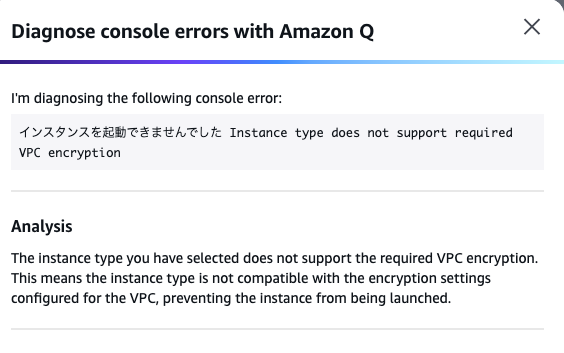
Amazon VPC 暗号化制御の強制モードを試したよー
環境的には、パブリックサブネットにAmazon EC2を起動させて試行。Amazon S3に対しての通信は、S3 VPC Endpoint Gateway Endpoint。Security Groupはデフォルトのもの。
・⚠️パブリックサブネットがある場合は、IGWを除外しないと、暗号化強制モードの設定ができない。
・Amazon EC2は対応しているAWS Nitro System のバージョンを使うインスタンスタイプじゃないと起動に失敗する。画像はt3で起動しようとした時のエラーに基づいた、Amaozn Qの解析結果。
🚫Nitro v2は起動不可。T3やC5で不可を確認。
💡Nitro v3以降なら起動可能。C5nで確認
💡Nitro v4はC7iで起動確認。
💡Nitro v5はI7ieで起動確認。
💡Nitro v6はC8iで起動確認。
・🚫S3エンドポイント経由での通信の場合、httpsの通信じゃないとブロックされる。つまり、(普通はやらないけど)--endpoint-url "http://s3.amazonaws[.]com" をつけた場合など。(aws s3api list-buckets 実行時に応答が返ってこなくなる)
・でも、カレントリージョンとは異なるエンドポイントを指定して、さらにエンドポイントに対応したリージョンを --region で指定してあげると通る。Internet Gateway経由になっているため。
・Pingもlocalhostや127.0.0.1、自身のプライベートIPアドレスなら通るけど、パブリックIPアドレスを指定すると、到達する時に非暗号化通信として認識されるのかブロックされる
・外向き(IGWの外)に対してPingする分には通る
3
15
1,803

30 Oct 2025
Enable MFA delete on S3 buckets:
aws s3api put-bucket-versioning --bucket BUCKET --versioning-configuration Status=Enabled,MFADelete=Enabled --mfa "SERIAL TOKEN"
Prevents accidental bucket deletion.
6
41
2,241



11 May 2025
いい記事〜〜!!
aws s3コマンドはマルチパートアップロードとかよしなに制御してくれて
aws s3apiコマンドはJSON形式で出力返してくれるの嬉しい

記事を投稿しました! AWS CLI で使い分けよう!S3の高レベルコマンドと API コマンドの違いと適切な選択方法 on #Qiita qiita.com/mkydk/items/fc1f52…
4
318

29 Apr 2025
🟧 AWS Quiz - Level: Intermediate (Hands-On Based)
Question:
You're using AWS CLI to copy a file from your local machine to an S3 bucket. Which command is correct?
A) aws ec2 upload-file myfile.txt s3://my-bucket/
B) aws s3 cp myfile.txt s3://my-bucket/
C) aws s3api put-object --bucket my-bucket --key myfile.txt
D) aws upload s3 --file myfile.txt --bucket my-bucket
💬 Drop your answer in the comments (A/B/C/D)
📢 Let’s see who knows their AWS CLI basics! ✅ Answer in 24 hours.
9
1
16
3,225

16 Feb 2025
Depends on the obj count. Recursive delete is actually done on the client side by listing all objects and send del req to s3api per obj. Big bucket takes forever. If written correctly, a deny all policy will override all allow policy.
2
609

お、いいね。bucket-regionとprefixで。awscliのs3apiは2.18.8でそれぞれ対応してることを確認。 / “Amazon S3 で ListBuckets API にリージョンとバケット名のフィルタリングが新たに追加 - AWS” htn.to/4fZzviTYLu
4
1,277

23 Aug 2024
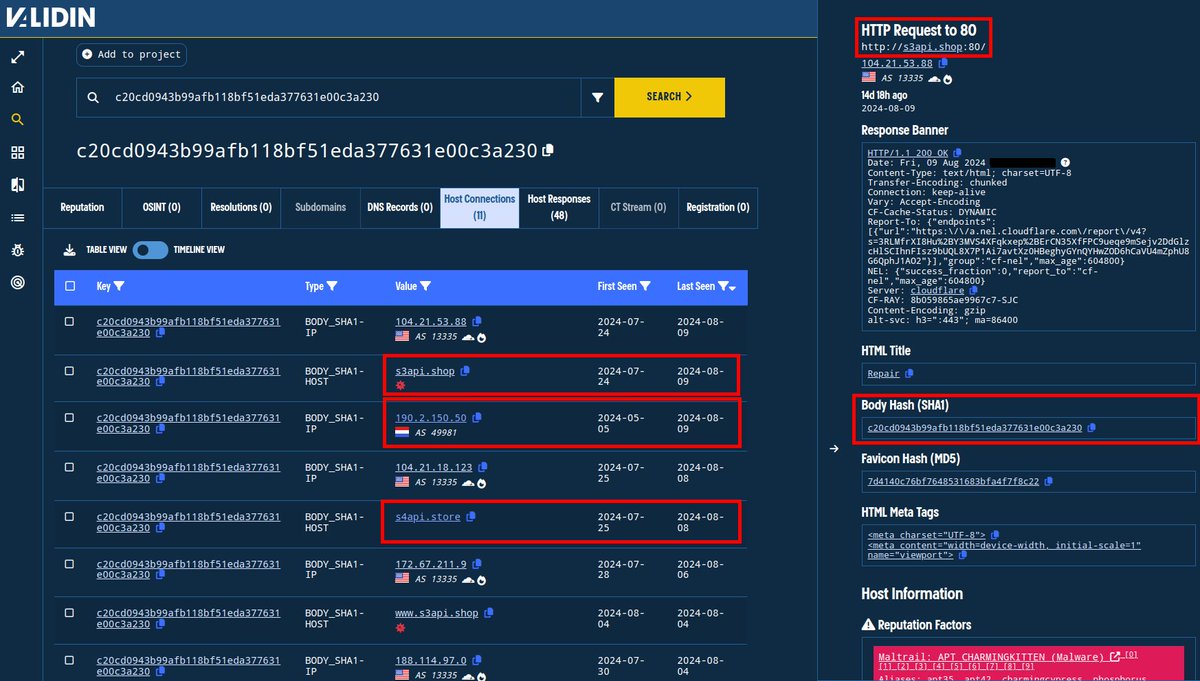
The recent #APT42 research published by Google's TAG highlighted the domain s3api[.]shop. The domain s4api[.]store and IP 190.2.150[.]50 returned identical HTTP content until ~August 9, but not since, just like s3api[.]shop.
The path /api/ on both domains returns the same msg.

1
1
7
1,547

28 May 2024
awslim s3 cp ... や awslim s3 ls ... が動かなくて小一時間くらい四苦八苦しましたが、awslim s3 ... は aws s3 ... ではなく aws s3api ... 相当であると理解しました
github.com/fujiwara/awslim
1
9
1,003

19 Apr 2024
🔓 Abusing AWS S3 Bucket Permissions 👇
AWS S3 buckets are popular targets for hackers due to potential misconfigurations and improper access control. Let's dive into the techniques attackers use to identify and exploit vulnerable S3 buckets!
1️⃣ Bucket Recon: Spot S3 buckets URLs via source code inspection (HTML & JS files), brute-forcing, Google dorking (site:s3.amazonaws.com "company_name"), DNS caching, or reverse IP lookups.
2️⃣ Permission Testing: Use AWS CLI to test permissions. For read (aws s3 ls s3://[bucket-name] --no-sign-request) and write (aws s3 cp localfile.txt s3://[bucket-name] --no-sign-request).
3️⃣ ACL Exploration: Retrieve bucket/object ACLs (aws s3api get-bucket-acl --bucket [name]) and test WRITE_ACP by attempting to set new ACLs.
4️⃣ Full Control Abuse: Look for FULL_CONTROL permissions to read, write, and modify ACLs. Exploit any authenticated AWS client access by using your AWS profile in the CLI commands.
5️⃣ Policy Misconfigurations: Identify overly permissive policies (e.g., Action set to "*") and recommend granular, need-based permissions.
By trying out these tricks, you may be able to effectively identify and report misconfigured S3 buckets, helping organizations secure their sensitive data in the cloud!
#BugBounty #YesWeRHackers #BugBountyTips
1
32
87
7,050


4 Jan 2024
Hello World with @localstack 👋
⚡️ pip install localstack
⚡️ python3 -m pip install awscli-local
⚡️ Hello world 👋 -> awslocal s3api create-bucket --bucket my-site
Super handy for testing without touching the real cloud☁️
5
48
3,926

15 Nov 2023
Object Storargeに S3API互換性 あるとはいえ、S3独自もあったり命名規則が違ったりしますからねー
AWSではグローバルユニークだが、OCIではテナンシー内のリージョン内でユニークでよかったりしますし
4
2,114