
17 Feb 2025
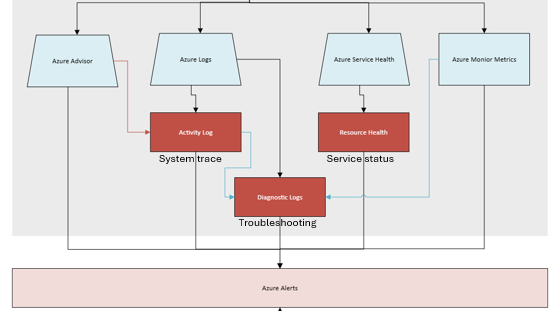
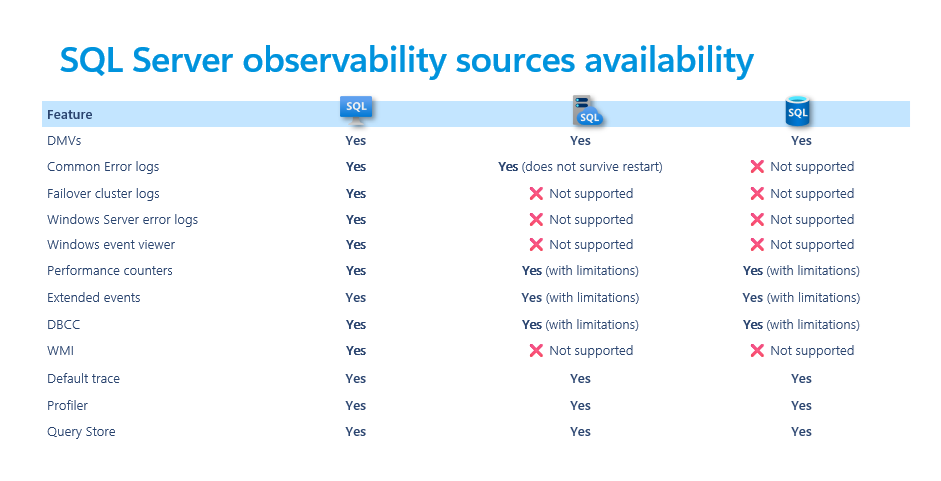
[observation] The image below provides a list with different SQL Server process side sources and their availability in different Azure SQL offers (SQL VM, SQL MI & SQL DB)
#ObservAbility #MondayObs #AzureSQL #SQLVM #SQLMI #SQLDB
1
3
5
432
12 Nov 2024
[presentations] Azure SQL DBA Learning Path delivered by Dr. Danimir Ljepava, @bobwardms, @erinstellato, @SQLGoddess & me, has PDF resources available online: aka.ms/azuresql-dba
#azuresql #sqldb #sqlmi #sqlvm #sqldba
3
5
261
15 Jul 2024
[blog] Azure Backup for SQL Server in Azure VM: Tips and Tricks from the Field by Laura Grob, @AnalyticAnna, David Pless, Mike Piskorski, Wilson Souza, Armen Kaleshian:
techcommunity.microsoft.com/…
#azuresql #sqlvm #backup
6
9
803

#SQL Server on #Azure VM の日本語化 および インプレイス アップグレード方法について質問を受けたのでまとめてみました。
個人的には、SQL Server 上位バージョンへの移行は、新規 SQLVM を構築するほうがダウンタイムも少なく、お勧めしたいです。
#JSSUG
nobtak.com/entry/sqlt01
3
400

29 Feb 2024
How to Migrate a Two-Tier On-Premises Application to Azure VMs and SQL Managed Instance 🚀
(You can replicate the same approach for AWS cloud as well)
Goals:
- Move existing application to Azure for cost and management benefits.
- Maintain equal performance as the on-premises version.
- Minimize administrative overhead after the migration.
- Use Azure SQL Managed Instance for the database.
Application: SmartHotel360
- Tier 1: Frontend web server (WEBVM)
- Tier 2: Database server (SQLVM)
Solution Overview:
We'll rehost your application by migrating it to Azure. The database will move to Azure SQL Managed Instance, and the front-end application will run on an Azure Virtual Machine (VM).
Prerequisites:
- Azure Subscription
- On-premises VMware Environment (ESXi hosts, vCenter Server)
- On-premises application with web and database tiers (e.g., SmartHotel360, WEBVM, SQLVM)
Step-by-Step Guide (High Level):
1. Prepare Azure for your Migration
2. Set up your Azure SQL Managed Instance
3. Get Azure Database Migration Service (ADMS) Ready
4. Prepare Azure Migrate
5. Configure Your On-Premises Environment
6. Replicate the On-Premises VMs
7. Migrate the Database using ADMS
8. Migrate the VMs using Azure Migrate
9. Finalize the Migration
10. Clean Up
For Detailed steps:
techyoutube.com/index.php/20…
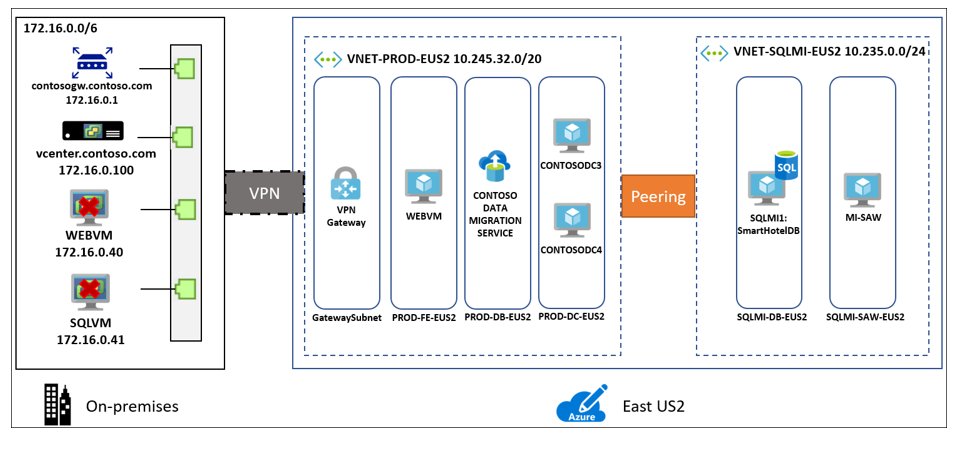
ALT Source: https://learn.microsoft.com/en-us/azure/cloud-adoption-framework/migrate/azure-best-practices/contoso-migration-rehost-vm-sql-managed-instance
7
42
2,010
28 Oct 2021
You will not want to miss the #PASSDataCommunitySummit and especially this LITTLE session - "Azure SQL Demo Fest":
passdatacommunitysummit.com/…
#azureSQL #sqlmi #sqlvm
Hahaha ... Mua-ha-ha !
4
3

10 Feb 2021
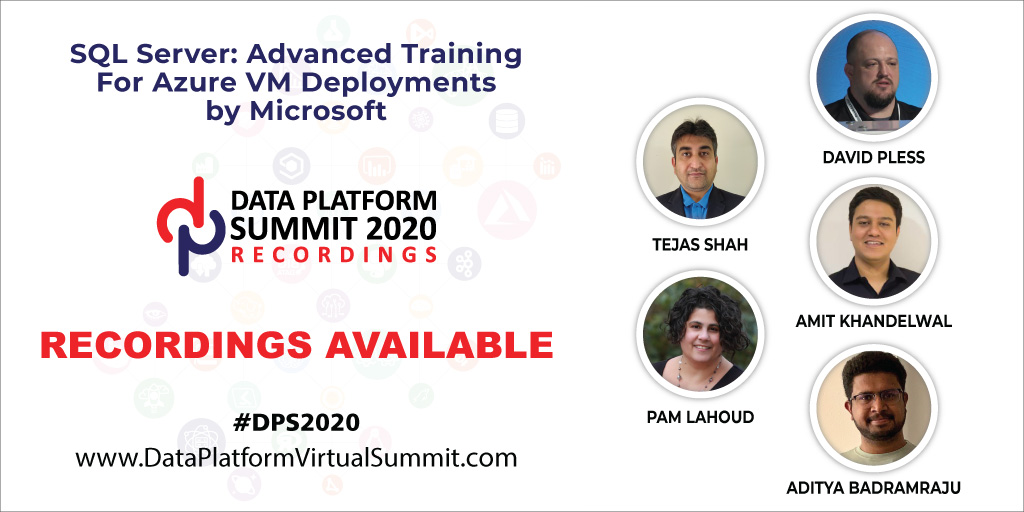
#DPS2020 Training Class Recordings on SQL in Azure VM by
@dpless @SQLGoddess @amvin87 @mr_tejs & @Aditya_Feb22 available for subscription.
Learn more: bit.ly/dps_2020
Pls Share
#SQLServer #SQL2019 #Azure #IaaS #Migration #AzureVM #SQLVM #DPS10
4
7

15 Oct 2020
4
10

14 Jul 2020
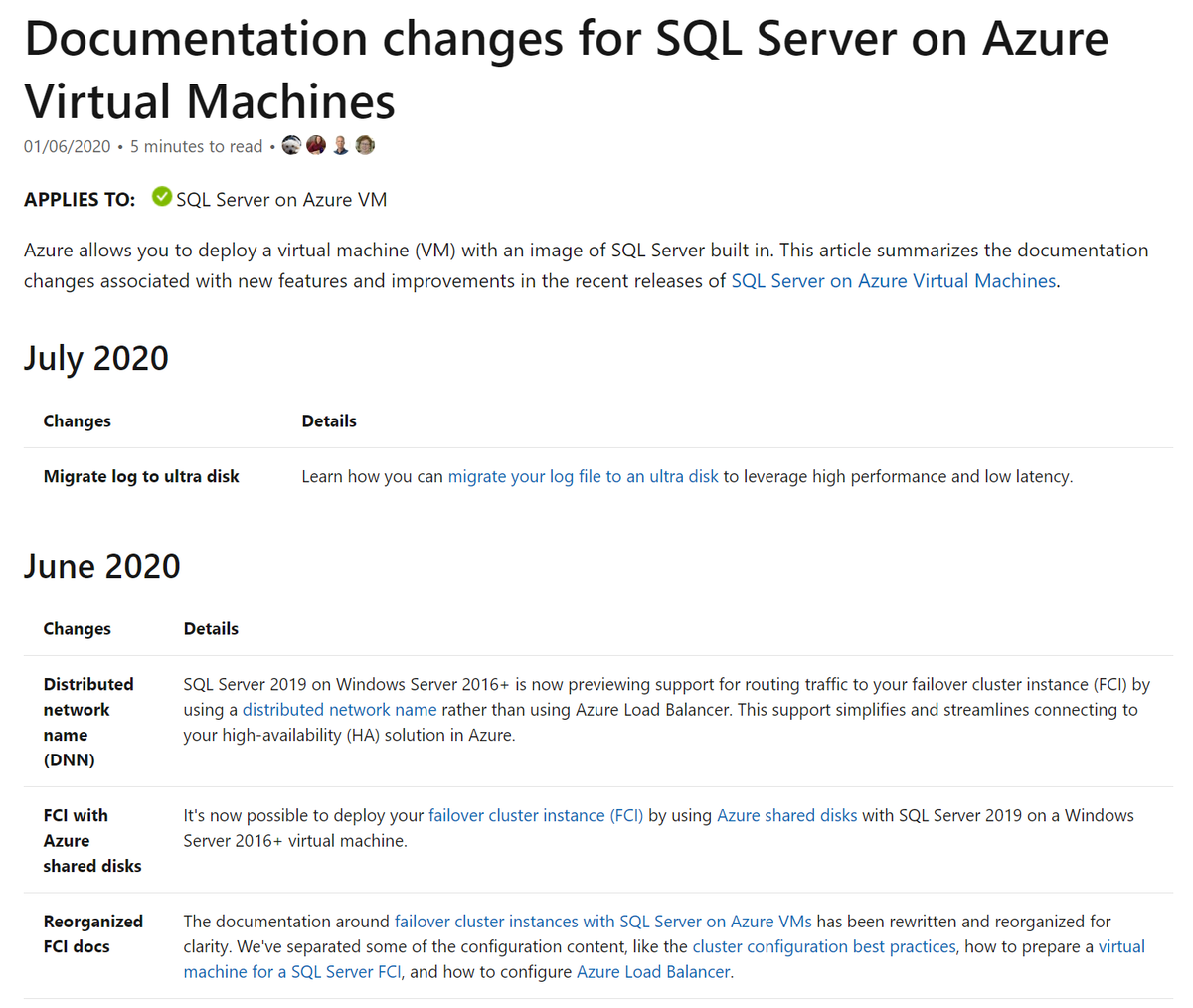
Documentation changes for SQL Server on Azure Virtual Machines brought to you by @SQLDocs, @markingmyname and @MashaMSFT.
msft.it/6015Tmv8b
#SQLDocs
#SQLVM
#AzureVM
#SQLServeronAzureVirtualMachines
8
7

11 Apr 2020
Part 3 of my series on setting up a SharePoint 2016 development farm on Azure. In this article, we will create a SQL Server 2014 virtual machine (sqlVM) in the virtual network we created in Part 2 of this series. We will make sqlVM a member of the...
ehikioya.com/sharepoint-2016… #KE
1
4
3 Apr 2020
Part 3 of my series on setting up a SharePoint 2016 development farm on Azure. In this article, we will create a SQL Server 2014 virtual machine (sqlVM) in the virtual network we created in Part 2 of this series. We will make sqlVM a member of the...
ehikioya.com/sharepoint-2016… #KE
2
24 Mar 2020
Part 3 of my series on setting up a SharePoint 2016 development farm on Azure. In this article, we will create a SQL Server 2014 virtual machine (sqlVM) in the virtual network we created in Part 2 of this series. We will make sqlVM a member of the...
ehikioya.com/sharepoint-2016… #KE
2
3
6 Mar 2020
Part 3 of my series on setting up a SharePoint 2016 development farm on Azure. In this article, we will create a SQL Server 2014 virtual machine (sqlVM) in the virtual network we created in Part 2 of this series. We will make sqlVM a member of the...
ehikioya.com/sharepoint-2016… #KE
1
2
3 Feb 2020
Part 3 of my series on setting up a SharePoint 2016 development farm on Azure. In this article, we will create a SQL Server 2014 virtual machine (sqlVM) in the virtual network we created in Part 2 of this series. We will make sqlVM a member of the...
ehikioya.com/sharepoint-2016… #KE
2
4
14 Jan 2020
Part 3 of my series on setting up a SharePoint 2016 development farm on Azure. In this article, we will create a SQL Server 2014 virtual machine (sqlVM) in the virtual network we created in Part 2 of this series. We will make sqlVM a member of the...
ehikioya.com/sharepoint-2016… #KE
1
2
4 Jan 2020
Part 3 of my series on setting up a SharePoint 2016 development farm on Azure. In this article, we will create a SQL Server 2014 virtual machine (sqlVM) in the virtual network we created in Part 2 of this series. We will make sqlVM a member of the...
ehikioya.com/sharepoint-2016… #KE
2
2
15 Dec 2019
Part 3 of my series on setting up a SharePoint 2016 development farm on Azure. In this article, we will create a SQL Server 2014 virtual machine (sqlVM) in the virtual network we created in Part 2 of this series. We will make sqlVM a member of the...
ehikioya.com/sharepoint-2016… #KE
2
3
21 Oct 2019
Part 3 of my series on setting up a SharePoint 2016 development farm on Azure. In this article, we will create a SQL Server 2014 virtual machine (sqlVM) in the virtual network we created in Part 2 of this series. We will make sqlVM a member of the...
ehikioya.com/sharepoint-2016… #KE
2
2
19 Oct 2019
Part 3 of my series on setting up a SharePoint 2016 development farm on Azure. In this article, we will create a SQL Server 2014 virtual machine (sqlVM) in the virtual network we created in Part 2 of this series. We will make sqlVM a member of the...
ehikioya.com/sharepoint-2016… #KE
2
3