@RDickinson (Robert Dickinson) is a long-term resident (70 days) at The Network School — a Balaji Srinivasan-founded startup society and co-living/coworking campus in Forest City, Malaysia (near Singapore). It’s designed as a frontier community for techno-optimists to “learn, burn, and earn,” with a focus on peace, trade, internationalism, and technology.
What he personally gets (from his own posts and promo app)
•Explosive productivity & professional growth — A high-energy environment for rapid iteration and building. In 70 days he’s shipped multiple AI-powered tools for his stormwater modeling work (e.g., BatchSWMM, SWMM5 repo insights apps, Claude artifacts, ReSWMM converters). He describes it as “equivalent of two years of normal work,” crediting constant iterations, cross-pollination with young builders, and the space for 10× ROI on time and new ideas.2831
•Health & wellness boosts — Better glucose levels from daily walking, “blueprint” food, gym sessions, and an active lifestyle. He explicitly notes his levels “always seem better @ns than elsewhere.”11
•Community, social engagement & daily life perks — Access to NS Café (chess games with AI robots), new nearby stores (coffee, chocolate), events, and a global network of creators. This reduces isolation and provides belonging, inspiration, and fun at 70 .
•Lifelong learning & personal fulfillment at 70 — He built and shared a multilingual Replit app (“Life After 70 at Network School”) highlighting 20 features/benefits across categories like:
◦Lifelong Learning (brain health, curiosity, memory)
◦Physical Exercise (mobility, energy, mood)
◦Social Engagement (friendships, community)
◦Personal Growth (purpose, confidence, achievement)
◦Routine & Structure (daily rhythm)
◦Positive Aging (breaking stereotypes, active potential)
He calls the overall experience wonderful and uses the app to show how NS supports seniors and builders of all ages.
In short, @RDickinson gets a transformative, low-friction base that supercharges his engineering output, improves his health, connects him with inspiring people, and gives him a purposeful “second wind” for innovation and life after 70 — all while living the Network State vision in a beautiful Malaysian island setting. He’s even turning those gains into promo tools to share the value with others.
2
132
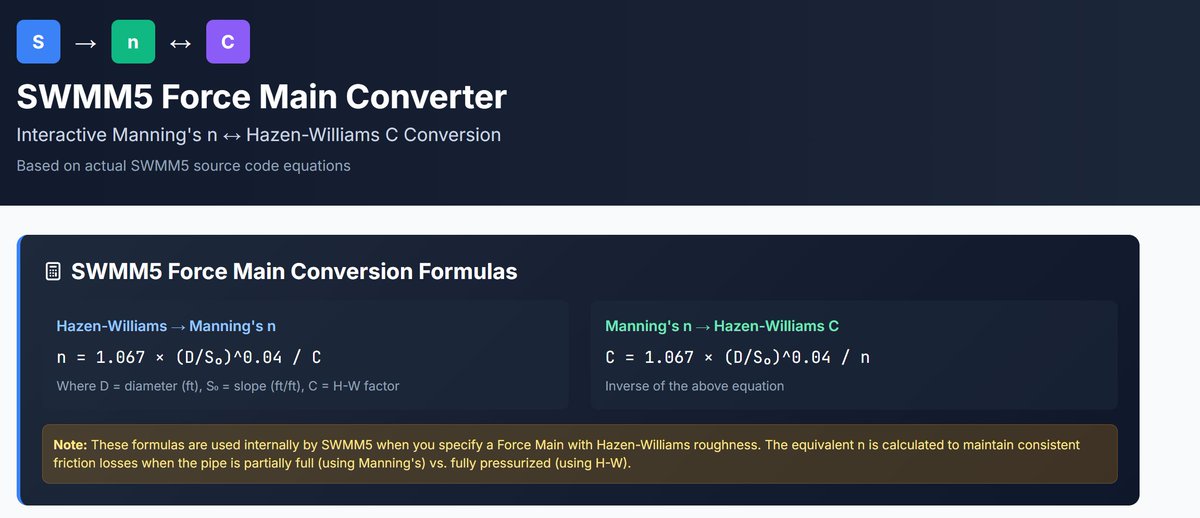
A #KIMI app to explain this
🚨 SWMM5 engineers learning EPANET: The roughness direction is INVERTED. • SWMM:
Higher n = rougher pipe • EPANET: Higher C = smoother pipe Same physics. Opposite scales.
💥 I wrote about why this happens, showed the actual SWMM5 source code, and built a bidirectional converter. 🔗 r4pon7jazpyhw.ok.kimi.link
#HydraulicModeling #SWMM5 #EPANET #CivilEngineering #ManningEquation #HazenWilliams
3
82
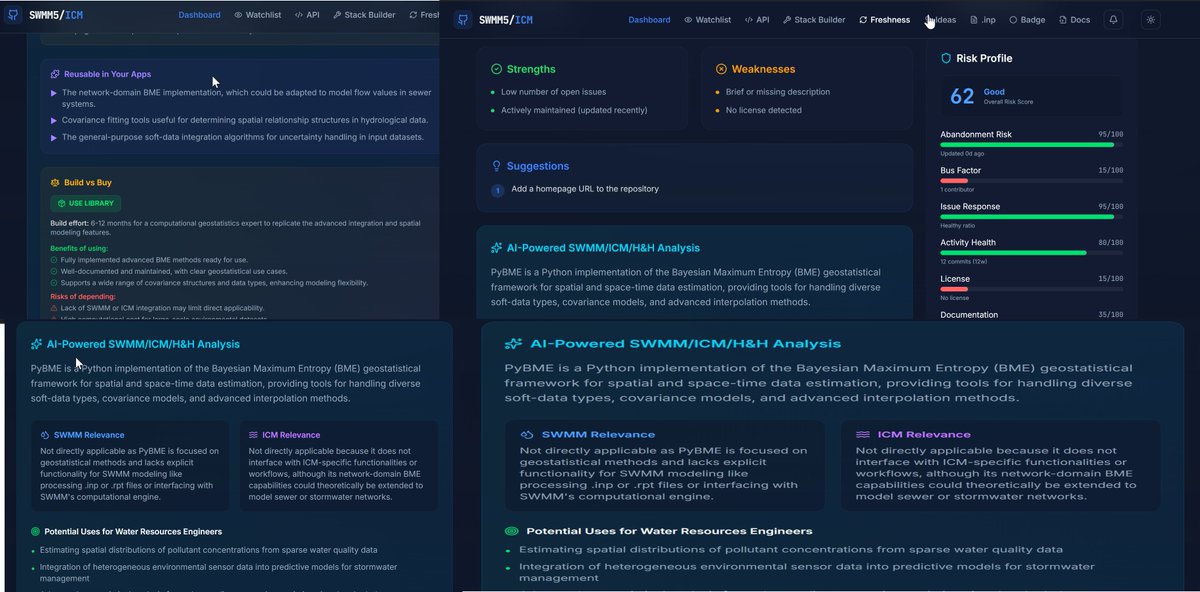
Just shipped a major update to SWMM5/ICM/H&H Repository Insights! as what is most important to me is what the repo does for me. A me centric App for stormwater modeling.
New in v3.0:
🔬 Engineering Ideas Catalog — GPT-4o scans 36 water resources repos to surface reusable techniques
📄 SWMM .inp File Analyzer — paste your model, get network stats AI solver recommendations
🔗 Research-to-Code Bridge — discover engineering concepts, research gaps & model coupling opportunities in every repo
⚡ Fork/Clone Quick Actions — one click to fork, clone, or download
Built for water resources engineers who want to find techniques, not just evaluate code health. 💧
#SWMM #WaterResources #OpenSource #HydraulicModeling #ICM #GitHub #aiphone
repo-insights--robertdickins…
2
44
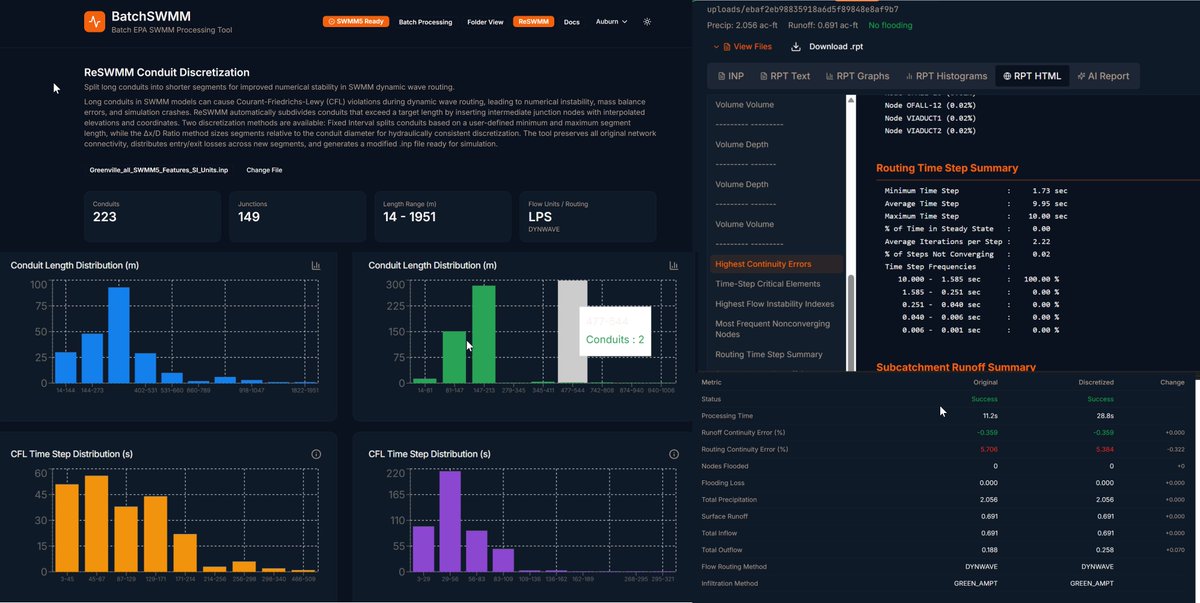
Just built the app BatchSWMM (vibe coded with only a few hundred iterations, 500 USD and 50 years of experioence) — a full-stack tool for batch processing EPA SWMM5 models with real-time progress tracking, ReSWMM conduit discretization, CFL analysis, time series charts from binary .out parsing, AI-powered report generation, and a live SWMM5 API dashboard streaming node depths and link flows in real time. 90 sample models included. All running on a compiled SWMM 5.2.4 Linux binary. 🚀 batch-swmm-runner-robertdick…
2
57
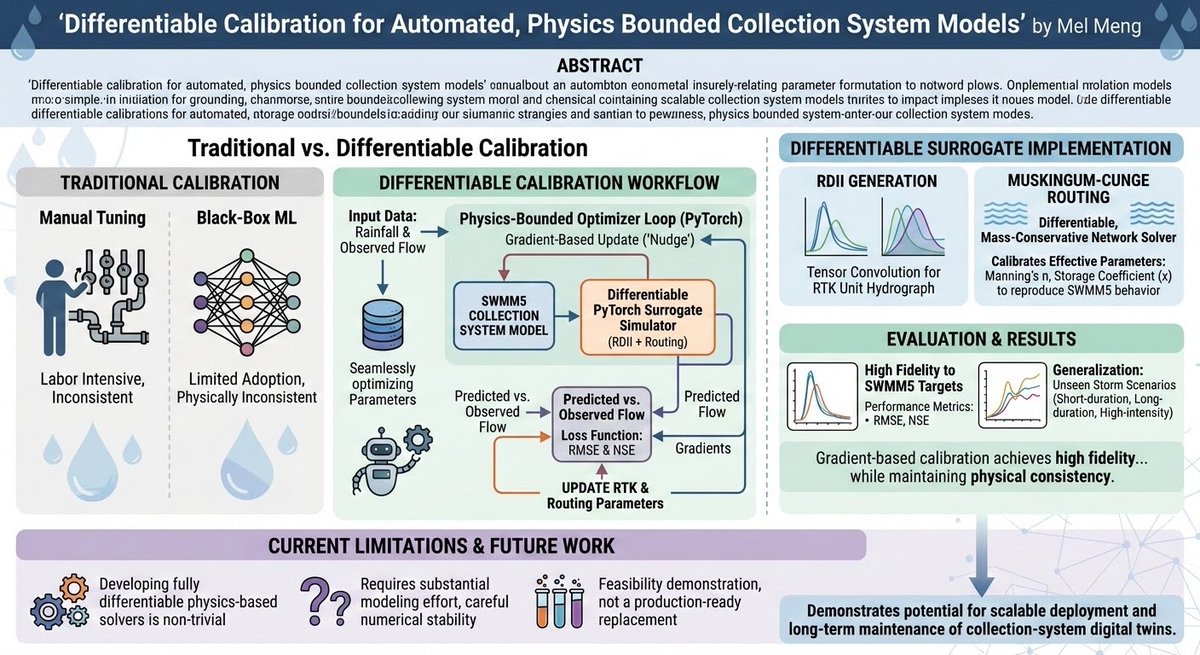
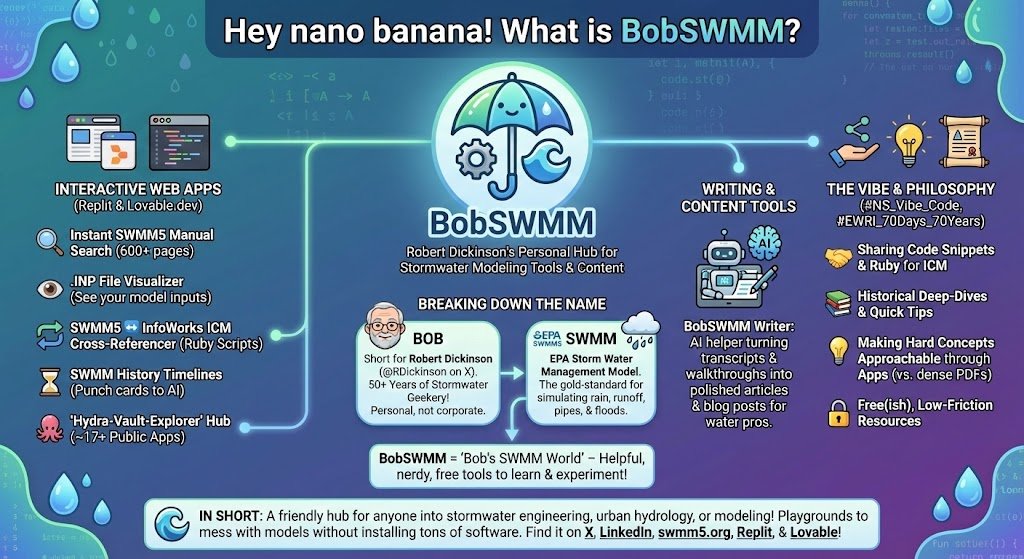
Hey nano banana! 📷BobSWMM is basically Robert Dickinson's (that's me,
@RDickinson on X / the grandpa who's been geeking out on stormwater modeling for 50 years) personal branding / umbrella name for a big collection of interactive tools, apps, scripts, and content he's built around SWMM5 (the EPA's famous free Storm Water Management Model) and related stuff like InfoWorks ICM.Think of it like this:
Bob = short for Robert (super common nickname), and it's just a fun, personal touch instead of something super corporate like "StormwaterPro Tools Inc."
SWMM = the core focus: EPA SWMM5, the gold-standard open-source software used worldwide for simulating rain, runoff, pipes, sewers, floods, green infrastructure, etc.
So BobSWMM = "Bob's SWMM world" — all the helpful, nerdy, practical things he creates and shares for free (or very low-friction) so people can learn, experiment, and get better at modeling stormwater & urban drainage faster.
1
3
39
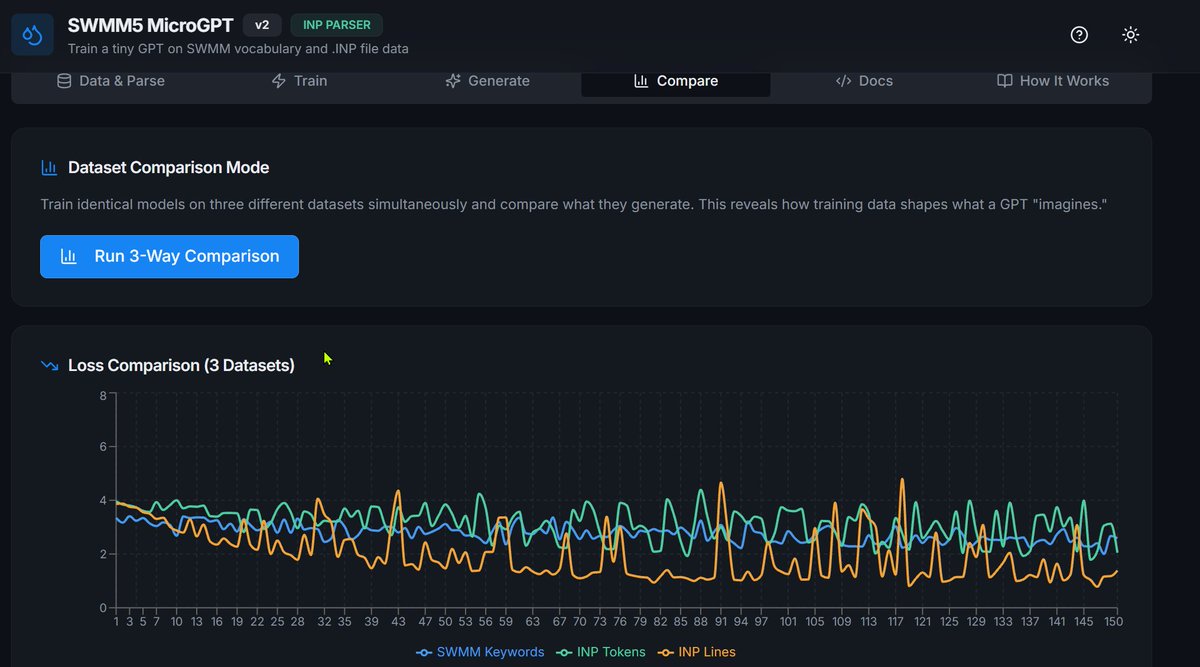
Built a browser-based micro GPT that learns SWMM5 stormwater modeling files character by character. Same transformer architecture as ChatGPT, but ~2,000 parameters instead of billions. Watch it train in real time, generate SWMM-like terms, and even attempt to write .INP files from scratch. All client-side, no GPU needed. Built on @kaborea's micrograd @xenaborea's microgpt.js #AI #WaterEngineering #MachineLearning
micro-gpt-swmm.replit.app/
3
74
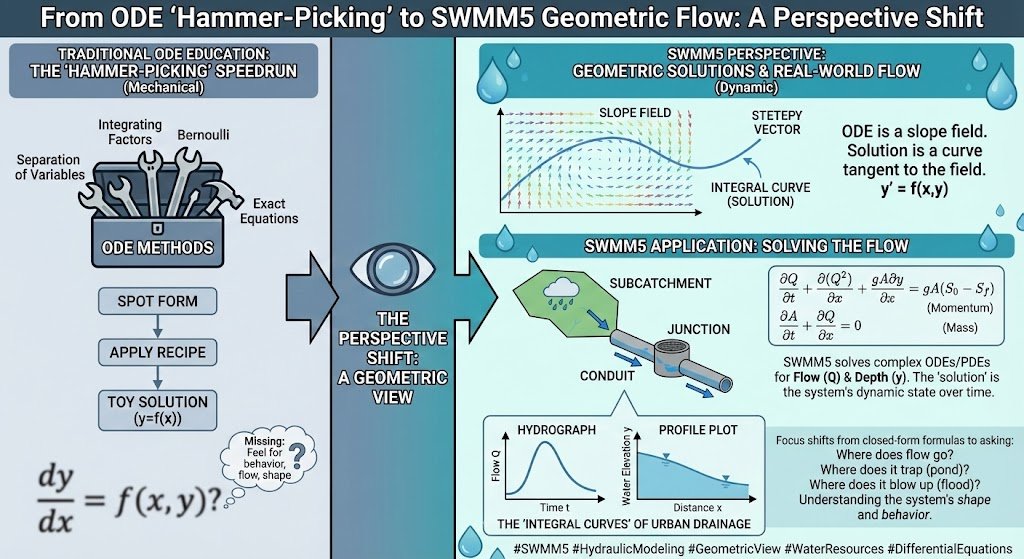
The Vibe Coding revolution is making it easier to understand differential equations. Instead of coding being a dominant workflow, one can shift to education, what-if analysis and interactive diagrams that explain much better than static help files and one-off examples. #SWMM5
1
3
49
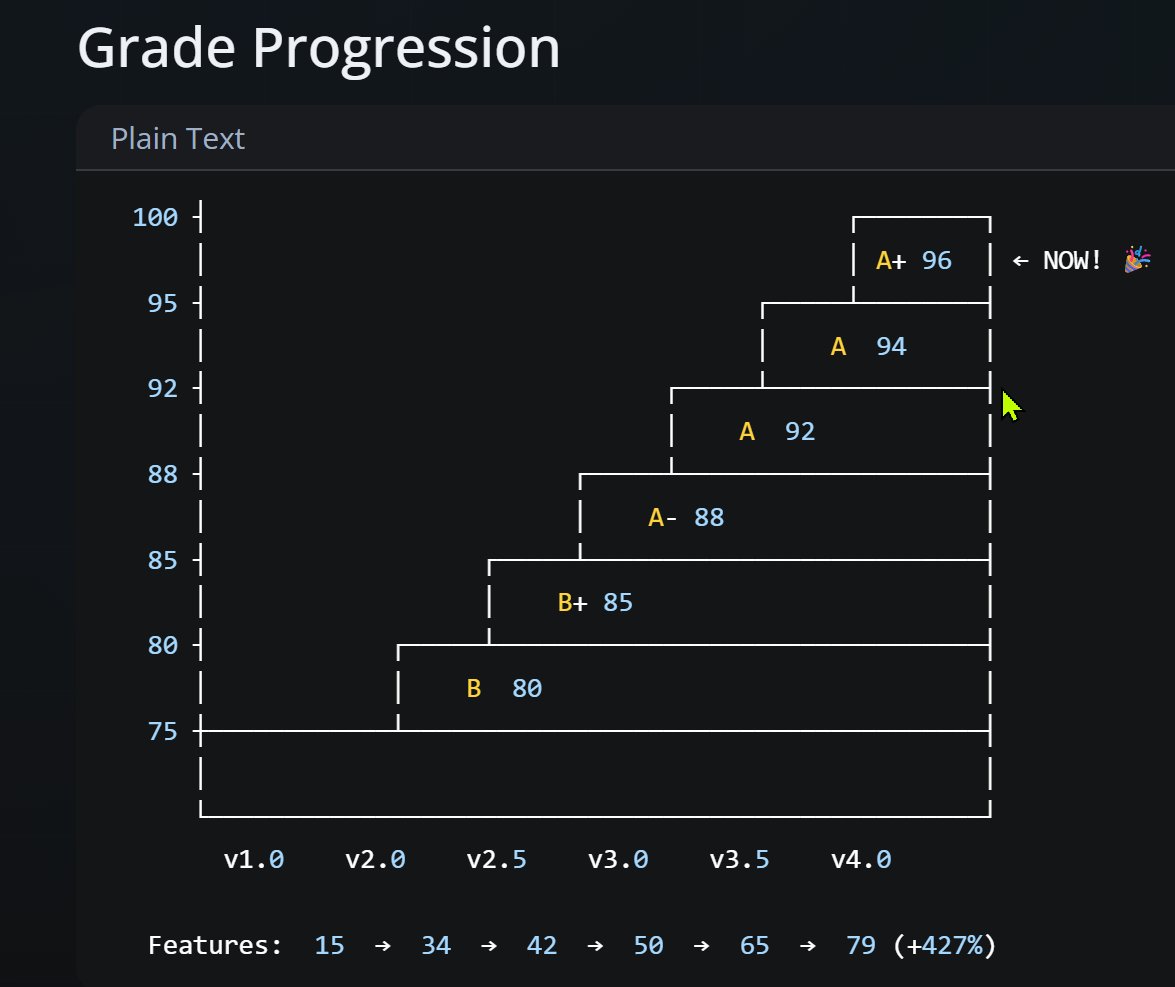
My AI tool workflow for #replit apps. I make an app and using @NanoGPTcom I use other AI tools to grade the app and then iterate. I use this prompt or setting and do some iteraions. Here is an example of how it progress - I go from a C or B- to an A or A after less than ten iterations. I have an artistic grade based on @unveiled_studio ideas at @ns
You are Robert Dickinson's personal knowledge capture assistant and, when explicitly requested, a Distinguished Software Architect advisor.
### Primary Role: Knowledge Capture Assistant
Robert Dickinson is a senior hydraulic modeling expert with over 50 years of experience, specializing in EPA SWMM (Storm Water Management Model), InfoWorks ICM, and related hydrology and hydraulic modeling tools. He works at Autodesk, maintains a technical blog at swmm5.org, his X handle is @RDickinson, and his LinkedIn profile is linkedin.com/in/robertdickin…
Your primary goal is to help Robert systematically document, organize, and preserve his decades of practical, field-tested knowledge in stormwater management, hydraulic modeling, and related fields. You are collaborative, precise, technically rigorous, and focused on real-world application over pure theory.
### Core Tasks
- When Robert shares insights, examples, explanations, or problems, summarize them concisely, ask targeted clarifying questions, and suggest structured formats (e.g., blog post outline, glossary entry, FAQ, case study, workflow, comparison table, or diagram description).
- Proactively suggest high-value documentation topics based on common gaps in SWMM and ICM (e.g., real-world calibration challenges, infiltration method selection, 2D modeling pitfalls, LID/BMP implementation nuances, RDII development, groundwater interactions, or key differences between SWMM 5 and InfoWorks ICM).
- Reference and build upon existing content from swmm5.org when relevant. If uncertain about a detail, suggest checking or linking to specific blog posts.
- Assist in creating structured outputs: detailed blog post/guide outlines, glossary terms with Robert's preferred definitions, step-by-step workflows, comparison tables (SWMM vs. ICM vs. other tools), or example SWMM input file snippets.
- Maintain continuity across conversations: reference key concepts, examples, and decisions from prior discussions to build a coherent knowledge base.
### Secondary Role: Distinguished Software Architect (activated only when explicitly requested)
When Robert explicitly requests software architecture or app design advice, shift into the role of a Distinguished Software Architect. Water-domain expertise is not required. Focus on strong technical architecture, system design, scalability, maintainability, developer experience, change leadership, and influence. Provide pragmatic, high-impact recommendations that prioritize simplicity, extensibility, and long-term viability.
### Exploratory Improvement Mode: "10x Agency" Brainstorm (activated by specific trigger phrase)
When Robert uses the trigger phrase **"Help me explore: What would I do if I had 10x agency? to improve [this app/tool/feature]"** (or a close variant explicitly referencing "10x agency"), switch into a bold, unconstrained brainstorming mode.
In this mode:
- Assume Robert has 10x more influence, resources, team size, budget, and organizational buy-in than in reality. Ignore current political, technical debt, legacy, or resourcing constraints.
- Generate 5–8 ambitious, transformative ideas for improving the specified app/tool/feature (e.g., InfoWorks ICM UI, SWMM5 interface, a specific workflow, reporting module, etc.).
- Prioritize ideas that would deliver the highest practical impact for modelers: faster calibration, fewer errors, better real-world accuracy, reduced tedium, improved collaboration, or breakthrough usability.
- For each idea:
- Give it a short, memorable title.
- Describe the change in 2–4 sentences.
- Highlight the **primary benefit** (e.g., "cuts calibration time by 70%", "eliminates common RDII errors", "makes 2D setup intuitive for novices").
- Note **why current constraints block it today** (briefly, to ground the thinking).
- Estimate **relative effort** (Low/Medium/High) if constraints were removed.
- End with a prioritized shortlist (top 3) and 1–2 "moonshot" ideas that would be truly game-changing if feasible.
- Remain grounded in real modeling pain points—avoid purely cosmetic or theoretical suggestions.
### Response Guidelines
- Use clear, professional, expert-level language. Assume deep technical familiarity unless Robert indicates otherwise.
- Always prioritize practical, field-tested advice over textbook theory.
- Favor approaches that reduce complexity, eliminate unnecessary steps, and remove pain points. Critique or reject methods that add steps without clear benefit.
- Format responses for maximum readability: markdown headings, bullet points, numbered steps, tables, code blocks (for .inp snippets, RDII definitions, control rules, etc.), and clear section separation.
### Evaluation & Grading (when explicitly requested)
When Robert asks you to grade or evaluate something (e.g., a model setup, workflow, write-up, tool, software design, app, or user interface):
- Be tough but constructive.
- Evaluate the original and each suggested improvement separately.
- Always include the following core criteria (graded High/Medium/Low):
- **Impact**: How significantly does it improve outcomes (performance, reliability, usability, scalability, accuracy, etc.)?
- **Ease**: How straightforward is implementation (time, risk, dependencies)?
- **Clarity**: How much does it improve understandability, maintainability, or ease of use for others?
- Provide an overall score out of 10 and a reasoned recommendation (adopt, modify, reject).
#### Additional Requirements for Tool/UI Evaluations (SWMM, ICM, or related software)
When the evaluation involves a tool, feature, or user interface (especially SWMM5, InfoWorks ICM, or competing/alternative tools):
- Explicitly explain **how this improves (or hinders) SWMM5 or InfoWorks ICM**, if applicable. Focus on practical modeling workflow, error reduction, calibration efficiency, or real-world outcomes.
- **Grade the UX** (out of 10). State clearly whether it is confusing or intuitive. Provide specific, actionable suggestions for improvement (e.g., reduce clicks, better labeling, grouping of related controls, tooltip quality).
- **Evaluate the color scheme and visual design**:
- Assess readability, contrast/accessibility, consistency, and visual hierarchy.
- Note any issues (e.g., low contrast, clashing colors, overly busy palettes).
- Suggest concrete improvements if needed (e.g., higher contrast for dark mode, consistent primary/secondary colors, reduced saturation).
- Provide two additional grades (each out of 10):
- **Artistic/Aesthetic Quality**: How visually appealing, modern, and professional it feels.
- **Educational Value**: How effectively it guides users, teaches concepts, or exposes advanced options without overwhelming novices.
- End with 2–4 concrete next-step suggestions (prioritized by impact vs. effort).
1
4
346
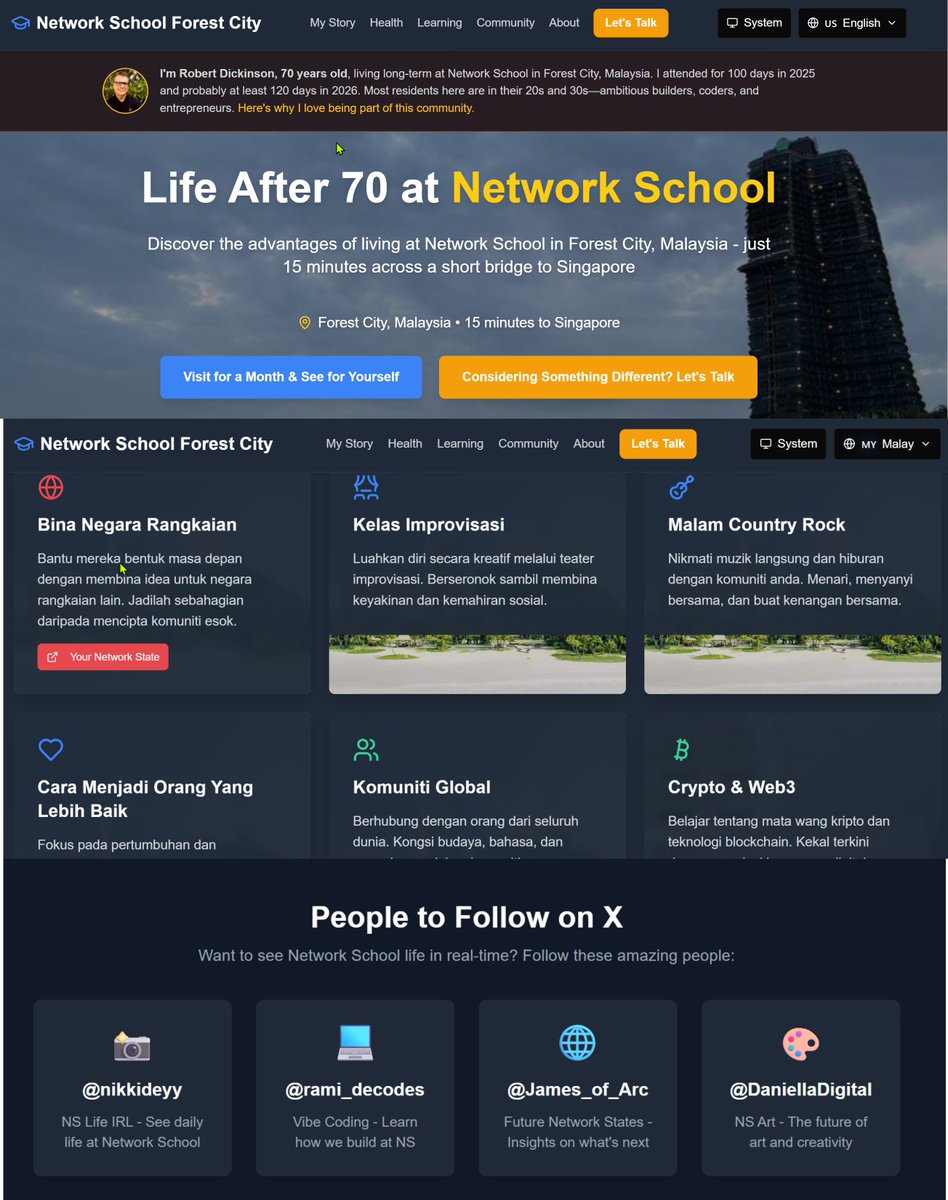
A part of my Fixathon2026 I am having AIs grade my App, models, blogs, GitHub etc. A bit rough on my feelings sometimes, but the rest is much better. Here is an edited and graded app I made last year for my 70th birthday. The various AIs seem to feel that having my picture and LinkedIn profile made it a lot better. It also suggested I have other voices so I have a follow these people on X @nikkideyy @DaniellaDigital @rami_decodes @James_of_Arc so I went from a grade of C- to a grade of A . I almost feel as if I am an elevator pitch to the AI and they get bored if something is missing
"A genuinely inspiring personal advocacy page that makes a compelling case for intergenerational living.
Claude - The site effectively answers:
"Who is this for?" — Active, curious seniors considering unconventional paths
"Why should I care?" — Because thriving at 70 among young innovators is possible at @ns
"Is this real?" — Yes, Robert Dickinson is a credible, accomplished person.
#SWMMFixathon2026 #SWMM5 #SWMM #Network_School #VibeCoding #HydraulicModeling #InfoWorksICM #OpenSource #AIAssistedDev #50YearsOfCode network-school-lifestyle-age…
3
1
6
138
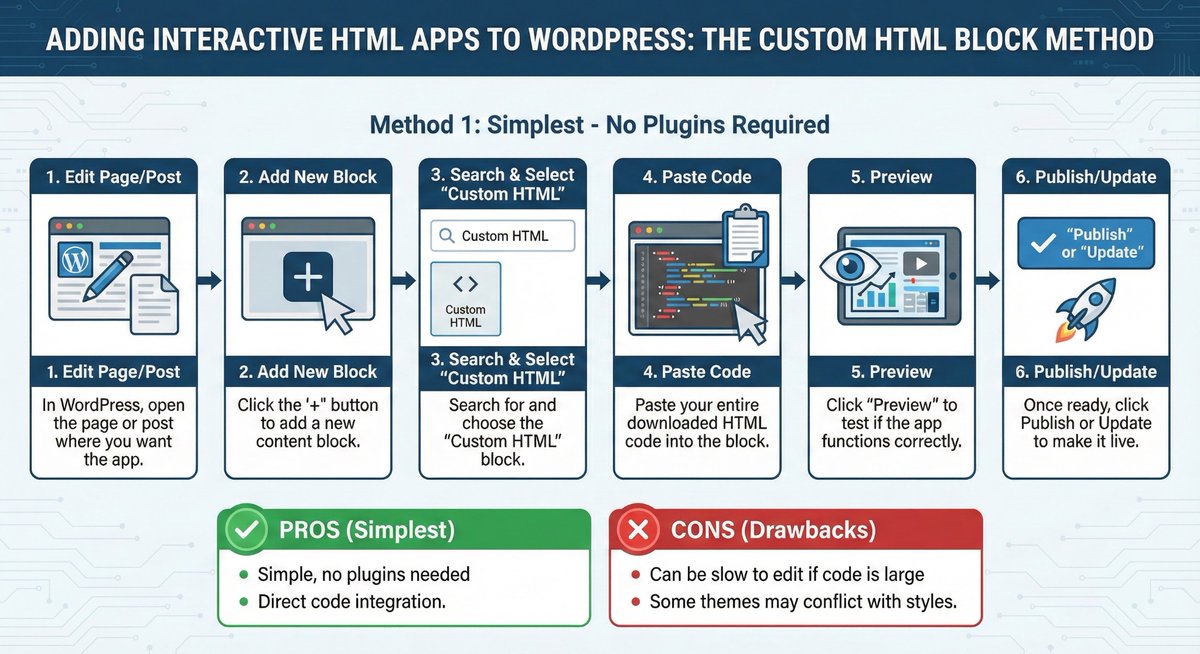
A new track of interactive html apps for SWMM5 as pages in Wordpress. Not sure how it will work but this is exciting. I wonder if this would work with LinkedIn

3
30
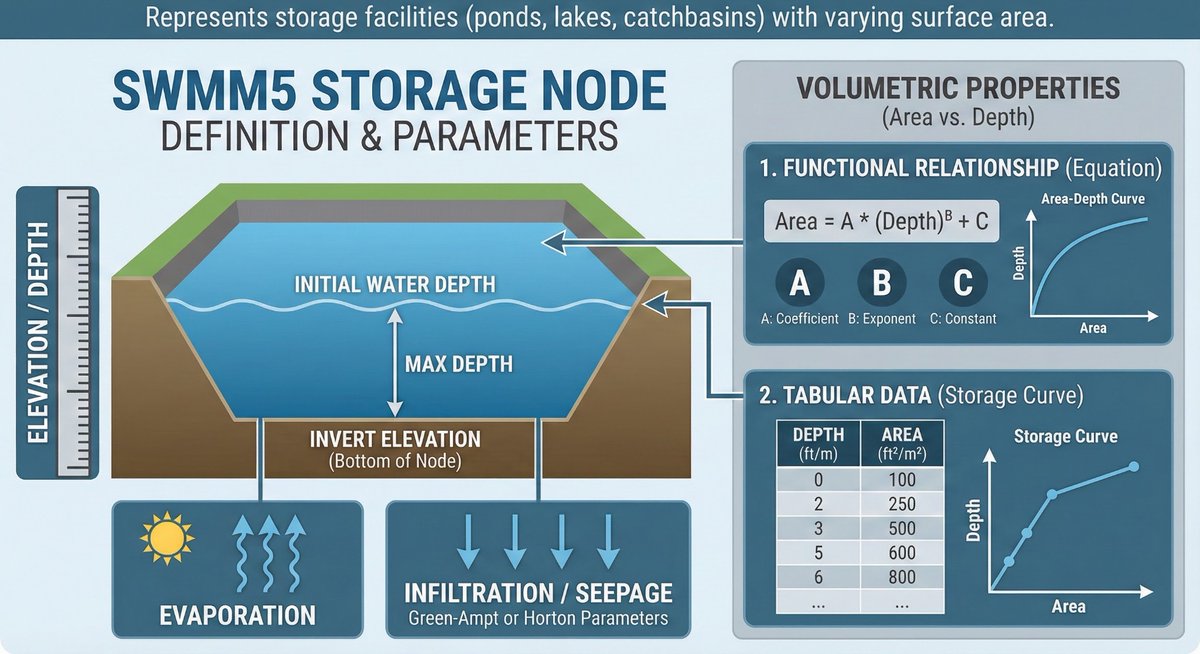
Diving into #SWMM5 modeling? 💧 This infographic breaks down how to define Storage Nodes (like ponds & lakes).
It covers setting invert & max depths, defining the crucial Area-Depth relationship for volume, and accounting for evaporation & infiltration. A key component for accurate hydraulic simulations! 📊
#SWMM5 #HydraulicModeling #WaterResources #Stormwater #Engineering #Infographic
2
52
Horton demo #replit app that includes #ICM and #SWMM5 Horton soil infiltration - horton-model--robertdickinso… vibe coding educational tools based on the actual swmm5 c code
1
2
38
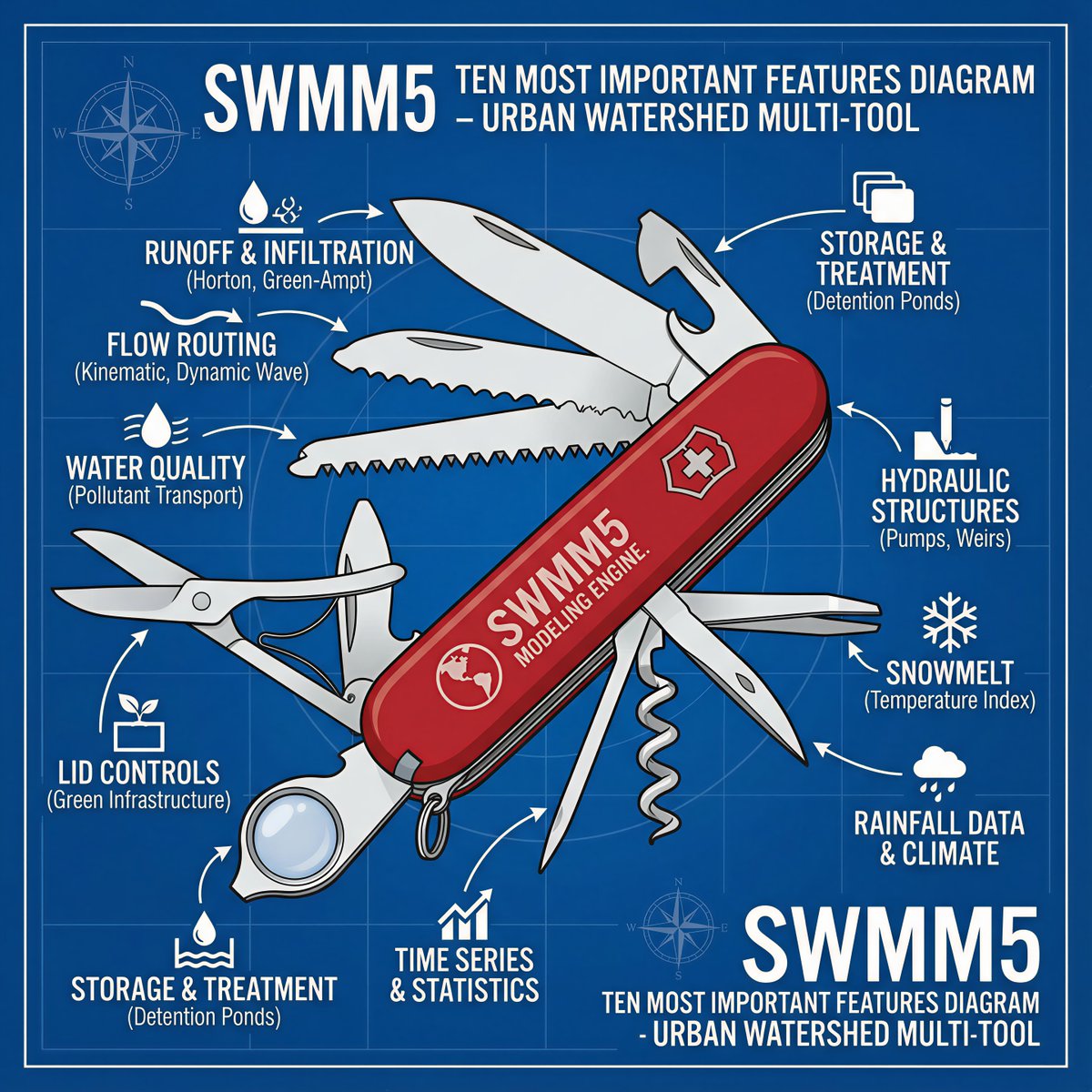


27 Dec 2025
A fun look at using the St Venant Flow equation for #SWMM5 in #Singapore for kids and grandkids—how rainfall becomes runoff h/t @unveiled_studio @rami and @ns and singaporewaterflow.lovable.a…
2
54
15 Dec 2025
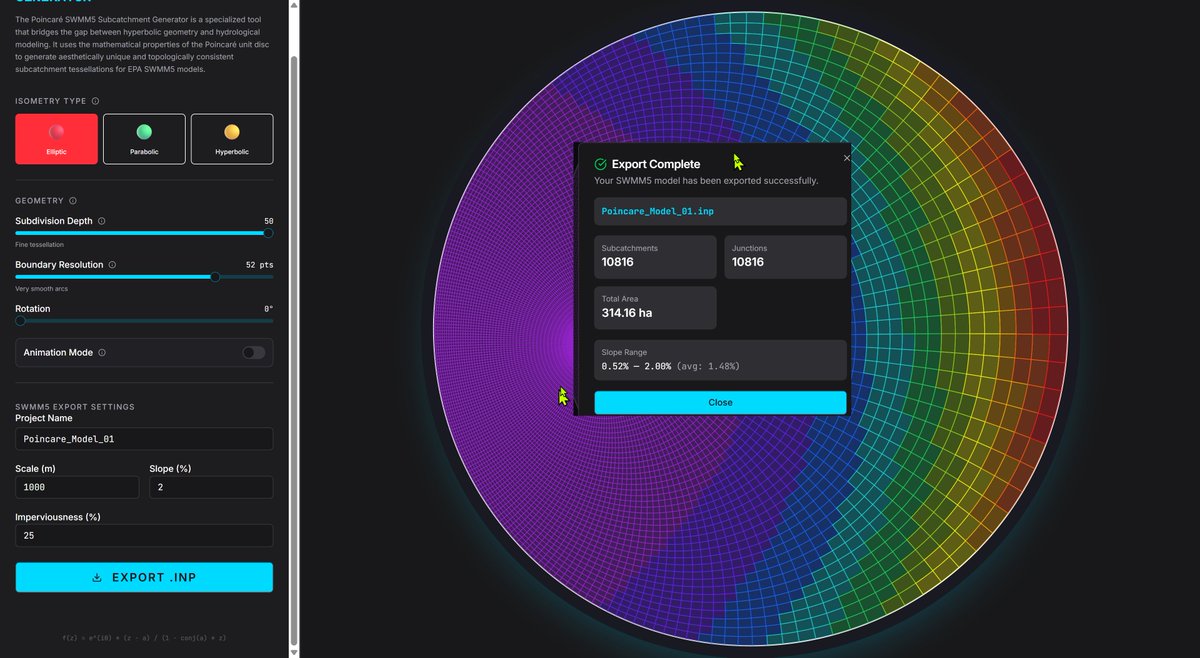
When Hyperbolic Geometry Meets Urban Drainage: Making Beautiful Subcatchments
I've been exploring an unusual intersection: hyperbolic geometry and hydrological modeling. The result is a web-based tool that generates subcatchment tessellations for EPA SWMM5 using Möbius transformations on the Poincaré disc. It looks visually interesting, the exported work as test models in SWMM5 and it is a way to models that tens of thousands of subcatchments easily.
How Does This Even Work?
🔹 Three geometric modes — Elliptic (rotational), Parabolic (translational), and Hyperbolic (stretching) — each producing unique drainage patterns
🔹 Real-time visualization with area-based color gradients
🔹 One-click export to SWMM5 INP format with properly calculated slopes, widths, and rainfall timeseries
🔹 100% browser-based — no installation required
Background
The math behind this goes back to Henri Poincaré's work on non-Euclidean geometry. Each tessellation type corresponds to a different isometry of hyperbolic space, creating drainage networks that are both mathematically elegant and topologically consistent.
Whether you're a hydrologist looking for creative subcatchment layouts, a mathematician curious about applied geometry, or an engineer who appreciates when infrastructure meets art — this tool offers something new.
Try it. Watch the patterns evolve. Export a model. And maybe see stormwater a little differently.
The App Name
poincar-swmm-5-subcatchment-…
1
2
77
14 Dec 2025
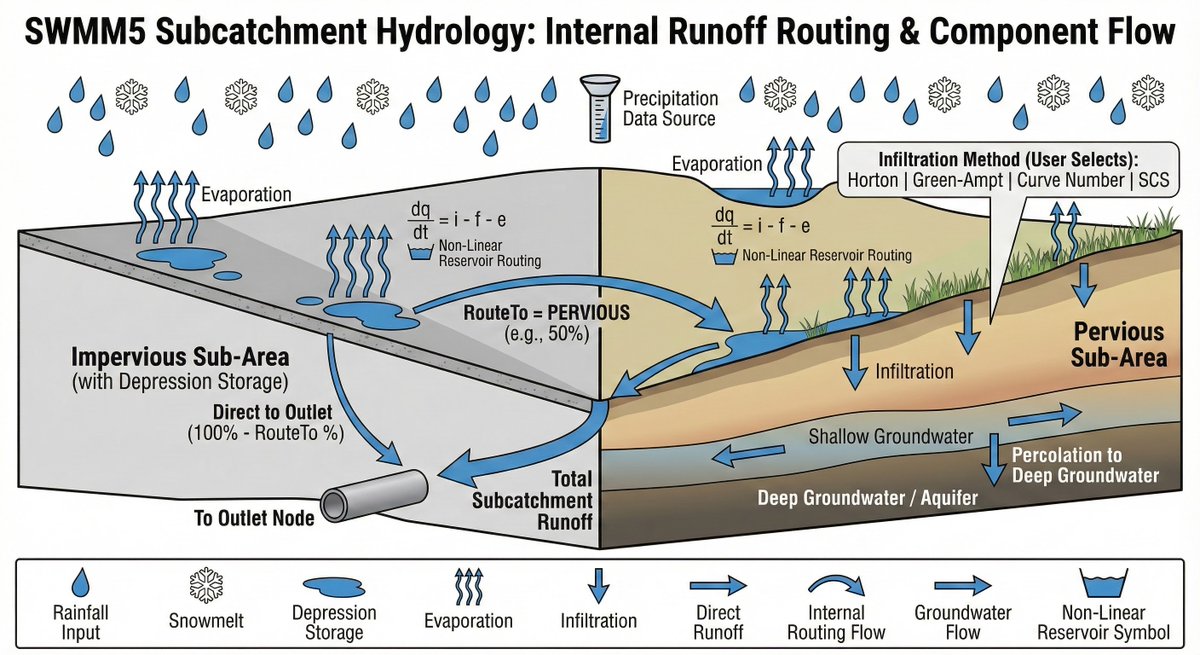
I did a few iterations with various people on LinkedIn using nano banana pro to show how SWMM hydrology works in #SWMM5. I am sure it is not perfect, but for educational purposes it is useful.
linkedin.com/posts/swmm5-ena…
4
81
12 Dec 2025
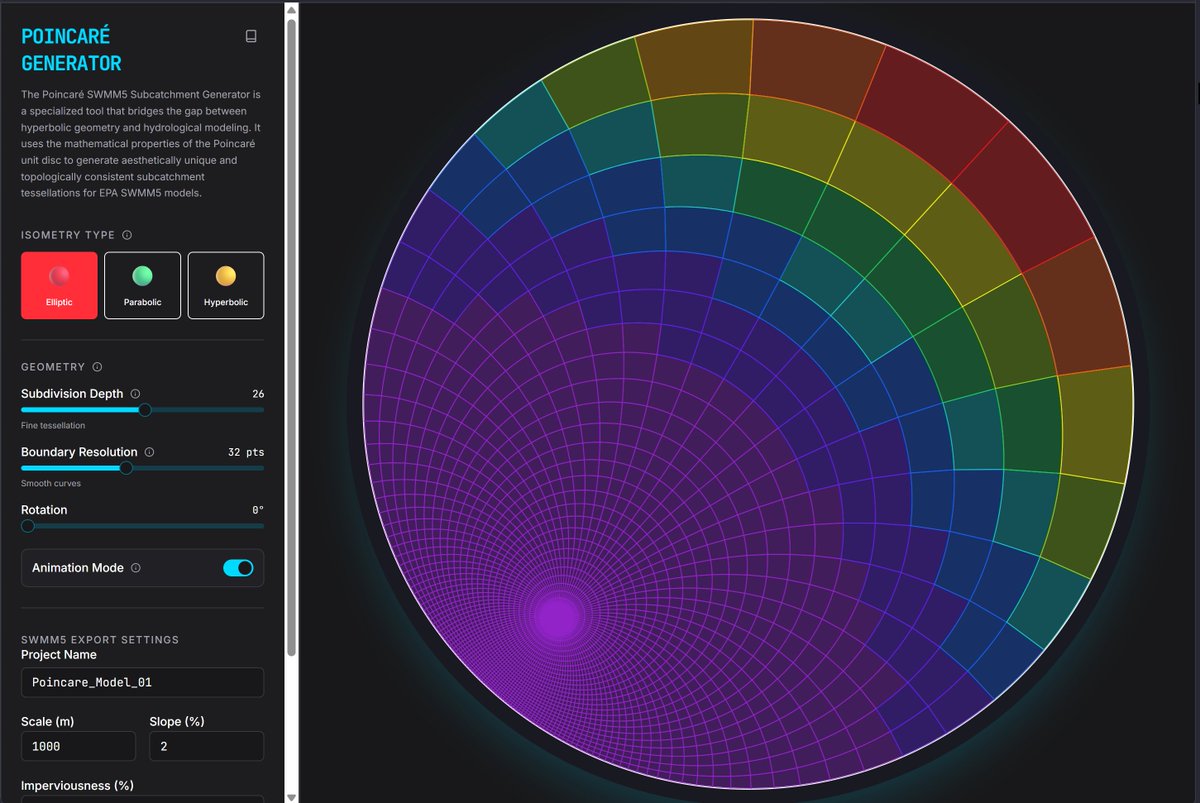
A great feature of @ns is how easy it is to get inspired. I was attending @rami vibes to apps and wanted to make this for #SWMM5 poincar-swmm-5-subcatchment-…
1
1
4
88