
13 Oct 2019
Started collecting all my #snowflaketips here:
gcdatagroup.com/2019/10/10/s…
#bigdata #snowflakedb #data #sql
1

20 Feb 2019
You can acces the CREATE statement and data types of any object by executing the get_ddl function in @SnowflakeDB
#snowflakeTips #sqlhelp #sql #sqlTips
1
1
1 Feb 2019
Create your tables as TRANSIENT if you don't want to give your DBA a heart attack, but beware, there is no Fail-safe period for TRANSIENT tables. For more info in temporary and transient tables you can check the @SnowflakeDB docs:
docs.snowflake.net/manuals/u…
#SnowflakeTips #sqlhelp

1
31 Jan 2019
You can convert rows into columns using the PIVOT statement in @SnowflakeDB.
More info in docs.snowflake.net/manuals/s…
#SnowflakeTips #SQL #sqlhelp #data #sqlTips
2
30 Jan 2019
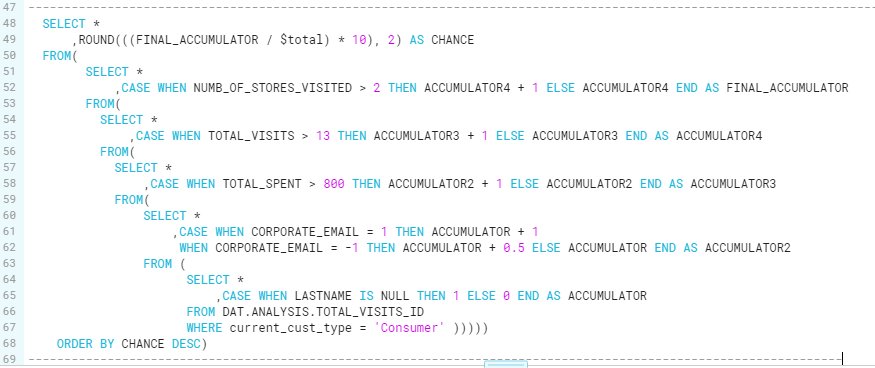
@SnowflakeDB has neither cursor or DO WHILE. I managed to build an accumulator by nesting SELECTs and creating
a new column to store the accumulated value instead of a variable.
#SnowflakeTips #Data #SQL #SQLtips
1
29 Jan 2019
Para generar un ID único en un SELECT como si fuera el IDENTITY de una tabla se puede usar la función ROW_NUMBER ordenadopor toda la clave de la tabla. #SQLtip recien aprendido. #sqlhelp @SnowflakeDB #SnowflakeTips

1