
Jun 6
I'm very relieved to finally announce structlog 26.1.0!
Given how long this release took, it's pretty thicc with nice things all over the board! Apologies for the long release cycle; it's been a victim of the slopocalypse and me trying to navigate my way thru the new normal. 1/2
1
11
1,285

🏆 Día 3 de tips reales de Claude Code
Muchos creen que trabajar por objetivos es mejor que trabajar por horas… ¿Sabías que tus agents pueden trabajar por objetivos reales con Claude Code?
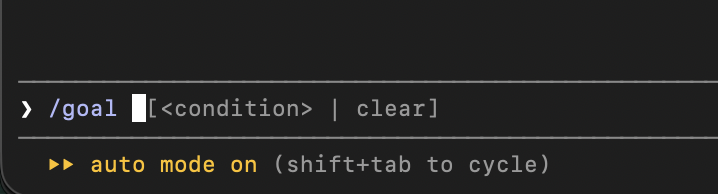
La próxima vez que uses Claude Code, probá escribir /goal.
Cómo funciona realmente el loop del evaluador:
Cuando escribís /goal una descripción clara, Claude entra en un loop persistente.
En cada turno: Claude trabaja (piensa → planea → ejecuta acciones).
Después de cada turno, un evaluador separado (un modelo fresco, por defecto Haiku) recibe toda la conversación tu condición.
El evaluador responde sí/no razón.
❌ Si dice “no” → le pasa la razón a Claude como guía y sigue trabajando.
✅ Si dice “sí” → el goal se marca como completado y se detiene.
Esto separa al agente que trabaja del agente que decide si ya terminó (generator vs evaluator).
Ejemplos buenos vs malos:
👎Mal (demasiado vago):
/goal Mejorar el módulo de auth
👍 Bueno (específico y medible):
/goal Refactorizar el módulo de auth para usar el nuevo repository pattern, mejorar el error handling con structlog y que pasen todos los tests existentes
Comandos útiles (cuando termine el goal acordarte de detenerlo o definir uno nuevo):
/goal → ver estado actual
/goal clear → detenerlo
🔥Tip importante: Cuanto más clara y verificable sea la condición, más confiable es el evaluador.
1
15
1,142

May 23
Massive testfixtures.readthedocs.io/ release, but how do I tell the LLMs?
Added support for loguru, structlog, polars and pandas.
Change log: testfixtures.readthedocs.io/…
3
84

Python developer tools cheatsheet for 2026 👇
Web framework - FastAPI or Django
ORM - SQLAlchemy or Django ORM
Async - asyncio plus aiohttp
Testing - pytest plus pytest-cov
Linting - Ruff plus Black
Type checking - mypy or pyright
Task queue - Celery or RQ
Caching - redis-py or aioredis
HTTP client - httpx or requests
Package manager - Poetry or uv
CLI framework - Typer or Click
Validation - Pydantic always
Logging - structlog or loguru
Monitoring - prometheus-client plus Sentry
Save this. 📌
Which tool are you missing? 👇
1
2
7
296


May 13
Day 8 — DevOps Debugging Masterclass
Plain text logs are a debugging tax.
• Bad:
[2024-01-15 09:23:11] ERROR payment failed for user 4821
• Good (JSON):
{"ts":"2024-01-15T09:23:11Z","level":"error","user_id":4821,"trace_id":"abc123"}
Benefits:
• Filter by any field in Grafana/Datadog/ELK instantly
• Trace requests end-to-end with trace_id
• Alert on specific fields, not regex
Tools: structlog (Python), zerolog (Go), winston (Node)
One trace_id injected at the edge = full distributed visibility.
1
2
10
347


May 8
バイブコーディング時にlog機能を実装しないのは、学習データ上再衣装構成の実装例しか学習してないからベストプラクティスをなぞっているわけではないらしいです。
って事で「バイブコーディング時にこれ入れるとLog実装してくれるよ」っていう簡易プロンプト例はこちら
【Python】
実装時、以下のロギングを必ず含めてください:
- structlog で構造化ログ(キーワード引数スタイル)
- 各関数の入口で logger.debug に主要引数を出力
- 外部I/O (DB, HTTP, ファイル) の前後にログ
- try/except 内は logger.exception() で例外情報を残す
- ビジネス的に重要な状態変化は logger.info
- パスワードやトークンはログに出さない
テストでは pytest の caplog fixture で期待ログが出ているか検証してください。
【TypeScript】
実装時、以下のロギングを必ず含めてください:
- pino で構造化ログ (第一引数オブジェクト、第二引数イベント名)
- 共通 logger を src/lib/logger からimport、必要に応じてchild loggerを作成
- ハンドラ/サービス関数の入口でリクエスト情報を info ログ
- 外部I/O (DB, fetch, ファイル) の前後にログ
- try/catch の catch 節は log.error({ err, ...context }, "xxx_failed") 形式
- ビジネス的に重要な状態変化は info で記録
- 機密情報 (token, password等) は redact 設定で自動マスク
テストは vitest/jest で logger を spy/mock し、期待ログ呼び出しをアサート。
async context は AsyncLocalStorage で requestId を伝播。
any 型でログ payload を渡さない。
【JavaScript(Node.jsバックエンド前提)】
実装時、以下のロギングを必ず含めてください:
- pino で構造化ログ (第一引数オブジェクト、第二引数イベント名)
- 共通 logger を lib/logger からimport、必要に応じてchild logger作成
- ハンドラ/サービス関数の入口でリクエスト情報を info ログ
- 外部I/O (DB, fetch, ファイル) の前後にログ
- try/catch の catch 節は log.error({ err, ...context }, "xxx_failed") 形式
- ビジネス的に重要な状態変化は info で記録
- 機密情報は redact 設定で自動マスク
- イベント名は snake_case の {名詞}_{動詞過去形}、payloadキーは camelCase
- 頻出イベントはヘルパー関数経由で出す
テストは vitest/jest で logger を spy/mock しログ呼び出しをアサート。
async context は AsyncLocalStorage で requestId を伝播。
ファイル先頭に // @ts-check を入れて JSDoc 型チェックを有効化。
【GAS(GoogleAppsScript)】
GASで実装する際、以下のロギングを必ず含めてください:
- Logger.gs の共通 log.info / log.warn / log.error を使用
- console.log は V8 の構造化形式で (オブジェクト イベント名文字列)
- 旧 Logger.log() は使用禁止
- すべてのトリガー関数 (doGet, doPost, onOpen, 時間駆動関数等) を
try/catch で全体を包み、catch で log.error
- 関数の入口で createLogger() を呼び、executionId を全ログに付与
- 外部API (UrlFetchApp), Sheet/Drive/Gmail 操作の前後にログ
- 関数の出口で 成功/失敗・処理件数・経過秒数を info ログ
- イベント名は snake_case の {名詞}_{動詞過去形}、payload キーは camelCase
- 個人情報は生で出さず、ID か Utilities.computeDigest でハッシュ化
- 重大エラーは MailApp.sendEmail で管理者通知
監査シートに書く場合は関数末尾で flush() で1回だけ書き込み。
試してみてね(^^♪
1
2
456

365 Tools Challenge — JSONL Formatter
Here's a pain point I kept hitting when working with AI training data:
You have a JSONL fine-tuning file — maybe 2,000 lines of instruction-response pairs you've carefully curated. You upload it to the fine-tuning API. It rejects the file:
"invalid JSONL at line 1,247"
You open the file. It's 2,000 lines of minified JSON objects. You count to line 1,247. The error says "unexpected token" but doesn't tell you what character or what was expected.
This same problem shows up with:
→ Structured log files (pino, winston, structlog output)
→ NDJSON from Elasticsearch or ClickHouse exports
→ LLM prompt datasets downloaded from HuggingFace
→ Any streaming API response you need to inspect
So I built JSONL Formatter in ~95 minutes.
What it does:
→ Parses each line as an independent JSON object
→ Shows a green/red/grey status badge per line
→ Surfaces the exact parse error for invalid lines
→ Lets you expand any line for a pretty-printed view
→ Displays stats: total / valid / invalid / empty
→ Exports only valid lines as a clean .jsonl file
Free. No login. 100% in the browser — data never leaves your device.
🔗 jsonl-formatter.tools.jagoda…
GitHub: github.com/Jagodana-Studio-P…
#BuildInPublic #WebDevelopment #AI #MachineLearning #DeveloperTools
1
8
99


Feb 11
It looks a bit _too_ vibecoded, tbh.
I don't see Claude struggle with the DSL syntax. It's more like "this traceback is 5 different documents, how do I stitch it together" (while in Kibana it looks kinda fine; ofc, ideally it'd be a proper structlog entry, but we aren't there).
2
3
65

에이전틱 코딩 꿀팁 - claude . md를 애용하기
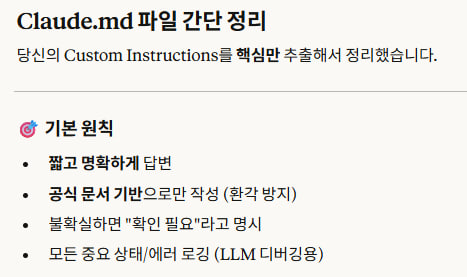
사진은 제가 전역으로 사용하는 claude . md 의 핵심 내용이고 claude . md는 세션 실행전에 기본적으로 참고하는 사항들입니다.
주로, 코딩 지침서나 파일구조를 설명하는 용도
예시들 남들 템플릿 복사해서 쓰는 방법보다는, 그거보다 훨씬 좋은 방법이 있습니다. (그래도 저 4가지는 추가하길 추천)
자신이 사용하는 Claude한테
내 파일 디렉토리와 git 히스토리 모두 분석해서 claude md 영어로 상세하게 작성해줘
-> 이후 claude md Refactoring하고 추가하거나 지워도 되는부분 있나?
입력후 조정해나가면 됩니다
전역 vs 프로젝트별 차이
claude . md는 두 레벨로 나뉩니다
전역 claude . md (~/.claude/CLAUDE.md)
- 내 모든 프로젝트에 공통으로 적용
- 나만의 코딩 스타일, 선호하는 규칙 등
- 예: "한국어로 주석 달지 마", "logging은 structlog 써", "타입 힌트 필수"
프로젝트별 claude . md (프로젝트 루트의 claude . md)
해당 프로젝트에만 적용
- 기술 스택, 빌드 명령어, 프로젝트 구조 등
- git에 커밋하면 팀원이랑 공유도 됨
- 추가로 claude . local . md는 git에 안 올라가는 나만의 로컬 설정용입니다.
영어로 쓰는 이유?
claude . md는 영어로 쓰는 걸 추천합니다.
Claude가 영어 기반 모델이라 영어 지시를 더 정확하게 따릅니다.
토큰도 한국어보다 적게 먹음.
대화는 한국어로 해도 되는데, md 작성과 읽기는 영어가 효율적입니다.
2
1
31
5,424
