
27 Nov 2024
CLUSTER DESIGN HISTORY: The LSI SAS Switch
Right around the time the node storage shelf was reaching its limits for us we started exploring Microsoft's newly released Storage Spaces in Windows Server 2012 RTM.
A shared SAS JBOD plus two nodes gave us great value with Hyper-V and Storage Spaces. We called that a disaggregate or asymmetric cluster. We had great storage performance, an excellent rebuild setup if a disk fails, and the dual pathways SAS gave us.
That meant dual HBAs per node and dual Controllers per JBOD.
But, we hit the SAS port limit pretty quick since most SAS JBOD manufacturers built JBODs with two SAS ports per controller.
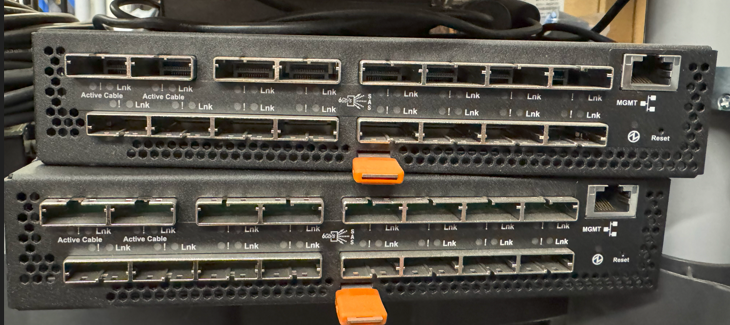
Enter the LSI SAS Switch.
We could set up domains on each if there was a need to but in the end, the No Single Point of Failure maxim for cluster building meant that we were deploying two of them per cluster or clusters connected.
Dual domain would come in if we were setting up two or more clusters via the LSI SAS Switches.
In the end, JBOD manufacturers started bumping up the number of external SAS ports to four, sometimes six, or even eight per controller so the need for the switches diminished and then eventually disappeared.
So indeed they disappeared not long after they were introduced. :-(
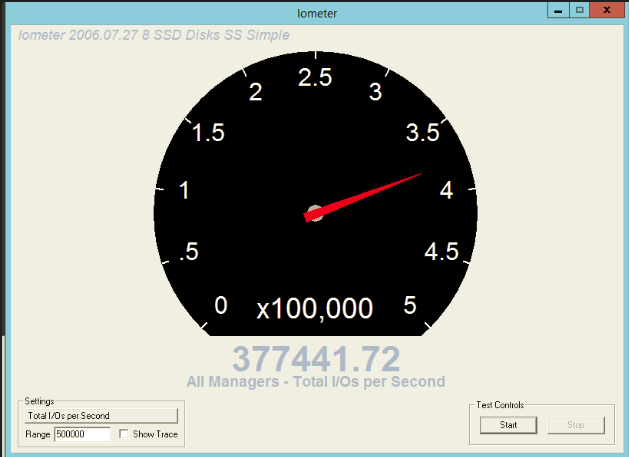
The 377K IOPS was via a single node running HGST single-level cell (SLC) SAS SSDs with an Intel (LSI) HBA controller via one 6Gbps cable to the JBOD.
We had lots of headroom on the compute, memory, and storage side of things.
It turned out that one four lane 6Gbps SAS cable was only capable of running 377K IOPS through it!
We had lots of fun pushing our systems to their maximum performance and leaving them burn in for the ultimate test!
Things we still do today!
Tags
#WinServ #AzL #AzSHCI #Cluster #S2D
#HighAvailability
#SystemBuilderTips
1
2
432
9 Oct 2024
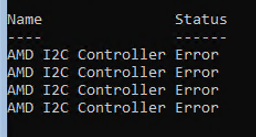
AMD EPYC DEVICE ERROR: AMD I2C Controller
This one was a bit of a puzzle.
A needle in the haystack search result turned up the device was attached to the 3D-VCache component of the AMD EPYC processor and it needed a BIOS update to function correctly.
Sure enough, there was a newer BIOS available for the Tyan 1U we're building this S2D cluster out on and the error was gone once we rebooted post BIOS update!
Tyan 1U AMD EPYC Single Socket Link:
mitaccomputing.com/Barebones…
PowerShell Device Status Not Equal to OK
Get-WmiObject Win32_PNPEntity | Where-Object Status -ne "OK" | Select-Object Name,Status
Tags
.@AMD .@Tyan
#SystemIntegration #SystemBuilderTips #SystemArchitecture
#TechnicalArchitect
#WinServ #HyperV #Cluster #HighAvailability
#AzureStackHCI #AzSHCI
#StorageSpacesDirect #S2D
#Error #ErrorFix

3
401
4 Oct 2024
Remote Desktop Services & QuickBooks Enterprise On-Premises Hyper-V Setup
This is how we would set up a Remote Desktop Services based QB Enterprise environment for 60-100 power users:
Virtual Machines on a Windows Server 2022 with the Hyper-V Role:
- VM0: RD Broker, Gateway, Web
-- 4x vCPUs
-- 4GB vRAM
- VM1-8: RD Session Hosts
-- 4x vCPUs
-- 24GB vRAM (Start Here - Tune Later)
---- Office and QB Apps
---- Other Apps
- VM9: QB Backend (MySQL or other database system)
-- 4x vCPUs
-- 8GB vRAM
---- DB Manager
---- Files
---- Firewall Exceptions for ALL QB
The host server should be set up with a RAID 6 Enterprise SATA SSD configuration with no less than QTY 8 Enterprise SATA SSDs. A separate 22110 M.2 RAID 1 for the OS (22110 = Power Loss Protection PLP NVMe Drive) should be used.
A single AMD EPYC Genoa with 24 pCores (Physical Cores) would probably be enough and 32GB DDR5 ECC x 12 for RAM.
Make sure the storage subsystem is _built_ for IOPS!
The above setup will run 80-100 high performant users in a QB environment with room to grow.
A small-ish 2-node S2D cluster would be the next step up to provide private cloud high availability on-premises.
Add in RemoteApp publishing and Finance is productive anywhere.
Oh, and make sure to secure that RD Gateway with DUO or other Multi-Factor Authentication!!!
NOTE1: Remote Desktop Services Session Host performance is counter intuitive meaning assigning more virtual resources to the virtual machine(s) running the Session Host Role will actually deteriorate. Yeah, as in get worse. Keep this in mind.
Our sweet spot for Remote Desktop Services Session Hosts in a Remote Desktop Farm setting is:
-- 4x vCPUs
-- 24GB vRAM (can bump this up as needed to avoid swap)
NOTE2: Browsers suck.
TAGS
#SystemIntegration #SystemBuilderTips #SystemArchitecture
#TechnicalArchitect
#WinServ #HyperV #Cluster #HighAvailability #S2D
#Hypervisor
#AzureStackHCI #AzSHCI
#StorageSpacesDirect #S2D
#QuickBooks #OnPremises
1
1
6
519
4 Oct 2024
OPINION: THE AMD EPYC 9124, CPU & SERVER BOARD FUTURES, AND TYAN's 1U GENOA PLATFORM
Processors are getting _yuge_ along with the memory slots to accompany them!
I've seen mention of the dropping of Hyper-Threading for actual pCores (Physical Cores) which is, in my opinion, the best option to gain some ground on what is now a board real estate crunch.
As virtually everyone knows that does a daily commute, as soon as we come to the merge things get congested and ultimately there's very little increase in performance in the previous doubling of the lanes as a result.
Having actual pCores in the CPU pipeline means end to end lanes. No merge crunch to deal with.
Another change that is out there is putting certain component interconnects on the bottom of the board. In a 2U or pedestal setting this makes sense but in a 1U setting no go. Tolerances are just two tight.
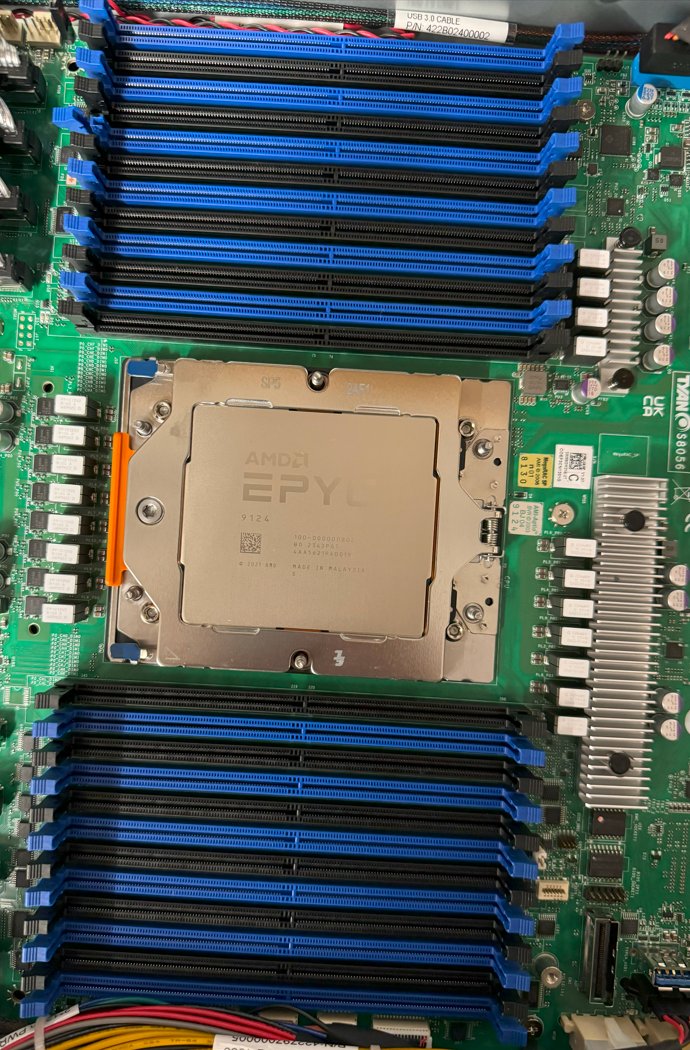
Oh, and one more thing: An inadvertent consequence of the Core Tax by software vendors, that is the charging by CPU pCore count, is that the pictured 16 pCore CPU is almost as expensive as its 32 pCore sibling which is just nuts.
System pictured is a 1U Tyan B8056G68CE12HR-2T server platform with 12 NVMe hot swap bays. It has an OCPv3 slot and two externally facing PCIe add-in-card slots along with a dual 10GbE pNIC (Physical Network Adapter). It's a powerful high density or low available rack space option for us.
For hosting providers with the rack space and appropriate cooling this platform presents an excellent value.
Tags
.@AMD .@Tyan
#SystemIntegration #SystemBuilderTips #SystemArchitecture
#TechnicalArchitect
#WinServ #HyperV #Cluster #HighAvailability #S2D
#AzureStackHCI #AzSHCI
#StorageSpacesDirect #S2D
4
556
7 Aug 2024
EXCHANGE VM SETUP & PERFORMANCE TESTING
Microsoft has a utility designed to help folks see how a particular solution set will behave under Exchange Server workloads.
JetStress 2013 Download (good as of this writing):
microsoft.com/en-us/download…
Microsoft also has a page, that is still up as of this writing, for the Exchange Solution Reviewed Program (ESRP) Storage:
learn.microsoft.com/en-us/ex…
On it we can find a number of different solution sets for small mailbox counts all the way up very large ones.
For us, we have a guideline for Exchange Server deployments based on our many years, decades really, of deploying Microsoft Exchange Server.
As the product's internals changed so too did the solution set requirements. So, take the above with a big of a grain of salt as the lean in today's Exchange Server is towards RAM and CPU with storage I/O being a lower priority.
Suffice it to say, we deploy a VM, or VMs in the case of a Database Availability Group (DAG), with the following specifications for production (for updates)
- vCPUs: 4-6 (6-8)
- vRAM: 24GB (64GB)
- OS Disk: 250GB
- Exchange Install Disk: 250GB
- Logs Disk: 250GB
- Database Disk(s): 750GB Max
The above is a _guideline_ with actual configurations based on our assessment of an existing Exchange Server environment for migration or in the case of a Greenfield on our experience relative to the size of the organization and what they do.
Tags
.@MSFTExchange .@WindowsServer
#MicrosoftExchange #ExchangeServer
#SystemBuilderTips
#SystemPerformance #SolutionPerformance
#ITArchitecture
3
403
17 May 2024
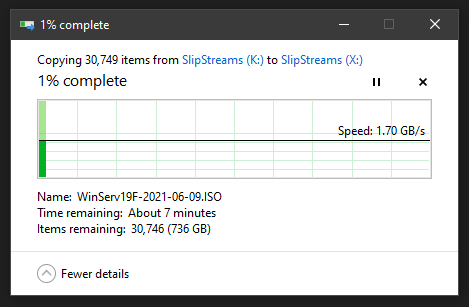
Time for a storage upgrade on my own workstation.
From: Intel P3600 1.8TB PCIe NVMe AiC
To: Samsung 990 PRO 1TB NVMe M.2
The 1TB will do for now.
Next up: Asus HYPER Bifurcation card and 4x 990 PRO drives with a Simple Storage Spaces (Stripe) to see if the slipstream work will run faster.
The VM OS install should be cut down from 5 minutes to about 1. ;0)
Acronym
AiC = Add-in-Card
Tags
#SystemBuilderTips
#Performance
#Storage
#HyperV
1
2
293
7 May 2024
What is Power Loss Protection (PLP) in Solid-State/NVMe Drives?
PLP is the difference between a full-on data loss disaster recovery situation and powering back up and back to business after a full power loss.
Cache at any level in a standalone and cluster solution set should _always_ have PLP.
On a RAID Controller that's sometimes called Non-Volatile Cache for the actual cache RAM or in the case of DRAM a capacitor or battery backup to protect that volatile cache memory from data loss.
PLP. Only PLP for cache.
Further reading by Dan Lovinger (MSFT):
techcommunity.microsoft.com/…
Tags
.@WindowsServer
#WinServ #Cluster #Storage #HyperV #VMware
#SystemBuilderTips #TechnicalArchitect
#S2D #AzureStackHCI #AzSHCI #ASHCI
1
3
241
29 Apr 2024
Ubuntu 24.04 LTS Noble Numbat is now downloaded.
Next up is testing WordPress and Mastodon setup to see if we need to tweak anything for them to run on this new version.
Each workload has a particular set of prerequisites to be installed and configured prior to installing the actual product itself.
It's not unlike the process we go through when proofing a new Storage Spaces Direct (S2D) or Hyper-V cluster design where we build it first to make sure all of the components and their firmware will play nice together.
Saying it will work and _knowing_ it will work are two very different things. The last thing we want is someone to pull up stakes because we failed to follow through on a commitment for products and/or services.
We host dedicated private WordPress and Mastodon instances on a dedicated virtual machine per workload for companies so it's critical to get things right.
Keeping the software happy and the hardware stable and reliable over a hardware and/or software solution lifetime requires a time commitment to test, test, test. ;0)
Tags:
.@Canonical .@Ubuntu .@WordPress
.@WindowsServer
#Cluster #S2D #HyperV #WordPress #Mastodon #VPS
#TechnicalArchitect #SystemBuilderTips

4
1,072
16 Sep 2020
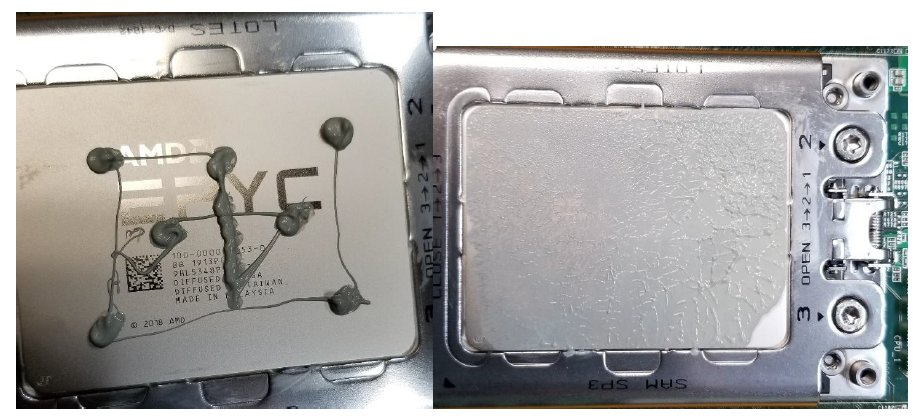
How do I place thermal paste when installing or replacing an @AMD #EPYC or #ThreadRipper CPU?
This is how.
Even coverage is critical.
For our application, the @CoolerMaster ML360 RGB TR4 won. It's on its way!
#SystemBuilderTips
#Workstations
#GamingSetup
2
1
2
9 Sep 2020
Blog Post: #AzureStackHCI / #S2D: Optimal Network Configuration
bit.ly/MIBASCHIS2DNw
#Cluster #WinServ #AzSHCI #ASHCI #Performance #SystemBuilderTips
#EPYC #EPYCRome
CC: @Mellanox @AMD
1
6
11
30 Mar 2020
Blog Post: @TYAN #RMM TIPs: Default Username and Password Plus Set Up Tips
bit.ly/MIBTYANTips2003
#SystemBuilderTips #WinServ #Cluster #S2D #AzureStackHCI #ASHCI #HyperV #AMDEPYC #EPYC
CC @AMD
1
1
2
22 Oct 2019
Blog Post: #DataCentre #SSDs: No Power Loss Protection (PLP) Means No #S2D Deployments
bit.ly/MIBPLP1910
#Storage #Cluster #WinServ #AzureStackHCI #ASHCI #WinServ
#SystemBuilderTips
1
2