How to Adjust Font Size in WordPress for Better Readability 🏗️ webstick.blog/how-to-change-… #ChangeFont #WordPressTypography #TextSize #WPDesign #CustomizeWP #WebsiteStyling #WPBeginner

6
つぶやきProcessing retweeted

Jun 12
//#つぶやきProcessing #p5js
t=0,p=0
draw=_=>{
frameRate(3)
createCanvas(W=(w=200)*2,W)
textSize(20)
text("DON'S SAWTOOTH WAVE",10,30)
D="MTWTFSS".split('')
for(i=0;i<7;i )
text(D[(i t)%7],x=i*57,60),
line(x-50,p,x,p=360-(i t)%7*40)
t}
1
4
307

Jun 11
WordPress Typography Guide – How to Resize Fonts Like a Pro 🖋️ webstick.blog/how-to-change-… #ChangeFont #WordPressTypography #TextSize #WPDesign #CustomizeWP #WebsiteStyling #WPBeginner

1
Processing Community Japan retweeted
Jun 9
//#minacoding 09 Magic #つぶやきProcessing #p5js
t=0,P=[]
draw=_=>{r=random
createCanvas(W=(w=200)*2,W)
textSize(50)
P.push([0,r(TAU),int(r(127169,127184))])
P.map(B=>(R=B[0] =3,text(String.fromCodePoint(B[2]),R*cos(T=B[1]) w,R*sin(T) w)))
t>w?P.shift():0
t}
3
11
325
Jun 8
Need Bigger Text? Learn How to Change Font Size in WordPress ⚡ webstick.blog/how-to-change-… #ChangeFont #WordPressTypography #TextSize #WPDesign #CustomizeWP #WebsiteStyling #WPBeginner

6

Jun 3
@daylight is already pursuing that approach and has succeeded in making highly responsive e-ink.
1) I wanted higher PPI (e-ink is 300, this can be 700 ).
2) I want even lower input lag for typing notes interspersed with reading; I want lower input lag for page resizing for PDFs that don't scale textsize like an epub; I want to be able to jump between different book chapters without delays.
3) I want a beautiful screen for displaying monochrome images since I have a monochrome camera, but every time I see the images, it is via RGB. A monochrome camera, being unfiltered light hitting a sensor, is more true to the world in a certain sense, while having a much better sense of depth and low light resolution of complex features. I suspect the desire to have the richness and saturation of color within images contributed to their use as substitutes for living life. I wonder if a culture where monochrome images become trendy on social media, in part due to resolution, depth, and contrast values where monochrome will have a perpetual edge, could reduce the amount of dopamine addiction of social media, shifting it to something that leaves the viewer yearning and motivated to go out and explore the world, a reminder that the map (image) is not the territory, as it were... and the ephemerality of moments. A touch of sadness perhaps to counterbalance the (performative?) ecstasy maxing.
Of course, this requires a technology stack that is compatible enough with how people use and will use smartphones going forward to catch on. One might imagine a voice first future where input lag is irrelevant, but I imagine it still may be some time before such a primary interaction modality is seamless, and even then, there may still be a desire for a very fast and sharp screen 10% of the time.
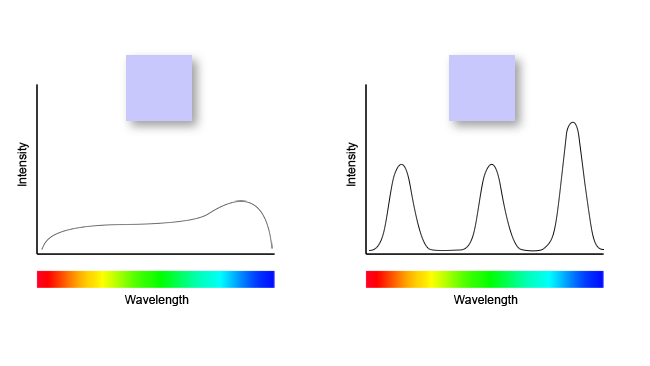
For those unaware, the principle of metamerism is shown below, which is that each perceptual color may be formed with a rather different set of possible spectral inputs, which can have a radically different physiological effect, across several clearly identified components at the very least, some more thoroughly studied than others.
4
107

// はじめての #つぶやきprocessing Day3 #p5js #creativecoding
W=400,C=W/2,t=0,N=500;draw=_=>{t ||(createCanvas(W,W),textAlign(TC=CENTER, TC),background("#070"));t<N&&(translate(C,C),th=1e5*t,textSize(1e-3*t**2),fill(255),text("🎾",C*sin(3*th),C*sin(2*th)))}
1
2
5
372
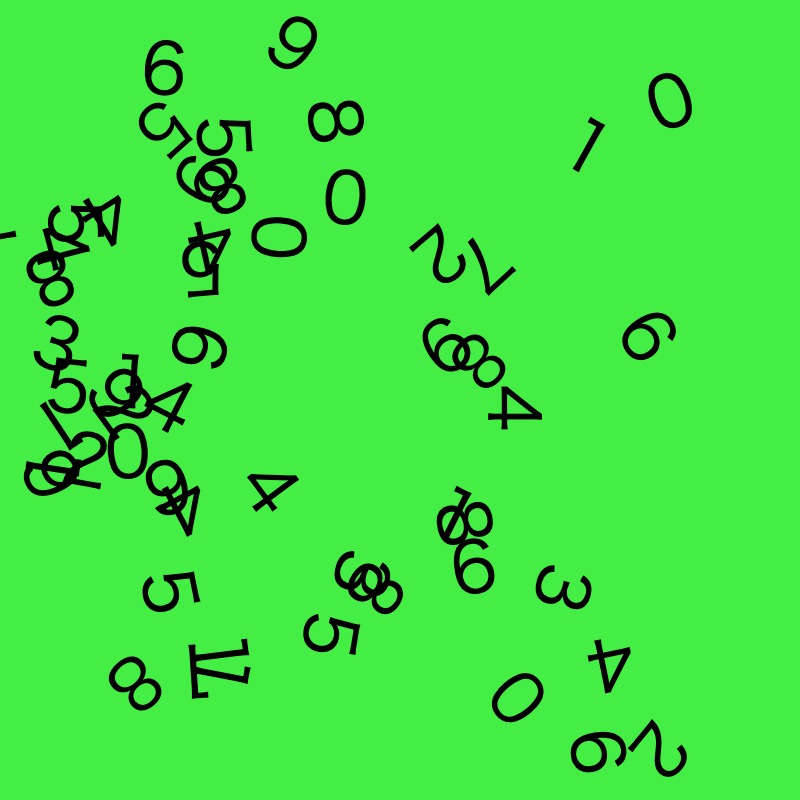
// #つぶやきProcessing Day2 #p5js
W=400,C=W/2,t=0,P=[];
draw=_=>{
t ||(v=createCanvas(W,W),r=random,textSize(35),
P=[...Array(55)].map(_=>[r(-C,C),r(-C,C),r(10)|0,r(PI)]));
background("#4E4");
translate(C,C);
P.map(p=>{
a=noise(p[0]/90,p[1]/90,t*1e-4)*TAU;
p[0] =cos(a); p[1] =sin(a);
(abs(p[0])>C || abs(p[1])>C)&&(p[0]=r(-C,C),p[1]=r(-C,C));
push();
translate(p[0],p[1])
rotate(p[3])
text(p[2],0,0)
pop();
})
}
1
1
5
364
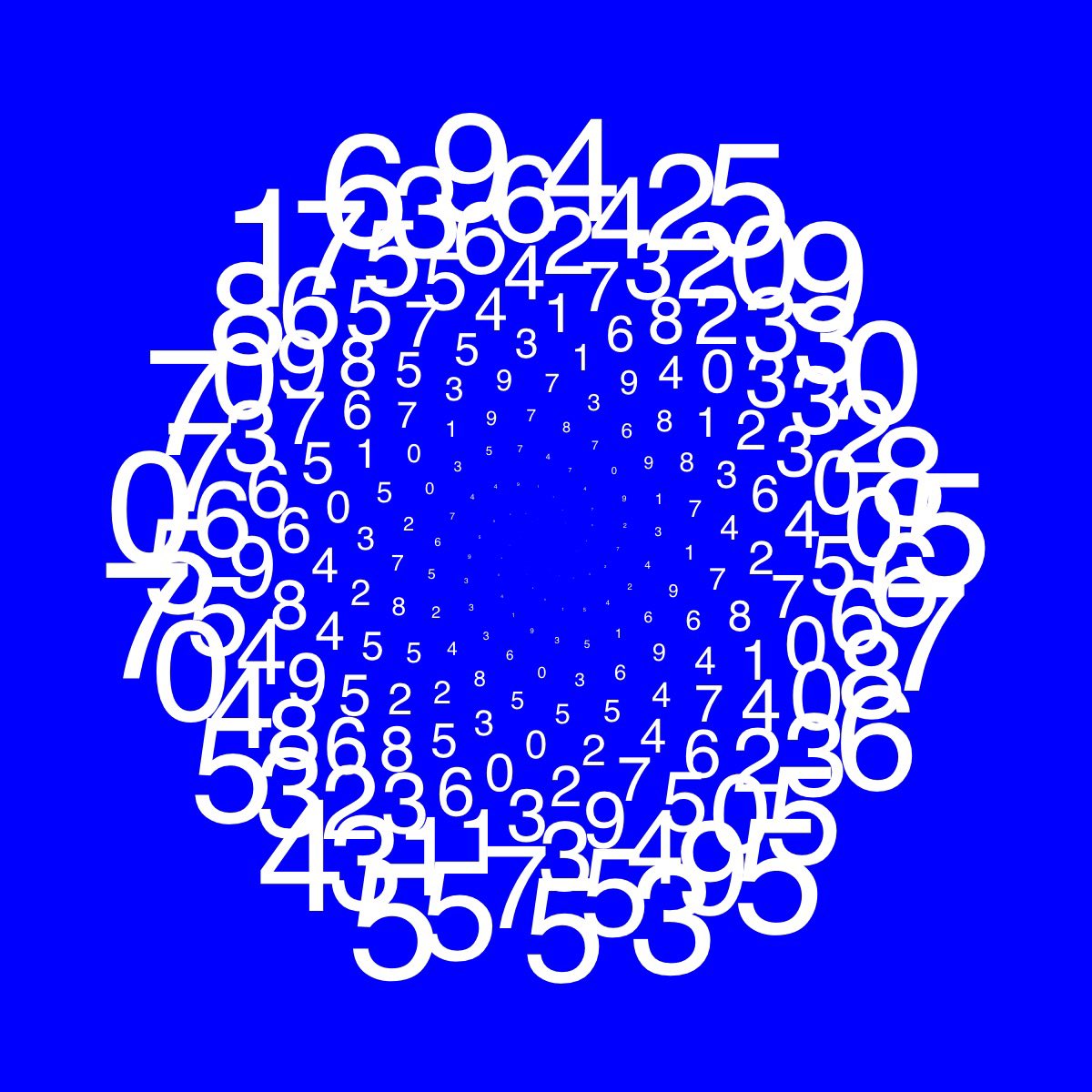
// はじめての #つぶやきprocessing Day1 #p5js
W=400,C=W/2,t=0,N=250;draw=_=>{t ||(v=createCanvas(W,W),background("#00F"),textAlign(TC=CENTER, TC));t<N&&(translate(C,C),r=0.6*t, textSize(0.001*t**2),fill(255),text(floor(random(10)),x=r*cos(t),y=r*sin(t)))}
1
2
9
496

May 4
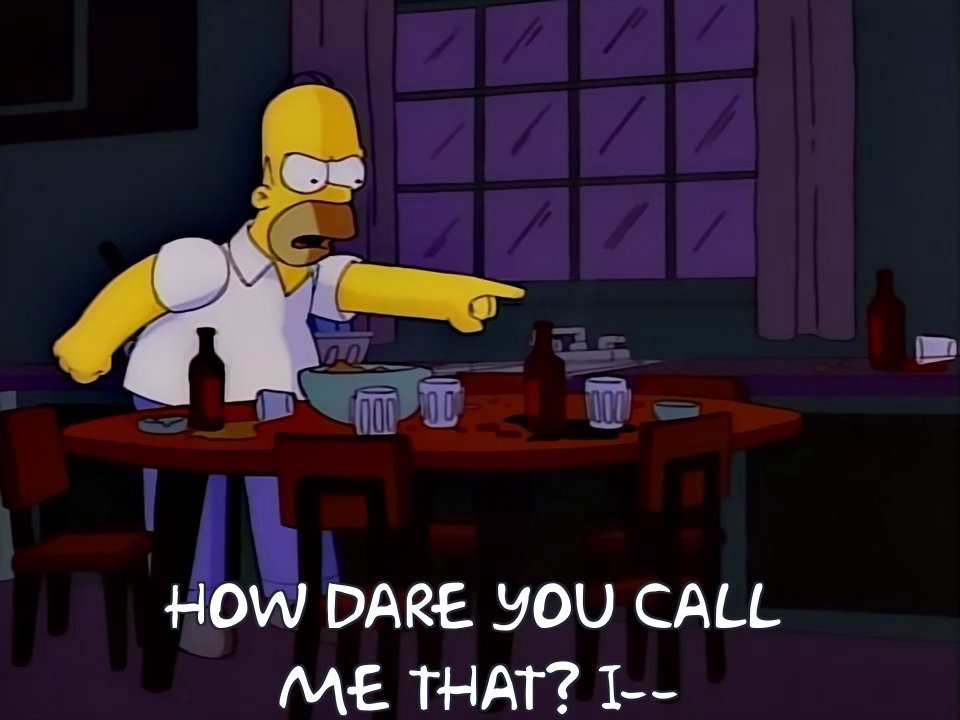
I think my only nitpick is that the lower margin is too low for my taste, with no way to change it. Here's a comparison between the original (left) and the new one (right). Setting all caps and the font to 56 to gets the original textsize, but they also bumped the line spacing
23
2,210
Apr 14
//#つぶやきProcessing #p5js
t=0,x=y=a=b=C=0
draw=_=>{r=random
t �||createCanvas(W=(w=200)*2,W) fill(0) textSize(470) text(['W','🐧'][int(r(2))],0,W)
M=t%2?(x=r(W),y=r(W),a=r(W)-x,b=r(W)-y,C=['red','cyan','gold'][int(r(3))],OVERLAY):EXCLUSION
blendMode(M)
fill(C)
rect(x,y,a,b)}
2
5
757

Apr 11
HOW DID I JUST FIND OUT TODAY THAT DOWNLOADING BOOKS AS EPUB ALLOWS U TO CHANGE TEXTSIZE ND EVERYTHING 😭😭ive been reading by horizontally tilting and zooming my hail mary pdf
2
50

Mar 23
This customizable Minigame Task is 100% AI scripted.
No UI imports, no external assets – just pure code. I’m dropping the full prompt for FREE below! 👇
Want the full script too? > Since I can't upload it here, just reply with "DM" and I’ll send it over to you! 📜
"Create a Roblox "Hit the Target" minigame as a single LocalScript. Place it in StarterPlayer > StarterPlayerScripts. The entire GUI must be built purely via code with Instance.new, no pre-made ScreenGui or assets required. Zero external dependencies. No server scripts needed. Fully standalone.
=== CONCEPT ===
A horizontal rhythm bar sits centered on screen inside a dark glassmorphism panel. A thin white indicator stripe bounces continuously left and right across the bar. Somewhere on the bar is a gray target zone. The player must click or tap exactly when the stripe overlaps the target zone. Each successful hit increases the stripe speed and shrinks the target zone, making it progressively harder. A miss penalizes the player by removing one point of progress and reverting the difficulty by one level. After the required number of successful hits (default 5), the minigame ends and fires a completion callback.
=== CONFIGURATION TABLE (top of script, all values tweakable) ===
BAR_WIDTH = 0.6 (bar takes 60 percent of screen width) BAR_HEIGHT = 0.08 (bar height is 8 percent of screen) GREEN_ZONE_WIDTH = 0.24 (starting target zone width as fraction of bar) GREEN_ZONE_SHRINK = 0.04 (target zone shrinks by this amount per successful hit) MIN_GREEN_ZONE_WIDTH = 0.08 (target zone never gets smaller than this) BASE_STRIPE_SPEED = 0.4 (stripe moves at 0.4 units per second initially) SPEED_INCREASE = 0.2 (speed increases by this per successful hit) REQUIRED_HITS = 5 (number of hits needed to complete the minigame)
=== COLOR PALETTE (define a COLORS table) ===
BACKGROUND: RGB(20, 20, 25) - dark panel background ACCENT: RGB(180, 180, 190) - muted gray accent for text ACCENT_DARK: RGB(100, 100, 110) - darker gray for borders and strokes BAR_BACKGROUND: RGB(30, 30, 35) - rhythm bar background GREEN_ZONE: RGB(140, 140, 150) - target zone color (gray, not green despite the name) STRIPE: RGB(220, 220, 230) - moving indicator stripe color TEXT: RGB(200, 200, 200) - general text color TITLE: RGB(180, 180, 190) - title text color SCORE_GOOD: RGB(150, 200, 150) - muted green for hit feedback SCORE_MISS: RGB(200, 100, 100) - muted red for miss feedback PROGRESS_BG: RGB(30, 30, 35) - progress bar background PROGRESS_FILL: RGB(160, 160, 170) - progress bar fill color
=== GUI STRUCTURE (all built with Instance.new) ===
ScreenGui named "HitMinigameGUI", ResetOnSpawn false, starts Enabled false, parented to PlayerGui.
Overlay Frame: full screen (1,0,1,0), fully transparent (BackgroundTransparency 1), just a click-blocker layer.
MainFrame: centered panel, Size (0.6, 0, 0.6, 0), Position (0.2, 0, 0.2, 0), semi-transparent background (BackgroundTransparency 0.3), no border. Add UICorner with CornerRadius 16px. Add UIStroke with ACCENT_DARK color, thickness 3, transparency 0.3. Add UIGradient going top-to-bottom from RGB(40,45,50) to RGB(25,30,35), rotation 90.
Title TextLabel: inside MainFrame, top area, Size (1,0,0.14,0), Position (0,0,0.02,0), transparent background, font FredokaOne, TextScaled true, color TITLE. Add UIStroke for readability (ACCENT_DARK, thickness 1.5, transparency 0.5). Add UITextSizeConstraint min 28 max 56. Default text is "Task" but gets set dynamically via the API.
GameArea Frame: inside MainFrame, transparent container, Size (1,0,0.5,0), Position (0,0,0.22,0). Holds the rhythm bar and progress elements.
RhythmBar Frame: inside GameArea, Size (BAR_WIDTH, 0, BAR_HEIGHT, 0), centered with AnchorPoint (0.5, 0.5), Position (0.5, 0, 0.35, 0), color BAR_BACKGROUND, border 2px with RGB(60,60,70). Add UICorner with CornerRadius (0.3, 0).
GreenZone Frame (target zone): inside RhythmBar, Size (GREEN_ZONE_WIDTH, 0, 1, 0), Position (0.5, 0, 0, 0), AnchorPoint (0.5, 0), color GREEN_ZONE, no border. Add UICorner (0.3, 0).
MovingStripe Frame: inside RhythmBar, Size (0.04, 0, 1, 0), starts at Position (0, 0, 0, 0), color STRIPE, no border. Add UICorner (0.5, 0). Add a UIStroke glow effect with white color, thickness 2, transparency 0.5.
Progress TextLabel: inside GameArea, Size (0.4, 0, 0.15, 0), Position (0.3, 0, 0.62, 0), transparent background, font FredokaOne, TextScaled, color TEXT. Shows "0 / 5" format. UITextSizeConstraint min 28 max 48.
Progress Bar: inside GameArea, a background Frame (0.2, 0, 0.05, 0) at Position (0.4, 0, 0.82, 0), color PROGRESS_BG, fully rounded UICorner (0.5, 0). Inside it a fill Frame starting at Size (0, 0, 1, 0), color PROGRESS_FILL, same rounded corners. Fill animates via tween as progress increases.
Action TextLabel: inside MainFrame, bottom area, Size (1, 0, 0.12, 0), Position (0, 0, 0.85, 0), transparent background, font FredokaOne, TextScaled, color ACCENT. Text says "CLICK / TAP!". UITextSizeConstraint min 28 max 52.
Close Button (TextButton): inside MainFrame, top-right corner, Size (0, 40, 0, 40), Position (1, -10, 0, 10), AnchorPoint (1, 0), red background RGB(180, 60, 60), transparency 0.1, text "X", font GothamBold, TextSize 24, white text, ZIndex 10. Add UICorner 8px.
=== GAME STATE VARIABLES ===
isGameActive (boolean, false initially) successfulHits (number, starts at 0) stripePosition (number, 0 to 0.96 range, starts at 0 which is left edge) stripeDirection (1 for right, -1 for left, starts at 1) currentSpeed (starts at BASE_STRIPE_SPEED) currentGreenZoneWidth (starts at GREEN_ZONE_WIDTH, shrinks with hits) greenZonePosition (0 to 1 range, center of target zone, starts at 0.5) onGameComplete (callback function, nil initially) disabledPrompts (table storing ProximityPrompts that were disabled)
=== STRIPE MOVEMENT ===
Use RunService BindToRenderStep with a unique name like "HitMinigame_Update" and priority Camera 1. In the callback, receive deltaTime and update stripePosition by adding (stripeDirection times currentSpeed times deltaTime). When stripePosition goes below 0, clamp to 0 and flip direction to 1. When stripePosition goes above 0.96 (which is 1.0 minus the stripe width of 0.04), clamp to 0.96 and flip direction to -1. Update the stripe Frame Position to UDim2.new(stripePosition, 0, 0, 0). This gives smooth frame-independent bouncing.
=== HIT DETECTION ===
When the player clicks, calculate stripeCenter as stripePosition 0.02 (half the stripe width). Calculate greenStart as greenZonePosition minus half of currentGreenZoneWidth. Calculate greenEnd as greenZonePosition plus half of currentGreenZoneWidth. If stripeCenter is between greenStart and greenEnd, it is a hit.
On HIT:
Increment successfulHits by 1
Show green "HIT!" feedback text
Flash the target zone bright green RGB(150, 255, 150) for 0.1 seconds then revert
Update progress display and progress bar
Increase currentSpeed by SPEED_INCREASE
If successfulHits reaches REQUIRED_HITS, wait 0.2 seconds then end the game with success
Otherwise, move the target zone to a new position (see below)
On MISS:
Show red "MISS!" feedback text
If successfulHits is greater than 0, subtract 1 from successfulHits
Revert currentSpeed by subtracting SPEED_INCREASE (clamp to BASE_STRIPE_SPEED minimum)
Revert currentGreenZoneWidth by adding GREEN_ZONE_SHRINK back (clamp to GREEN_ZONE_WIDTH maximum)
Update progress display
Animate the target zone size change with a tween
=== TARGET ZONE REPOSITIONING (after each hit) ===
Shrink currentGreenZoneWidth by GREEN_ZONE_SHRINK (clamp to MIN_GREEN_ZONE_WIDTH). Calculate valid position range ensuring the zone stays within the bar (minPos = half the zone width, maxPos = 1 minus half the zone width). Generate a random new position that is at least 0.2 away from the current position (use a repeat-until loop). Animate the zone to its new position AND new size simultaneously using TweenService with TweenInfo duration 0.3, EasingStyle Back, EasingDirection Out.
=== FEEDBACK ANIMATIONS ===
Create a temporary TextLabel at Position (0.5, 0, 0.45, 0) with AnchorPoint (0.5, 0.5), transparent background, GothamBold font, TextScaled, ZIndex 10. Add UITextSizeConstraint min 24 max 42. Use TweenService to animate TextTransparency to 1 and Position upward to (0.5, 0, 0.35, 0) over 0.6 seconds with Back easing Out. When the tween completes, destroy the label. This is non-blocking so gameplay continues during the animation.
=== INPUT HANDLING ===
Connect to UserInputService.InputBegan. Only process input when isGameActive is true. Skip if gameProcessed is true. Accept MouseButton1 and Touch input types, but ONLY if the input position falls within the MainFrame bounds (check using AbsolutePosition and AbsoluteSize of MainFrame). If input is within bounds, call the hit check function. If the player presses the Q key, force exit the minigame. Also connect the close button MouseButton1Click and TouchTap events to the force exit function.
=== GAME START FUNCTION ===
Accept parameters: callback function, optional requiredHits number, optional title string. If already active, return immediately. If requiredHits is provided, override REQUIRED_HITS. Reset all game state to initial values. Reset all UI elements (progress text, progress bar fill to 0, target zone position and size, stripe position to 0). Enable the ScreenGui. Disable ALL ProximityPrompts in workspace (iterate workspace GetDescendants, find all enabled ProximityPrompt instances, store them in the disabledPrompts table and set Enabled to false). Bind the render step for stripe movement.
=== GAME END FUNCTION ===
Accept a success boolean parameter. Calculate finalScore as 100 if success, 0 if not. Set isGameActive to false. Disable the ScreenGui. Unbind the render step. Re-enable all stored ProximityPrompts (check they still exist and have a parent before re-enabling). Clear the disabledPrompts table. Call the onGameComplete callback with the finalScore.
=== PUBLIC API ===
Create a HitMinigame table with three functions:
StartMiniGame(callback, requiredHits, title) - Sets the title label text if title is provided, then calls the internal start function. The callback receives a score number (100 for success, 0 for exit or fail).
IsActive() - Returns the isGameActive boolean.
ForceExit() - Ends the game with success false.
Store the table in _G.HitMinigame for global access from other scripts. Also return the table from the module.
=== USAGE EXAMPLE (for reference, not part of the script) ===
From any other LocalScript call: _G.HitMinigame.StartMiniGame(function(score) if score >= 100 then -- player completed it, give reward else -- player failed or exited end end, 5, "Pick the Lock")
"
4
561

Mar 16
Well it's very obviously fake, the textsize is wrong, the tweet is dated before the accounts creation date, it's word for word the same sentence e-pajeets have used for fake screenshots in the past.
1
6
85

Mar 3
2/ Here's the code (i used Gemini for this but any will work). Just paste it into CodePen.io and click start coding and paste it into the left box
<!DOCTYPE html>
<html lang="en">
<head>
<meta charset="UTF-8">
<meta name="viewport" content="width=device-width, initial-scale=1.0">
<title>Interactive Digital Infrastructure</title>
<script src="cdnjs.cloudflare.com/ajax/li…"></script>
<script src="cdnjs.cloudflare.com/ajax/li…"></script>
<style>
body { margin: 0; padding: 0; display: flex; justify-content: center; align-items: center; height: 100vh; background-color: #f0f0f0; font-family: 'Comic Sans MS', sans-serif;}
canvas { box-shadow: 0 4px 8px rgba(0,0,0,0.1); border: 1px solid #ccc; background-color: #fff; }
</style>
</head>
<body>
<script>
const Engine = Matter.Engine,
Runner = Matter.Runner,
Bodies = Matter.Bodies,
Composite = Matter.Composite,
Mouse = Matter.Mouse,
MouseConstraint = Matter.MouseConstraint;
let engine;
let world;
let boxes = [];
function setup() {
// Save the canvas reference so the mouse knows where to look
let canvas = createCanvas(800, 800);
engine = Engine.create();
world = engine.world;
engine.positionIterations = 10;
engine.velocityIterations = 10;
// --- THE BASE (Static: Cannot be dragged) ---
let base1 = Bodies.rectangle(400, 750, 600, 40, { isStatic: true });
let base2 = Bodies.rectangle(400, 710, 480, 40, { isStatic: true });
let pedestal = Bodies.rectangle(520, 650, 10, 80, { isStatic: true });
Composite.add(world, [base1, base2, pedestal]);
boxes.push({ body: base1, w: 600, h: 40, isStatic: true });
boxes.push({ body: base2, w: 480, h: 40, isStatic: true });
boxes.push({ body: pedestal, w: 10, h: 80, isStatic: true });
// --- THE INFRASTRUCTURE BLOCKS (Dynamic: Fully draggable) ---
addBlock(280, 630, 200, 120); // Left massive support
// THE NEBRASKA BLOCK
let nebraskaBlock = Bodies.rectangle(520, 590, 15, 40, { friction: 0.8, restitution: 0, density: 0.05 });
Composite.add(world, nebraskaBlock);
boxes.push({ body: nebraskaBlock, w: 15, h: 40, isNebraska: true });
// Middle Bridge
addBlock(400, 540, 440, 60);
// Layer 1
addBlock(280, 470, 180, 80);
addBlock(480, 470, 180, 80);
// Layer 2
addBlock(240, 380, 80, 100);
addBlock(340, 380, 60, 100);
addBlock(460, 340, 80, 180);
addBlock(540, 380, 60, 100);
// Top fragile layers
addBlock(240, 290, 40, 80);
addBlock(340, 310, 30, 40);
addBlock(460, 230, 100, 40);
addBlock(440, 180, 30, 60);
addBlock(480, 180, 30, 60);
// Greebles
addBlock(220, 230, 20, 40);
addBlock(260, 230, 20, 40);
addBlock(540, 310, 40, 40);
// --- FIXED MOUSE INTERACTION ---
let canvasMouse = Mouse.create(canvas.elt);
// This line right here fixes the dragging offset issue for high-res screens!
canvasMouse.pixelRatio = window.devicePixelRatio;
let mConstraint = MouseConstraint.create(engine, {
mouse: canvasMouse,
constraint: {
stiffness: 0.2, // Makes the dragging feel a bit elastic
render: { visible: false }
}
});
Composite.add(world, mConstraint);
Runner.run(Runner.create(), engine);
}
function addBlock(x, y, w, h) {
let body = Bodies.rectangle(x, y, w, h, { friction: 0.8, restitution: 0 });
Composite.add(world, body);
boxes.push({ body: body, w: w, h: h });
}
function draw() {
background(255);
// Draw Text & Graphics
fill(0); noStroke(); textAlign(CENTER, CENTER);
textSize(24); text("ALL MODERN DIGITAL\nINFRASTRUCTURE", 400, 80);
stroke(0); strokeWeight(3); noFill(); beginShape();
vertex(200, 140); bezierVertex(200, 120, 400, 140, 400, 120); bezierVertex(400, 140, 600, 120, 600, 140); endShape();
noStroke(); fill(0); textSize(18); textAlign(LEFT, TOP);
text("A PROJECT SOME\nRANDOM PERSON\nIN NEBRASKA HAS\nBEEN THANKLESSLY\nMAINTAINING\nSINCE 2003", 580, 450);
stroke(0); strokeWeight(2); noFill(); beginShape();
vertex(600, 610); quadraticVertex(580, 650, 545, 600); endShape();
fill(0); triangle(545, 600, 555, 595, 548, 608);
// Draw the physics blocks
rectMode(CENTER);
for (let i = 0; i < boxes.length; i ) {
let b = boxes[i];
let pos = b.body.position;
let angle = b.body.angle;
push();
translate(pos.x, pos.y);
rotate(angle);
strokeWeight(3); stroke(0);
// Color code the blocks
if (b.isNebraska) {
fill('#ffcccc'); // Light red so it stands out
} else if (b.isStatic) {
fill(220); // Darker grey for the floor
} else {
fill(245); // Light grey for standard blocks
}
rect(0, 0, b.w, b.h);
pop();
}
}
</script>
</body>
</html>
1
2
2,054
