
Jun 9
We just released HDR video decoding in TorchCodec for CPU and CUDA: you can now decode HDR videos without losing precision by passing VideoDecoder(..., output_dtype=torch.float32).
Try it out, we'd love to get your feedback meta-pytorch.org/torchcodec/…
1
57


You joke, but I already do this. In the videos I make, the frames of the video of me are pulled out using the VideoDecoder API and written to an inner canvas.
1
2
524

Jan 14
<!doctype html>
<html lang="en">
<head>
<meta charset="utf-8">
<meta name="viewport" content="width=device-width, initial-scale=1.0">
<title>Tesla Dashcam SEI Explorer</title>
<style>
:root {
color-scheme: light dark;
--bg: #ffffff;
--bg-panel: #f5f5f5;
--text: #1a1a1a;
--text-muted: #666666;
--accent: #0080ff;
--accent-hover: #0099ff;
--border: #888888;
--drop-hover-bg: #e8f4ff;
}
@media (prefers-color-scheme: dark) {
:root {
--bg: #1a1a1a;
--bg-panel: #252525;
--text: #e8e8e8;
--text-muted: #999999;
--accent: rgb(255, 0, 51);
--accent-hover: rgb(200, 0, 40);
--border: #666666;
--drop-hover-bg: #291818;
}
}
* {
box-sizing: border-box;
margin: 0;
}
html,
body {
height: 100%;
}
body {
font-family: system-ui, -apple-system, sans-serif;
background: var(--bg);
color: var(--text);
line-height: 1.4;
}
a {
color: var(--accent);
}
/* ===== APP SHELL ===== */
.app {
display: flex;
flex-direction: column;
height: 100%;
padding: 1rem;
gap: 0.75rem;
}
/* Header - fixed height */
.header {
flex-shrink: 0;
}
.header .nav {
font-size: 0.85rem;
margin-bottom: 0.25rem;
}
.header h1 {
font-size: 1.4rem;
margin-bottom: 0.125rem;
}
.header .subtitle {
color: var(--text-muted);
font-size: 0.85rem;
}
/* Main content - fills remaining space */
.main {
flex: 1;
min-height: 0;
/* Critical for flex children to shrink */
display: flex;
gap: 1rem;
}
/* ===== COLUMN LAYOUT (default: wide screens) ===== */
/* Left: Video Controls */
.video-section {
flex: 1;
min-width: 0;
display: flex;
flex-direction: column;
gap: 0.5rem;
}
/* Right: Metadata Export */
.meta-section {
width: 285px;
flex-shrink: 0;
display: flex;
flex-direction: column;
gap: 0.5rem;
}
/* ===== VIDEO AREA ===== */
.video-wrap {
flex: 1;
min-height: 0;
background: #000;
border-radius: 8px;
position: relative;
display: flex;
align-items: center;
justify-content: center;
}
.video-wrap canvas {
max-width: 100%;
max-height: 100%;
}
/* Drop overlay */
.drop-overlay {
position: absolute;
inset: 0;
display: flex;
align-items: center;
justify-content: center;
background: var(--bg-panel);
border: 2px dashed var(--border);
border-radius: 8px;
cursor: pointer;
transition: background 0.15s, border-color 0.15s;
}
.drop-overlay.hidden {
display: none;
}
.drop-overlay:hover,
.drop-overlay.dragover {
background: var(--drop-hover-bg);
border-color: var(--accent);
}
.drop-overlay p {
color: var(--text-muted);
font-size: 0.9rem;
}
.drop-overlay input {
display: none;
}
/* ===== SCRUBBER ===== */
.scrubber {
flex-shrink: 0;
display: flex;
align-items: center;
gap: 0.5rem;
padding: 0.5rem 0.75rem;
background: var(--bg-panel);
border-radius: 6px;
height: 44px;
}
.scrubber button {
width: 32px;
height: 32px;
border: none;
border-radius: 50%;
background: var(--accent);
color: #fff;
cursor: pointer;
display: flex;
align-items: center;
justify-content: center;
transition: background 0.15s, opacity 0.15s;
}
.scrubber button:hover:not(:disabled) {
background: var(--accent-hover);
}
.scrubber button:disabled {
opacity: 0.5;
cursor: not-allowed;
}
.scrubber button svg {
width: 14px;
height: 14px;
fill: currentColor;
}
.scrubber input[type="range"] {
flex: 1;
height: 4px;
cursor: pointer;
-webkit-appearance: none;
appearance: none;
background: transparent;
padding: 12px 0;
margin: -12px 0;
}
.scrubber input[type="range"]::-webkit-slider-runnable-track {
height: 4px;
background: var(--border);
border-radius: 2px;
}
.scrubber input[type="range"]::-webkit-slider-thumb {
-webkit-appearance: none;
width: 14px;
height: 14px;
background: var(--accent);
border-radius: 50%;
margin-top: -5px;
cursor: pointer;
}
.scrubber input[type="range"]::-moz-range-track {
height: 4px;
background: var(--border);
border-radius: 2px;
}
.scrubber input[type="range"]::-moz-range-thumb {
width: 14px;
height: 14px;
background: var(--accent);
border: none;
border-radius: 50%;
cursor: pointer;
}
.scrubber input[type="range"]:disabled {
opacity: 0.5;
cursor: not-allowed;
}
/* ===== METADATA PANEL ===== */
.meta-panel {
flex: 1;
min-height: 0;
display: flex;
flex-direction: column;
background: var(--bg-panel);
border-radius: 6px;
overflow: hidden;
padding-bottom: 3px;
}
.meta-header {
flex-shrink: 0;
padding: 0.5rem 0.75rem;
border-bottom: 1px solid var(--border);
}
.meta-header .filename {
font-weight: 600;
font-size: 0.75rem;
word-break: break-all;
}
.meta-header .framenum {
font-size: 0.7rem;
color: var(--text-muted);
}
.meta-list {
flex: 1;
overflow-y: auto;
padding: 0.5rem 0.75rem;
display: flex;
flex-direction: column;
gap: 0.375rem;
font-size: 0.8rem;
font-variant-numeric: tabular-nums;
}
.meta-list .item {
display: flex;
flex-direction: column;
}
.meta-list .label {
font-size: 0.7rem;
color: var(--text-muted);
}
.meta-list .value {
font-weight: 600;
color: var(--accent);
}
/* Export button */
.export-btn {
flex-shrink: 0;
height: 44px;
padding: 0 0.75rem;
border: none;
border-radius: 6px;
background: var(--accent);
color: #fff;
font-size: 0.8rem;
font-weight: 600;
cursor: pointer;
transition: background 0.15s, opacity 0.15s;
}
.export-btn:hover:not(:disabled) {
background: var(--accent-hover);
}
.export-btn:disabled {
opacity: 0.5;
cursor: not-allowed;
}
/* ===== ROW LAYOUT (short/narrow screens) ===== */
@media (max-height: 600px),
(max-width: 600px) {
.main {
flex-direction: column;
}
.video-section {
flex: none;
}
.video-wrap {
flex: none;
min-height: 200px;
max-height: 40vh;
}
.meta-section {
width: auto;
flex: 1;
min-height: 120px;
}
.meta-panel {
flex: 1;
min-height: 300px;
}
.meta-list {
flex-direction: row;
flex-wrap: wrap;
/* gap: 0.5rem; */
}
.meta-list .item {
min-width: 90px;
flex: 1;
}
}
</style>
</head>
<body>
<div class="app">
<header class="header">
<p class="nav"><a href="index.html">← Back to Dashcam Tools</a></p>
<h1>Tesla Dashcam SEI Explorer</h1>
<p class="subtitle">View dashcam footage with embedded SEI metadata. All processing happens locally in your
browser—no video/SEI data is uploaded. (<a
href="github.com/teslamotors/dashc…">view source</a>)</p>
</header>
<main class="main">
<section class="video-section">
<div class="video-wrap">
<div class="drop-overlay" id="dropOverlay">
<input type="file" id="fileInput" accept="video/mp4" multiple>
<p>Drop MP4 here or click to select</p>
</div>
<canvas id="canvas"></canvas>
</div>
<div class="scrubber">
<button id="playBtn" title="Play/Pause" disabled>
<svg viewBox="0 0 24 24">
<polygon points="6,4 20,12 6,20" />
</svg>
</button>
<input type="range" id="slider" min="0" max="0" value="0" disabled>
</div>
</section>
<aside class="meta-section">
<div class="meta-panel">
<div class="meta-header">
<div class="filename" id="fileName">No file loaded</div>
<div class="framenum" id="frameNum">Frame 0/0</div>
</div>
<div class="meta-list" id="metaList"></div>
</div>
<button class="export-btn" id="exportBtn" disabled>Export CSV</button>
</aside>
</main>
</div>
<script src="vendor/protobuf.min.js"></script>
<script src="vendor/jszip.min.js"></script>
<script src="dashcam-mp4.js"></script>
<script>
// State
let seiType = null, seiFields = null, seiFieldsCsv = null;
let mp4 = null, frames = null, firstKeyframe = 0;
let currentFileName = null;
let decoder = null, decoding = false, pendingFrame = null;
let playing = false, playTimer = null;
// DOM
const $ = id => document.getElementById(id);
const dropOverlay = $('dropOverlay'), fileInput = $('fileInput');
const canvas = $('canvas'), ctx = canvas.getContext('2d');
const slider = $('slider'), playBtn = $('playBtn'), exportBtn = $('exportBtn');
const frameNum = $('frameNum'), fileName = $('fileName'), metaList = $('metaList');
// Events
dropOverlay.onclick = () => fileInput.click();
fileInput.onchange = e => { handleFiles(e.target.files); e.target.value = ''; };
document.ondragover = e => { e.preventDefault(); dropOverlay.classList.add('dragover'); };
document.ondragleave = e => { if (!e.relatedTarget) dropOverlay.classList.remove('dragover'); };
document.ondrop = async e => {
e.preventDefault();
dropOverlay.classList.remove('dragover');
const items = e.dataTransfer?.items;
if (items) {
const { files, directoryName } = await DashcamHelpers.getFilesFromDataTransfer(items);
handleFiles(files, directoryName);
} else {
handleFiles(e.dataTransfer?.files ?? []);
}
};
slider.oninput = () => { pause(); showFrame( slider.value); };
playBtn.onclick = () => playing ? pause() : play();
document.onkeydown = e => {
if (!frames) return;
if (e.key === ' ') {
e.preventDefault(); playing ? pause() : play();
} else if (e.key === 'ArrowLeft' && slider.value > 0) {
e.preventDefault(); pause(); slider.value = slider.value - 1; showFrame( slider.value);
} else if (e.key === 'ArrowRight' && slider.value < frames.length - 1) {
e.preventDefault(); pause(); slider.value = slider.value 1; showFrame( slider.value);
}
};
exportBtn.onclick = exportCsv;
// Initialize protobuf
DashcamHelpers.initProtobuf().then(({ SeiMetadata, enumFields }) => {
seiType = SeiMetadata;
seiFields = DashcamHelpers.deriveFieldInfo(SeiMetadata, enumFields, { useLabels: true });
seiFieldsCsv = DashcamHelpers.deriveFieldInfo(SeiMetadata, enumFields, { useSnakeCase: true });
}).catch(err => console.error('Protobuf init failed:', err));
async function handleFiles(fileList, directoryName = null) {
if (!seiType) await DashcamHelpers.initProtobuf().then(({ SeiMetadata, enumFields }) => {
seiType = SeiMetadata;
seiFields = DashcamHelpers.deriveFieldInfo(SeiMetadata, enumFields, { useLabels: true });
seiFieldsCsv = DashcamHelpers.deriveFieldInfo(SeiMetadata, enumFields, { useSnakeCase: true });
});
const files = (Array.isArray(fileList) ? fileList : Array.from(fileList))
.filter(f => f.name.toLowerCase().endsWith('.mp4'));
if (!files.length) { alert('Please choose at least one MP4 file.'); return; }
// Single file: load and display video
if (files.length === 1) { loadFile(files[0]); return; }
// Multiple files: extract metadata and create zip
const zip = new JSZip();
let exported = 0;
for (const file of files) {
try {
const mp4 = new DashcamMP4(await file.arrayBuffer());
const messages = mp4.extractSeiMessages(seiType);
if (messages.length) {
zip.file(file.name.replace(/\.mp4$/i, '_sei.csv'), DashcamHelpers.buildCsv(messages, seiFieldsCsv));
exported ;
}
} catch { }
}
if (!exported) { alert('No files produced SEI metadata.'); return; }
DashcamHelpers.downloadBlob(await zip.generateAsync({ type: 'blob' }), directoryName ? `${directoryName}_sei.zip` : 'dashcam_sei_metadata.zip');
alert(`Exported ${exported} CSV${exported > 1 ? 's' : ''} as ZIP. To view a clip, select a single file.`);
}
async function loadFile(file) {
if (!file) return;
if (!file.name.toLowerCase().endsWith('.mp4')) {
alert('Please select an MP4 file');
return;
}
if (!seiType) { alert('Protobuf not initialized'); return; }
pause();
if (decoder) { try { decoder.close(); } catch { } decoder = null; }
metaList.innerHTML = '';
ctx.clearRect(0, 0, canvas.width, canvas.height);
try {
mp4 = new DashcamMP4(await file.arrayBuffer());
frames = mp4.parseFrames(seiType);
firstKeyframe = frames.findIndex(f => f.keyframe);
if (firstKeyframe === -1) throw new Error('No keyframes found');
const config = mp4.getConfig();
canvas.width = config.width;
canvas.height = config.height;
slider.max = frames.length - 1;
slider.value = firstKeyframe;
dropOverlay.classList.add('hidden');
currentFileName = file.name;
fileName.textContent = file.name;
exportBtn.disabled = false;
playBtn.disabled = false;
slider.disabled = false;
showFrame(firstKeyframe);
} catch (err) {
mp4 = null;
frames = null;
firstKeyframe = 0;
currentFileName = null;
slider.max = 0;
slider.value = 0;
frameNum.textContent = 'Frame 0/0';
fileName.textContent = 'No file loaded';
exportBtn.disabled = true;
playBtn.disabled = true;
slider.disabled = true;
dropOverlay.classList.remove('hidden');
alert(err.message);
}
}
function play() {
if (!frames || playing) return;
playing = true;
playBtn.innerHTML = '<svg viewBox="0 0 24 24"><rect x="5" y="4" width="4" height="16"/><rect x="15" y="4" width="4" height="16"/></svg>';
playNext();
}
function pause() {
playing = false;
playBtn.innerHTML = '<svg viewBox="0 0 24 24"><polygon points="6,4 20,12 6,20"/></svg>';
if (playTimer) { clearTimeout(playTimer); playTimer = null; }
}
function playNext() {
if (!playing) return;
let next = slider.value 1;
if (next >= frames.length) next = firstKeyframe;
slider.value = next;
showFrame(next);
playTimer = setTimeout(playNext, mp4.getConfig().durations[next] || 33);
}
function showFrame(index) {
frameNum.textContent = `Frame ${index 1}/${frames.length}`;
renderSei(frames[index].sei);
if (decoding) { pendingFrame = index; return; }
decodeFrame(index);
}
async function decodeFrame(index) {
/* Naive decoding strategy: start from the preceding keyframe and decode up to the target frame.
This is not optimal in all cases since it re-decodes frames that have already been decoded. */
decoding = true;
try {
let keyIdx = index;
while (keyIdx >= 0 && !frames[keyIdx].keyframe) keyIdx--;
if (keyIdx < 0) { showError('No preceding keyframe'); return; }
if (decoder) try { decoder.close(); } catch { }
let count = 0;
const target = index - keyIdx 1;
const decodePromise = new Promise((resolve, reject) => {
decoder = new VideoDecoder({
output: frame => {
if ( count === target) ctx.drawImage(frame, 0, 0);
frame.close();
if (count >= target) resolve();
},
error: reject
});
const config = mp4.getConfig();
decoder.configure({ codec: config.codec, width: config.width, height: config.height });
for (let i = keyIdx; i <= index; i ) decoder.decode(createChunk(frames[i]));
decoder.flush().catch(reject);
});
await decodePromise;
} catch (err) {
if (!err.message?.includes('Aborted')) showError('Decode failed');
} finally {
decoding = false;
if (pendingFrame !== null) { const n = pendingFrame; pendingFrame = null; decodeFrame(n); }
}
}
function createChunk(frame) {
const sc = new Uint8Array([0, 0, 0, 1]);
const config = mp4.getConfig();
const data = frame.keyframe
? DashcamMP4.concat(sc, frame.sps || config.sps, sc, frame.pps || config.pps, sc, frame.data)
: DashcamMP4.concat(sc, frame.data);
return new EncodedVideoChunk({ type: frame.keyframe ? 'key' : 'delta', timestamp: frame.index * 33333, data });
}
function renderSei(sei) {
metaList.innerHTML = '';
for (const { propName, label, enumMap } of seiFields) {
const value = sei?.[propName];
const item = document.createElement('div');
item.className = 'item';
const displayValue = value != null ? DashcamHelpers.formatValue(value, enumMap) : '—';
item.innerHTML = `<span class="label">${label}</span><span class="value">${displayValue}</span>`;
metaList.appendChild(item);
}
}
async function exportCsv() {
if (!frames || !seiFieldsCsv) return;
const messages = frames.map(f => f.sei).filter(Boolean);
if (!messages.length) { alert('No SEI metadata to export.'); return; }
const filename = (currentFileName || 'dashcam').replace(/\.mp4$/i, '') '_sei.csv';
DashcamHelpers.downloadBlob(new Blob([DashcamHelpers.buildCsv(messages, seiFieldsCsv)], { type: 'text/csv' }), filename);
}
function showError(msg) {
ctx.fillStyle = '#000';
ctx.fillRect(0, 0, canvas.width, canvas.height);
ctx.fillStyle = '#888';
ctx.font = 'bold 32px system-ui';
ctx.textAlign = 'center';
ctx.fillText(msg, canvas.width / 2, canvas.height / 2);
}
</script>
</body>
</html>
1
2
53

10 Aug 2025
Step 3
- Demuxed the video in-browser with mediabunny (npm i mediabunny) → decoded frames using a VideoDecoder instance → painted them via Canvas 2D Context API.
10
3,141

2 May 2025
Actually this does not need a canvas, only in case you want to manipulate the pixels
Other than that, you need the WebCodecs APIs.
In the browser, you have VideoEncoder, VideoDecoder, VideoFrame, AudioDecoder, AudioEncoder, AudioData as global variables, together with Media Parser this is sufficient for video conversion!
3
117

I only took a cursory glance, but has this been fully tested with python multiprocessing (eg: within DataLoader)?
The version I wrote within Autopilot needed to be instantiated within the main process's CUDA context, and then needed elegant locking around NVDEC when used within subprocesses.
If you didn't instantiate the VideoDecoder within the main process and reused its CUDA context, it would be oddly fragile.
Lastly, if you care about performance, you care remotely about perf, you need to know where your I-frames are, or you may decode >>2x than you need.
This was so critical to figure out apparently this got patented: patentimages.storage.googlea…
1
10
1,346

21 Feb 2025
I did some research on Android open source:
WFB-ng android client, running rtl8812au driver in userspace and a low latency videodecoder in XR mode.
github.com/gehee/FPVue_xr
1
2
309

If you also want to become my product distributor, please visit my personal homepage!#video #videoWallcontrolller #videodecoder #LEDVideoProcessor #MatrixSwitcher
1
1
229

VideoDecoderについてはほんとになんとかしてほしい…
特にRDNAになってからがひどい…
Youtubeとかが解像度関係なく見れたもんじゃないレベルでDecodeが止まるときがある
27 Jan 2025

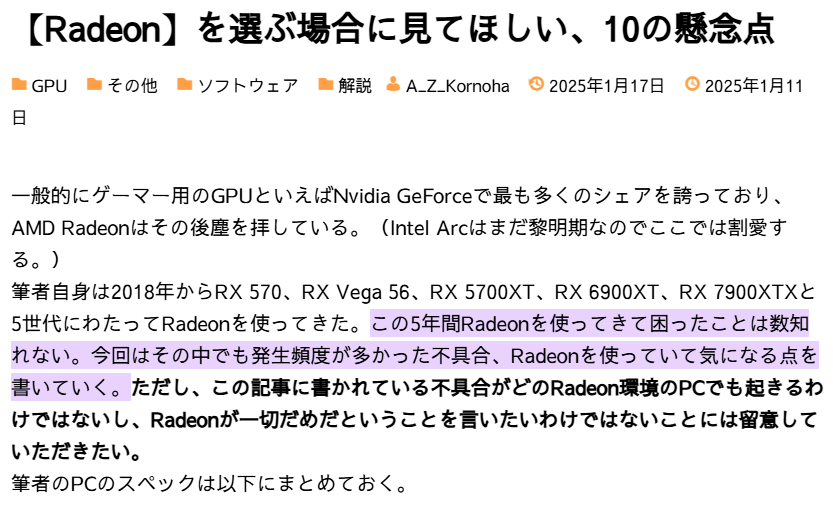
ここ最近GeForceが高いから「スペックの割に安いRadeonに挑戦してみよう」って考えてる方におすすめな記事があった
➡ tech.casteria.net/others/wat…
4つ目「CUDAをそのまま使えない」
9つ目「Radeonの情報量の少なさ」
個人的には以上2つがいつも困る(= ベンチ一式完走させるのに一苦労)
1
5
997

31 Oct 2024
Technically our export engine is a webgl video player. We use VideoDecoder to create video frames and paint them on canvas .
It allows us to play video at up to ~4x speed and still capture every frame
But our „export player” cuts a lot of corners, for example it is able to only play forward and is not able to seek to a given timestamp as we always play frame by frame when exporting.
It also only works with one specific codec that is used by our recording engine.
It’s because we have to demux binary data and doing it while supporting multiple codecs and with seeking seemed like quite an enormous task
82

Using WebCodexs API because FFmpeg.js doesn't fulfill the requirement of web encoder/decoder APIs.
Please pin Hog on a Log.
<!DOCTYPE html>
<html>
<head>
<meta charset="UTF-8">
<title>Video Transcoder using WebCodecs API</title>
<style>
body { font-family: Arial, sans-serif; margin: 20px; }
#progress { display: none; }
#download-link { display: none; margin-top: 20px; }
</style>
</head>
<body>
<h1>Video Transcoder</h1>
<input type="file" id="file-input" accept="video/*"><br><br>
<video id="input-video" controls style="max-width: 100%;"></video>
<br><br>
<button id="transcode-button">Transcode to MP4</button>
<br><br>
<progress id="progress" value="0" max="100"></progress>
<br><br>
<a id="download-link" href="#">Download Transcoded Video</a>
<script>
const fileInput = document.getElementById('file-input');
const transcodeButton = document.getElementById('transcode-button');
const progressBar = document.getElementById('progress');
const downloadLink = document.getElementById('download-link');
const inputVideo = document.getElementById('input-video');
let mediaData = [];
let videoReader;
fileInput.addEventListener('change', async () => {
const file = fileInput.files[0];
if (file) {
inputVideo.src = URL.createObjectURL(file);
}
});
transcodeButton.addEventListener('click', async () => {
const file = fileInput.files[0];
if (!file) {
alert('Please select a video file to transcode.');
return;
}
progressBar.style.display = 'block';
progressBar.value = 0;
mediaData = [];
// Decode and Encode Video
try {
await transcodeVideo(file);
} catch (error) {
console.error('Transcoding failed:', error);
alert('Transcoding failed. See console for details.');
}
progressBar.style.display = 'none';
});
async function transcodeVideo(file) {
// Create a FileReader to read the file as an ArrayBuffer
const arrayBuffer = await file.arrayBuffer();
// Create a MediaSource to play the video
const mediaSource = new MediaSource();
inputVideo.src = URL.createObjectURL(mediaSource);
mediaSource.addEventListener('sourceopen', async () => {
const sourceBuffer = mediaSource.addSourceBuffer('video/webm; codecs="vp8, vorbis"');
sourceBuffer.appendBuffer(new Uint8Array(arrayBuffer));
sourceBuffer.addEventListener('updateend', () => {
mediaSource.endOfStream();
});
});
await inputVideo.play();
// Set up VideoDecoder and VideoEncoder
const decoder = new VideoDecoder({
output: handleDecodedFrame,
error: (e) => console.error(e),
});
const encoderConfig = {
codec: 'avc1.42E01E', // H.264 codec
width: inputVideo.videoWidth,
height: inputVideo.videoHeight,
bitrate: 2_000_000, // Adjust as needed
framerate: 30, // Adjust as needed
};
const encoder = new VideoEncoder({
output: handleEncodedChunk,
error: (e) => console.error(e),
});
encoder.configure(encoderConfig);
const track = inputVideo.captureStream().getVideoTracks()[0];
const processor = new MediaStreamTrackProcessor({ track });
const reader = processor.readable.getReader();
let frameCount = 0;
while (true) {
const result = await reader.read();
if (result.done) break;
const frame = result.value;
decoder.decode(frame);
frame.close();
frameCount ;
progressBar.value = (frameCount / (inputVideo.duration * encoderConfig.framerate)) * 100;
}
decoder.close();
encoder.close();
// Create a Blob from the encoded data
const mp4Blob = new Blob(mediaData, { type: 'video/mp4' });
const url = URL.createObjectURL(mp4Blob);
downloadLink.href = url;
downloadLink.download = 'output.mp4';
downloadLink.style.display = 'block';
downloadLink.textContent = 'Download Transcoded Video';
}
function handleDecodedFrame(videoFrame) {
// For simplicity, directly encode the decoded frame
encoder.encode(videoFrame);
videoFrame.close();
}
function handleEncodedChunk(chunk) {
mediaData.push(chunk.byteLength ? chunk.data : new Uint8Array());
}
</script>
</body>
</html>
2
20
8,848
18 Aug 2024
No, it is a demuxer written in TypeScript!
It takes out encoded video samples (like a H.264 chunk) which can be decoded with VideoDecoder, it is a global API available in browsers
So no WebAssembly is needed
2
230
13 Aug 2024
The difficulty of WebCodecs:
- To decode a video, you need to first manually parse the binary format of the container to extract the audio and video tracks
- You need to tell the VideoDecoder() the exact codec, e.g. This is a "hvc1.2.4.L150.b0" video and a "mp4a.40.02" audio track. Some like "vp8" are easy, but h264, h265, av1, aac, and vp9, all have subvariants that are meticulous to parse from their separate binary format
- Byte slices of frames need to be calculated, and metadata like isKeyframe and timestamp needs to be provided as well, which is also codec-specific
The best library that can do most of this is mp4box.js, but it works only for ISOBMFF containers (aka ".mp4"s) and predates WebCodecs.
If you deal with a Matroska container (aka ".webm") instead, the implementation of this will be completely different! And on this side, existing libraries are less strong
Yes, there are plenty of WebCodec demos out there that work with specific containers and codecs
But if you are not a multimedia nerd and just want to "decode a video with WebCodecs" - you have no chance of doing it generically because it means implementing all the available containers and codecs
I've been going totally mad building this with 0 dependencies, but I finally see the horizon. LFG 🧑🏼💻
10
2
119
11,859

Wiedergabe reicht aus: #MacOS-Lücke ermöglicht Schadcode-Attacke per Video #Sicherheitslücke #Videodecoder glm.io/187489?s
1
10
11
3,342

27 Dec 2023
D350 4K H.265/H.264 Decoder...
Professional 4K Video Decoder
#Kiloview #video #HDMI #SDI #production #postproduction #livestreaming #liveproduction #nditechnology #extendedport #powerful #flexible #recording #transmission #remotetransmission #remote #Decoder #videodecoder

3
49


1 Jun 2023
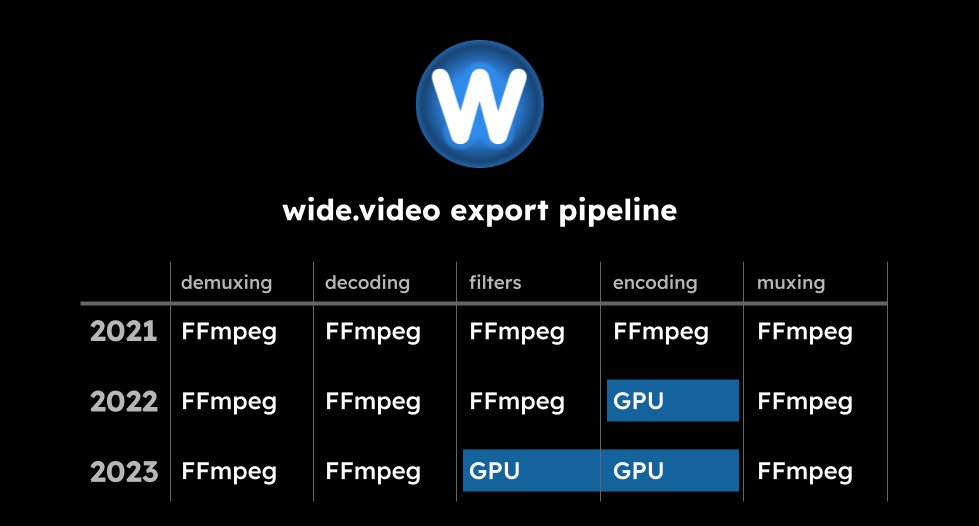
Many steps in the process. Luckily, the heaviest ones can already be GPU accelarted in browser: decoding=VideoDecoder, filters=WebGL, encoding=VideoEncoder. Theoretically, you can avoid ffmpeg completely or use it as a fallback like we do

2
118

In MP4 H264, the avcC box defines an array of SPS and PPS. How do you know which one to use for each mdat? I can't find where the mapping is. There's only 1 entry in the files I've seen but VideoDecoder gives a SPS and PPS for every key frame which I discard right now.
1
4
8,354