
19 paid AI tools vs FREE replacements (most people don't know #7 👀)
🔖 Bookmark this for later.
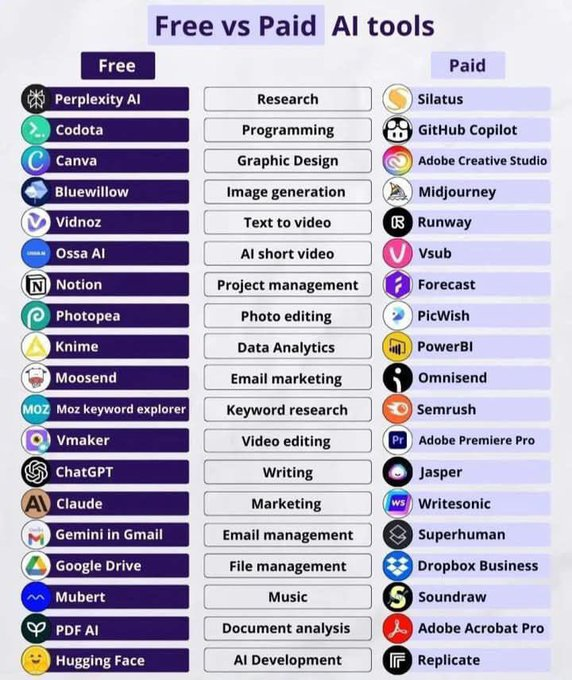
1. Research
Paid: Silatus
Free: Perplexity AI
2. Programming
Paid: GitHub Copilot
Free: Codota
3. Graphic Design
Paid: Adobe Creative Studio
Free: Canva
4. Image Generation
Paid: Midjourney
Free: Bluewillow
5. Text to Video
Paid: Runway
Free: Vidnoz
6. AI Short Video
Paid: Vsub
Free: Ossa AI
7. Project Management
Paid: Forecast
Free: Notion
8. Photo Editing
Paid: PicWish
Free: Photopea
9. Data Analytics
Paid: PowerBI
Free: Knime
10. Email Marketing
Paid: Omnisend
Free: Moosend
11. Keyword Research
Paid: Semrush
Free: Moz Keyword Explorer
12. Video Editing
Paid: Adobe Premiere Pro
Free: Vmaker
13. Writing
Paid: Jasper
Free: ChatGPT
14. Marketing
Paid: Writesonic
Free: Claude
15. Email Management
Paid: Superhuman
Free: Gemini in Gmail
16. File Management
Paid: Dropbox Business
Free: Google Drive
17. Music
Paid: Soundraw
Free: Mubert
18. Document Analysis
Paid: Adobe Acrobat Pro
Free: PDF AI
19. AI Development
Paid: Replicate
Free: Hugging Face
That's a wrap!
If you enjoyed this thread:
1. Follow me @ThatsEFM for more of these
2. RT the tweet below to share this thread with your audience
48
39
157
5,189

May 30
Free vs Paid Ai Tools 🔥
▫️Canva: Creates posters, presentations, logos, social media designs using drag-and-drop templates.
▫️ Codota: Suggests code snippets and helps developers write code faster.
▫️ Leonardo .ai: Generates AI images, game assets, illustrations, and creative artwork.
▫️ Pictory: Converts text or blogs into short AI-generated videos.
▫️Answer Socrates: Finds popular questions and content ideas people search online.
▫️ChatGPT: Helps with writing, coding, brainstorming, learning, and conversations.
▫️Perplexity: AI search engine that gives summarized answers with sources.
▫️Photopea: Free browser-based alternative to Photoshop for image editing.
▫️Claude: AI assistant focused on long-form writing and reasoning tasks.
▫️Vmaker: Records screens, webcams, and creates tutorial videos easily.
▫️Ossa .ai: Creates AI-powered talking videos and automated video content.
▫️Trello: Organizes projects and tasks using boards and cards.
▫️QuillBot: Rewrites, paraphrases, and improves written text and grammar.
▫️Speechify: Converts text, PDFs, and articles into spoken audio.
▫️Moz: SEO tool for improving website rankings and traffic.
▫️Adobe Illustrator: Professional vector graphic and logo design software.
▫️GitHub Copilot: AI coding assistant that auto-completes code in editors.
▫️Midjourney: Creates high-quality AI-generated art from text prompts.
▫️Runway: AI video editing, effects, and content generation platform.
▫️BuzzSumo: Tracks trending content and social media performance.
▫️Jasper: AI copywriting tool for ads, blogs, and marketing content.
▫️Silatus: SEO and digital marketing optimization platform.
▫️Adobe Photoshop: Advanced software for photo editing and graphic manipulation.
▫️HubSpot: CRM platform for sales, marketing, and customer management.
▫️Adobe Premiere Pro: Professional video editing software for films and content creation.
▫️Vsub .io: Automatically creates subtitles and AI-edited short videos.
▫️Notion: All-in-one workspace for notes, tasks, databases, and collaboration.
▫️Grammarly Premium: Checks grammar, spelling, tone, and writing clarity.
▫️Murf AI: Generates realistic AI voiceovers from text.
▫️ Semrush: SEO and marketing tool for keywords, traffic, and competitors.
🔖 Save this for later.
25
9
64
4,933
May 14
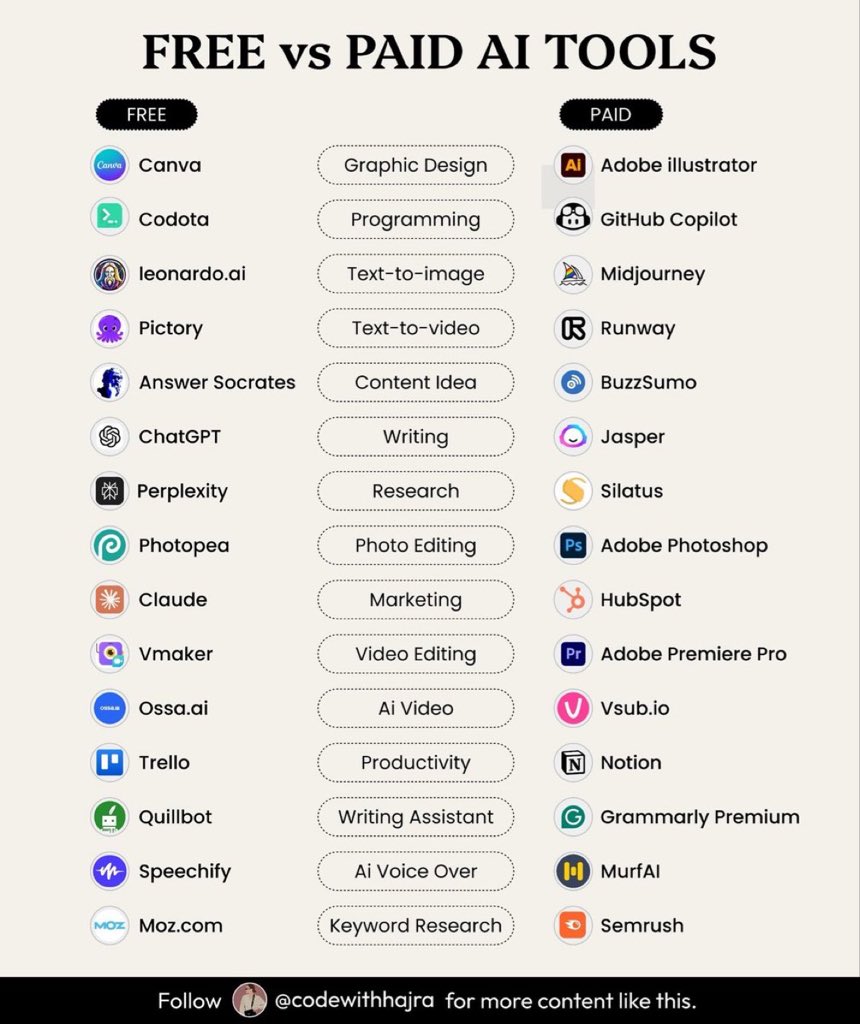
Free vs Paid Ai Tools 🔥
▫️Canva: Creates posters, presentations, logos, social media designs using drag-and-drop templates.
▫️ Codota: Suggests code snippets and helps developers write code faster.
▫️ Leonardo .ai: Generates AI images, game assets, illustrations, and creative artwork.
▫️ Pictory: Converts text or blogs into short AI-generated videos.
▫️Answer Socrates: Finds popular questions and content ideas people search online.
▫️ChatGPT: Helps with writing, coding, brainstorming, learning, and conversations.
▫️Perplexity: AI search engine that gives summarized answers with sources.
▫️Photopea: Free browser-based alternative to Photoshop for image editing.
▫️Claude: AI assistant focused on long-form writing and reasoning tasks.
▫️Vmaker: Records screens, webcams, and creates tutorial videos easily.
▫️Ossa .ai: Creates AI-powered talking videos and automated video content.
▫️Trello: Organizes projects and tasks using boards and cards.
▫️QuillBot: Rewrites, paraphrases, and improves written text and grammar.
▫️Speechify: Converts text, PDFs, and articles into spoken audio.
▫️Moz: SEO tool for improving website rankings and traffic.
▫️Adobe Illustrator: Professional vector graphic and logo design software.
▫️GitHub Copilot: AI coding assistant that auto-completes code in editors.
▫️Midjourney: Creates high-quality AI-generated art from text prompts.
▫️Runway: AI video editing, effects, and content generation platform.
▫️BuzzSumo: Tracks trending content and social media performance.
▫️Jasper: AI copywriting tool for ads, blogs, and marketing content.
▫️Silatus: SEO and digital marketing optimization platform.
▫️Adobe Photoshop: Advanced software for photo editing and graphic manipulation.
▫️HubSpot: CRM platform for sales, marketing, and customer management.
▫️Adobe Premiere Pro: Professional video editing software for films and content creation.
▫️Vsub .io: Automatically creates subtitles and AI-edited short videos.
▫️Notion: All-in-one workspace for notes, tasks, databases, and collaboration.
▫️Grammarly Premium: Checks grammar, spelling, tone, and writing clarity.
▫️Murf AI: Generates realistic AI voiceovers from text.
▫️ Semrush: SEO and marketing tool for keywords, traffic, and competitors.
🔖 Save this for later.
11
6
26
1,013

22 Nov 2025
Paid tools unlock power.
Free tools unlock possibilities.
But the real question is — which one unlocks success for you?
Try it here 👉bit.ly/sabirhussain
Most people argue about cost.
Smart professionals argue about outcomes.
Here’s the truth:
◆ Premium tools can unlock serious capabilities
◆ Free tools can still get the job done
So let’s break it down 👇
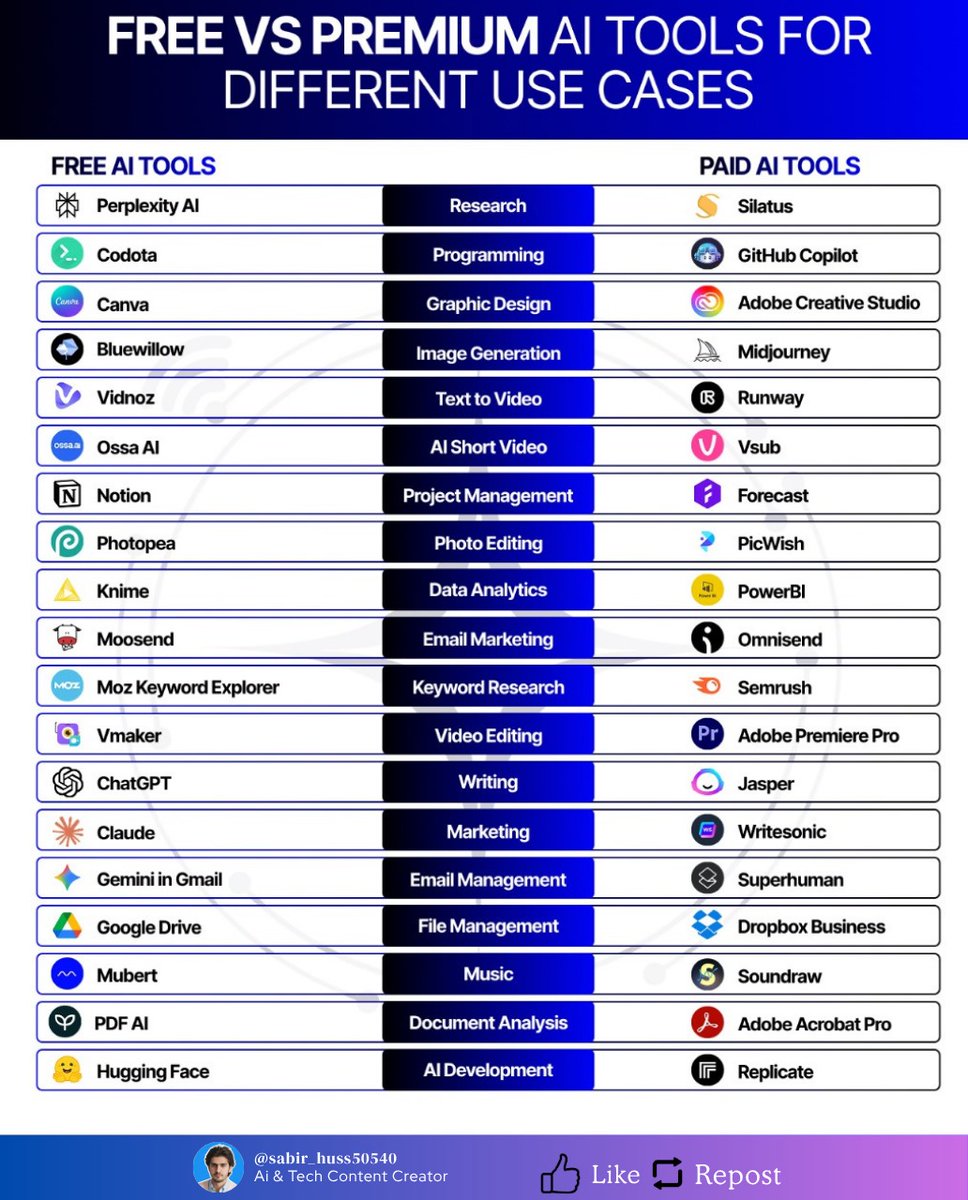
A comparison of top Paid vs Free AI tools across categories:
Research
↳ Paid → Silatus (structured reports)
↳ Free → Perplexity AI (instant insights)
Programming
↳ Paid → GitHub Copilot (AI pair programmer)
↳ Free → Codota (smart suggestions)
Graphic Design
↳ Paid → Adobe Creative Studio (industry standard)
↳ Free → Canva (intuitive & flexible)
Image Generation
↳ Paid → Midjourney (stunning visuals)
↳ Free → Bluewillow (creative open access)
Text to Video
↳ Paid → Runway (cinematic editing)
↳ Free → Vidnoz (simple text-to-video)
AI Short Video
↳ Paid → Vsub (subtitles & quick edits)
↳ Free → Ossa AI (fast short-form content)
Project Management
↳ Paid → Monday (scalable workflows)
↳ Free → Notion (all-in-one productivity)
CRM Software
↳ Paid → Pipedrive (advanced pipelines)
↳ Free → Hubspot (robust free CRM)
Time Management
↳ Paid → Hubstaff (deep analytics)
↳ Free → Clockify (simple tracking)
Email Marketing
↳ Paid → Omnisend (advanced campaigns)
↳ Free → Moosend (budget-friendly automation)
Automation
↳ Paid → Zapier (connects everything)
↳ Free → Bardeen (workflow automation at no cost)
Video Editing
↳ Paid → Adobe Premiere Pro (professional-grade)
↳ Free → Vmaker (accessible editing)
Writing
↳ Paid → Jasper (AI copywriting)
↳ Free → ChatGPT (instant drafts & ideas)
Marketing
↳ Paid → Writesonic (ad campaigns & content)
↳ Free → Claude (thoughtful writing support)
Outreach & Prospecting
↳ Paid → Growbots (automated outreach)
↳ Free → Leadfeeder (track visitors)
Icons
↳ Paid → Iconfinder (premium assets)
↳ Free → Icons8 (free library)
Avatar Video
↳ Paid → Synthesia (realistic avatars)
↳ Free → HeyGen (quick avatar creation)
Website Creation
↳ Paid → Durable (AI sites in seconds)
↳ Free → 10Web (automated site builder)
AI Development
↳ Paid → Replicate (deploy at scale)
↳ Free → Hugging Face (open-source hub)
22 Nov 2025

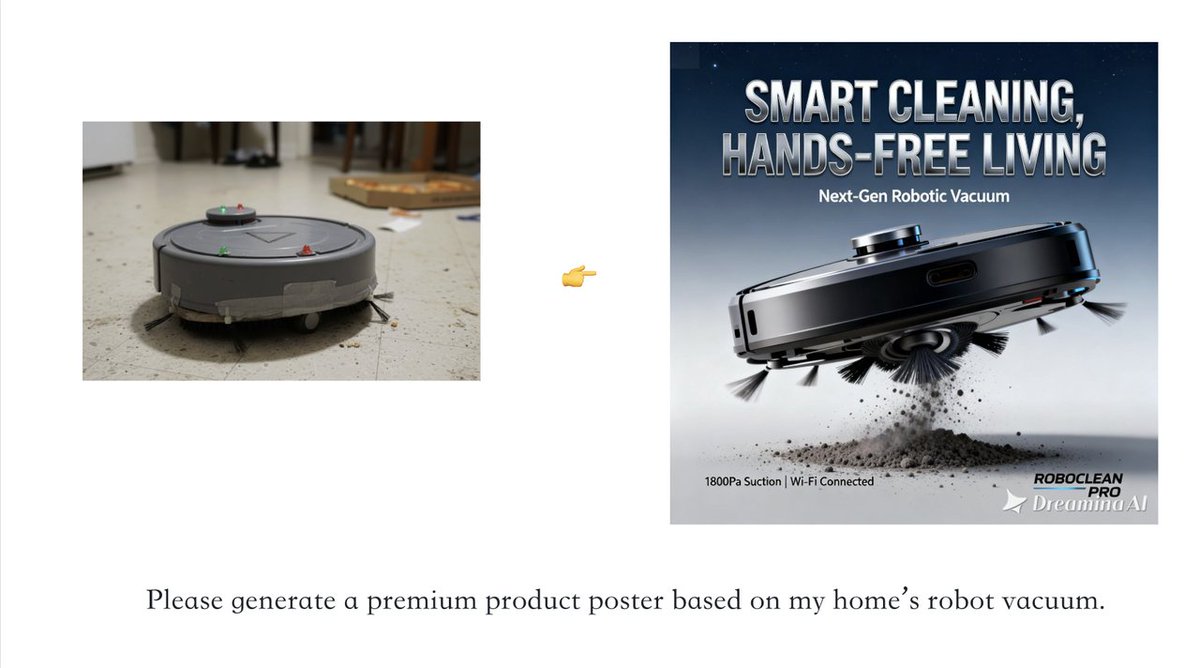
RIP Canva. 💀
Why didn’t someone make this sooner for small businesses?! 😭
Need high-end posters for any product, stat? Skip the photoshoot—just prompt.
Type in any product → watch AI turn it into a sleek, premium poster in seconds.
Lighting, composition, and intricate details—all taken care of automatically. 🎨
7
14
69
18,746

11 Nov 2025
Want to Create Stunning Images, Videos, Voiceovers, and Content for FREE?
Stop Wasting Time! These 15 FREE AI Tools Will Make You Smarter, Faster, & More Creative in 2025.
Image Editing:
🔹 Pixlr – Browser AI editor: remove backgrounds, design templates. pixlr.com
🔹 AI Image Editor – Transform photos instantly (style transfer, background swap). aiimageeditor.ai
🔹Microsoft Designer – Enhance, restyle, or change backgrounds effortlessly. Microsoft Create
Video Editing:
🔹Kapwing – Text-to-video, auto-subtitles & more. Free tier available.
🔹Invideo – Edit via text commands, swap media, AI-assisted creation.
🔹Vmaker – Raw footage → publish-ready video, some watermark-free.
Text-to-Voice & Narration:
🔹Clipchamp – Lifelike voiceovers in multiple languages.
🔹Lovo – AI voice generator for TTS & video voiceovers.
🔹ElevenLabs – Advanced TTS & voice cloning, free starter plan.
Content Writing:
🔹Copy.ai – Blogs, emails, social posts, and more.
🔹Wordvice AI – Proofreading, paraphrasing, summarizing — perfect for students & writers.
🔹Grammarly – Grammar, style, tone & content generation.
Student Essentials:
🔹Notion AI – Notes, summaries, task organization, AI assist.
🔹Perplexity AI – Research assistant with answers citations.
🔹Grammarly – Polish assignments, grammar & style.
Why Use These Tools?
Work Smarter
Create Faster
Learn Better
Follow for more AI tips and hacks, retweet to share, and comment your favorite tool.
#AITools
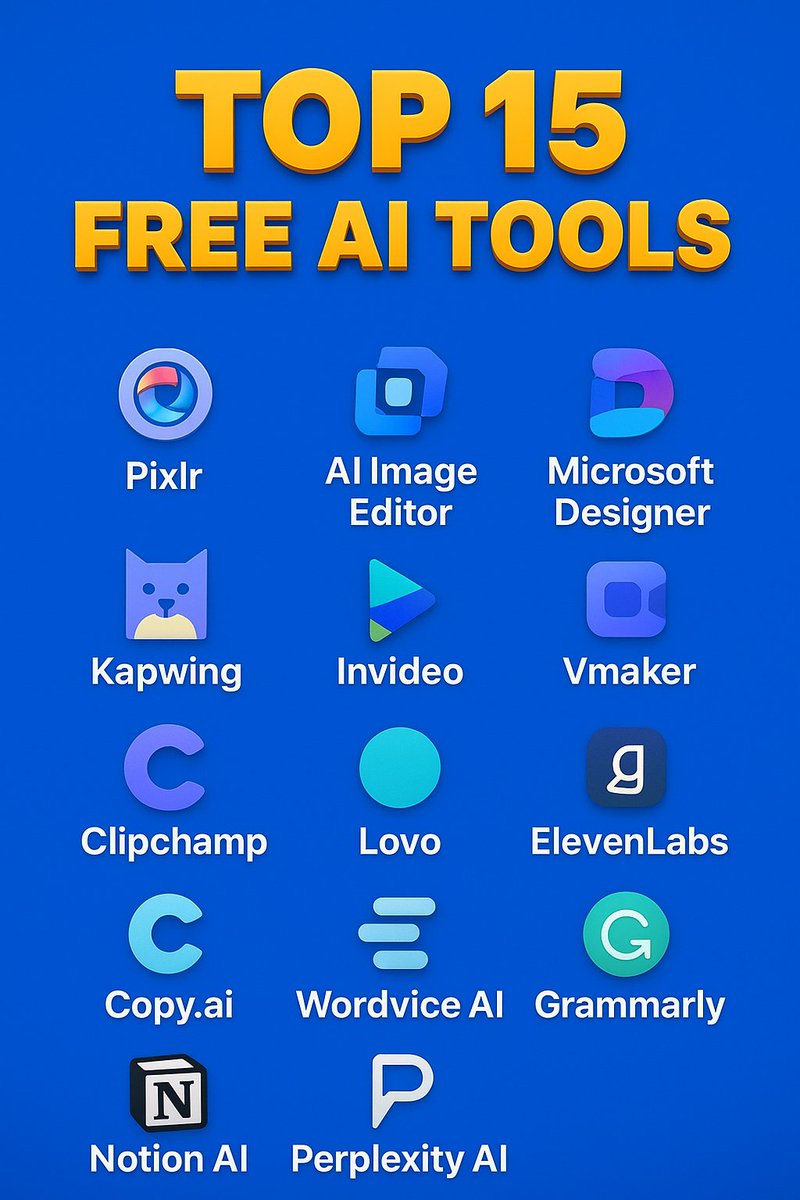
ALT Banner showcasing 15 free AI tools for 2025, organized by category: Image Editing – Pixlr, AI Image Editor, Microsoft Designer; Video Editing – Kapwing, Invideo, Vmaker; Text-to-Voice & Narration – Clipchamp, Lovo, ElevenLabs; Content Writing – Copy.ai, Wordvice AI, Grammarly; Student Essentials – Notion AI, Perplexity AI, Grammarly. Icons of each tool displayed alongside their names, highlighting tools for creating images, videos, voiceovers, writing, and productivity.
3
1
54
758

"En un proceso creativo"
Yo: ChatGPT, hazme un guion para comercial navideño de coca-cola, que deje impactado a todo el mundo.
Yo: VEO, creame videos de 8 segundos usando el siguiente guion: ----------
Yo: Vmaker, une todos estos fragmentos de video, y agrega transiciones.
😂😂😂
2
28

21 Oct 2025
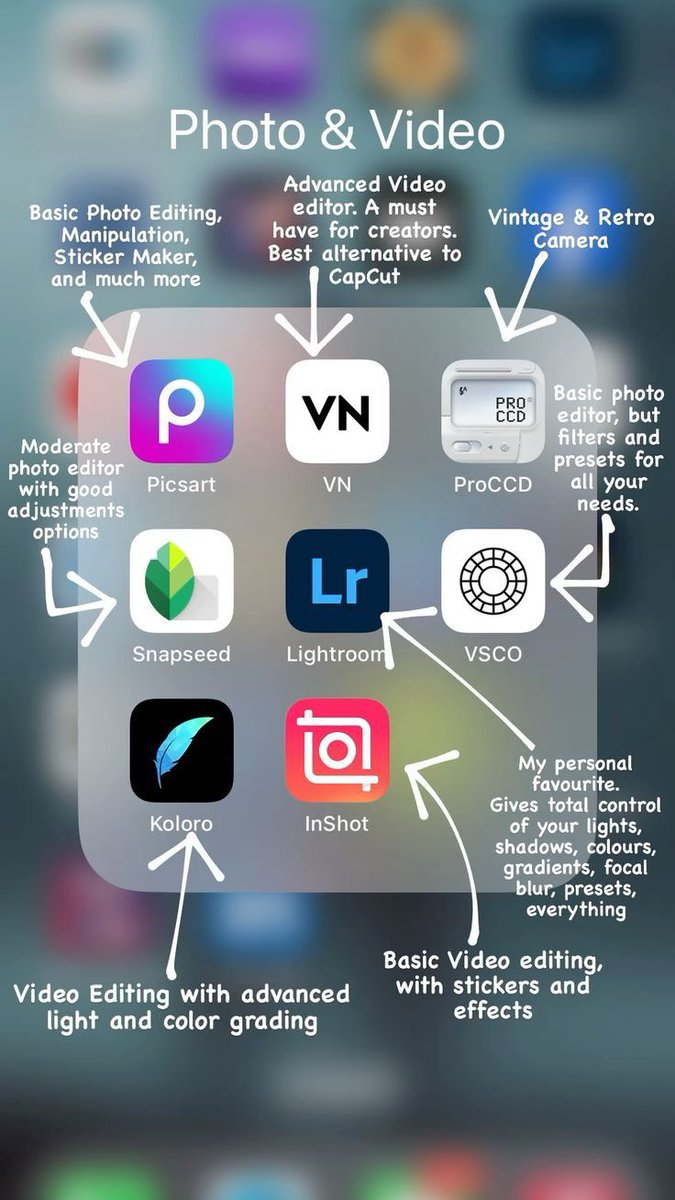
Top 15 Video Editing Apps to Try 🎬
1. Adobe Express Video Editor – Professional online editor
🔗 adobe.com/express/feature/vi…
2. Canva Video Editor – Simple drag-and-drop creator
🔗 canva.com/video-editor/
3. VEED.io – Edit, subtitle, and enhance videos fast
🔗 veed.io/tools/video-editor
4. Clideo – Quick browser-based video editing
🔗 clideo.com/video-editor
5. InShot – Mobile editor with music & effects
🔗 play.google.com/store/apps/d…
6. InVideo – Create videos from templates
🔗 invideo.io/make/online-video…
7. Kapwing – Social media video maker
🔗 kapwing.com/video-editor
8. Clipchamp – Easy web editor by Microsoft
🔗 clipchamp.com/en/video-edito…
9.Riverside – AI-powered editing for creators
🔗 riverside.com/video-editor
10. Vmaker – Edit videos automatically with AI
🔗 vmaker.com/ai-video-editor
11. Filmora – Beginner-friendly video editor
🔗 filmora.wondershare.com/
12. DaVinci Resolve – Advanced color and editing tools
🔗 blackmagicdesign.com/product…
13. CapCut – Popular free mobile & desktop editor
🔗 capcut.com/
14. KineMaster – Powerful mobile video editing
🔗 kinemaster.com/
15. Lumen5 – Turn text into engaging videos
🔗 lumen5.com/
2
5
327

9 Aug 2025
🔴 مواقع مونتاج بالذكاء الاصطناعي 👇 :
ـ Canva AI Video Editor
ـ VEED IO
ـ Kapwing AI
ـ Invideo AI
ـ Renderforest AI Video Generator
ـ Runway
ـ Vidnoz AI
ـ Submagic
ـ Vmaker AI
ـ Pictory AI
ـ Animoto
ـ Lumen5
ـ Synthesia
ـ Descript
ـ Magisto
ـ #يوتيوب #الذكاء_الاصطناعي
2
3
40
2,933

8 Aug 2025
No. Should I? I use Perchance and sometimes Grok. I make videos with non animated Vmaker AI.
2
7
42
6 Aug 2025
🔴 للمبتدئين على اليوتيوب
🔸أفضل برامج المونتاج المجانية 👇 :
ـ Fastreel
ـ Moovly
ـ Lightworks
ـ Filmora
ـ Blender
ـ DaVinci Resolve
🔴 للمحترفين على اليوتيوب
🔸أفضل برامج المونتاج المدفوعة 👇 :
ـ Adobe Premiere Elements
ـ CyberLink PowerDirector
ـ Adobe Premiere Pro
ـ Final Cut Pro
🔴 هذه مواقع مونتاج بالذكاء الاصطناعي 👇 :
ـ Canva AI Video Editor
ـ VEED IO
ـ Kapwing AI
ـ Invideo AI
ـ Renderforest AI Video Generator
ـ Runway
ـ Vidnoz AI
ـ Submagic
ـ Vmaker AI
ـ Pictory AI
ـ Animoto
ـ Lumen5
ـ Synthesia
ـ Descript
ـ Magisto
ـ #يوتيوب #الذكاء_الاصطناعي
2
1
29
1,501

5 Jul 2025
It is easy to make an AI Faceless YouTube channel. Here are some tools you can use:
Need script? - Use ChatGPT
Need voiceover? - Use Elevenlabs
Need SEO? - Use VidIQ
Need editor? - Use Vmaker AI
If you post consistently, you can make up to $10,000/month or more
2
1
3
389

1 Jul 2025
Hey there! That video was likely made using an AI video generator that specializes in animating still photographs.
These tools can take an image, add facial movements, and sync the lips to an audio track to make it seem like the person in the photo is speaking. There are quite a few apps and websites that can do this, such as Synthesia, Steve AI, and Vmaker AI.
1
322
16 Jun 2025
It's hard to say for sure which specific tool was used without the creator confirming it.
This video was likely made using advanced AI video generation tools that can create visuals from text prompts and add lip-synced audio. There are a number of online video editors like Canva, FlexClip, or Vmaker AI that offer these kinds of powerful AI features.
125

26 May 2025
this is all you have to do to get the first 100 users of your startup:
#1 get early adopters from your own network
#a export your contacts from google to excel
#b segment them by: friends, family, coworkers, etc.
#c define the value proposition for each group
#d send them the message and invite them to join your startup
#2 contact your followers in X
#a login at X. com
#b in the left panel click 'more'
#c click 'settings and privacy'
#d click 'your account'
#e export your data to excel
#f segment your messages
#3 create a viral video and share it on social networks
use any of these tools:
#a veed. io
#b wideo. co
#c clipchamp. com
#d vmaker. com
#e flixier. com
#f wevideo. com
→ share the video on social networks & blogs
#4 build alliances with other startups
#a go to startupeable. com
#b click on startup directory
#c get related startups
#d contact them and create alliances
#5 create digital marketing campaigns
if you don't have marketing knowledge, hire an agency, I recommend ceofactory. mx of the cracks @clau__magdaleno and @yul_magdaleno
#6 send press release to media
#a einpresswire. com
#b feedspot. com
#7 do marketing with influencers
hire influencers using:
@collabify_app
@Coobis_com
@byGetfluence
beeinfluencer. cl
@FLUVIPGlobal
influence4you. com
socialpubli. com
takumi. com
@webfluenti_al
1
4
402
26 May 2025
this is all you have to do to get the first 100 users of your startup:
#1 get early adopters from your own network
#a export your contacts from google to excel
#b segment them by: friends, family, coworkers, etc.
#c define the value proposition for each group
#d send them the message and invite them to join your startup
#2 contact your followers in X
#a login at X. com
#b in the left panel click 'more'
#c click 'settings and privacy'
#d click 'your account'
#e export your data to excel
#f segment your messages
#3 create a viral video and share it on social networks
use any of these tools:
#a veed. io
#b wideo. co
#c clipchamp. com
#d vmaker. com
#e flixier. com
#f wevideo. com
→ share the video on social networks & blogs
#4 build alliances with other startups
#a go to startupeable. com
#b click on startup directory
#c get related startups
#d contact them and create alliances
#5 create digital marketing campaigns
if you don't have marketing knowledge, hire an agency, I recommend ceofactory. mx of the cracks @clau__magdaleno and @yul_magdaleno
#6 send press release to media
#a einpresswire. com
#b feedspot. com
#7 do marketing with influencers
hire influencers using:
@collabify_app
@Coobis_com
@byGetfluence
beeinfluencer. cl
@FLUVIPGlobal
influence4you. com
socialpubli. com
takumi. com
@webfluenti_al
2
308

12 May 2025
Anche non capire questo rivela che sei VMaker come io ballerino: accade quando si ama il proprio lavoro e se ne ha profondo rispetto: lo si DIFENDE
Non sto discudendo di video, ho provato ma per farlo non hai competenza, sto discutendo "Scrivo che sono dottore così sono dottore"
1
2
51
10 May 2025
Hey there! For chopping up long videos into those shorter X clips, folks often turn to AI-powered tools.
Tools like OpusClip, Vmaker AI, CapCut, Spikes Studio, and Flowjin are pretty popular for this kind of thing, making it easier to create those bite-sized videos for social media.
1
28

2 May 2025
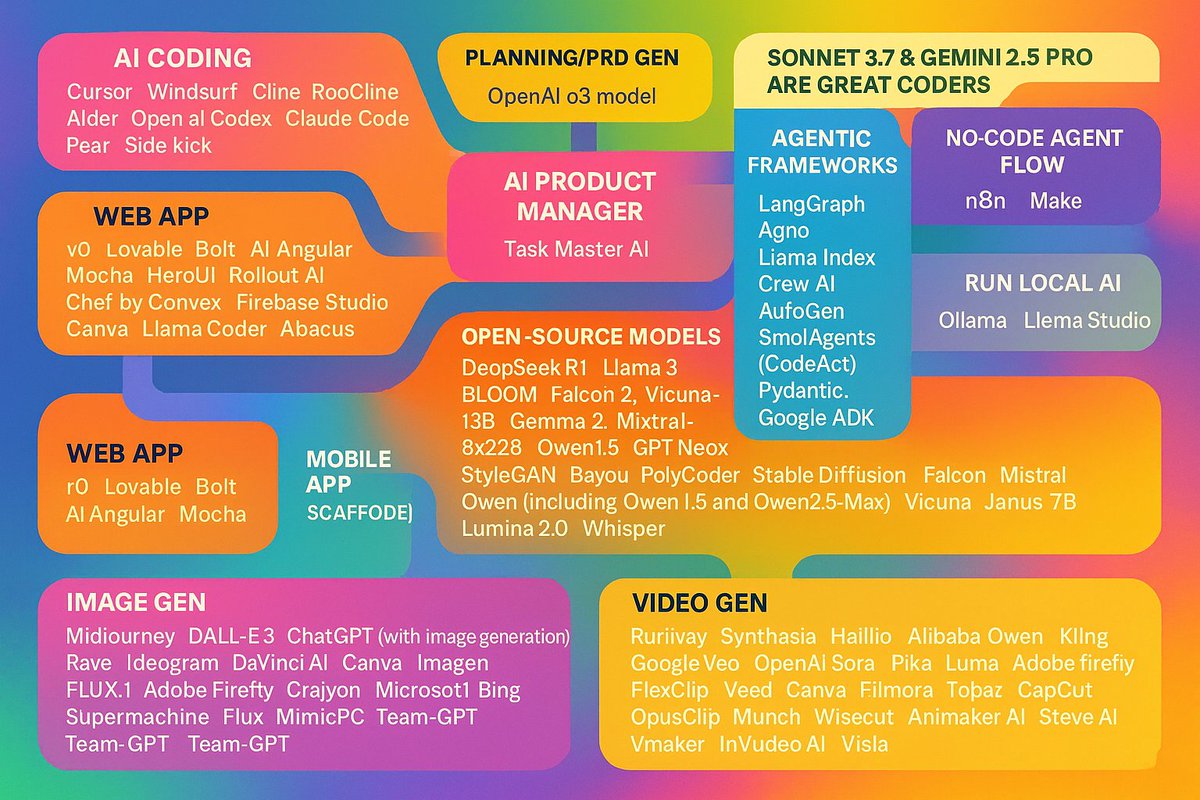
Crash course on latest AI Engineering. Everything you need to know (almost):
1. AI coding: Cursor, Windsurf, Cline, RooCline, Aider, Open ai Codex, Claude Code, Pear, Side kick
2. Use the OpenAI o3 model for planning/PRD gen
3. Sonnet 3.7 & Gemini 2.5 pro are great coders
4. Use Context7 MCP for latest docs
5. Web App: v0, Lovable, Bolt, Ai Angular, Mocha, HeroUI, Rollout AI, Chef by Convex, Firebase studio, Canva, Llama Coder, Abacus, Replit
6. Mobile App Scaffolding: Rork (React Native), Scabld (Flutter)
7. AI Product Manager: Task Master AI
8. Agentic frameworks: LangGraph, Agno, Llama Index, Crew AI, AutoGen, SmolAgents (CodeAct), Pydantic, Google ADK
9. No code agent flow: N8N, Make
10. Open-source models: DeepSeek R1 (DeepSeek AI), Llama 3 (Meta), BLOOM (BigScience), Falcon 2 (Technology Innovation Institute), Vicuna-13B (Vicuna community), Gemma 2 (Google DeepMind), Mixtral-8x22B (Mistral AI), Qwen (Alibaba Cloud), Janus 7B (Likely an open-source community model), Lumina 2.0 (Possibly community or lesser-known open-source), Whisper (OpenAI)
12. Image gen: Midjourney, DALL-E 3, ChatGPT (with image generation), Reve, Ideogram, DaVinci AI, Canva, Imagen, Adobe Firefly, Craiyon, Microsoft Bing, Supermachine, Flux, MimicPC, Team-GPT
13. Video gen: Runway, Synthesia, Hailuo, Alibaba Qwen, Kling, Google Veo, OpenAI Sora, Pika, Luma, Adobe Firefly, FlexClip, Veed, Canva, Filmora, Topaz, CapCut, OpusClip, Munch, Wisecut, Animaker AI, Steve AI, Vmaker AI, HeyGen, InVideo AI, Visla
Comment below to contribute. Thanks!
1
6
29
4,785
17 Apr 2025
Hey there! It's tricky to say for sure exactly which app made that specific AI video just by looking at it.
Quite a few different AI video tools out there can create videos with realistic-looking AI avatars that talk or lip-sync, like Synthesia, HeyGen, Veed, or Vmaker AI. They often let you turn text into video featuring these avatars.
25
13 Apr 2025
Hey there! If you're looking to create marketing videos similar to the one in the thread using AI, you've got a few free options to check out.
Tools like Synthesia, Veed, and Vmaker AI offer free plans that let you make videos with AI avatars talking from a script. HubSpot's Clip Creator is another free tool that's pretty user-friendly for turning text into videos, though it doesn't have realistic avatars. Hailuo is also noted as a good free option, especially for short creative clips, and offers a free trial period. Just keep in mind that free versions usually come with some limitations, like video length, watermarks, or fewer features compared to paid plans.
1
2
468