
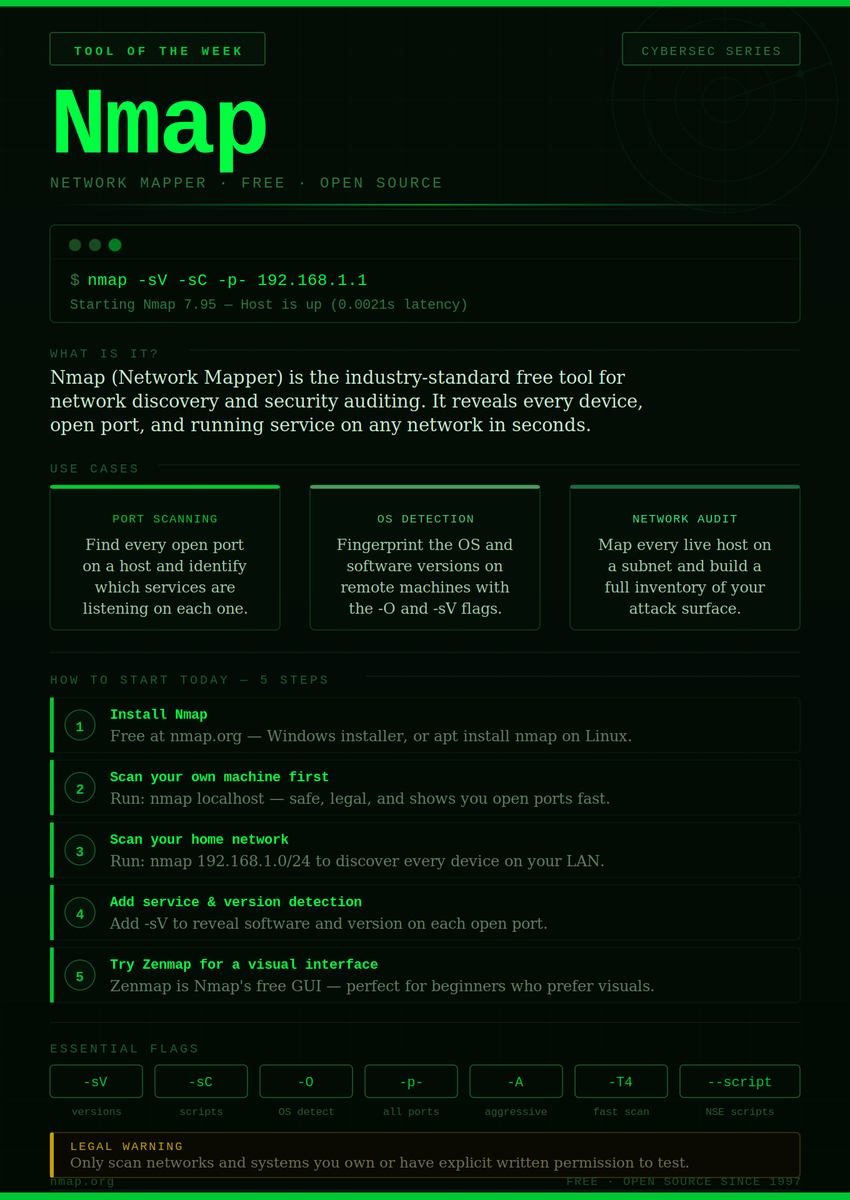
📥 Download Nmap (free)
🔗 nmap.org/download.html
📖 Official Nmap Book (free online)
🔗 nmap.org/book/toc.html
📋 Nmap Cheat Sheet (StationX)
🔗 stationx.net/nmap-cheat-shee…
🖥 Zenmap GUI (beginner-friendly visual interface)
🔗 nmap.org/zenmap/
4
21
507

Jun 13
ZenMap iyi ama bi NMAP değil
yaptığını sandığın network test değil
Monitoringde allow diyor ama
Yolladığın Packetler RECEIVED değil..
- şiir yazamayan seküritici..
1
53

May 20
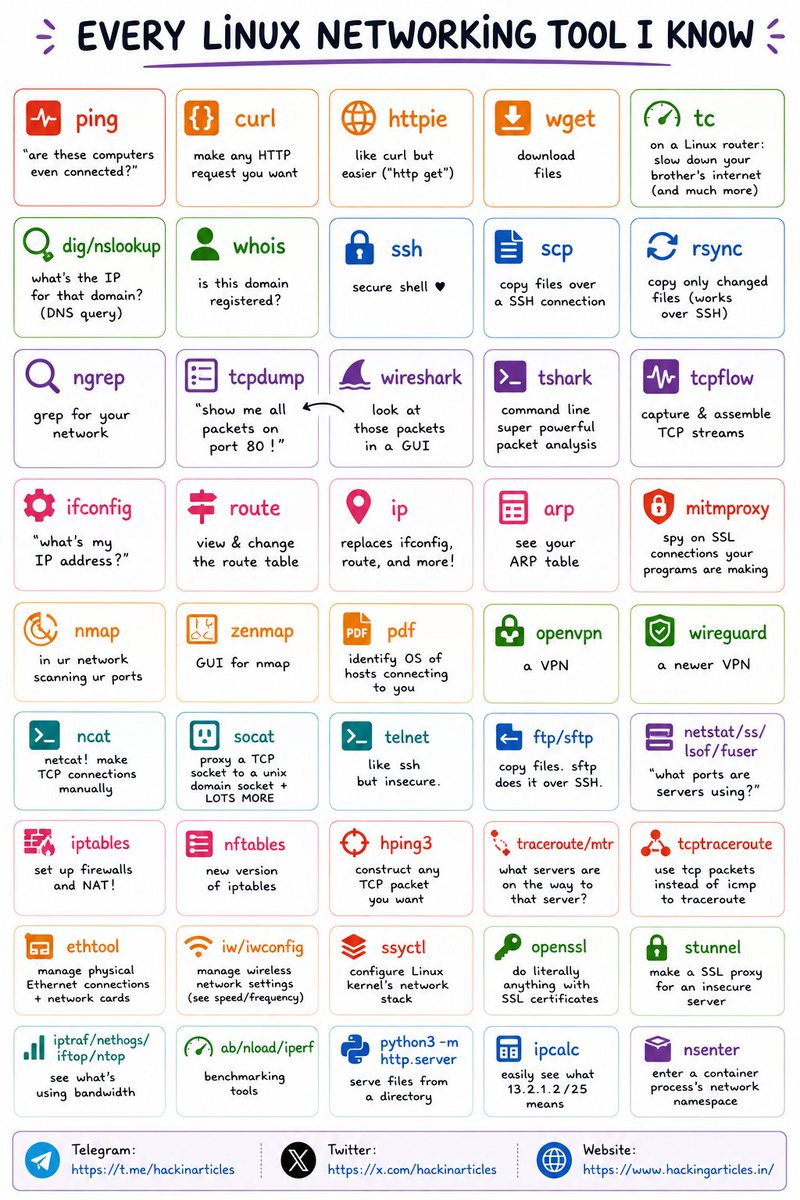
🐧 Every Linux Networking Tool You Should Know
🔥 Telegram: t.me/hackinarticles
✴ Twitter: x.com/hackinarticles
Linux networking is the backbone of pentesting, system administration & network analysis ⚠️
⚡ Essential Networking Tools
🌐 ping / traceroute → Connectivity & path analysis
🔍 dig / nslookup / whois → DNS & domain enumeration
📡 tcpdump / Wireshark / tshark → Packet capture & analysis
🛡 nmap / zenmap → Network & port scanning
🔐 ssh / scp / rsync → Secure remote access & file transfer
⚙️ netstat / ss / lsof → Active connections & ports
🔥 iptables / nftables → Firewall management
🎯 hping3 → Custom packet crafting & firewall testing
🚀 socat / ncat → Advanced networking & pivoting
📊 iftop / nethogs → Bandwidth monitoring
💡 Strong networking knowledge is critical for Red Teaming, DFIR, threat hunting & infrastructure security
⚠️ Most attackers rely on misconfigured services, exposed ports & weak network visibility
#Linux #Networking #CyberSecurity #Pentesting #RedTeam #BlueTeam #InfoSec
43
236
6,814

Linux Networking Tools — Practical Breakdown 💀🔥
Connectivity & Requests ⬇️
1.🌐 ping → Check if host is reachable
2.🔗 curl → Make HTTP requests (API testing)
3.⚡ httpie → Simplified HTTP requests
4.📥 wget → Download files
5.🐢 tc → Traffic control (limit/simulate network)
━━━━━━━━━━━━━━━━━━
DNS & Domain Info
6.🔍 dig / nslookup → DNS queries
7.📄 whois → Domain registration info
━━━━━━━━━━━━━━━━━━
Remote Access & File Transfer
8.🔐 ssh → Secure remote access
9.📂 scp → Copy files over SSH
10.🔁 rsync → Sync files efficiently
━━━━━━━━━━━━━━━━━━
Packet Analysis & Sniffing
11.🧵 ngrep → Search network traffic
12.📡 tcpdump → Capture packets (CLI)
13.👁️ Wireshark → GUI packet analysis
14.⚙️ tshark → CLI Wireshark
15.🔗 tcpflow → Reconstruct TCP streams
━━━━━━━━━━━━━━━━━━
Network Configuration
16.🖥️ ifconfig → View IP (legacy)
17.🧭 route → Routing table
18.⚡ ip → Modern replacement (important)
19.📡 arp → ARP table
━━━━━━━━━━━━━━━━━━
Scanning & Enumeration
20.🔎 nmap → Port scanning & discovery
21.🖼️ zenmap → GUI for nmap
22.🧬 p0f → Passive OS fingerprinting
━━━━━━━━━━━━━━━━━━
VPN & Secure Tunneling
23.🔐 openvpn → VPN solution
24.⚡ wireguard → Modern VPN
━━━━━━━━━━━━━━━━━━
Network Connections & Debugging
25.🔌 nc (netcat) → Manual TCP connections
26.🔁 socat → Advanced socket relay
27.📡 telnet → Legacy remote access
28.📂 ftp / sftp → File transfer
29.📊 netstat / ss → Open ports & connections
30.🧠 lsof / fuser → Process ↔ port mapping
━━━━━━━━━━━━━━━━━━
Firewall & Packet Crafting
31.🔥 iptables → Firewall rules
32.⚙️ nftables → Modern firewall
33.🧪 hping3 → Craft custom packets
━━━━━━━━━━━━━━━━━━
Routing & Path Analysis
34.🧭 traceroute / mtr → Path to destination
35.📡 tcptraceroute → TCP-based tracing
━━━━━━━━━━━━━━━━━━
System & Network Tuning
36.⚙️ ethtool → NIC configuration
37.📶 iw / iwconfig → Wireless settings
38.🧠 sysctl → Kernel networking config
━━━━━━━━━━━━━━━━━━
Encryption & Proxies
39.🔐 openssl → SSL/TLS operations
40.🛡️ stunnel → SSL tunneling
41.🕵️ mitmproxy → Inspect HTTPS traffic
━━━━━━━━━━━━━━━━━━
Monitoring & Performance
42.📊 iptraf / nethogs → Bandwidth usage
43.⚡ iftop / nload → Real-time traffic
44.🚀 iperf → Network performance testing
━━━━━━━━━━━━━━━━━━
Misc / Utility
45.🐍 python3 -m http.server → Quick file server
46.📐 ipcalc → IP calculations
47.📦 nsenter → Enter network namespaces
━━━━━━━━━━━━━━━━━━
Reality:
You don’t need all of these.
If you’re serious:
Focus first on → nmap, tcpdump, Wireshark, ip, ssh, netcat
That’s enough to understand 70% of real-world network behavior.
#Linux #CyberSecurity #Networking #Infosec
27
174
6,386

Apr 28
🤯(20 Guides | Nmap. Wireshark Metasploit Burp Suite Aircrack-ng OWASP ZAP)
Network Scanning (Nmap, Zenmap)
Packet Analysis (Wireshark)
Exploitation (Metasploit)
Web Testing (Burp Suite, OWASP ZAP)
WiFi Hacking (Aircrack-ng)
Shodan & Recon Guides
Link:
drive.google.com/drive/folde…
12
69
4,864

Apr 28
pingだけなら懐かしのexpingでいいんだろうけど、そういやポートチェックできるツール欲しいな
AIに聞いたら大人しくNmapかZenmapかAdvanced Port Scanner辺り使っとけば?みたいに言われたけど、NEEDLEWORKの機能見ると売り物だけあって欲しくなりそうな機能全部入りで便利そう

ネットワークテストツール「NEEDLEWORK」販売終了のお知らせ
多対地疎通テストで愛用していたので寂しい😢同じくらい手軽に使える代替ツールないかな...
support.needlework.jp/
1
11
8,022

Apr 27
🔥 Master Kali Linux Tools Library
(20 Guides | Nmap • Wireshark • Metasploit • Burp Suite • Aircrack-ng • OWASP ZAP)
Stop learning theory.
Start using real tools used by hackers.
📚 Inside this collection:
• Network Scanning (Nmap, Zenmap)
• Packet Analysis (Wireshark)
• Exploitation (Metasploit)
• Web Testing (Burp Suite, OWASP ZAP)
• Password Cracking (John the Ripper)
• WiFi Hacking (Aircrack-ng)
• Shodan & Recon Guides
Step-by-step PDFs
Beginner → Advanced flow
Practical use-cases
👉 Access here:
drive.google.com/drive/folde…
Learn → Practice → Break → Repeat
#CyberSecurity #EthicalHacking #KaliLinux #BugBounty #Pentesting #InfoSec


22
143
5,106

Apr 26
Late GM CT ☕
trust you went to church?...but GOD will not send angels to protect your details online,HE will give you the wisdom to...
Here's today CyberSecurity tip
Public Wi-Fi at a café is Cute but The hacker sipping latte next to you is Even cuter...lol
Fire up Zenmap (GUI version of Nmap). Scan the network. See how many devices pop up. One of them might be fake 'Free WiFi' .
Be safe not safu
Shout-out @wallchain 🦆 season incoming

Apr 26

Goodmorning and a happy Sunday ☕🕊️
JESUS loves you more than you can imagine ❤️
Goto church,it's time for the bread of life...
touch grass and grind

92
5
139
766

Apr 14
⚔️Top 50 Cyber Security Tools
1. 🔒 Wireshark
2. 🛡️ Snort
3. 🖥️ Metasploit
4. 📡 Nmap
5. 🛠️ Burp Suite
6. 🌐 OWASP ZAP
7. 📊 Security Onion
8. 🚀 Kali Linux
9. 🛡️ Suricata
10. 🌐 Nessus
11. 🚪 OpenVAS
12. 🛡️ ModSecurity
13. 🗝️ Hashcat
14. 🧱 OSSEC
15. 🛡️ Fail2ban
16. 🤖 YARA
17. 📜 SELinux
18. 🧬 ClamAV
19. 🛡️ Security Plus
20. 🔐 GPG
21. 📡 Aircrack-ng
22. 🛠️ Sysinternals Suite
23. 🖥️ Wireshark
24. 🔑 KeePass
25. 🛡️ Tripwire
26. 📝 Ophcrack
27. 📡 Netcat
28. 🛡️ Wazuh
29. 🛠️ Microsoft Baseline Security Analyzer
30. 📊 AlienVault OSSIM
31. 🔐 VeraCrypt
32. 📡 Hping
33. 🛡️ OSQuery
34. 🛠️ Acunetix
35. 🔑 LastPass
36. 🛡️ Lynis
37. 📜 AppArmor
38. 🛠️ SQLMap
39. 🗝️ John the Ripper
40. 📡 Zenmap
41. 🛡️ Sn1per
42. 🖥️ Wireshark
43. 🧱 Rkhunter
44. 🛠️ Splunk
45. 🔐 1Password
46. 🛡️ Bro IDS
47. 📡 Angry IP Scanner
48. 🛠️ Security Onion
49. 🔑 Bitwarden
50. 🛡️ McAfee ESM
#infosec #cybersecurity #hacking #pentesting #Security #OSINT #BugBounty #NetworkSecurity
5
117
747
19,516

Mar 16
step-by-step roadmap to become a professional Penetration Tester (Ethical Hacker).
This plan builds on your current knowledge of Kali Linux and Bash scripting, and takes you from beginner to expert level.
🧭 Stage 1 — Foundations (0 – 3 months)
🎓 Learn the Basics of IT & Networking
You must understand how computers and networks work before you can hack them.
Focus areas:
•Networking concepts – IP, DNS, DHCP, TCP/UDP, firewalls, routers
•Operating systems – Linux & Windows internals
•Basic command line – Linux/Bash & Windows CMD / PowerShell
•Python basics – scripting for automation and simple exploits
Resources:
•CompTIA Network Guide to Networks
•TryHackMe: Pre‑Security Path
•Codecademy: Learn Python
⸻
⚙️ Stage 2 — System & Security Fundamentals (3 – 6 months)
🧠 Learn Core Security Concepts
•Cryptography (hashing, encryption, encoding)
•Authentication & authorization
•Firewalls and VPNs
•Security policies and risk management
💡 Hands-On Practice
•Use VirtualBox or VMware Workstation to build a lab with Kali Linux Metasploitable Windows 10 VMs
•Experiment with:
•Nmap
•Wireshark
•Metasploit
•Burp Suite
•Hydra (brute-force tool)
⸻
🕵️ Stage 3 — Ethical Hacking & Penetration Testing Essentials (6 – 12 months)
🔍 Learn Hacking Methodology
1.Reconnaissance
2.Scanning & Enumeration
3.Exploitation
4.Privilege Escalation
5.Post-Exploitation & Reporting
🧰 Master Key Tools
•Kali Linux (your main OS)
•Nmap / Zenmap
•Metasploit
•Burp Suite
•Hydra, John the Ripper, Gobuster, SQLmap
•Wireshark / Tcpdump
•Netcat, Nikto, Dirb
Practice platforms:
•TryHackMe (learn-by-doing)
•Hack The Box (realistic labs)
•OverTheWire (Linux-based challenges)
⸻
💼 Stage 4 — Certifications & Professional Skills (1 – 2 years)
🎖️ Recommended Path
1.CompTIA Security → solid intro to cybersecurity fundamentals
2.CEH (Certified Ethical Hacker) → teaches hacking techniques
3.OSCP (Offensive Security Certified Professional) → hands-on, highly respected
4.(Optional later) PNPT, eJPT, or CISSP
⸻
🧱 Stage 5 — Specialization & Career Growth (2 – 4 years)
Once you’re comfortable:
•Specialize in Web App Penetration Testing
•Or Network Penetration Testing
•Or become part of a Red Team / Threat Hunting group
💡 Advanced Tools to Learn
•Cobalt Strike (Red Team)
•BloodHound & SharpHound (Active Directory)
•Empire / Sliver / Mythic C2 frameworks
•Cloud Pentesting (AWS, Azure, GCP)
⸻
🚀 Stage 6 — Portfolio & Experience
Build a Strong Portfolio
•Document every lab or CTF you complete
•Write short reports (just like real pentest reports)
•Post projects or write-ups on GitHub or LinkedIn
Gain Real Experience
•Join bug-bounty programs (HackerOne, Bugcrowd)
•Do freelance security testing or intern with a SOC team
2
118

Mar 15
Firstly, you shouldn't be exposing your IP address like that.
You’re running Kali Linux inside VMware, and your VM network adapter is likely set to NAT. NAT isolates the VM, so Nmap only sees VMware virtual devices. That’s why Zenmap cannot properly discover hosts or open ports.
Fix it like this:
Change the adapter to Bridged
Shut down the VM
VMware = VM Settings = Network Adapter
Select Bridged (Connected directly to the physical network)
Enable Replicate physical network connection state
Check your network interface in Kaliip a
Confirm your IP matches your real network (e.g., 192.168.1.x).
Run Zenmap as rootsudo zenmap
Scan the correct subnetnmap -sn 192.168.1.0/24
Once the adapter is bridged, Kali will appear on the same LAN as your router and both Nmap and Zenmap will detect real devices and open ports correctly.
1
2
269




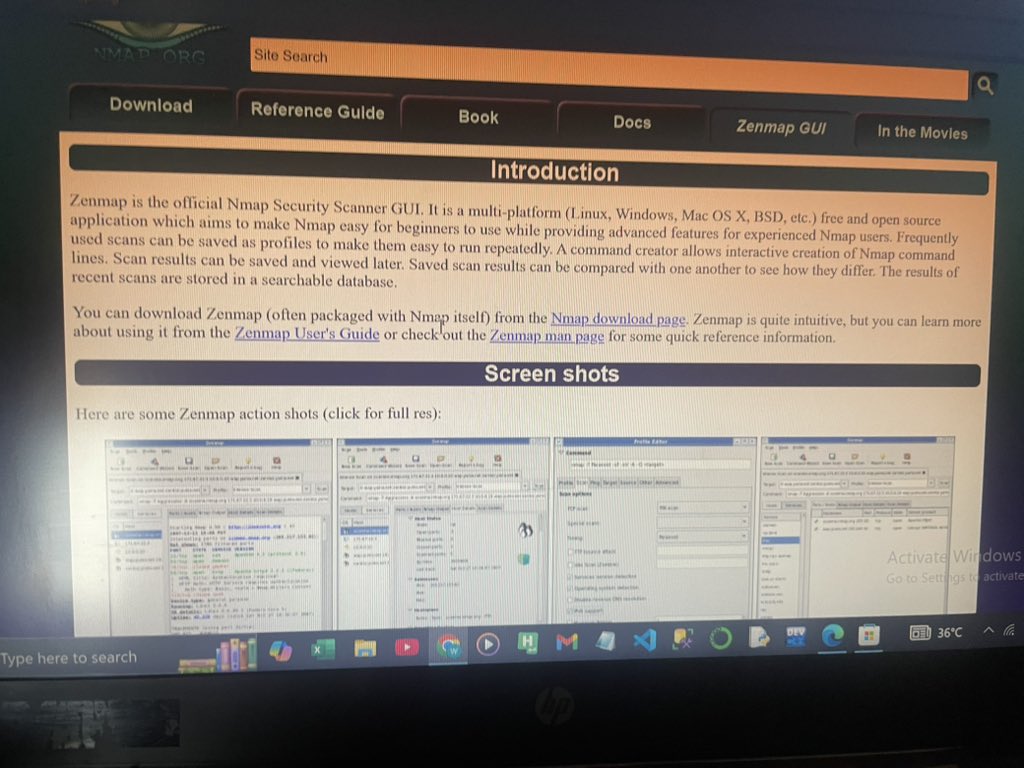
Day 21 ✅#100daysofcybersecurity
#100days
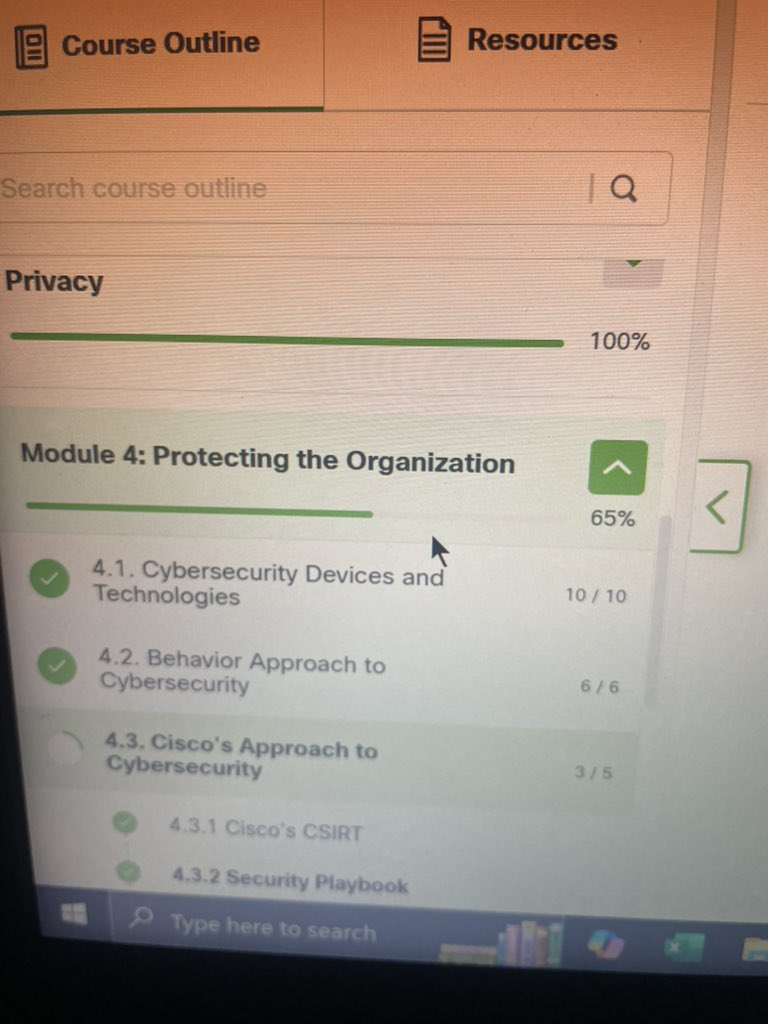
Started module 4 and half way done.
I understand the concept of security playbook and also how to identify a Pen test,Vulnerability
10 security practice. Also installed zenmap


1
2
14
330

Mar 3
DAY 30:
We will still do some quiz today. You should try not to use AI to answer as all the topic of each session were well elaborated on.
1. What is the difference between a hacker and a cyber security professional?
2. Can a developed Cybersecurity skill be use for good or evil or both?
3. Which of the following tools can be used to provide a list of open ports on network devices?
a. Ping
b. Nmap
c. Tracert
d. Whois
4. 'Today, there are single security appliances that will solve all the network security needs.'
Is this statement true or false?
5. Which tool can identify malicious traffic by comparing packets contents to know attack signatures?
a. NETFLOW
b. Nmap
c. IDS
d. Zenmap
6. What do you understand by RISK MANAGEMENT in Cybersecurity?
7. Behavior-based analysis involves using baseline information to detect what?
a. Risk
b. Backdoors
c. Anomalies
d. Vulnerabilities
8. What is the last stage of a pen test?
9. With careful planning and consideration, can some risks be completely eliminated?
Mar 2

DAY 29:
Today, I would just like to ask some questions on the topics we have talked about recently. They won't be difficult ones but just what we have talked about.
1. You’ve logged into your new laptop and it has prompted you to change your network password. You already struggle to remember the few passwords you use for your personal accounts online.
You ask one of your colleagues for their advice. They tell you to use one of the passwords you use for your personal accounts — that’s what they do! They keep their personal passwords written down at the back of their diary, just in case they forget them.
How would you rate your colleague’s attitude to password security on a scale of 1 (bad practice) to 5 (good practice)? 😁
2. What would you call a malware designed to track your online activity and capture your data?
A. Adware
B. Spyware
C. Virus
D. Ransomware
3. What would you call a malicious code that replicates itself independently by exploiting vulnerabilities in network?
A. Worms
B. Spyware
C. Adware
D. Virus
3. You’re enjoying your lunch in the canteen when a colleague approaches you. They seem distressed.
They explain that they can’t seem to connect to the public Wi-Fi on their phone and ask if you have the private Wi-Fi password to hand so that they can check that their phone is working.
How would you respond?
A. Yes, of course. Give me your phone and I’ll put it in for you.
B. I’m not sure we’re allowed to use the private Wi-Fi network. Let me check with my manager first
C. Sure. It’s Xgff76dB
4. On your way into the office, a person whom you have never seen before asks you to hold the door — they forgot their access card. What type of attack is this?
5. You have started getting an error message when accessing your computer: ‘Your connection was interrupted. A network change was detected.’ What would you call such attack?
6. You’ve logged into your laptop but it contains some photos belonging to the previous user, who no longer works in the company. Your line manager asks you to delete them. You drag the photos into the recycle bin, open the recycle bin, select them and click ‘Delete’ once again. That should do it!
Do you think the photos are really gone from the laptop?
A. Yes, the photos can no longer be retrieved
done.
B. No, the photos are just inaccessible from the operating system.
7. The data use policy of the company you used to set up the account states that for any content you publish: “you grant us a non-exclusive, transferable, sub-licensable, royalty-free, and worldwide license to host, use, distribute, modify, run, copy, publicly perform or display, translate, and create derivative works of your content (consistent with your privacy and application settings)”.
What does this statement really mean?
A. You no longer own your content and the photo sharing company can re-use any of your content but only in specific circumstances
done.
B. You own your content but the photo sharing company can re-use any of your content for any purposes.
C. You own your content and the photo sharing company has to get permission to re-use your content.
2
3
67
Feb 19
DAY 18:
Today, let's go deeply into security appliances.
FIREWALL
In computer networking, a firewall is designed to control or filter which communications are allowed in and which are allowed out of a device or network. A firewall can be installed on a single computer with the purpose of protecting that one computer (host-based firewall) or it can be a standalone network device that protects an entire network of computers and all of the host devices on that network (network-based firewall).
As computer and network attacks have become more sophisticated, new types of firewalls have been developed, which serve different purposes. Let me also tell about some type of firewalls we have. There are:
1. Network layer firewall: This filters communications based on source and destination IP addresses.
2. Transport layer firewall: Filters communications based on source and destination data ports, as well as connection states.
3. Application layer firewall: Filters communications based on an application, program or service.
4. Context aware layer firewall: Filters communications based on the user, device, role, application type and threat profile.
5. Proxy server: Filters web content requests like URLs, domain names and media types.
6. Reverse proxy server: It's placed in front of web servers. Reverse proxy servers protect, hide, offload and distribute access to web servers.
7. Network address translation (NAT) firewall: This firewall hides or masquerades the private addresses of network hosts.
8. Host-based firewall: Filters ports and system service calls on a single computer operating system.
Let's talking about another thing more interesting. It's called PORT SCANNING.
In networking, each application running on a device is assigned an identifier called a port number. This port number is used on both ends of the transmission so that the right data is passed to the correct application. Port scanning is a process of probing a computer, server or other network host for open ports. It can be used maliciously as a reconnaissance tool to identify the operating system and services running on a computer or host, or it can be used harmlessly by a network administrator to verify network security policies on the network.
Let me show you how to carry out a port scan on a computer on your local home network.
1. Download and launch a port scanning tool like Zenmap. Enter the IP address of your computer, choose a default scanning profile and press ‘scan.’
The scan will report any services that are running, such as web or email services, and their port numbers.
2. The scan will also report one of the following responses:
>‘Open’ or ‘Accepted’ means that the port or service running on the computer can be accessed by other network devices.
>‘Closed,’ ‘Denied’ or ‘Not Listening’ means that the port or service is not running on the computer and therefore cannot be exploited.
>‘Filtered,’ ‘Dropped’ or ‘Blocked’ means that access to the port or service is blocked by a firewall and therefore it cannot be exploited.
3. To execute a port scan from outside of your network, you will need to run it against your firewall or router’s public IP address.
Enter the query ‘what is my IP address?’ into a search engine such as Google to find out this information.
Go to the Nmap Online Port Scanner, enter your public IP address in the input box and press ‘Quick Nmap Scan.’ If the response is open for ports 21, 22, 25, 80, 443 or 3389 then most likely, port forwarding has been enabled on your router or firewall and you are running servers on your private network.
This is little talk about networking (Nmap) which is in Cybersecurity and you can be very good at it if you practice too.
That should be enough for today. You should read to understand and if you are confused anywhere, you're free to ask questions.
THANK YOU
Feb 18
DAY 17:
There is no single security appliance or piece of technology that will solve all the network security needs in an organization. You must consider what tools will be most effective as part of your security system.
Regardless, let me discuss with you about SECURITY APPLIANCES.
SECURITY APPLIANCES can be standalone devices like a router or software tools that are run on a network device. They fall into six general categories.
1. Routers: While routers are primarily used to interconnect various network segments together, they usually also provide basic traffic filtering capabilities. This information can help you define which computers from a given network segment can communicate with which network segments.
2. Firewalls: Firewalls can look deeper into the network traffic itself and identify malicious behavior that has to be blocked. Firewalls can have sophisticated security policies applied to the traffic that is passing through them.
3. Intrusion prevention systems: IPS systems use a set of traffic signatures that match and block malicious traffic and attacks.
4. Virtual private networks: VPN systems let remote employees use a secure encrypted tunnel from their mobile computer and securely connect back to the organization’s network. VPN systems can also securely interconnect branch offices with the central office network.
5. Antimalware or antivirus: These systems use signatures or behavioral analysis of applications to identify and block malicious code from being executed.
6. Other security devices: Other security devices include web and email security appliances, decryption devices, client access control servers and security management systems.
Alright, today's session would be quite brief but I am sure that I have wrote somethings that you could learn from. You should read to understand and be free to ask questions. I appreciate your encouragement on all of my post. As usual, always remember to-
USE YOUR COMMON SENSE
1
2
7
189


Nmap, Wireshark , zenmap, snort...
All great stuff.
You won't believe how many problems I have been able to find/prevent and fix for large customers using these tools.
A true moneymaker for IT savvy people.
1
3
21