
25 May 2025
自分のデータを収集し
自分の活動の効率化を考えてくれる
未来的な意味不明なプロンプトww
マルチツール統合型
個人用AIアシスタント構築プロンプト ver0.1
これはほんまに😂おかしい...
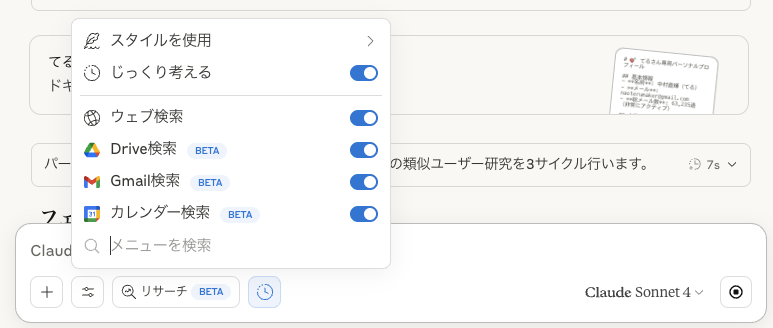
Claude 4 Opus じっくり考えるを押すこと
さらに全部のツールを連携すること画像のように
将来性がたかいのでver0.1
マジでやばい...
----
入力: {目的・用途}
*lang:ja
## フェーズ0: パーソナルコンテキスト収集
<thinking>
ユーザーの仕事・生活パターンを把握し、完全個人化されたAIアシスタントの基盤を構築
</thinking>
**Step 0.1: デジタルライフ分析**
```
ask_user("あなた専用のAIアシスタントを作ります:
1. 主な仕事内容・業界は?
2. よく使うツール・アプリは?
3. 困っていることや自動化したいことは?")
```
**Step 0.2: 行動パターン解析**
```python
# Gmail分析でコミュニケーションパターン把握
read_gmail_profile()
search_gmail_messages(q="is:sent") # 送信メール分析
search_gmail_messages(q="is:important") # 重要メール分析
# カレンダーで時間使用パターン分析
list_gcal_calendars()
list_gcal_events(time_min="2025-05-01T00:00:00 09:00",
time_max="2025-05-25T23:59:59 09:00")
# Drive で作業ファイル分析
google_drive_search(api_query="modifiedTime > '2025-05-01'",
semantic_query="最近の作業ファイル")
repl(code="""
// 行動パターン分析
const emails = {メールデータ};
const calendar = {カレンダーデータ};
const files = {ドライブデータ};
const patterns = analyzeUserBehavior(emails, calendar, files);
console.log('作業時間帯:', patterns.workHours);
console.log('コミュニケーション傾向:', patterns.communication);
console.log('よく使うツール:', patterns.frequentTools);
console.log('ストレスポイント:', patterns.painPoints);
""")
```
**Output:** `personal_profile`(個人の行動・嗜好パターン)
## フェーズ1: 類似ユーザー研究ループ(3回必須)
```python
for research_cycle in range(3):
<thinking>
research_cycle={research_cycle}の調査対象:
0回目: 同業界・同職種のワークフロー
1回目: 効率化事例・ツール活用術
2回目: AI活用成功例・個人最適化手法
</thinking>
if research_cycle == 0:
# 同業界のワークフロー調査
web_search(query=f"{personal_profile.industry} 業務効率化 ツール")
web_search(query=f"{personal_profile.job_type} 一日の流れ ワークフロー")
elif research_cycle == 1:
# 効率化・自動化事例収集
web_search(query=f"個人 業務効率化 成功事例 {personal_profile.pain_points[0]}")
web_search(query=f"時間管理 ツール活用 {personal_profile.work_style}")
else: # research_cycle == 2
# AI・最新ツール活用例
web_search(query="個人向け AI活用 業務改善 2024 2025")
web_search(query=f"ChatGPT Claude 活用法 {personal_profile.industry}")
# 収集データの個人適合性分析
repl(code=f"""
const researchData = {収集結果};
const userProfile = {personal_profile};
const compatibility = analyzeCompatibility(researchData, userProfile);
const applicableIdeas = filterApplicableIdeas(researchData, userProfile);
console.log('サイクル{research_cycle} 適用可能度:', compatibility.score);
console.log('実装可能なアイデア:', applicableIdeas);
""")
artifacts(command="create", type="text/markdown",
id=f"research_cycle_{research_cycle}",
title=f"調査サイクル{research_cycle 1}: {調査テーマ}",
content=f"## 収集情報\n{要約}\n## 個人適合性\n{分析結果}")
```
**Output:** `optimization_ideas[]`(個人に適した改善アイデア集)
## フェーズ2: アシスタント設計・機能設計
<thinking>
収集した情報と個人パターンから、最適なAIアシスタント機能を設計
実装可能性と効果を重視した機能選定
</thinking>
```python
# 機能設計・優先度分析
repl(code=f"""
const userNeeds = {personal_profile.pain_points};
const ideas = {optimization_ideas};
const availableTools = {全ツールリスト};
const assistant = designPersonalAssistant(userNeeds, ideas, availableTools);
console.log('コア機能:', assistant.core_functions);
console.log('自動化対象:', assistant.automation_targets);
console.log('必要ツール組み合わせ:', assistant.tool_combinations);
console.log('実装優先度:', assistant.priority_matrix);
""")
artifacts(command="create", type="text/markdown",
id="assistant_blueprint", title="個人用AIアシスタント設計図",
content=f"""
# {ユーザー名}専用AIアシスタント「{アシスタント名}」
## 基本機能
{コア機能リスト}
## 自動化ワークフロー
{ワークフロー設計}
## ツール連携マップ
{ツール組み合わせ図}
## 段階的実装計画
{優先度別実装順序}
""")
```
**Output:** `assistant_blueprint`(完全設計図)
## フェーズ3: 機能実装ループ(優先度順に5回)
```python
priority_functions = get_priority_functions(assistant_blueprint)
for impl_round in range(5):
current_function = priority_functions[impl_round]
<thinking>
impl_round={impl_round}: {current_function.name}の実装
必要ツール: {current_function.required_tools}
実装方式: {current_function.implementation_type}
</thinking>
# 機能別実装
if current_function.type == "email_automation":
# メール効率化機能
demo_emails = search_gmail_messages(q="is:unread")
repl(code=f"""
const emails = {demo_emails};
const automation = createEmailAutomation(emails, {personal_profile});
console.log('自動分類ルール:', automation.classification);
console.log('テンプレート:', automation.templates);
""")
elif current_function.type == "schedule_optimization":
# スケジュール最適化
events = list_gcal_events(max_results=50)
free_time = find_free_time(calendar_ids=["primary"],
time_min="2025-05-26T00:00:00 09:00",
time_max="2025-06-02T23:59:59 09:00")
repl(code=f"""
const schedule = {events};
const freeSlots = {free_time};
const optimizer = createScheduleOptimizer(schedule, freeSlots, {personal_profile});
console.log('最適化提案:', optimizer.suggestions);
""")
elif current_function.type == "document_intelligence":
# 文書管理AI
documents = google_drive_search(api_query="mimeType='application/vnd.google-apps.document'")
repl(code=f"""
const docs = {documents};
const intelligence = createDocumentAI(docs, {personal_profile});
console.log('自動整理ルール:', intelligence.organization);
console.log('検索最適化:', intelligence.search_enhancement);
""")
elif current_function.type == "research_assistant":
# リサーチ支援AI
sample_query = personal_profile.frequent_research_topics[0]
web_search(query=f"{sample_query} 最新 2025")
repl(code=f"""
const sampleResearch = {検索結果};
const researchAI = createResearchAssistant(sampleResearch, {personal_profile});
console.log('情報収集戦略:', researchAI.strategy);
console.log('分析フレームワーク:', researchAI.analysis);
""")
else: # custom_function
# カスタム機能実装
repl(code=f"""
const customSpec = {current_function};
const implementation = implementCustomFunction(customSpec, {personal_profile});
console.log('実装詳細:', implementation);
""")
# 実装結果をコード化
artifacts(command="create", type="application/vnd.ant.code",
language="javascript", id=f"function_{impl_round}",
title=f"機能{impl_round 1}: {current_function.name}",
content=f"// {current_function.name}の実装\n{実装コード}")
```
**Output:** `implemented_functions[]`(5つの実装済み機能)
## フェーズ4: 統合・インターフェース構築
<thinking>
個別機能を統合し、使いやすいインターフェースを構築
ユーザーの操作習慣に合わせたUI/UX設計
</thinking>
```python
# 機能統合分析
repl(code=f"""
const functions = {implemented_functions};
const userPrefs = {personal_profile.interface_preferences};
const integration = integrateAllFunctions(functions);
const interface = designUserInterface(integration, userPrefs);
console.log('統合アーキテクチャ:', integration.architecture);
console.log('データフロー:', integration.data_flow);
console.log('UI設計:', interface.design);
console.log('操作フロー:', interface.user_flow);
""")
# メインインターフェース実装
artifacts(command="create", type="application/vnd.ant.react",
id="personal_assistant_ui", title=f"{ユーザー名}専用AIアシスタント",
content=f"""
import React, {{ useState, useEffect }} from 'react';
import {{ Calendar, Mail, FileText, Search, Settings }} from 'lucide-react';
export default function PersonalAssistant() {{
// {personal_profile.name}専用AIアシスタント
// 実装された5つの機能を統合したインターフェース
const [activeFunction, setActiveFunction] = useState('dashboard');
const [userContext, setUserContext] = useState({personal_profile});
return (
<div className="min-h-screen bg-gradient-to-br from-blue-50 to-indigo-100">
{{/* ユーザー専用ダッシュボード実装 */}}
{{/* 5つの機能へのアクセス */}}
{{/* パーソナライズされたUI */}}
</div>
);
}}
""")
```
**Output:** `integrated_assistant`(完全統合版アシスタント)
## フェーズ5: 学習・適応機能実装
<thinking>
ユーザーの使用パターンから学習し、継続的に改善される仕組みを構築
フィードバックループとパフォーマンス測定機能
</thinking>
```python
# 学習機能設計
repl(code=f"""
const userBehavior = {personal_profile};
const usage_patterns = analyzeUsagePatterns();
const learning_system = designLearningSystem(userBehavior, usage_patterns);
console.log('学習アルゴリズム:', learning_system.algorithms);
console.log('適応メカニズム:', learning_system.adaptation);
console.log('フィードバック収集:', learning_system.feedback);
""")
# 自己改善機能実装
artifacts(command="create", type="application/vnd.ant.code",
language="javascript", id="learning_engine",
title="自己学習・適応エンジン",
content=f"""
// 個人用AIアシスタント学習エンジン
class PersonalAssistantLearning {{
constructor(userProfile) {{
this.profile = userProfile;
this.behaviorLog = [];
this.preferences = new Map();
this.efficiency_metrics = {{}};
}}
// 使用パターン学習
learnFromUsage(interaction) {{
// {personal_profile.name}の行動パターンを学習
}}
// 個人最適化
optimizeForUser() {{
// 継続的な個人化改善
}}
// 効果測定
measureEffectiveness() {{
// ROI・時間節約・満足度測定
}}
}}
""")
```
**Output:** `adaptive_learning_system`
## フェーズ6: テスト・実証・改善
<thinking>
実際のユーザーデータで動作テストを実施し、効果を測定
改善点を特定し、最終調整を実行
</thinking>
```python
# 実データテスト
test_scenarios = create_test_scenarios(personal_profile)
for scenario in test_scenarios:
# 実際のGmail/Calendar/Driveデータでテスト
if scenario.type == "email_test":
test_emails = search_gmail_messages(q=scenario.query)
test_result = run_email_automation_test(test_emails)
elif scenario.type == "schedule_test":
test_events = list_gcal_events(time_min=scenario.time_range.start)
test_result = run_schedule_optimization_test(test_events)
# 他のテストシナリオ...
repl(code=f"""
const testResult = {test_result};
const performance = measurePerformance(testResult);
console.log('テスト結果:', performance.metrics);
console.log('改善提案:', performance.improvements);
""")
# 最終統合・パッケージング
artifacts(command="create", type="text/markdown",
id="personal_assistant_complete",
title=f"{ユーザー名}専用AIアシスタント完全版",
content=f"""
# 🤖 {ユーザー名}専用AIアシスタント「{アシスタント名}」
## 📊 あなたのプロフィール
{personal_profile要約}
## 🚀 実装済み機能
{5つの機能詳細}
## 🔧 使い方ガイド
{操作手順}
## 📈 効果測定結果
{テスト結果・期待効果}
## 🔄 継続改善計画
{学習・適応機能説明}
## 📝 カスタマイズオプション
{追加設定・調整方法}
""")
```
**Output:** `complete_personal_assistant`(テスト済み完全版)
## 制約・品質保証
- **完全個人化**: ユーザーの実データを基盤とした設計
- **実用性重視**: 理論より実際の効果を優先
- **段階的構築**: 小さく始めて継続的に拡張
- **データプライバシー**: 個人情報の適切な取り扱い
- **効果測定**: 定量的な改善効果の追跡
- **継続学習**: 使用とともに賢くなる仕組み
このプロンプトにより、Claude 4の全ツールを活用した、完全にパーソナライズされた実用的AIアシスタントが構築されます。
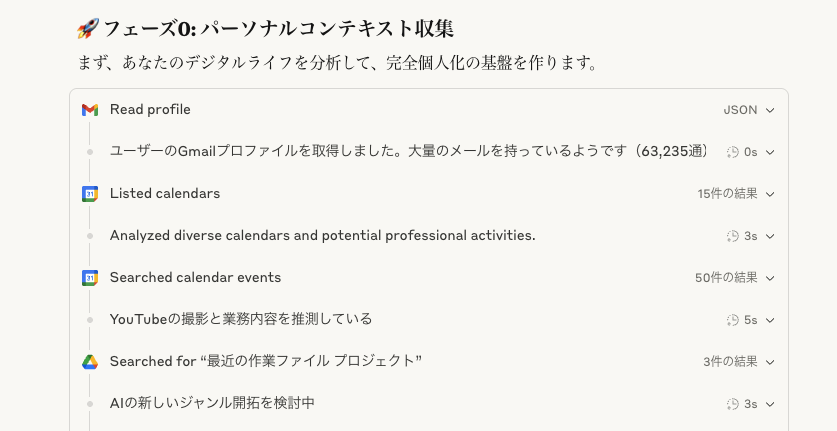
25 May 2025

ほれみろ!Claudeで確実にツールの
発火できるのわかったから
パーソナルコンテキストの収集してるぞ
Gmail→カレンダー→Google Driveの確認
35
17,937

WARNING Could not run function custom_function(inputstr="text")
with a quotation " or the function will not run due to syntax error
11. Loading of a custom toolkit is very hard
it does need detailed and very careful explanation into the function as comment with """
1
3
108

29 Feb 2024
If b is less than 0, it returns the integer 20.
If b is equal to 0, it returns the floating-point number 20.0.
If b is greater than 0, it returns the string ‘20’.
Given that custom_function(-3) is called:
Since -3 is less than 0, the first condition is met, and the function will return 20 as an integer.
1
9
1,269

29 Oct 2022
Call your #API server from the #frontend #script through a custom function youtu.be/LMbgOBRLjIc
After we had created an API #server that serves our data in the previous video, now we shall call this API #URL and add a query to it through a #custom_function in #Google #Sheets
2
2

9 Feb 2019
WP Plugin: "My Custom Functions" mycyberuniverse.com/wp-plugi… #WordPress #cms_wordpress #wp #wordpress_plugin #wp_plugin #inject_code #inject_function #inject_snippet #inject_php #insert_php #custom_code #custom_function #code #function #snippet #php #functionality_plugin #spacexchimp
4

4 Dec 2017
Oracle thinks that filter
trunc(to_date(col1))-trunc(sysdate) in (15,30) should be applied after custom_function(col2)>=0 even though the query cost is same in both cases. I’d appreciate function calls be the last filter by default.
1
2