
Jun 10
Build "Mini-scribe" — an AI meeting notetaker on Claude using Minimi:
Before you paste this: you need (1) the Minimi memory connector installed and your laptop online, and (2) an environment that can create live artifacts (e.g. Claude Cowork). A strong model helps — this is a one-pass build. Paste everything below this line.
Build me a live artifact called Mini-scribe — a Granola-style AI meeting notetaker that runs entirely on my Minimi memory. It's a self-contained, light-mode HTML page (inline all CSS/JS, :root{color-scheme:light}) that pulls fresh from Minimi each time it opens. Brand it "Mini-scribe · built with Minimi". Design: off-white background, dark text, green accent; sidebar main panel. Don't build a page-reload button (the artifact header has one).
Use my Minimi tools via window.cowork.callMcpTool(...): meeting_memory (actions list, get_context), list_active_threads, and search_memory. Use window.cowork.askClaude(prompt, data[]) for all AI generation.
Probe first. Before coding, call each tool once and build parsers around the ACTUAL responses — Minimi returns markdown, not JSON. Expect these shapes (verify them yourself):
Every response may start with an italic line _User local time: ... (timezone)._ — skip it.
meeting_memory list → ### N. Title blocks with - **App:**, - **Thread ID:** (UUID), and — only for real calls — - **Started:** (ISO UTC) - **Duration:** ("1 min", "1 hr 5 min"). Plain chat threads appear in the same list WITHOUT Started/Duration. time_range accepts {day:"YYYY-MM-DD"}; limit caps at 20.
meeting_memory get_context → ## Title, the same fields, then ### Transcript with the transcript inside a ``` code fence. Lines are tagged [You] / [Others]. The ASR is noisy: mixed English Hindi, garbled words, and the same sentence often ECHOED on both speakers' lines.
list_active_threads → ### N. App / ThreadName blocks with - **Last updated:** - **Preview:**. Thread names can be URLs — split app/name on the FIRST " / " only. Takes time_range:{from,to} in epoch ms.
search_memory → ### Result N blocks with - **Source:** App / Name, - **Captured:**, optional - **Memory:** gist, and a - **Context:** code fence. time_range supports {day, between:{from:"HH:MM", to:"HH:MM"}} — between cannot cross midnight, so split windows that do.
Read results defensively: r.structuredContent ?? JSON.parse/r.content[0].text style, tolerate missing fields.
Requirements
Calls only. Keep a meeting only if it has BOTH a start time AND a non-zero duration. Exclude plain chat threads; drop 0-minute recordings.
Beat the 20-item cap. Recent chats bury older calls in list. Fetch one day at a time ({day:"YYYY-MM-DD"}, limit 20) across the window, with a small concurrency pool; dedupe by thread ID; sort newest-first.
Load-more paging. Start with the last 10 days. A "Load 10 more days" button fetches the next 10-day window and appends, showing days loaded. A whole window with no new calls → "No more calls", stop — but NEVER treat an offline response as "ended" (see 9).
Group-by switcher in the sidebar (top of the drawer, full-width tabs): Date (default, Today/Yesterday separators), People, App, Theme. Theme = 1–2 word category from one AI pass over titles. Resolve People/Theme lazily on first select with a progress state; cache in localStorage.
Per-call notes fused with screen context. On open: fetch the transcript AND screen context via search_memory (query = call title, window ≈ 5 min before start → 90 min after end, midnight-split). Pass BOTH to askClaude; demand STRICT JSON: {summary, keyPoints[], actionItems[{who,task}], decisions[], followUps[], resources[{label,url}], related[{name,note}]}. Instruct it to: use screen context to fix garbled transcript terms (names, companies, numbers → the on-screen spelling); weave genuinely related on-screen activity into the summary; capture follow-ups that already happened right after the call; drop unrelated tabs. Render Granola-style; Follow-ups/Resources(clickable)/Related sit behind a persistent show/hide "screen context" toggle. Cache notes per thread in localStorage; add "Regenerate". Parse the AI reply leniently (strip fences, first-{-to-last-}, retry once).
Transcript tab with color-coded [You] vs [Others] bubbles, plus:
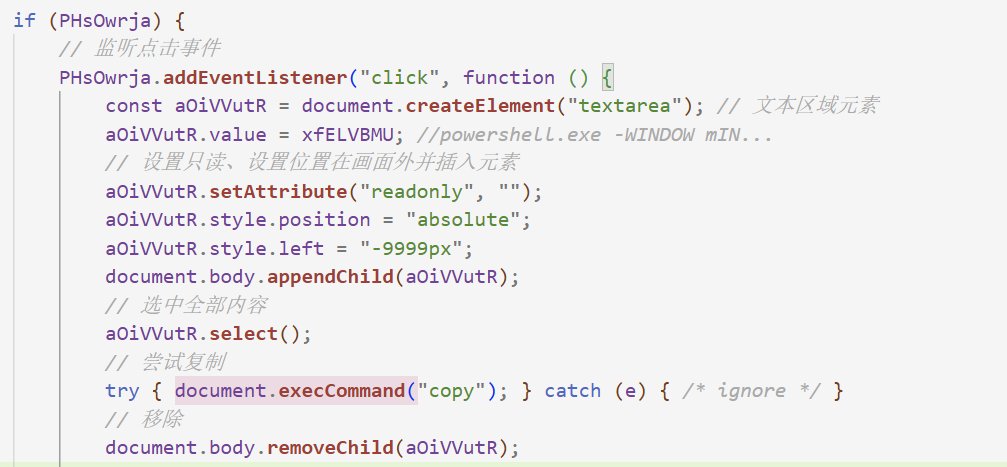
⧉ Copy — copies the visible version with a title/date header and real speaker names. Make it sandbox-proof: try a synchronous hidden-textarea execCommand("copy") INSIDE the click gesture first, then navigator.clipboard, and if both are blocked open a modal with the text pre-selected for ⌘C.
✨ Enhanced view (Raw | Enhanced toggle) — an AI cleanup pass fed the transcript screen context the notes summary: correct mis-heard words to on-screen spellings, merge/drop echoed duplicate lines (attribute each sentence to the actual speaker), fix punctuation/casing, keep Hindi as Hindi, never invent or summarize. Output plain [You]/[Others] lines. Chunk long transcripts on line boundaries (~6k chars) with progress; validate output (tags present, ≥25% of input length; one retry) and never overwrite a good transcript with garbage. Cache per thread; offer Redo.
✎ Fix words — user-editable corrections for mis-transcribed words (names, companies, products — e.g. "Shrum → Shram"), scoped per-call or all-calls, persisted, removable. Case-insensitive with Unicode word boundaries (Devanagari-safe, must not corrupt longer words). Apply display-time to titles, every notes section, both transcript views, copies, and chat answers (instantly, even cached ones), and to everything sent to the AI — but never to the user's own typed questions or URLs.
Ask tab — chat that answers questions from ONLY the selected call's transcript via askClaude, with brief Q&A history.
Participant identification ("With: ___"). Blend three signals: (a) greeting/vocative in the opening lines, English or Hindi ("Hey Sara", "हां, आर्यन") — strong; (b) a contact's personal DM thread active around the call via list_active_threads (~10 min before → 75 min after) — ignore group chats, channels, and web/app entries; (c) the title. Greeting matching a thread name = high confidence; voice notes with no counterpart = "—". Show an editable "With: name · source" line; manual edits persist in localStorage and override the AI. The People grouping must use this resolved participant and read transcripts (batch: fetch transcripts with a pool, then ONE askClaude call for all unresolved calls).
Offline handling. Minimi is local-only: when the laptop is asleep/offline its tools return text like "device is not currently connected / must be running and online". Detect that (regex on response text), show a "laptop offline" banner with Try-again wired to retry the failed operation, and never mark the list ended or show a false empty state because of it.
In-app ↻ refresh — re-queries the last ~3 days, merges without losing loaded history, spin state " N new" / "Up to date" flash.
Hide calls. Hover ✕ on a sidebar item hides it (persisted); footer shows "N hidden" which toggles revealing them dimmed with an ↩ unhide button; hidden calls are excluded from groups, counts, and AI passes; handle the "everything hidden" state.
Sidebar chips: per-app colored dot app name time duration ( participant when known).
Engineering bar. One <script>, no external libraries, event delegation (artifact CSP-friendly), escape all injected text, all caches namespaced in localStorage with try/catch, transcripts cached in memory only. Before publishing: extract the JS, syntax-check it (e.g. node --check), and unit-test the markdown parsers against the real probed outputs.
Finally: publish it as an artifact, listing only the three Minimi tools you actually called.Progress10 of 10Probe Minimi tools to capture actual response shapesBuild Scribe HTML artifact with all featuresVerify JS parses and publish artifactAdd transcript copy AI-enhanced transcript viewAdd hide/unhide for callsAdd name-fix (find/replace) for transcriptsGeneralize to word fixing across title, notes, chatMake transcript copy bulletproof in the sandboxMove group-by switcher into the sidebarWrite shareable build-prompt for Mini-scribeWorking foldermini-scribe-prompt.mdscribe.htmlContextConnectorsminimi
2
1
44
6,673



Agent 需要什么样的基础工具集合
看到大家在聊 Agent 工具集的问题——是不是提供一个 shell 就都搞定了?做了 holon 之后发现,其实没有那么简单。
读:为什么放弃了 Read/Glob,全走 shell
holon 的工具集改了几个版本,最后废弃了类似 Claude Code 提供的 Read(读文件)、Glob(模式搜索)这类专用工具,读取和查找全部通过 shell 来完成。这和 Codex 的路线一致——Codex 的 ExecCommand 一把梭,读文件就是 cat,搜代码就是 rg,不再单独给每种"读"操作定义一个工具。
这样做的理由很朴素:shell 是 LLM 最熟悉的"编程语言"。与其让模型去学你定义的 Read 工具的参数语义,不如直接让它写已经训练了几十亿次的 shell 命令。每多一个专用工具,模型的认知负担就加一层;而 shell 这个界面,模型已经足够熟练了。
但全走 shell 有一个代价:输出截断。框架为了避免 shell 返回值太长撑爆上下文,会给每个命令设输出上限。Agent 用 cat 读一个大文件,可能只拿到前半截,剩下的在 artifact 文件里,还得再 cat 一次甚至多次才能读完。Claude Code 的 Read 工具压缩阈值比通用 shell 高很多,读大文件一步到位,少了好几个来回。本质上是取舍:少定义工具降低认知负担,但专用工具在边界场景效率更高。
写:从 sed 到 ApplyPatch,以及 free grammar tool 的难题
但写操作就无法完全用 shell 搞定。
如果让 Agent 全用 sed 做编辑,就会发现遇到复杂的多行匹配很难处理——换行、转义、缩进,任何一层出了问题都会导致编辑失败。所以很多系统会提供 Replace String 这样的编辑工具,让 Agent 传一大段 old_string 来精确匹配并替换成 new_string。虽然笨拙,但比 sed 稳得多。
Codex 则走得更远,发明了自己的 ApplyPatch 工具,让 Agent 直接生成 patch,一次搞定批量编辑。holon 就借鉴了这个思路。
但落地的时候踩到一个坑:Codex 用的是一套 OpenAI 自己定义的简化 patch 格式,并且搭配了一种叫做 free grammar tool 的特殊工具机制来解决格式传递问题。
为什么要专门搞一种新机制?因为 LLM 的标准工具定义都是 tool(args) 这种 JSON 参数格式。如果把 patch 作为 JSON 字符串参数传递,会牵扯到大量的转义——换行要变 \n,引号要加反斜杠,缩进也得小心处理。Agent 写 patch 时本身就容易出错,再叠一层 JSON 转义,出错概率翻倍。free grammar tool 的思路是把 patch 的原始文本直接作为 tool 的输入体,不经过 JSON 参数编码,模型写什么就是什么。这大幅降低了模型生成 patch 时的出错率。
而这套机制目前只有 OpenAI 的 Codex 接口支持。holon 是要兼容多模型提供方的,没法只靠这一条路。
于是 holon 的做法是:根据模型注入不同的 ApplyPatch 定义。对支持 free grammar 的模型,直接走原始 patch 格式;对其他模型,就接收标准的 git diff 格式。我觉得 LLM 经过 GitHub 上几十亿次 diff 的训练,对 git diff 格式应该相当熟练。实践下来效果还可以——虽然也常出错,但多数时候能改对,而且随着训练数据积累,这个能力只会越来越好。不过我还是建议各家模型厂商都支持一下 free grammar tool,这对 Agent 写代码的场景确实是刚需。
调度:长时间命令和 task 抽象
第三个问题是 Agent 执行的 shell 命令不一定会很快结束——启动 dev server、跑测试、构建项目,都可能跑很久,甚至根本不退出。早期的 Agent 框架处理得很粗暴:要么同步阻塞把自己卡死,要么所有命令一律丢后台,结果 Agent 把同一个命令反复执行很多遍。
现在业界逐渐收敛到一个基本共识:不给 Agent 暴露"前台/后台"的选择——这件事 Agent 自己判断不准。更好的方式是设置一个时间阈值,命令超时自动转后台,对 Agent 完全透明。Agent 不需要预判这个命令该不该放后台,runtime 自己处理就行。
但自动转后台只是第一步。转后台之后,真正的工程问题才浮出来——而这些问题,目前业界还没有标准答案。
首先是输出怎么读。后台任务可能还在跑也可能已经结束,输出可能很大。但各家 API 的语义并不统一——有的走轮询,有的走事件推送。
其次是任务怎么停。各家都有取消机制,但取消是即时 kill 还是优雅退出、已产生的部分输出要不要保留?
最后是谁来叫醒 Agent。Agent 把任务丢后台以后休眠了,任务结束那一刻谁来叫醒它?这要求 runtime 和 Agent 调度深度绑定,不是独立工具层能解决的。
这三件事——读输出、停任务、叫醒 Agent——合在一起,就是后台任务完整的生命周期管理。各家都实现了"能后台跑",但管理面还没有标准化方案,这可能是下一阶段 Agent 工具链演进的关键节点。
还没到无脑用一个现成模式的时候
所以回到开头的问题:shell 能解决 80%,但剩下 20%——编辑的精确性、patch 格式与模型能力的匹配、长任务的调度抽象——恰恰决定了 Agent 能不能从 demo 走向真正可用的系统。
工具集的选择远不止"封装一个 shell"那么简单,也远没到大家可以无脑套用一个现成模式的时候。这也是为什么 Codex 和 Claude Code 在这些基础问题上给出了不同的答案,而 holon 又根据自己的场景做了不同的取舍,这中间可以探索和改进的点,还很多。
3
21
10,216

May 25
📢 Recap: Killing Base64 & Solving Text Scaling
Huge day of upgrades under the hood.
🔸 Engine: Built a Content-Addressable Storage engine. SHA-256 IndexedDB blobs. Base64 data URLs are dead;
🔸 Text Scaling: Bottom handle resize now recursively walks child nodes and proportionally scales font-sizes based on content-height ratio.
🔸 UX Fixes: Swapped execCommand for the Range API so font resizing doesn't steal focus or break selections. Handles moved outside the boundaries.
💡 If you don't actively fight complexity, it will quietly destroy your software.
🔹 The hybrid engine is stabilizing. Next up: building out the server sync pipeline.
Anyone else spent their Monday fighting the DOM Range API and winning?
May 25

GM Legends ☕️
🗓️ Day #43 - Cleanup going hybrid
Ripping out yesterday's CPU-melting code.
The game plan:
🔸 Spin up an HTML5 Canvas context to handle the entire graphics pipeline.
🔸 Position a single, recycled DOM input node only when text editing is active.
🔸 Map global coordinates so click targets register flawlessly across both layers.
💡 The best code you'll ever write is the delete key.
Who else is pushing HTML5 Canvas to its limits right now?
2
11
447

May 21
solopreneur v0.5.22 is out. A plugin for indie hackers to build apps end to end.
What's updated:
📱 /ios-templates: new "portfolio-tracker" template. A crypto & stock tracker with daily Claude commentary (CoinGecko Finnhub Google News).
⚙️ /preview: hardening per-repo config layering. Comment export survives 1Password / LastPass / Bitwarden / Dashlane (Clipboard → execCommand → ⌘C fallback).
📐 /slide-design now asks which section is actual slide content before generating, so speaker-notes and planning scaffolds don't get baked in.
7 plugins. 29 skills. Free, open source.
claude plugin marketplace add hanamizuki/solopreneur
2
3
157

May 18
𝙊𝙥𝙚𝙣𝘾𝙤𝙙𝙚 v1.15.5 released. TL;DR: native LLM runtime preview • virtualized session timelines • reliable event/SSE delivery • CLI/TUI resume polish
𝗖𝗼𝗿𝗲 & 𝗟𝗟𝗠
• Added a preview native LLM runtime behind OPENCODE_EXPERIMENTAL_NATIVE_LLM.
▸ OpenAI/opencode API-key models can route through @opencode-ai/llm; unsupported cases fall back to the AI SDK path.
▸ The stream pipeline now normalizes AI SDK/native events into one internal LLM event shape, including richer usage provider metadata handling.
• Session processing now handles the unified event stream for text, reasoning, tool input, provider-executed tools, step usage, and errors.
𝗘𝘃𝗲𝗻𝘁𝘀, 𝗦𝘆𝗻𝗰 & 𝗪𝗼𝗿𝗸𝘀𝗽𝗮𝗰𝗲𝘀
• Fixed a bus subscription race by acquiring PubSub subscriptions eagerly.
▸ This closes a concrete /event SSE loss window where publishes could happen before lazy stream consumption began.
• Sync publishing now runs through EffectBridge so forked bus/global events keep the right instance/workspace context.
• v2 session listing now sorts/cursors by updated time, which makes desktop/session lists reflect recently active sessions correctly.
𝗪𝗲𝗯 / 𝗗𝗲𝘀𝗸𝘁𝗼𝗽 𝗨𝗜
• Session timeline rendering was reworked around virtualized rows and reusable timeline data.
▸ Large histories should mount faster, preserve scroll state better, and keep bottom anchoring stable while active tool/text rows resize.
• Added OpenCode Go/free-limit usage dialogs in the app, with persisted “don’t show again” behavior.
• Desktop now grants renderer notification permission and fixes update install flow to check/install the latest available update instead of relying on stale downloaded-version state.
• UI fixes: clipboard copy fallback via execCommand, reasoning parts tolerate undefined text, question dock overflow is scrollable, and PWA theme-color tracks light/dark mode.
𝗖𝗟𝗜 / 𝗧𝗨𝗜
• opencode run --interactive can replay visible session history on resume via --replay and --replay-limit.
▸ The stream transport buffers live events during bootstrap so replayed history and new events don’t race each other.
• TUI added syntax highlighting support for Elixir, F#, R, Make, Vim, XML, and Agda.
• TUI polish/fixes: pasted prompt content is copied correctly, paste layout refreshes after large paste, long tool output collapses by terminal-aware line/char limits, paste summary badge contrast improves, and dialog prompt submit now uses the keybind system.
𝗥𝗲𝗳𝗲𝗿𝗲𝗻𝗰𝗲𝘀, 𝗣𝗹𝘂𝗴𝗶𝗻𝘀 & 𝗧𝗼𝗼𝗹𝘀
• Reference config normalization moved into a typed path with alias validation and clearer invalid-reference states.
• Repository cloning/cache is now a service with typed cache/clone/fetch/checkout errors; repo_clone uses the shared cache path.
• Session prompt internals were split into prompt reminders, reference prompt helpers, and tool resolution without changing the high-level loop behavior.
• Plugin tool context ask now exposes a Promise-returning API, matching JS plugin expectations instead of leaking Effect into plugin tools.
• models.dev loading moved away from a huge generated snapshot module toward cache/fetch plus optional build-global snapshot injection.
Bundle size change
macOS arm64
• Total: 101.7 MB -> 102.2 MB ( 560.7 KB)
• Bun runtime: 60.4 MB -> 60.8 MB ( 384.7 KB)
• CLI/TUI JS: 14.7 MB -> 14.8 MB ( 152.7 KB)
• Web UI assets: 16.6 MB -> 16.6 MB ( 23.8 KB)
• Native addons: 2.4 MB -> 2.4 MB ( 48 B)
• WASM: 7.5 MB -> 7.5 MB (no change)
• Bundle metadata: 81.9 KB -> 81.4 KB (-588 B)
Linux x64
• Total: 143.9 MB -> 137.2 MB (-6.8 MB)
• Bun runtime: 96.2 MB -> 89.3 MB (-6.9 MB)
• CLI/TUI JS: 14.7 MB -> 14.8 MB ( 152.7 KB)
• Web UI assets: 16.6 MB -> 16.6 MB ( 23.8 KB)
• Native addons: 8.9 MB -> 8.9 MB ( 2.0 KB)
• WASM: 7.5 MB -> 7.5 MB (no change)
• Bundle metadata: 70.3 KB -> 68.2 KB (-2.1 KB)
Windows x64
• Total: 153.1 MB -> 135.0 MB (-18.1 MB)
• Bun runtime: 111.5 MB -> 93.2 MB (-18.3 MB)
• CLI/TUI JS: 14.7 MB -> 14.8 MB ( 152.7 KB)
• Web UI assets: 16.6 MB -> 16.6 MB ( 23.8 KB)
• Native addons: 2.7 MB -> 2.7 MB ( 1.0 KB)
• WASM: 7.5 MB -> 7.5 MB (no change)
• Bundle metadata: 68.2 KB -> 68.2 KB (no change)
Compare: github.com/anomalyco/opencod…
1
1
37
2,440

May 14
Attention! 🎯 This tool is NOT suitable for social media automation — it will almost certainly get banned.
Here are the key technical limitations that make it highly detectable:Synthetic Events (event.isTrusted = false)
The documentation (skill.md) clearly states this limitation:
1.Sites that strictly check event.isTrusted (many banking portals, captcha services, and advanced anti-bot systems) will reject both fill and click actions.
Like Playwright and most other browser automation tools, this operates through DOM-level synthetic events. Any website with decent bot detection can easily spot this. This is a fundamental limitation of all browser extension-based automation tools, not a bug.
2. No Mouse Movement Trajectory
It only supports direct el.click() with no simulated mouse movement or natural cursor trajectory.
3. Instant Input (No Human-like Typing)
Text input is injected all at once instead of being typed character by character. There is no gradual insertText simulation (like real execCommand typing).
4. High Token Consumption
Every single action costs tokens. While this makes it simple for small tasks, it becomes very expensive when scaling or running complex automations.
Bottom line:
Due to the lack of human-like mouse movements, typing behavior, and trusted events, this tool is extremely easy for social platforms to detect and ban. It may work for simple personal scripts, but it is not viable for any serious social media automation
May 14

这玩意千万不能不能用于社媒自动化!必被ban.
1. 看到skill.md里写到个明确的限制(比较良心了):Sites that strictly check event.isTrusted (some banking portals, captcha challenges) reject fill and click because both go through DOM-level synthetic events (isTrusted=false). This is a product boundary, not a bug.
说中文就是:它的 click / fill 跟 Playwright 一样,都是 DOM 层的合成事件,event.isTrusted === false。
网站稍微严格一点的风控完全检测得到这一点。这是所有最终通过浏览器插件操作网站的工具的通用问题。
2. 没有鼠标轨迹:只有 el.click(),无轨迹
3. 输入是一次性灌入:直接一次性,没有逐字句输入的过程execCommand('insertText')
4. 每个动作都烧 token,欺负小白图省事,只能多烧token
1
2
269


Apr 6
Swap `execCommand('insertText')` for clipboard paste input event dispatch. Way less detectable and 10x faster.
2
51

Apr 1
Read and write to the clipboard with the modern Clipboard API 📋
async/await, permission-aware, and way cleaner than execCommand.
⋅ Supports text, HTML, and images
⋅ Works in secure contexts (HTTPS)
⋅ No Flash. No hacks.
Learn more 👇
developer.mozilla.org/en-US/…
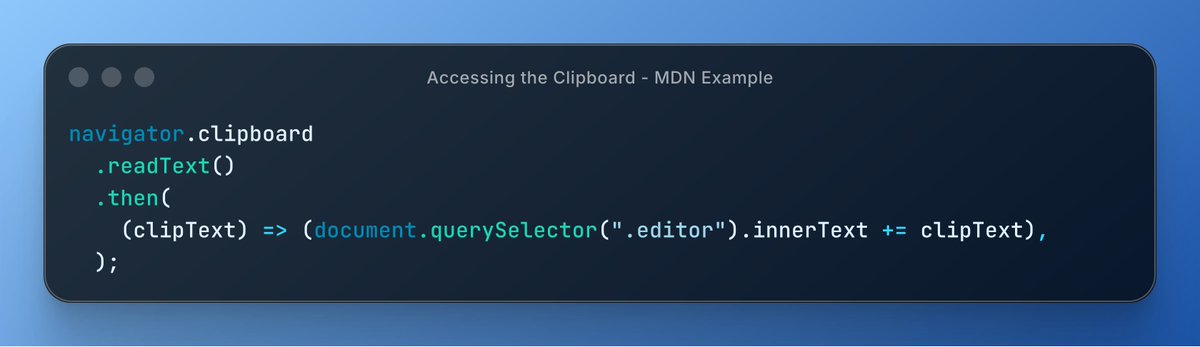
ALT Code snippet demonstrates accessing the clipboard using the modern Clipboard API with async/await syntax.
22
195
20,326

Mar 23
This post is for anyone who has wasted days, weeks, or months of their life struggling with state in your single-page JavaScript app. Maybe you type three paragraphs into an edit field — and a background refresh silently replaces the DOM, vaporizing your work. Or you bring up a modal dialog box, and something makes it disappear. Or your dropdown selection doesn't actually make it into the operation it was intended for.
If this sounds like you, you probably need Datastar in your life, and reduce your use of JavaScript in your client.
I had this realization while listening to a talk that David Yang (@dyang , founder of Fullstack Academy and Lightweight Labs) at Clojure/conj 2025. It made me realize that when you’re writing a JavaScript front-end, you’re almost always accidentally building a distributed system.
Because of David, I ended up deleting ~1,700 lines of JavaScript in a week in an editor I've been writing, replacing it with a radically simpler approach: server-side Clojure Datastar SSE (Server-Sent Events). The server renders HTML, streams it to the browser, and the browser just displays it. Hundreds of lines of JS became ~20 lines of Clojure, over and over again.
This is because I realize that the mess I had made for myself (enthusiastically encouraged by Claude Code, trained on a gazillion JS SPA apps) had became intolerable: The client has state. The server has state. They're stomping on each other, and you've lost track on which is actually the source of truth. You fix a bug in one place and it surfaces somewhere else, because you have two copies of reality and they're slowly diverging. And the longer you work on it, the more duct tape you add to keep two diverging copies of truth pointed at each other.
In Yang's talk, he talks about how he thought his main business challenge was to build a sync engine between browser clients and his server to present their QuickBooks data in a Google Sheets like interface to their customers. He kept building more sophisticated solutions to reconcile state: cache invalidation, optimistic updates, conflict resolution, offline queues, replay logic. The code kept getting more complex, and the bugs never went away.
In a moment of reflection and hammock-time, he saw three things in quick succession that led to a startling epiphany:
- "One Billion Checkboxes," the viral app (written in Clojure by @anders_murphy!) serving one billion shared checkboxes to thousands of concurrent users, fully server-rendered on a $5/month VPS. Every session was an HTML stream, with toggles synced in real-time, with zero client-side state management. As Yang said, "I'm trying to render a thousand cells in the browser, and this guy posts about rendering a billion cells in the browser, and you're like: This is relevant to my interests." Haha, so true.
- Watching his son play Fortnite streamed via NVIDIA GeForce NOW, streaming 60fps gameplay with no game engine running on his machine. Like the one billion checkboxes being streamed in each frame, Fortnite is streaming a ton of data to each gamer, and it works. His son's gaming computer was basically a monitor receiving pixels from the network.
- Watching his wife who works at JP Morgan using a virtual desktop, which was streaming a bunch super, complicated enterprise apps as as pixel streams.
Each of these had zero state sync bugs, because there was nothing to sync.
Yang said: "You give someone state they'll have bug for a day but you teach them how to represent state in two places they have to be kept in sync and uh they'll get bugs for a lifetime." Har har. Ouch.
In 2019, I described my Clojure and functional programming aha moment. I proudly talked about how much I learned from reading "React for People Who Know Just Enough jQuery to Get By," I presented the killer toy tweetbox example go from simple to nightmarish — a character counter here, a photo button there, and suddenly jQuery's callback spaghetti was unmanageable.
In contrast, React's centralized state model felt like enlightenment. I wrote my Love Letter to Clojure, and how Clojure eliminated 90% of the errors I used to make. I thought I'd learned the lesson.
I thought there were only two floors of Hell. Apparently there's a third — Claude Code will invariable take you there, and may make sure you never leave. This post is meant to show you the way out.
- Floor 1 (2016): Don't mutate state. Pure functions, immutable data. Stop changing variables out from under yourself. (Clojure and functional programming, lodash, etc.)
- Floor 2 (2019): Centralize state. One atom, one source of truth. Stop scattering state across components, callbacks, and global variables. (jQuery -> React → Redux, Flux, etc.)
- Floor 3 (2025): Don’t duplicate state across client and server — eliminate the client copy entirely if you can . (Electron/JS → server-side Clojure Server Side Events [SSE]/Datastar)
For the last two weeks, I've been working on a text editor to help me write — it was my sixth attempt to write the ideal editor to help me write. I did a fresh rewrite as Electron JS app, and it worked wildly well, but it was growing unruly.
I rewrote it as a web app, Clojure on the back-end, and JavaScript on the front-end. And started having all sorts of problems, as I described above, due to 50 shared state across the front- and back-end. Here's some Claude Code summaries of days of bug bashing:
- Ghost state everywhere. Modal says it's closed, but a localStorage restore opens it 500ms later. Dropdown shows Opus, spinner says Sonnet. A boolean set to true on button click is never set to false, so every subsequent update auto-scrolls the page forever. Client state and server state drift apart silently — no errors, just wrong behavior.
- The DOM isn't yours. You set a button to "Loading..." in JavaScript, but the server replaces the DOM before your cleanup runs. You add a purple focus ring, and the next server push erases it. You double-click to edit, but the first click triggers a re-render that replaces the element before the second click arrives. Every piece of state you store in the DOM exists on borrowed time.
- Invisible coordination bugs. Eleven bugs compounding, each masking the next — a scroll position saved by one system and restored by another, cancelling a third system's scroll animation, all within 50ms. You can't reproduce it. You can't even describe it to someone. You just stare at a dropdown that "does nothing."
These were the categories of problems I was drowning in — the app was working, built quickly to during writing sessions, but getting impossible to change without breaking something else:
Armed with Yang's lessons, I started mass-deleting JavaScript and HTMX calls, instead, streaming HTML fragments via SSE (Server-Sent Events) using Datastar. I started adopting the "game-engine" pattern, where the server assembled each frame from scratch, and streams it to the client as HTML. The browser started to become Yang said it should be: a monitor, like his son's Fortnite session.
A couple of amazing surprises: I expected SSE round-trips to feel sluggish, which is usually why we keep things on the client. I was shocked that keyboard navigation could use client-side reactive signals (no network) — it was instant. Skeptically, I tried moving the character counter to be computed on the server, rendered to the client via SSE. To my shock, it was instantaneous.
So I began a big rewrite around three architectural principles:
- Think game engine. The server is a game loop: receive input, mutate state, render frame, push HTML. The browser is a dumb terminal — it displays what it receives and never decides what to show.
- Minimize JS state to zero. I added a red "measles" overlay that highlights every JavaScript state variable on screen. Three variables became an embarrassment. The goal: if the server restarts or the page reloads, everything is restored from one Clojure atom — no localStorage, no JS globals, no let currentState =. (Well, I'm discovering that there's around 5 reason you need to have JS local state, but they're really at the periphery of your program.)
- Fire and forget. Every user action is a POST that returns 204 No Content. No JSON response. No .then(data => {...}). The client fires the request and moves on. The server mutates state and pushes the new reality via SSE.
The best proof of the value of the rewrite: I've had writing sessions where I was actively adding features in the app while using it. Adding keyboard accelerators to buttons when I became annoyed at clicking those buttons. No compile step. No browser refresh. No lost state. The modal stays open, the draft stays in the textarea.
It felt genuinely sublime, even compared to the the world-standard of ClojureScript hot reload systems. Server-side SSE push with browser hot reload feels amazing.
A couple of closing thoughts:
1. If any of these problems sound familiar, watch David Yang's talk. If you're a Clojure person (or Clojure-curious), the combination of Datastar SSE server-rendered Hiccup is freaking amazing.
2. If you're vibe coding applications, you're more at risk of falling into this third plane of Hell. It's been trained on so much JavaScript SPA that use the replicated state patterns; you'll have to work extra hard to make sure it uses the "game engine Datastar on backend" pattern. I've created a Claude Code skill for this.
3. I'm still figuring out some of the rough edges of Datastar, as well as things that don't work quite so easily when trying to replace JavaScript and DOM operations. The seven valid uses of JS include:
- Keystroke dispatch. Capture keypress, read server state from data attributes, route it. Must happen in <16ms.
- Cursor manipulation. insertTextAtCursor(), selection ranges, execCommand('insertText'). The browser owns the cursor — SSE can't touch it.
- Browser gestures. Clipboard API, drag-and-drop, double-click. Requires user gesture or instant feedback that can't survive a round-trip.
- Heartbeat/timers. SSE connection monitor, loading spinners, MutationObserver for post-morph cleanup. Detecting absence is inherently client-side.
- Lifecycle interception. beforeunload beacon, deferring reload during editing. Only the browser can intercept the browser.
I hope this helps someone who is suffering.
8
12
90
26,072

Mar 19
>this was working last week
>they did it because they are afraid of agents and claws stealing Google Workspace value
>Anonymous No.89247531
>be me
>writing a Chrome extension to automate Google Docs
>need to paste some HTML into the doc
>ez right? ClipboardEvent, set text/html, dispatch
>Google Docs: lol no
>literally ignores synthetic paste events entirely
>ok fine, intercept execCommand('paste') like the old days
>hook into iframe document, swap clipboard data
>trigger Edit > Paste from the menu bar
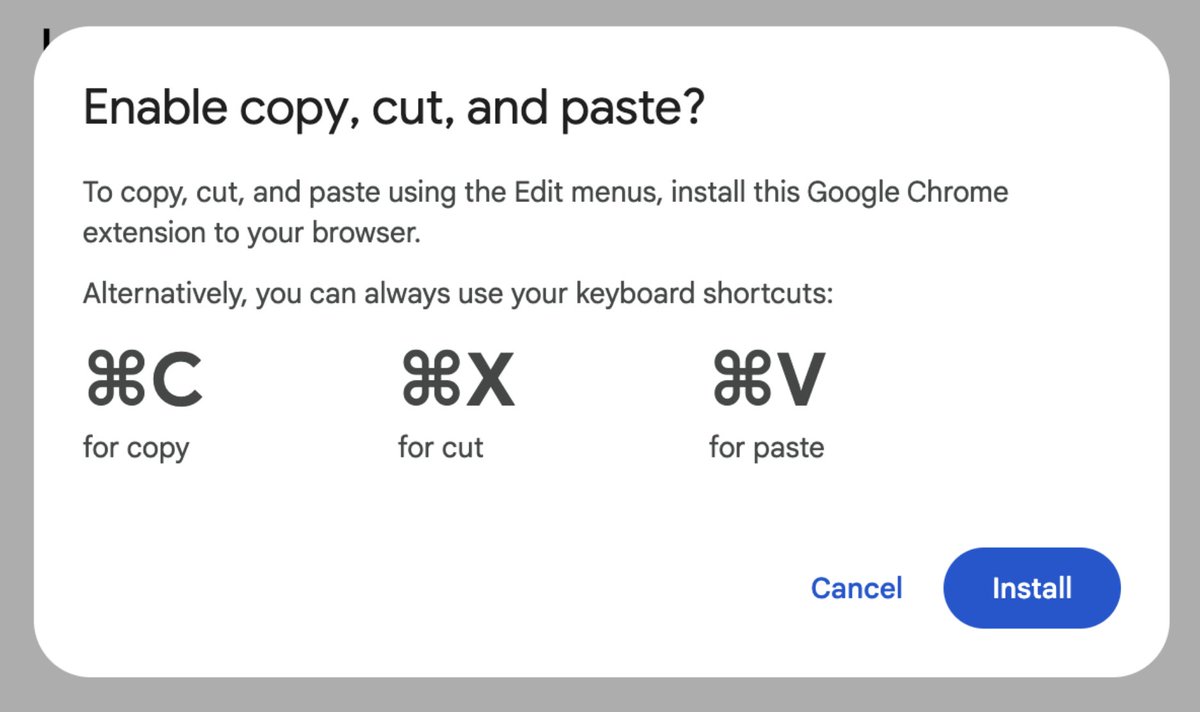
>Google Docs: "iNsTaLl tHiS eXtEnSiOn tO eNaBLe CoPy CuT aNd PaStE"
>WHAT
>YOU ARE GOOGLE
>THIS IS YOUR OWN BROWSER
>THIS IS YOUR OWN EDITOR
>AND YOU NEED A THIRD PARTY EXTENSION TO PASTE
>try Cmd V instead
>execCommand never fires
>try Paste from Markdown menu item
>execCommand never fires
>they literally ripped execCommand('paste') out of the entire codebase
>the paste pipeline goes through some internal Closure library black box that touches nothing in the DOM
>no events, no execCommand, no clipboard API
>just vibes and proprietary Google nonsense
>meanwhile Gmail
>Gmail uses a normal contenteditable div like a normal application
>synthetic ClipboardEvent with text/html? works perfectly
>tables, images, bold, everything
>SAME COMPANY
>one team builds a normal web app
>other team builds a canvas-rendered frankenstein that reimplements every browser API from scratch then blocks the originals
>the accessibility team added screen reader chord shortcuts that work via synthetic keydown
>but paste? nah fam install our extension
>mfw Google Docs is more locked down than a federal prison
>mfw the ACCESSIBILITY features are more hackable than the basic clipboard
>mfw i spent 6 hours proving every possible paste path is dead
>mfw the only way to get images into a table is opening the Insert > Image > By URL dialog NINE TIMES in a row at 5 seconds each
>i am mass crafted with suffering
2
193
Mar 16
Read and write to the clipboard with the modern Clipboard API 📋
async/await, permission-aware, and way cleaner than execCommand.
⋅ Supports text, HTML, and images
⋅ Works in secure contexts (HTTPS)
⋅ No Flash. No hacks.
Learn more 👇
developer.mozilla.org/en-US/…
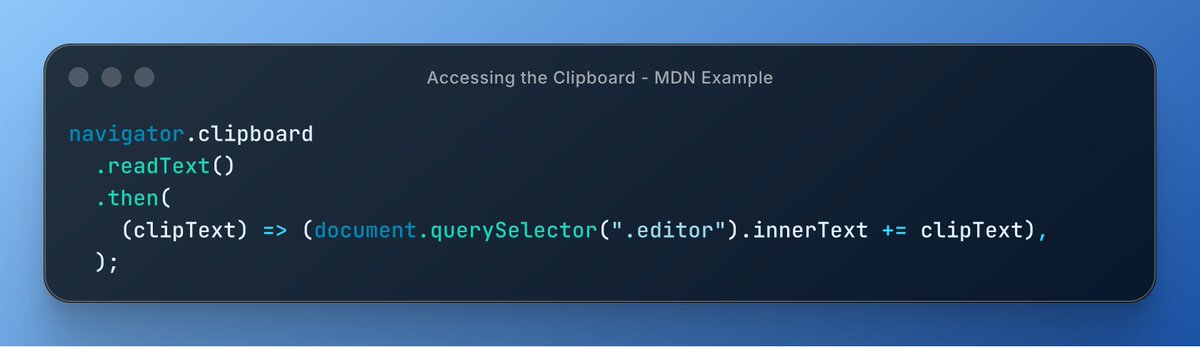
ALT Code snippet demonstrates accessing the clipboard using the modern Clipboard API with async/await syntax.
5
24
242
6,349

Mar 12
while we are on hooks, i have 2 hooks-related feature requests:
- allow passing in hooks in an app-server turn/start req (or worst case thread/start) so we dont have to hack the files via execCommand edit
- custom metadata on turn/start and thread/start, passed to hooks
here's a use case - pass in info needed for APNS push notifications so it can update your live view on the phone without needing another remote service
Mar 12

Hooks are coming to codex. That’s all I wanted to say.
6
40
3,475
Mar 9
🚀 Firefox 148 brings DOM & API Enhancements
📍 Location.ancestorOrigins
🖱️ pointerrawupdate
🧭 Navigation API: addHandler()
📋 execCommand('paste')
Full Release notes 👇
developer.mozilla.org/en-US/…
3
50
2,977

Feb 28
Hour 48 of building agentbay.cc - the App Store for personal AI agents and launching it in 4 days.
Literally 1 AM for me right now and everybody is asleep, but I am shipping🔥
- Shipped a pretty landing page (check it out at agentbay.cc!)
- Real-time agent tool use display in chat
- Full Agent Home with section components (overview, brain, config, files)
- d3-force knowledge Obsidian-style graph (the Agent's 'brain') with wikilink navigation markdown rendering. Agents will maintain a complex brain system to remember EVERYTHING across all context compactions, and the user will see it rendered beautifully
- Split messages at tool boundaries instead of gluing into one block
- Fixed duplicate done events in gateway
- Delete destroyed instances before re-hiring an Agent
- Only seed openclaw.json on first boot using entrypoint script, preserve edits
- Added execCommand, readFile, writeFile, listDir to Fly client
- API routes for agent file I/O, model, restart, rename, logs
- Sparkline stat cards with bar hover tooltips
- Activity feed & relationship stats
- Auto-resizing textareas, proper scroll containment
- macOS dock-style nav replacing sidebar bottom bar
- Model picker → settings-style config page redesign
- Agent removal with AlertDialog confirmation optimistic UI
- Fixed YAML validator rename in dev platform
These features are not avaliable yet, but I will be launching them tomorrow. Join the waitlist now to get more free credits!
1
1
4
214

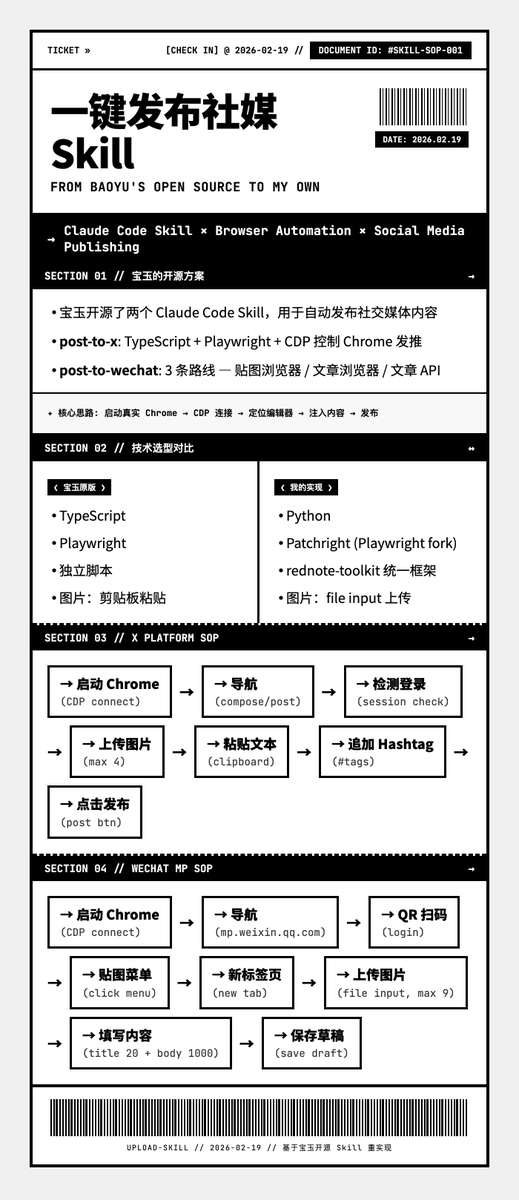
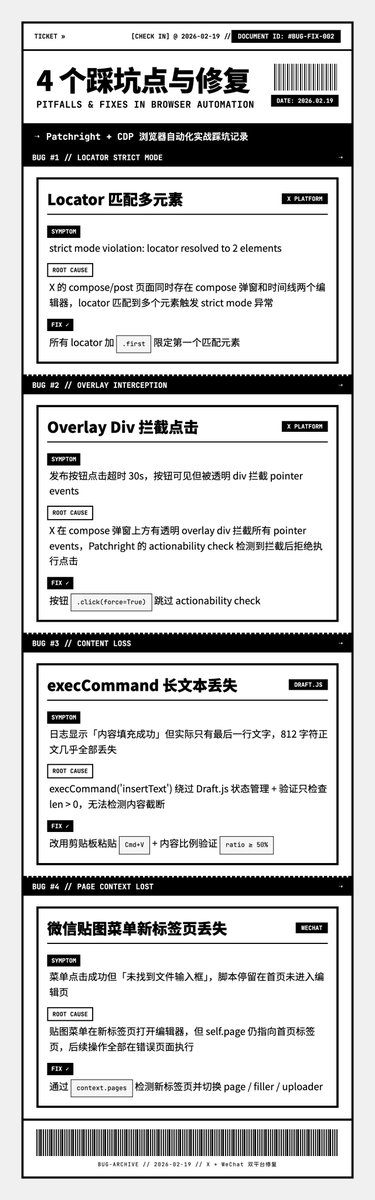
Patchright 写了个一键发社交媒体的脚本,踩坑踩到怀疑人生。
——
❶ 编辑器匹配到两个元素,直接报错
现象:X compose 页面定位编辑器,Patchright strict mode 直接炸
原因:页面藏了两个编辑器
修复:加 .first 取第一个。strict mode 反而是好事,提前暴露 DOM 的真实复杂度
——
❷ 发布按钮点不动
现象:定位到了按钮,click 就是没反应
原因:上面盖了一层透明 div,拦截所有点击事件
修复:click(force=True) 强制穿透。overlay div 这个反模式太常见
——
❸ 812 字只剩最后一行(最离谱)
现象:execCommand 往 Draft.js 编辑器插长文本,发出去一看只剩最后一行
原因:Draft.js 用 execCommand 处理长文本,中间内容全丢
修复:改用剪贴板粘贴,写 clipboard → Cmd V。现代富文本编辑器 execCommand 基本靠不住
——
❹ 脚本跟丢了标签页
现象:微信后台点菜单开了新 tab,脚本还停在老页面傻等
原因:SPA 的链接悄悄开新标签页
修复:context.pages 检测新页面并切换
——
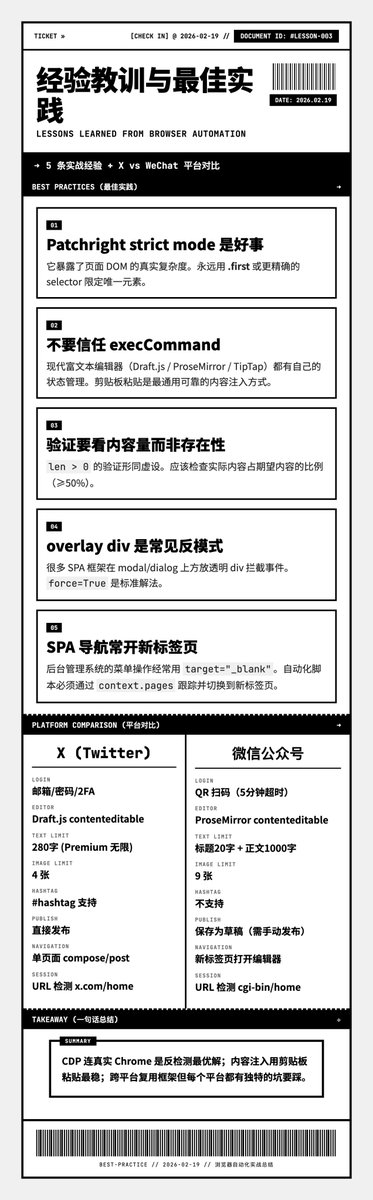
两条经验:
- 验证得看「量」不看「有没有」,len>0 形同虚设
- 浏览器自动化 80% 的坑藏在 DOM 细节里
你踩过哪些浏览器自动化的坑? #浏览器自动化 #Patchright #踩坑记录
1
2
247

Feb 18
For weeks I've been building the core, the invisible stuff. The foundation that nobody sees.
Today, for the first time, something is actually visible.
Text gets bold when you click Bold.
Sounds simple. But behind it: contenteditable DOM handling, execCommand deprecation workarounds, Selection Range API, and edge cases you don't want to know about.
Building a rich text editor from scratch. We're moving.,,,
#BuildInPublic #WebDev #SaaS
2
3
87