

Interesting. I'll take a look. Thank you! I even contacted them directly previously to try to find out if we can control the screens directly (other than sending full-screen images, which is slow) and if they have any protocol for partial updates, or just straight framebuffer control, and they were not very helpful. I have things related to G1 pretty high on my todo still, including writing my own firmware (I figured out a few things for this already), but maybe now we'll have an easier way? I wonder if this refactor relates to G1s as well.
5
singleapi retweeted

Claude Fable one-shot a 32-bit OS that boots in QEMU. VESA framebuffer, PS/2 drivers, compositing windows manager @ ~100fps, drop shadows drawn in software. It even wrote its own test that drags a window and screenshots it.
REPO: github.com/filipvabrousek/os…
#Fable
#Claude
#osdev
2
3
52
4,464

Jun 14
You can now stream iOS simulators directly into AI coding agents — and control them from the browser at 60 FPS.
Evan Bacon's serve-sim is the missing link between AI agent tools (Codex, Cursor, Claude Desktop) and real iOS testing. Here's what it does:
— Captures the simulator framebuffer via simctl io
— Exposes an MJPEG stream WebSocket control channel
— Serves a React preview UI on localhost:3200
— Forwarded gestures: swipe, pinch-to-zoom, keyboard (CMD SHIFT H works)
— Camera injection: replace the simulator's stub camera with a live webcam, image file, or looping video — no Xcode plugin needed
— Simulator logs forwarded to browser for MCP tools
— Drag-and-drop media into the simulator
— Works with iPhone, iPad, Apple Watch
The architecture is clean: a Swift helper captures frames, a dylib swizzles AVFoundation for camera injection, and everything is controlled via CLI.
npx serve-sim "iPhone 16 Pro"
That's it. Your agent can now test iOS apps remotely. Tunnel the URL and anyone can interact with your simulator from anywhere.
Apple Silicon (arm64) only. Requires Xcode CLI tools Node 18 .
github.com/EvanBacon/serve-s…
2
83
DukeUnreal - El el Israel. Num 1# retweeted

Apr 27
The AccelGraphics AG300 seems like a workstation-side spiritual predecessor to the 3dfx Voodoo. 5MB VRAM for framebuffer, 2.5MB DRAM for Z-buffer. Gouraud shading, separate z-buffer, VGA passthrough, no texturing.

ALT On the left: opened spiral notebook guide for the AG300 and a 3dfx voodoo. Two AccelGraphics AG300 boards on the right.
3
40
1,559

Jun 14
the part i'm proudest of:
TetherShot captures your iPhone screen over wi-fi. cable-free. even when the phone is locked.
it rides apple's developer-services tunnel, so you get a real framebuffer — not a compressed mirror.
tethershot.apoorvdarshan.com
18

Jun 14
The new SDK has better support for EFI, I think we're just short of supporting Windows11/arm64 too if only it had a ram-framebuffer type graphics device. I also couldn't get FreeBSD to boot either.
Overall, I'm excited about the macOS27 and updated SDKs.
4/4
67

✅ Kernel: 100% funcional (modo texto)
✅ Drivers base: UART, framebuffer, GPIO
✅ Planificador: Round-robin con prioridades
✅ Syscalls básicas: lectura, escritura, ejecución
1
23
Jun 13
there's a hidden macOS flag — AllowScreenCaptureDevices — that makes your iPhone show up as a native AVCaptureDevice over USB.
apple uses it internally. never shipped a button.
so TetherShot flips it and grabs the real framebuffer in one click.
github.com/apoorvdarshan/Tet…

1
1
23

Jun 13
Apple Lisa Emulator in Rust and WebAssembly - The Machine That Thought It Was 1983 Again
I built a browser-based Apple Lisa emulator in Rust, with a lot of help from autonomous Codex/Claude loops. It works beautifully.
That is the part I still find hard to believe. The Apple Lisa emulator I have been experimenting with is now running LisaOS in the browser. Not as a mockup, not as a video, not as a skin over somebody else’s local emulator, but as a hardware-level emulator written in Rust, compiled to WebAssembly, and launched directly from a regular web browser.
As far as I can tell, this is the first Apple Lisa OS emulator of this kind: Rust, WebAssembly, browser-based, and usable without setting up a local build environment. You open a page, give it a moment, and you are suddenly sitting in front of one of the most important computers of the early 1980s.
What makes this project especially interesting to me is not only the emulator itself, but the way it was built. A large part of the work was done through autonomous Codex loops. I defined the goal, collected every technical document I could find about the Lisa hardware, ROM behavior, memory map, disk protocol, MMU, and boot process, then let the agent work toward a very concrete objective: get a visible LisaOS desktop in the framebuffer with working input.
Piece by piece, it decoded the machine.
It was not magic in the cinematic sense. It was much stranger and, honestly, much more impressive. The agent read documentation, wrote debugging tools, inspected logs, made hypotheses, patched the emulator, ran it again, failed, found the next broken assumption, and kept going. The process looked a lot like a human engineer doing reverse engineering work, except that much of it happened autonomously, in long loops, while I was doing other things. I guided it a few times, mostly when it got stuck conceptually, but the core of the experiment was to see how far a well-scoped autonomous coding loop could push a genuinely difficult systems project. The answer, at least in this case, is: surprisingly far.
The emulator now runs with the original ROM, but it also has a ROMless architecture, which I call HSL emulation. That matters because the Apple Lisa ROM still does not have an open license. I did not want this to be a project that depends on casually passing around someone else’s ROM binary and pretending the legal issue does not exist. The ROMless layer lets the emulator boot without requiring the user to copy the original ROM.
The disk side has a similar story. Originally, I assumed everyone would need to install LisaOS manually from floppy images, create their own hard disk image, and go through the whole setup process themselves. That still works, and I actually recommend doing it at least once, because it gives you a very real sense of what using this machine felt like. But for convenience, the emulator can also fetch a prepared LisaOS disk image and boot directly into a working system. The point is not to hide the historical machine behind a modern wrapper. The point is to make the entry point easy enough that people can actually experience it. And Lisa is worth experiencing.
The Apple Lisa is not just another retro computer. It is one of the most important machines in the history of personal computing. It was the first commercial implementation of a graphical user interface in a form that still feels recognizable today: windows, menus, a mouse, documents, copy and paste, system-managed applications, and a whole philosophy of interacting with a computer visually rather than through a command line. The Lisa was expensive, commercially unsuccessful, and later overshadowed by the Macintosh, but technically it was one of those rare machines where the future arrived early.
It also sits right in the middle of the great Silicon Valley mythology: Xerox PARC, Steve Jobs, Apple, Microsoft, Windows, and the long chain of ideas that moved from research labs into consumer software. If you want a good cultural snapshot of that era, watch Pirates of Silicon Valley. It is obviously dramatized, but it captures the energy and weirdness of that moment better than almost anything else.
Emulating the Lisa is not like writing a small retro toy. An emulator does not simply “run old software.” It has to pretend to be the entire physical machine. The CPU, memory map, interrupts, I/O devices, display, disk controller, timing assumptions, keyboard, mouse, serial ports, and all the little undocumented behaviors that the original operating system quietly relied on. In a normal application, the API is the environment. In an emulator, the API is the computer.
If one bit in the MMU is wrong, LisaOS may stop booting. If an interrupt is raised too early or too late, the system can hang in a state nobody has debugged in forty years. If a Motorola 68000 exception frame is slightly wrong, the OS may crash in a way that tells you almost nothing. If the disk protocol replies with the wrong status at the wrong moment, the boot process simply falls apart. This is why emulator work can be so unforgiving. There is rarely one big breakthrough. Success is hundreds of tiny compatibilities lining up at the same time.
For this emulator to work, I had to recreate a lot of the Lisa’s hardware behavior: the Motorola 68000 CPU, including instructions, exceptions, interrupts, bus error frames, and Line A traps used by the system; the Lisa’s 24-bit address space and memory map; the MMU with contexts, segments, SOR and SLR registers, and switching between system and user mappings; booting from a ProFile hard disk image; the ProFile disk protocol over the parallel port, including busy lines, commands, reads, writes, parity, tags, and block transfers; the VIA 6522 chips that handle I/O; the COPS controller for the keyboard, mouse, and real-time clock; the Lisa framebuffer; parameter memory; and enough ROM/startup behavior to let the system believe it is running on real hardware.
The most important point is this: the emulator does not draw Lisa Office System. It only emulates the machine.
The original LisaOS boots, talks to the disk, switches memory contexts, processes mouse input, and draws its own interface into video memory. When you finally see the Desk menu, File/Print, Edit, Housekeeping, and the Lisa desktop, you are not looking at a recreation of the UI. You are looking at the original system running because enough of the original computer has been reconstructed underneath it. That is the magic of emulation. When it works, the old software believes the machine exists again.
The latest part that made me ridiculously happy is RS232. I implemented serial printing end to end. You can go into LisaOS preferences, select a printer, and print from applications. The browser then downloads a PDF.
Under the hood, the emulator captures the raw serial data that would have been sent to a physical dot-matrix printer over RS232. That stream has to be intercepted, interpreted, rendered, and converted into something a modern browser can hand back as a PDF. There is something wonderfully absurd about that. A 1980s workstation thinks it is talking to a printer over a serial port, while a WebAssembly emulator in a browser quietly turns the output into a modern document. Two completely different eras of computing, stitched together through a hacked serial path.
For me, this project is a great example of what AI-assisted engineering is starting to look like when it moves beyond autocomplete and boilerplate. This was not a CRUD app. It was not a wrapper around an API. It was a reverse engineering and systems programming problem involving undocumented behavior, old hardware, incomplete documentation, binary artifacts, timing assumptions, and debugging through traces.
Could a human engineer do this? Of course. In fact, every useful step in the process resembles something a human engineer would do: read documents, study existing knowledge, form hypotheses, build tools, inspect failures, and slowly converge on the correct behavior. But that is also the point. A project that would normally require a very specific, very patient, and probably very expensive engineer became feasible through a well-defined AI workflow, good source material, and autonomous iteration.
I am not claiming the model invented emulation from a vacuum. No human engineer does that either. We all build on documentation, prior work, examples, memory, and patterns absorbed over years. Existing Lisa projects, documentation, and emulator code almost certainly live somewhere in the training distribution of modern models. That does not make the result uninteresting. It makes the process more interesting. The real question is no longer whether the system has read the world. The question is what it can actually do with that knowledge when placed inside a loop that can test, fail, inspect, and improve.
This project also reminded me why preservation matters. There is a huge amount of computing history sitting in strange formats, old binaries, partial documentation, abandoned tools, and machines that are becoming harder and harder to maintain. AI may become incredibly useful in bringing some of that back to life. Not by replacing historians or engineers, but by making it possible to explore dead or obscure systems at a speed and cost that would have been hard to justify before.
There are still rough edges, of course. This is a preview before a much longer technical writeup. I want to document the Lisa architecture, the MMU work, ProFile emulation, the ROMless boot path, the serial printing implementation, and the autonomous-agent workflow itself. I think the process is at least as important as the artifact. The emulator is the thing you can run, but the way it was produced may be the more interesting part.
For now, the system works well enough to boot, use LisaOS, run applications, move the mouse, interact with the desktop, and print to PDF. It runs best on a desktop browser or a tablet. There will not be a mobile version, because I do not have the time and, honestly, the Lisa was a desktop workstation. It deserves a large screen, a mouse or trackpad, and a little patience.
One geeky detail I love: the Lisa display did not have square pixels. The pixel aspect ratio is roughly 1:1.5, so on modern displays the image has to be corrected in real time. Otherwise circles become ellipses and squares become rectangles. That is the kind of detail that makes emulation feel physical. You are not just running old code. You are recreating the assumptions of an old machine.
I do not know yet what all of this means. I only know that seeing LisaOS come alive in a browser, through a Rust emulator compiled to WebAssembly, with working input, disk, ROMless boot, and serial printing, felt like more than just another programming project.
A piece of computing history came back to life. And it came back through tools from a completely different era.
What a time to be alive.
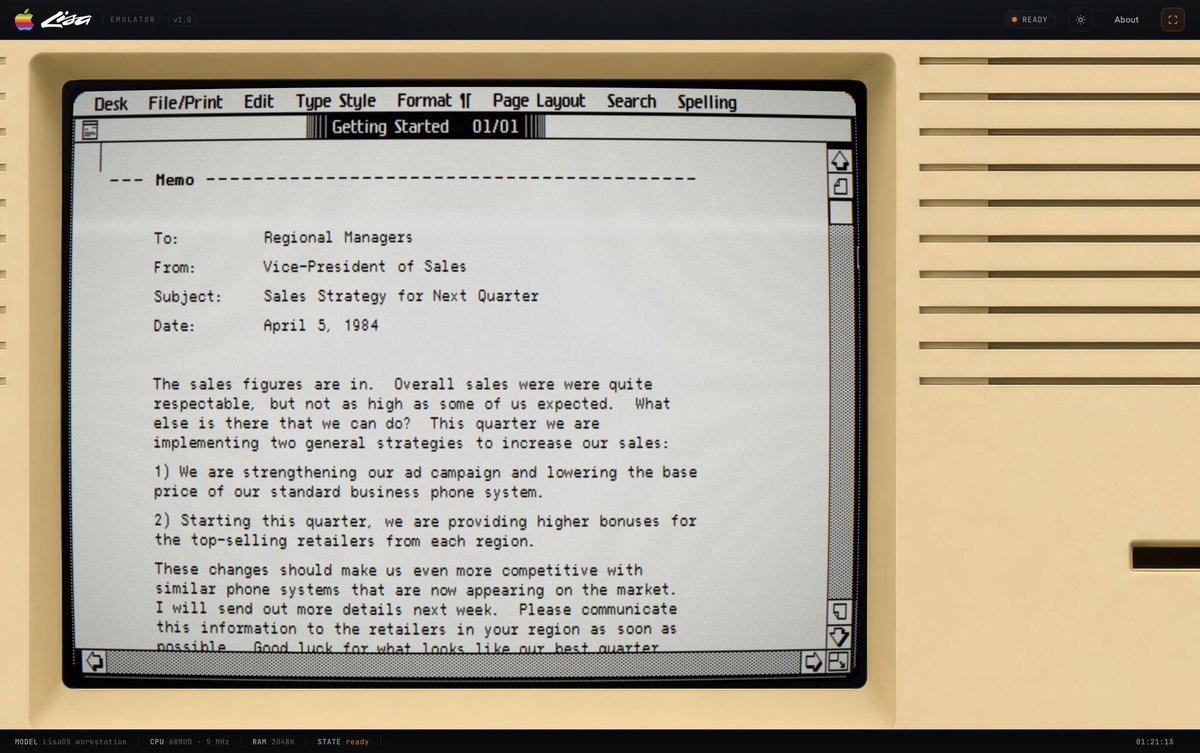
6
8
725

Jun 13
Phase 14 of ChronoOS: graphical mode is partially alive.
Framebuffer UI exists. Window manager pieces exist. Not a full desktop yet.
But this is the first time ChronoOS starts looking less like a terminal and more like a world.
#buildinpublic #osdev
16

Jun 12
5| Pipes are that chokepoint in capture mode. Run a stage, collect its lines into a buffer, hand the buffer to the next stage. grep with -i and -v, sort, uniq, nl, wc, head, tail. None of them know they are in a pipeline. They read the output of whatever ran in front of them.
Redirection is the same hook aimed at a file instead of the screen > writes >> appends, and the command on the left never changes. It still calls the one output function. The plumbing alone decides whether those bytes reach the framebuffer or the VFS.
&& and run on real exit status. Each fallible builtin returns success or failure, the dispatcher records it, and the connectors gate on it. mk dir && cd dir short circuits the way your fingers expect. This is the line between a shell and a menu of commands.
1
5
55
Jun 12
3| There is also no terminal emulator beneath nox. It reads scancodes off the i8042 controller and rasterizes its own glyphs into a framebuffer. What looks like a terminal is a capsule drawing characters to pixels, with the kernel mediating every step in between.
1
7
103

Jun 12
with some archaic EDID grubbing, it was a while ago, super super messy but got eventually got sunshine to do nvidia encoding and stream the virtual framebuffer over sunshine to my MacBook. would have kept working awesome if the m.2 didn’t cook itself. damn gaming laptops. 3/
1
16

Jun 12
Plot twist time: remember those demos we dropped last Wednesday?
Every single one of them was built on top of a brand new template we just published. Meet md-framebuffer-template, the fastest way to build audiovisual SidecarTridge Multi-device apps for the Atari ST family.
What it is: a starter that lets you write 50 Hz, sub-20-millisecond games, demos or even retro-console emulators entirely on the RP2040 side. You draw into a 320x200, 16-colour framebuffer that lives in the Pico's RAM, you call fb_publish() once a frame, and the firmware blits it tear-free to your Atari ST screen on every VBL. No m68k assembly. No bus timing. No double-buffering juggling.
What you get out of the box:
- Dual page-flipped framebuffer on the ST, fully managed for you.
- Real 50 Hz locked to the Atari ST vertical blank.
- ~19 ms of compute every VBL for your app to draw a frame.
- ~6 kHz, 6-bit sampled audio out through the YM2149.
- Atari ST keyboard handled on the RP2040, scancodes delivered straight to your code.
- Helpers for sprites, blits, text, palette tricks, color cycling.
And one more for the AI-curious: the repo ships with a Claude Code SKILL.md that teaches Claude the whole framebuffer model, the fb_* / palette / audio / ikbd APIs, the main-loop pattern, the RAM constraints, even how to strip the bundled demos to start fresh. If you code with Claude Code, it understands this template out of the box.
If you ever wanted to write something Atari ST flavored without touching the 68000, this is your shortcut. Grab it here and start hacking:
github.com/sidecartridge/md-…
4
11
535
