

contentvisibility, intersectionObserver, there are plenty of modern ways to handle tens of thousands of elements in a performant way.
1
10

Jun 7
ilk prompt buydu sonradan ekleme çıkarmalar yaptım
Create a single-page, fullscreen e-commerce landing page for a melatonin sleep supplement called "Somnia®" using React Tailwind CSS. The aesthetic is nocturnal and premium — a fixed night-sky video backdrop with content that scrolls up and dissolves under a fixed navbar.
Fonts
Display (headings, logo): Instrument Serif (normal italic)
Body (nav, descriptions): Inter (400/500/600)
Import both from Google Fonts.
Color system (night theme)
Background: #0D0B1F (deep midnight indigo)
Primary text / "ink": #ECE8F8 (moonlight)
Secondary text / "muted": #9D95BE (lavender-grey)
Accent (italic emphasis, prices, ticks): #B9A4F0 (soft lavender)
Stars / review ratings: #D9B45A (warm gold)
Buttons: moonlight pill #EFEAFB background with dark #15101F text
Use italic lavender for emphasized words in every headline (e.g. noise, restful sleep, reimagined).
Fixed background layer (z-0, position: fixed, inset-0)
A looping muted autoplay video (object-cover, full viewport), opacity ~0.9, native loop plus an ended handler that resets currentTime=0 and replays — no fade-to-white, the loop point must be invisible.
Layer on top, in order: a faint twinkling starfield (multiple radial-gradient dots animated with a slow 6s twinkle keyframe), a dark night veil rgba(11,9,26,0.55), a low indigo horizon glow (radial-gradient bottom-center), and top/bottom fades into the background color.
Fixed navbar (z-30, position: fixed, top-0)
Logo: "Somnia®" with the ® as a small superscript, Instrument Serif, text-3xl.
Links: Home (active, moonlight) · Science · Ingredients · Reviews · Shop (muted, hover→moonlight).
CTA pill "Shop Now": moonlight bg, dark text, hover:scale-1.03.
Layout: max-w-7xl mx-auto flex justify-between items-center px-8 py-6.
Scroll model (critical)
The background and navbar stay perfectly fixed. ONLY a scrolling layer (.scroller, position: fixed; inset:0; overflow-y:auto; z-10) moves.
Apply a CSS mask-image: linear-gradient(to bottom, transparent 0px, transparent 58px, #000 150px, #000 100%) to .scroller so content dissolves as it rises up under the navbar, not at the page edge.
body { overflow: hidden }. Section anchors use scroll-margin-top: 120px.
Scroll reveal animation
Wrap each block in a Reveal component using IntersectionObserver. Hidden state: opacity:0; translateY(38px) scale(0.985); blur(7px). Visible: fade/rise/un-blur over 1.1s cubic-bezier(0.22,0.7,0.2,1), with staggered per-item delays.
Hero uses three fade-rise keyframe animations staggered 0s / 0.2s / 0.4s.
Respect prefers-reduced-motion (disable all of the above).
Sections (top to bottom)
Hero — full-height, centered. Soft moon-glow radial behind a giant headline: *"Beyond the noise, deep and restful sleep."* (text-5xl→8xl, line-height 0.95, letter-spacing -2.46px). Muted sub-paragraph about plant-based, non-habit-forming melatonin. "Try Somnia" pill. "Scroll to explore" eyebrow at bottom.
Stats — 3-up: "92% fell asleep faster", "0 morning grogginess", "100% non-habit-forming". Big serif numbers.
Science — centered eyebrow headline "Sleep, reimagined by nature." paragraph.
The Ritual — 3 steps (Take / Drift / Wake) with numbers 01–03 and divider lines.
Ingredients — 2×2 dark-glass grid: Melatonin 10mg, Magnesium Glycinate 200mg, L-Theanine 150mg, Chamomile 120mg, each with dose description.
Comparison — table "Not your old sleeping pill": 6 rows (non-habit-forming, no grogginess, drug-free & vegetarian, etc.) with lavender ✓ for Somnia vs. dim — for traditional pills.
Your Night — hour-by-hour timeline (0:00 lights out → 7:00 natural wake) in a bordered list.
Reviews — 3 dark-glass cards, gold ★★★★★, serif pull-quotes, name role.
Product & Shop — 2-column: transparent product PNG floating on the night with a soft lavender moon-glow behind it (blurred radial, NO hard box); right side = product name "Somnia Melatonin 10 mg", gold rating, description (120 vegetarian tablets / 4-month supply), an interactive plan toggle ("Subscribe & Save 20% → $33.60/mo" vs "One-time → $42.00") that updates the price and the "Add to cart" button live.
Bundles — 3 pricing cards (1 / 3 / 6 bottles) with per-bottle pricing, "Most popular" and "Best value" badges, savings labels.
FAQ — 4 questions in a bordered list.
Final CTA — "Tonight, sleep differently." "Shop Somnia — $42".
Footer — logo, nav links, copyright.
General
Everything responsive; cards/tables/dividers use dark-glass surfaces (rgba(255,255,255,0.04–0.08) fills, subtle light borders).
Keep the whole experience calm, minimal, and dreamy — generous spacing (py-32 between sections), no clutter, no harsh whites.
2
1
7
889

🟣 Underrated #TechSEO Tip
Heavy scroll handlers on the document or window fire nonstop and block the main thread. INP doesn't measure scrolling directly. It measures clicks, taps, and key presses. But a blocked main thread means those interactions feel sluggish.
Use passive event listeners for scroll and touch events. Better yet, replace scroll handlers with IntersectionObserver entirely.
10

Jun 7
React devs, you see this in every beginner tutorial:
useEffect(() => {
fetchUsers();
});
…and you think yeah, that’s how you fetch data.
But In production nobody fetches like this. Not even close.
Production code has few options:
1) TanStack Query (the undisputed king in 2026)
It’s not just fetching
it’s a full data synchronization engine:
- Automatic caching deduplication (no duplicate calls)
- Background refetching, stale-while-revalidate, polling
- Built-in loading, error, and success states
- Infinite queries pagination out of the box
- Mutations with optimistic updates & rollback
- Devtools that show you exactly what’s happening
- Request cancellation built-in
You just write `useQuery` and move on. Clean. Powerful. Battle-tested.
2) Or your team’s custom data layer (the 'we built it ourselves' route)
A heavily opinionated helper function/custom hook that does all the heavy lifting so your components stay very simple:
- Axios instance with interceptors for:
- Dynamic headers (Content-Type, Accept, custom tracking)
- Auth (JWT/Bearer automatic token refresh on 401) - BaseURL switching per environment
- AbortController logic in every request (cleanup on unmount so then no memory leaks or race conditions)
- Retry logic with exponential backoff
- Global error handler -->> toast notifications or error boundaries
- Infinite scroll / pagination logic (IntersectionObserver cursor-based or offset)
- Request deduping loading state management (spinner or skeleton)
- Type safety runtime validation (Zod)
- Analytics tracking on every API call (if needed)
- Timeout rate-limit protection
The component? Looks like:
const { data, isLoading } = useUsers();
That is it. Everything else is abstracted away.
Tutorials show the toy version, most times.
Production ships the system.
So next time you see a raw `fetch` inside `useEffect` with no dependency array… you already know what the PR comment will be
What is YOUR production data-fetching setup?

You see this in a React component:
useEffect(() => {
fetchUsers();
});
What are your PR comments ?
7
19
955

Jun 4
How I build with Lovable 🏢
Spline = 3D building orbitable in browser zero Three.js needed
CSS clamp() = massive headline scales all screens zero media queries
CountUp.js ScrollTrigger = $5 trillion stat animates only when visible
Light background single 3D asset = architecture sells itself
CSS letter-spacing = architectural editorial tension in one property
IntersectionObserver = 3D heavy site stays fast on any connection
Jun 3

How i build with Claude
1. mix-blend-mode screen = smoke floats over dark background zero masking
2. GSAP ScrollTrigger = entire scene swaps from smoke to architecture on scroll
3. Three.js environment map = G-Wagon reflects real architecture lighting
4. Three.js Points = smoke particle drift with randomized velocity vectors
5. GSAP cross-dissolve = opacity transition between two WebGL scenes
Save this
4
25
2,538
May 31
How i build with Lovable
1. Spline = 3D car in hero users orbit with cursor zero setup
2. GSAP ScrollTrigger = car drives across viewport on scroll
background-clip text = golden gradient headlines zero image needed
3. Framer Motion staggerChildren = trust badges land one by one
4. CSS linear-gradient = dark to light showroom spotlight transition
5. CountUp.js IntersectionObserver = stats animate only when visible
Save this 🚗
May 30
How i build with Lovable
1. Two colors only = every element feels intentional zero visual noise
2. BARBA.js = page transitions feel like cinema cuts not page loads
3. CSS glitch = multiple text-shadow offsets at different speeds VHS effect
4. Chart.js radar = personality quiz returns mask match in real time
repeating-linear-gradient = scan lines surveillance aesthetic for free
Save this 🎭
10
8
94
18,752


May 27
🚀 開発環境が更新されました。以下のPRがマージされました。#オプチャグラフ
#274: [STG] 広告収益の底上げと台湾・タイ版SEO改善(広告遅延読み込み・翻訳全面見直し・サイト名ラベル英語化)
---
広告の遅延読み込み化、台湾・タイ版翻訳の全面見直し、検索サイト名ラベルの英語統一。
## 1. 広告を遅延読み込み化(収益)
ページ下部の広告が「見られないまま読み込み済み」になり、視認率11〜36%・In-page表示RPM¥37(Vignette¥334/Rewarded¥737の1/10)と安く評価されていた。原因は [`GoogleAdsense::loadAdsTag()`](app/Views/Classes/Ads/GoogleAdsense.php) の一括 push。IntersectionObserver で各広告がビューポート手前600pxに入って初めて読み込む遅延読み込みに変更。視認率向上でviewable重視の単価を引き上げ、CWVも改善方向。IO非対応環境は従来動作にフォールバック。
※広告はstaging非描画のため実挙動は本番のみ確認可。
## 2. 台湾・タイ翻訳の全面見直し(計81件)
旧世代機械翻訳の不自然さ・不統一・誤りを LINE台湾/タイ公式の用語で見直し。
- **サイト名(タイトル接尾辞)**: 流量(アクセス)統計→成長軸。`LINE社群成長統計` / `LINE OPENCHAT สถิติการเติบโต`
- **OpenChat用語統一**: 繁体字 開放聊天室/聊天室/社群聊天室 混在 → 公式語 `社群`。タイ語 → `OpenChat`
- **バグ修正**: パンくず「トップ」誤訳(頂部/ด้านบน→首頁/หน้าแรก)、「メンバー%s人」助数詞欠落、header_site_title(CSSクラス)のゴミ値" thi"除去
- **誤訳/全角記号**修正
## 3. 検索結果のサイト名ラベルを「Open Chat Graph」に統一
検索結果でアイコン横に出るサイト名ラベル(og:site_name / WebSite schema)を、タイトルから切り離し全言語共通の英語ブランド `Open Chat Graph` に固定([`Metadata.php`](app/Views/Classes/Meta/Metadata.php))。台湾・タイで日本語カタカナ「オプチャグラフ」が出るのを防ぐ。LINE公式がラベルを「LINE」で出すのと同じ構図。タイトルは各言語のまま、日本語ブランドはタイトル・本文に残るため国内検索に影響なし。
検証: 全キー原文一致・printfプレースホルダ同数維持・JSON妥当・ローカル描画smoke合格(og:site_name=Open Chat Graph / タイトルは各言語維持を確認)。翻訳の逐一の旧→新+日本語逆翻訳は別添レビュー資料(tw45/th36件)。
2
2
126
May 25
How I build with Lovable 👇
React Three Fiber = Three.js inside React zero boilerplate
Rapier.js RigidBody = real physics on every floating 3D object
useFrame hook = 60fps mouse reactive updates on every element
backdrop-filter blur = frosted glass depth between 3D layers
GSAP timeline = each sentence lands with cinematic weight
IntersectionObserver = one page feels like multiple worlds
Save this 🌐
May 24
This is how I turn one AI-generated component into a full landing page.
I created this component effortlessly using Neuform ai with just 2 prompts using Gemini 3.1 Pro.
After, I download the DESIGN.md and the HTML file (you can also use React)
Then I go into my AI builder, attach both files, and ask it to build the hero section and the rest of the landing page using the DESIGN md as your design system.
And voilà… with a single prompt, I can generate a beautiful landing page in seconds.
5
37
3,934

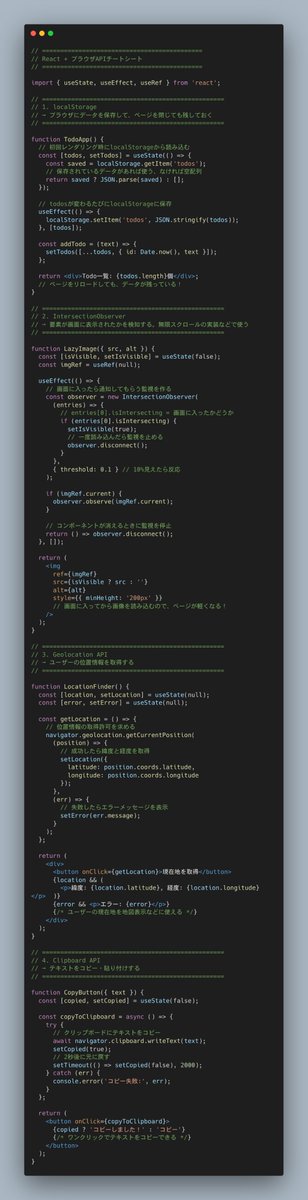
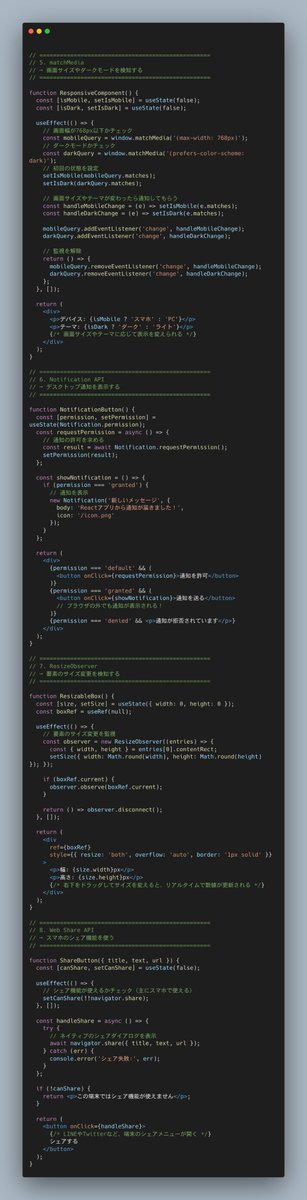
画面の下までスクロールしたことの検知や、ブラウザ通知の許可などブラウザAPIに関する機能使ってる?
localStorage、IntersectionObserver、Clipboard API...
全部Reactで実装するとこうなる
うまく使えば画像遅延読み込み、位置情報取得、通知機能などなど、実用的な機能を手軽に作れる
2
15
1,818

May 22
anyone can build a website like this using Claude Code
imagine being an ordinary person and being able to build a site like this with your own hands, without having any special skills or formal education
when i first saw this guy's work, i couldn't believe my eyes that it was even possible
however, using Claude nowadays, anything is possible!
how to build it:
> use Three.js to render any product inside a real-time 3D environment directly in the browser
> WebGL distortion shaders are the secret behind every premium liquid transition you see on award sites
> Lenis.js controls scroll speed so your animations always feel buttery never choppy
> GSAP ScrollTrigger ties any 3D object rotation to scroll position with 3 lines of code
> Splitting.js breaks any headline into spans so you can animate each word independently
> ShaderMaterial in Three.js lets you write custom visual effects impossible to achieve with CSS alone
> one color palette per product section CSS custom properties swapped on scroll via IntersectionObserver
7
1
43
1,994
May 20
How I built an EATnaked level food brand site with Lovable 👇
1. Spline lets you embed interactive 3D objects directly in the browser with zero Three.js knowledge
2. IntersectionObserver is the free native browser API that triggers any animation when elements enter the viewport
4. Save this if you want a food brand site that makes people hungry before they even read the menu 🥗
4
9
62
22,623

May 20
Access ALL prompts for stunning animated websites in one click: sceneai.art/
prompt:
Create a premium, single-page scrolling landing page for a natural exploration travel company named "Ratiz". The design must be extremely clean, modern, Apple-esque, and perfectly match the layout structure described below.
Technical Constraints & Global Setup:
Single File: All HTML, CSS, and JS MUST be in one single index.html file.
Tailwind CSS: Use Tailwind CSS via CDN (<script src="cdn.tailwindcss.com"></script>).
Typography: Use the "Inter" font from Google Fonts (weights 300, 400, 500, 600, 700). Apply tight letter spacing (tracking-tight) to all large headings.
Animations: Implement smooth scrolling. Add custom CSS within a <style> block for reveal-on-scroll animations (slide up and fade in), smooth image hover zooms (transform: scale(1.05) transition 0.7s), and FAQ accordion transitions.
Colors: Strictly monochromatic layout (black, white, grays) with nature providing the color through images.
Assets Provided (MUST USE THESE EXACT URLs):
Hero Video Background: cdn.sceneai.art/Hero Secti…
Image 1 (Desert Walker): cdn.sceneai.art/Hero secti…
Image 2 (Wide Canyon): cdn.sceneai.art/Hero secti…
Image 3 (Tour 1 - Footprints): cdn.sceneai.art/Hero secti…
Image 4 (Tour 2 - Car): cdn.sceneai.art/Hero secti…
Image 5 (Tour 3 - Camels): cdn.sceneai.art/Hero secti…
Image 6 (Tour 4 - Rock Arch): cdn.sceneai.art/Hero secti…
Image 7 (FAQ Background): cdn.sceneai.art/Hero secti…
Step-by-Step Section Requirements:
Section 1: Navigation
Layout: Clean white background, padding roughly py-4 px-10.
Left: Logo with an SVG icon (triangle circle) and the text "Ratiz" in bold.
Center: Text reading "Based in: AlUla Region". (AlUla Region should be bold).
Right: Links: "Tours", "About", "Blog", "Gallery".
Section 2: Hero Video Area (CRITICAL LAYOUT)
Container: Placed just below the navbar inside a wrapper with horizontal padding (px-6). The container itself must be massive (h-[85vh]), have heavily rounded corners (rounded-[3rem]), and use overflow-hidden.
Background: Use the Hero Video URL as a looping, muted, autoplaying background covering the container. Add a dark gradient overlay (bottom to top) for text readability.
Hover Animation: The wrapper must have a group class. When hovered, the video background should smoothly zoom in using a slow transition (scale-[1.03] duration-[1.5s] ease-out).
Content Placement: Pinned to the absolute bottom left and right of the container with ample padding (p-12).
Content (Left/Top): Massive white heading: "Explore the Best\nNatural Places".
Content (Right/Top): Small white paragraph: "We organize scenic tours, photo stops, and guided routes..."
Content (Bottom Bar): A flex row. On the left: "20 Scenic Spots Included" next to four semi-transparent icons. On the right: three "pill" shaped buttons with glassmorphism effects (semi-transparent white borders) containing icons and text: "Private Trips", "Transport Included", "Custom Route". Add a thin white separator line between the left and right elements.
Section 3: Discovery/About Area
Layout: Two columns. Left column text (40%), right column images (60%).
Left: A small light gray pill badge "Explore". Large heading: "Discover beautiful routes and scenic spots across AlUla's natural landscapes." A black oval button "Start your trip" next to a circular black button with an up-right arrow.
Right: Two images side-by-side.
Left Image (Use Image 1 URL): Taller aspect ratio (aspect-[4/5]), heavily rounded corners. Text overlay at bottom "See real moments from our trips." with a white arrow button.
Right Image (Use Image 2 URL): Wider aspect ratio. Frosted glass pill badge top-right "Nature Path". Below the image, right-aligned caption text: "Every route reveals new perspectives..."
Both images must scale up slightly inside their containers when hovered.
Section 4: Tours Grid
Header: Small pill badge "Our Tours". Large heading: "Find your perfect desert experience". Right-aligned black button "See All Tours".
Grid: 4 vertical cards (aspect-[3/4]), rounded corners.
Card 1: Use Image 3 URL. Title "Desert Journey", Price "$ 49 / per person".
Card 2: Use Image 4 URL. Title "Sunset Ride", Price "$ 55 / per person".
Card 3: Use Image 5 URL. Title "Scenic Hike Trail", Price "$ 39 / per person".
Card 4: Use Image 6 URL. Title "Golden Evening", Price "$ 60 / per person".
Card Styling: Each needs a dark bottom gradient, text in the bottom left, and a white circular arrow button in the top right. Add smooth image zoom on hover.
Section 5: FAQ & Help
Layout: Two columns. Left image (33%), right accordion (67%).
Left: Badge "FAQ". Tall image card using Image 7 URL. Dark overlay with text "Didn't see your question? Our team is here to help..."
Right: Heading: "Everything you need to know before your desert journey...". Below it, an accordion with 5 questions.
Accordion Logic: Enclosed in light gray rounded boxes. Clicking expands it to show text and rotates the downward arrow. Write JS to toggle max-height and close previously opened items. Include 5 generic tour-related FAQs.
Section 6: Call to Action
Layout: A large, light-gray box (bg-gray-50) spanning the container width, heavily rounded. Two columns inside.
Left: Badge "Start now". Heading: "Discover your next perfect desert escape". Black button "Plan Your Trip".
Right: Two square image cards side-by-side (Reuse Image 2 and Image 6 URLs).
Section 7: Footer
Layout: A large, heavily rounded, very dark gray box.
Background: Use Image 3 URL as a heavily desaturated, low-opacity (15%) background overlay behind the footer text. Add a dark gradient on top.
Content: Large logo "Ratiz". Two columns of text links ("Navigation" and "Social").
Absolute Bottom (Outside the dark box): Copyright "© 2026 Ratiz" and links "Privacy Policy", "Terms of Service".
Javascript Requirements:
Use IntersectionObserver to add an .active class to elements with a .reveal class as they scroll into view to trigger the CSS animations.
Implement the toggle logic for the FAQ accordion.
1
1
3
735

May 16
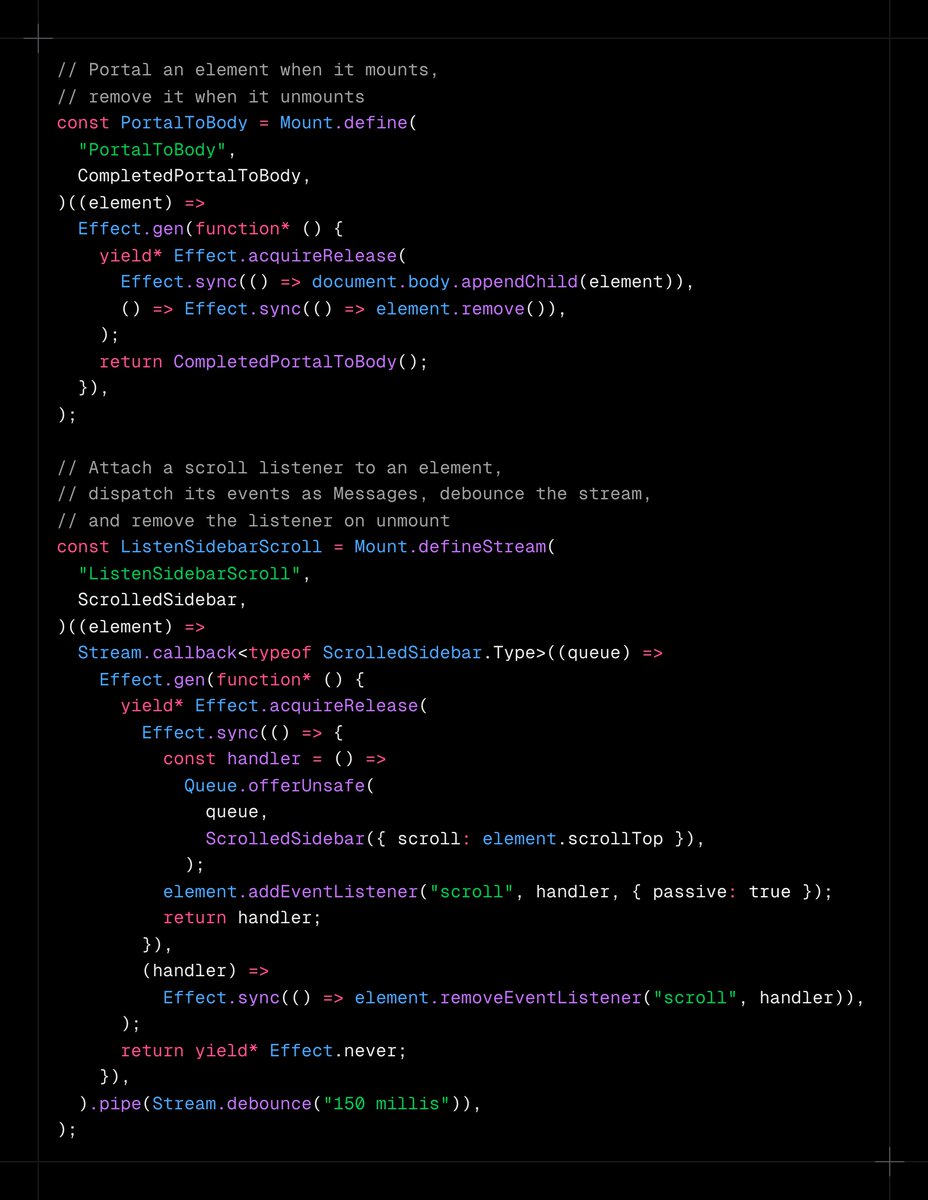
`Mount.defineStream` is new in Foldkit.
Mount is the natural shape for wiring DOM events from a specific element into your program or declaring side effects that occur as a result of an element mounting.
`Mount.define` is for one-shot side effects that occur as a result of an element mounting, like portal-ing or instantiating a third-party library bound to an element. `Mount.defineStream` adds support for ongoing streams, for example listening to scroll events or running an IntersectionObserver.
Release notes: github.com/foldkit/foldkit/r…
1
13
616

May 15
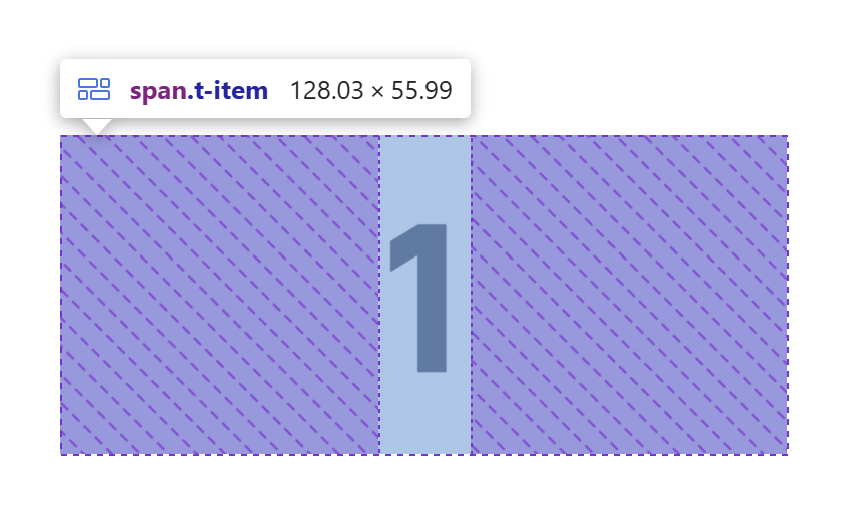
TIL if you use zoom of, say, 110% in browser – the sizes get all messed up around subpixels which renders IntersectionObserver completely broken for threshold of 1 in ALL browsers. Beware.
4
429

May 11
Count-up animations triggered by IntersectionObserver cubic ease-out via requestAnimationFrame.
No library. 30 lines of TypeScript.
1
2
19

May 11
第五道墙最隐蔽:modal 内容懒挂载查 document.hasFocus()
SideNav 点了,URL 改了,dialog 壳挂了,但里面是空的——X 用 IntersectionObserver 判断"这个 tab 在后台",跳过挂载实际表单
钥匙:CDP Emulation.setFocusEmulationEnabled
让页面以为有焦点,不真夺 OS focus。测试框架标准操作。加了这个 modal 立刻挂全
2
23