
Amazon MWAA が Apache Airflow 3.2 をサポートするようになりました。
Amazon Managed Workflows for Apache Airflow(MWAA)が、人気のあるオープンソースのワークフローオーケストレーション・フレームワークの最新メジャーリリースであるApache Airflowバージョン3.2をサポートするようになった。Amazon MWAAは、基盤となるインフラストラクチャを管理することなく、Apache Airflowを大規模に実行できるマネージドサービスである。このリリースにより、AWS上でデータパイプラインを構築および運用するチームに新しいデータ認識スケジューリング機能と開発生産性の向上をもたらす。
Apache Airflow 3.2では、データエンジニアリングチームがパイプライン実行をより正確に制御できるように、特定のデータスライス(例:日付でパーティション化されたS3パス)に基づいてダウストリームDAGをトリガーするアセットパーティショニングを使用できるようになった。これに加えて、このリリースでは、承認のための完全な監査履歴ビュー、AgenticOperatorに対するHITL(Human-in-the-Loop)サポート、Deadline Alertsに対する同期コールバックサポートなど、HITL(Human-in-the-Loop)機能が拡張された。さらに、大規模なDAGのレンダリングを高速化するグリッドビューの仮想化、Airflow UIからの完全なXCom管理、PythonOperatorにおける非同期コール可能オブジェクトのサポートなど、さまざまな改善が加えられた。
新しいApache Airflow 3.2環境をAmazon MWAAで起動したり、2.11以降から数回のクリックでアップグレードすることができる。現在サポートされているすべてのAmazon MWAAリージョンで、AWSマネジメントコンソールからこれが可能です。Apache Airflow 3.2に関する詳細は、Amazon MWAAドキュメンテーションおよびApache Airflowドキュメンテーション内のApache Airflow 3.2変更ログをご覧ください。Apache、Apache Airflow、Airflowは、米国およびその他の国におけるApache Software Foundationの登録商標または商標です。
1
685

Apr 17
Apache Airflow 3.2 is here, bringing partitioned Dag runs and asset events, async Python support for @ task and PythonOperator, and UI theming.
This quick notes guide comes with code examples for every new feature to use as patterns in your own Dags.
Download the guide to learn how to:
↔️ Pass timestamps between Dags scheduled based on assets without custom workarounds
⚡ Cut task runtime by running concurrent async API calls in a single @ task
🎨 Flag critical production deployments by adjusting the colors in the Airflow UI using an Airflow configuration variable
Link below.
4
1
6
310

Most data engineers learn Apache Airflow by trial and error.
But understanding a few core patterns can make your pipelines far more reliable and scalable.
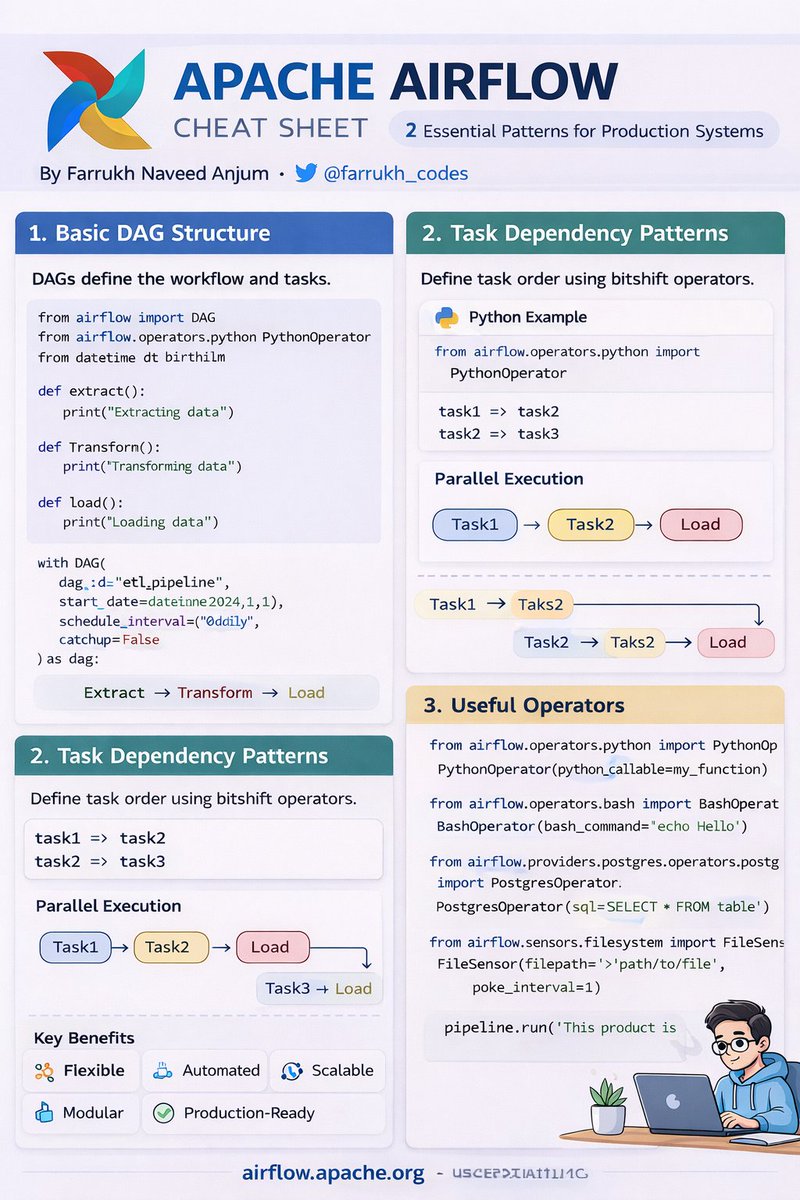
So I created this Apache Airflow Cheat Sheet covering the essentials every data engineer should know.
Key concepts included:
1️⃣ DAG Structure
Airflow pipelines are defined as Directed Acyclic Graphs (DAGs) written in Python.
Typical ETL flow:
Extract → Transform → Load
with DAG("etl_pipeline") as dag:
extract >> transform >> load
This defines the execution order of tasks.
2️⃣ Task Dependency Patterns
Airflow makes dependency management extremely intuitive.
Sequential tasks:
task1 >> task2 >> task3
Parallel execution:
task1 >> [task2, task3]
This allows parallel pipelines for large-scale data processing.
3️⃣ Useful Operators
Operators define what a task actually does.
Common operators:
• PythonOperator → run Python code
• BashOperator → run shell commands
• PostgresOperator → run SQL queries
• FileSensor → wait for files or events
Example:
PythonOperator(
task_id="process_data",
python_callable=my_function
)
Why Airflow is powerful for Data Engineering:
• Python-based pipelines
• scalable scheduling
• strong dependency management
• production-ready orchestration
• rich monitoring UI
It is widely used for:
• ETL pipelines
• ML workflows
• data lake pipelines
• analytics orchestration
Created by
Farrukh Naveed Anjum
Follow @farrukh_codes for more cheat sheets on:
Python • Data Engineering • AI Systems • Software Architecture
#ApacheAirflow
#DataEngineering
#Python
#ETL
#BigData
#MachineLearning
#AnalyticsEngineering
#DataPipeline
#TechTwitter
#DeveloperCommunity
1
1
23

Mar 5
What I did
🔹 I created a new DAG file: postgres_student_dag.py inside the dags/ folder.
🔹 Tasks Implemented
1. PythonOperator Task – check_student_age
A simple Python function that checks whether a student is an adult or a child.
1
12
Mar 5
Day 29 of 30DaysDataEngineeringSeries
Today's focus on integrating Airflow with PostgreSQL for workflow orchestration.
Airflow interacts directly with PostgreSQL using PostgresOperator. PythonOperator and database operators can be used in one DAG
Mar 4

Day 28 of #30DaysDataEngineeringSeries
Today, I continued exploring workflow orchestration with Apache Airflow.
I set up Airflow using Docker, creating a productive dev environment with VSCode for a smooth workflow.
1
1
49
Mar 3
2️⃣ Task: A single unit of work in a workflow.
Examples:
▪️Extract data from an API
▪️Save a file to S3
3️⃣ Operator
A template used to define a task.
Examples:
▪️PythonOperator – Runs Python code
▪️BashOperator – Runs shell commands
▪️PostgresOperator – Executes SQL queries
1
21

Jan 29
DAY 6: 27th Jan
Cont. Apache Airflow
- Implementing Airflow DAGs
- Airflow operators(BashOperator, PythonOperator,EmailOperator,
airflow tasks)
- Airflow tasks & task dependencies(upstream >> or downstream <<)
- Airflow scheduling - DAG run - cron style syntax
15

Jan 22
The #AirflowRealityGap is real: while docs push #KubernetesOperator, most teams run 200 DAGs on #PythonOperator. Why? Containerization overhead rarely beats shipping fast. Teams *are* decoupling, via #KubernetesExecutor, not ideology. banandre.com/blog/airflow-be…
4
26 Dec 2025
#AirflowOptimization starts with asking: what does "efficient" really mean? Avoid the 3 #DAGAntiPatterns, PythonOperator ETL, monoliths, manual parallelism. Let Airflow orchestrate, not compute. #DataEngineeringWin banandre.com/blog/airflow-da…
15

4 Dec 2025
* 🕒 **S3 Sensor** waits for incoming files
* 🐍 **PythonOperator Pandas** handles transformations
* ⚡ **Postgres Hook COPY** for lightning-fast bulk inserts
* ✅ Final SQL validations on the target table
1
26

31 Oct 2025
GCP ComposerでPythonOperatorのタスクでメモリを多めに使う処理を走らせ、worker podのメモリ上限に達すると、kubernetesのpod preemptionによってworker podが削除されてしまう。また、あらゆるpodがノードを共有してるので、ノードがresource pressureにあうと、ノードのスケールアップやダウンが起こり、schedulerやworkerもろとろ全滅する動きになる。これはairflow自体とcomposerを GKEで動かす仕組み両方の欠陥。百歩譲っても、schedulerはworkerやユーザのワークロードからは完全に隔離して、resource pressureの影響を絶対に受けないようなアーキテクチャにすべきだった。
1
1
428

24 Sep 2025
21 Days Roadmap to Apache Airflow Basics
- Days 1–7: Airflow Fundamentals (1 hour daily)
> Install Airflow locally (using Docker or pip).
> Learn Airflow concepts: DAGs, Tasks, Operators.
>Explore the Airflow UI, scheduler, and logs.
- Days 8–14: Building DAGs (1 hour daily)
> Write simple Python DAGs.
> Use built-in operators (BashOperator, PythonOperator).
> Learn task dependencies and scheduling with CRON/intervals.
>Experiment with XComs (data sharing between tasks).
- Days 15–21: Real-World Integrations (1 hour daily)
> Connect Airflow to a database (Postgres/MySQL).
> Build ETL DAG: extract (API/CSV)
→ transform (Python) → load (DB).
> Intro to sensors, hooks, and custom operators.
> Learn the basics of monitoring & retries.
- Throughout: Note every project idea (e.g., automate daily data load, schedule ETL, run API → DB pipelines)
- Day 22: Pick your first project and build
> (e.g., daily pipeline that fetches weather API data → cleans with Pandas → loads into Postgres → sends Slack/Email notification).
2
24
149
7,912

17 Sep 2025
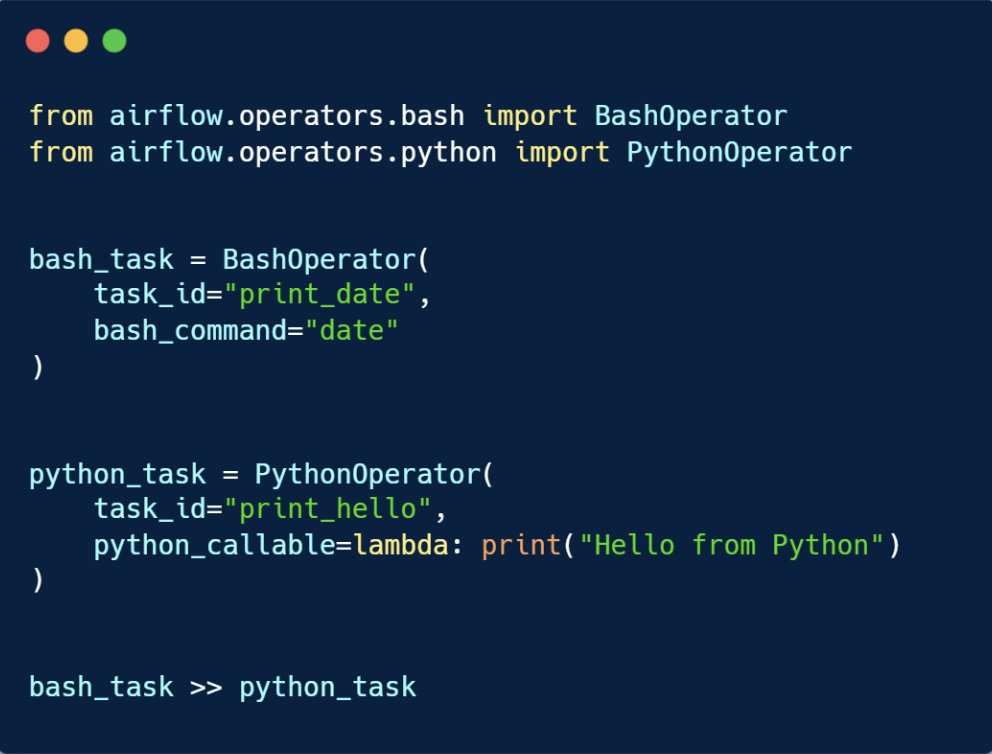
💡Airflow Operators: The Building Blocks
In Airflow, tasks are created using Operators. They’re the “actions” your workflow performs.
Here are the common ones for data engineers:
◉BashOperator → run bash commands.
◉ PythonOperator → run Python functions.
Example:
2
3
9
210

10 Sep 2025
AirflowのDAGに使用するSQLの中にjinjaテンプレの変数使ってたんだけど、DAGの動きをPythonOperatorでゴリゴリに書いてたから上手く代入されずBigqueryInsertjobOperatorとか使う事で変数に渡されることを知り2日3日沼った
50

31 Aug 2025
Check out my latest article: Day 2 of Learning Apache Airflow: Implementing BashOperator and PythonOperator DAGs linkedin.com/pulse/day-2-lea… via @LinkedIn
5

23 Aug 2025
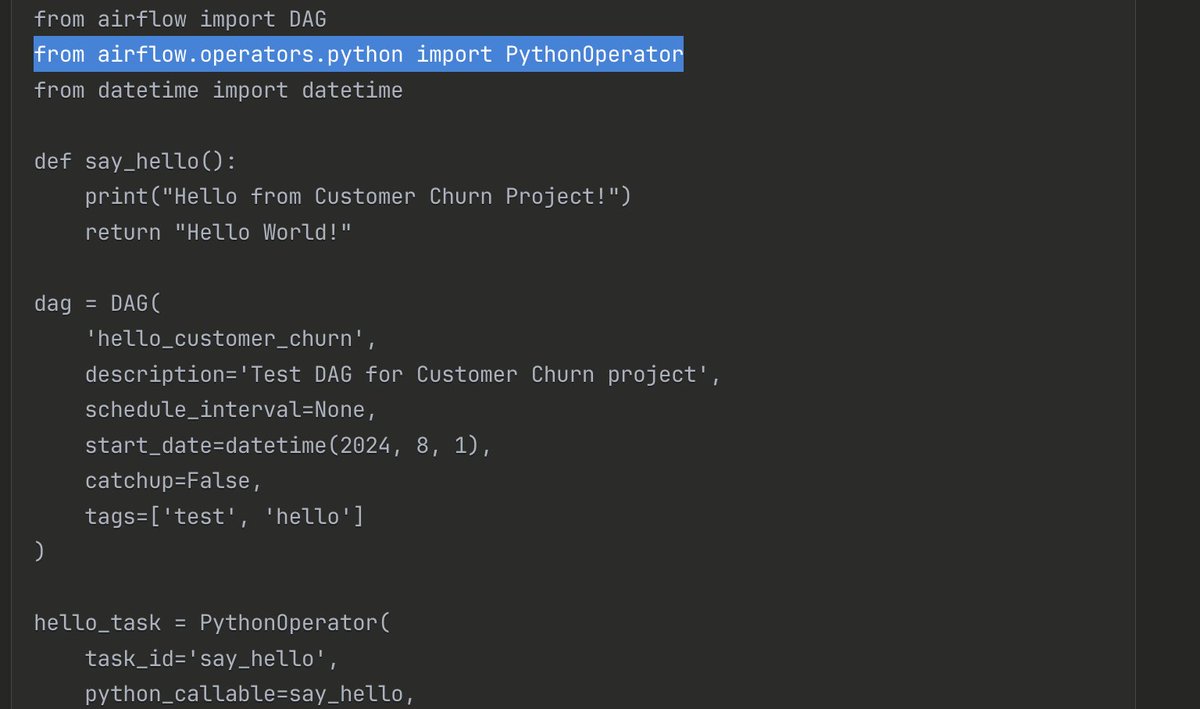
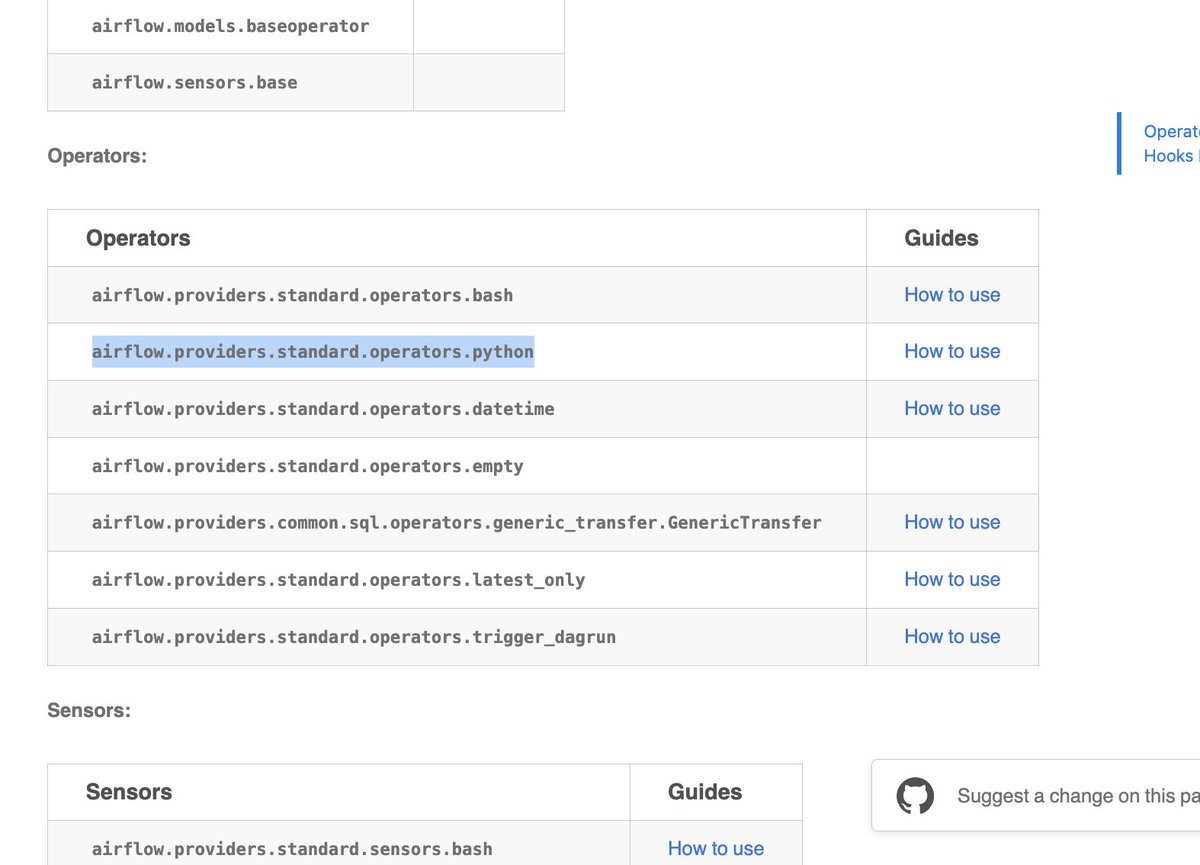
i had import pythonoperator but when claude generated code then it gave the code of Airflow 2x but it is Airflow 3.x running so i got confused and went to the official docs and read the operators section and god the right code
33

13 Aug 2025
🛠 Data Engineering #6: Data Orchestration — The Conductor of Data Pipelines
⸻
🔹 1. What is Data Orchestration?
Coordinating, scheduling, and monitoring multiple data processing tasks so they run in the correct order, at the right time, and handle failures gracefully.
Think of it as the Air Traffic Control for data pipelines.
⸻
🔹 2. Popular Orchestration Tools
•Apache Airflow — Open-source, Python-based DAG scheduling, widely used.
•Prefect — Pythonic, flexible, cloud or local execution.
•Dagster — Strong data asset & lineage support.
•AWS Step Functions — Serverless orchestration on AWS.
⸻
🔹 3. Key Features
✅ Scheduling (cron-like or event-based)
✅ Dependency management (task order)
✅ Retries & failure alerts
✅ Parameterized runs
✅ Monitoring & logging
⸻
🔹 4. Real-World Example
🏬 Retail Analytics Pipeline (Airflow DAG)
1.Extract daily sales from PostgreSQL.
2.Transform in Spark.
3.Load into Snowflake.
4.Notify BI team when complete.
⸻
🔹 5. Simple Airflow DAG Example
from airflow import DAG
from airflow.operators.python import PythonOperator
from datetime import datetime
def extract():
print("Extracting data...")
def transform():
print("Transforming data...")
with DAG("retail_pipeline",
start_date=datetime(2025, 8, 12),
schedule_interval="@daily",
catchup=False) as dag:
t1 = PythonOperator(task_id="extract", python_callable=extract)
t2 = PythonOperator(task_id="transform", python_callable=transform)
t1 >> t2
⸻
🔹 6. Performance Tips
✅ Break large pipelines into smaller, reusable tasks.
✅ Use XComs or external storage for passing data, not huge in-memory objects.
✅ Avoid single points of failure — use retries & alerting.
✅ Parallelize tasks where dependencies allow.
⸻
🔹 7. Interview Questions Answers
Q1: Difference between Airflow and Prefect?
A:
•Airflow: Mature, enterprise adoption, rich UI, better for batch workflows.
•Prefect: Easier local dev, handles dynamic workflows better, great cloud-hosted options.
Q2: How to make Airflow jobs fault-tolerant?
A:
•Set retries with exponential backoff.
•Use on_failure_callback for alerts.
•Store intermediate data in S3 or DB for restart.
Q3: How do you handle dependencies between tasks?
A:
•Use >> and << operators in Airflow for ordering.
•Keep DAGs small; break into sub-DAGs or multiple DAGs.
Q4: Can orchestration tools handle streaming?
A:
•Not directly — they trigger jobs, but streaming is handled by systems like Kafka, Flink.
•They can schedule streaming job restarts and monitor health.
⸻
💡 Pro Tip:
For interviews, always explain how orchestration fits into the bigger pipeline — ingestion, processing, storage, and delivery. Recruiters love when you tie it all together.
#DataEngineering #Airflow #Prefect #Dagster #DataPipelines #ETL
1
111

12 Aug 2025
Day 18/180 – Airflow Deep Dive 🚀
✔️ Built & tested PythonOperator BashOperator DAG
✔️ Understood airflow tasks test for isolated debugging
✔️ Covered Scheduler, Executor, Metadata DB basics
#180DaysOfDE #Airflow #DataEngineering
1
123

3 Aug 2025
Day 91 – August 3, 2025
Explored Airflow DAGs today.
🛠️ Built a simple pipeline with:
DummyOperator
PythonOperator
Dependencies & retries
Getting comfortable with scheduling workflows like a pro.
#DataEngineering #Airflow #91DaysOfCode
2
22
3 Aug 2025
Day 91 – August 3, 2025
Explored Airflow DAGs today.
🛠️ Built a simple pipeline with:
DummyOperator
PythonOperator
Dependencies & retries
Getting comfortable with scheduling workflows like a pro.
#DataEngineering #Airflow #91DaysOfCode
29