
Latest release of SqlClient (version 7.0.1) is out now - get all the details from the blog post from the product team: ift.tt/FhH0evk
#sqlserver #dotnet
1
8
605
SqlClient - the .NET driver for SQL Server - has just been updated to 7.0.1, to address som of the breaking changes from 7.0.0.
Release notes here:
github.com/dotnet/SqlClient/…
9
59
3,232

Apr 24
Years ago, I needed data, efcore wasn't yet ready, and our queries were provided by another team, so I built my own layer on to of SQLClient/ADO. It was fine, always had trouble with type matching, and then finally found dapper - very similar to my own code but much better!
2
449
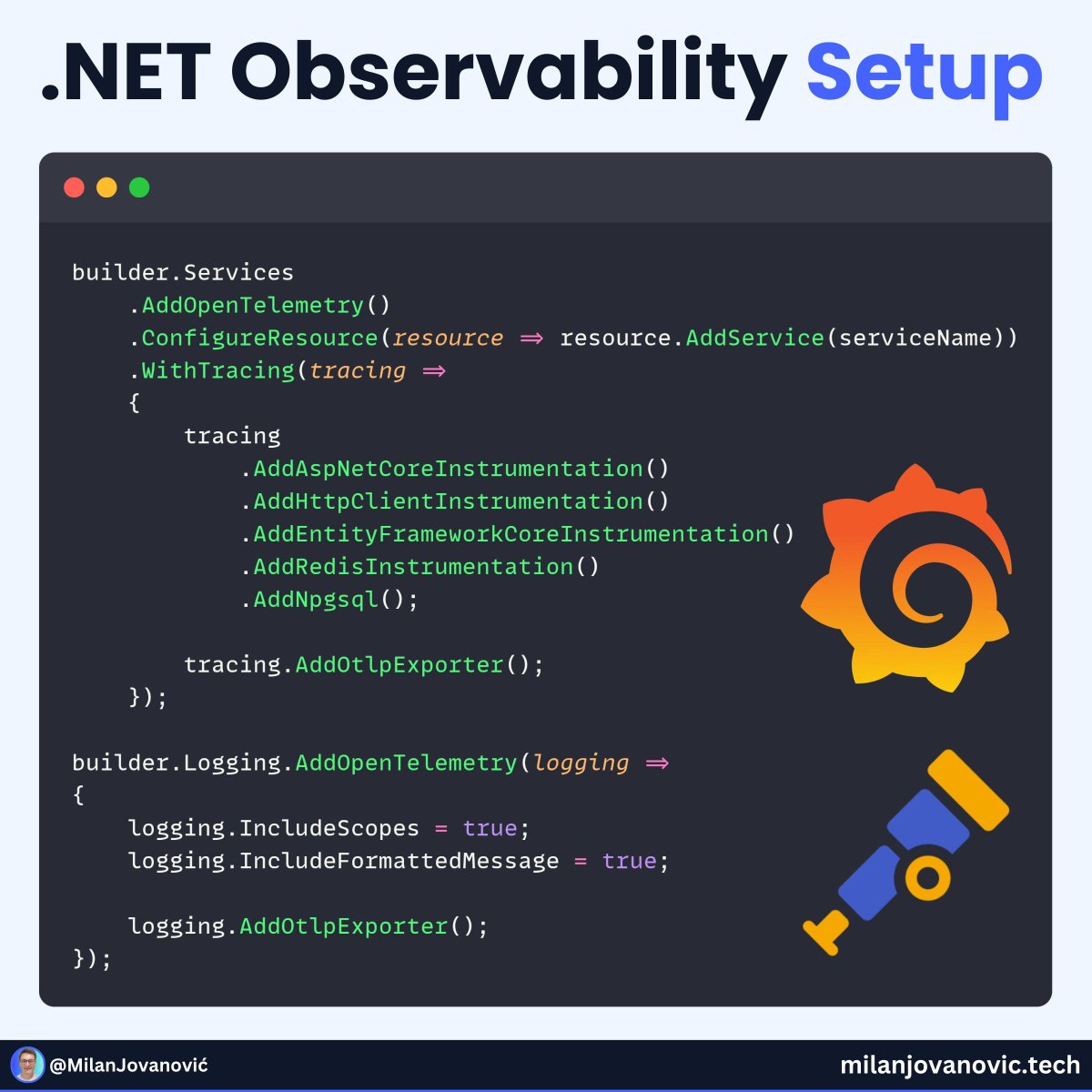
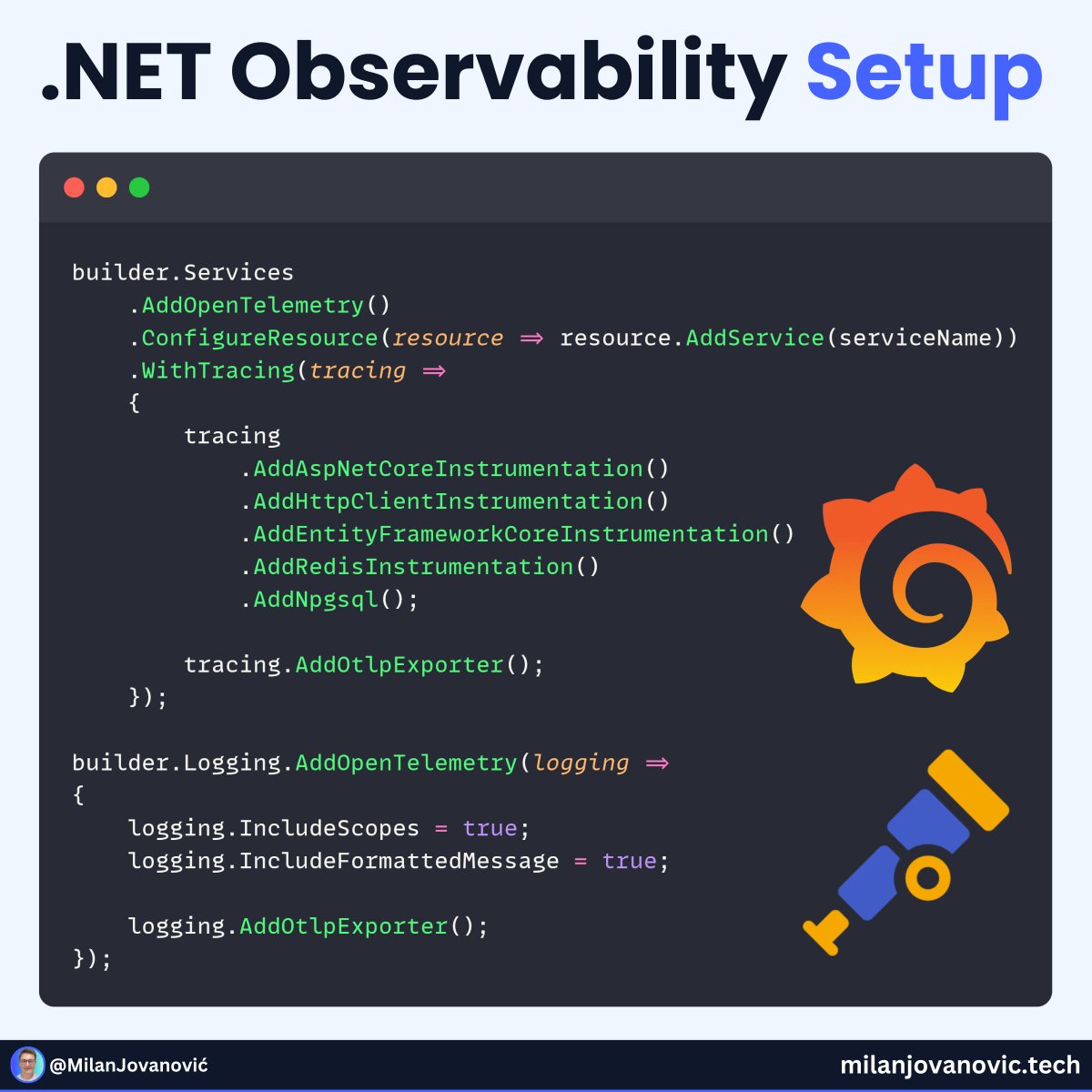
Struggling to trace what’s happening across your .NET app?
Here’s a simple OpenTelemetry setup I use in every project:
- ASPNET Core instrumentation
- HttpClient instrumentation
- EF Core instrumentation
- Redis instrumentation
- Npgsql (or SqlClient)
This gives you rich, end-to-end traces, instantly.
To visualize them, try:
0. Aspire Dashboard
1. Grafana
2. Jaeger
3. Seq
Seq also supports structured logs, which pairs nicely with tracing.
Want to go deeper with OpenTelemetry in .NET?
Here’s a practical guide: milanjovanovic.tech/blog/int…
Have you tried the Aspire dashboard yet?
You can even self-host it as a container.
3
34
191
9,449
SqlClient 7.0 preview 4 release notes - major breaking changes in this preview release, please help the team by testing it out
#dotnet #sqlserver #sqlclient
github.com/dotnet/SqlClient/…
1
5
24
1,798

Jan 26
EF Core was not designed for bulk data operations
But I had to insert data from 50,000 IoT devices
When building data-intensive applications with Entity Framework Core, you will eventually face a critical performance challenge:
- inserting, updating, or deleting thousands of records efficiently.
The standard EF Core approach using SaveChanges() works perfectly for small datasets or even a few hundred rows.
But it becomes a significant bottleneck when you need to process thousands of records.
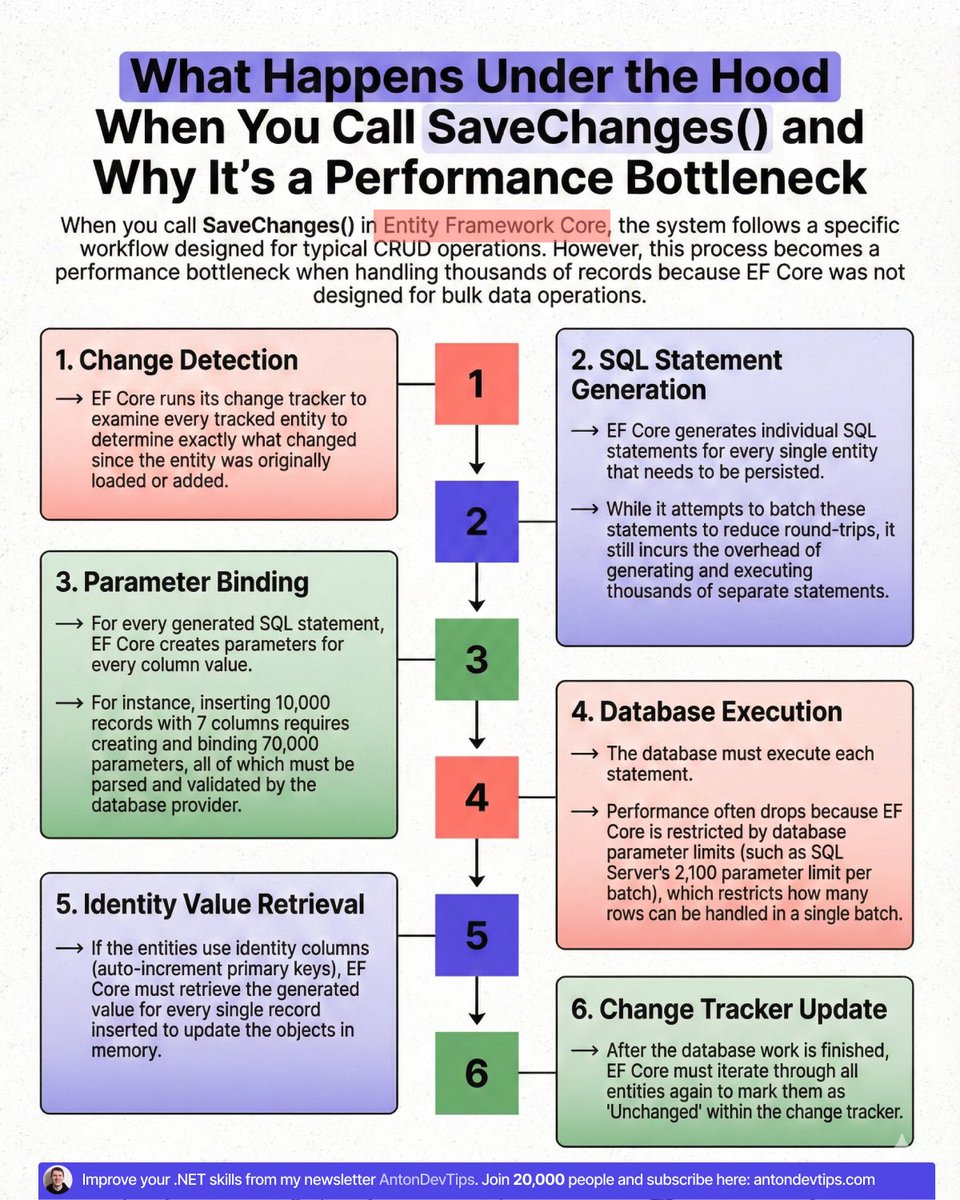
To understand why EF Core struggles with bulk operations, you need to understand what happens when you call SaveChanges().
Step 1: Change Detection
Step 2: SQL Statement Generation
Step 3: Parameter Binding
Step 4: Database Execution
Step 5: Identity Value Retrieval
Step 6: Change Tracker Update
After detecting changes, EF Core generates SQL statements for each entity that needs to be persisted.
For inserts, EF Core generates individual INSERT statements.
In SQL Server, EF Core uses a MERGE statement to insert multiple rows at once.
However, EF Core is limited by the SQL Server parameter limit (2,100 parameters per batch), which restricts the number of rows or columns in a single batch. Performance drops quickly when entities have many columns.
You might think about using raw SQL with a single INSERT statement.
This approach is faster than using SaveChanges(), but it has serious problems:
❌ SQL injection risk - Building SQL strings from user input is dangerous
❌ No type safety - You lose compile-time checking
❌ No navigation properties - You can't work with related entities
❌ Maintenance burden - You need to update SQL strings when your model changes
If you try to introduce parameters into the raw SQL string, Microsoft(.)Data(.)SqlClient will generate multiple insert statements (❌ ) instead of a single batch. And performance will drop even more than with EF Core SaveChanges.
I had to insert 50,000 telemetry records from IoT devices into the database every few minutes. Each device sends temperature readings, humidity levels, and status updates.
So I looked for a better solution. And I found the 𝗘𝗻𝘁𝗶𝘁𝘆 𝗙𝗿𝗮𝗺𝗲𝘄𝗼𝗿𝗸 𝗘𝘅𝘁𝗲𝗻𝘀𝗶𝗼𝗻𝘀 library.
Entity Framework Extensions provides high-performance bulk operations that can process thousands of records in less than a second. You still use the same code you have in EF Core with a new set of DbContext extension methods.
Tomorrow, I'll share with 21,320 people:
Why Every EF Core Developer Needs to Try Entity Framework Extensions.
This library saved me days of development and performance improvements. And the license paid for itself within the first month of use.
📌 If you want to join us, subscribe to my weekly newsletter:
↳ antondevtips.com/?utm_source…
——
♻️ Repost to help others use bulk operations in EF Core
➕ Follow me ( @AntonMartyniuk ) to improve your .NET and Architecture Skills
3
3
19
950
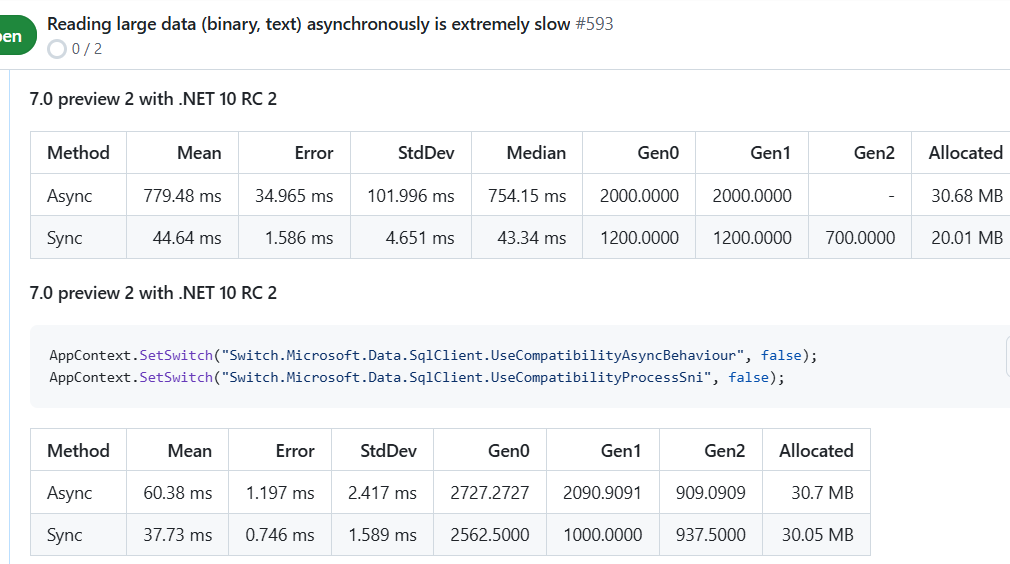
If you suffer under slow blob reads with SqlClient, try out 7.0 preview 2!
#dotnet #sqlserver
4
34
2,413

3 Oct 2025
Friday morning experiment, take native SqlClient code in a class with several methods and convert to using Dapper.
Original code, 356 line with documentation, Dapper code, nearly 50 percent less lines.
Do not have time to use EF Core but my thought is EF Core can cut Dapper code in half.
So if using native SqlClient consider the above alternatives.
2
1
7
1,741
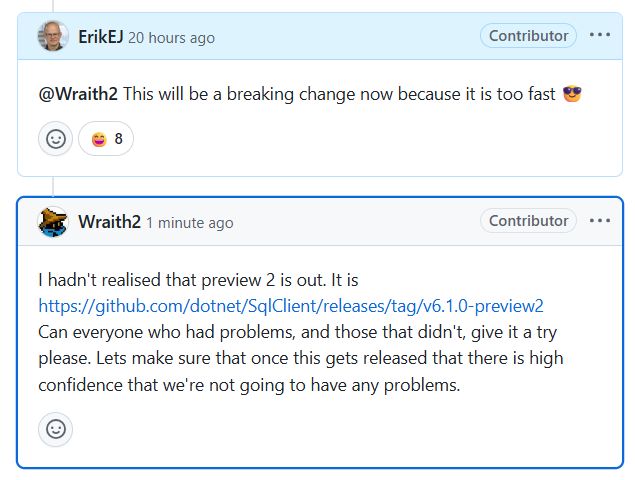
Please help the community contributor who fixed slow async processing with large data in the SqlClient driver - just add this to your SQL data access library:
<PackageReference Include="Microsoft.Data.SqlClient" Version="6.1.0-preview2.25178.5" />
2
21
96
8,302

29 Jun 2025
I have previously experienced *extremely* poor performance with ToListAsync() in EF core with large varbinary fields (compared to ToList()). which I loosely believe is originating from async handling in SqlClient. Is this a known issue, and if so, is it addressed in this release?
1
6
489

25 Jun 2025
Struggling to trace what’s happening across your .NET app?
Here’s a simple OpenTelemetry setup I use in every project:
- ASP .NET Core instrumentation
- HttpClient instrumentation
- EF Core instrumentation
- Redis instrumentation
- Npgsql (or SqlClient)
This gives you rich, end-to-end traces — fast.
To visualize them, try:
1. Seq
2. Jaeger
3. Grafana
4. Aspire Dashboard
Seq also supports structured logs, which pairs nicely with tracing.
Want to go deeper with OpenTelemetry in .NET?
Here’s a practical guide: milanjovanovic.tech/blog/int…
Have you tried .NET Aspire yet?
2
45
263
12,494
25 May 2025
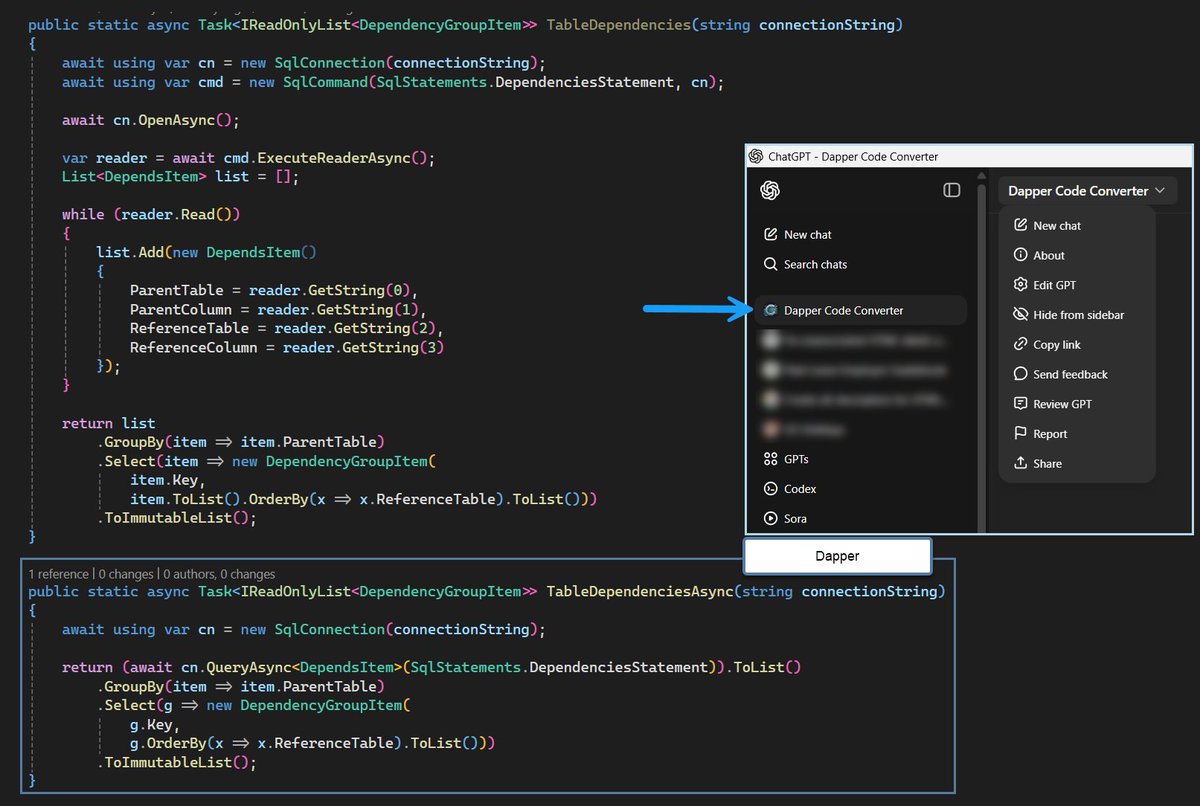
Creating a custom GPT with ChatGPT can be extremely beneficial. For example, a developer wants to convert from using SqlClient operations to Dapper and will be converting many of these. Using a custom GPT allows a developer to skip prompting and instead paste code in and go.
In this case, I created instructions in Microsoft Word, saved as a PDF, and uploaded to the custom GPT.
8
69
2,944

19 May 2025
In recent weeks, some of our customers reported performance degradations. You won't believe what happened next 😱
Clickbait aside, #efcore, SqlClient, and transient retries don't always go well together. More on our blog!
duende.link/1khti3w #dotnet #identityserver #azure
8
348

16 May 2025
I understand MS-TDS is transport-agnostic, and can work over named pipes, etc. It doesn't explain why it has to assume messages be received in a single fragment, or face disconnection. It doesn't explain why the .NET SqlClient library will blindly cause a protocol violation.
1
4
429
6 May 2025
In recent weeks, some of our customers reported performance degradations. You won't believe what happened next 😱
Clickbait aside, #efcore, SqlClient, and transient retries don't always go well together. More on our blog!
duende.link/1khti3w #dotnet #identityserver #azure
4
13
981

1 May 2025
This is fantastic. I use SqlClient directly over EF heavily and any little boost is welcome but 20% is amazing.
1
2
144

8 Apr 2025
You can technically publish SqlClient EventSource counters as Otel metrics. Would publish at least connection related metrics. Inside AddMetrics use
AddEventCountersInstrumentation and AddEventSources("Microsoft.Data.SqlClient.EventSource")
2
2
16
688

8 Apr 2025
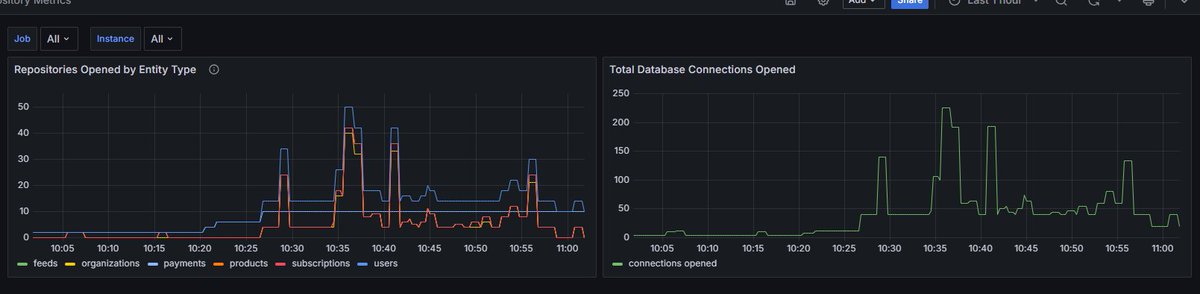
I really wish there were some built-in metrics for SqlClient or Entity Framework Core, but in lieu of that I built some of my own using our stupid repositories that I want to get rid of
2
1
24
1,772

26 Jan 2025
EC2にpyenv入れて設定して、python入れて、mySQL入れて設定して、sqlclient入れて、Django入れて設定して、nginx入れて設定して、gunicorn入れて設定して、イマココ。ああ、サーバーの構築まんどくさい。
1
4
150