
Joined February 2017
- Tweets 1,576
- Following 191
- Followers 1,874
- Likes 2,023
260 Photos and videos


12 Nov 2025
The news about the NGINX Ingress Controller retirement doesn’t sit well.
It’s been one of the most reliable and well-understood ingress solutions across clusters I’ve managed - from on-prem to cloud.
Gateway API may be the future but stability, familiarity, and maturity are not easy to replace overnight.
Progress is good, but some tools deserve more than just an EOL notice.
kubernetes.dev/blog/2025/11/…
4
1
6
3,680
30 May 2025
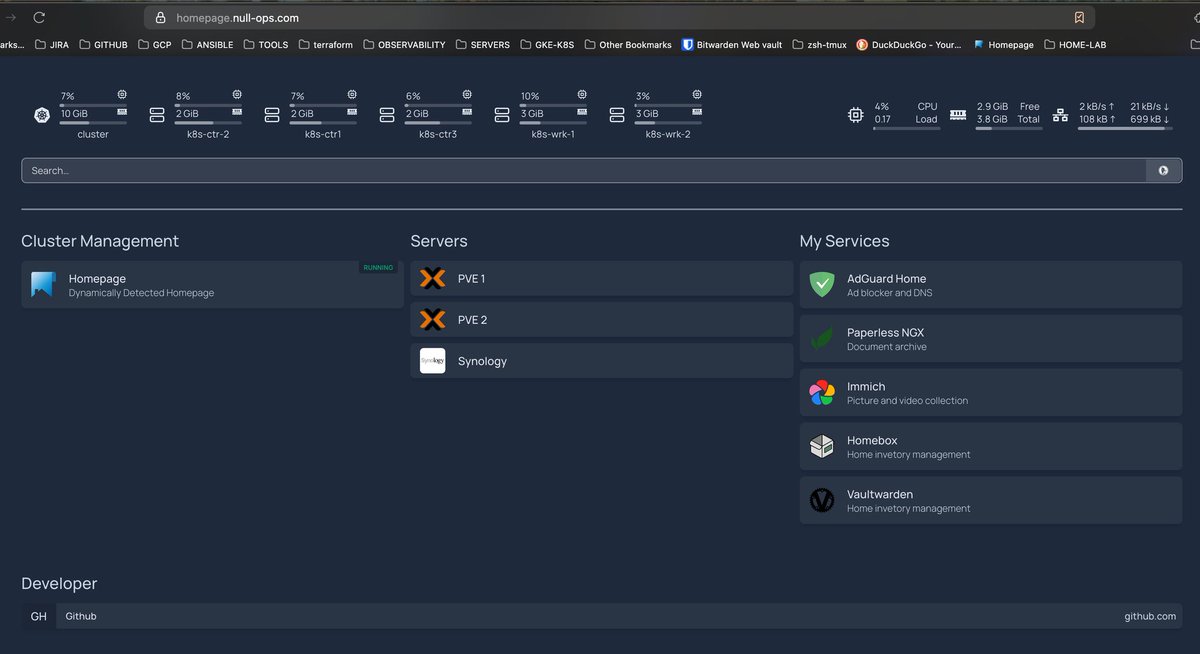
Home lab update: Latest overhaul - DNS, SSL, VPN, MetalLB and couple of prod ready services.
I’ve made some major improvements to my home lab running on k3s Kubernetes, fully managed with FluxCD for seamless GitOps automation.
Here’s what’s new:
✅ Added a dedicated DNS server with Cloudflare as the upstream resolver
✅ Mapped a custom TLD domain to my home lab environment
✅ Set up a VPN that lets me securely connect from anywhere - and the cool part? The TLD domain resolves and is fully accessible over both LAN and VPN, but stays hidden from the public internet
✅ Enabled SSL certificates across all services for secure access
✅ Deployed MetalLB to provide LoadBalancer support for services inside k3s
✅ Rolled out several key apps including AdGuard (DNS filtering), Paperless (document management), Homebox (home inventory management), Immich (photo backup), and Vaultwarden (password management)
All of this is orchestrated on a lightweight, efficient Kubernetes cluster running locally - combining flexibility, security, and automation.
Happy to share more details or help anyone interested in setting up something similar!
#HomeLab #Kubernetes #k3s #FluxCD #Cloudflare #DevOps #Infrastructure #cloudnative #gitops
1
3
46
2,982
30 Mar 2025
Luckily i migrated my project to Proxmox over a year ago. Best decision.
These Broadcom "business" decisions are truly baffling to me.
28 Mar 2025

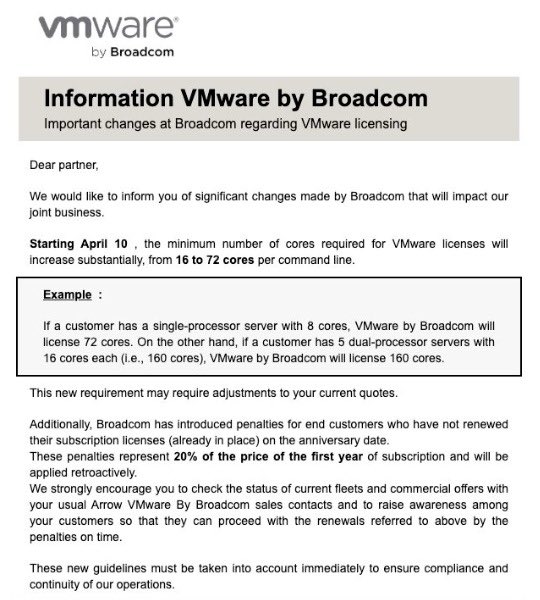
It’s a little early for an April Fools @VMware …right? … right?
This is madness! But then again, none of us can really pretend to know the internal number crunching and strategy that’s being put into place.
I just don’t understand how the broader SMB/SME user base can survive this… which is an issue for ALL ecosystem partners as well.
1
591
30 Mar 2025
This is quite an impressive project. Run Kubernetes on your old Android smartphone.
blog.denv.it/posts/pmos-k3s-…
2
26
1,314
26 Mar 2025
** 88. Linux interview questions with answers: Extensive list **
1. What is the chmod command in Linux, and how do you use it?
Answer: The chmod command changes file or directory permissions. It uses symbolic (e.g., chmod u wx file adds write and execute for the user) or numeric modes (e.g., chmod 644 file sets read/write for owner, read-only for group/others).
2. How do you create a new directory in Linux?
Answer: Use the mkdir command, e.g., mkdir /path/to/new_directory.
3. What is the difference between a soft link and a hard link in Linux?
Answer: A soft (symbolic) link points to a file’s path, uses a different inode, can link directories, and breaks if the original is moved. A hard link points directly to the file’s data, shares the same inode, cannot link directories, and persists if the original is renamed/moved.
4. How do you create a symbolic link in Linux?
Answer: Use the ln -s command, e.g., ln -s /path/to/source /path/to/link.
5. What are standard streams in Linux?
Answer: Standard streams are stdin (input), stdout (output), and stderr (error), used for communication between programs and their environment.
6. How do you list all files in a directory in Linux?
Answer: Use the ls command with options like ls -a (show hidden files) or ls -l (detailed list), e.g., ls -la /path/to/directory.
7. How do you check memory usage in Linux?
Answer: Use free to show total, used, and free memory (e.g., free -h for human-readable format) or cat /proc/meminfo for detailed memory stats.
8. What is a swap partition in Linux?
Answer: A swap partition is disk space used as virtual memory when RAM is full, temporarily storing inactive data. It’s typically twice the RAM size or equal to it as a minimum.
9. How do you mount a filesystem in Linux?
Answer: Use the mount command, e.g., sudo mount /dev/sda1 /mnt, after identifying the partition (e.g., with lsblk) and creating a mount point (e.g., mkdir /mnt).
10. How do you unmount a filesystem in Linux?
Answer: Use the umount command, e.g., sudo umount /mnt, ensuring the filesystem isn’t in use.
11. How do you check disk space usage in Linux?
Answer: Use df -h for a human-readable overview of used and available space, or du -sh /path to estimate usage of a specific directory.
12. What is a Linux daemon?
Answer: A daemon is a background process that runs continuously, performing tasks like managing network services (e.g., httpd for Apache) without user interaction.
13. How do you start and stop a daemon in Linux?
Answer: Use systemctl, e.g., sudo systemctl start httpd to start, sudo systemctl stop httpd to stop, or sudo systemctl restart httpd to restart.
14. What is a cron job in Linux?
Answer: A cron job is a scheduled task that runs at specific times or intervals, managed via the crontab file for automating system maintenance or scripts.
15. How do you schedule a cron job in Linux?
Answer: Edit the crontab with crontab -e, then add a line like 0 2 * * * /path/to/script to run daily at 2 AM (format: minute, hour, day, month, weekday).
16. What is SSH in Linux?
Answer: SSH (Secure Shell) is a protocol for secure remote access, providing encrypted communication and authentication (often via public-key cryptography) for terminal access or file transfers.
17. How do you connect to a remote server using SSH in Linux?
Answer: Use ssh username@remote_ip, e.g., ssh user@192.168.0.1, and enter the password when prompted.
18. What is SELinux?
Answer: SELinux (Security-Enhanced Linux) is a security framework that enforces mandatory access control policies to enhance system security and prevent unauthorized access.
19. How do you troubleshoot SELinux issues in Linux?
Answer: Check logs with sealert -a /var/log/audit/audit.log, temporarily disable enforcement with setenforce 0, or generate custom policies with audit2allow.
20. How do you add a new user in Linux?
Answer: Use adduser username (interactive) or useradd username (basic), then set a password with passwd username.
21. What is the difference between su and sudo in Linux?
Answer: su switches to another user (typically root) with their password, while sudo runs a command with elevated privileges using the user’s own password, offering finer control and auditing.
22. What is the difference between /etc/passwd and /etc/shadow files in Linux?
Answer: /etc/passwd stores user info (username, UID, home directory, shell) and is world-readable; /etc/shadow stores encrypted passwords and security details, readable only by root.
23. How do you configure a network interface in Linux?
Answer: Use ip commands, e.g., sudo ip addr add 192.168.1.100/24 dev eth0, or edit config files like /etc/network/interfaces, /etc/netplan.
24. What is the netstat command in Linux?
Answer: netstat displays network connections, routing tables, and statistics, e.g., netstat -tuln shows listening TCP/UDP ports.
25. How do you check network connectivity in Linux?
Answer: Use ping to test connectivity, tracepath for path details, or nslookup for DNS resolution.
2
84
267
22,308
26 Mar 2025
26. What is virtual memory in Linux?
Answer: Virtual memory extends physical RAM using disk space (swap), allowing processes to use more memory than physically available by swapping inactive pages to disk.
27. What is a process ID (PID) in Linux?
Answer: A PID is a unique number assigned to each running process, used to identify and manage it (e.g., with kill).
28. How do you find the PID of a running process?
Answer: Use pgrep process_name or ps aux | grep process_name to find the PID.
29. How do you kill a process in Linux?
Answer: Use kill PID (e.g., kill 1234) for a graceful termination or kill -9 PID (SIGKILL) to force termination.
30. What is a file descriptor in Linux?
Answer: A file descriptor is an integer identifying an open file, socket, or pipe for I/O operations (e.g., 0 for stdin, 1 for stdout, 2 for stderr).
31. How do you check the number of file descriptors in use?
Answer: Use ulimit -n for the max limit or lsof -u username to list open descriptors for a user.
32. What is a Linux socket?
Answer: A socket is a file descriptor for network communication (e.g., TCP/IP, Unix domain), identified by IP, port, and protocol.
33. How do you check dependencies of a shared library?
Answer: Use ldd /path/to/binary to list dynamic library dependencies.
34. What is a Linux thread?
Answer: A thread is a lightweight process within a process, sharing memory and resources, used for concurrent task execution.
35. What is the difference between a process and a thread?
Answer: A process is an independent program with its own memory, slower to create/terminate, and resource-heavy. A thread is a unit within a process, shares memory, is faster, and uses fewer resources.
36. What is a Linux pipe?
Answer: A pipe is a unidirectional communication channel between processes, with a read end and a write end (e.g., used in cmd1 | cmd2).
37. How do you create a pipe in Linux?
Answer: Use the pipe system call, e.g., int pipefd[2]; pipe(pipefd) creates a pipe with pipefd[0] (read) and pipefd[1] (write).
38. What is an environment variable in Linux?
Answer: An environment variable stores configuration data (e.g., PATH) shared across processes, inherited by child processes.
39. How do you set an environment variable in Linux?
Answer: Use export VAR=value, e.g., export PATH=$PATH:/usr/local/bin.
40. What is the PATH variable in Linux?
Answer: PATH is an environment variable listing directories searched for executable files, separated by colons (e.g., /usr/bin:/bin).
41. How do you add a directory to the PATH variable in Linux?
Answer: Use export PATH=$PATH:/new/path, e.g., export PATH=$PATH:/usr/local/bin.
42. What is a regular expression in Linux?
Answer: A regular expression (regex) is a pattern for matching text, used in tools like grep or sed (e.g., *.txt matches files ending in .txt).
43. How do you use regular expressions in Linux?
Answer: Use with tools like grep, e.g., grep "pattern" file.txt searches for “pattern” in file.txt.
44. What is a disk quota in Linux?
Answer: A disk quota limits disk space usage per user or group, preventing overuse, managed per filesystem.
45. How do you set a disk quota in Linux?
Answer: Use setquota, e.g., setquota -u john 100M 150M 0 0 /home sets a 100MB soft limit and 150MB hard limit for user john.
46. How do you execute multiple commands in a single line in Linux?
Answer: Separate commands with a semicolon (;), e.g., cmd1; cmd2; cmd3, executed sequentially.
47. What does a nameless directory represent in Linux?
Answer: An empty directory name (/) is the root directory, the base of the filesystem where all files and devices are attached.
48. How do you enable root logging in Ubuntu?
Answer: Edit /etc/lightdm/lightdm.conf with sudo sh -c 'echo "greeter-show-manual-login=true" >> /etc/lightdm/lightdm.conf'.
49. How do you append one file to another in Linux?
Answer: Use cat file1 >> file2 to append file1’s contents to file2.
50. How do you run a program in the background in Linux?
Answer: Use nohup command &, e.g., nohup myprogram &, to run detached from the terminal.
51. How do you check for Rootkit infections in Linux?
Answer: Use tools like rkhunter (install with sudo apt install rkhunter, run rkhunter --check), chkrootkit, or clamav.
52. How are parallel ports referred to in Linux?
Answer: Parallel ports are /dev/lp0 (LPT1), /dev/lp1 (LPT2), etc., for devices like printers.
53. How are drives represented in Linux?
Answer: Drives use designations like /dev/fd0 (floppy), /dev/hda (hard drive), not drive letters.
54. What is the pwd command in Linux?
Answer: pwd (print working directory) displays the current directory, e.g., /home/user.
55. What is redirection in Linux?
Answer: Redirection directs data between outputs/inputs, e.g., cmd > file (output to file), cmd < file (input from file).
1
1
7
1,052
26 Mar 2025
56. How do you terminate an ongoing process in Linux?
Answer: Use kill PID or pkill process_name, e.g., kill 1234 or pkill firefox.
57. How do you apply command grouping in Linux?
Answer: Use parentheses, e.g., (cmd1; cmd2) runs commands as a group.
58. How do you set up password aging in Linux?
Answer: Use chage (e.g., chage -M 90 user for 90-day max) or edit /etc/login.defs (e.g., PASS_MAX_DAYS 90).
59. How do you list all processes running in Linux?
Answer: Use ps aux (detailed list), top (real-time), or htop (interactive, color-coded).
60. What is the rsync command, and how do you use it?
Answer: rsync synchronizes files between locations, e.g., rsync -av /source /dest copies with attributes preserved.
61. How do you format a disk in Linux?
Answer: Use mkfs, e.g., mkfs.ext4 /dev/sdb1 after unmounting (umount /dev/sdb1) and identifying the partition (lsblk).
62. How do you change the password for a user account?
Answer: Use passwd username, e.g., passwd john, then enter and confirm the new password.
63. What is the ulimit command, and how do you use it?
Answer: ulimit sets resource limits, e.g., ulimit -u 50 limits a user to 50 processes.
64. What is the find command, and how do you use it?
Answer: find searches for files, e.g., find /path -name "file.txt" locates file.txt in /path.
65. What is the /proc filesystem?
Answer: /proc is a virtual filesystem providing runtime info on system and kernel data (e.g., processes, memory).
66. How do you secure a Linux server?
Answer: Use strong passwords, update software, configure SSH with key authentication, set up firewalls, disable unused services, disable root login, secure SSH brute force attacks with tools like fail2ban, encrypt traffic, and monitor logs.
67. How do you troubleshoot a Linux OS that fails to boot?
Answer: Check boot logs, error messages, GRUB options, hardware, and try an older kernel or recovery mode.
68. What is the init process in Linux?
Answer: init (PID 1) is the first process at boot, initializing the system; modern systems use systemd.
69. What is LVM in Linux?
Answer: LVM (Logical Volume Manager) manages disk space dynamically, supporting resizing, mirroring, and snapshots.
70. What is the /etc/resolv.conf file?
Answer: /etc/resolv.conf configures DNS settings, listing servers and search domains.
71. What is the difference between absolute and relative paths in Linux?
Answer: Absolute paths start from root (e.g., /home/user/file), while relative paths are from the current directory (e.g., ./file).
72. How do you check the status of a service or daemon?
Answer: Use systemctl status service_name, e.g., systemctl status apache2.
73. How do you compress and decompress files in Linux?
Answer: Compress with tar -czvf archive.tar.gz files, decompress with tar -xzvf archive.tar.gz.
74. What is the difference between a process and a daemon?
Answer: A process is any running program (foreground/background); a daemon is a background service running independently, often started at boot.
75. What is the sed command in Linux?
Answer: sed (stream editor) transforms text, e.g., sed 's/old/new/g' file.txt replaces “old” with “new”.
76. What is sudo in Linux?
Answer: sudo (Superuser Do) runs commands with administrative privileges, requiring user authentication.
77. What is umask in Linux?
Answer: umask sets default permission restrictions for new files, e.g., umask 022 removes write for group/others.
78. What is the sudoers file, and how do you configure it?
Answer: /etc/sudoers controls sudo privileges; edit with visudo, e.g., user ALL=(ALL) ALL grants full sudo access.
79. How do you change ownership of a file or directory?
Answer: Use chown, e.g., chown user:group file.
80. How do you recursively copy files and directories?
Answer: Use cp -R source dest, e.g., cp -R /src /dst.
81. How do you set up a static IP address in Linux?
Answer: Edit /etc/network/interfaces, e.g., iface eth0 inet static address 192.168.1.100, then restart networking.
82. How do you copy a file to multiple directories?
Answer: Use a loop or xargs, e.g., echo dir1 dir2 | xargs -n 1 cp file.
83. How do you find the IP address of a Linux system?
Answer: Use ip addr show or ifconfig to display network interface details.
84. How do you check system logs in Linux?
Answer: View logs in /var/log, e.g., tail /var/log/syslog or less /var/log/messages.
85. How do you troubleshoot a slow-performing Linux server?
Answer: Use top/htop for resource usage, check disk I/O, network traffic, and logs for bottlenecks.
86. How do you identify and terminate a CPU-intensive process?
Answer: Use top to find the PID, then kill PID, e.g., kill 1234.
87. What is the route command in Linux?
Answer: route manages the IP routing table, e.g., route -n shows routes.
88. How do you configure a Linux system as a router?
Answer: Enable IP forwarding (echo 1 > /proc/sys/net/ipv4/ip_forward), configure interfaces, and set routing rules.
1
5
962
26 Mar 2025
CVE exploit on Nginx ingress controller discovered
26 Mar 2025

For those who use Nginx ingress controller in prod. Disable admissionWebHooks and upgrade to the latest version.
wiz.io/blog/ingress-nginx-ku…
2
494
26 Mar 2025
For those who use Nginx ingress controller in prod. Disable admissionWebHooks and upgrade to the latest version.
wiz.io/blog/ingress-nginx-ku…
8
35
2,403
14 Mar 2025
** Step-by-step guide to set up HPA (Horizontal Pod Autoscaler) in Kubernetes **
** Step 1: Ensure metrics server is installed **
HPA relies on the **metrics server** to collect resource usage data. It should be installed on most of k8s distros but, If it's not installed, install it using:
kubectl apply -f https://github .com/kubernetes-sigs/metrics-server/releases/latest/download/components.yaml
Verify installation:
kubectl get deployment metrics-server -n kube-system
** Step 2: Create a deployment **
Create a sample **deployment.yaml** file with resource requests/limits:
apiVersion: apps/v1
kind: Deployment
metadata:
name: my-app
labels:
app: my-app
spec:
replicas: 1
selector:
matchLabels:
app: my-app
template:
metadata:
labels:
app: my-app
spec:
containers:
- name: my-app-container
image: nginx
resources:
requests:
cpu: "100m"
memory: "128Mi"
limits:
cpu: "200m"
memory: "256Mi"
Apply the deployment:
kubectl apply -f deployment.yaml
** Step 3: Create an HPA manifest **
Create an **hpa.yaml** file to define the autoscaling rules:
apiVersion: autoscaling/v2
kind: HorizontalPodAutoscaler
metadata:
name: my-app-hpa
spec:
scaleTargetRef:
apiVersion: apps/v1
kind: Deployment
name: my-app
minReplicas: 1
maxReplicas: 5
metrics:
- type: Resource
resource:
name: cpu
target:
type: Utilization
averageUtilization: 70
This is example shows that k8s will monitor and scale the deployment on the CPU usage. The same can be done for other metrics.
Apply the HPA:
kubectl apply -f hpa.yaml
** Step 4: Verify HPA **
Check HPA status:
kubectl get hpa
Example output:
NAME REFERENCE TARGETS MINPODS MAXPODS REPLICAS AGE
my-app-hpa Deployment/my-app 30%/70% 1 5 1 10s
** Step 5: Simulate load to trigger scaling**
To simulate high CPU load, run:
kubectl run -it --rm load-generator --image=busybox -- /bin/sh -c "while true; do wget -q -O- http://my-app.default.svc.cluster.local; done"
Now check HPA again:
kubectl get hpa
You should see an increase in replicas if the CPU utilization exceeds the threshold.
** Step 6: Clean up (Optional) **
If you want to remove the setup, run:
kubectl delete -f hpa.yaml
kubectl delete -f deployment.yaml
This setup ensures your application scales dynamically based on CPU utilization. You can also extend HPA to use **memory metrics** or **custom metrics**.
8
67
3,845
4 Mar 2025
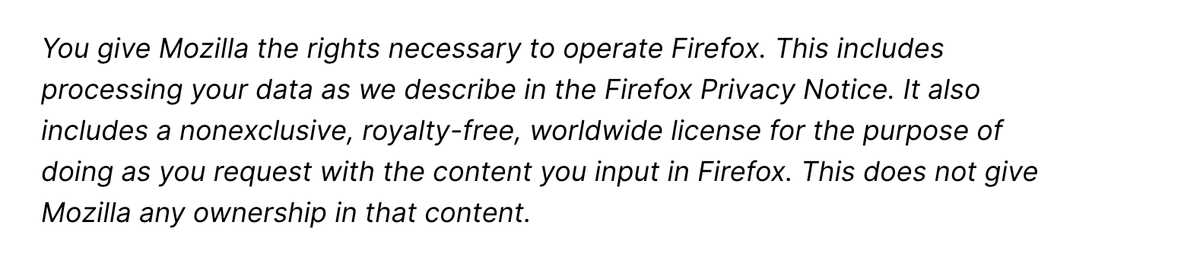
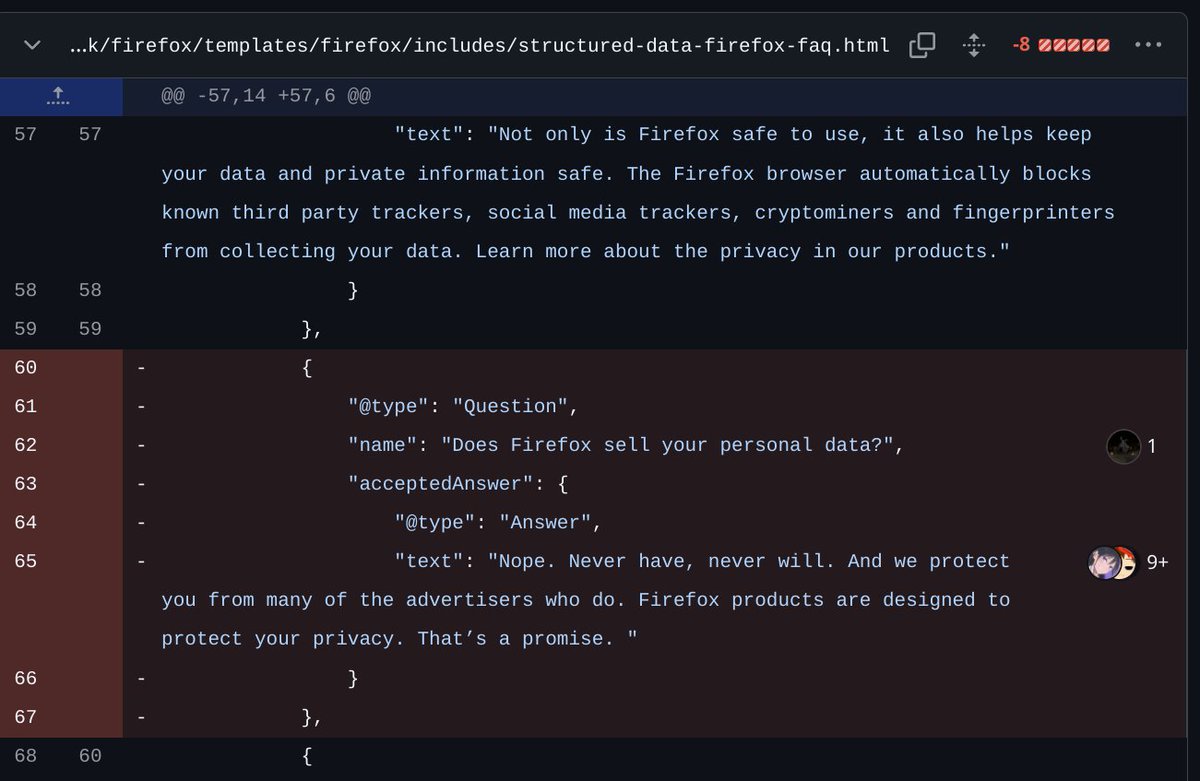
I understand changes from the business side are necessary to upkeep a product but still this is quite disappointing. This should be an opt-in for users. I've been using firefox since 2004.
Hopping i can make it better with betterfox profiles and on a lookout for alternatives. @firefox
1
656
3 Mar 2025
** 61 Kubernetes questions with answers: Extensive list **
A curated list of kubernetes questions with answers, focused on kubernetes architecture and concepts. Most of them are from my interview experiences in the past.
1. What are the key components of Kubernetes?
Answer: Kubernetes is built from components that manage containerized applications, grouped into:
- Control Plane Components:
- API Server: Gateway for all interactions, exposing the Kubernetes API, validating requests, and updating cluster state.
- etcd: Highly available key-value store holding the cluster’s configuration and state data, acting as the single source of truth.
- Scheduler: Assigns pods to nodes based on resource availability, policy constraints, and workload requirements.
- Controller Manager: Runs controllers (e.g., node, replication) to monitor and adjust the cluster state.
- Cloud Controller Manager (optional): Integrates with cloud-specific APIs for resources like load balancers and storage.
- Node-Level (Worker) Components:
- Kubelet: Agent on each node, ensuring containers run as specified in pods.
- Kube-proxy: Maintains network rules on nodes for pod communication.
- Container Runtime: Software (e.g., Docker, containerd) that runs containers.
- Other Components: Networking plugins (CNI) and storage drivers (CSI) manage connectivity and storage.
2. What is a Pod in Kubernetes?
Answer: A Pod is the smallest deployable unit in Kubernetes, representing one or more containers scheduled together. They share the same network namespace (IP address and ports) and storage volumes, and are designed to be ephemeral.
3. What is a Deployment in Kubernetes?
Answer: A Deployment is a resource object that declaratively manages a set of replica pods. It ensures the desired number of pod replicas are running, supporting rolling updates and rollbacks for stateless applications.
4. How does Kubernetes handle container networking?
Answer: Kubernetes assigns each Pod a unique IP address and enables communication between Pods using this IP. It uses virtual networking via CNI plugins to provide connectivity across the cluster.
5. What is a Service in Kubernetes?
Answer: A Service is an abstraction providing a stable endpoint to access pods, regardless of their individual IP addresses or locations. It offers load balancing, service discovery, and internal connectivity for scalable communication.
6. What is a ReplicaSet?
Answer: A ReplicaSet ensures a specified number of pod replicas are running at all times. It monitors pod health and creates replacements if pods fail, typically managed via Deployments.
7. What is a StatefulSet?
Answer: A StatefulSet manages stateful applications, providing stable network identities (unique hostnames) and ordered deployment/scaling of pods. It’s ideal for databases or systems requiring persistent storage and consistent identities.
8. What is a DaemonSet?
Answer: A DaemonSet ensures a specific pod runs on every node (or a subset) in the cluster. It’s used for system-level tasks like logging agents, monitoring agents, or network proxies.
9. How do you scale applications in Kubernetes?
Answer: Applications can be scaled horizontally by adjusting the number of pod replicas or vertically by modifying resource limits of individual pods.
10. What is a PVC in Kubernetes?
Answer: A Persistent Volume Claim (PVC) is a user or pod’s request for storage. It dynamically provisions and binds a Persistent Volume (PV) based on requested size, type, and access mode.
11. Explain the concept of a ConfigMap.
Answer: A ConfigMap stores configuration data (e.g., environment variables, files) separately from application code. It can be mounted as a volume or injected into pods, enabling flexible configuration management.
12. How do you expose a service outside the Kubernetes cluster?
Answer: Services can be exposed externally using:
- NodePort: Assigns a static port on each node’s IP.
- LoadBalancer: Uses a cloud provider’s load balancer with a dedicated IP.
- Ingress: Routes external traffic via rules and a single IP.
13. What are the different types of Kubernetes volumes?
Answer: Kubernetes supports volumes like:
- EmptyDir: Temporary storage that exists while a pod runs.
- HostPath: Mounts a file/directory from the node’s filesystem.
- PersistentVolumeClaim (PVC): Binds to a Persistent Volume for persistent storage.
- ConfigMap/Secret: Mounts configuration or sensitive data.
14. What is the purpose of an Ingress in Kubernetes?
Answer: An Ingress manages external HTTP/S access to services, providing routing rules, SSL termination, and load balancing through a single IP address.
15. What is the purpose of a readiness probe?
Answer: A readiness probe checks if a pod is ready to receive traffic. If it fails, Kubernetes excludes the pod from load balancing until it passes.
16. How do you secure access to the Kubernetes API server?
Answer: Secure the API server with:
- Authentication (certificates, tokens, external providers).
- Role-Based Access Control (RBAC) to manage permissions.
17. What is the purpose of a HorizontalPodAutoscaler (HPA)?
Answer: An HPA automatically scales pod replicas based on CPU/memory utilization or custom metrics, ensuring applications handle varying traffic loads.
18. How do you handle application configuration and sensitive information in Kubernetes?
Answer:
- Configuration: Use ConfigMaps or environment variables.
- Sensitive Information: Store in Kubernetes Secrets for secure management.
19. How does Kubernetes handle rolling back a failed deployment?
Answer: Kubernetes supports rollbacks via the `kubectl rollout undo` command or by specifying a previous revision, reverting the Deployment to a stable state.
20. What is the purpose of a Pod Disruption Budget (PDB)?
Answer: A PDB defines the minimum number of pods that must remain available during disruptions (e.g., maintenance), ensuring application availability.
21. What is a node in Kubernetes?
Answer: A node is a worker machine in Kubernetes that runs containerized applications managed by the control plane.
22. What is the Kubernetes API server?
Answer: The API server is the central hub, accepting commands, validating them, storing configuration data in etcd, and coordinating cluster changes.
23. Explain the role of etcd in Kubernetes.
Answer: etcd is a distributed key-value store that reliably stores the cluster’s configuration and state data, serving as the backbone for consistency.
24. What is the role of the Kubernetes scheduler?
Answer: The scheduler assigns pods to nodes based on resource availability, constraints, and workload requirements.
25. Describe the function of the kube-controller-manager.
Answer: The kube-controller-manager runs controller processes (e.g., node, replication) to monitor and adjust the cluster state to match the desired state.
26. What is the purpose of the cloud-controller-manager?
Answer: The cloud-controller-manager integrates Kubernetes with cloud providers (e.g., AWS, GCP) to manage cloud-specific resources like load balancers.
27. Explain the role of the kubelet in Kubernetes.
Answer: The kubelet is a node agent that:
- Communicates with the API server for pod assignments.
- Manages containers via the container runtime.
- Monitors pod health and reports node status.
28. What is the function of the kube-proxy in Kubernetes?
Answer: The kube-proxy manages network routing, maintaining rules for pod-to-pod and service communication.
29. Define a container runtime in Kubernetes.
Answer: A container runtime (e.g., Docker, containerd) manages the execution and lifecycle of containers, handling image management and resource isolation.
30. Why is a namespace used in Kubernetes?
Answer: Namespaces divide cluster resources for logical isolation, access control via RBAC, resource quotas, and simplified management across teams or environments.
31. What is a Persistent Volume in Kubernetes?
Answer: A Persistent Volume (PV) is a storage abstraction that persists data beyond a pod’s lifecycle, used for stateful applications.
32. Describe the difference between a Deployment and a StatefulSet in Kubernetes.
Answer:
- Deployment: For stateless apps, manages replicas with no unique identity, supports scaling and updates.
- StatefulSet: For stateful apps, provides stable identities and ordered pod management.
33. Describe the purpose of a label in Kubernetes.
Answer: Labels are key-value pairs attached to objects (e.g., pods) for identification, grouping, and selection by services or deployments.
34. Explain the concept of pod anti-affinity in Kubernetes.
Answer: Pod anti-affinity defines rules to prevent pods from co-locating on the same node, improving fault tolerance and availability.
3
66
321
27,313
3 Mar 2025
35. Explain the concept of pod affinity in Kubernetes.
Answer: Pod affinity defines rules to co-locate pods on the same node, optimizing performance or resource use for related workloads.
36. What is the purpose of a Taint in Kubernetes?
Answer: A Taint repels pods from a node unless they have a matching toleration, controlling pod placement for specific workloads.
37. What is the purpose of a NetworkPolicy in Kubernetes?
Answer: A NetworkPolicy defines rules for pod network traffic (ingress/egress), enforcing fine-grained access control.
38. Explain the concept of ClusterIP in Kubernetes.
Answer: ClusterIP is a service type exposing an internal IP within the cluster for pod-to-pod communication, inaccessible externally by default.
39. What is a pod resource request and limits and why do we need them?
Answer:
- Resource Requests: Minimum CPU/memory a container needs, used by the scheduler to place pods.
- Resource Limits: Maximum resources a container can use, preventing overconsumption.
- Why Needed:
- Efficient Scheduling: Ensures pods are placed on nodes with enough resources.
- Resource Isolation: Prevents resource hogging.
- Stability: Avoids system instability from overuse.
40. What are sidecar and init containers?
Answer:
- Sidecar Containers: Run alongside the main container in a pod, providing support functions (e.g., logging, monitoring) with the same lifecycle.
- Init Containers: Run to completion before the main container starts, used for setup tasks (e.g., initializing configs, waiting for dependencies).
41. What are the differences between ClusterIP, LoadBalancer, and NodePort services?
Answer:
- ClusterIP (default): Exposes a service on an internal IP, accessible only within the cluster.
- NodePort: Exposes a service on a static port of each node’s IP, allowing external access.
- LoadBalancer: Exposes a service externally via a cloud provider’s load balancer with a dedicated IP.
42. What’s the best Kubernetes component type to choose when deploying a database on Kubernetes (StatefulSet or DaemonSet)?
Answer: StatefulSet is preferred for databases due to its stable network identities, ordered deployment, and persistent storage, ensuring reliable data reconnection after restarts.
43. When do we need a DaemonSet?
Answer: Use a DaemonSet to run a pod on every node (or a subset) for tasks like log collection, monitoring, or node-level networking plugins.
44. What is a CNI?
Answer: CNI (Container Network Interface) is a specification and set of libraries for configuring network interfaces in Linux containers, handling pod networking like IP allocation and policy enforcement.
45. What is a StorageClass?
Answer: A StorageClass defines storage types in a cluster, specifying quality/performance levels. PVCs request a StorageClass for dynamic PV provisioning.
46. What is a Pod Disruption Budget, Pod Priority, and Preemption?
Answer:
- Pod Disruption Budget (PDB): Sets the minimum number of pods that must stay available during disruptions.
- Pod Priority: Assigns priority values to pods, influencing scheduling and preemption.
- Preemption: Evicts lower-priority pods to accommodate higher-priority ones when resources are scarce.
47. What pod distribution strategies are there?
Answer:
- Pod Anti-Affinity: Prevents similar pods from co-locating on the same node.
- Topology Spread Constraints: Distributes pods evenly across failure domains (e.g., zones, nodes).
- DaemonSet: Ensures a pod runs on every node.
48. Give one scenario with a best practice how to deploy pods with a pod distribution strategy? When to use them, how, and what strategy to use?
Answer:
- Scenario: Deploying a highly available web application.
- Approach: Use Topology Spread Constraints to distribute pods across zones/nodes, minimizing impact from failures.
- Implementation: Define constraints in the pod spec (e.g., topologyKey: "topology.kubernetes. io/zone", maxSkew).
- When to Use: For high availability and resiliency across failure domains.
49. What components does the control plane consist of and what do they do?
Answer:
- API Server: Exposes the Kubernetes API, central management entity.
- etcd: Stores cluster state and configuration.
- Scheduler: Assigns pods to nodes based on resources/constraints.
- Controller Manager: Runs controllers to maintain desired state.
- Cloud Controller Manager (optional): Manages cloud-specific resources.
50. What is a service mesh and how does it work?
Answer: A service mesh is an infrastructure layer managing service communication via sidecar proxies. It intercepts traffic to provide load balancing, encryption, and observability without altering app code.
51. What is an operator and what is a CSI driver in Kubernetes?
Answer:
- Operator: Packages and manages stateful apps using custom resources/controllers, automating tasks like backups.
- CSI Driver: A standard interface for integrating storage systems with Kubernetes, enabling dynamic storage management.
52. What Kubernetes resources can we utilize to isolate and restrict access/communication to an application workload from the rest of the cluster?
Answer:
- Namespaces: Logical partitions for resource separation.
- Network Policies: Rules for pod communication control.
- RBAC: Permissions management for users/service accounts.
53. What does RBAC enable us to do on Kubernetes?
Answer: RBAC provides fine-grained control over cluster resource actions, defining roles and bindings to enforce security policies and restrict access.
54. How do we attach a Kubernetes secret on a Deployment?
Answer:
- Environment Variables: Reference secret keys in the pod spec.
- Volumes: Mount the secret as a volume, exposing data as files.
55. Are Kubernetes secrets encoded or encrypted and are they encrypted at rest by default?
Answer:
- Encoding vs. Encryption: Secrets are base64 encoded, not encrypted by default.
- Encryption at Rest: Not encrypted by default; requires cluster configuration to enable.
56. Give an example of good practice how to manage Kubernetes secrets more securely?
Answer:
- External Management: Use tools like HashiCorp Vault or AWS Secrets Manager.
- Encryption: Enable encryption at rest.
- Access Control: Restrict via RBAC and service accounts.
- Rotation/Auditing: Regularly rotate secrets and audit access.
57. What is overcommitment?
Answer: Overcommitment schedules more resource requests than available, assuming not all pods use max resources simultaneously, increasing utilization but risking starvation.
58. What is node pressure?
Answer: Node pressure occurs when a node’s resources (CPU, memory, disk) are heavily utilized, potentially degrading performance or triggering pod evictions.
59. What are node taints and node drain?
Answer:
- Node Taints: Labels repelling pods unless tolerated, controlling placement.
- Node Drain: Safely evicts pods from a node (e.g., for maintenance), rescheduling them elsewhere.
60. What steps would you take to troubleshoot a failing pod (pod state - CrashLoopBackOff/ErrImagePull/Evicted)?
Answer:
- Examine Events: `kubectl describe pod [pod-name]` for error details.
- Check Logs: `kubectl logs [pod-name]` for container issues.
- Verify Image: For ErrImagePull, check image name/registry access.
- Resource Check: For Evicted, review node usage/limits.
- Health Probes: For CrashLoopBackOff, validate liveness/readiness configs.
61. What are Liveness and Readiness probes?
Answer:
- Liveness Probe: Checks if a container is running; failures trigger restarts.
- Readiness Probe: Checks if a container is ready for traffic; failures remove it from service endpoints.
1
5
753
19 Feb 2025
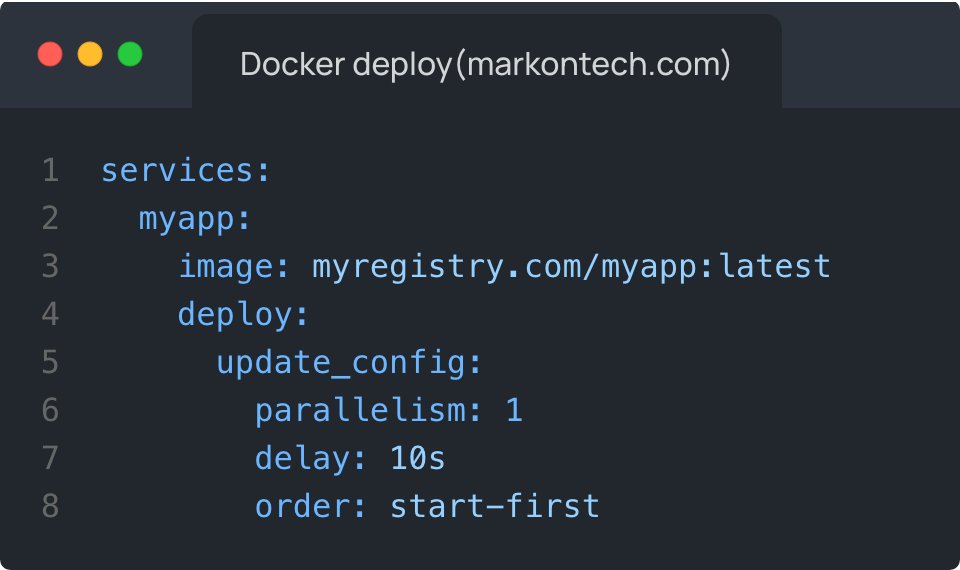
** Quick Docker compose tip **
Updating image version of the running container
Yes, this is possible with Docker and with almost no-downtime.
In your services block, you need to define deploy options(like in the picture bellow). The important part here is the order attribute. And what this tells Docker is to create and start new container with the new image version. Once the new container is created it will redirect the traffic to the new container and delete and remove the old container.
This config is best paired with the replicas option to provision multiple replicas/instances of the same container to ensure high availability.
Note: this works best if you enact semantic versioning of your images.
7
59
2,742
18 Feb 2025
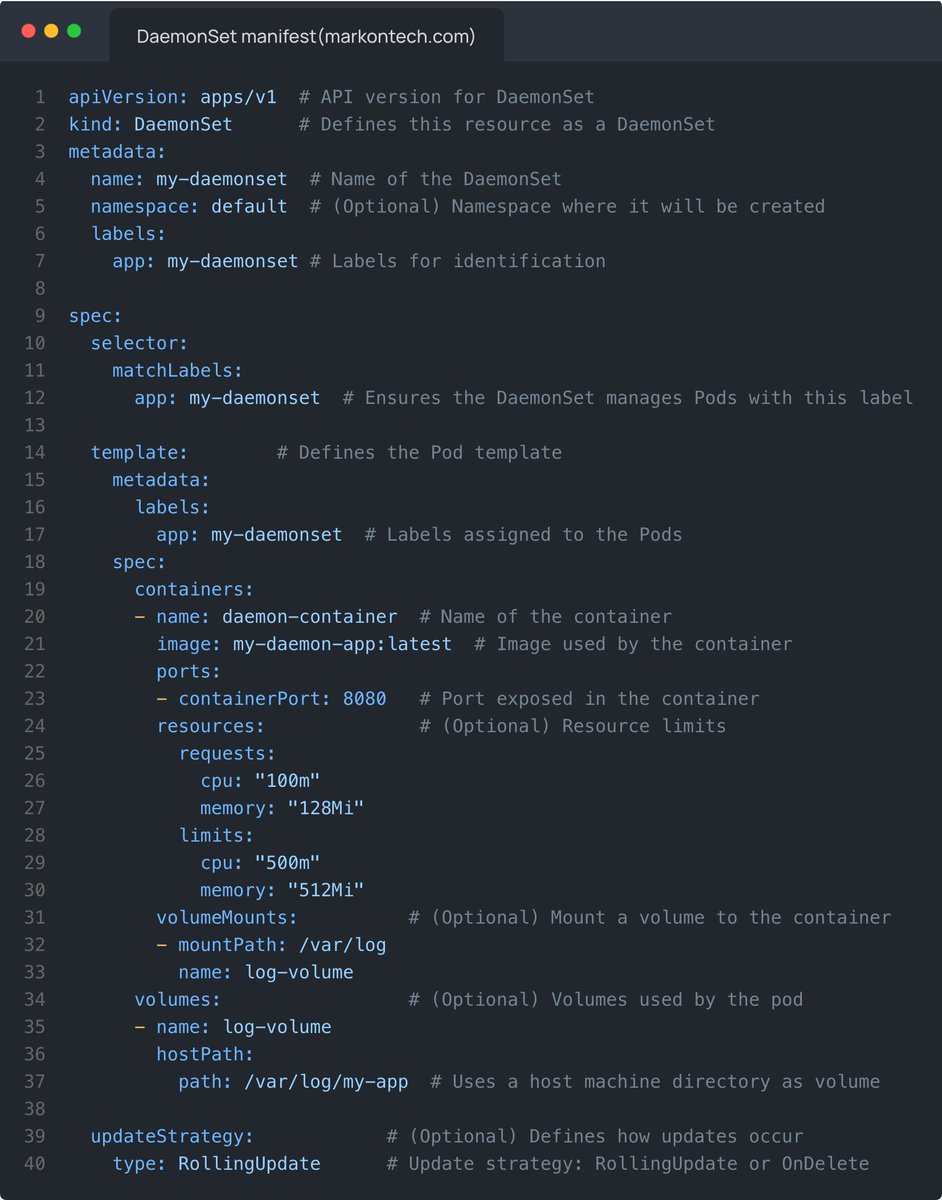
** Kubernetes DaemonSet manifest YAML explained **
A DaemonSet ensures that a specific pod runs on all (or some) nodes in the cluster.
** Key features **
Runs one pod per node:
- Unlike a deployment, DaemonSets schedule one pod per node automatically.
- Used for system-wide services: often used for logging agents (Fluentd), monitoring (Prometheus node exporter), or network services.
- hostPath volumes: commonly used in DaemonSets to access node-level directories.
- updateStrategy(when applied):
- RollingUpdate: Replaces pods one by one.
- OnDelete: Pods are updated only when manually deleted.
1
20
128
6,476
17 Feb 2025
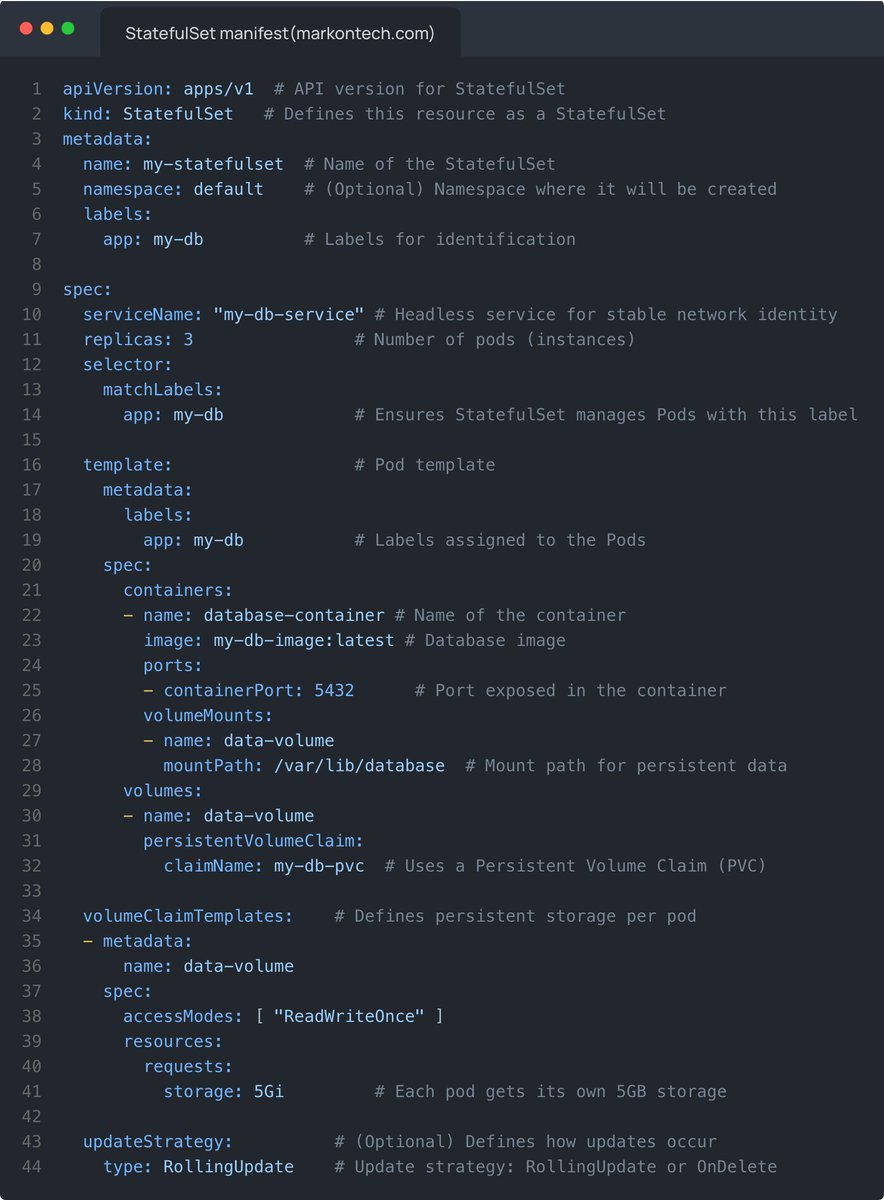
** Kubernetes StatefulSet YAML manifest explained **
Used for stateful applications like databases (MySQL, PostgreSQL, Cassandra, etc.).
** Key features **
Pods have stable network IDs:
- Pods are named as my-statefulset-0, my-statefulset-1, etc.
- Each pod gets a stable hostname: <pod-name>.<service-name>.
Uses persistent volumes:
- Unlike deployments, where new pods get new storage, each pod keeps its persistent volume.
- volumeClaimTemplates ensures each pod gets its own persistent volume.
Rolling updates with ordering:
- Pods are updated one at a time in order (when RollingUpdate strategy is applied).
34
238
11,618