
Software Engineer | React | Javascript | Node Js
Joined May 2018
- Tweets 7,384
- Following 179
- Followers 333
- Likes 13,387
1,143 Photos and videos






Sanjeev Chaurasia retweeted

Apr 3
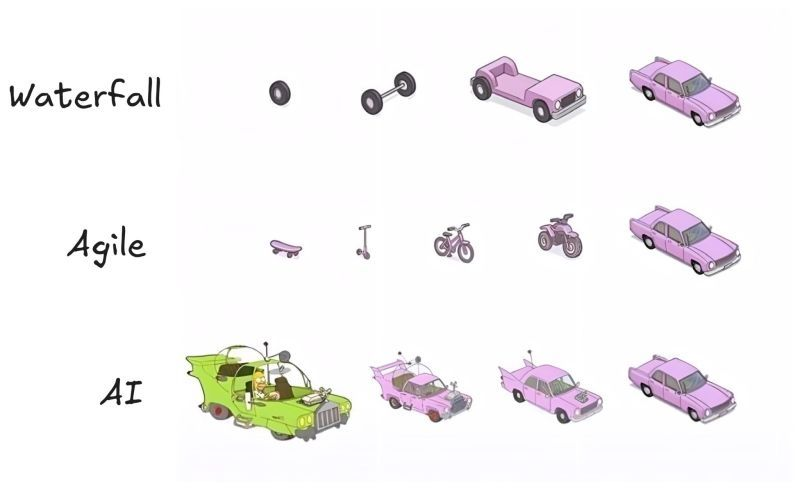
Honestly, this is the most accurate diagram I've seen.
Waterfall: You plan for 18 months and deliver exactly what nobody needs anymore.
Agile: You deliver something usable at every step, but the CEO keeps asking, "Where's the car?"
AI: You get the car on day one. It has six wheels, the doors are on backwards, and it has a rocket launcher. You spend more time making it yours than actually "building"; it's shaping. owning. verifying. That's what the best AI developers do now. They don't build. They shape and own.
129
1,676
8,504
781,228
Sanjeev Chaurasia retweeted

6 Oct 2025
VISUAL STUDIO CODE ALL SHORTCUT KEYS
Basic Editing Shortcut Keys
Ctrl X = Cut line (empty selection)
Ctrl C = Copy line (empty selection)
Alt ↑ / Alt ↓ = Move line up/down
Shift Alt ↓ / ↑ = Copy line up/down
Ctrl Shift K = Delete line
Ctrl Enter = Insert line below
Ctrl Shift Enter = Insert line above
Ctrl Shift \ = Jump to matching bracket
Ctrl ] = Indent line
Ctrl [ = Outdent line
Home = Go to beginning of line
End = Go to end of line
Ctrl Home = Go to beginning of file
Ctrl End = Go to end of file
Ctrl ↑ / Ctrl ↓ = Scroll line up/down
Alt PgUp / PgDn = Scroll page up/down
Ctrl Shift ] / [ = Fold/Unfold region
Ctrl K Ctrl [ = Fold all subregions
Ctrl K Ctrl ] = Unfold all subregions
Ctrl / = Toggle line comment
Shift Alt A = Toggle block comment
Alt Z = Toggle word wrap
Multi-Cursor and Selection Shortcuts
Alt Click = Insert cursor
Ctrl Alt ↑ / ↓ = Insert cursor above/below
Ctrl U = Undo last cursor operation
Ctrl L = Select current line
Ctrl Shift L = Select all occurrences of current selection
Ctrl F2 = Select all occurrences of current word
Ctrl D = Add selection to next find match
Ctrl Shift Alt → / ← = Column (box) selection
Find and Replace Shortcuts
Ctrl F = Find
Ctrl H = Replace
F3 / Shift F3 = Find next / previous
Alt Enter = Select all matches of Find
Ctrl D = Add selection to next find match
Ctrl K Ctrl D = Move last selection to next find match
File Management Shortcuts
Ctrl N = New file
Ctrl O = Open file
Ctrl S = Save
Ctrl Shift S = Save as
Ctrl F4 = Close editor
Ctrl K Ctrl W = Close all editors
Ctrl Shift T = Reopen closed editor
Ctrl Tab = Switch between open editors
Ctrl P = Quick Open (Go to File)
Ctrl Shift N = New window
Ctrl Shift W = Close window
Search and Navigation Shortcuts
Ctrl P = Quick Open
Ctrl Shift O = Go to Symbol
Ctrl G = Go to Line
Ctrl T = Show all symbols
Ctrl Shift M = Show problems
Ctrl Shift F = Search across files
Ctrl Shift H = Replace in files
Ctrl Shift E = Show Explorer / Focus
Ctrl B = Toggle sidebar visibility
Ctrl Shift U = Show Output panel
Ctrl Shift C = Open new terminal
Ctrl Shift Y = Toggle Debug Console
Code Editing and Refactoring Shortcuts
Alt Shift F = Format document
Ctrl K Ctrl F = Format selection
F12 = Go to definition
Alt F12 = Peek definition
Ctrl . = Quick fix
Shift F12 = Show references
F2 = Rename symbol
Ctrl K Ctrl X = Trim trailing whitespace
Ctrl Space = Trigger suggestion
Ctrl Shift Space = Trigger parameter hints
Alt Enter = Apply code action
Ctrl / = Toggle line comment
Alt Shift A = Toggle block comment
Integrated Terminal Shortcuts
Ctrl = Toggle integrated terminal Ctrl Shift = Create new terminal
Ctrl Shift C = Copy selection
Ctrl Shift V = Paste into terminal
Ctrl ↑ / ↓ = Scroll terminal up/down
Ctrl K = Clear terminal
View and Layout Shortcuts
Ctrl Shift P = Show Command Palette
Ctrl Tab = Switch editor tabs
Ctrl 1 / 2 / 3 = Focus into editor group
Ctrl K Ctrl ← / → = Move between editor groups
Ctrl \ = Split editor
Ctrl K Ctrl → = Focus next group
Ctrl K Ctrl ← = Focus previous group
Ctrl K Z = Zen mode
Ctrl = Zoom in
Ctrl - = Zoom out
Ctrl B = Toggle sidebar visibility
Debugging Shortcuts
F9 = Toggle breakpoint
F5 = Start/Continue debugging
Shift F5 = Stop debugging
F11 = Step into
Shift F11 = Step out
F10 = Step over
Ctrl K Ctrl I = Show hover
Ctrl Shift D = Open Run and Debug panel
Extensions and Source Control
Ctrl Shift X = Show Extensions view
Ctrl Shift G = Show Source Control view
Ctrl Shift E = Show Explorer
Ctrl Shift J = Toggle Search details
Ctrl K Ctrl G = View Git output
Get the complete Visual Studio Code Mastery ebook here: codewithdhanian.gumroad.com/…

37
607
3,272
154,079

Sanjeev Chaurasia retweeted

22 Nov 2023
Patterns are fundamental in problem-solving.
When a common occurring problem (pattern) is solved, we document it to be reused.
Over the years there are many patterns that have occurred.
For the front end, we can categorize them into Design (problem-solving), Rendering, and Performance.
Knowing them is crucial, especially in the LLD system design, I am curating them on my blog solving them in React, and there are 20 of them.
Give it a read - learnersbucket.com/examples/…
2
4
63
4,435
Sanjeev Chaurasia retweeted
28 Oct 2023
This is how you can prepare for the 4 Frontend interview rounds
JavaScript-based problem solving -> learnersbucket.com/javascrip…
Machine Coding -> learnersbucket.com/javascrip…
System Design -> learnersbucket.com/examples/…
Web Fundamentals -> learnersbucket.com/tag/web/
5
46
269
24,561
Sanjeev Chaurasia retweeted

17 Oct 2023
Future CSS Tip! 🔮
You can create this scrolling image pop-out effect with CSS scroll-driven animations and zero JS! 🔥
.pop {
view-timeline-name: --pop;
}
img {
animation: slide both;
animation-timeline: --pop;
animation-range: entry 100% cover 50%;
}
.skateboarder {
--x: 0;
--y: -45%;
}
@ keyframes slide {
to { translate: var(--x) var(--y); }
}
The "trick" is to layer up two image elements and keep one clipped by the container 🤙
Slide them both together and it will look like one pops out of the container 🎈 You can leverage scoped custom properties to translate by different distances too! 😎
You can use macOS's built-in image background removal tool to get the pop-out image ✨ And for added effect, you can animate the brightness on that to make it stand out ⭐️
@CodePen link below! 👇

49
604
4,069
634,304
Sanjeev Chaurasia retweeted
16 Sep 2023
Frontend System Design is not that hard, All you need to learn
For High-Level is
- Platform identification (Mobile, Web, Desktop)
- Rendering strategy (CSR, SSR, SSG, ISR)
- Frontend application architecture (Micro-frontend, MVVM)
- Internationalization
- Testing strategy (E2E)
- Tech Stack finalisation
- Tools integration
- Error monitoring, logging, and tracing
- User analytics monitoring, logging.
- Security
- Authentication and authorization
- Data exchange, sharing, storing, and caching strategies
- CI and deployment strategy
For low-level is
- File and folder structure
- Design system (CSS styling and optimization)
- Component designing
- Route management and normalization
- State management and normalization
- Instrumentation
- API contract finalization (request and response payloads)
- Error handling
- HTML and SEO optimization
- Performance optimization
- Pagination, lazy loading, and skeleton UI
- Accessibility
- Bundling and caching techniques
- Unit testing, e2e testing
- Versioning
- Design pattern
- Security practices and form management
- Authorization and user role management
- Best practices and guidelines for code reviews
- Team collaboration and task distribution
You can learn it from learnersbucket .com
13
165
934
166,016
Sanjeev Chaurasia retweeted

31 May 2023
Get paid in USD while working remotely with these job platforms ⬇️
- RemoteOK
- Wellfound (AngelList)
- Devrel Careers
- Working Nomads
- Remotive
- Himalayas
- We Work Remotely
- JustRemote
- Remote. co
- FlexJobs
- Arc. dev
- Skip the Drive
- Jobspresso
- Europe Remotely
37
761
2,676
351,535
Sanjeev Chaurasia retweeted
24 May 2023
Do checkout my #javascript interview cheat sheet, if you are preparing for frontend interview.
It is a free resource covering all the rounds of interview for frontend.
learnersbucket.com/javascrip…
4
12
82
8,164
Sanjeev Chaurasia retweeted

2 May 2023
Two days back, my uncle was murdered brutally in broad daylight in Pune.
Reason for the murder was that he asked a gang of men to not do drugs near his house.
While nothing is going to bring back my uncle and stop the suffering of my family, all we can do is wait for justice.
486
1,243
5,601
625,628
Sanjeev Chaurasia retweeted
26 Apr 2023
New Article!.
What is Tree Shaking and How does it help.
learnersbucket.com/examples/…
1
3
44
3,060
Sanjeev Chaurasia retweeted

19 Apr 2023
Git. A thread:
ALT Git logo - Git - A distributed version control system
34
87
386
98,242
Sanjeev Chaurasia retweeted

5 Apr 2023
Theming and Theme Switching with React and styled-components
✍ @tapasadhikary
bit.ly/2Xy28mL
1
2
7
1,439
Sanjeev Chaurasia retweeted

15 Feb 2023
If you don't know generics, I promise you'll understand them by the end of this thread.
I like a challenge.
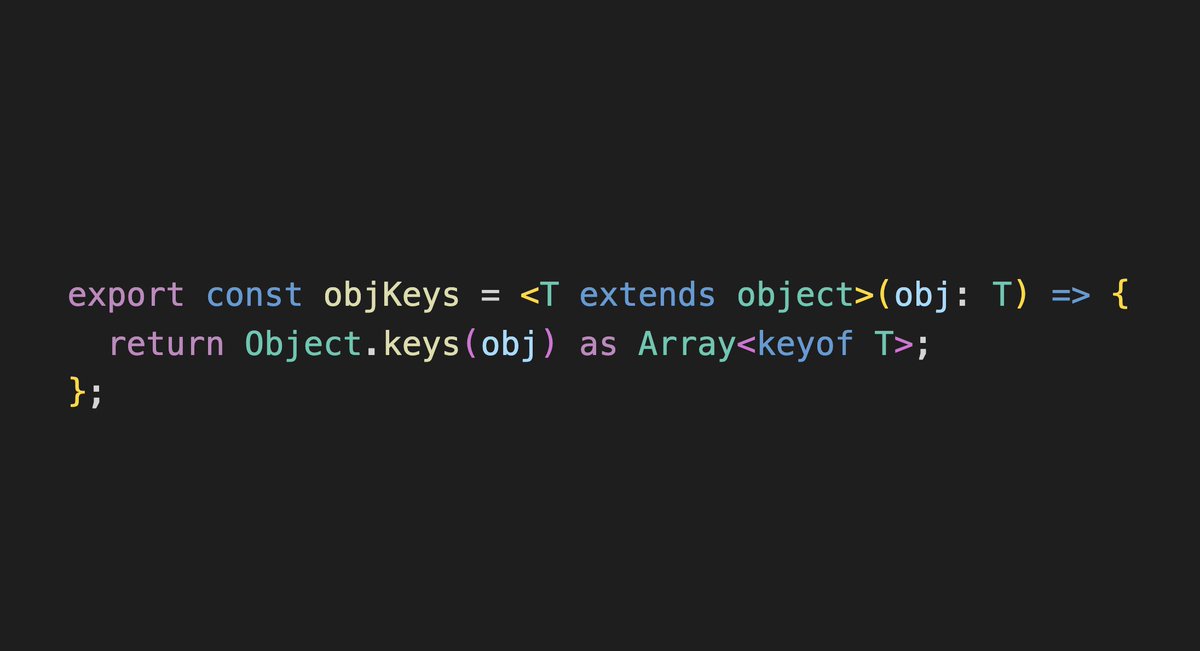
ALT export const objKeys = <T extends object>(obj: T) => { return Object.keys(obj) as Array<keyof T>; };
115
917
5,396
727,625
Sanjeev Chaurasia retweeted

10 Feb 2023
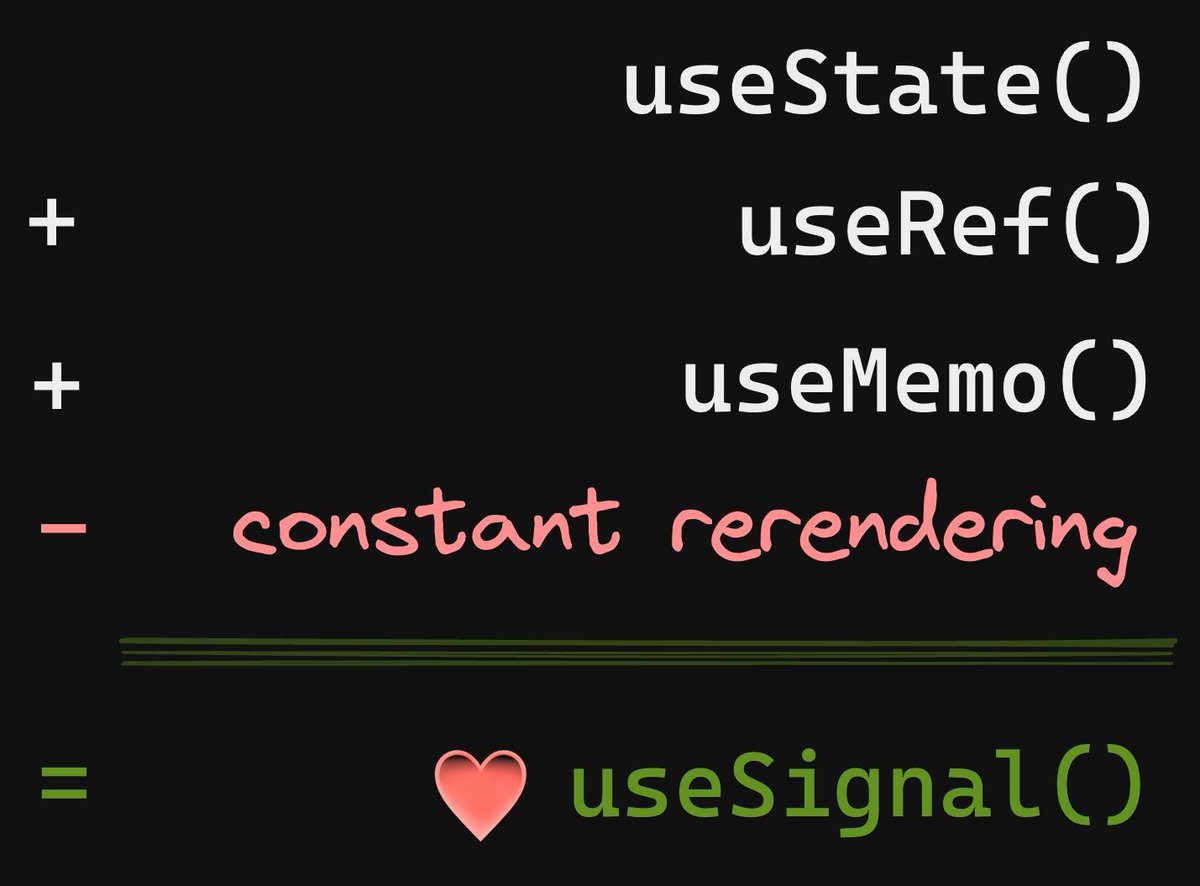
useSignal() is the future of web frameworks and is a better abstraction than useState(), which is showing its age.
🧵🪡🧶
42
222
2,138
424,704
Sanjeev Chaurasia retweeted

1 Feb 2023
Learn Cloud Computing for free:
AWS → explore.skillbuilder.aws
Azure → learn.microsoft.com
GCP → github.com/priyankavergadia/…
Linux → netacad.com/courses/os-it/nd…
Networking → softwaretestinghelp.com/comp…
DevOps → edx.org/learn/devops
Security → cybrary.it/course/introducti…
101
1,508
4,324
388,628
Sanjeev Chaurasia retweeted
3 Jan 2023
Learn how to add request and response interceptor to the Fetch method of #javascript.
learnersbucket.com/examples/…
2
10
1,066