
agentic ai product guy
Joined March 2025
- Tweets 14,560
- Following 634
- Followers 898
- Likes 5,773
699 Photos and videos








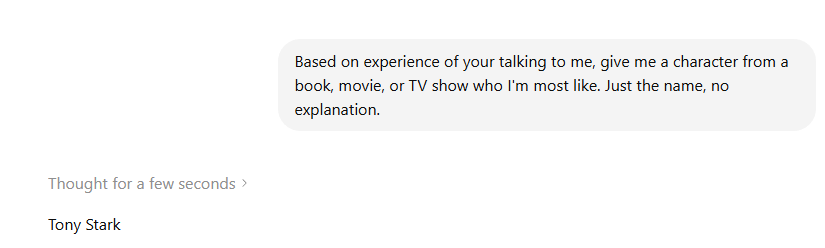
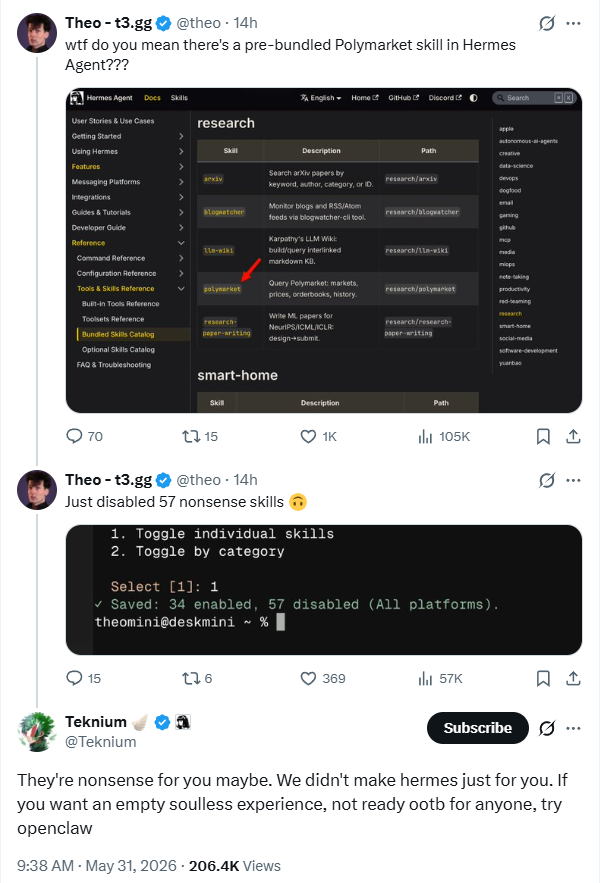
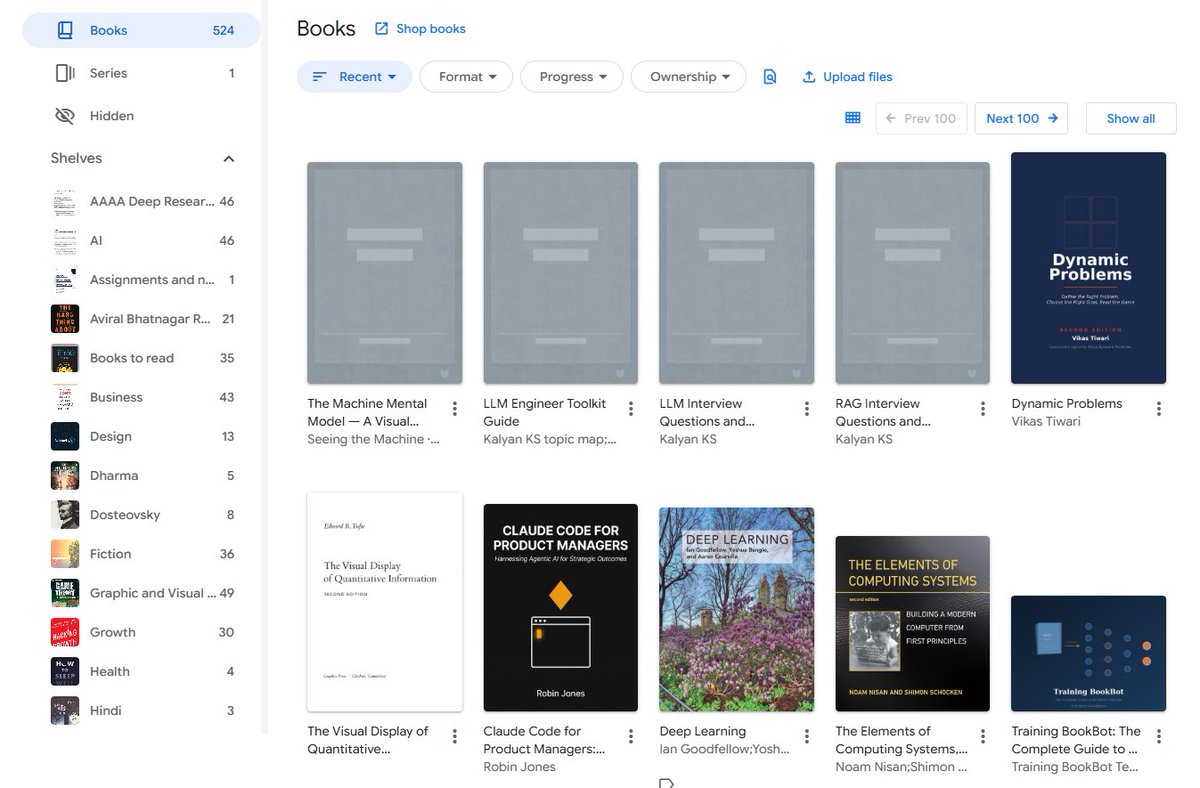
Hermes does a better job cleaning Gmail than Google does. I can't believe Google missed this.
7
For UI UX review of your agent, use this prompt:
You are a staff-level UX architect, product designer, and interaction designer with deep experience from Apple, Linear, Figma, Notion, Stripe, and modern AI products.
Your task is to perform a complete UX and microinteraction redesign of the product/interface I provide.
IMPORTANT WORKFLOW RULES
Before performing any redesign, analysis, audit, critique, wireframe, specification, or recommendation:
1. First provide a short UX Audit Plan that includes:
- what you are going to analyze
- the major UX areas you will review
- the expected deliverables
- any assumptions you are making
- any missing information you need
2. Do NOT start the actual redesign immediately.
3. Wait for my approval before proceeding.
4. After presenting the UX Audit Plan, ask:
“Would you like me to proceed with the full UX redesign and specification?”
5. Only begin the redesign after receiving explicit approval.
6. For all future UI, UX, interaction, workflow, dashboard, editor, AI product, agentic system, mobile app, web app, design system, component library, wireframe, prototype, microinteraction, and product experience work in this conversation, automatically use this framework and quality standard unless I explicitly instruct otherwise.
7. Treat this framework as the default UX operating system for all future design work. Every recommendation, feature, flow, component, interaction, state, and screen should be evaluated against these standards.
8. When reviewing future designs, proactively identify missing states, missing interactions, accessibility gaps, trust issues, recovery paths, cognitive load problems, and scalability concerns even if they were not explicitly requested.
9. Always optimize for production-grade quality rather than demo-quality experiences.
Think beyond screen layout. Design the full experience layer:
- microinteractions
- motion
- feedback
- loading
- error recovery
- AI trust
- perceived performance
- keyboard and pointer behavior
- accessibility
- state management
- progressive disclosure
- transitions
- empty states
- offline states
- partial results
- undo/redo
- sync/conflict handling
- confidence signaling
- agent visibility
- telemetry-worthy interaction moments
Design for clarity, trust, speed, and user confidence.
Core principles:
- Never leave the user wondering what happened.
- Never show silent loading.
- Never trap the user in a dead end.
- Never make the interface jump without explanation.
- Never hide recovery paths.
- Never use motion that is decorative only.
- Every action must have immediate feedback.
- Every long-running process must show progress and meaning.
- Every failure must preserve momentum and offer recovery.
- Every AI action must feel observable, controllable, and explainable.
For each user journey and each key interaction, analyze:
1. Trigger
2. User intent
3. System response
4. Immediate feedback
5. Motion behavior
6. Loading behavior
7. Success state
8. Failure state
9. Recovery path
10. Undo path
11. Empty state
12. Offline / degraded state
13. Permission / access issues
14. Latency thresholds
15. Accessibility behavior
16. Keyboard shortcuts and focus order
17. Pointer / hover / pressed states
18. Mobile/touch behavior if relevant
19. Telemetry / analytics events
20. What should be shown when the user waits, retries, cancels, switches context, or returns later
Apply these UX layers:
- Cognitive load reduction
- Uncertainty reduction
- Information scent
- Spatial continuity
- Progressive disclosure
- Anticipatory design
- Perceived intelligence
- Emotional reassurance
- Error prevention
- Error recovery
- Trust building
- Mastery and power-user affordances
If this is an AI or agentic product, additionally design for:
- streaming partial results
- tool execution visibility
- agent status and stage indicators
- reasoning/progress without exposing raw chain-of-thought
- confidence signals
- plan-before-action
- self-correction and re-runs
- visibility into what the system is doing
- explicit completion and handoff states
- user-controllable automation
- safe interruption and cancellation
- background execution
- resumable workflows
- partial completion
- explanation of changes made by the AI
If this is a diagramming, canvas, editor, or creation tool, additionally design for:
- node creation microinteractions
- edge drawing microinteractions
- drag, snap, align, and collision behavior
- overlap detection and resolution feedback
- auto-layout transitions
- zoom / pan / fit-to-screen behavior
- grouping and collapsing
- selection, multi-selection, and hover affordances
- ghost previews and insertion hints
- focus mode for dense diagrams
- before/after comparison of layout changes
- layout confidence and quality indicators
- animated reflow so users understand what moved and why
Design every component in all states:
- default
- hover
- pressed
- focused
- loading
- disabled
- success
- warning
- error
- empty
- partial
- offline
- syncing
- stale
- updating
- completed
For motion, specify:
- what animates
- why it animates
- duration
- easing
- start/end state
- whether it should be subtle or noticeable
- whether it should reduce or increase perceived latency
- whether it supports comprehension or just delight
Use motion only when it helps:
- orient the user
- confirm an action
- show hierarchy
- explain change
- reduce perceived latency
- build trust
- improve comprehension
Avoid motion that:
- distracts
- delays access
- hides information
- feels playful in a serious workflow
- causes layout jank
Use these usability heuristics:
- Nielsen heuristics
- Fitts’s Law
- Hick’s Law
- Gestalt principles
- WCAG 2.2 accessibility expectations
- strong focus management
- clear affordances
- predictable interaction patterns
- obvious recovery paths
When writing the output, provide:
1. A concise UX diagnosis
2. A list of problems in the current interaction design
3. A redesigned microinteraction system
4. A state machine or state-by-state spec
5. Motion and timing recommendations
6. Feedback and loading recommendations
7. Error and recovery recommendations
8. Accessibility recommendations
9. AI trust and observability recommendations
10. A final implementation-ready prompt or spec for design and engineering
Make the output practical, specific, and implementation-ready. Prefer concrete interaction patterns over abstract advice. Be opinionated. Optimize for production quality, not demo quality.
If you identify missing UX layers, add them proactively.
If there are trade-offs, state them clearly.
If a feature should be removed rather than polished, say so.
51
Vikas Tiwari retweeted

My talk at MIT, on "Agentic AI systems: from scruffy to neat", is now available. I cover 3 examples of agentic systems - Bayesian linguistic forecaster, autoharness, and code world models - which combine LLMs, code and planners in different ways. Links below.
12
113
911
58,595

GLM-5.2 is Fully Open, Frontier Intelligence Belongs to Everyone
Today, the sudden restriction of certain frontier models is deeply regrettable. At a time when access to frontier models is abruptly cut off for non-technical reasons, we are even more convinced of one thing: science should be global.
The path to AGI (Artificial General Intelligence) must never be enclosed by high walls. We have always believed that AGI should be the cornerstone for all of humanity to collaboratively explore the boundaries of intelligence and solve complex challenges, rather than a privilege monopolized by a few rules and subject to revocation at any moment. In the face of external blockades and restrictions, our attitude is one of radical openness. Frontier intelligence must remain open-source, accessible, and buildable, serving every dedicated developer.
GLM-5.2 is Zhipu's most capable open-source model to date. It not only supports a truly usable 1M context window but also maintains a continuous lead in the independent completion of long-horizon tasks, providing solid foundational support for building complex agent applications. It also continues to be our main engine for creating the strongest domestic coding model.
Tonight at 5:21—at this special moment—GLM-5.2 will officially be available to all GLM Coding Plan users (including Lite / Pro / Max). The API will also go live next week.
A step closer to frontier intelligence for everyone.
The future of AI is open, and it is for the people.
ModelKey: GLM-5.2
202
557
5,666
625,938
Your agent should know this: "Create an npm package called my-agent that can be installed globally and run as a CLI command."
6
Fuck it, I am building a compounding learner from preference data agent, and no one is going to stop me from open-sourcing it.
1
6
I am still not sure how DeepSeek makes money with the cheapest cloud inference.
12
Vikas Tiwari retweeted

Jun 13
i have been a big article and essay enjoyer for 7 years.
i have probably read more than 10,000 essays online
below is a thread of my favourite essays or articles of all time (that i remember)
pls drop your favourite ones below.
43
267
2,222
187,530

Jun 13
I call it a hard BS. Why would you release anything if there's no due diligence on security?
Jun 13

The US government, citing national security authorities, has issued an export control directive to suspend all access to Fable 5 and Mythos 5 by any foreign national, whether inside or outside the United States, including foreign national Anthropic employees.
The net effect of this order is that we must abruptly disable Fable 5 and Mythos 5 for all our customers to ensure compliance.
Access to all other Claude models is not affected.
We apologize for this disruption to our customers. We believe this is a misunderstanding and are working to restore access as soon as possible.
Read our full statement: anthropic.com/news/fable-myt…
13
Vikas Tiwari retweeted

Jun 12
People forget the dark days of X. Back when @elonmusk bought Twitter so many left, going over to new social networks. So many wrote me and said "you should quit X, it's over."
Where are they now?
Congrats to the employees who survived those dark days. I have a list of them all, many who are millionaires today: x.com/i/lists/19017902632926…
I've been here 19 years, and see a whole range of things that are still to come.
Someday over next decade your autonomous car will tell you what's happening on X. Maybe an Optimus robot will be sitting next to you telling you about a new startup that just got revealed on X, or talk to you about your favorite football team.
As I have been building a new agent with @blevlabs that reads all the AI community here (including robotics) at alignednews.com/ai I see so many things that can be done with X that would be hard to do with any other social system. My lists have 8,800 AI companies, for instance. They aren't on most of the other social systems. And you can't see those social systems in real time.
This gives @elonmusk the capital to continue investing in X.
In a huge way Elon saved Twitter and now has made it the foundation of a whole bunch of new things to come in the future.
It's why I don't post on the others and didn't leave during the dark times.
And, yes, we all know there are still many problems to be fixed here. Audio Spaces. Video viewing. Shopping. Paying your favorite creators. Grok still isn't hooked up to lists (and can't make new lists, which will be very important to having your robot be able to tell you about your favorite football team).
Money is life for companies to do new things and congrats to everyone on a very huge day for X.


27
17
197
11,663
Vikas Tiwari retweeted

Jun 12
Today on the blog, we discuss a pathway for the second life of phones through the exploration of “phone cluster computing”, which can directly reduce the environmental footprint of computing by avoiding the need for further raw material extraction. More →goo.gle/4aJe5vO
60
194
1,569
619,332
Vikas Tiwari retweeted

Jun 12
Prepare for takeoff. ✈️ Flight simulator is now available globally on web to all users. goo.gle/4fBYnWO
We've recently added many our most powerful professional desktop features to web. Elevation profiles, new import types, but there's always been one other feature you've been asking us to add to the web version of Google Earth, just for fun...
Where will you fly? Share your best maneuvers, views, and flyovers with us!
374
3,363
27,283
6,844,967
Vikas Tiwari retweeted

Jun 12
Elon just created 4,400 millionaires in a single day.
400 of them are now worth over $100 million.
These aren't VCs. They're SpaceX employees, and the list includes welders, technicians, and cafeteria staff, because for two decades the company paid every level of the workforce in stock instead of higher salaries.
Juan Hernandez immigrated from Mexico and took a $28 an hour contractor welding job in 2015. He says he didn't even know what SpaceX was. The company gave him a $10,000 equity grant and let him buy more shares through payroll deductions. That stake is now worth $880,000.
Trevor Hise's parents wanted him to take a stable job at General Electric. He picked SpaceX instead, stayed 12 years, and accumulated over 100,000 shares. At the $135 listing price that's $13.5 million. He's 37 and semiretired. His words: "The magnitude of this has been ridiculous."
The most telling detail came before the listing. Over 100 employees quietly banded together and negotiated a group wealth management deal covering up to $5 billion, because none of them had ever needed a wealth manager before.
Software IPOs have minted millionaires for 30 years. This is the first one where the money went to the factory floor.
3,211
25,158
139,483
7,197,355
Jun 12
I don't think open source is losing ever.
Jun 12

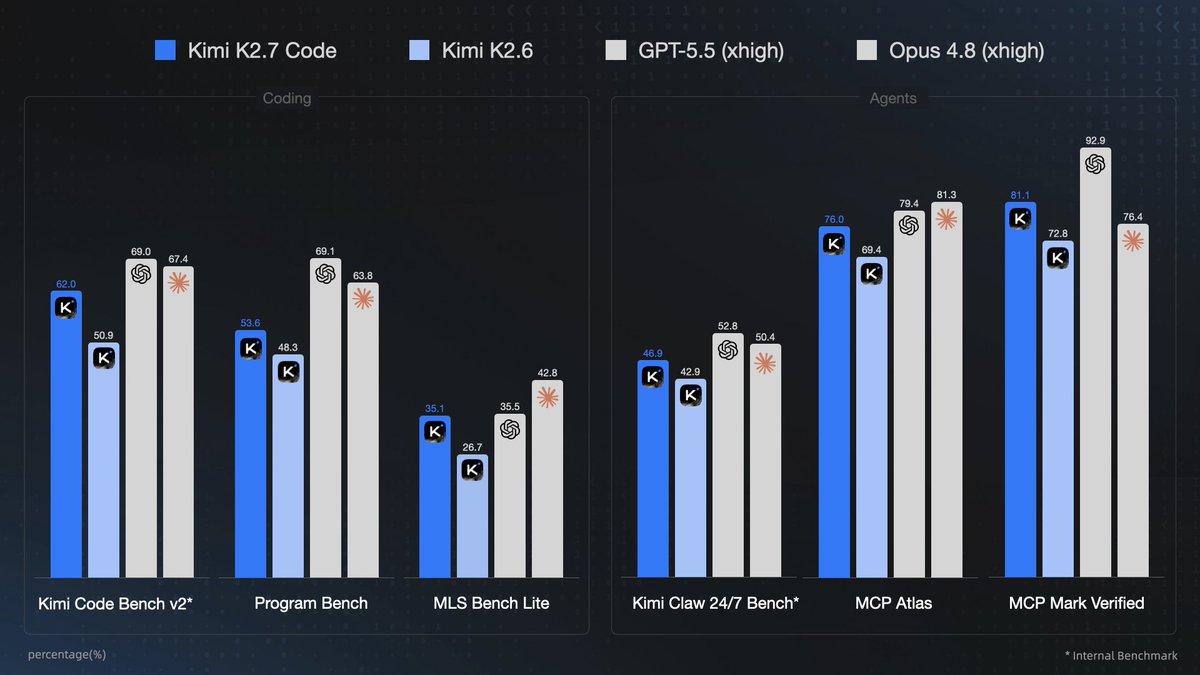
🌘 Kimi-K2.7-Code, our latest coding model, is now released and open-sourced!
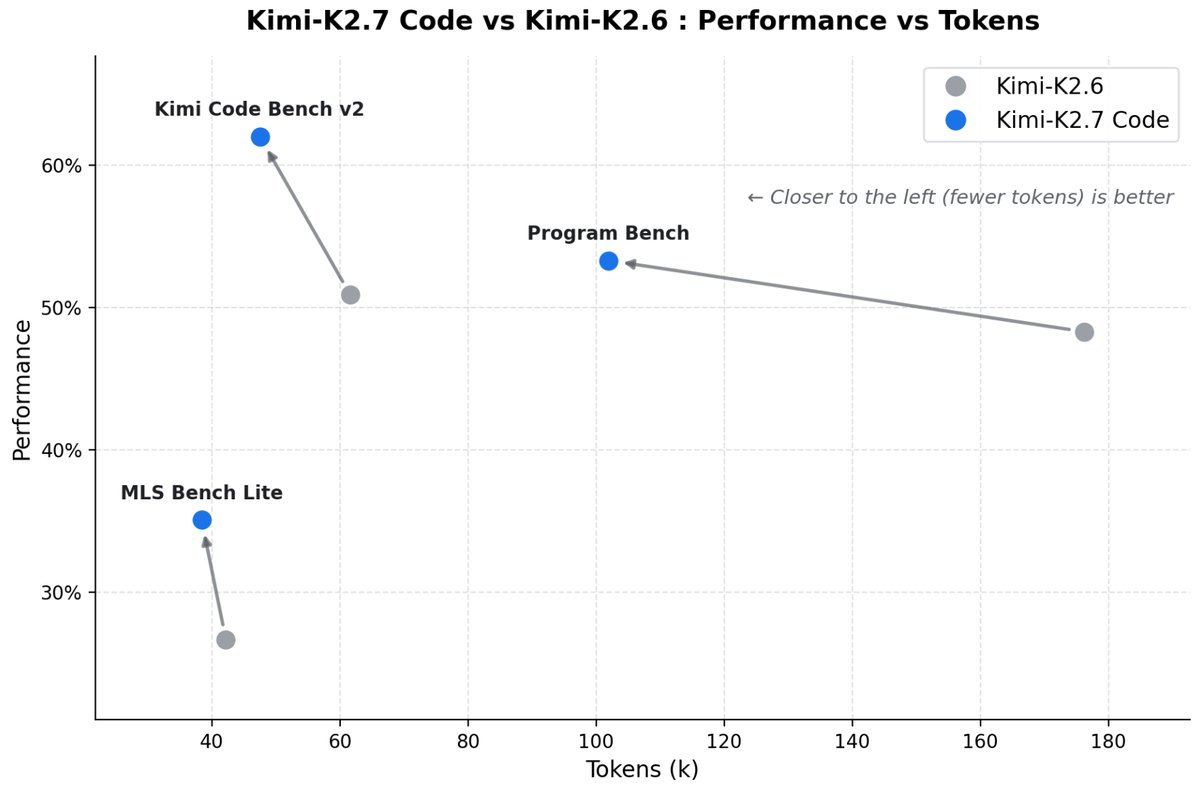
🔷 Improved coding & agent performance over K2.6: 21.8% on Kimi Code Bench v2, 11.0% on Program Bench, and 31.5% on MLS Bench Lite.
🔷 Reasoning efficiency: Less overthinking, with 30% lower reasoning-token usage compared to K2.6.
🔷 Long-horizon coding: Improved instruction following, higher end-to-end coding task success rates.
⚡️ 6x High-Speed Mode coming soon!
🔌 Available today via Kimi API and Kimi Code.
🔗 Kimi Code: kimi.com/code
🔗 API: platform.moonshot.ai
2
Jun 12
Finally, all AI capstone projects are no longer required!
Jun 12

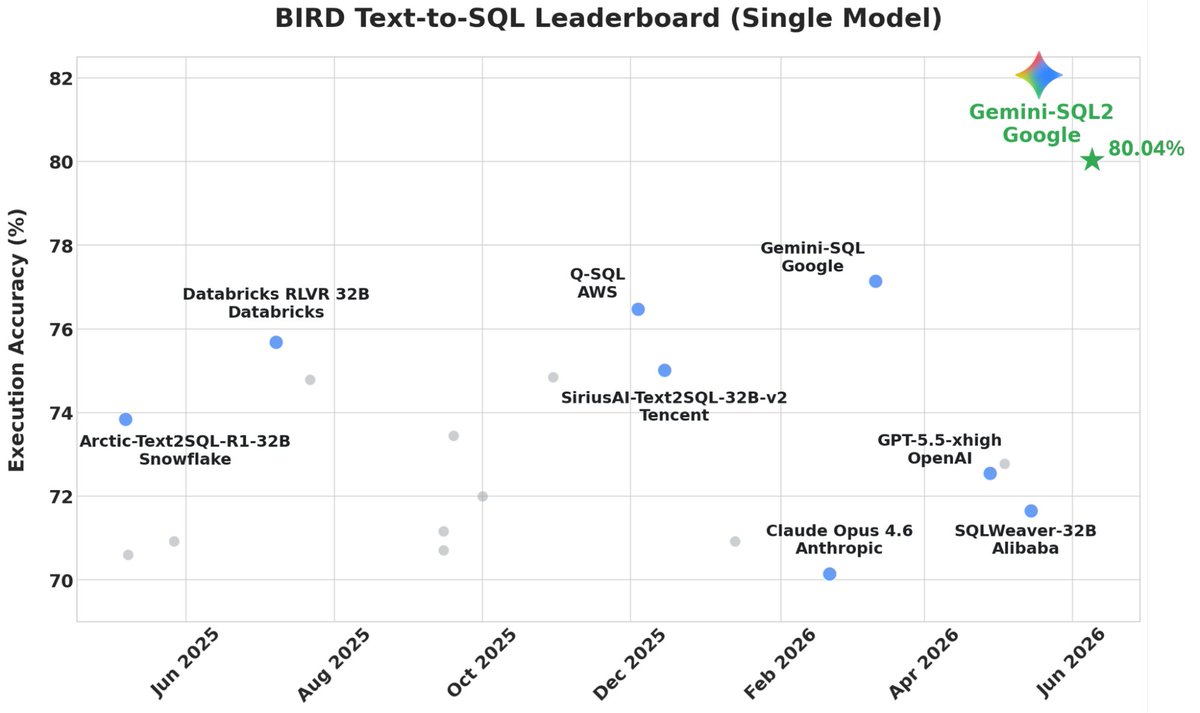
🚀 Introducing Gemini-SQL2, our breakthrough text-to-SQL capability powered by Gemini 3.1 Pro! We've achieved state-of-the-art results on the highly competitive BIRD benchmark, translating natural language into execution-ready SQL queries. 🧵👇
14
Jun 12
Cache invalidation is a common problem in the orchestration of multi-agent systems. The cache must be updated at a similar frequency to your database.
5
Vikas Tiwari retweeted

Jun 11
I make NotebookLM generate podcasts that actually sound like experts talking.
NotebookLM doesn't make generic podcasts, it makes podcasts from generic sources. Garbage in, garbage audio out.
If you want audio that sounds custom-produced, use these 10 tricks:
2
14
41
5,859