Usability Consultant based in Manchester
Joined July 2008
- Tweets 3,719
- Following 44
- Followers 222
- Likes 3,281
Photos and videos

Over 50 Excellent Figma Plugins to Boost Your Next Design Project! 🙌
- Clean Document
- Logo Creator
- Design Lint
- Lorem Ipsum
- Split Shape
- Background Remover
- Unsplash
- Viewports
- Find and Replace
- Iconify
- Content Reel
- 3D Mockup
- Lottie Files
- Material Symbols
- Design System Organizer
- Wireframe
- Figmotion
- Isometric
- Arc
- Better Font Picker
- Dopely Colors
- Mapsicle
- Anima
- Mockuuups Studio
- UIHUT
- Draw Connector
- TinyImage Compressor
- Pitchdeck Presentation Studio
- ProtoPie
- HtmlGenerator
- React Export
- Vue Export
- Svelte Export
- Tailwind Export
- CSS Styling Export
- FigJam AI
- EmojiOne
- FontAwesome
- Jam Icons
- Twitter Emoji
- Remove bg
- Illustration Libraries
- Artboard Studio
- Vision Simulator
- Color Mixer
- Table Generator
- Chart Generator
- Shadow Creator
- Live Text Input
- Google Maps Embed
- Drop-down Menu
- Entrance Animation
- Code Embed
- Responsive Design
- Breakpoints
- Constraints Support
#UX #UI #UXDesign #UIDesign #ProductDesignb
2
7
28
1,624
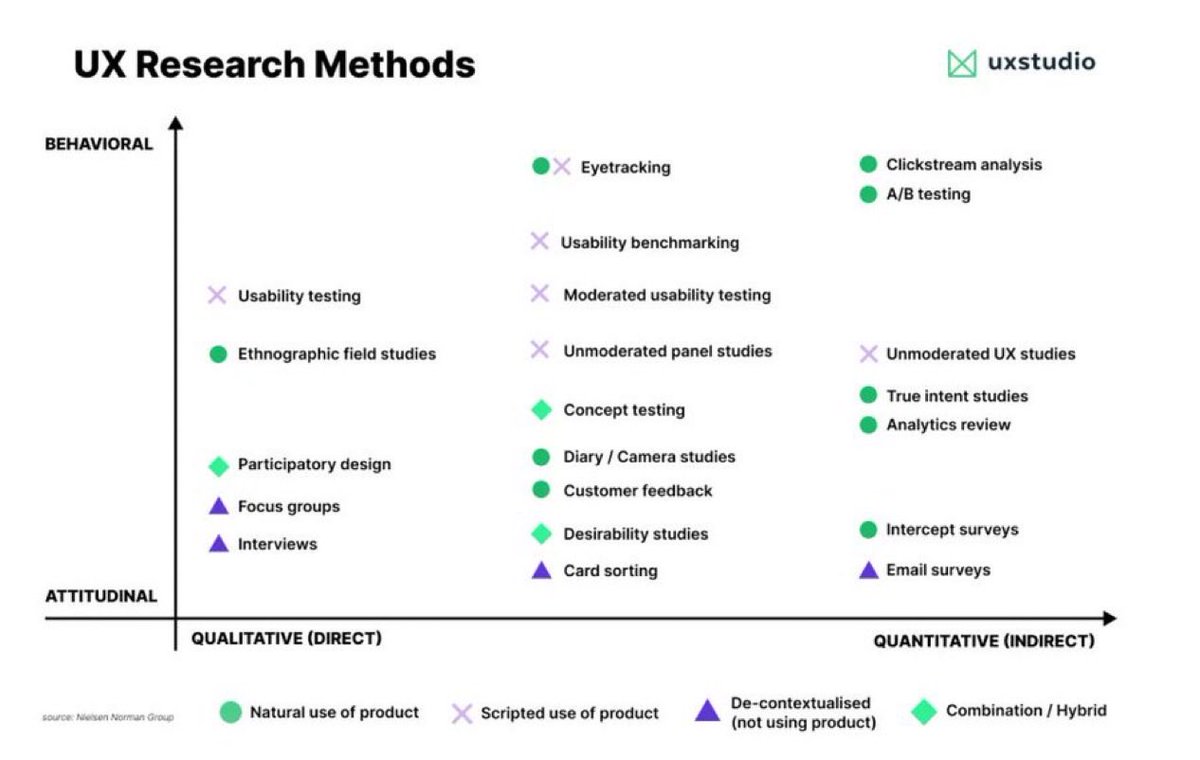
Useful UX Research Methods Cheatsheet to boost your next design project 🙌
FREE Cheatsheet attached 🔖
1. What is UX Research?
It’s the systematic study of user behaviour, needs, and pain points—designed to fuel smarter product and design decisions. This process ensures we’re solving real problems, not just fulfilling assumptions.
2. Why it matters
UX research empowers you to:
• Get a clear view of what to build
• Discover what genuinely brings value to users
• Strip away designer biases
• Test and validate ideas early
• Spot improvement areas
• Streamline development
• Choose the right next steps for your product journey
3. When to conduct it
From the earliest ideation stage, through prototyping, to post-launch follow-up—UX research can drive better outcomes at every phase:
• Discovery
• Validation
• Prototyping
• Follow-up
4. Methods at your disposal
Choose based on your phase and goals:
– Qualitative (e.g., interviews, usability testing, card sorting): reveals the “why” & “how” in depth. Great for detailed insights from fewer people.
– Quantitative (e.g., surveys, A/B tests, analytics): gives you the “what,” “when,” and “how many.” Ideal for validating with larger data sets.
5. What does a UX Researcher do?
They explore user frustrations and needs through qualitative and quantitative tools, analyze the findings, and pass actionable insights to designers—ensuring the product truly aligns with user expectations.
6. Step UX Research framework
1. Set clear objectives
2. Choose appropriate methods
3. Craft a research plan & interview script
4. Define roles, logistics & workload
5. Run interviews & usability tests (think-aloud, encourage natural behaviors, observe, don’t over-moderate)
6. Analyze findings, compile insights with visuals, quotes, and deliver actionable recommendations
7. Conclusion
UX research is not optional—it’s essential. It helps you understand your users deeply, inform design decisions, validate hypotheses with data, and ultimately craft experiences that resonate and deliver value.
#UX #UI #UXResearch #UserExperience #ProductDesign
2
8
27
1,041
Check out the full website 🙌
principles.design
4
10
566
Excellent open source collection of Design Principles and methods! 🙌
The collection contains:
- 195 Examples
- 1448 Design Principles
- 167 Creators
What are Design Principles?
Design Principles are a set of considerations that form the basis of any good product.
Why use them?
Design Principles help teams with decision making. A few simple principles or constructive questions will guide your team towards making appropriate decisions.
Who uses them?
Organisations, individuals and product teams have benefited from writing and following their principles.
#UX #UI #UXDesign #UIDesign #ProductDesign #UserExperience
3
16
65
2,910
Check out the full post 🙌
uxdesign.cc/good-to-great-ui…
2
4
487
7 Excellent Tips to Create Great UI Animations 🙌
1. Make the content in tabs slide
- A good animation fades the content in and out from one state to another.
- A great animation shows continuity in a transition by making the content move between states.
2. Connect the shared elements of a card
- A good animation uses transitions like push left or slide up to show the content on a detail screen.
- A great animation establishes a connection between two states by animating the shared content.
3. Use a cascading effect in your content
- A good animation changes the position and opacity of the material when it enters the screen.
- A great animation quickly staggers the appearance of each group or element.
4. Make the content push other elements out of the way
- Good animations move and show elements in context.
- Great animations show elements affecting their surroundings when they change.
5. Make menus appear in context
- Good animated menus show the content appearing from the direction of the button that opened them.
- Great animated menus emerge from the action that created them, growing from the point of touch.
6. Use buttons to show different states
- Good interactions display the events next to the button.
- Great interactions use the button itself to show the different states.
7. Bring attention to something important
- Good design uses colour, size, and position to highlight an important action the user needs to notice or act upon.
- Great design uses animation to bring attention to that important action, without being disruptive.
Save to Bookmarks 🔖
#UX #UI #UXDesign #UIDesign #ProductDesign
1
6
42
1,653
20 Excellent FREE Illustration Resources for your next design project 🙌
Save to Bookmarks for reference 🔖
1. absurd .design
2. blackillustrations .com
3. drawkit .com
4. humaaans .com
5. undraw .co
6. opendoodles .com
7. freebiesupply .com
8. manypixels .co
9. icons8 .com/illustrations
10. lukaszadam .com/illustrations
11. stubborn .fun
12. storyset .com
13. draftss .com
14. freevector .com
15. icons8 .com
16. blush .design
17. iradesign .io
18. icons8 .com
19. openpeeps .com
20. vectorian .net
Thanks for your support @uxlinks
#UX #UI #UXDesign #UIDesign #ProductDesign
1
4
17
1,267
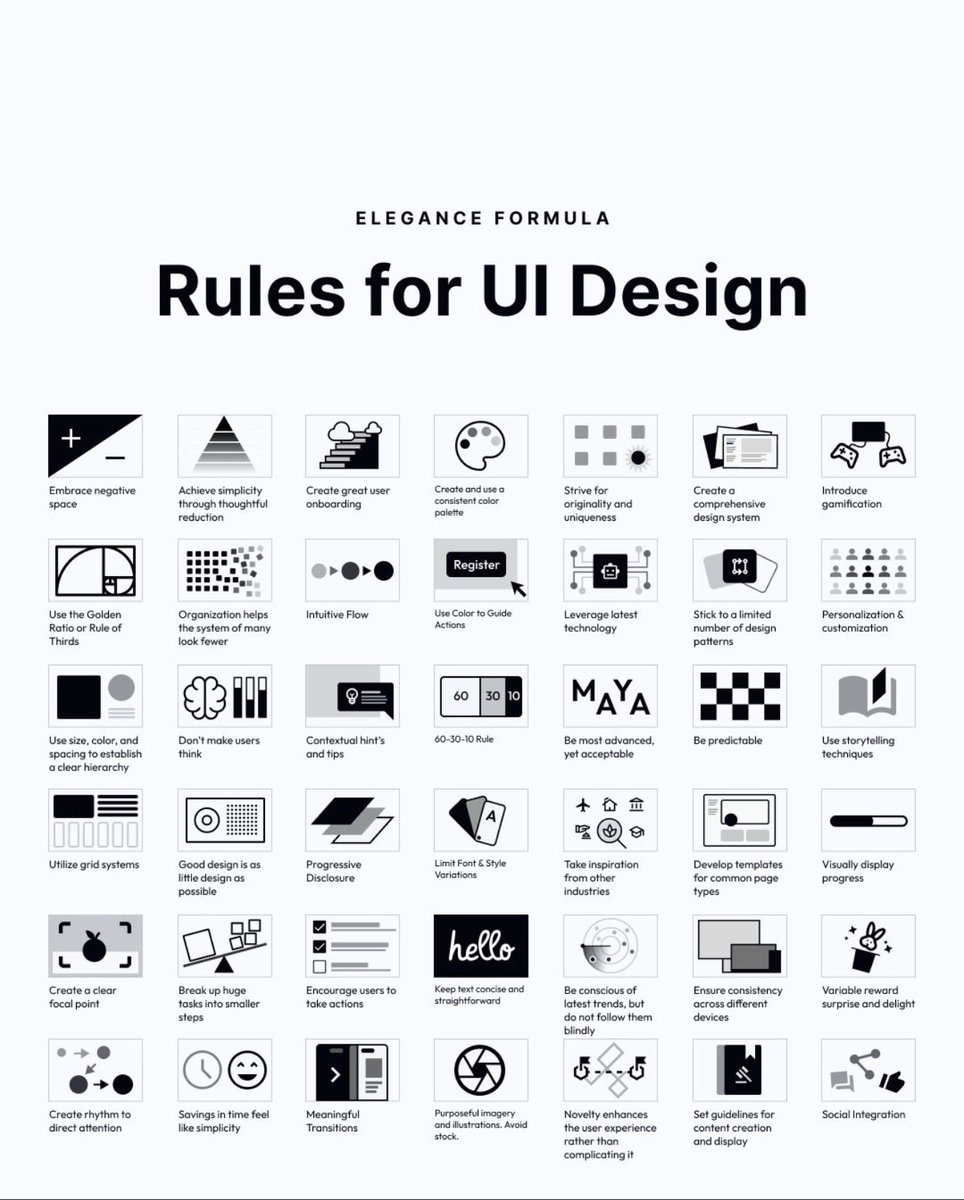
58 rules for beautiful UI design 🙌
Save to bookmarks for reference 🔖
Hierarchy. Simplicity. Predictability. Progressive disclosure. Meaningful transitions.
A solid reminder that great interfaces are systems — not decoration.
#UX #UI #UXDesign #UIDesign #ProductDesign
11
65
517
17,032
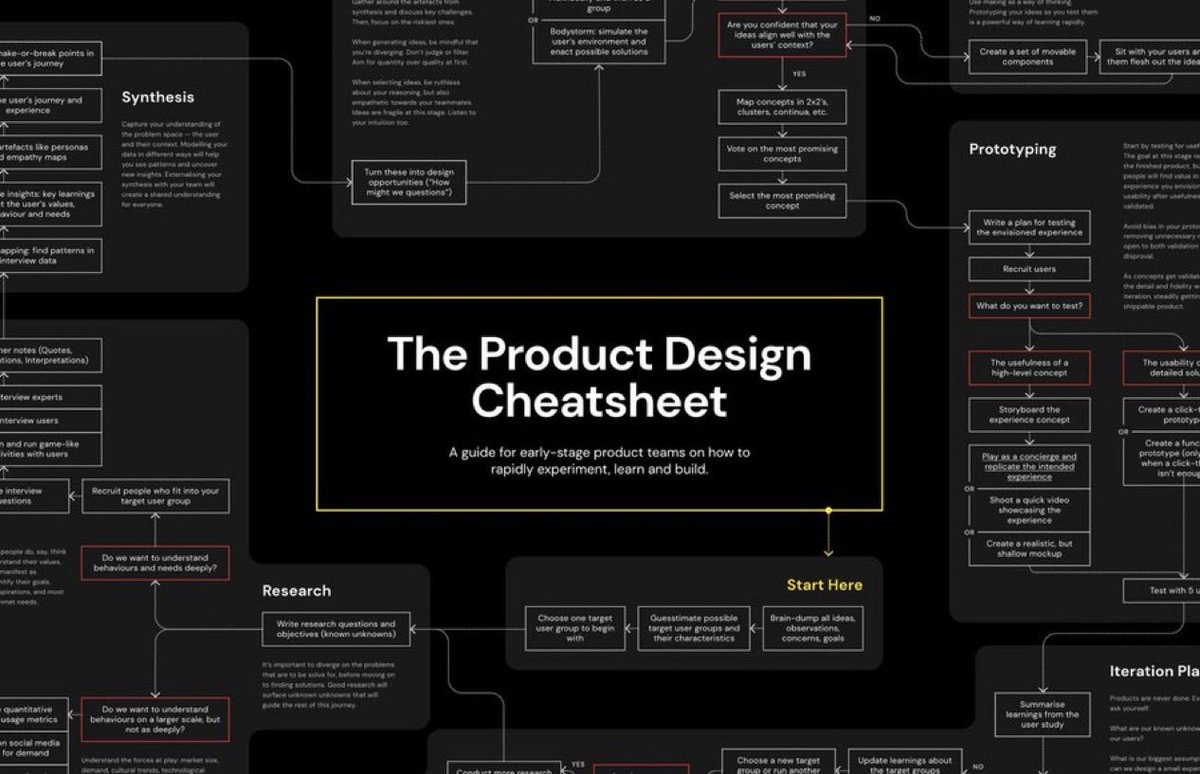
The Product Design Journey: From Idea → Impact 🙌
Great products aren’t accidents. They’re built through a process:
1️⃣ Research with empathy
2️⃣ Define the problem
3️⃣ Ideate boldly
4️⃣ Prototype fast
5️⃣ Test learn
6️⃣ Launch & refine
✨ Design isn’t just steps—it’s a mindset: human-centered, iterative, and purpose-driven.
#UX #DesignThinking
3
10
55
2,460
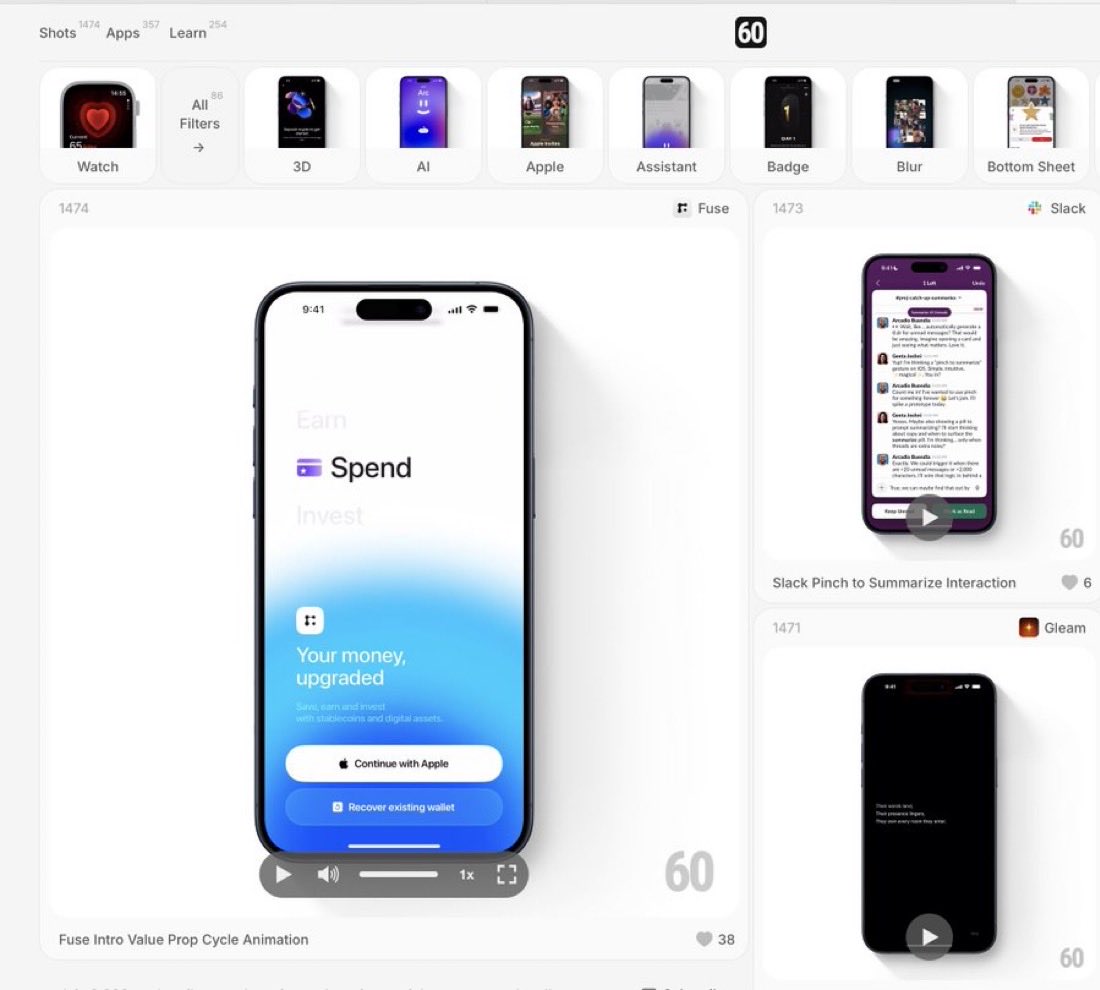
Excellent Design Inspiration to boost your next mobile design project 🙌
Save to Bookmarks 🔖
60fps is a curated collection of UI/UX animation and interaction design details from the world’s best iOS, android and web apps
#UX #UI #UXDesign #UIDesign #ProductDesign #Animation
4
6
39
1,923
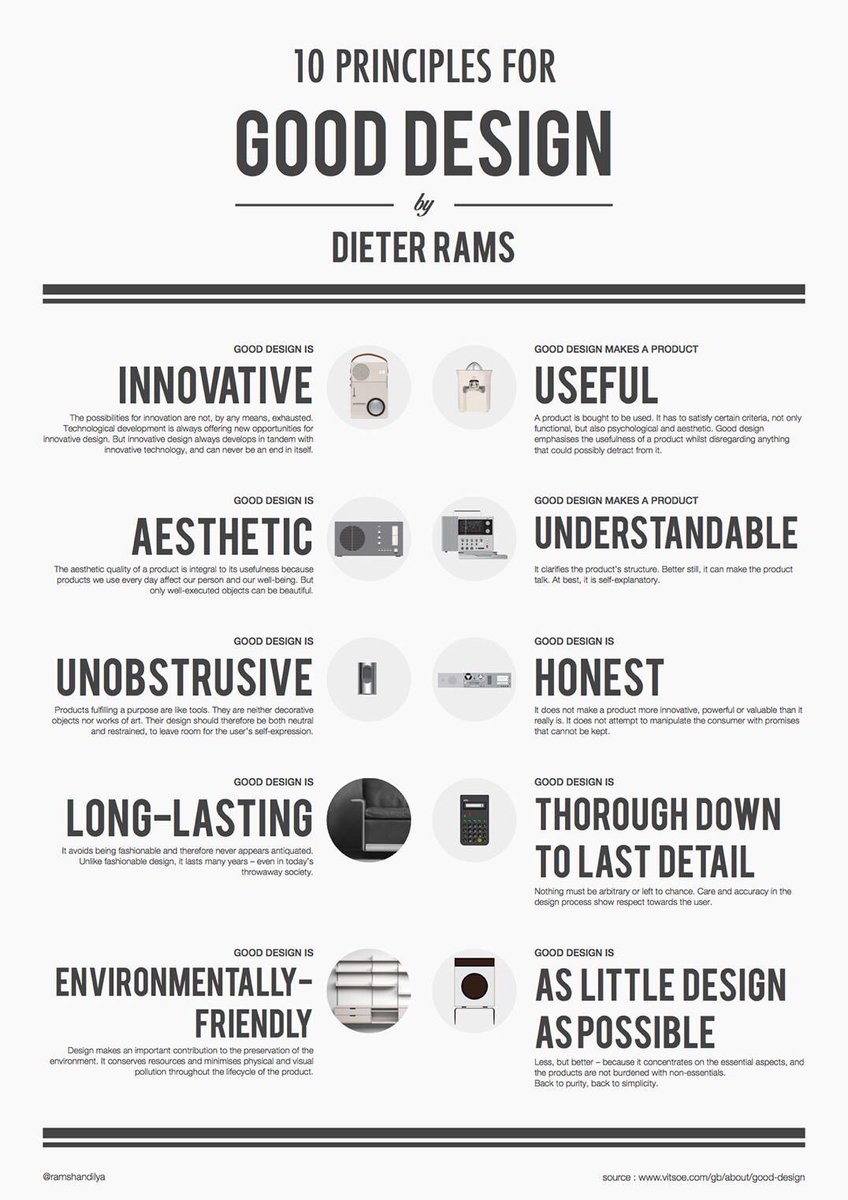
Excellent 10 Principles for Good Design, to Boost Your UX / UI Designs, by Dieter Rams! 🙌
FREE Cheatsheet attached 🔖
1. Good design is innovative
Possibilities for innovation are not, by any means, exhausted. Tech development is always offering new opportunities for innovative design. But innovative design always develops in tandem with innovative technology, & can never be an end in itself.
2. Good design makes a product useful
A product is bought to be used. It has to satisfy certain criteria, not only functional, but also psychological and aesthetic. Good design emphasises the usefulness of a product whilst disregarding anything that could possibly detract from it
3. Good design is aesthetic
The aesthetic quality of a product is integral to its usefulness because products we use every day affect our person and our well-being. But only well-executed objects can be beautiful.
4. Good design makes a product understandable
It clarifies the product’s structure. Better still, it can make the product talk. At best, it is self- explanatory.
5. Good design is unobtrusive
Products fulfilling a purpose are like tools. They are neither decorative objects nor works of art. Their design should therefore be both neutral and restrained, to leave room for the user’s self- expression.
6. Good design is honest
It does not make a product more innovative, powerful or valuable than it really is. It does not attempt to manipulate the consumer with promises that cannot be kept.
7. Good design is long-lasting
It avoids being fashionable and therefore never appears antiquated. Unlike fashionable design, it lasts many years – even in today’s throwaway society.
8. Good design is thorough down to the last detail
Nothing must be arbitrary or left to chance. Care and accuracy in the design process show respect towards the user.
9. Good design is environmentally-friendly
Design makes an important contribution to the preservation of the environment. It conserves resources and minimises physical and visual pollution throughout the lifecycle of the product.
10. Good design is as little design as possible
Less, but better – because it concentrates on the essential aspects, and the products are not burdened with non-essentials.
Back to purity, back to simplicity.
Follow @UXlinks to massively increase your UX / UI skills and knowledge 🙌
#ux #ui #uxdesign #uidesign #productdesign
2
5
26
1,079
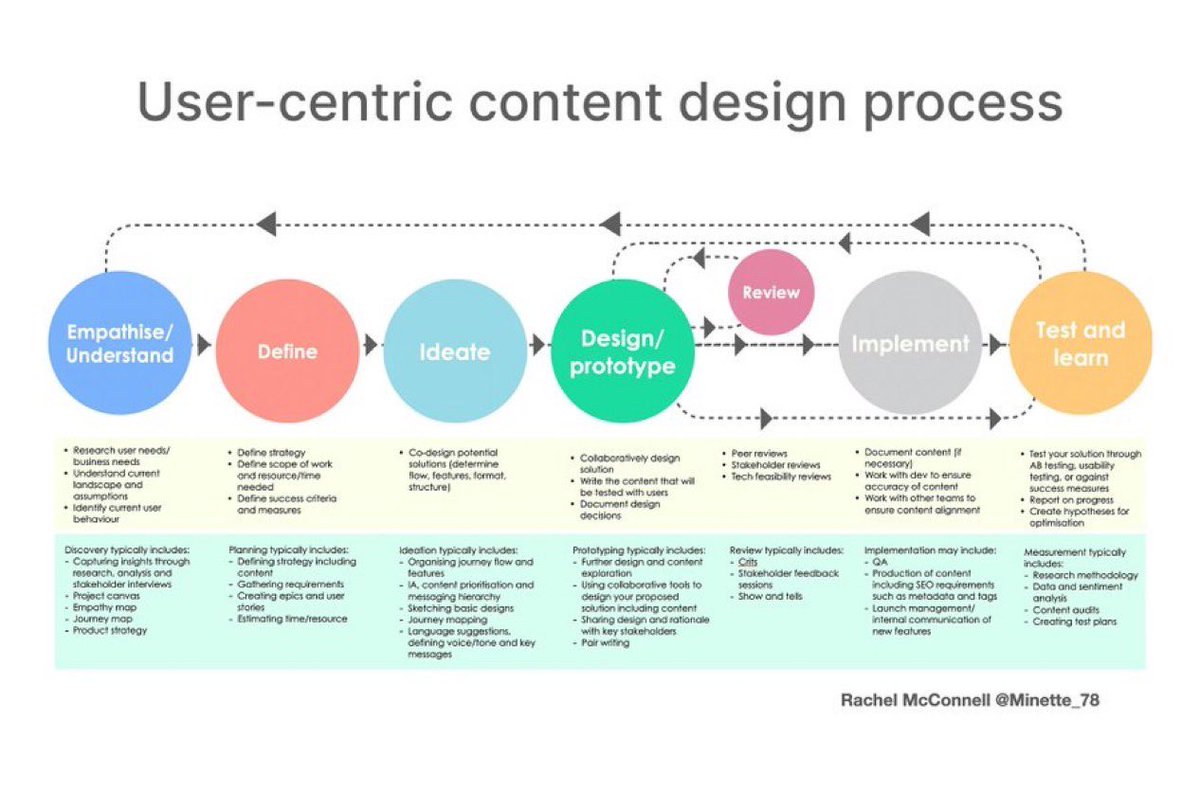
Learn the User-Centric Content Design Process to Boost your Next Design Project! 🙌
Save to Bookmarks for reference 🔖
Empathise/ Understand
- Research user needs/ business needs
- Understand current landscape and assumptions
- Identify current user behaviour
Discovery typically includes:
- Capturing insights through research, analysis and stakeholder interviews
- Project canvas
- Empathy map
- Journey map
- Product strategy
Define
- Define strategy
- Define scope of work and resource/time needed
- Define success criteria and measures
Planning typically includes:
- Defining strategy including content
- Gathering requirements
- Creating epics and user stories
- Estimating time/resource
Ideate
- Co-design potential solutions (determine flow, features, format, structure
Ideation typically includes:
- Organising journey flow and features
- IA, content prioritisation and messaging hierarchy
- Sketching basic designs
- Journey mapping
- Language suggestions, defining voice/tone and key messages
Design/ prototype
- Collaboratively design solution
- Write the content that will be tested with users
- Document design decisions
Prototyping typically includes:
- Further design and content exploration
- Using collaborative tools to design your proposed solution including content
- Sharing design and rationale with key stakeholders
- Pair writing
Review
- Peer reviews
- Stakeholder reviews
- Tech feasibility reviews
Review typically includes:
- Crits
- Stakeholder feedback sessions
- Show and tells
Implement
- Document content (if necessary
- Work with dev to ensure accuracy of content
- Work with other teams to ensure content alignment
Implementation may include:
- QA
- Production of content including SEO requirements such as metadata and tags
- Launch management/ internal communication of new features
Test and learn
- Test your solution through
- AB testing, usability testing, or against success measures
- Report on progress
- Create hypotheses for optimisation
Measurement typically includes:
- Research methodology
- Data and sentiment analysis
- Content audits
- Creating test plans
#UX #UI #UXDesign #UIDesign #ProductDesign
1
9
32
1,301
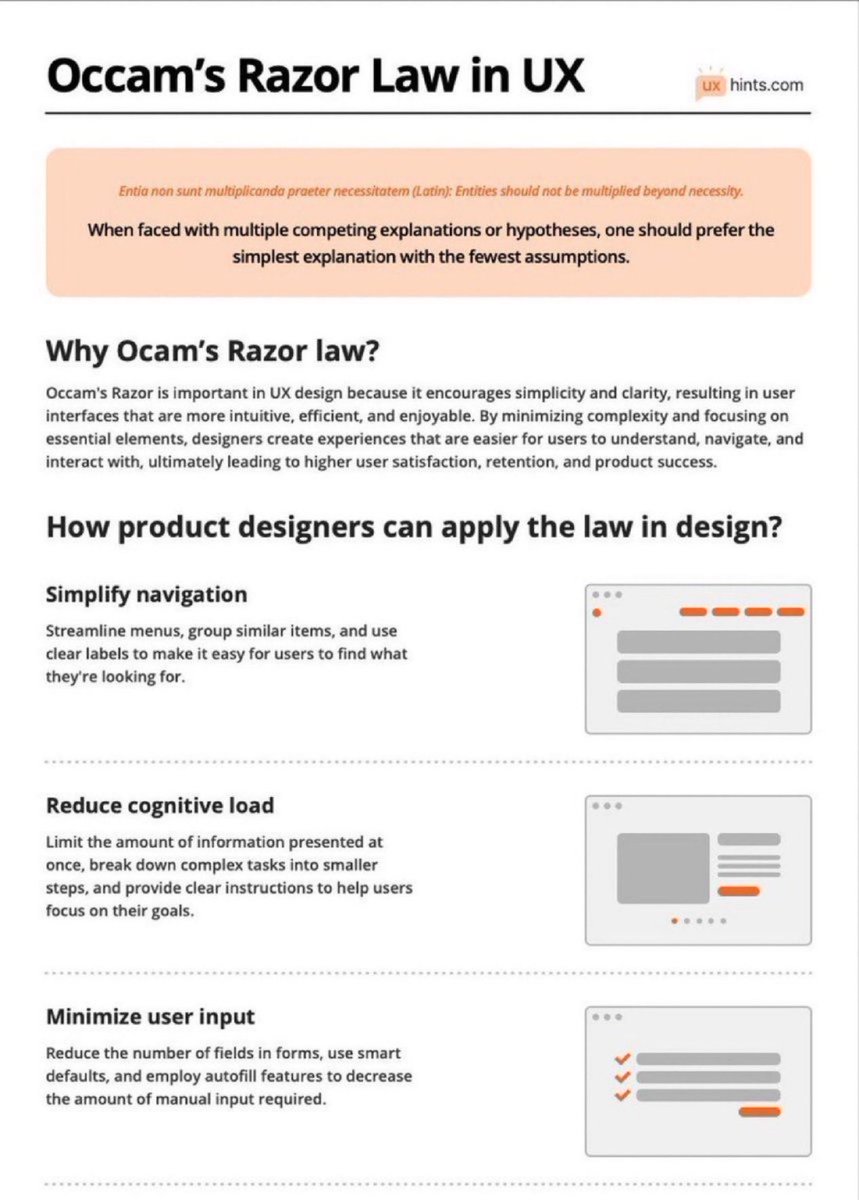
Learn How To Use Occam’s Razor Law to Boost Your Next Design Project! 🙌
FREE PDF Download 🔖
Occam’s Razor is a problem-solving principle stating that the simplest explanation or solution, with the fewest assumptions, is often the most likely to be correct.
Summary:
Why Ocam’s Razor law?
Occam's Razor is crucial in UX design for promoting simplicity and clarity. By focusing on essential elements and minimizing complexity, designers create intuitive and efficient user interfaces. This leads to higher user satisfaction, retention, and product success.
How product designers can apply the law in design?
Simplify navigation
Streamline menus, group similar items, and use clear labels to make it easy for users to find what they're looking for.
Reduce cognitive load
Limit the amount of information presented at once, break down complex tasks into smaller steps, and provide clear instructions to help users focus on their goals.
Minimize user input
Reduce the number of fields in forms, use smart defaults, and employ autofill features to decrease the amount of manual input required.
Emphasize clarity and consistency
Use consistent visual elements, typography, and color schemes throughout the design to help users build a mental model of the interface.
Remove unnecessary elements
Eliminate any extraneous features, buttons, or content that don't directly contribute to the user's goals or improve their experience.
Optimize for mobile
Design with mobile devices in mind, ensuring that interfaces are responsive, touch-friendly, and easily navigable on smaller screens.
Prioritize usability over aesthetics
While an attractive interface is important, prioritize functionality and ease of use over purely visual design elements.
Test and iterate
Conduct user testing to identify potential issues or areas for improvement, and continually refine the design based on user feedback.
#UX #UI #ProductDesign #UXDesign #UIDesign
2
3
34
1,051
20 Excellent and Popular Chrome Extensions for UX/UI Designers & Devs 🙌
WhatFont
Fonts Ninja
SVG Grabber
Heurio
Sizzy
Window Resizer
Dark Reader
Dark Mode
Site Palette
Colorzilla
Color by Faros
ColorPick Eyedropper
Css Viewer
Spectrum
Savee
Sitesee
Unstack Style Guide
Muzli 2
JSONView
React Developer Tools
#UX #UI #ProductDesign #WebDevelopment #UXDesign #UIDesign
2
5
17
906
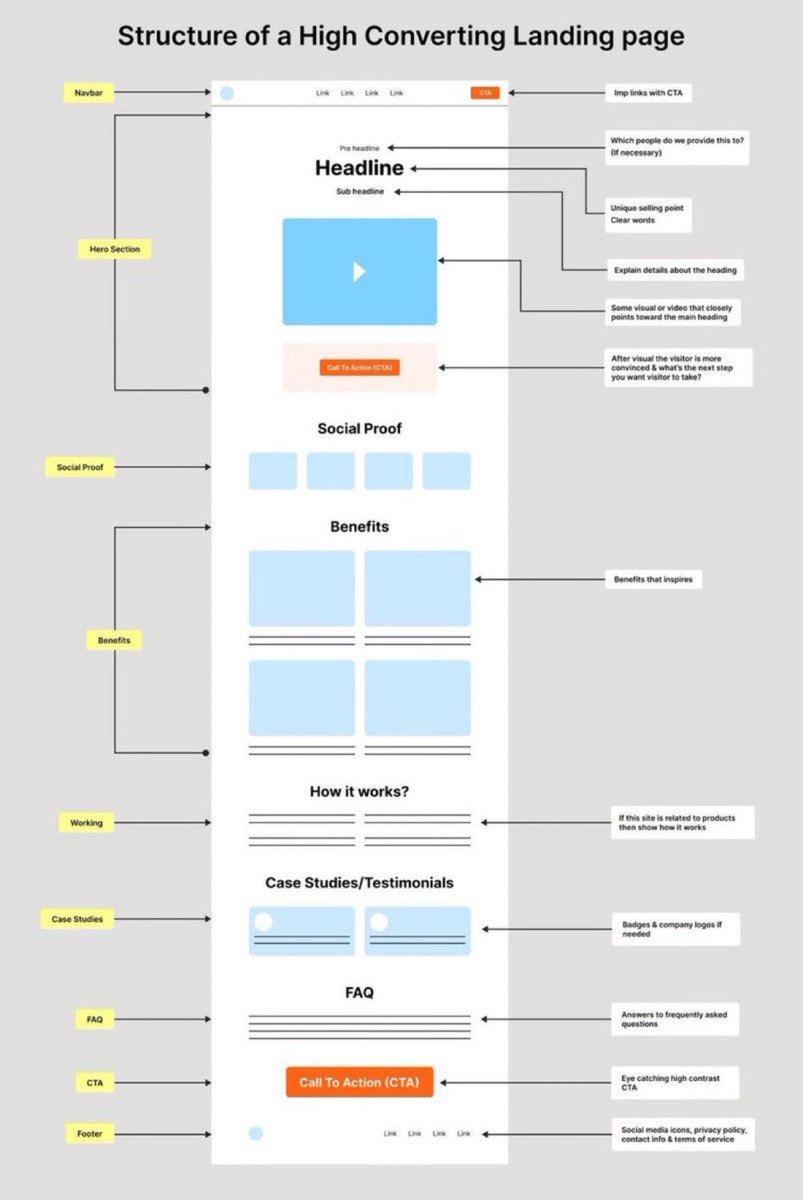
Excellent Cheatsheet to Unlock the Secrets of a High Converting Landing page 🙌
FREE Cheatsheet attached ⭐
#UX #UI #UXDesign #UIDesign #WebDesign #ProductDesign
2
6
27
1,287
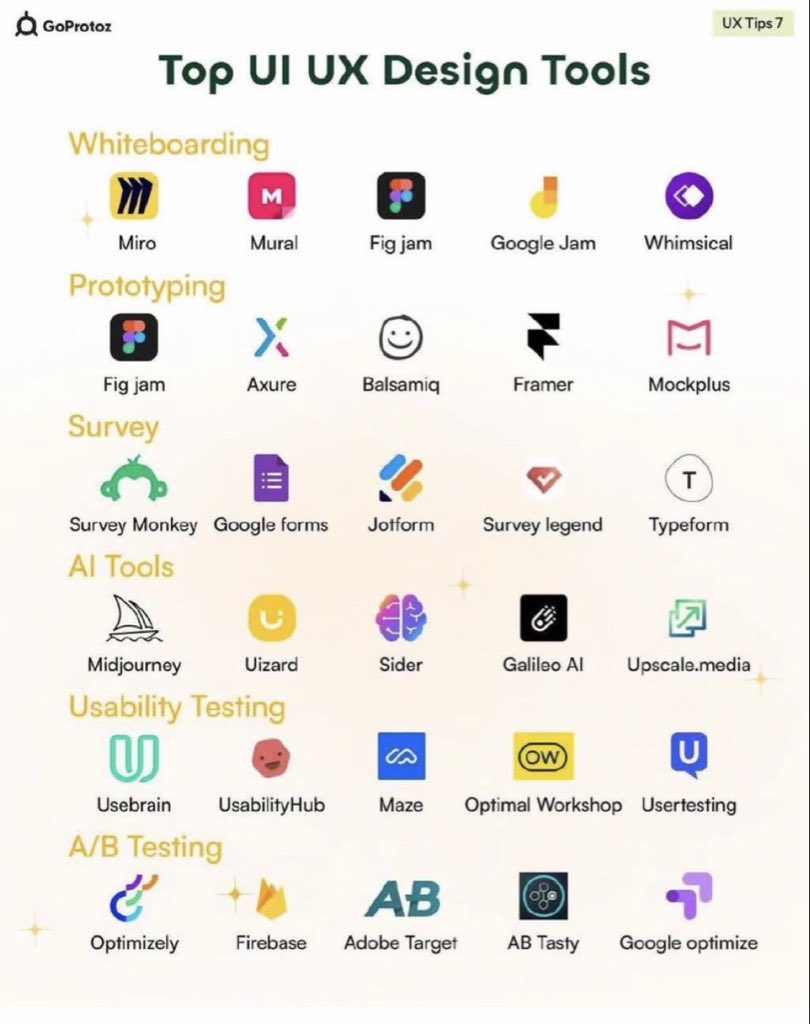
Top UI UX Design Tools for Creators 🙌
FREE cheatsheet attached 🔖
What are your thoughts?
-Whiteboarding
⁃Miro
⁃Mural
⁃Fig jam
⁃Google Jam
⁃Whimsical
Prototyping
⁃Fig jam
⁃Axure
⁃Balsamiq
⁃Framer
⁃Mockplus
Surveys
⁃Survey Monkey
⁃Google forms
⁃Jotform
⁃Survey legend
⁃Typeform
Al Tools
⁃Midjourney
⁃Uizard
⁃Sider
⁃Galileo Al
⁃Upscale.media
Usability Testing
⁃Usebrain
⁃UsabilityHub
⁃Maze
⁃Optimal Workshop
⁃Usertesting
A/B Testing
⁃Optimizely
⁃Firebase
⁃Adobe Target
⁃AB Tasty
⁃Google optimize
#UX #UI #UXDesign #UIDesign #ProductDesign
4
18
69
2,572
20 Excellent FREE Illustration Resources for your next design project 🙌
Save to Bookmarks for reference 🔖
1. absurd .design
2. blackillustrations .com
3. drawkit .com
4. humaaans .com
5. undraw .co
6. opendoodles .com
7. freebiesupply .com
8. manypixels .co
9. icons8 .com/illustrations
10. lukaszadam .com/illustrations
11. stubborn .fun
12. storyset .com
13. draftss .com
14. freevector .com
15. icons8 .com
16. blush .design
17. iradesign .io
18. icons8 .com
19. openpeeps .com
20. vectorian .net
Thanks for your support @uxlinks
#UX #UI #UXDesign #UIDesign #ProductDesign
3
7
42
2,426
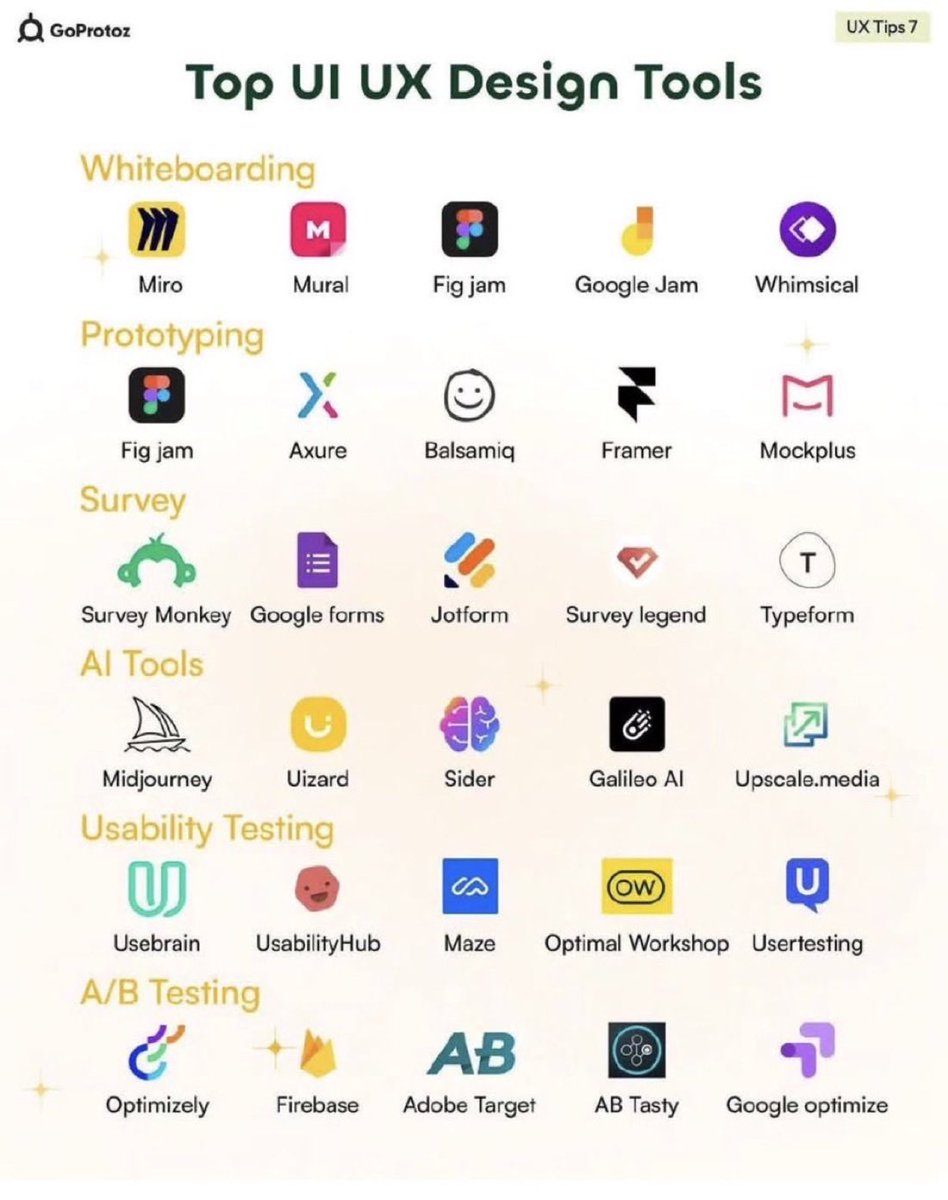
Top UI UX Design Tools for Creators 🙌
FREE cheatsheet attached 🔖
Whiteboarding
⁃Miro
⁃Mural
⁃Fig jam
⁃Google Jam
⁃Whimsical
Prototyping
⁃Fig jam
⁃Axure
⁃Balsamiq
⁃Framer
⁃Mockplus
Surveys
⁃Survey Monkey
⁃Google forms
⁃Jotform
⁃Survey legend
⁃Typeform
Al Tools
⁃Midjourney
⁃Uizard
⁃Sider
⁃Galileo Al
⁃Upscale. media
Usability Testing
⁃Usebrain
⁃UsabilityHub
⁃Maze
⁃Optimal Workshop
⁃Usertesting
A/B Testing
⁃Optimizely
⁃Firebase
⁃Adobe Target
⁃AB Tasty
⁃Google optimize
#UX #UI #UXDesign #UIDesign #ProductDesign
6
43
248
12,263
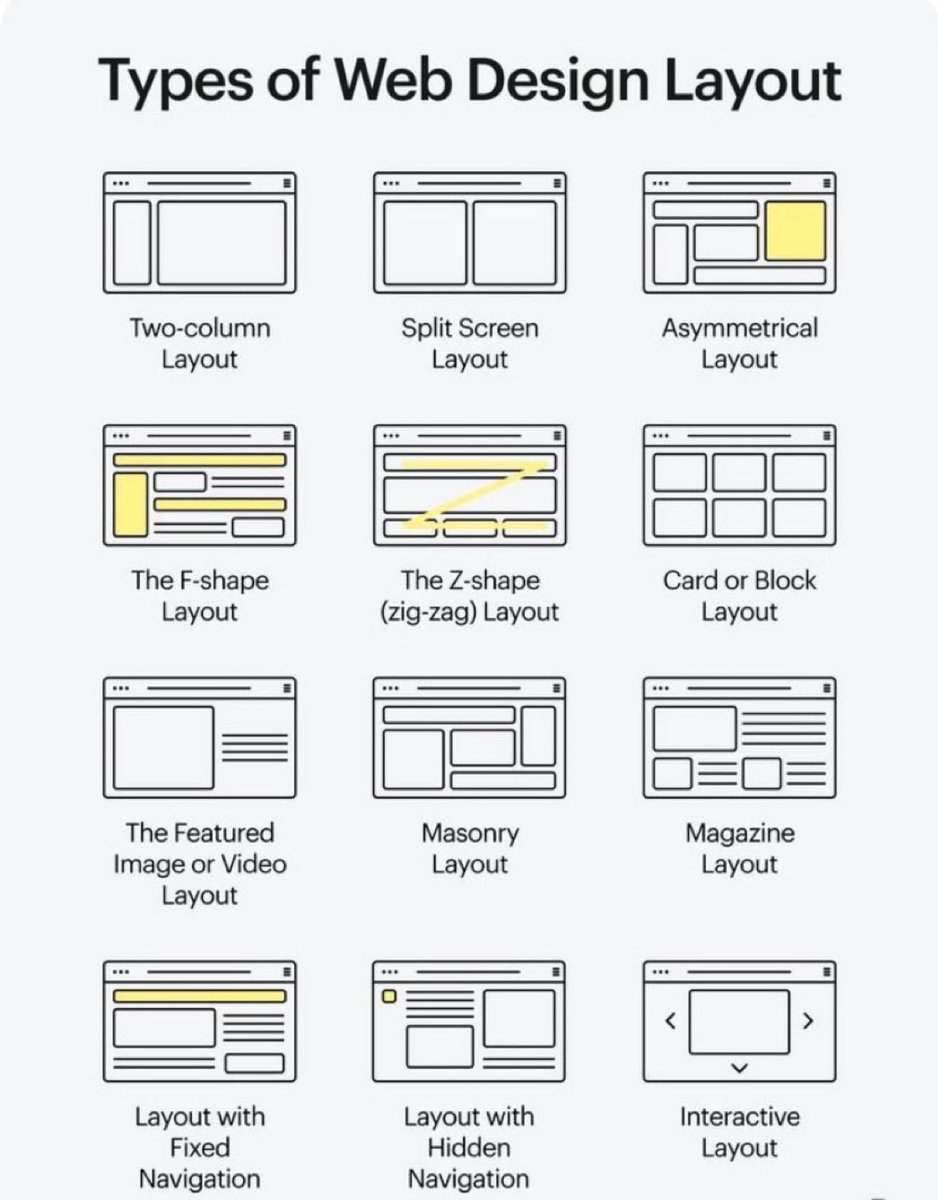
Choosing the right web design layout can transform user experience 🙌
FREE cheatsheet attached 🔖
Here are 12 classic styles every designer should know:
🟦 Two-column → balanced text sidebar
🟨 Split screen → compare options
🟧 Asymmetrical → bold modern
📖 F-shape → natural reading flow
⚡ Z-shape → landing pages & CTAs
🗂️ Card/Block → scan-friendly chunks
🎥 Featured media → visual storytelling
🧩 Masonry → galleries & feeds
📰 Magazine → content-heavy layouts
📌 Fixed nav → menu always visible
📂 Hidden nav → minimalist menus
🎛️ Interactive → sliders & carousels
Which layout do you use most? 👇
#UX #UI #UXDesign #UIDesign #ProductDesign
13
147
754
28,561