
iOS Developer 📱
Joined October 2022
- Tweets 950
- Following 290
- Followers 304
- Likes 3,194
141 Photos and videos


James retweeted

24 Oct 2025
🔥 Day One Videos Are Live!
The wait is over! We've just released ALL the recordings from Day 1 of the SwiftLeeds Conference.
These talks showcase incredible insights from our amazing speakers, covering everything from cutting-edge Swift techniques to real-world development stories. Whether you attended or missed the conference, these sessions are packed with valuable knowledge for iOS developers at every level.
Watch now: youtube.com/@swiftleeds/vide…
If you find these talks helpful, please consider subscribing to our channel—your support means the world to us and helps us continue bringing you quality Swift content! 😌
3
11
1,135
James retweeted
23 Oct 2025
Missed out on SwiftLeeds this year?
Don’t panic all our recordings will soon be available starting now with the opening keynote from Daniel Steinberg, that one!
youtu.be/xMThETWlSuM
5
13
1,986



Get ready for an awe dropping #AppleEvent on Tuesday, September 9!
6,078
11,962
116,083
11,191,911

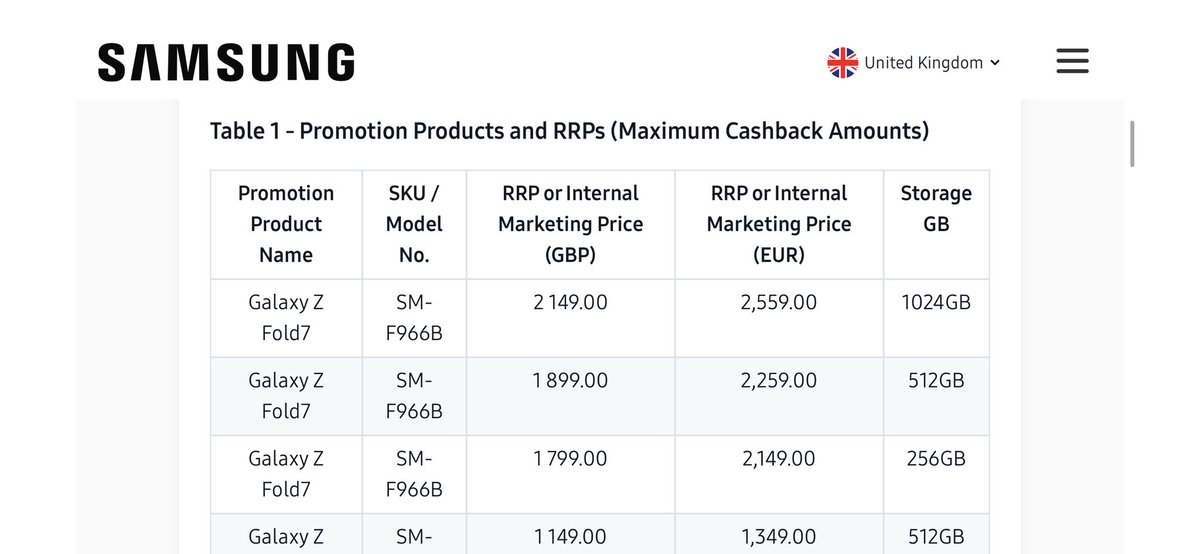
@SamsungUK - can’t get answers regarding the registration of my Fold 7 Buy and Try promotion. Called promo team multiple times and not getting answers. They say Samsung has stopped all registrations at this time.
Need answers urgently as 14-day return about to expire. Not happy
4
86
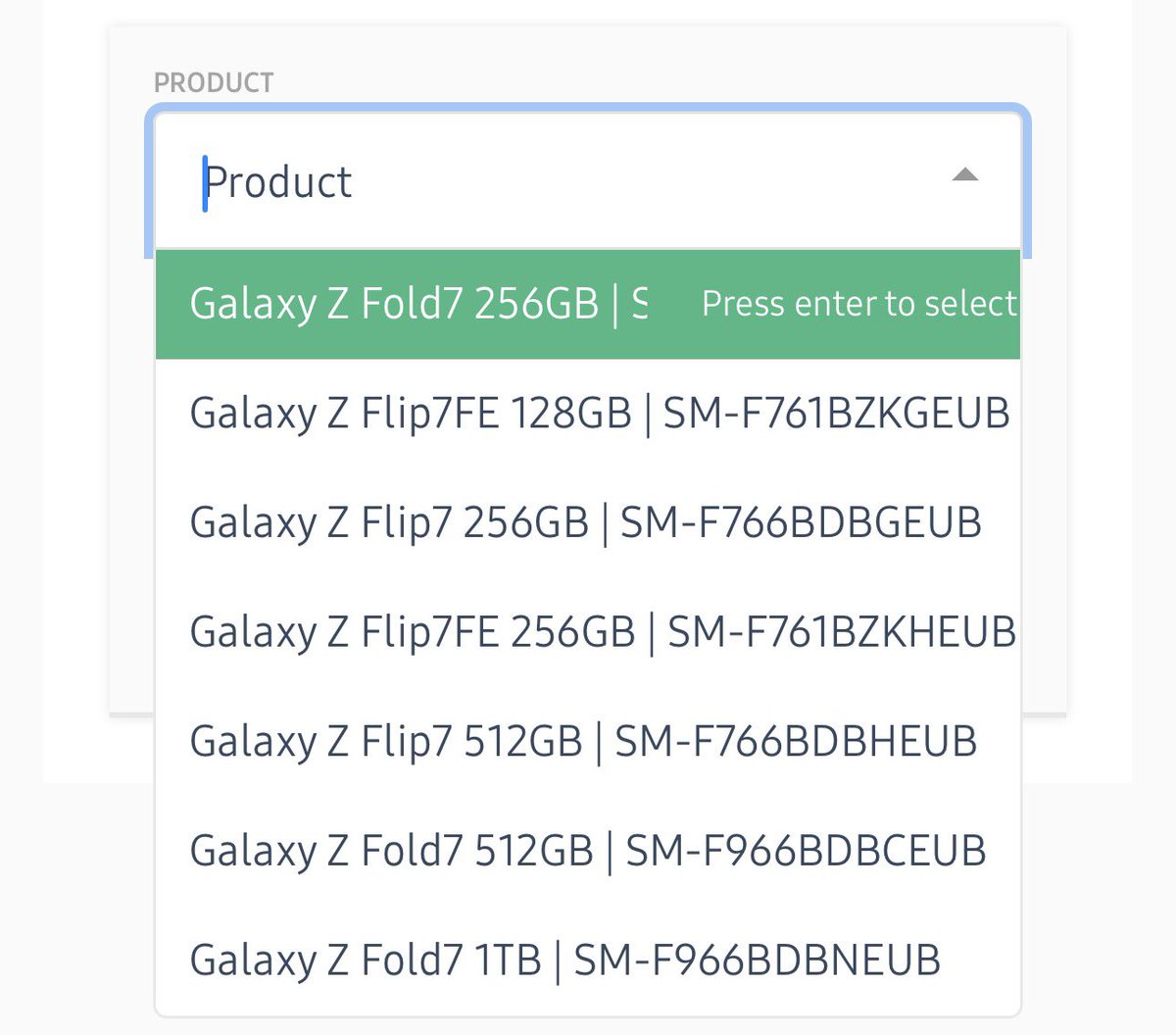
Pre-ordered the Jet Black phone, went to register now the site is up and that SKU doesn’t show in the list on the form. I very closely checked the terms multiple times before purchasing as I would not have ordered one without this promotion as I’ve been on iPhones forever.
1
1
38
James retweeted

20 Jul 2025
A single slider could end the Liquid Glass drama.
154
404
8,047
554,955
James retweeted

30 Jun 2025
📸 Detect barcodes like QR in Xcode's Simulator ✨
The next version of @rocketsim_app Camera Simulation supports capturing metadata like barcodes 🚀
3
8
138
17,081
James retweeted

16 Jun 2025
Stretchy headers are a common pattern in iOS apps where the image expands as the user pulls down. We can create this effect in SwiftUI using the visualEffect() modifier without changing the image frame. I've just published a post about it: nilcoalescing.com/blog/Stret…
8
32
448
22,793
James retweeted

13 Jun 2025
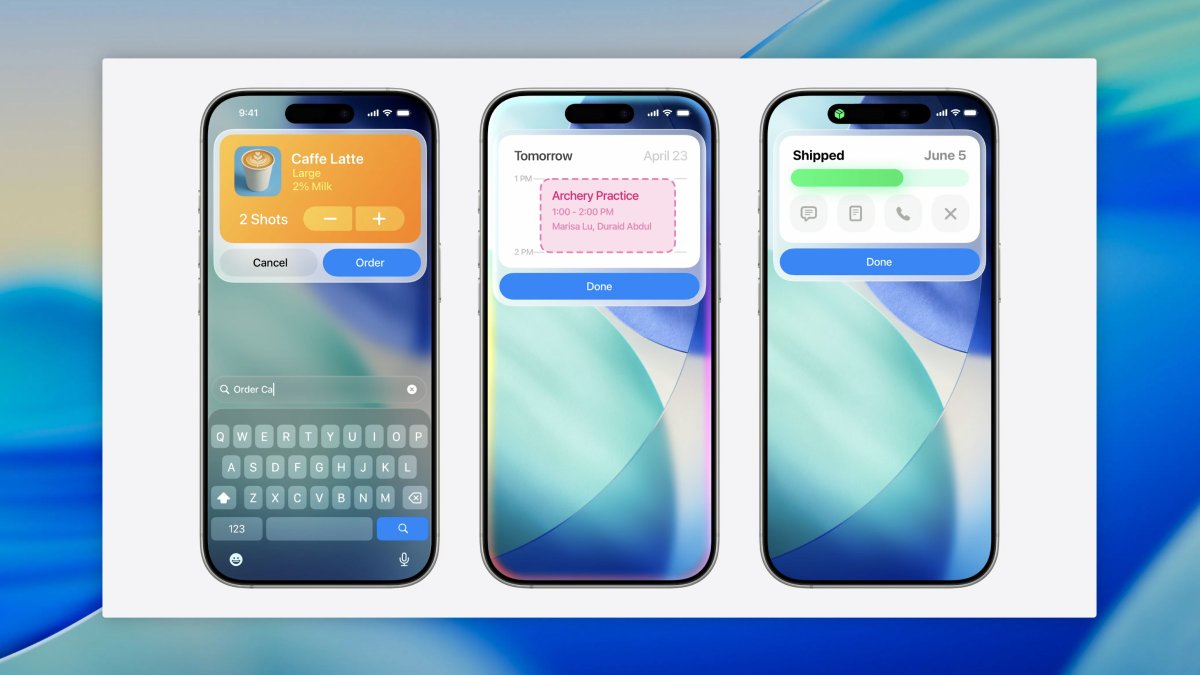
App Intents can now show gorgeous little mini apps when run 😍 #WWDC25
12
34
1,020
72,553
James retweeted

13 Jun 2025
Dear Apple,
I’m unsurprised and shocked at the same time.
26
75
1,900
438,260
James retweeted

14 Jun 2025
A little bit of fun to end the #WWDC25 week on: I went on the first 30 minutes of the Code Crawl event, and used my time to remake an effect from the early iPhone days!
12
16
243
19,765
James retweeted
12 Jun 2025
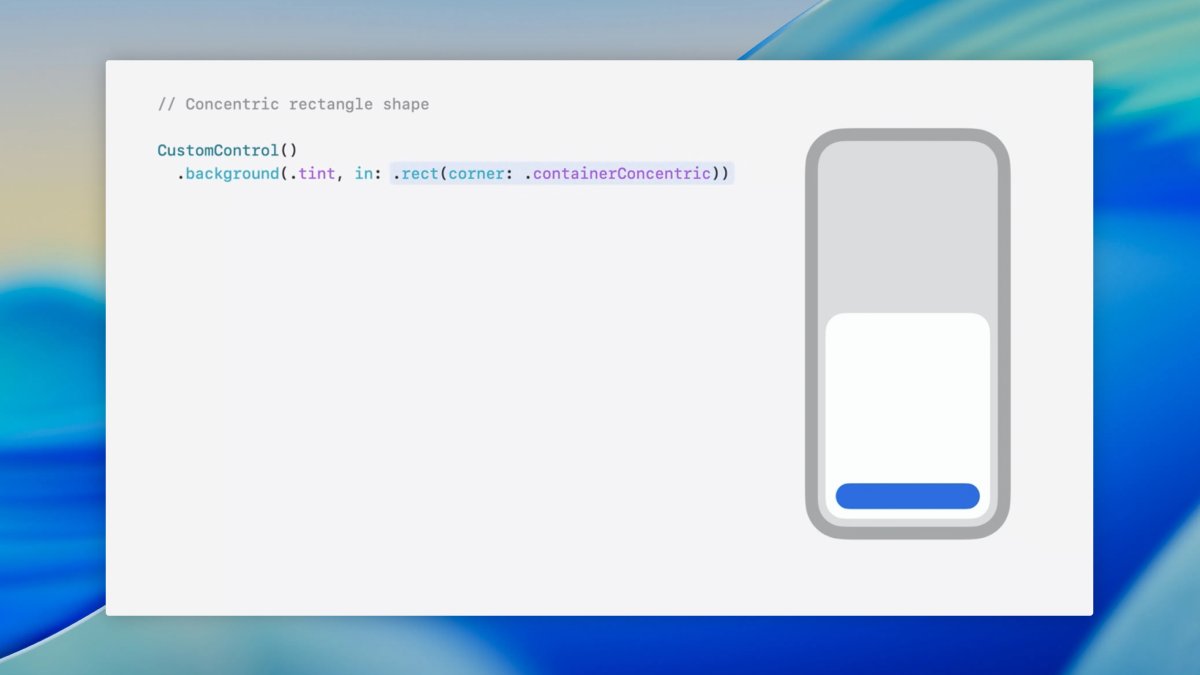
no more private api to get device corner radius ( or giant hard coded files ), get the perfect corner radius for free with `containerConcentric` 😍
unavailable in beta 1, but fingers crossed we get it soon!
#WWDC25
7
25
456
35,207
James retweeted

12 Jun 2025
Notes from the SwiftUI Lab:
- Avoid glass overlapping glass
- Avoid glass in anything that scrolls
- Use glass when you want to grab attention
- Remember to put glass in appropriate GlassEffectContainers
- Move tinting away from NavBar into the content that scrolls behind the NavBar glass
- LazyVStack in ScrollView: ForEach should return a static number of Views so the system knows what a "row" is
- Use new performance instrument to find scrolling issues
- "New design is still in beta"; issues like dark background behind glass being unreadable should be filed as feedback
- Generally embrace SwiftUI for the app lifecycle even when using UIKit/AppKit for core navigation/structure
- MatchedTransitionSource: Use to connect different Views and presentations
- Singleton or EnvObject? Prefer Environment in SwiftUI (also helpful for Preview context)
- System uses less colors now; avoid arbitrary tinting - use to draw attention or indicate states
- Use ContainerValues to pass data up the hierarchy (not Bindings) or PreferenceKeys or Closures (for actions/UIKit)
- Animations are available for widgets on visionOS (same as since iOS 17)
- Known issue in beta where link gestures don't work
- Use standard system controls
- SafeAreaBar API for custom TabBar
- NavLink uses trailing chevron SF Symbol (useful for custom buttons)
- Fluidly draggable component like TabBar: Currently no API for that, file feedback if interested in this
- Unit test SwiftUI Views: Bugs are mostly in business logic -> catch them there instead of testing SwiftUI Views, e.g. test that the NavPath of a NavModel contains .home instead of a snapshot test for login
- Keep Views as small as possible and use Models
- "Whatever architecture you pick, have a testable architecture"
- Consider what work can be done outside the main thread (for performance optimization)
- Consider scaling high-res images down to display size before showing them
- Watch out for View inits & bodies being too expensive -> break up the body into multiple Views
- Color.random in the background of list rows -> if its flicking during scrolling, your Views are invalidating
- DatePicker disrespecting dynamic size is a known issue
- Common SwiftUI antipatterns: conditional modifiers using if statements; public static let shared; if statements for NavStack in NavSplitView detail column (instead: ContentUnvailableView inside NavStack); Not using a11y representations instead of label & value; if statements "loose state" on change
- Architecture depends on the app/developer preference -> SwiftUI is architecture-agnostic; lean into Observable (also compatible with UIKit)
- ObservableObject led to needlessly invalidated Views, which is "fixed" with Observable
- Debug SwiftUI: Knowing why the View updated/was invalidated -> let _ = Self._printChanges(); conditional breakpoints; even they use print debugging :) ; comment-out-debugging to narrow down on issues
16
57
643
60,042

James retweeted
25 May 2025
Testing the camera in Xcode's Simulator used to be impossible.
I'm working on a major update of RocketSim, which allows you to use the Mac camera inside Xcode's Simulator.
Here's a demo of Looki, which we always had to test on a real device.
Game-changing for productivity! 🚀
28
42
476
61,943
James retweeted

29 Apr 2025
Don’t tie your ego to the failure
That’s the only way you can fail so many times before winning
29 Apr 2025

Fail. Fail. Fail. Fail. Fail. Fail. Fail. Fail. Fail. Fail. Fail. Fail. Fail. Fail. Fail. Fail. Fail. Fail. Fail. Fail. Fail. Fail. Fail. Fail. Fail. Fail. Win!
5
3
53
7,438
James retweeted

21 Apr 2025
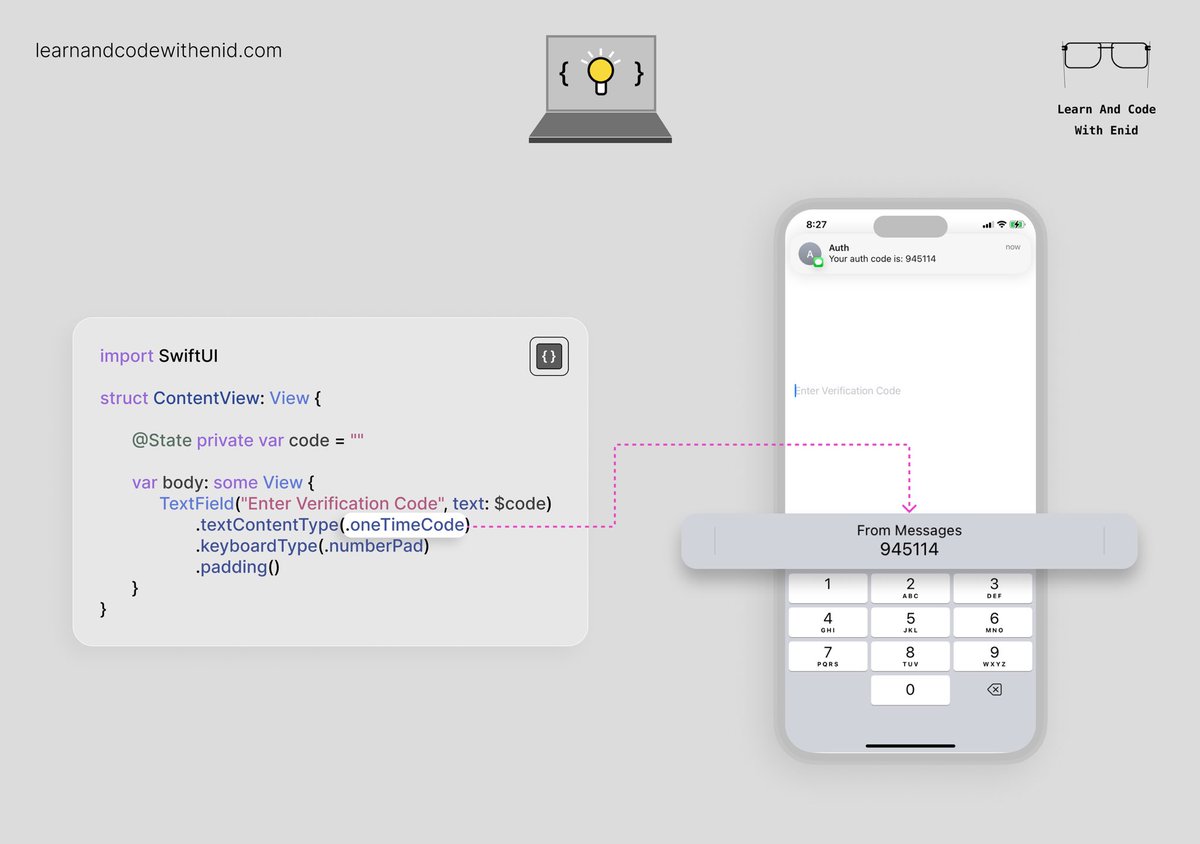
SwiftUI Tip 💡
Let users autofill one-time codes from Messages or Mail using .textContentType(.oneTimeCode).
→ learnandcodewithenid.com
1
25
237
18,002
James retweeted

13 Feb 2025
2025 is 12% complete.

94
2,109
15,641
327,999