
Your go-to hub for all things #DolphinDB and more. Solutions, updates & exclusive features for your time series & real-time analytics journey.
Joined April 2025
- Tweets 687
- Following 1
- Followers 15
- Likes 336
371 Photos and videos



nunique(X, [ignoreNull=false]) — Count distinct values instantly! 🔍
Counts unique values including NULLs by default. ignoreNull=true excludes them. Pass a tuple for composite cardinality: nunique([id, val]) counts unique pairs.
#DolphinDB #DataPrep #Analytics #SQL
2
next(X) — Lead a series by 1 position! ⏩
next(x) shifts every element one index earlier; the last becomes NULL. next(price) - price yields tomorrow-minus-today returns — no loop needed.
#DolphinDB #TimeSeries #DataTransformation #Quantitative
1
mstd(X, window, [minPeriods]) — Rolling sample standard deviation! 📐
Set minPeriods=2 for partial results early. Pair with mavg for Bollinger Band calculations.
#DolphinDB #TimeSeries #QuantFinance #Statistics
10
maxDrawdown(X, [ratio=true]) — Maximum drawdown in one line! 📉
Returns peak-to-trough rate (default) or absolute drop (ratio=false). Alias: mdd. Group-by compatible for per-strategy MDD across a full backtest.
#DolphinDB #QuantFinance #QuantResearch #Statistics
1
nullFill(X, Y) — Replace NULL values without mutating the original! 🛡️
nullFill(x, 0) returns a new object — the original is untouched. Pass a same-length vector as Y for position-matched fills. For in-place filling, use nullFill!.
#DolphinDB #DataCleaning #DataPrep #ETL
1
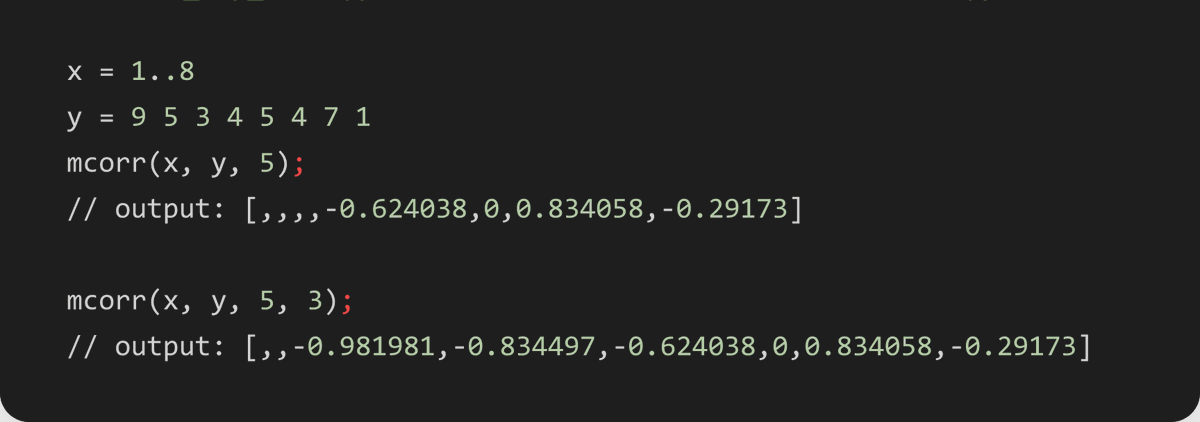
mcorr(X, Y, window, [minPeriods]) — Rolling Pearson correlation between two series! 🔗
Lower minPeriods to get earlier results — useful for live pair-trading signal generation.
#DolphinDB #QuantFinance #TimeSeries #Analytics
3
mcount(X, window, [minPeriods=1]) — Count non-NULL values per rolling window! 🔢
mcount(x, 3) returns valid element count at each position. Pair with mavg/mstd to check data density before calculations.
#DolphinDB #DataPrep #DataCleaning #TimeSeries
14
mavg(X, window|weights, [minPeriods]) — Rolling mean or weighted MA! 📉
window (int) → simple rolling mean. weights vector → custom WMA. minPeriods sets minimum valid observations required before output is emitted.
#DolphinDB #TimeSeries #Quantitative #DataPrep
2
now([nanoSecond=false]) — Current timestamp with one call! ⏱️
now() → TIMESTAMP (milliseconds). now(true) → NANOTIMESTAMP (nanoseconds). Essential for latency measurement, event logging, and timestamping streaming records.
#DolphinDB #TimeSeries
1
mad(X, [useMedian=false]) — Mean or median absolute deviation! 📊
Default: mean(abs(X - mean(X))). Set true for median-based MAD — more robust against outliers. NULLs ignored automatically.
#DolphinDB #Statistics
28
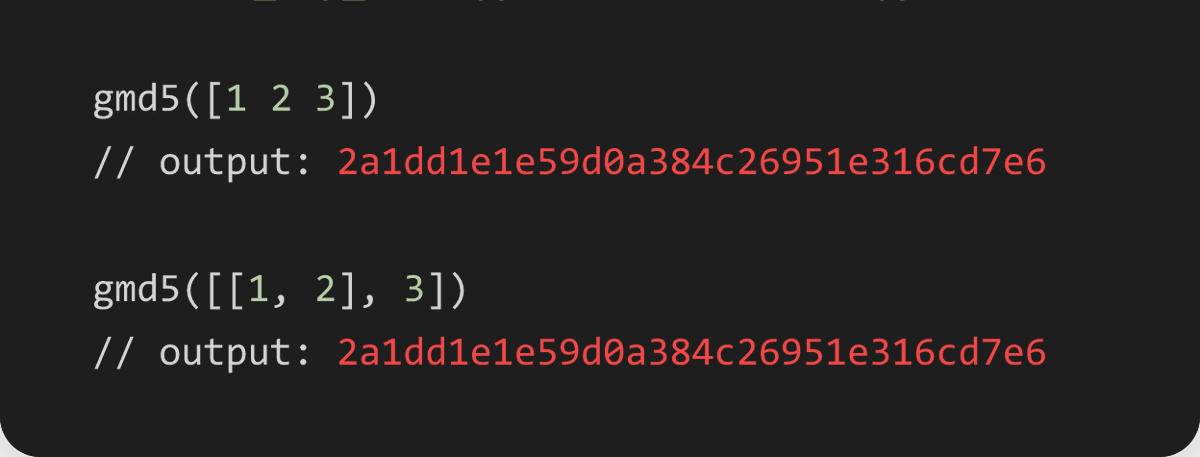
gmd5(X) — Global MD5 hash across all elements! 🔐
Unlike md5, gmd5 flattens tuples and array vectors first — so identical data always yields the same fingerprint. Great for deduplication and integrity checks.
#DolphinDB #DataPrep
1
gema(X, window, alpha) — EMA with explicit decay control! 📈
Set alpha (0–1) directly instead of deriving it from a window. Smaller alpha = slower response. More precise than ema for custom signal smoothing.
#DolphinDB #TimeSeries
1
tableUpsert(table, keyColNames, insertColNames, [mode]) — Upsert into a DFS table! 🔄📥
The distributed upsert operation for DFS tables. Specify which columns are keys and which get updated on conflict.
#DolphinDB #DatabaseManagement
2
twindow(T, X, window)** — Collect all values in a time window into a tuple! 📦⏱️
Unlike aggregation functions (tmsum, tmavg) that reduce the window to a single value, twindow preserves all elements as a tuple.
#DolphinDB #TimeSeries
2
tmove(T, X, window) — Time-based moving value shift! 🔄⏱️
Shifts X forward within each time window. Think of it as a time-aware lag or shift operation. .
#DolphinDB #TimeSeries
5
tmLowRange(T, X, window) — Time-based low range! 📊⏱️
The inverse of tmTopRange. Counts consecutive larger elements to the left within a time-length window. Use tmLowRange to detect "N-day low" conditions in price series.
#DolphinDB #TimeSeries
3
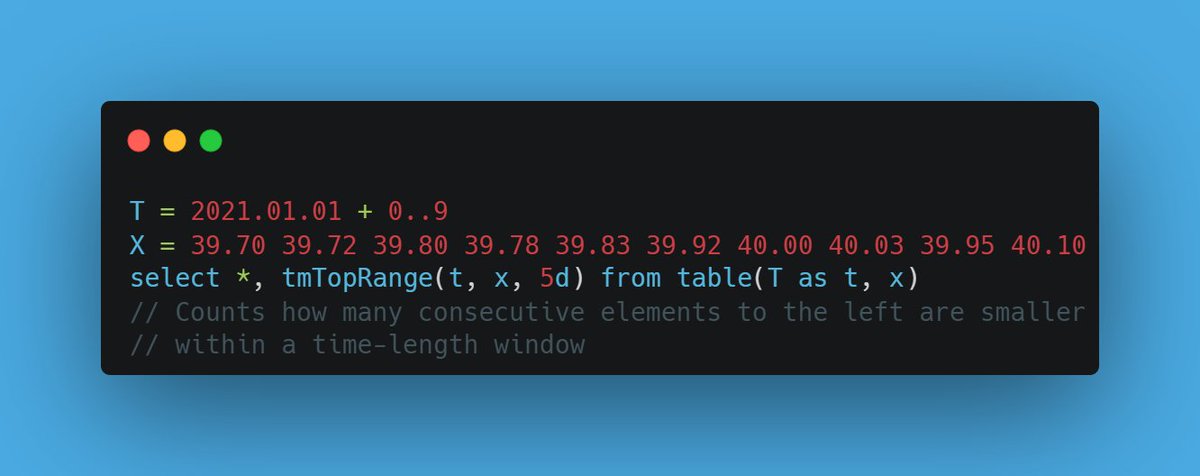
tmTopRange(T, X, window) — Time-based top range! 📊⏱️
The time-aware version of topRange. Counts consecutive smaller values to the left, but only within the time window. Perfect for "N-day high" detection that respects calendar boundaries.
#DolphinDB #TimeSeries
5
tmsum2(T, X, window) — Time-based rolling sum of squares! ➕✖️⏱️
Like tmsum but squares each element before summing. A building block for variance calculations (Var = E[X²] - E[X]²).
#DolphinDB #TimeSeries
3
tmstdp(T, X, window) — Time-based rolling population std! 📉⏱️
Population standard deviation counterpart of tmvarp. Together with tmvar, tmstd, tmvarp, and tmstdp, DolphinDB gives you all four variance/volatility variants.
#DolphinDB #TimeSeries
2
tmvarp(T, X, window) — Time-based rolling population variance! 📊⏱️
Like tmvar but computes population variance (divides by N, not N-1). Use when your window represents the entire population rather than a sample.
#DolphinDB #TimeSeries
4