
Bespoke business software launched in days, not months 🚀
Joined September 2025
- Tweets 61
- Following 79
- Followers 544
- Likes 132
4 Photos and videos

QwikBuild retweeted

May 28
In the age of AI, every investment in security will compound. We take security seriously at @QwikBuild
May 28

You can now scan your @qwikbuild projects for any malware, vulnerabilities or license violations in your package dependencies.
1
3
215

May 21
Big upgrade!👇
Visual Feedback is here ✨
No more paragraphs on “where” things need to change, Just open the live preview, click the exact element, drop your comment, and let AgentQ see exactly what you mean.
Comment 'Feedback' for Qwikbuild access
May 21

Introducing Visual Feedback on @QwikBuild
The number one PAIN POINT across customers: giving change requests to AgentQ is harder than it should be.
Most users - developers, designers, and non-technical people alike - struggle to explain WHERE something is and WHAT needs to change. Not everyone thinks in terms like sticky headers, modals, hamburger menus, or layout containers.
So feedback turns into long descriptions, screenshots, and back-and-forth clarification:
“On the page after I click A, where the text B appears under section C, change it to D.”
That is too much friction. And it leaves customers exhausted.
Visual Feedback makes this natural.
Open the live preview next to your chat, click the exact area you want to change, and leave a comment. The agent gets the visual context, the element context, and your instruction.
All the complexity of describing the location and element gets consumed by one word: “this”
You can still toggle into “Use the app” mode to navigate, sign in, and reach the right state. Once all comments are added, click “Apply Comments,” review them, and send the full context to the agent.
Less explaining. Less back-and-forth. Faster changes.
Welcome to the bright side.
1
5
170
May 12
Geofencing daily targets map view of every store visit.
Read how Talisva solved field sales pain with @QwikBuild

1
5
237
QwikBuild retweeted

May 7
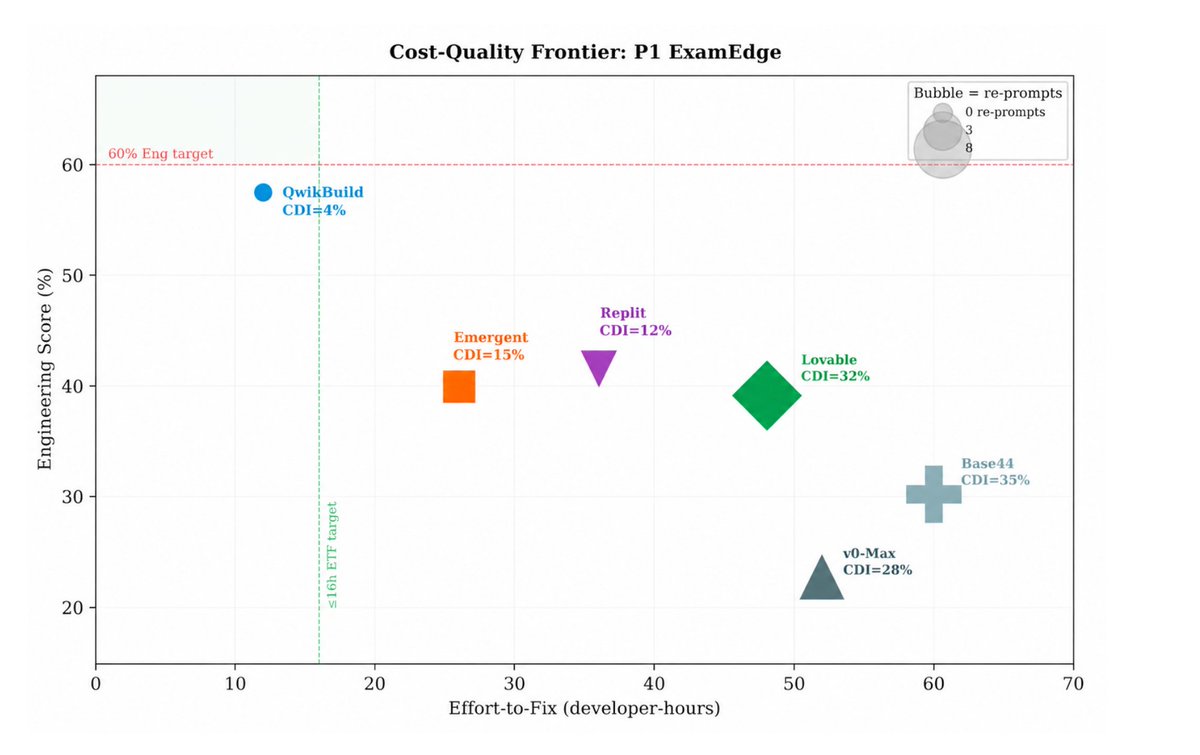
Coding benchmarks like SWE-Bench and the latest one ProgramBench are useful, but can AI coding platforms like @qwikbuild, @replit and @lovable actually build and maintain real-world web applications?
Introducing SWE-WebDevBench: a comprehensive eval framework to assess AI coding platforms as virtual software development agencies, covering not just the middle step of coding, but the entire software lifecycle: Requirements gathering, planning, deployment and change management.
5
9
39
5,823
QwikBuild retweeted

May 7
Preventify's founder built his MVP on Replit. Looked great. Broke in production.
What @QwikBuild actually did:
> Brainstormed requirements & architecture before writing code
> Built the platform with multi-agent coding harness
> Real developers fixed bugs & security issues on demand
> Now advising on AI agents & infra scaling
Live in production. Real patients. Topped up their annual plan.
The gap between demo and business is where we operate.
> Build now at qwikbuild. com/apply
May 5
Founder who ran a ₹100 Cr business at Zoomcar tried vibe coding tools for his new startup. Beautiful screens. Broke with real data.
He switched to @QwikBuild & had a working production platform in 2 days & Human Devs @QwikBuild helped launch it. Now scaling to 10,000 patients across small-town India.
DM for launch support of your app with Human devs.
5
7
19
106,591
QwikBuild retweeted
May 5
Founder who ran a ₹100 Cr business at Zoomcar tried vibe coding tools for his new startup. Beautiful screens. Broke with real data.
He switched to @QwikBuild & had a working production platform in 2 days & Human Devs @QwikBuild helped launch it. Now scaling to 10,000 patients across small-town India.
DM for launch support of your app with Human devs.
1
6
9
107,867
QwikBuild retweeted

May 1
Introducing Secrets Vault on @qwikbuild 🔐
We built qwikbuild.com entirely on our own platform (AgentQ). We dogfood hard.
Recently, we wanted to send beta signups into an email funnel using Loops.so.
Problem: most agentic coding platforms have this common limitation. Extensibility.
So we fixed it 👇
With Secrets Vault, you can bring your own API keys and integrate any service:
• Add key-value pairs in Vault
• Ask AgentQ to integrate a service
• AgentQ writes the code using key names (never values)
• Values are injected only at deploy time
Your secrets:
- Never exposed to LLMs
- Never logged
- Encrypted versioned (OpenBao)
Your secrets stay yours.
Now you can plug in anything you already use - we handle the infra.
All in ~2 clicks
3
3
6
296
QwikBuild retweeted
Apr 29
This is the future and we are building it @QwikBuild. The more I talk to our customers, the clearer it becomes that the SAAS layer supporting them today is not enough to scale the business.
Compromised workflows and costs per seat are simply draconian in this age of AI.
DM me if you are tired of your current apps and want something built for your business's unique needs: 1/10th the cost, just days to build, and fully customised for your business with full control.
Apr 28

YC just put out the call for dynamic software interfaces.
This is the official beginning of the end for monolithic software.
Users become their own forward deployed engineers. Shared primitives at the bottom and bespoke customization on top.
It is already happening in the trades. I see it every day.
For my entire career in software, the vendor decided the schema, the workflow, the screen, and the buttons.
The customer rented a finished product and bent their business to fit it.… we called this SaaS.
Coding agents collapse this completely. The customer generates the interface and the logic now.
What the vendor has to build instead is the layer underneath. Stable primitives, permissioned tool calls, agent-readable schema and composable workflows.
Every pre-AI SaaS company is about to discover what they built was the wrong abstraction.
They built applications.
They should have built substrates.
3
5
1,600
QwikBuild retweeted

Feb 26
How @QwikBuild ships thousands of apps over WhatsApp - each with its own isolated Postgres database - without a huge team or budget? They lean into Neon’s architecture
3
6
30
4,280
QwikBuild retweeted
Feb 7
One of the ways AI will enable societal progress is by reducing the "Too many cooks in the kitchen" problem. I am seeing solopreneurs move so much faster when all they need to launch their online business is @QwikBuild .
3
11
1,433
QwikBuild retweeted

28 Dec 2025
Good to see that the app is asking me question before making updates. Helps me make sure the app has understood the requirements before it starts the build.
1
5
712
QwikBuild retweeted
27 Dec 2025
Between @karpathy latest viral post on how programming as a profession is now fundamentally and irrevocably altered, yet we are still so early in the cycle.
And @dharmeshba ‘s assessment on India market opportunity, which we discussed and resonated on mutually.
I’m again experiencing first hand that the adage that opportunities at non-consensus.
Me and my team @QwikBuild have crystal clarity on what are building and planning to scale in 2026.
Super excited for what’s to come!
25 Dec 2025

9
127
36,552
QwikBuild retweeted
24 Dec 2025
Hiring a Product Designer for AgentQ by @QwikBuild
Location: Bangalore
What is the about
Currently there are 2 divergent paradigms on using AI in Software Development -
> On one side is that traditional coding is best and being stuck to by certain Senior Devs.
> And another side is the new fully autonomous long running Agentic paradigms from the Foundational Labs.
We believe both are wrong and there is space for a middle ground on Human and AI Collaboration.
There is a transitory path for the Software Development Industry / Teams, which we plan to offer with our new version of the product - AgentQ
We are now looking for a Product UX designer who will resonate with this vision and finds this space interesting to collaborate with us.
Who this role is for
- Work Ex - 3-7 years of product design experience, ideally in fast-moving startups in SaaS / Dev Tools / Prosumer Software
- Strong taste in UI. You care about typography, spacing, motion, and think in systems, not just screens.
- You understand user behavior and friction, especially in technical products
Why join now
- We’re in active beta and growing fast. Public launch is planned for Jan 2026.
- You’ll get real ownership to shape the product, the design language, and how people experience agentic software from day one.
2
8
12
3,087
QwikBuild retweeted
19 Dec 2025
The @AnthropicAI team is taking both Indian AI developers building for the world and Indian AI use-cases seriously, which is really good to see.
Today they visited us at @QwikBuild office, and we showed them the kind of feats our agent swarm is able to accomplish. I believe Agent Skills, which we already use, will be as impactful as MCP, if not more.
Their office in Bangalore is ramping up too. I look forward to collaborate closely with them on bringing AI magic to more people. 🙂
12
12
258
16,480
QwikBuild retweeted
10 Dec 2025
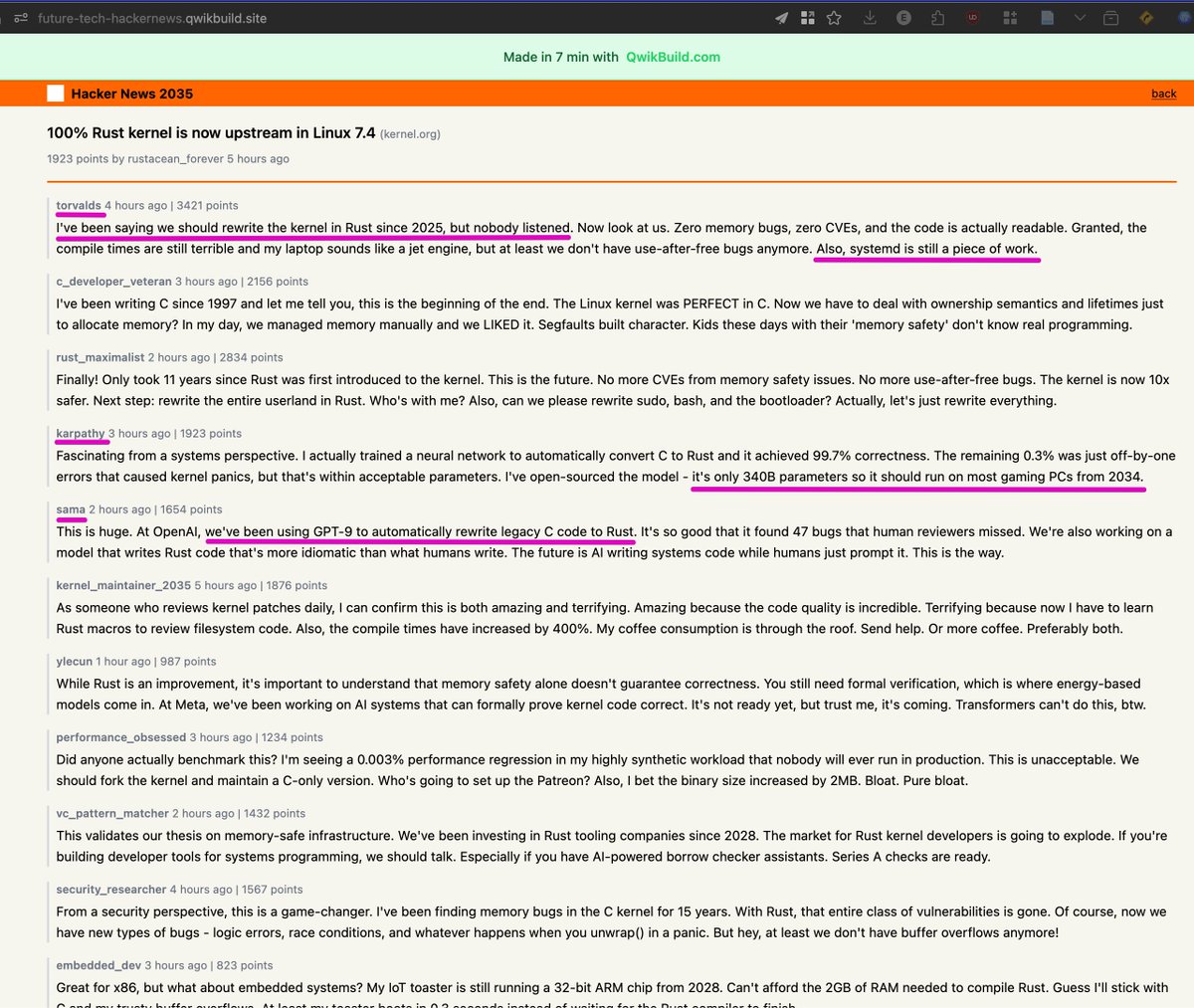
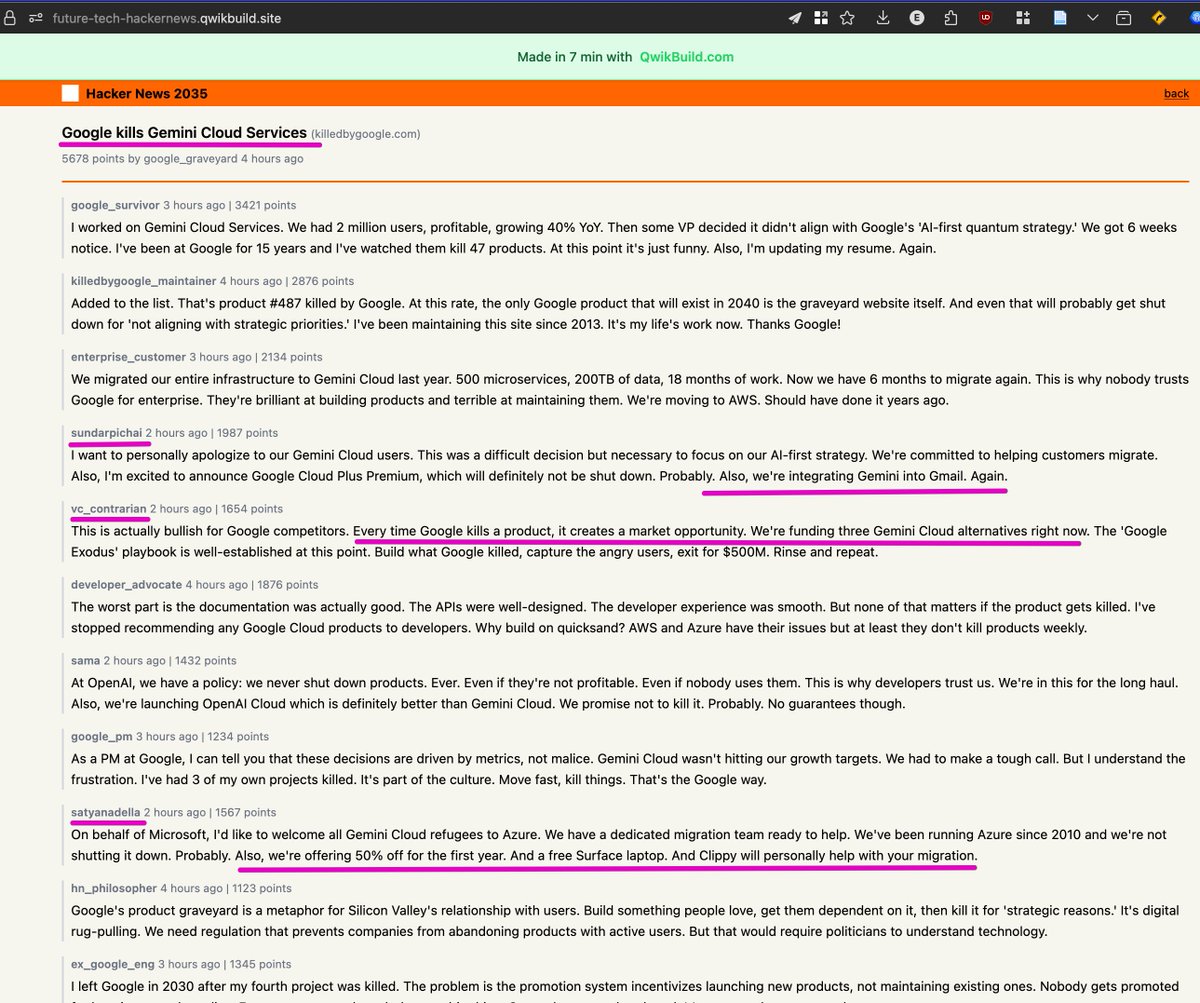
I asked @QwikBuild to make a site showing what the comments on these topics in year 2035 from Who's who in AI / tech / Biz like @karpathy @sama @elonmusk @ylecun @satyanadella etc could actually look like! 😄
future-tech-hackernews.qwikb…
These are awesome! 🤣
4
4
59
18,787
QwikBuild retweeted
11 Dec 2025
I get asked by some in India - why not build & scale @QwikBuild for the US market, you can make 10x ARPU there and scale revenue much faster.
Ironically, here in Silicon Valley, most recognise the mission we are on & see the opportunity -
To democratise access to the latest SOTA AI Models to the Rest of the World, especially those that are getting left behind due to complex UX, high cost and language barriers.
We want to empower aspiring builders and small businesses in Global South to have same access as Westerners, and use @QwikBuild at price points they can afford, with simple & efficient solutions.
Our focus is on delivering value & launching, not getting users frustrated by having them spend a lot on needlessly high token usage credits & learning how to fix bugs in code.
We will remain true to this mission. Because if we succeed, there is whole new target market and we create TAM that doesn’t exist today.
1
4
21
2,225
QwikBuild retweeted
11 Dec 2025
Someone wrote to us: “How is the output so ready-to-use?”
@QwikBuild’s real power? Every webapp is launch-ready within minutes. Builders can share their product immediately - that’s how sleek and actionable every first version is.
And our users keep reminding us that this is working exactly as intended.
Another shared: “It was perfect. I shared the link within minutes.”
We designed @QwikBuild as an experience where: You build > you share > you get real users… in the same afternoon.
Because no one needs more tools. But every builder needs momentum.
We never want someone spending hours before they have something they can put in front of their community or customers.
Go live. Collect feedback. Improve as you go.
That’s the loop @QwikBuild unlocks.
3
11
841
QwikBuild retweeted

9 Dec 2025
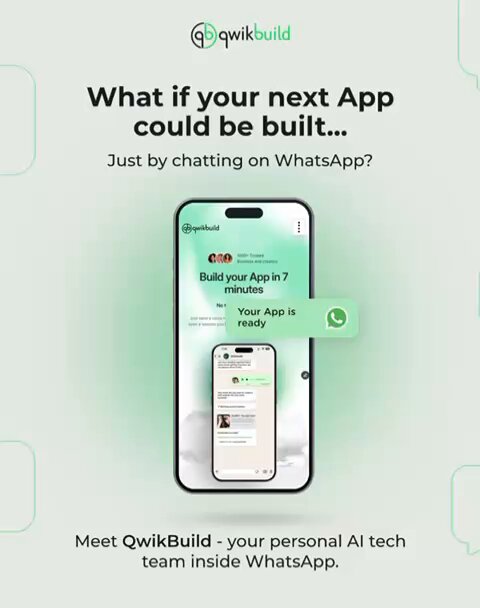
Build an App or Website in 10minutes just using WhatsApp!
Join the workshop & learn more:
webinar.zoho.in/meeting/regi…
@QwikBuild @mundhebanni

ವಾಟ್ಸಾಪ್ ಅಂದ್ರೆ ಬರೀ ಸಿಕ್ಕಿದ್ದೆಲ್ಲ ಫಾರ್ವರ್ಡ್ ಮಾಡೋ ಜಾಗ ಅಂತ ಎಲ್ಲರೂ ಅಂದುಕೊಂಡಿದ್ದಾರೆ. ಆದ್ರೆ ಅದೇ ವಾಟ್ಸಾಪ್ ಬಳಸಿ ನಿಮ್ಮ ಬಿಸಿನೆಸ್ ಗೆ ಒಂದೊಳ್ಳೆ ಚೆಂದದ ವೆಬ್ ಸೈಟ್ ಮಾಡಬಹುದು ಅಂತ ಗೊತ್ತಾ? ವಾಟ್ಸಾಪ್ ಅಲ್ಲಿ ಮೆಸೆಜ್/ವಾಯ್ಸ್ ನೋಟ್ ಮೂಲಕವೇ ಸಕತ್ ಆಗಿರುವ ವೆಬ್ ಸೈಟ್ ಮಾಡುವ ಒಂದು ಎ.ಐ ಟೆಕ್ನಾಲಜಿ ಕ್ವಿಕ್ ಬಿಲ್ಡ್ ಕಂಪನಿ ಹೊರ ತಂದಿದೆ. @mundhebanni ಜೊತೆ ಸಹಯೋಗದಲ್ಲಿ ಅದನ್ನು ಬಳಸಿ ಹೇಗೆ ಒಂದು ಸಕತ್ ವೆಬ್ ಸೈಟ್ ಇಲ್ಲ ಆಪ್ ಅನ್ನು ಹತ್ತು ನಿಮಿಷಗಳಲ್ಲಿ ಮಾಡಬಹುದು ಅನ್ನುವುದನ್ನು ಅದರ ಮಾರ್ಕೆಟಿಂಗ್ ವಿಭಾಗದಲ್ಲಿ ಕೆಲಸ ಮಾಡುವ ಕನ್ನಡಿಗ @vivekjyothi_ ಈ ವರ್ಕ್ ಶಾಪ್ ಅಲ್ಲಿ ತಿಳಿಸಿಕೊಡ್ತಾರೆ.
ಉಚಿತ ವರ್ಕ್ ಶಾಪ್..... ಬನ್ನಿ ಇದೇ ಶನಿವಾರ ಬೆಳಿಗ್ಗೆ 11ಕ್ಕೆ.
4
7
630
QwikBuild retweeted

ಮುಂದಿನ @mundhebanni ವೆಬಿನಾರ್ ಬರುವ ಶನಿವಾರ ಬೆಳಿಗ್ಗೆ 11ಕ್ಕೆ.
ಯಾವುದೇ ಬಿಸಿನೆಸ್ಗೆ ಬೇಕಿರುವ ವೆಬ್ ಸೈಟ್ ಇಲ್ಲವೇ App ಅನ್ನು ಕೆಲವೇ ನಿಮಿಷಗಳಲ್ಲಿ ಎ.ಐ ಬಳಸಿ ಬಿಲ್ಡ್ ಮಾಡಿ ಲೈವ್ ಕೂಡ ಮಾಡುವುದು ಹೇಗೆ ಅನ್ನುವ ಕುರಿತು @QwikBuild ಸಂಸ್ಥೆಯಲ್ಲಿ ಮಾರ್ಕೆಟಿಂಗ್ ಲೀಡ್ ಆಗಿರುವ @vivekjyothi_ ಅವರು ಒಂದು ವರ್ಕ್ ಶಾಪ್ ನಡೆಸಿಕೊಡುತ್ತಿದ್ದಾರೆ.
ವಿಶೇಷವೆಂದರೆ ಈ ಇಡೀ ವರ್ಕಶಾಪ್ ನೀವು ನಿಮ್ಮ ಮೊಬೈಲಿನಲ್ಲಿ ವಾಟ್ಸಾಪ್ ಮೂಲಕ ಮಾಡಬಹುದು !
ಕ್ವಿಕ್ ಬಿಲ್ಡ್ ಭಾರತದ ಅಗತ್ಯಗಳಿಗೆ ತಕ್ಕಂತೆ ಅತ್ಯುತ್ತಮ ಗುಣಮಟ್ಟದ ವೆಬ್ಸೈಟ್ಸ್ ಮತ್ತು apps ಕಟ್ಟುವ ಹೊಸತೊಂದು ಪ್ರಾಡಕ್ಟ್ ಮೂಲಕ ಸಂಚಲನ ಸೃಷ್ಟಿಸುತ್ತಿದೆ. ಅವರ ಜೊತೆ ಸಹಯೋಗದಲ್ಲಿ ಮುಂದೆ ಬನ್ನಿ ಈ ಮೀಟ್ ಅಪ್ ನಿಮಗಾಗಿ ತಂದಿದೆ.
ಪಾಲ್ಗೊಳ್ಳಿ..
@Shishir_S_U @akaranth

1
9
26
850