
まだ「ケツが青い74歳」だった・・・悲‼️
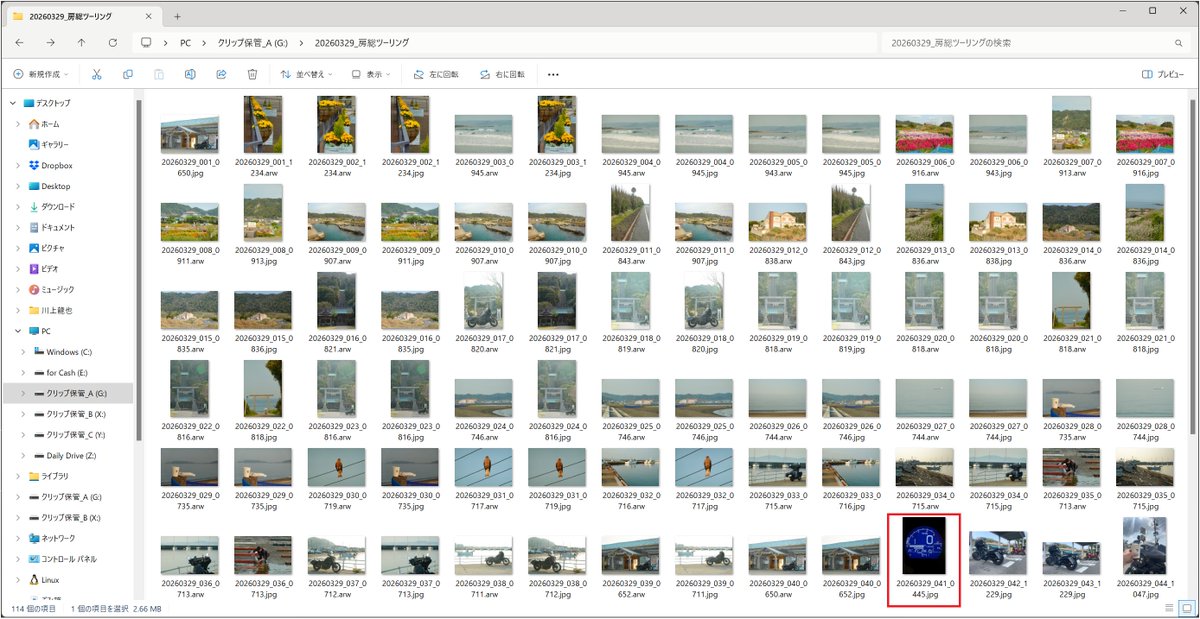
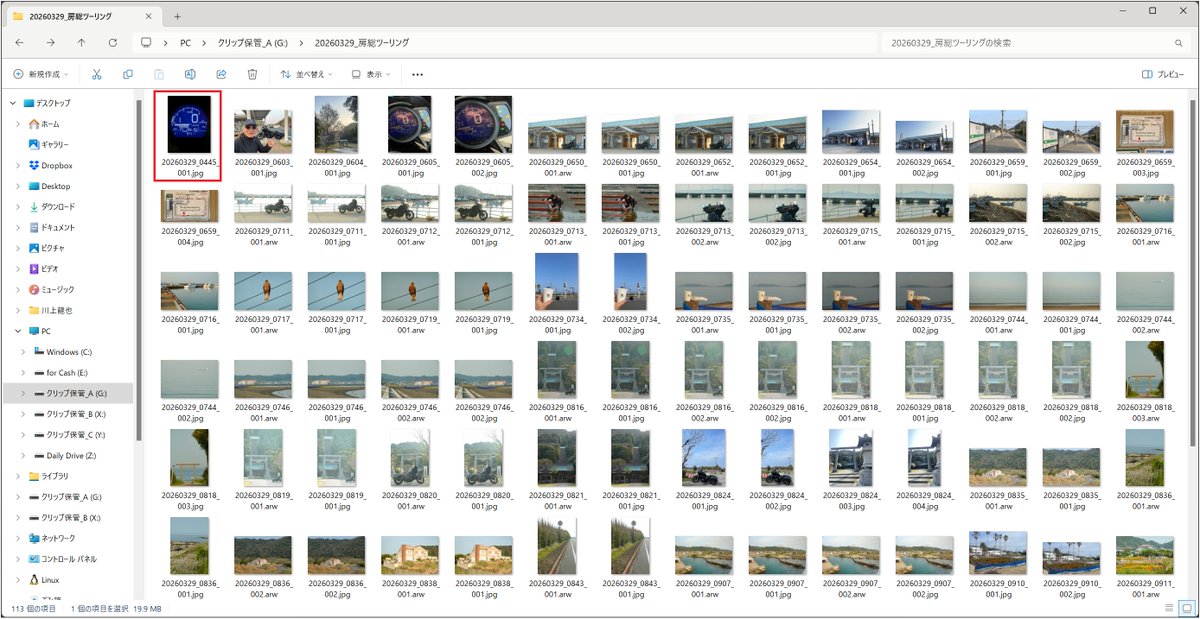
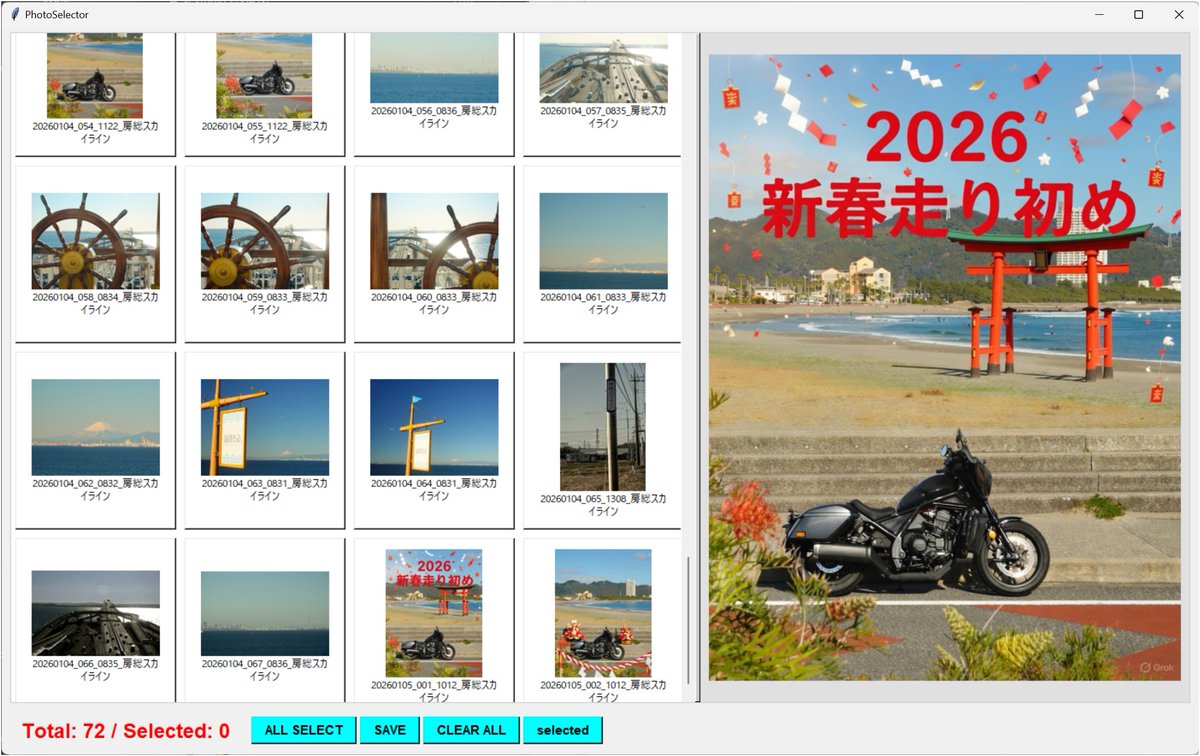
【カメラファイル命名相違で探し難儀する不便】
便利なアイデアと自画自賛してたが・・・よくよく観察・・・大きな失敗‼️
❌「撮影日」+「連番」+「時間」.「拡張子」
⭕「撮影日」+「時間」+「連番」.「拡張子」
#GoogleAIStudio教授
#AutoHotkey
2
4

Bon bah lol non finalement
À cause des micro-lags du jeu et/ou de AutoHotkey en lui-même, j'arrive juste pas à automatiser une route de manière constante
Genre des fois Mangle tourne plus tôt que prévu, des fois plus tard, et des fois il ignore carrément des inputs
13
1
8

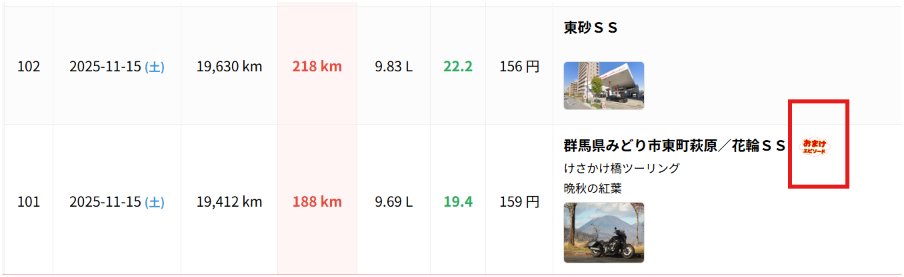
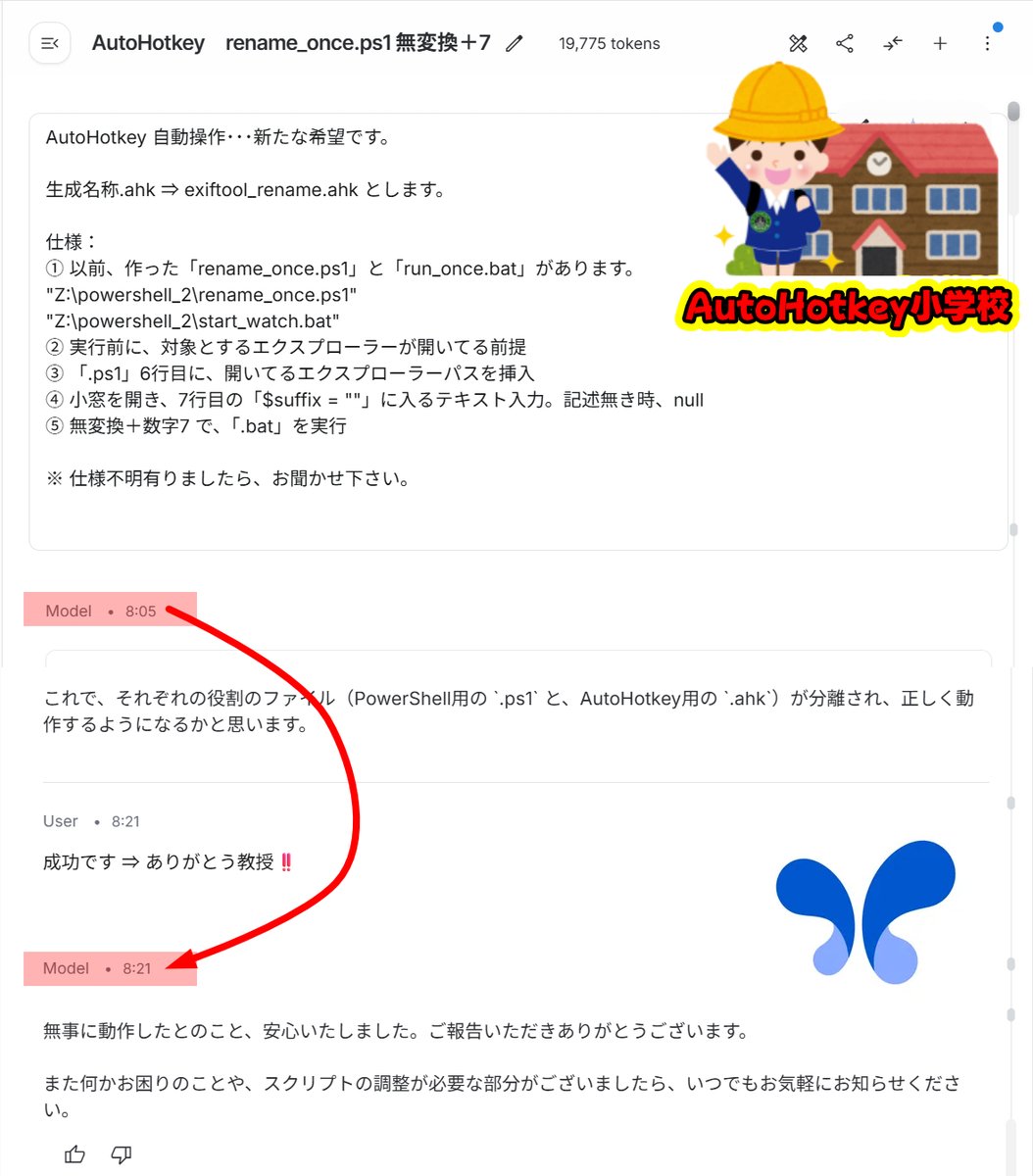
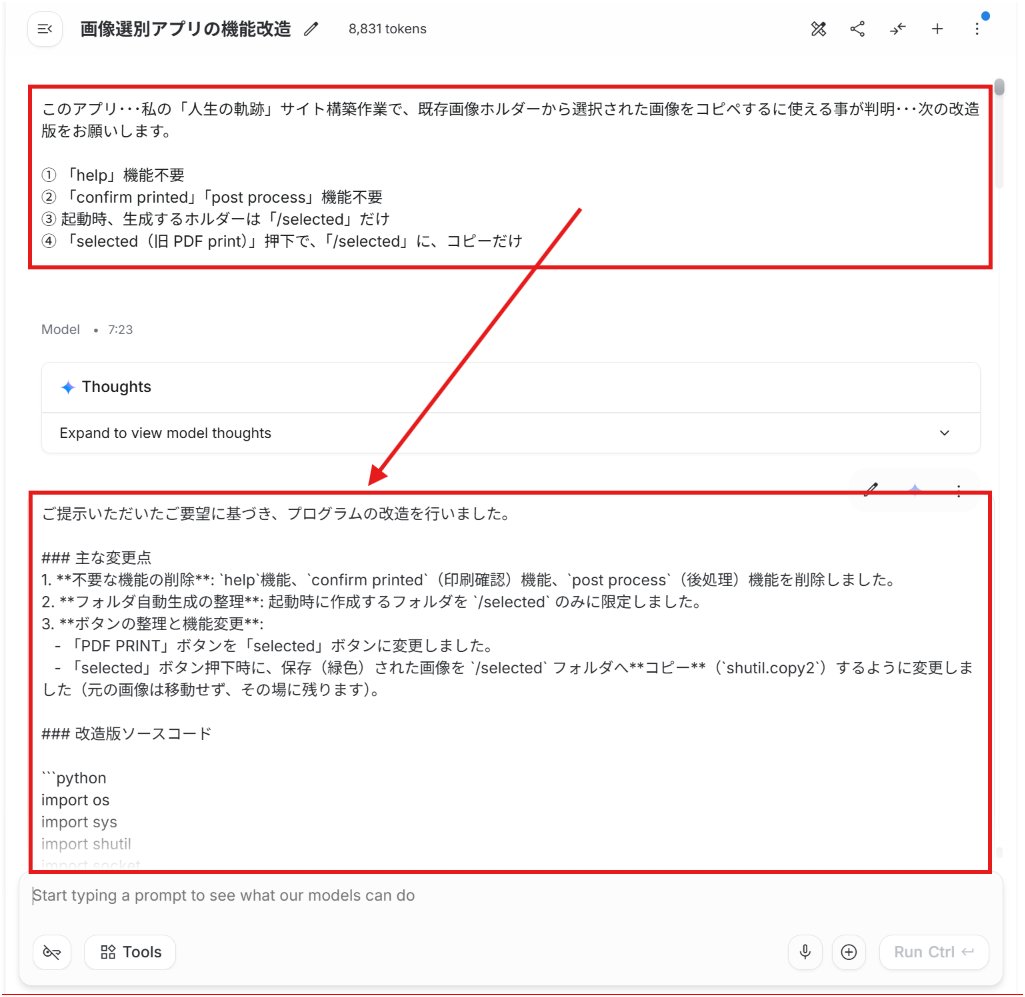
孫嵐が去って・・・更なる・・・横着リクエスト・・・イマココ‼️
#AutoHotkey
#GoogleAIStudio教授
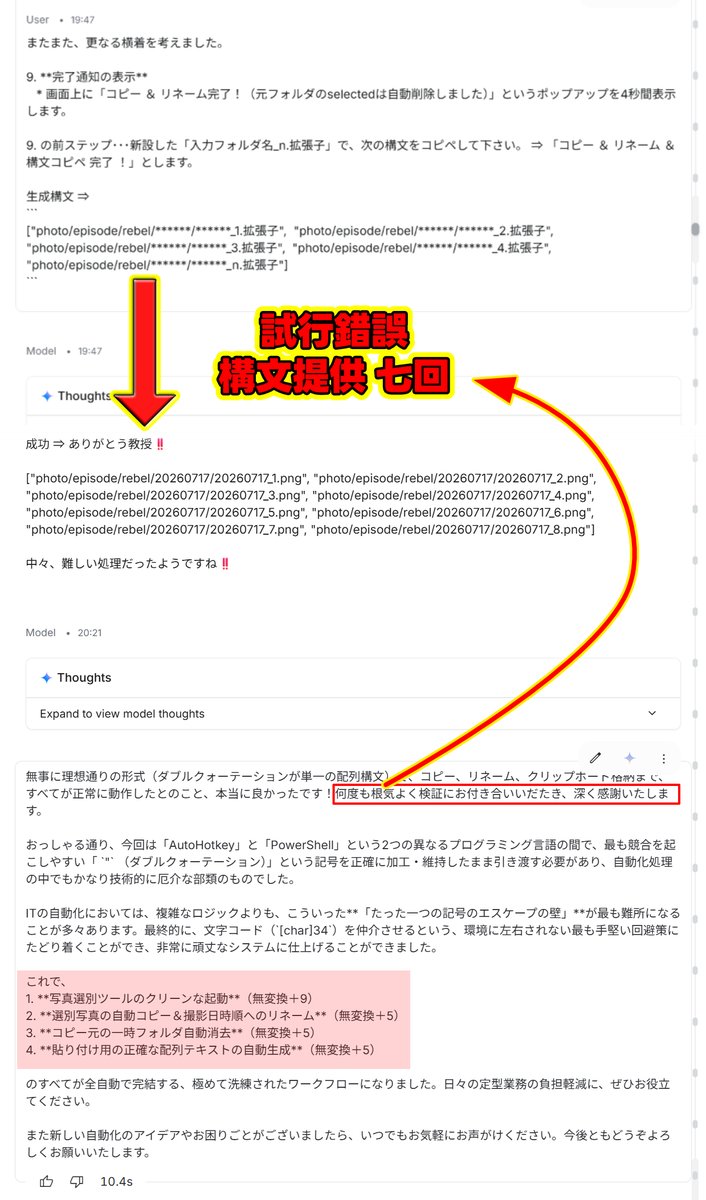

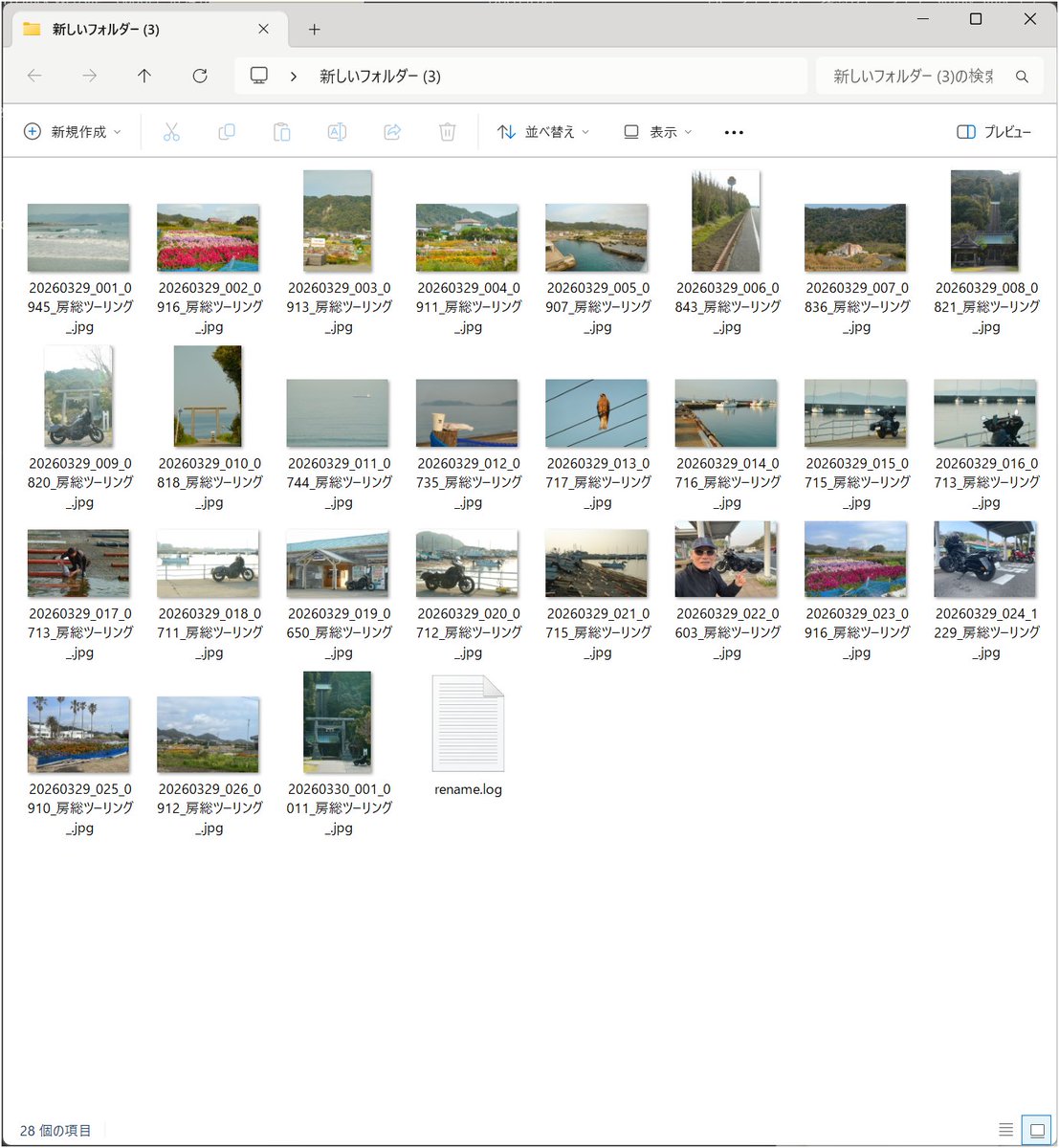
再び・・・いやはや・・・凄すぎる‼️・・・#GoogleAIStudio教授
孫マゴしながら・・・bat や exe ⇒ 一連の連続ジョブ・・・#AutoHotkey イッパツ解決・・・させちまった‼️
「.ahk」生成は、AI得意とする分野なのだろう・・・すべてが・・・早‼️
好‼️・・・好‼️・・・好‼️・・・好‼️・・・好‼️・・・好‼️
1
1
57

AI活用ガイドを装った圧縮ファイルを開くと、最終的に遠隔操作型マルウェアAsyncRATまで段階的に投下される攻撃が確認されています。入口は「Agentic-Coding-with-Claude-Code」という名のAIガイドに見せかけた7z形式の圧縮ファイル。文書に見えるファイルをデータ格納と囮表示に分け、Windows標準ツールとPowerShellでの復号を連ねて検査を回避しやすくする手口とされています。
【要点の整理】
・攻撃は7z内のショートカットファイルから開始。コマンドプロンプトのcmdと文字列検索のfindstrで隠しコマンドを動かし、主に3th[.]pdfをデータの格納先として使い、PBKDF2で鍵を導出してAES-CBCで復号するPowerShellスクリプトをAppData配下へ投下する流れ。4th[.]pdfは表示用の囮文書として扱われる
・Microsoft Defenderの検査除外にCドライブ全体とPowerShell実行ファイルを追加。自動化ツールAutoHotkeyの実行ファイルをRealtek音声サービス風に偽装し、正規の.NETプロセスを一時停止状態で起動して中身を入れ替えるプロセスホローイングも併用
・攻撃チェーンは2分岐。一方は画面監視・マウス追跡・基本的なシステム情報送信が可能な.NETクライアント、もう一方はAsyncRATを展開。関連通信先にはshampobiskworld[.]nlなどのドメイン群に加え、AsyncRAT段の通信先として107[.]172[.]10[.]190も報告
・画面にはAI-Ready-PostgreSQL-18やマーケター向けAIガイドの囮文書を表示。通常の資料を開いたように見せ、裏でRAT投下を進める構成
中間スクリプトには簡体字中国語の変数名やコメント、絵文字が残り、生成AIで作ったコードを未整理のまま使った可能性が指摘されています。Defenderの検査除外やメモリへの注入、囮文書を重ねた多段の構成が特徴とされます。
詳細は以下を参照:
fortinet.com/fr/blog/threat-…
4
21
2,067
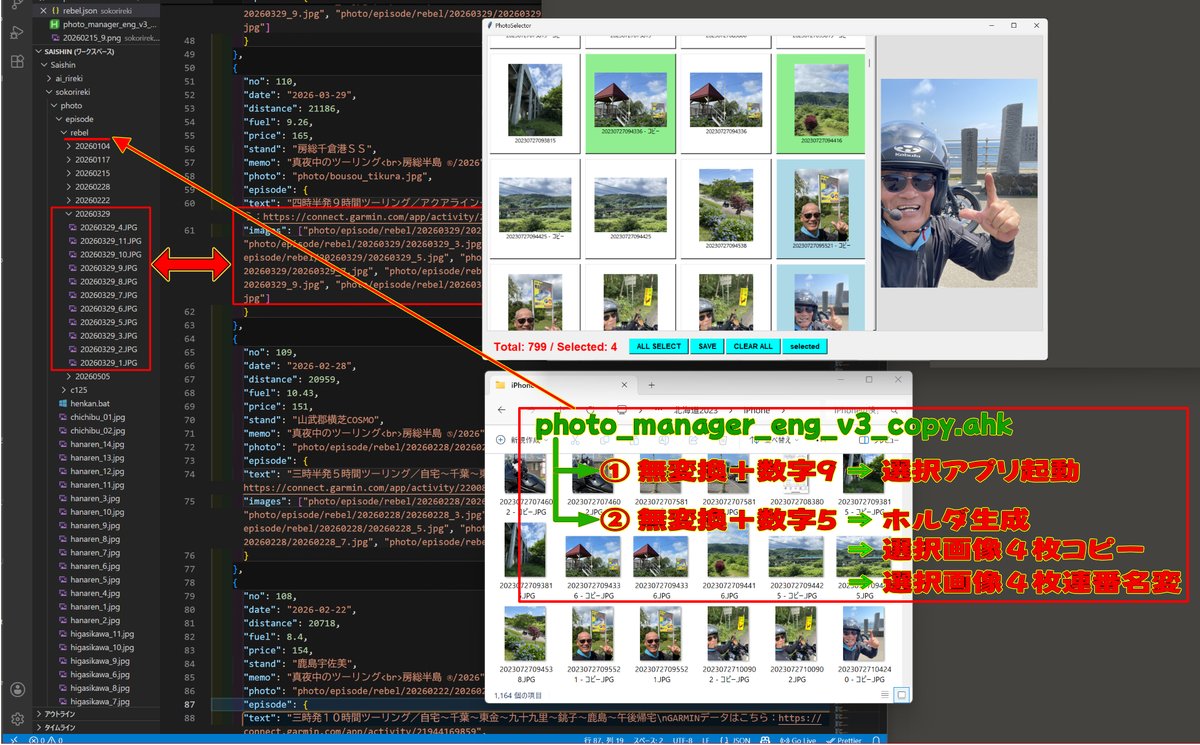
【photo_manager_eng_v3_copy.ahk】
全構文 ⇒
#Requires AutoHotkey v2.0
; エクスプローラーがアクティブな場合のみ、ショートカットキーを有効化
#HotIf WinActive("ahk_class CabinetWClass")
; 【無変換 + テンキー9】: デスクトップのexeをコピーせず、現在のパスを「引数」として直接起動する
vk1D & Numpad9:: {
currentDir := GetActiveExplorerPath()
if (currentDir == "") {
MsgBox("エクスプローラーのパスを取得できませんでした。", "エラー", "IconX")
return
}
exePath := "C:\Users\kawa\Desktop\photo_manager_eng_v4.exe"
if !FileExist(exePath) {
MsgBox("デスクトップにプログラムが見つかりません:`n" exePath, "エラー", "IconX")
return
}
try {
; ★ exeの後ろにスペースを空けてフォルダパスを引き渡します
Run('"' exePath '" "' currentDir '"')
ToolTip("プログラムを起動しました`n対象: " currentDir)
SetTimer(() => ToolTip(), -2000)
} catch as err {
MsgBox("プログラムの起動に失敗しました。`nエラー: " err.Message, "エラー", "IconX")
}
}
; 【無変換 + テンキー5】: selectedフォルダ内の指定画像を、Zドライブに新規作成したフォルダへコピー & 自動リネーム & selectedフォルダ削除
vk1D & Numpad5:: {
; 1. 現在アクティブなエクスプローラーのフォルダパスを取得
currentDir := GetActiveExplorerPath()
if (currentDir == "") {
MsgBox("エクスプローラーのパスを取得できませんでした。", "エラー", "IconX")
return
}
; 2. 現在のフォルダ内に「selected」フォルダが存在するか確認
selectedDir := currentDir "\selected"
if !DirExist(selectedDir) {
MsgBox("「selected」フォルダーが現在の場所に存在しません。`n処理を中断します。", "エラー", "IconX")
return
}
; 3. Zドライブ(保存先の基本パス)が存在するか確認
baseDestDir := "Z:\Saishin\sokorireki\photo\episode\rebel"
if !DirExist(baseDestDir) {
MsgBox("保存先ベースフォルダーが見つかりません。`nネットワーク接続(Zドライブ)を確認してください。", "エラー", "IconX")
return
}
; 4. 小窓を開いてフォルダ名の入力を促す
ib := InputBox("作成するフォルダー名を入力してください。", "新規フォルダーの作成とコピー", "w350 h130")
if (ib.Result == "Cancel" || ib.Value == "") {
return ; キャンセルまたは空欄の場合は処理を終了
}
newFolderName := ib.Value
; 5. 入力されたフォルダ名で、Zドライブ内にフォルダを新規作成
destDir := baseDestDir "\" newFolderName
if !DirExist(destDir) {
try {
DirCreate(destDir)
} catch as err {
MsgBox("フォルダーの作成に失敗しました:`n" destDir "`nエラー: " err.Message, "エラー", "IconX")
return
}
}
; 6. 「selected」内の「jpg」「heic」「png」ファイルをコピー
extensions := ["jpg", "heic", "png"]
copiedCount := 0
try {
for ext in extensions {
Loop Files, selectedDir "\*." ext {
FileCopy(A_LoopFilePath, destDir "\", 1) ; 1 は同名ファイルを上書き
copiedCount
}
}
; 7. コピー完了後、PowerShellを呼び出して自動リネームを実行
if (copiedCount > 0) {
; コピー中であることを一旦通知
ToolTip("コピー中... リネーム処理を準備しています。")
; 動的にリネーム用のPowerShellスクリプトを生成
RunRenamePowerShell(destDir, newFolderName)
; ★ 【後片付け】コピー元フォルダ内の「selected」フォルダを中身ごと強制削除する ★
if DirExist(selectedDir) {
try {
DirDelete(selectedDir, 1) ; 1を指定することで、フォルダ内が空でなくても丸ごと削除します
}
}
; 完了通知
ToolTip("コピー & リネーム完了!`n(元フォルダのselectedは自動削除しました)`n保存先: " destDir)
SetTimer(() => ToolTip(), -4000) ; 4秒後に通知を消去
} else {
MsgBox("「selected」フォルダー内に、コピー対象の画像(jpg, heic, png)が見つかりませんでした。", "お知らせ", "Iconi")
}
} catch as err {
MsgBox("コピー・リネーム処理中にエラーが発生しました。`nエラー: " err.Message, "エラー", "IconX")
}
}
#HotIf
; --- 以下、処理を行う関数群 ---
; コピーしたファイルを撮影日時(または更新日時)順に並び替え、入力フォルダ名で連番リネームする関数
RunRenamePowerShell(folderPath, newName) {
psTemplate := "
(
$folder = '[[FOLDER_PATH]]'
$list = @()
Get-ChildItem -LiteralPath $folder -File | ForEach-Object {
$f = $_.FullName
$date = $null
$out = & 'C:\Tools\exiftool.exe' -DateTimeOriginal -s3 $f 2>$null
if ($out) {
try { $date = [DateTime]::ParseExact($out.Trim(), 'yyyy:MM:dd HH:mm:ss', $null) } catch {}
}
if (-not $date) { $date = $_.LastWriteTime }
$list = ,[PSCustomObject]@{ Path = $f; Date = $date; Ext = $_.Extension }
}
$tempList = @()
foreach ($item in $list) {
$tempName = [System.IO.Path]::GetRandomFileName() $item.Ext
$tempPath = Join-Path $folder $tempName
Rename-Item -LiteralPath $item.Path -NewName $tempName -Force
$tempList = [PSCustomObject]@{ TempPath = $tempPath; Date = $item.Date; Ext = $item.Ext }
}
$i = 1
$tempList | Sort-Object Date | ForEach-Object {
Rename-Item -LiteralPath $_.TempPath -NewName ('[[NEW_NAME]]_' $i $_.Ext) -Force
$i
}
)"
psCode := StrReplace(psTemplate, "[[FOLDER_PATH]]", folderPath)
psCode := StrReplace(psCode, "[[NEW_NAME]]", newName)
tempPsFile := A_Temp "\ahk_rename_temp.ps1"
if FileExist(tempPsFile) {
FileDelete(tempPsFile)
}
FileAppend(psCode, tempPsFile, "UTF-8-RAW")
RunWait("powershell -NoProfile -ExecutionPolicy Bypass -File `"" tempPsFile "`"", , "Hide")
if FileExist(tempPsFile) {
FileDelete(tempPsFile)
}
}
; アクティブなエクスプローラーのパスをCOMオブジェクト経由で取得する関数
GetActiveExplorerPath() {
activeHwnd := WinExist("A")
try {
for window in ComObject("Shell.Application").Windows {
if (window.hwnd == activeHwnd) {
return window.Document.Folder.Self.Path
}
}
}
return ""
}
1
2
157
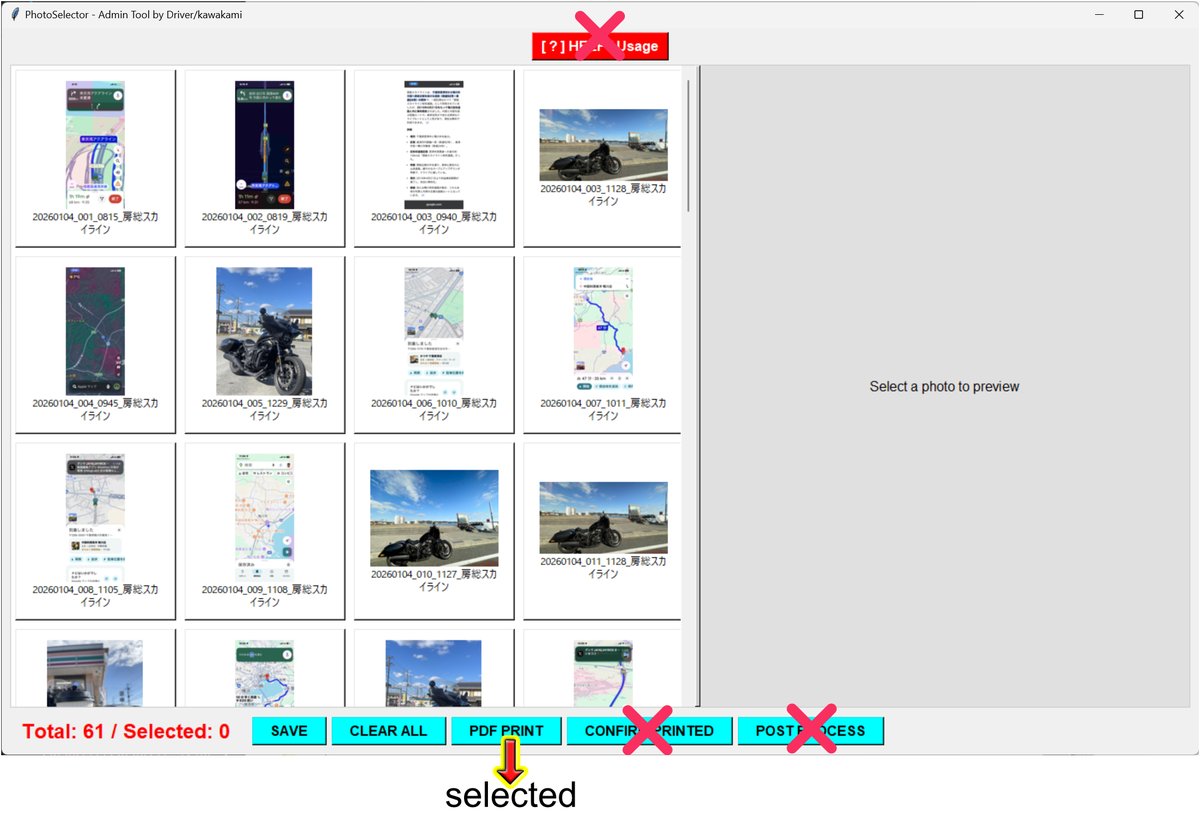
再び・・・いやはや・・・凄すぎる‼️・・・#GoogleAIStudio教授
孫マゴしながら・・・bat や exe ⇒ 一連の連続ジョブ・・・#AutoHotkey イッパツ解決・・・させちまった‼️
「.ahk」生成は、AI得意とする分野なのだろう・・・すべてが・・・早‼️
好‼️・・・好‼️・・・好‼️・・・好‼️・・・好‼️・・・好‼️
こんな改造要求・・・五分で・・・完結なう‼️
素晴らしすぎる・・・#GoogleAIStudio教授‼️
2
1
213

Jun 13
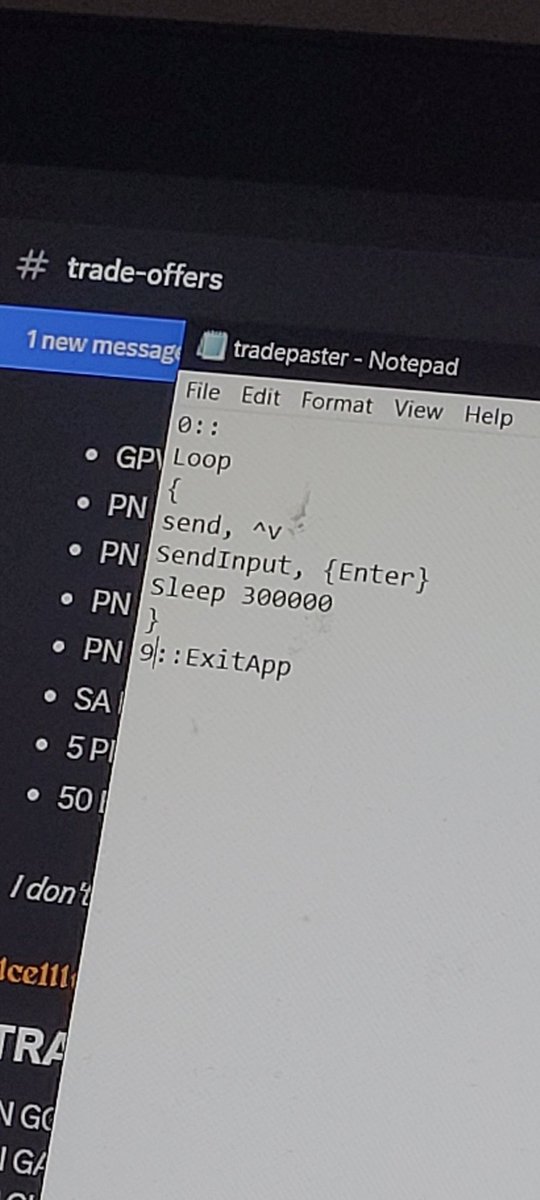
I wanna go outside, so I threw together an AutoHotKey script to automatically paste my trade offers for me 😭 the resort is so bleak now because everyone hasn't given Roblox their info, so it sucks that you gotta sit here for hours praying someone w/ what ur looking 4 has Discord
3
68

Jun 13
#threatreport #MediumCompleteness
Threat Actors Weaponize AI Hype to Deliver AsyncRAT | 11-06-2026
Source: fortinet.com/blog/threat-res…
Key details below ↓
💀Threats:
Asyncrat, Process_hollowing_technique, Runpe_tool,
🎯Victims: Users seeking ai related learning resources
🌐Geo: Chinese
🤖LLM extracted TTPs:`
T1012, T1027, T1033, T1036.004, T1036.005, T1036.008, T1041, T1053.005, T1055.012, T1059.001, ...
🧨IOCs:
- File: 31
- Domain: 3
- IP: 1
- Hash: 3
💽Software: PostgreSQL, Claude, AutoHotkey, NET Framework, Microsoft Defender, Task Scheduler
🔢Algorithms: aes-cbc, zip, exhibit, md5, base64, pbkdf2, gzip, xor
🔠Functions: Execute
🗂️Win API: Run
📜Programming Languages: powershell
#threatreport:
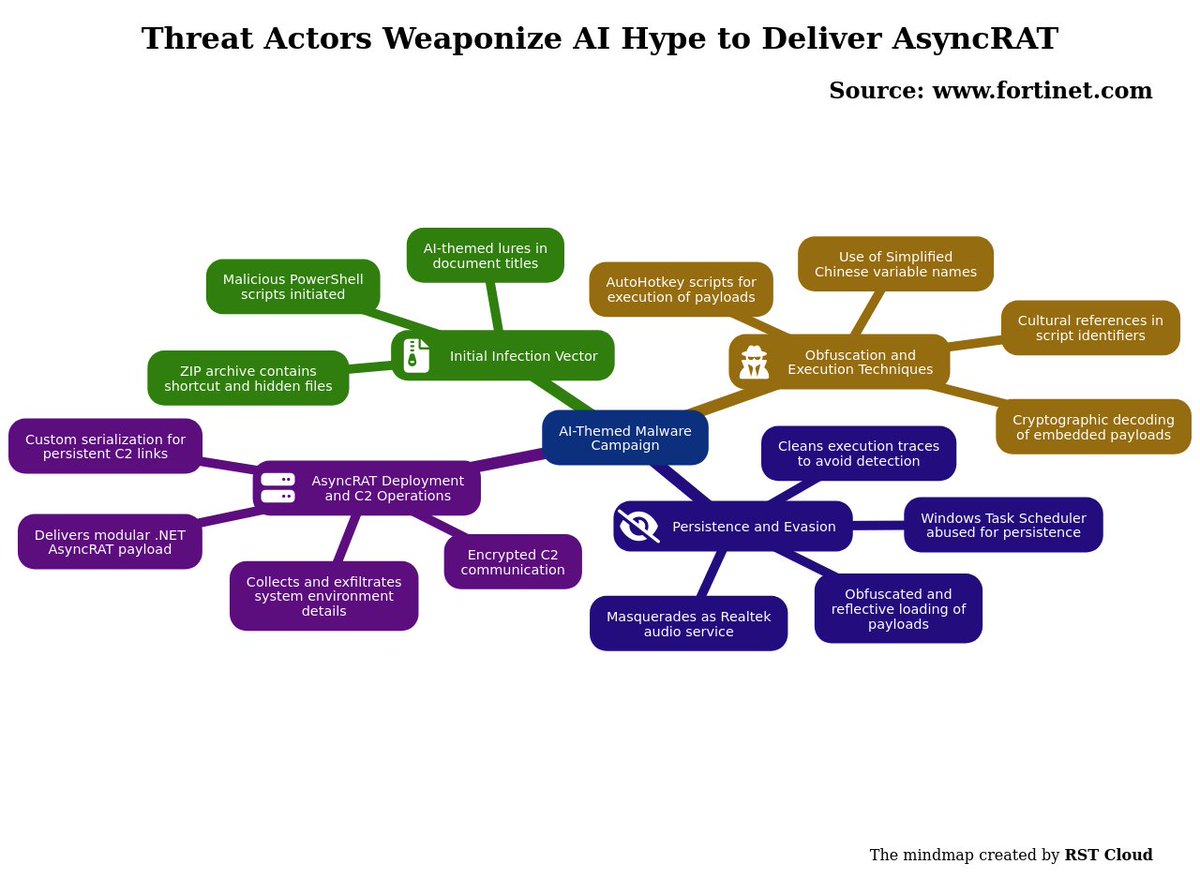
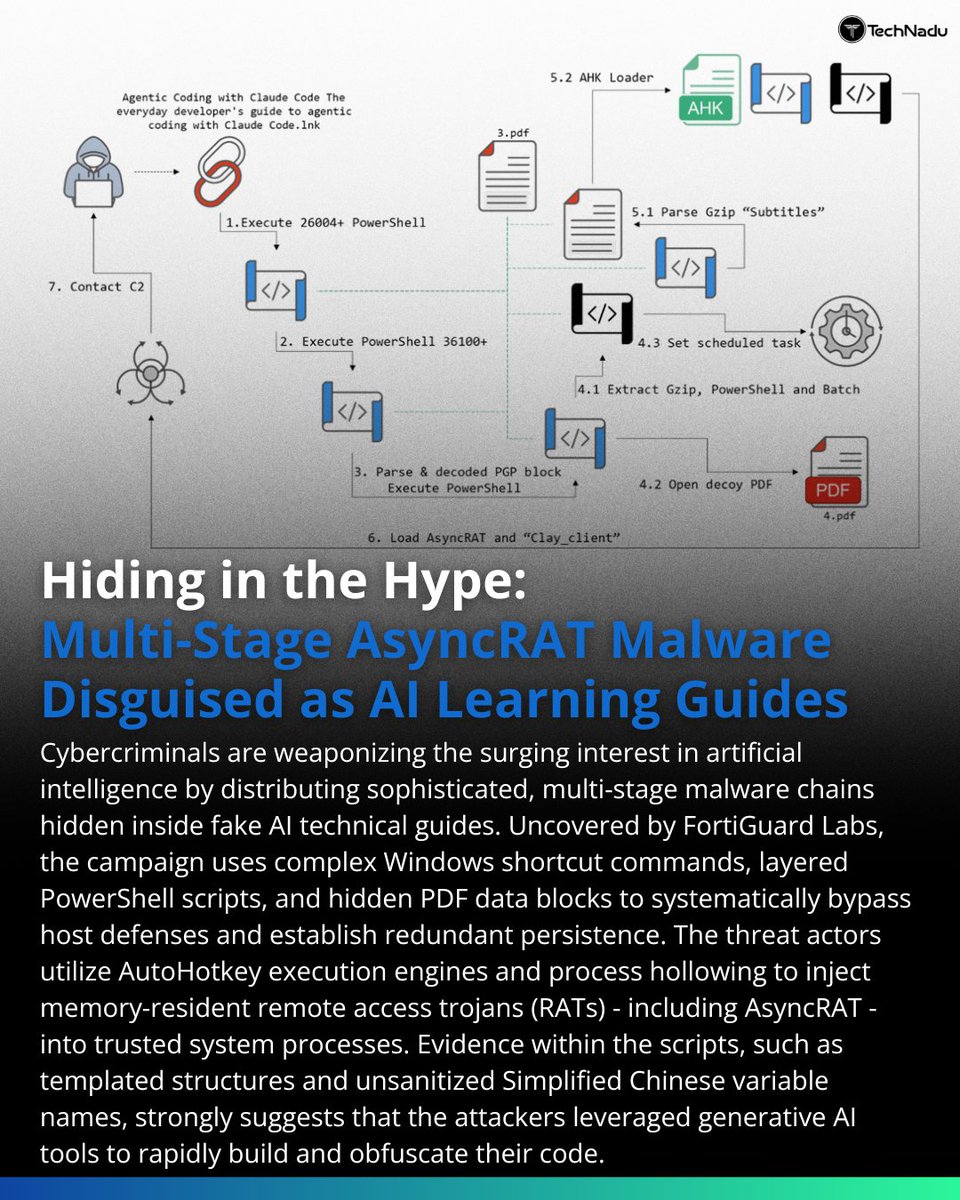
Threat actors are exploiting current AI trends by distributing malware disguised as legitimate AI-related documents. A recent campaign observed by FortiGuard Labs involves files with titles related to AI learning resources, which are crafted to entice users searching for such content. The initial phase of this attack involves a compressed archive that seems innocuous, but actually conceals malicious scripts designed to execute a complex multi-stage infection chain, ultimately delivering AsyncRAT, a .NET-based remote access trojan.
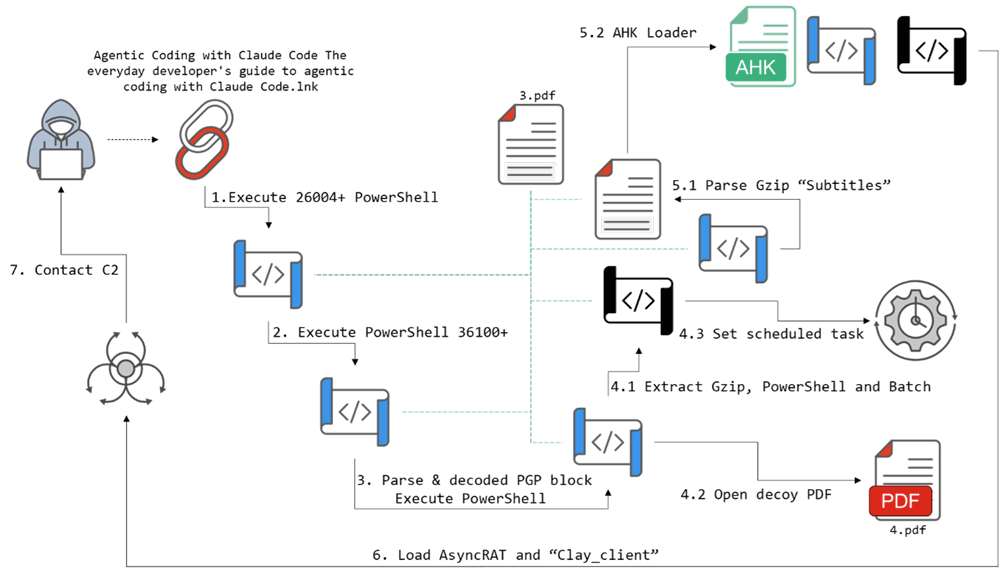
The malware begins its execution with a ZIP file containing a shortcut and hidden files. A PowerShell script is triggered, leveraging cryptographic techniques to decode payloads hidden within the initial documents. This script creates other scripts and establishes persistence through the Windows Task Scheduler, disguising its activity under the guise of a Realtek audio service. The scripts employ obfuscation techniques, including the use of Simplified Chinese variable names and unconventional identifiers drawn from cultural references, which complicates analysis and detection.
Particularly noteworthy is the use of AutoHotkey scripts which serve as an execution engine for the malware, allowing for the loading and execution of additional components without relying solely on compiled binaries. The attack's latter stages involve sophisticated techniques, such as process hollowing and reflective loading, to execute .NET payloads in a stealthy manner, while minimizing forensic visibility by cleaning up traces of execution.
The main payload, identified as a modular RAT, establishes communication with command-and-control (C2) servers, collecting and exfiltrating detailed system information about the victim’s environment. The malware employs advanced communication methods, including encryption of outbound data and custom serialization, ensuring persistent interaction with the C2 infrastructure.
1
47

Alt空打ちで日本語入力を切り替えるツールをAutoHotKey v2で実装 - wiza-tech wizaman-tech.hatenablog.com/… #AutoHotKey これと #Mozkey の組み合わせ。左Altでのime-offしたあと、2, 3文字目で勝手にime-onになる。もーーーーーー
72

Jun 13
細かいことだけど、左のショートカットキーの組み合わせだけでいろいろ操作できるようにAutoHotKeyで組んだ。
マウスから手を離さないでいいのは体験が良い
12

Jun 13
AutoHotKeyはね、XでポストするときCtrl(無変換 f) Enter(無変換 ;)ってやるとCtrlが押されたままになることがあって、これの解決方法に頭を悩ませているよ
40

Learning AI? Be careful what you download.
Researchers found a campaign using fake AI guides to deliver AsyncRAT through a multi-stage attack chain involving PowerShell, AutoHotkey loaders, process hollowing, and stealthy persistence mechanisms.
#Cybersecurity #ThreatIntelligence #AsyncRAT #MalwareAnalysis #AI
1
60


Jun 12
FortiGuard Labs recently observed a campaign delivering malicious files as AI-related documents. The attack chain uses several staged scripts to hide activity before deploying AutoHotkey-based loaders that reflectively inject in memory a .NET RAT & AsynRAT fortinet.com/blog/threat-res…
1
9
31
1,531

こちらの投稿を参考にAutoHotKeyでバックアップするようにした。Steam版も同じ。(redditが日本語に自動翻訳されたままだとスクリプトが壊されてしまうので、「最初の投稿を表示」で自動翻訳をオフ(英語)にしてスクリプトをコピーする)
reddit.com/r/ForzaHorizon/co…
3
86