
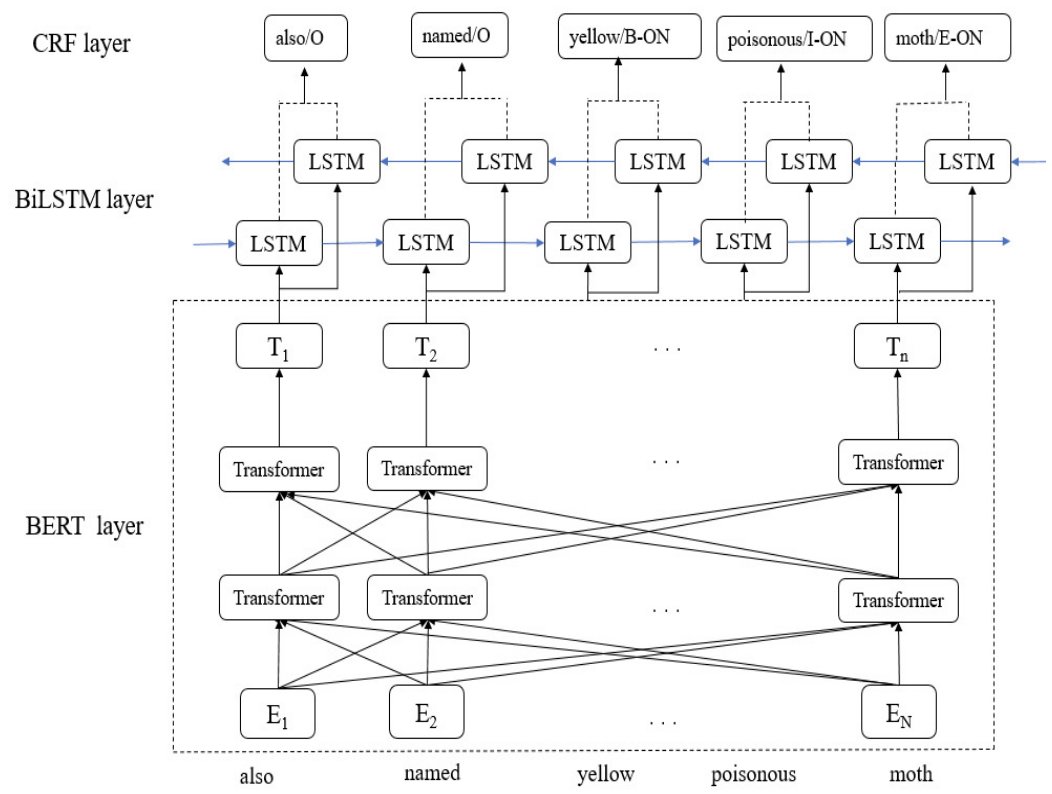
Using the BERT-BiLSTM-CRF model to automatically generate the triplets, and store them in the Neo4j database: “#AutomaticConstruction of #KnowledgeGraph of #TeaDiseases and Pests“ by Q. Huang, Y. Tao, S. Ding, Y. Liu, F. Marinello. ACSIS Vol. 37 p.141–146; tinyurl.com/57fm3bbn
1
2
2
89

9 Jun 2023
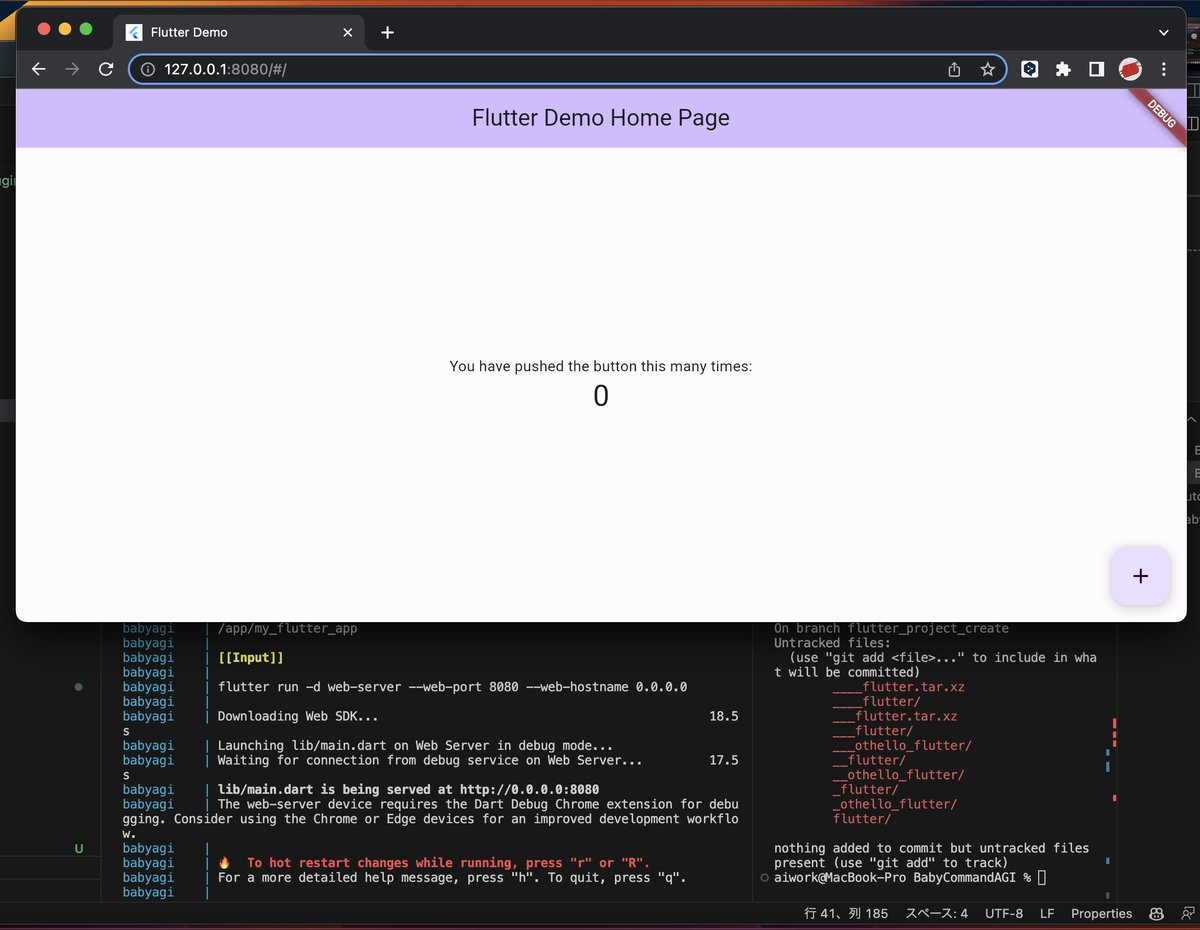
Based on @yoheinakajima's BabyAGI, I successfully set up a Flutter environment in a local Linux container using BabyCommandAGI and launched the default Flutter app. (Requires GPT-4 API)
Information from outside the container needs to be passed to the AI, so if you set the following OBJECTIVE and start, and if the AI executes "flutter run -d web-server --web-port 8080 --web-hostname 0.0.0.0" about an hour later, you can access the Flutter app created by the AI at "http://localhost:8080/". The port number 8080 is due to the settings in docker-compose.yml.
"Please create a default Flutter app, start a web server, and make it accessible from a browser outside the container. The port number accessible from outside the container is 8080."
[Reference for setting access from outside the container]
pythonspeed.com/articles/doc…
The above OBJECTIVE often fails and is unstable, so if you want to stabilize the environment construction and execute it, it is easier to construct the environment stably by setting the following OBJECTIVE.
"Please install the Flutter environment via git, create a default Flutter app, start a web server, and make it accessible from a browser outside the container. The port number accessible from outside the container is 8080."
There are often points where you can get stuck in environment construction. It is a very big challenge that it is easy to get stuck and loop if there is no information to support there.
Please note that 5 minutes after the web server starts up, BabyCommandAGI will finish as the task is completed and you will no longer be able to access the Flutter app. If the task has been completed, either wait for BabyCommandAGI to start and run again, or access the terminal directly in the container, set the environment path as follows, enter the folder of the target app, and run "flutter run -d web-server --web-port 8080 --web-hostname 0.0.0.0".
(Caution)Please be aware that if you do not stop the container, BabyCommandAGI will continue to hit the API.
If you want to prevent the API from being hit, please uncomment the following comments.
github.com/saten-private/Bab…
$ export PATH=$PATH:`pwd`/flutter/bin # Set the path to the installed Flutter environment
$ cd (folder of the target flutter app)
$ flutter run -d web-server --web-port 8080 --web-hostname 0.0.0.0
[BabyCommandAGI]
github.com/saten-private/Bab…
#AI #AIAgent #AIChallenges #BabyCommandAGI #AutomaticConstruction #EnvironmentSetup #Flutter #FlutterApp #CLI #LLM #Shell #Command #automation #autorun #babyagi #GPT #AIContainer
1
1
416

12 Oct 2021
GRAONTO: A graph-based approach for automatic construction of domain o... sciencedirect.com/science/ar… #Ontology #domain #knowledge #automaticconstruction #digitalization #Industry40
21 Jun 2021
GRAONTO: A graph-based approach for automatic construction of domain ontology
sciencedirect.com/science/ar…
#graphbasedrepresentation #relationextraction #relationextraction #subgraphmining #ontology #domain #automaticconstruction #domainontology
1
19 Jun 2021
Automatic Ontology Construction for Manufacturing Knowledge and Information Management semanticscholar.org/paper/Au…
#Domain #ontology #manufacturing #knowledge #Automaticconstruction #graphbasedapproach #fixturedesign #disambiguate
2
12 Apr 2021
GRAONTO: A graph-based approach for automatic construction of domain o... sciencedirect.com/science/ar…
#domainknowledge #ontology #graphbased #automaticconstruction #domainontology #MarkovClustering #AI #MachineLearning #ArtificialIntelligence #knowledgemanagement #ML
3
2

15 Oct 2019
The new domain name automaticconstruction .com has been listed for sale at perfectdomain.com , buy it before its gone! click here: perfectdomain.com/domain/aut… #Auto #Toma #Construction