Container v23 Auto‑Updated — One Manual Step Remains (Horizon DB Migration)
Good news: your Pi node container has been automatically upgraded to v23 — no uninstall/reinstall required. One one‑time manual action is still needed: migrate the Horizon API database. Follow this concise, safe 4‑step procedure to complete the migration and return your node to full online status.
•Container v23: already auto‑updated.
•Required manual step: Horizon API database migration (one time only).
•Estimated migration time: 10–15 minutes.
•Critical: do NOT stop Docker, disconnect, or power off your machine during the migration.
Step‑by‑step migration
1. When the migration prompt appears, click OK to start.
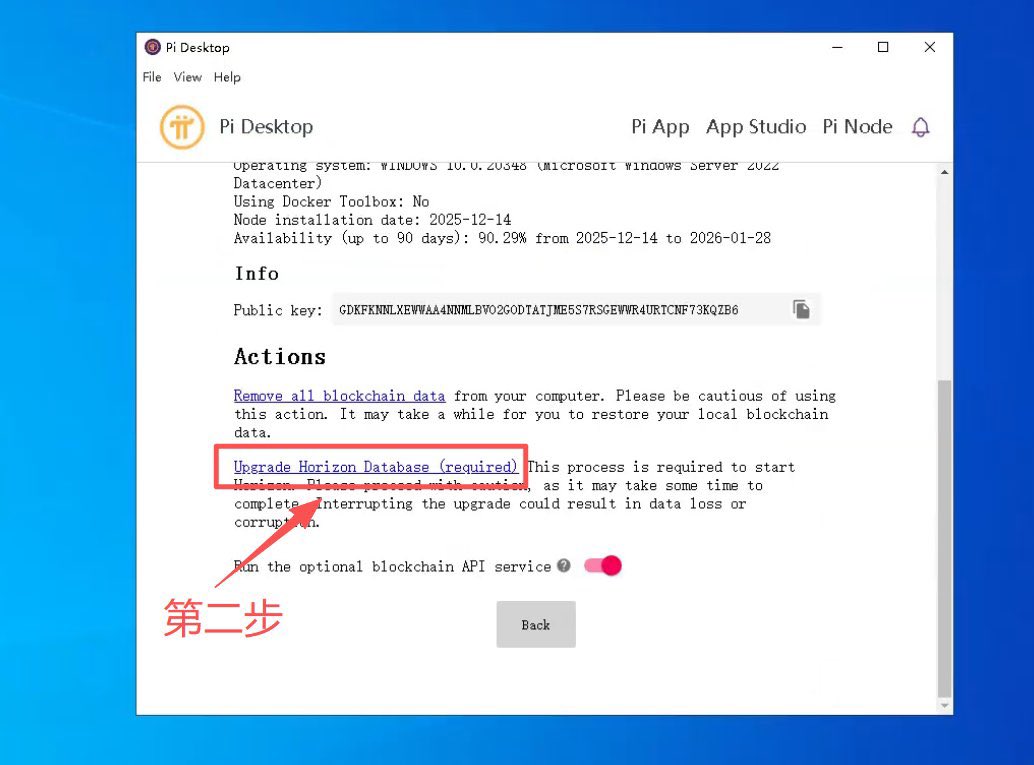
2. You’ll be taken to Technical Settings. Click the forced upgrade link: “Upgrade Horizon Database (required).”
3. Confirm the second prompt by clicking OK and wait patiently for ~10–15 minutes while the migration runs.
4. When the page shows “Migration Successful,” return to the Pi Node homepage — your node should now be fully online.
Safety & best practices
•Keep the host powered, networked, and Docker running until the migration finishes. Interruptions can cause data loss or corruption.
•Do not close the browser tab or exit the Pi Node application during migration.
•If anything goes wrong, capture logs and screenshots before seeking help.
•Maintain high online rate and availability score to protect your super‑node candidate status.
Call to action
All Pioneer node operators — complete this migration promptly to ensure uninterrupted service and preserve your node’s standing.
For timely guides and latest news, follow us at
@Pi_CoinMagazine.
#PiNetwork #ProtocolV23 #HorizonMigration #NodeOps #Docker #SuperNode #Pioneers #BlockchainMaintenance