
Jun 13
Fr tho windsurf aka Devin desktop now has been really good for that
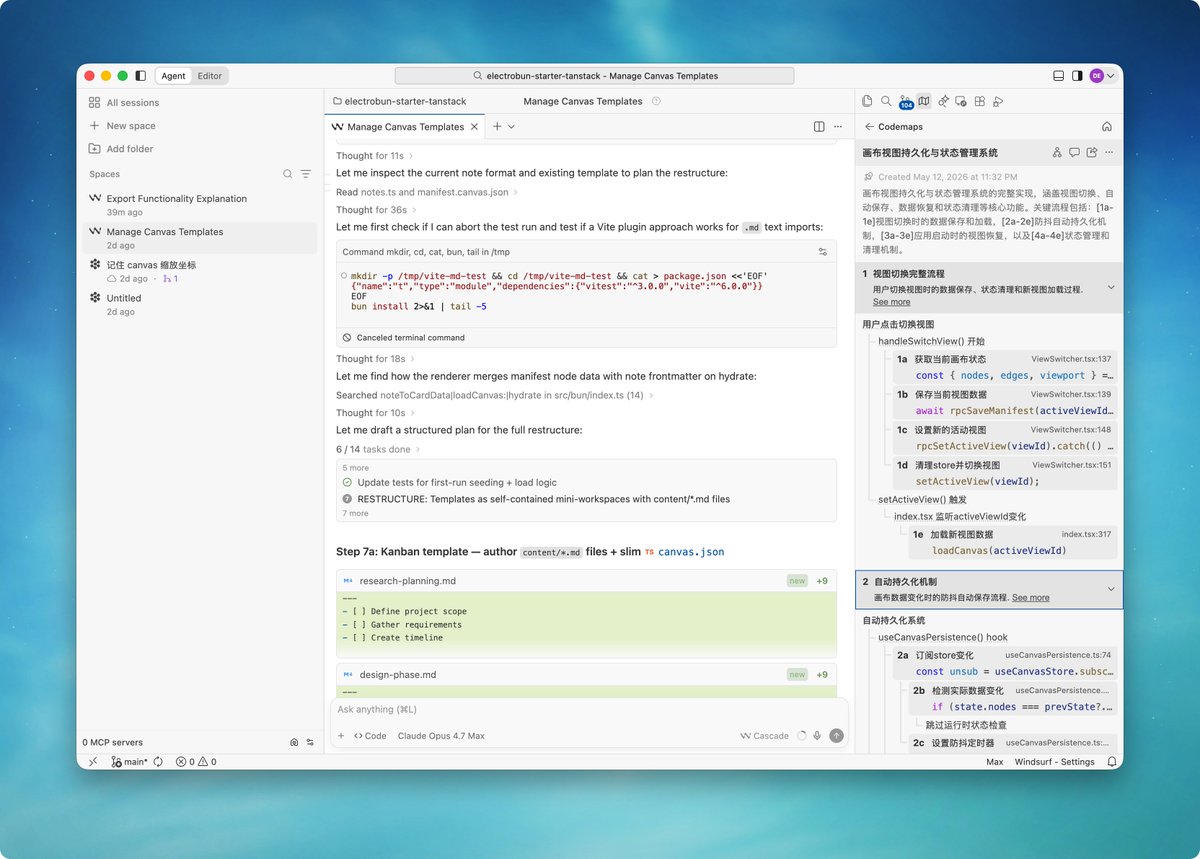
The codemaps (annotated diagrams of sections of related code) are indispensable and when you hover over a function it’ll pop up a summary of what it does. Codemaps can be added to agent context too.
Don’t sleep on interactive code blocks or canvas preview in ChatGPT either. I need to see that shit, I’m a real live dumbass
42

RepoPrompt CE assembles reviewable context from your codebase — CodeMaps, diffs, file structure — and hands it to AI agents in seconds. Built native in Swift, it's the bridge between your code and AI that actually works.
#macOS #Swift #DeveloperTools
🔗 Link in the comments
1
62

Jun 7
Codex then get a 20 USD windsurf(Devin) if you need codemaps or deepwiki
3
287

Jun 2
Windsurf is now Devin Desktop.
It's a bit of a bittersweet moment for me. I still remember joining the Windsurf team a little over a year ago, and I've probably spent most of my waking hours thinking about Windsurf ever since.
If you had told me back then about everything that has happened, I would've told you you're lying! It's been a crazy chaotic ride, but I've had fun every step of the way.
I'd like to give a big thanks to all of I've been working with since the Windsurf days (s/o @premqnair @ghostly_gray @jeffwsurf), and to all the new colleagues I've met at Cognition.
We've shipped a lot of stuff in the past year (SWE-1.5 & 1.6, Fast Context, Codemaps, Windsurf 2.0, etc.), and I can't wait to show you all the things we have planned for Devin Desktop.
Jun 2

Introducing Devin Desktop: the next generation of Windsurf
Manage fleets of local and cloud agents from one surface
Support for any ACP-compatible agent
With a full IDE for when you need to jump into the code
1
17
709

Windsurf 在 Cognition 的带领下越来越好用了,Devin 订阅已经和 Windsurf 打通了,订阅 Devin 后用同一个账号登录 Windsurf,就能共享一样的订阅额度。
Windsurf 里也可以直接用 Devin,享受真正的无人值守开发。Devin 云端虚拟机超级好用,能自主执行调试、测试、部署,连 Electron、Tauri 都能模拟真实操作,最后还给你一份带一堆截图的测试报告。
官方自研 SWE-1.6 模型免费使用,接近 1000 tokens/s 太爽了,搭配 Fast Context 做简单任务几秒就搞定。
Windsurf 的界面也简洁干净,Agent/Editor 两种模式就够了,切换丝滑,不像 Cursor 还要搞个新窗口增加认知负担。
还有 Codemaps 可视化代码地图,DeepWiki 智能文档都非常有特色,DeepWiki 是符号级文档,Codemaps 则是整个代码库的“流程地图”,两者一起用,基本把“读代码”这件事彻底干翻了。
不过和 Claude Code、Codex 相比,最大的槽点还是 tokens 比较贵。如果你一直重度使用 Opus 4.7 的话会比较肉疼。如果用 Opus 4.7/GPT-5.5 做 Plan、其他模型做执行还挺香的。

@aakashgupta 今天透漏了 Cognition 最终只花了大约 2.5 亿美元,接手了 Windsurf 的故事。
OpenAI 曾出价 30 亿美元打算收购 Windsurf,结果交易黄了,Google 则花了 24 亿美元挖走了 Windsurf 的 CEO 和 40 位核心人员。
Cognition 最终只花了大约 2.5 亿美元,就拿下了 Windsurf 的 IDE 产品、350家企业客户,以及 8200万美元的 ARR。这笔“捡漏”交易太值了,相当于用极低价格买到了成熟产品、客户和收入。
2024 年 9 月,Cognition 的 Devin 的 ARR 只有100万美元。到2025年6月已暴增至7300万美元。
Devin 能在自己的 VM 里运行,拥有桌面、浏览器和完整电脑控制能力,可以独立调试、测试、部署、上线代码。但 Devin 是“独立工具”,开发者容易忘记它,不方便管理。
Cognition 现在直接把 Devin 塞进了 Windsurf 核心,打造出真正的 Agent Command Center。你可以在编辑器里像 Kanban 一样管理所有 Agent。一键把任务扔给云端的 Devin,然后直接关电脑睡觉。Devin 会在云端继续干活,完成后自动生成 PR 等你 review。
对比之下,Cursor 最新版虽然也搞 agent-first,但你必须全程盯着屏幕,所有智能体都需要实时关注。Windsurf 则是真正“让你少操心”——卖的是工程产能,而不是让你更快地手动敲代码。
Cognition 用 2.5 亿的残局,硬是把自己盘活了——这笔交易太值了。
反观 Google 的 Antigravity,如今已经半死不活:bug 满天飞,503 错误天天见,讨论度直接归零。当初 24 亿打包走的那批人,现在看来全是只会开会吹牛的“领导”,真正干活的都留在了 Windsurf 😂。
7
2
50
8,132

May 12
My AI hot take right now is that @windsurf is very underrated.
SWE-1.6 is incredible and free. Agent manager mode/layout is nice. @cognition features like DeepWiki and Codemaps built in to the editor is a bonus. Devin cloud agents and PR review.
No one talking about it anymore
11
3
95
7,076
May 4
Something similar to windsurf deepwiki/codemaps or obsidian notes to learn more about the codebase in an interactive way beyond just an editor
Also collaboration features like zed and warp have
I think more internal plugins that personalize the interface like to render mermaid graphs and flowcharts etc if called. some people don’t want that but many do
1
2
280


Apr 29
I used to use JetBrains IDEs exclusively until I started using Windsurf. Serious devs need AI-powered tools that work with the dev, like deepwiki and codemaps alone in Windsurf make developing much more enjoyable. It's an integration game, focus on that first.
3
351

Apr 22
If you're evaluating AI IDEs this week, here's what getting started with @windsurf looks like (links below):
• Download and install from windsurf.com. Import any existing IDE settings during onboarding, or start fresh.
• Cascade is the agent panel on the right. Chat, generate, edit, run code. @-mention files, symbols, or docs to scope context.
• Choose your model - Opus, Codex, SWE, Kimi, GLM and more (Kimi K2.6 is free for the next 2 weeks 👀)
• DeepWiki: Cmd Shift Click any symbol for an in-depth explanation of what it does. Send it to Cascade with one click.
• Codemaps: hierarchical view of how files and functions execute together. Click a node to jump to code. Shareable as links.
• Devin in Windsurf: start and manage cloud sessions without leaving the editor.
• Agent Command Center: Kanban board of every running agent, local (Cascade) and cloud (@DevinAI). See what's in flight, blocked, or ready for review.
• Spaces: group sessions, PRs, files, and context for one task or project into a single view.
• Centralized review: handle diffs, PRs, and agent output in one place.
• MCP servers, Memories, and Workflows extend Cascade. Set them up once; reuse across projects.
12
14
141
16,966

Apr 19
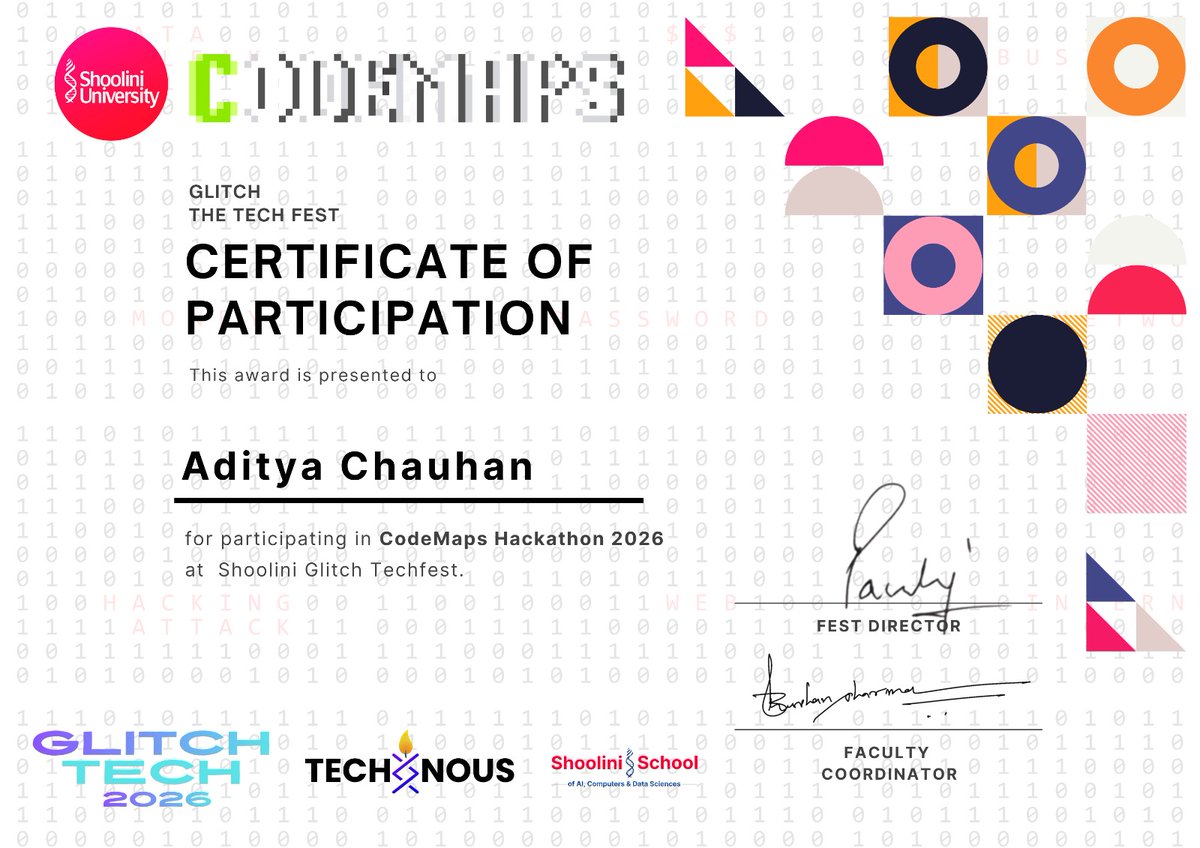
Participated in CodeMaps Hackathon at Shoolini University 🚀
Great experience collaborating, building, and learning under pressure.
Improved problem-solving, teamwork & dev skills.
Looking forward to more!
#CodeMaps #Hackathon #StudentDeveloper
3
33
Apr 17
Windsurf 2.0
• Agent Command Center
• Spaces
• @DevinAI Cloud Agents handoff
• Kanban-style agent management
• Arena mode, DeepWiki, Codemaps, and more
15
10
172
13,245


Mar 5
Another reason to use the @RepoPrompt mcp tools / agent mode
The read file tool tells the model exactly how many lines are in the file in the response readout, and if needed, codemaps give it line numbers for any function in the file for effective probing.
Good tools matter

one easy thing harnesses could do better is to give models a better idea of the size of files/outputs. it's very cheap to tokenize them locally and have the agents behave intelligently equipped with this knowledge instead of cautiously probing by 200 lines.
1
3
30
2,962

Existem dois recursos bem legais no Windsurf que me fizeram optar por ele ao invés de outras ferramentas.
1 - Codemaps: Ele gera um mapa detalhado de como funciona determinado fluxo ou funcionalidade. Você inclusive pode usar isso depois como contexto para IA.
2 - Deepwiki: Você pode selecionar qualquer elemento do seu código e ele vai explicar sua definição, uso, documentação, etc.
3
612

Feb 18
Building a System for Agent Self Verification:
Some folks asked about the ONE thing for good harness building from the blog
there’s no one thing, but I suggest starting with:
“how to build a self-verification loop into the harness via tests”
this is the best bang for buck for long horizon autonomous coding agents.
The agent needs mechanisms to:
- verify correctness of code sub-pieces with existing generated tests
- integrate via non-negotiable connector interfaces to other pieces of code (integration contracts). These contracts help guide correctness of new code
- plan for recovery and replanning when the initial build fails
- use hooks to reorganize context after each build phase in the file system. Use codemaps that point to files, don’t dump all context into one file, it’ll slopify over time without external context management
there’s more but thinking through what your agent needs to stay on track over many turns is a good team exercise
for more content:
@dexhorthy and the humanlayer team do a great job talking about verification, testing, and backpressure
@ryancarson’s recent Code Factory blog is also a great working example of this vision

1
7
42
6,805

Feb 15
I’m building a system to fix this. It’s a UI issue. Progress has been made using game interfaces like vibecraft.sh, but they lack visual graphs of repos (e.g. repo JSON/codemaps as interactive mermaid or excalidraw graphs).
By “interactive”, i mean that the graph’s nodes must be individually modifiable via click/drag/context menu commands. Changing elements in nodes is human-prompted and ai-driven requires “related node context” so that a change in one node affecting other nodes changes code in related nodes during target-node edits.
I have a lot more in my notes but u can see how such a simple abstraction can get complicated fast.
Feb 15

Short musings on "cognitive debt" - I'm seeing this in my own work, where excessive unreviewed AI-generated code leads me to lose a firm mental model of what I've built, which then makes it harder to confidently make future decisions simonwillison.net/2026/Feb/1…
5
347