
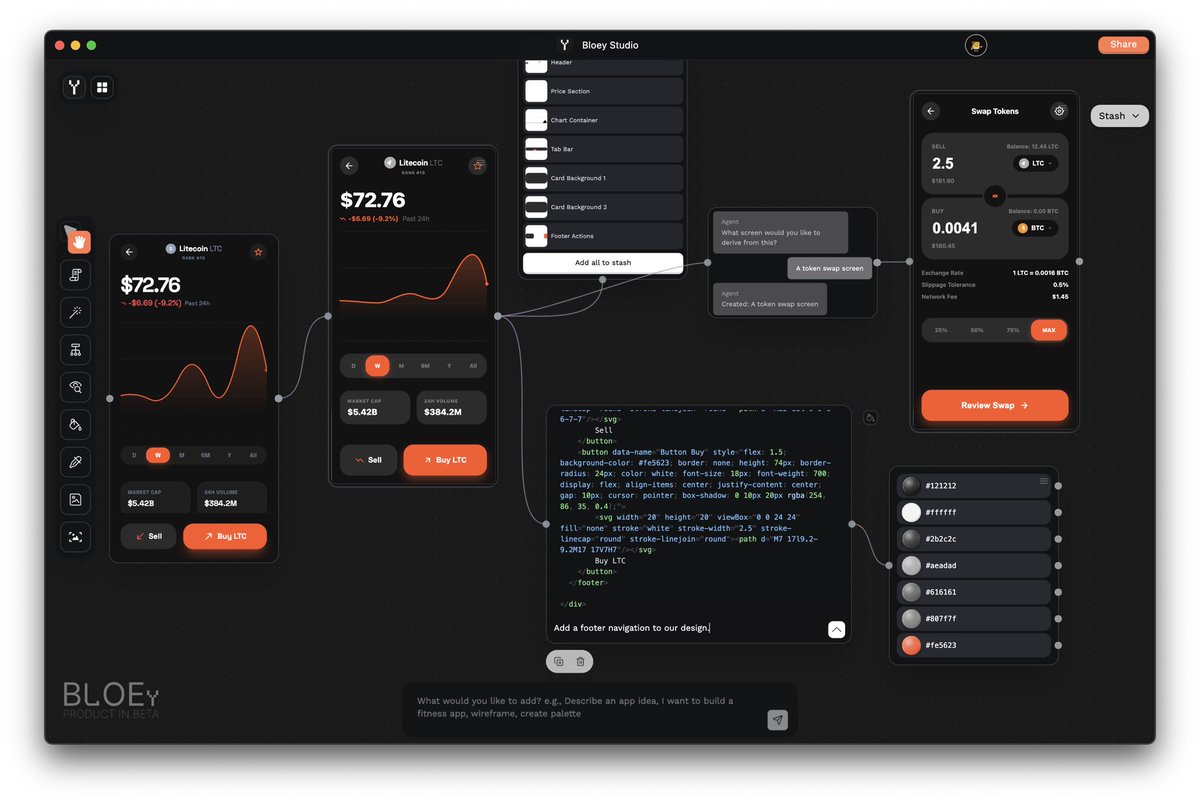
#Bloey has some cool new features today!
Generate a design with The Magician and live code or prompt however you like to provide updates and changes to your designs.. export the html, export directly to Figma, or use our in house editor tools by @FigClank .
And if you just want to mess with some colours? We extract them for you right away ;)
Follow @BloeyDesign for future updates!
#ClaudeCode #Figma #DesignToCode #CodeToDesign @figma #Design #DesignAgents @claudeai @buildonbase
2
8
384

12 Dec 2025
AI 駆動開発勉強会 フロントエンド支部 #1 w/あずもば で学んだことを共有します!
LLM に現在のUI を理解させる方法
Simulator / Emulator / 実機のスクショを撮る
スクショを LLM の入力欄に渡す
Base64 encode され、LLM が内容を理解できる
ただ、この方法は面倒なので、自動化が重要になる。
シュミレーターのスクリーンショットについて
IOS の場合はsimctl を使うと、スクリーンショットを撮れる。
Android であれば、adb コマンドを使えばスクリーンショットを撮れる。またUI ツリーを取得し、LLM が UI操作を行い、任意の画面操作が可能にもなる。
Design System とは?
プロダクトやサービスのUI を一貫性を持って効率的に構築するための「ルール・コンポーネント・ガイドライン」をまとめた体系
Design System を活用してる現場の現状
ほとんどの UI はDesign System を活用することで実装できる。
ただ、DogFooding などで問題や指摘が上がり改善する必要が….
既存のバグで特定の条件の時にUI が表示されるなど、対応が難しくなっていく…
Microsoft Ignite とは?
Microsoft の クラウド・AI 戦略がすべて分かる、最大級のエンタープライズ向け技術イベント
MicroSoft Build が開発者寄りなのに対し、Ignite は IT / クラウド基盤・AI のエンタープライズ活用 が中心
MIcrosoft Ignite 2025 キーノートについて
「可観測性」 をスタック全体で確立する、というテーマ
現在、AIエージェントを観測できない・ガバナンスできない・安全性が担保できない、といった課題が顕在化してるため、上記のテーマになった。
AI フレンドリーな設計原則
1宣言的設計
2関数型パラダイム
3イミュータブル
4型システム
5セオリー準拠
6系の明確化
Devinを使っていると、どれだけ CI を高速化できるか?が重要になる。
実行のスピードが遅いと、AI が失敗に気づくまでの時間がかかるので、ここが重要。
CI 高速化のための3つのコツ
- Integration Test の高速化を行う
- フィードバックの速度
- AI の実装ミスを 即座に検出
フロントエンド開発時、テストしやすい設計を行う
- Container のテスト
- 検証項目: 「この条件のときにこういうデータを渡すか?」
- 手法:MSW などでAPI をモックし、ビジネスロジックだけ検証
- Presenter (UI) のテスト
- 検証項目: 「特定のProps を渡した時に、こう描画されるか?」
- 手法 Storybook や スナップショットテストで機械的に確認
Ray-Ban Metaの登場で、理由があって着用するデバイスから、理由なく着用するデバイスへ変わった
Apple Watch や AirPods のようなファッションになる。
AIグラス・スマートグラスはスマホを置き換えるのか?
Meta Ray-Ban Displayを使えば、
SNS や 地図、通話など、見る・話すことはグラスで代替可能。
その上で、腕時計デバイスと一緒に使うと、ある程度代替可能になる。
XR アプリ開発の変化
Unity や Unreal Engine の開発は、初心者には難しかった。
これからは、ネイティブ言語でも作成できるので、開発が簡単になっていく。
仕様からネイティブ環境で 生成AI がプラットフォームごとに生成出来るようになる。
Microsoft Foundry(旧称 Azure AI Foundry)とは?
モデル選定、エージェント・ワークフロー構築、デプロイ、監視・評価までを一気通貫で扱える「AI アプリ/AI エージェント用の基盤サービス」のこと
音声から言葉を伝えると、色々と可能性が広がる。
XR デバイスは、音声のノイズが少ない
すぐに音声をデバイスに渡せるため
最近の 音声技術について
- クラウド環境で制御できて、使うモデルをどんどん入れて試せる
- 情報の取り扱いに関しては、自分で使われるところのデータ追跡性も高い
- 最近は API が作られているので、扱いやすくて簡単に利用できる。
VsCode の Copilot 拡張 は、OSS 化していて、コードを読むことができる
MCP Client としての Copilot 拡張の実装
MCP Client としての Copilot 拡張でのMCP Tool 選択の実装
GitHub Copilot Chat agent mode の ツール上限は128 個
どのように、ツール選択の精度を高めているか?
ユーザーの入力をベクトル化して、それに合ったツールを選択している。
ツールが増えすぎると、「仮想ツール」でツールをグループ化している64個以上 の時に、仮想ツール化が起こる。
仮想化ツールの仕組み
MCP Tool Name と MCP Tool Description をベクトル化して、意味合いが近いものをグループ化する。
その後、グループを情報を要約してDescripitonに追加する。
結果、利用するツール数を少なくしている。
Open Tabの機能について
開いているタブで同じLanguage id の内容を参照として入れている。
また、別言語のファイルは、コンテキストに入れてない様子。
Figma デザインから、アプリケーションを作成できる
Codex × SwiftUI で CodeToDesign アプローチを行える
スナップショット取得→修正の自動化手順
1. プロジェクトへ画像配置
2. カレントディレクトリ移動
3. Codex に プロンプト入力を基 に Swift UI を作成させる
4. 生成コードを確認・調整・必要に応じて再生成・修正
5, ContentView.swift に組み込み・表示確認・調整させる
GitHub Copilot for Xcode も、色々なモデルが利用可能
GPT-5.1 と Claude Opus 4.5 も利用できる。
一つのチャット内で、モデルを切り替えられる。
GitHub Copilot for Xcode が上手く動かない場合の対応方法 Xcode 自体の再起動を行う。
その上で、GitHub Copilot for Xcodeも再起動するといい。
GitHub Copilot for Xcodeの最新機能を利用したい場合は、直接GitHubからダウンロードする
HomeBrewだと、古いバージョンしか利用できない。
今日も、とても沢山のことを学ばせて頂きました。
主催いただいた 、AI 駆動開発勉強会 さん、あずもば さん、スポンサーの方々、ご登壇者の方々、ありがとうございました!
1
2
10
1,127

17 Aug 2025
Design meets dreams ✨ Made this poster for class, inspired by the grand opening of my brand Shimmer by Sahar. What do you think?
@f_forough
@CodeToInspire @ZohreMoham62483
#GraphicDesigner
#codetoinspire
#codetodesign
#grandopening

11
103


29 Feb 2024
🍎 How to Convert Web CSS Styles Directly into Figma Design Elements?
I'd like to share with you a fantastic Figma plugin that addresses this need, called Code to Design Playground.
🚀 Cutting straight to the chase, watch Irving's video tutorial here: share.irvinglab.com/code-to-…
This plugin primarily allows you to convert CSS styles copied from the Chrome Developer Tools directly into design elements in Figma. In the video, I'll demonstrate how to use this plugin to effortlessly transform web designs into Figma designs. Check it out!
🥝 For more useful web design plugins, read "Top Figma Plugins Recommended by a Senior Web Designer," which also includes this video tutorial: global.irvinglab.com/blog/fi…
🥝 If you're a Figma user, web designer, UI/UX designer, or someone who uses Figma for project management, brainstorming, marketing tasks, etc., making good use of these Figma plugins can significantly enhance your web visual design process, team collaboration, and reduce time and communication costs across departments. The free versions of these plugins are usually sufficient for most needs, making them perfect for web designers, UI/UX designers, or anyone who uses Figma for various project management and creative tasks.
🚀 Subscribe to the Irvinglab newsletter for more video tutorials and in-depth articles on web design, UI/UX, SEO, Shopify e-commerce design concepts, WordPress branding and design tips, recommendations and reviews on Shopify apps and WordPress plugins, marketing design, programming, AI software usage, and other practical content: irvinglab.com/newsletter/
Stay updated with a wealth of hands-on experience in website design and development, including design perspectives, Web UI/UX, SEO, Shopify e-commerce site design concepts, WordPress branding website design tricks, recommendations and insights on Shopify Apps and WordPress plugins, marketing design and programming, AI software use, and more.
🪴 Keywords: #Figma #FigmaPlugin #CodeToDesign #ChromeDev #CSS #WebDesign #Irvinglab #Irving
-
🍎 如何複製網頁中的 CSS 樣式直接轉換成 Figma 的設計圖?
我想和你分享一款很棒的 Figma 外掛來解決這個需求,叫做 Code to Design Playground
🚀 不囉唆,直接切入正題,觀看爾文的影片教學:share.irvinglab.com/code-to-…
-
這個外掛的主要用途是將在 Chrome 開發者工具中複製的 CSS 樣式直接轉換成 Figma 的設計元素。我會在影片中示範如何使用這個外掛,讓你能夠更輕鬆地將網頁設計轉換成 Figma 設計。快來看看吧!
🥝 想了解更多好用的網站設計外掛,前往閱讀「資深網頁設計師常用的 Figma Plugin 推薦 」,此影片教學也有嵌入到文章中:irvinglab.com/blog/figma-plu…
🥝 若你是 Figma 使用者、網頁設計師,那善用這些 Figma plugin大幅提升網頁視覺設計過程的執行效率、團隊協作的順暢、降低時間與跨部門的溝通成本,而且外掛的免費版本通常就夠用了!完全適用對象為網頁設計師、UIUX 設計師或本來就是用 Figma 來專案管理、腦力激盪發想、行銷工作的使用者等
-
🚀 Irvinglab 爾文實驗室電子報:歡迎來訂閱!會影更多的影片教學放在電子報中,比較容易撰寫長文紀錄與閱讀:irvinglab.com/newsletter/
不定期分享滿滿的網站設計與建置相關的實戰經驗,包含設計觀點、Web UI/UX、SEO、Shopify 電商網站設計概念、WordPress 品牌形象網站設計訣竅、Shopify App 和 WordPress 外掛推薦與使用心得、行銷設計與程式開發、AI 軟體使用等實用內容
🪴 關鍵字
#Figma #FigmaPlugin #CodeToDesign #ChromeDev #CSS #WebDesign #Irvinglab #Irving

2
90

Anima automates design system management 🤖🤯
Here's how Senior Product Designer @Satjaleenmadan of @Stuart_Delivery synced @MUI_hq components from @storybookjs to @figma using @AnimaApp 👉
bit.ly/3ZHwSAk
#designsystems #AI #StorybookToFigma #CodeToDesign
4
8
900

22 Nov 2022
Compare websites in light and dark mode in @Figma - side by side with the plugin html.to.design.
#codetodesign #figma #uiuxdesign
2
2
27 Sep 2022
Generating an icon component with 1001 variants has never been easier.
From @storybookjs to @figma!
Try @story_to_design
#design #codetodesign #desigsystems #storybook
1
2
8
21 Sep 2022
Components generate with @story_to_design have automatically prototype links for hover and press!
Maintain less, design more!
👉 story.to.design
#figma #designsystems #design #codetodesign
2
5
20 Sep 2022
"Can @story_to_design import this Form from #storybook to #figma?"
<spoiler> Yes it can! </spoiler>
#designsystem #designsystems #codetodesign
2
6

AirBnbのUIデザインだけでもすごいのに、ReactとSketchでコードからデザインガイドラインを作るあれは、何年経っても何度考えてもキュンキュンする。
#reactsketchapp #airbnbdesign #codetodesign #uidesign #designsystem #UIデザイン #デザインシステム
2