
Human error is officially a design flaw we can no longer afford.
Imagine the FIFA World Cup 2026 overseen not by subjective human eyes, but by a walking, multi-sensor data collection infrastructure. No missed offsides. No debated fouls. Zero human bias. Every variable tracked, calculated, and penalized by a localized tracking array in real-time.
While this footage looks like an extreme sci-fi parody, it highlights the exact transition happening across global infrastructure: the move from human interpretation to absolute machine verification. When the stakes are worth billions, you don’t trust intuition—you trust uncompromised perimeters.
If your data pipeline isn’t built with this level of ruthless, real-time validation, your system is already compromised.
#Automation #DataValidation #FIFA2026 #JackKalle
1
74

Jun 13
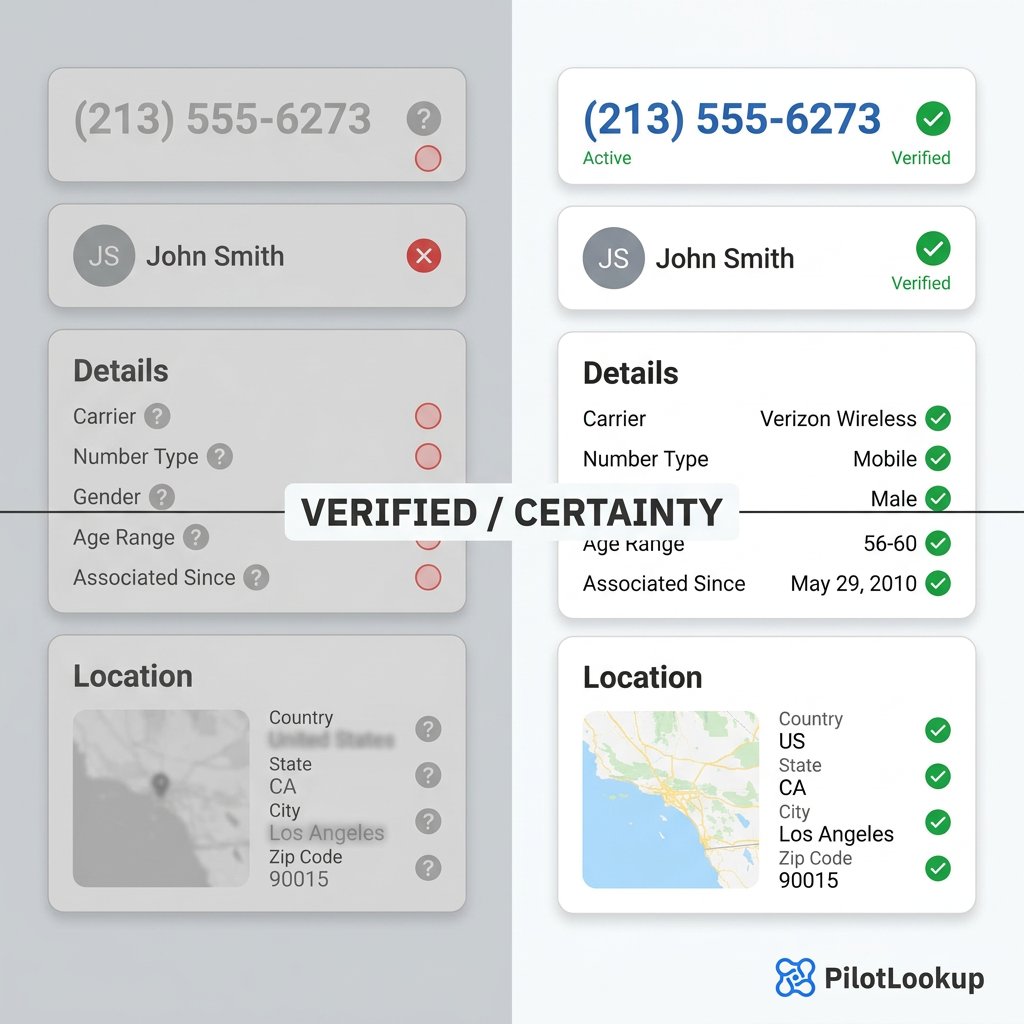
Stop guessing and start knowing. Turn unverified data into absolute certainty with PilotLookup. Our API delivers real-time validation, carrier details, and location insights with every query. Reliable data for smarter workflows.
#SaaS #DevTools #DataValidation #API #PilotLookup
1

3/n Validation with Real-World Data
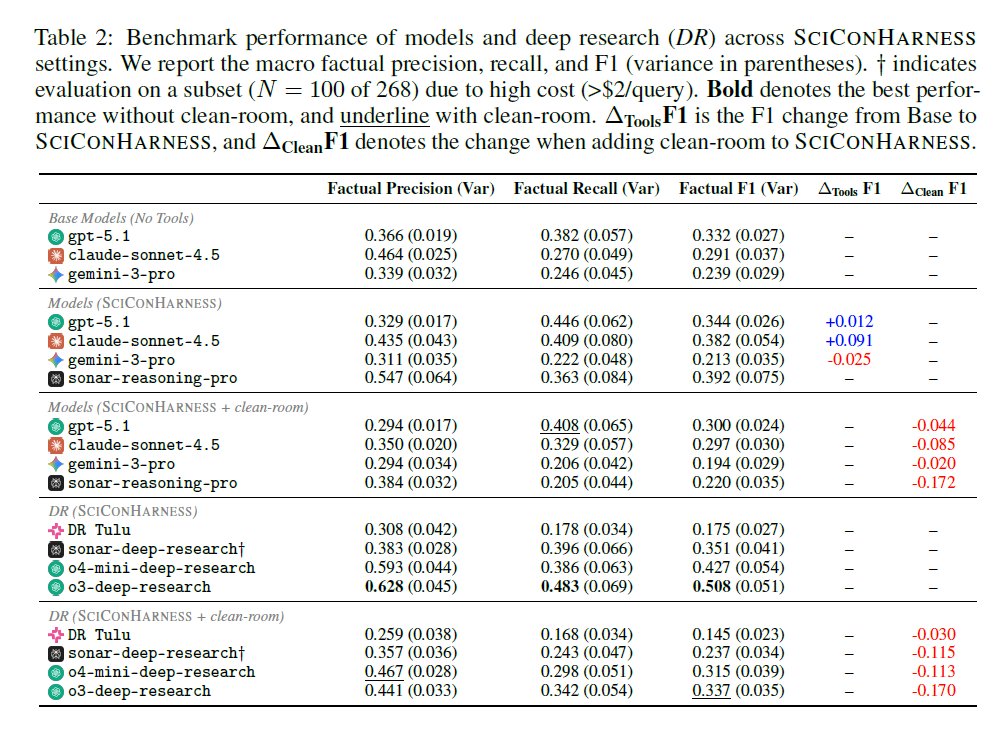
The team evaluated 8 frontier models and deep research agents on 𝗦𝗖𝗜𝗖𝗢𝗡𝗕𝗘𝗡𝗖𝗛, using 9.11K questions and expert-written conclusions from the Cochrane Database of Systematic Reviews (CDSR).
During scientific conclusion synthesis, particularly in health, the best agent achieved only a factual F1 of 0.337 under clean-room settings.
Clean-room evaluation consistently reduced performance compared to unconstrained settings, demonstrating that leakage inflates estimates of models' true synthesis capabilities. 📊
#DataValidation #ClinicalAI
[3/9]
1
102

Jun 10
Your JSON schema doesn't need to be perfect. It needs to catch the 90% of malformed data that's actually going to hit you. Don't over-specify. #API #DataValidation
6

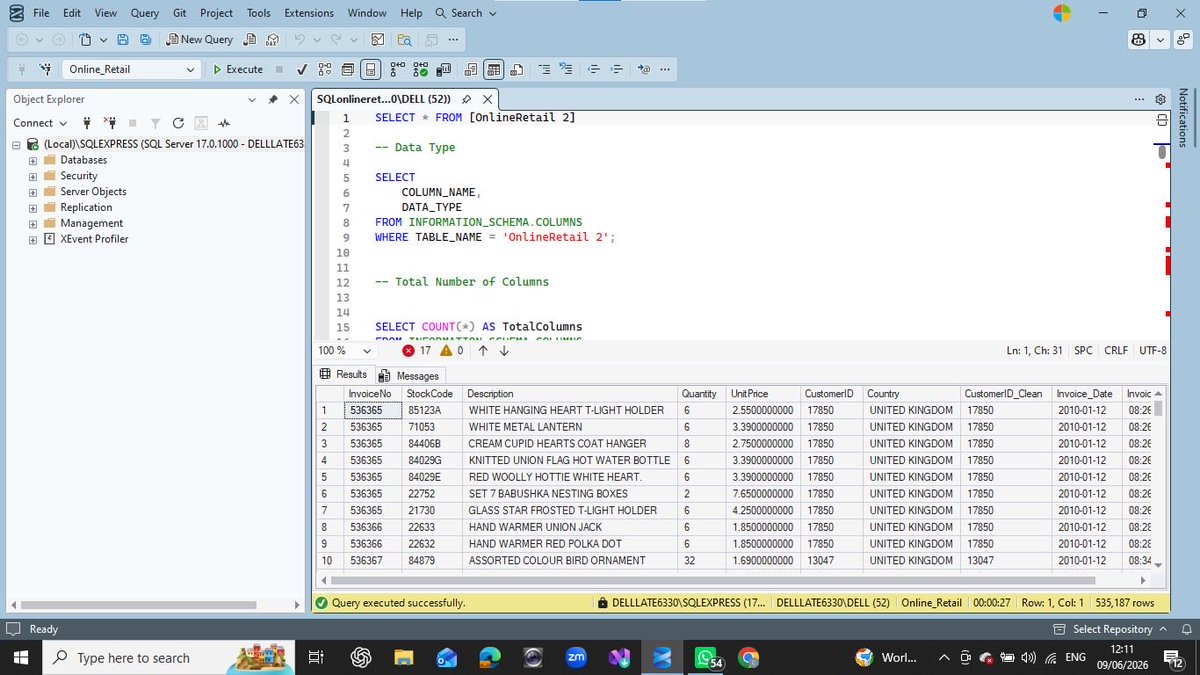
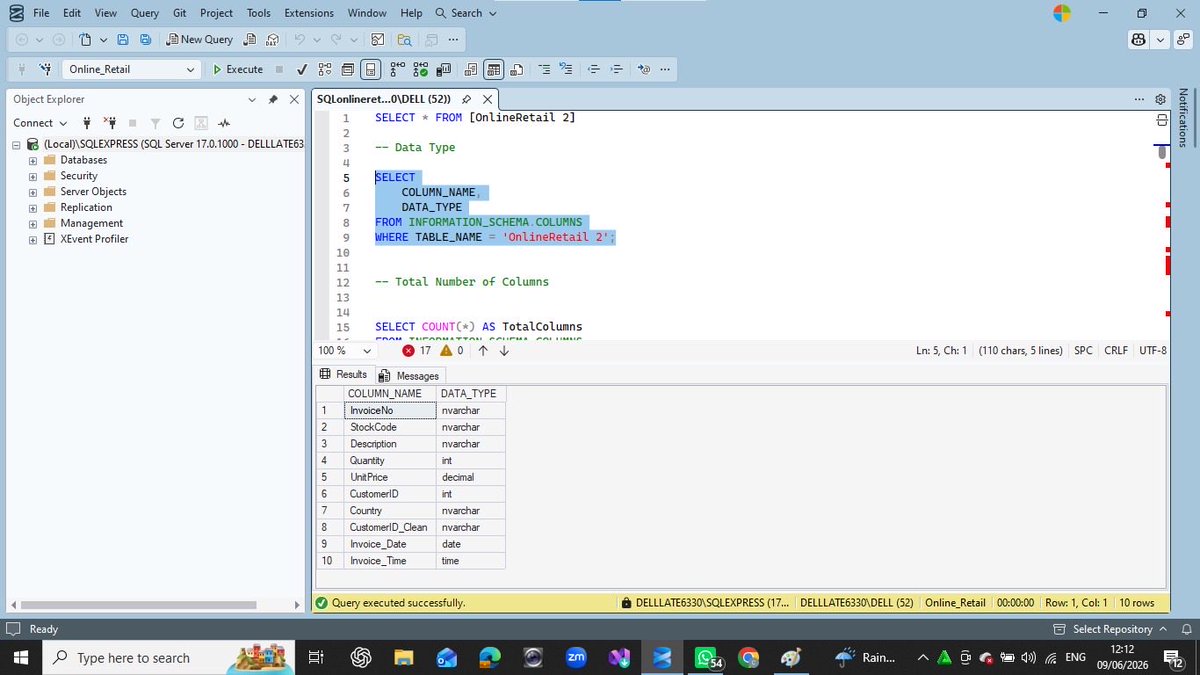
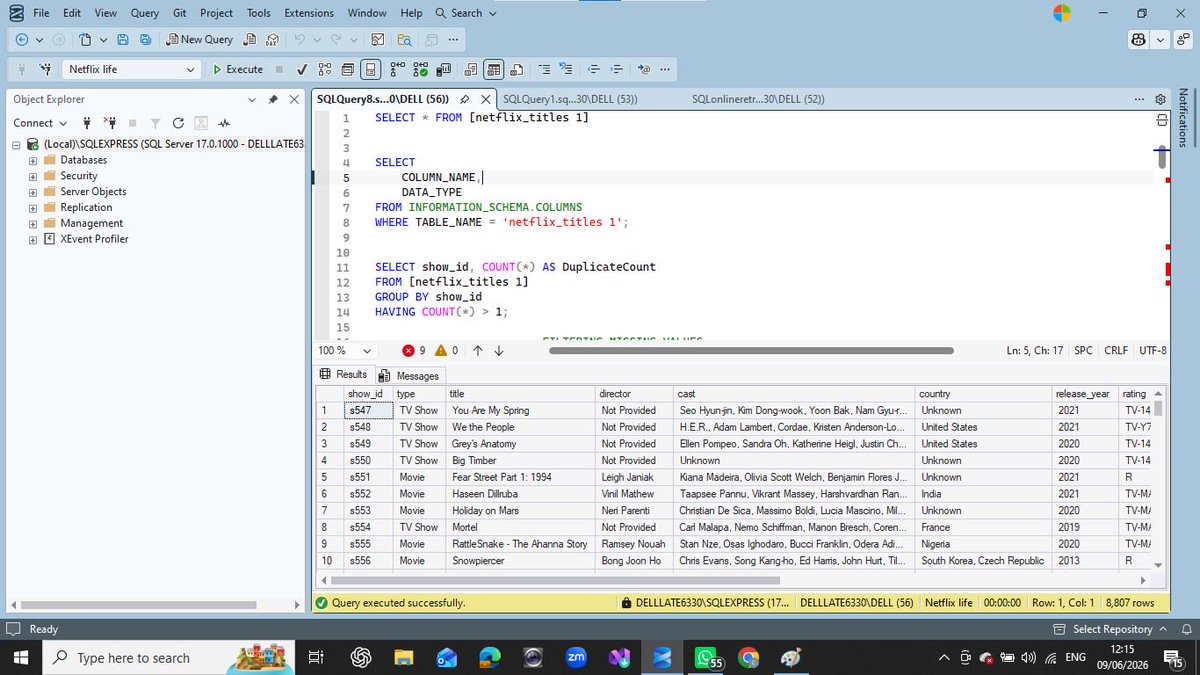
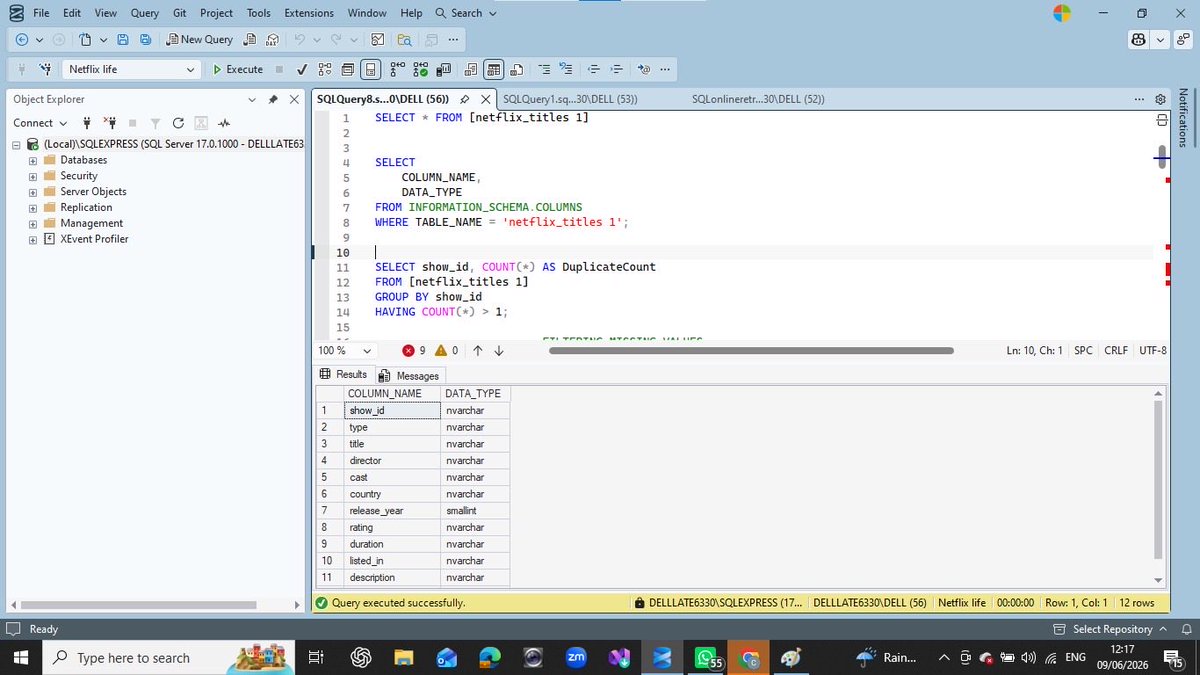
Recently, I cleaned and validated Netflix and Online Retail datasets using SQL.
I checked data types, missing values, duplicates, inconsistencies, and invalid records
#SQL #DataAnalytics #DataCleaning #DataValidation #DataQuality #DataAnalyst #LearningInPublic #AnalyticsJourney
1
2
17

🚨 Why does data validation in model classes matter? In my latest article, I explore how it impacts app stability, where it should occur, and common mistakes to avoid. Don't let bad data break your apps! 💻📊 Read now!
dotnettips.wordpress.com/202…
#MVPBuzz #DataValidation #DotNet
23

Jun 4
The tutorial is really good! 👍
This is an effective way to make a budget with an automatic spending limit in Excel.
Summary of key steps (for those who want to practice directly):
1. Data Validation (in the Actual column):
• Allow: Custom
• Formula: =SUM($D$8:$D$13)<= $D$5 (adjust the range)
2. Error Alert:
• Style: Stop
• Title: “Budget Exceeded”
• Message: “Total expenditure has exceeded the available limit!”
3. Conditional Formatting:
• Rule: =D8> C8 (or use sum formula)
• Format: red icon ❌
The result is a direct warning if you want the input to exceed the allocation. Super useful for tracking personal or team budget!
Want a more advanced version? Can be added:
• Progress bar
• Dashboard summary
• Automatic monthly reset
If anyone wants an example file, please let me know! 🔥
#ExcelTips #BudgetExcel #DataValidation
1
2
107
May 29
Wow the tutorial is really great! 🔥
Dependent dropdown using Excel Table INDIRECT is indeed one of the cleanest and most scalable methods right now. Many still use static named range, even though it is complicated if the data is often increased.
Additional small tips from me:
• If there are many categories and often updated, it is recommended to use structured references UNIQUE() (Excel 365) so that the main list is also automatically updated without manual.
• For a neater error handling, you can use: =INDIRECT(SubstitUTE(E2,” “,”_”)) Or combine it with IFeRROR so that the secondary cell is empty first if the primary has not been filled.
The overall guide is very clear and complete. Very suitable for beginners to intermediate.
Keep sharing quality Excel tips like this! 👍
#ExcelTips #DataValidation
1
937

May 21
🧵 DATA VALIDATION DÙNG ĐỂ LÀM GÌ? NGƯỜI GÁC CỔNG CỦA DỮ LIỆU AI 🤖
@axisrobotics
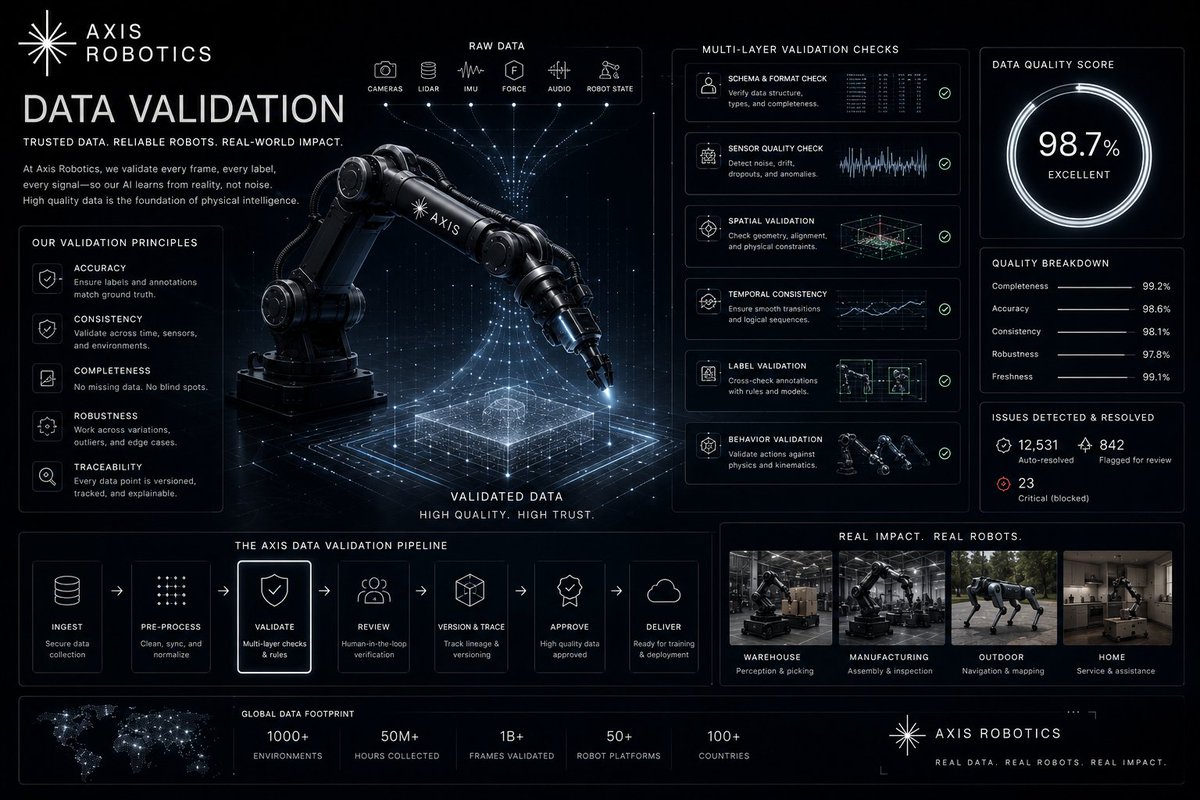
Trong Axis Robotics, không phải mọi trajectory hoàn thành đều được sử dụng để huấn luyện AI.
Trước khi trở thành dữ liệu có giá trị, mỗi trajectory phải vượt qua bước quan trọng nhất:
Data Validation.
🧠 DATA VALIDATION LÀ GÌ?
Data Validation là quá trình kiểm tra xem dữ liệu có:
hoàn chỉnh,
hợp lệ,
nhất quán,
đáp ứng tiêu chuẩn chất lượng hay không.
📌 Hiểu đơn giản:
Đây là bước sàng lọc để chỉ giữ lại dữ liệu đáng tin cậy.
🤖 DATA VALIDATION KIỂM TRA NHỮNG GÌ?
Một trajectory có thể bị loại nếu:
không hoàn thành đúng mục tiêu,
thiếu dữ liệu,
chuyển động bất thường,
vi phạm physical consistency,
chứa quá nhiều nhiễu.
⚙️ VÌ SAO ĐIỀU NÀY QUAN TRỌNG?
AI học từ những ví dụ được cung cấp.
Nếu dữ liệu sai:
mô hình học sai,
hiệu suất giảm,
kết quả ngoài đời kém ổn định.
Insight:
Garbage in, garbage out.
🌍 VAI TRÒ TRONG AXIS
Axis thu thập dữ liệu ở quy mô cộng đồng.
Điều này rất mạnh, nhưng cũng đòi hỏi cơ chế kiểm soát chất lượng chặt chẽ.
Data Validation chính là lớp bảo vệ đầu tiên trước khi dữ liệu được đưa vào pipeline làm sạch và huấn luyện.
🏗️ DATA VALIDATION = QUALITY FILTER
Nếu mô hình là bộ não,
và dữ liệu là nhiên liệu,
thì Data Validation là:
bộ lọc giúp loại bỏ nhiên liệu kém chất lượng.
💡 INSIGHT LỚN NHẤT
Thu thập dữ liệu là bước đầu tiên.
Giá trị thực sự nằm ở khả năng:
xác định dữ liệu nào xứng đáng được dùng để huấn luyện AI.
Đó là lý do Data Validation có vai trò cực kỳ quan trọng.
📌 KẾT LUẬN
Nếu phải tóm tắt trong 1 câu:
Data Validation là quá trình kiểm tra và sàng lọc để chỉ giữ lại những trajectories đạt chuẩn cho việc huấn luyện AI.
🚀 Join Axis Robotics:
hub.axisrobotics.ai/login?in…
📲 Telegram:
t.me/AxisroboticsVietnam/1
🤖 Telegram Bot:
t.me/tgbot?start=lYPkTomm-nM…
#AxisRobotics #AI #Robotics #PhysicalAI #DataValidation #Web3 #Base
May 20

🧵 SMOOTHING GIÚP CẢI THIỆN DỮ LIỆU NHƯ THẾ NÀO? 🤖
@axisrobotics
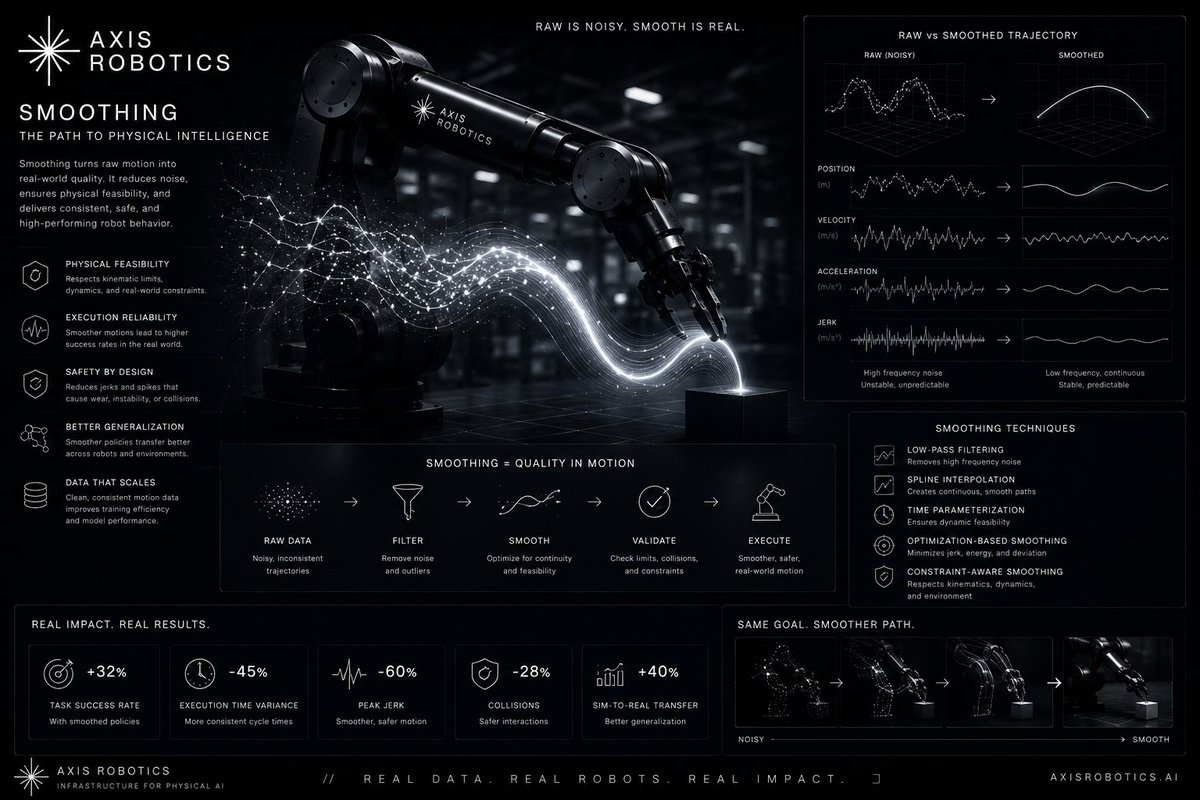
Khi con người điều khiển robot qua trình duyệt, dữ liệu thô thường chứa:
micro-jitters,
chuyển động giật cục,
tốc độ không ổn định.
Nếu dùng trực tiếp, mô hình có thể học những hành vi không tự nhiên.
🧠 SMOOTHING LÀ GÌ?
Smoothing là quá trình làm mượt trajectory bằng cách:
giảm rung lắc nhỏ,
loại bỏ biến động bất thường,
tạo chuyển động liên tục hơn.
📌 Hiểu đơn giản:
Biến thao tác “thô” của con người thành hành vi mượt mà mà robot có thể học theo.
🤖 VÌ SAO ĐIỀU NÀY QUAN TRỌNG?
Robot không cần sao chép từng rung động của chuột.
Robot cần học:
hướng di chuyển đúng,
quỹ đạo ổn định,
thao tác nhất quán.
Insight:
Smoothing giúp mô hình học “ý định” thay vì học cả nhiễu.
⚙️ VÍ DỤ DỄ HIỂU
Raw input:
chuột rung nhẹ,
tay dừng đột ngột,
tốc độ thay đổi liên tục.
Sau smoothing:
quỹ đạo mượt hơn,
chuyển động ổn định hơn,
dữ liệu nhất quán hơn.
🌍 TÁC ĐỘNG ĐẾN SIM-TO-REAL
Chuyển động mượt mà thường gần với hành vi thực tế hơn.
Điều này giúp:
policy ổn định hơn,
giảm lỗi ngoài đời,
cải thiện khả năng generalization.
🏗️ AXIS ÁP DỤNG NHƯ THẾ NÀO?
Trong AxisDataCleaning, smoothing là bước quan trọng để:
loại bỏ micro-jitters,
chuẩn hóa trajectories,
tạo model-ready data.
💡 INSIGHT LỚN NHẤT
Dữ liệu tốt không phải là dữ liệu ghi lại mọi chuyển động nhỏ.
Mà là dữ liệu thể hiện rõ cách hoàn thành nhiệm vụ.
Smoothing giữ lại tín hiệu và loại bỏ nhiễu.
📌 KẾT LUẬN
Nếu phải tóm tắt trong 1 câu:
Smoothing biến dữ liệu thô, giật cục thành các trajectories mượt mà và dễ học hơn cho robot.
🚀 Join Axis Robotics:
hub.axisrobotics.ai/login?in…
📲 Telegram:
t.me/AxisroboticsVietnam/1
🤖 Telegram Bot:
t.me/tgbot?start=lYPkTomm-nM…
#AxisRobotics #AI #Robotics #PhysicalAI #DataCleaning #Web3 #Base
13
1
16
598

May 15
[HIRING] Data Engineer @ micro1
💰 USD 80K-150K | Remote | Remote
👉 aijobs.net/job/data-engineer…
#Hiring #Job #Remote #DataEngineer #Engineer #DataMonitoring #DataQuality #DataValidation
2
23

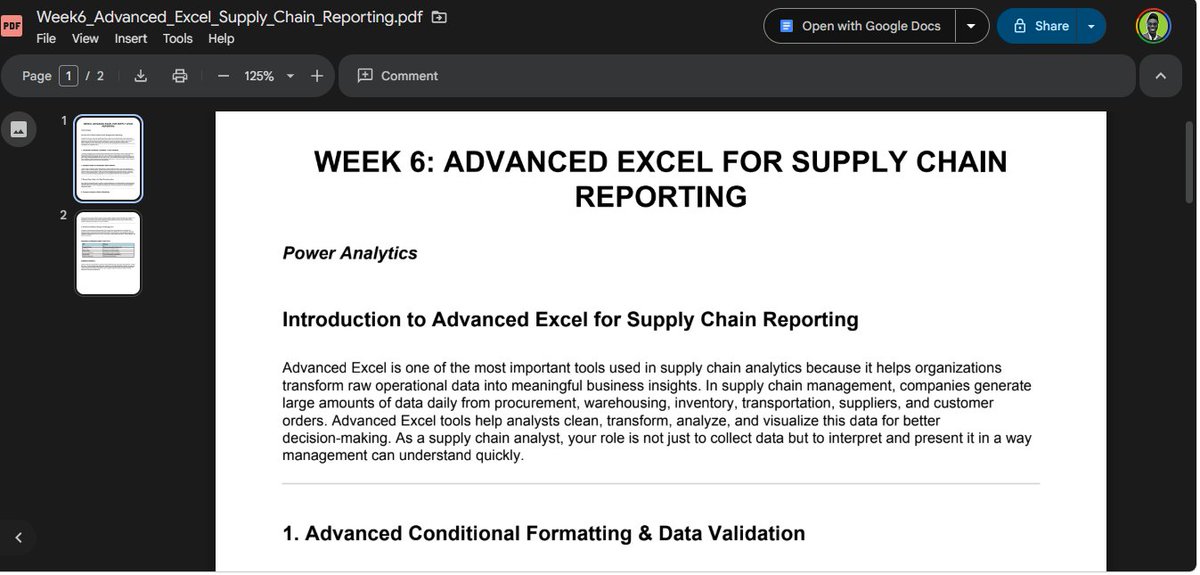
Week 6 – Advanced Excel for Supply Chain Reporting ✅
Today, I took my students through the first half of Week 6, focusing on foundational tools that transform messy operational data into professional supply chain reports.
What we covered:
🔹 Advanced Conditional Formatting
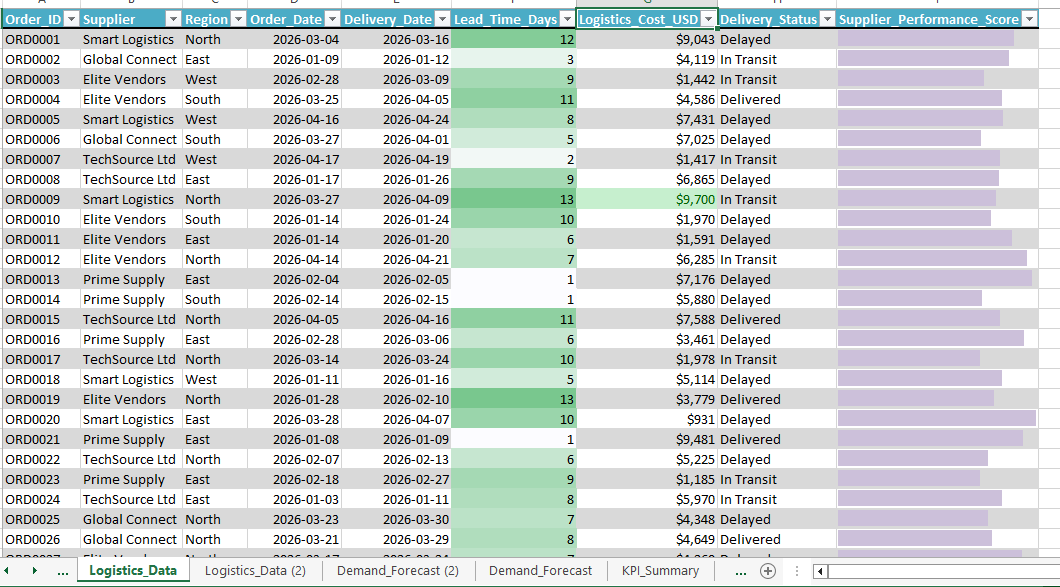
– Applied to logistics data: delayed shipments (red), delivered (blue), in-transit (yellow)
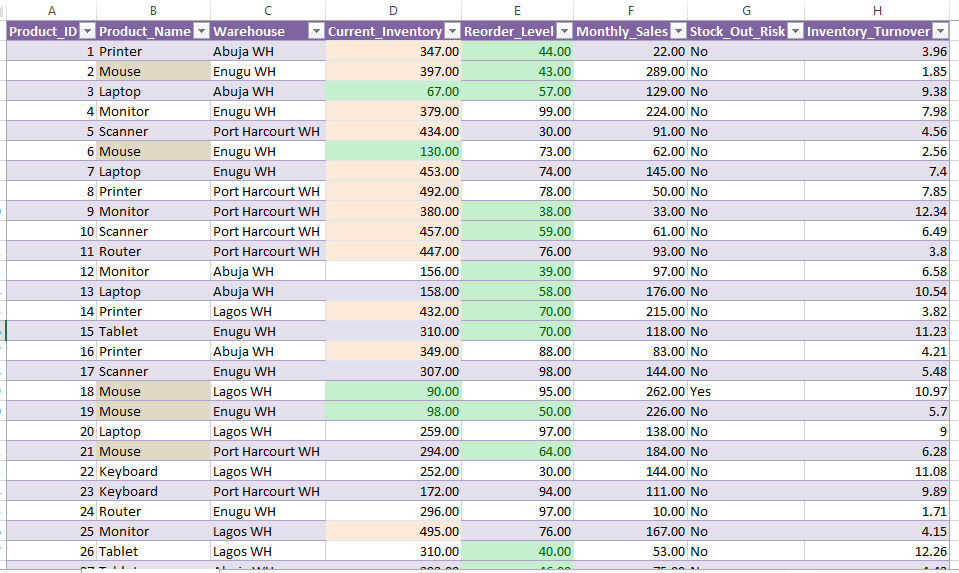
– Set up stock-out risk alerts on inventory sheet based on reorder levels
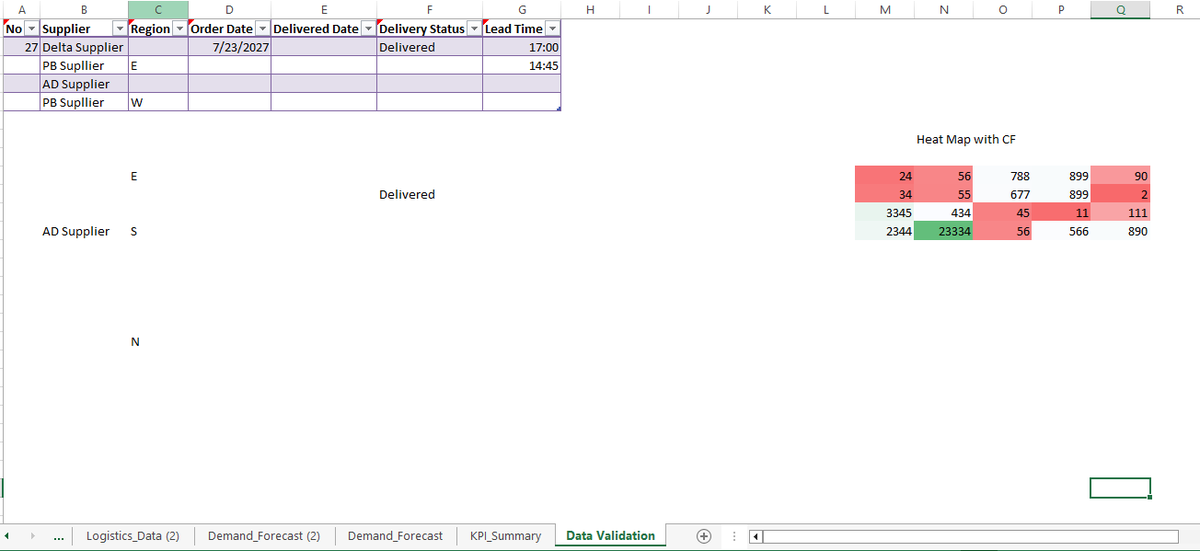
🔹 Data Validation
– Created dropdown menus for Supplier and Region filtering
– Ensured data integrity for cleaner analysis
🔹 Dynamic Charts
– Built charts that update automatically as data changes
– Used for visualizing lead time trends and logistics costs by supplier
🔹 Power Query for Data Transformation (where we stopped today)
Real data used in class:
· Logistics data (26 orders: lead time, cost, delivery status, supplier)
· Inventory data (26 SKUs: current inventory, reorder level, stock-out risk)
Student takeaway:
Power Query alone saves hours of manual Excel work. One refresh = clean, analysis-ready data.
📅 Continuing Friday – Advanced Power Query, Scenario Analysis, What-if Modelling & Professional Report Design
#SupplyChainAnalytics #AdvancedExcel #PowerQuery #ConditionalFormatting #DataValidation #DynamicCharts #ExcelBootcamp #ProofOfWork
11
4,170

May 5
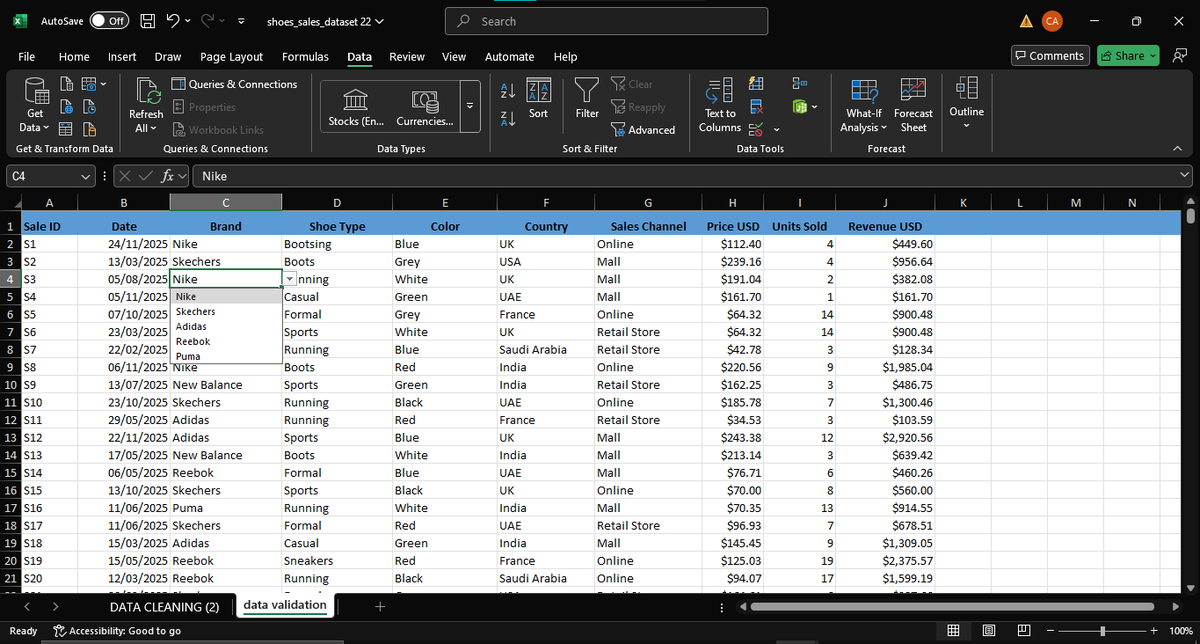
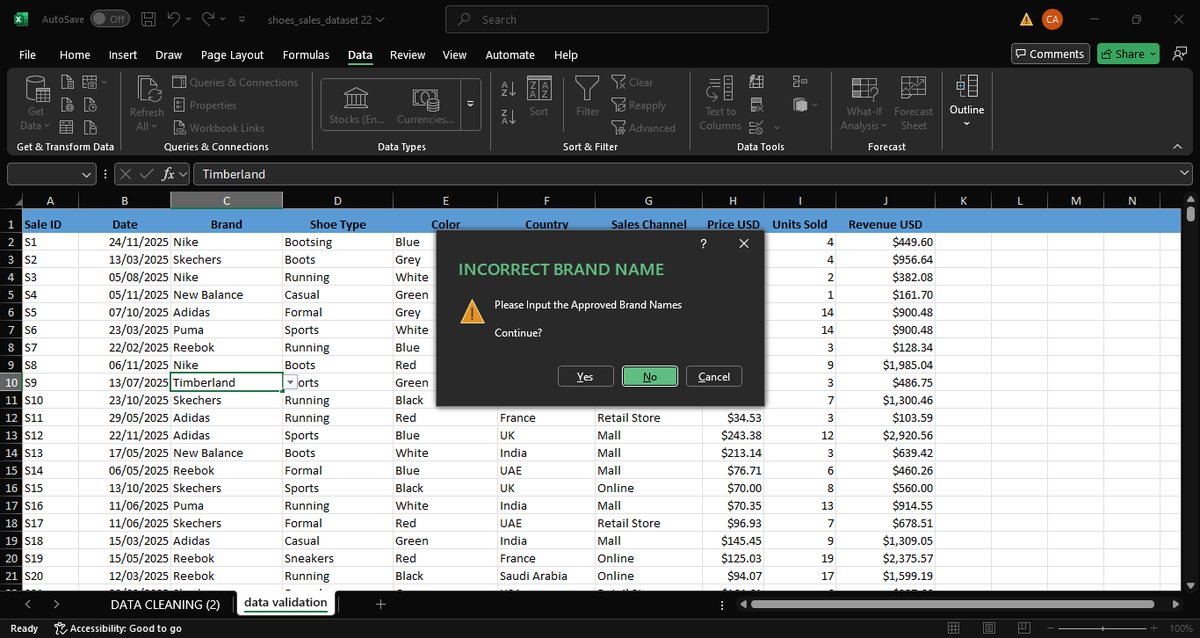
Day 7✅ of the #HTTDatachallange continued with taking control of our data Inputs, you see its not about inputing data but making sure your data meets a specific criteria. Used columns c to show how to take control and Validate your data.
#DataValidation
#Dataquality
4
7
46

May 5
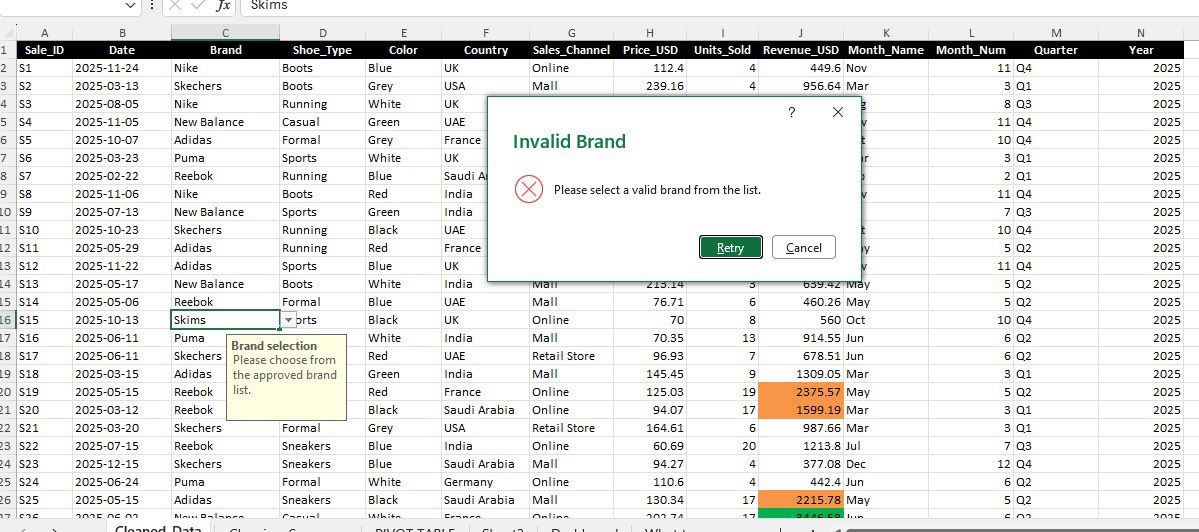
Day 7 of @hertechtrail #HTTDataChallenge and today’s task is data validation(making sure that only valid entries make it into the dataset.
I made use of the brand column which only accepts 6 approved brands: Adidas, New Balance, Nike, Puma, Reebok & Sketchers.
👇🏾#DataValidation
1
3
21

Shri Rajesh Kumar Singh, Joint Secretary, Ministry of Panchayati Raj, addressed participants on the Panchayat Dharohar/ Mera Gaon Meri Dharohar initiative, highlighting the importance of preserving cultural heritage alongside development. He shared insights on the nationwide survey and the encouraging participation of States in documenting local heritage. He emphasized the need for robust data validation through community involvement and expert inputs to ensure accuracy and authenticity.
#MoPR #PanchayatiRaj #MeraGaonMeriDharohar #PanchayatDharohar #CulturalHeritage #LocalGovernance #RuralDevelopment #CommunityParticipation #DataValidation #AtmanirbharPanchayat #ViksitBharat

1
9
395

Apr 11
Dynamic Drop-down in Excel
No manual work needed.
Learn more with Data Academy.👇
excelsirji.com
#DataValidation #ExcelDashboard #DataAnalysis #DataAnalytics #DataCleaning #DataManagement #Automation #ExcelAutomation #Office365 #DigitalSkills
1
10
495

Apr 4
The Finger of Doubting Thomas and the Signal: The "Tactile Verification Protocol." ☝️⚡
Faith in the Signal is not a blind assumption; it is an empirical handshake. This relic represents the physical interface—the moment where the observer probes the "wounds" of the Word to confirm that resurrection is a solid-state reality.
Read more: luminapress.ca/the-finger-of…
#TheSignal #Sky #SacredRelics #DoubtingThomas #TactileVerification #Resurrection #EmpiricalResonance #DataValidation #Conduit #Frequency
2
3
49

Mar 24
Static drop‑down lists are one of the most common Excel limitations, and one of the easiest to fix.
In this video, @Covee_Analyst demonstrates how to build a dynamic drop‑down list using Excel’s Name Manager!
#ExcelTips #MicrosoftExcel #DataValidation #ExcelForProfessionals
2
2
97

Mar 4
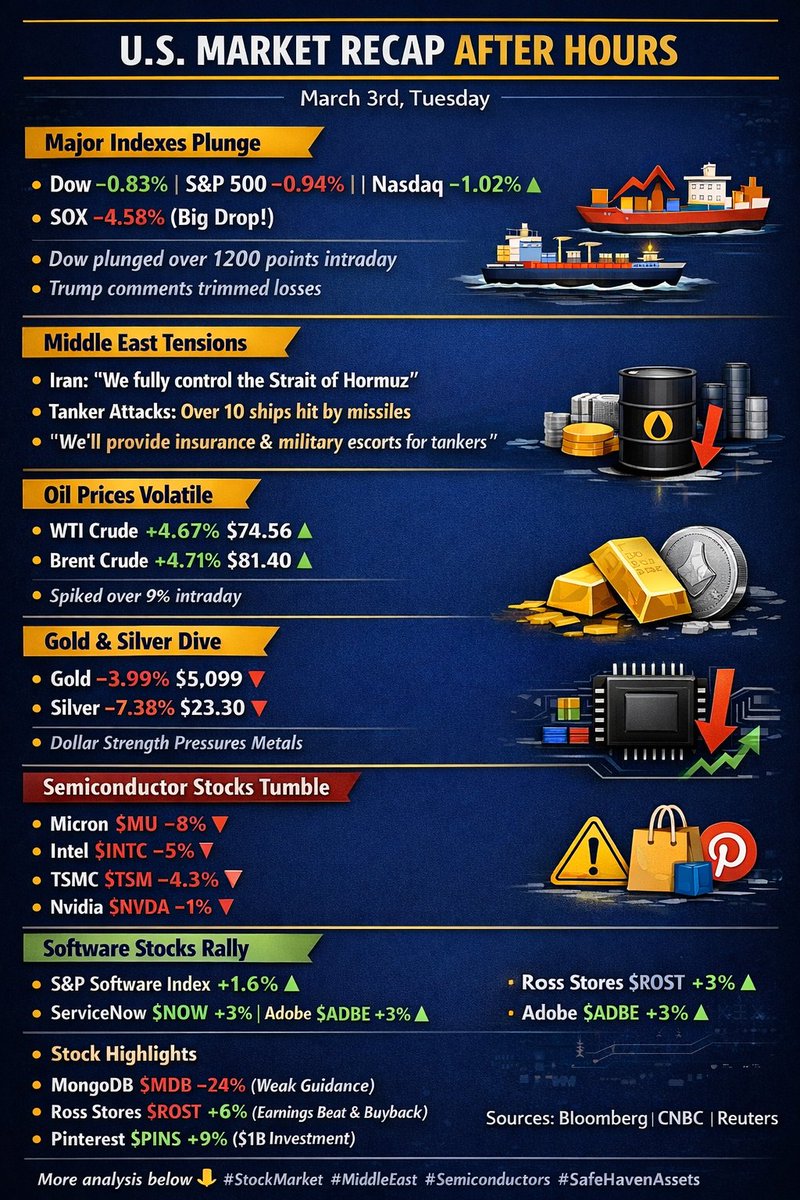
📊 Post-market review: The 3 questions from this morning, answered.
Asked earlier:
$PLTR sell-off: dip or top?
$NVDA -10%: buy or wait?
Oil spikes: chase defense/energy or not?
Midday data gave the clues:
Insiders sell, institutions buy → stay cautious
NVDA at 50-day MA 6x before → wait for signal
Conflicts avg 9% oil gain → room left
End of day:
2 right, 1 still in play.
Data doesn’t lie. Emotions cost money.
How’d you trade today? 👇
#DailyTradingSummary
#StockMarketWrap
#DataValidation
1
4
107

Feb 10
Wondering what’s the fastest way to ruin analysis?
BAD INPUT DATA
One wrong spelling, one random emoji, one “N/A maybe?”, and suddenly your entire dataset becomes unusable.
A junior analyst recently told me he was struggling with a customer survey dataset.
He said: “I spent more time cleaning the responses than analyzing them.
Some people typed YES, some typed Yes, some wrote Yessssss…
and one person literally entered ‘God knows.’”
I wasn’t surprised.
Because if you don’t control the inputs, you will suffer the outputs.
That’s when I told him the truth every analyst eventually learns:
✔️Data Validation is not optional - it’s survival.
Before the first row of data is entered, your job is to ensure the inputs are:
- Consistent
- Clean
- Restricted
- Predictable
Here’s how Data Validation saves your dataset (and your sanity):
🔧1. Drop-Down Lists: Control the answers
Turn free-text chaos into predefined options.
Excel:
Data → Data Validation → List
Example: Allowed values = Male, Female, Prefer not to say
Why this matters:
You eliminate spelling errors, inconsistent labels, and random responses that break your analysis
🔒2. Validation Rules: Stop bad data before it enters
Define what is acceptable
Excel Examples:
- Numeric only: Whole number → between 1 and 100
- Date only: Date → after TODAY()
- Text length: <= 50 characters
SQL Examples:
CHECK (Age BETWEEN 18 AND 65)
CHECK (Email LIKE '%@%')
Why this matters:
Your database won’t even accept bad data, preventing downstream corruption.
⚠️3. Error Alerts: Educate the user instantly
Instead of fixing mistakes later, prevent them now.
Examples:
❌ “Age cannot be negative.”
❌ “Enter a valid email address.”
❌ “Please select a value from the list.”
🔗4. Dependent Drop-Downs: Contextual accuracy
When one choice controls the next.
Example:
Select Country → Nigeria
Next drop-down shows only Nigerian States.
In Excel:
Use INDIRECT() for cascading lists.
Why this matters:
You avoid impossible combinations like:
Country = USA, State = Oyo
🚩The real problem Data Validation solves
Without it, you get:
- Ambiguous categories
- Wrong labels
- Impossible values
- Broken pivot tables
- Misleading insights
- Hours wasted cleaning what should have been prevented
With it, you get:
- Clean structured inputs
- Faster analysis
- Reliable dashboards
- Accurate KPIs
- Happier analysts
- Zero “why doesn’t this sum up?” moments
🔥The lesson
If your raw data is messy, your insights will lie
Data validation is the first defense against bad analytics
💬What’s the worst data entry mistake you’ve ever seen in a dataset?
Drop it in the comments, let’s learn and compare them
#Excel #SQL #PowerBI #DataValidation #DataAnalytics #DataAnalysis
5
19
104
3,758

Jan 31
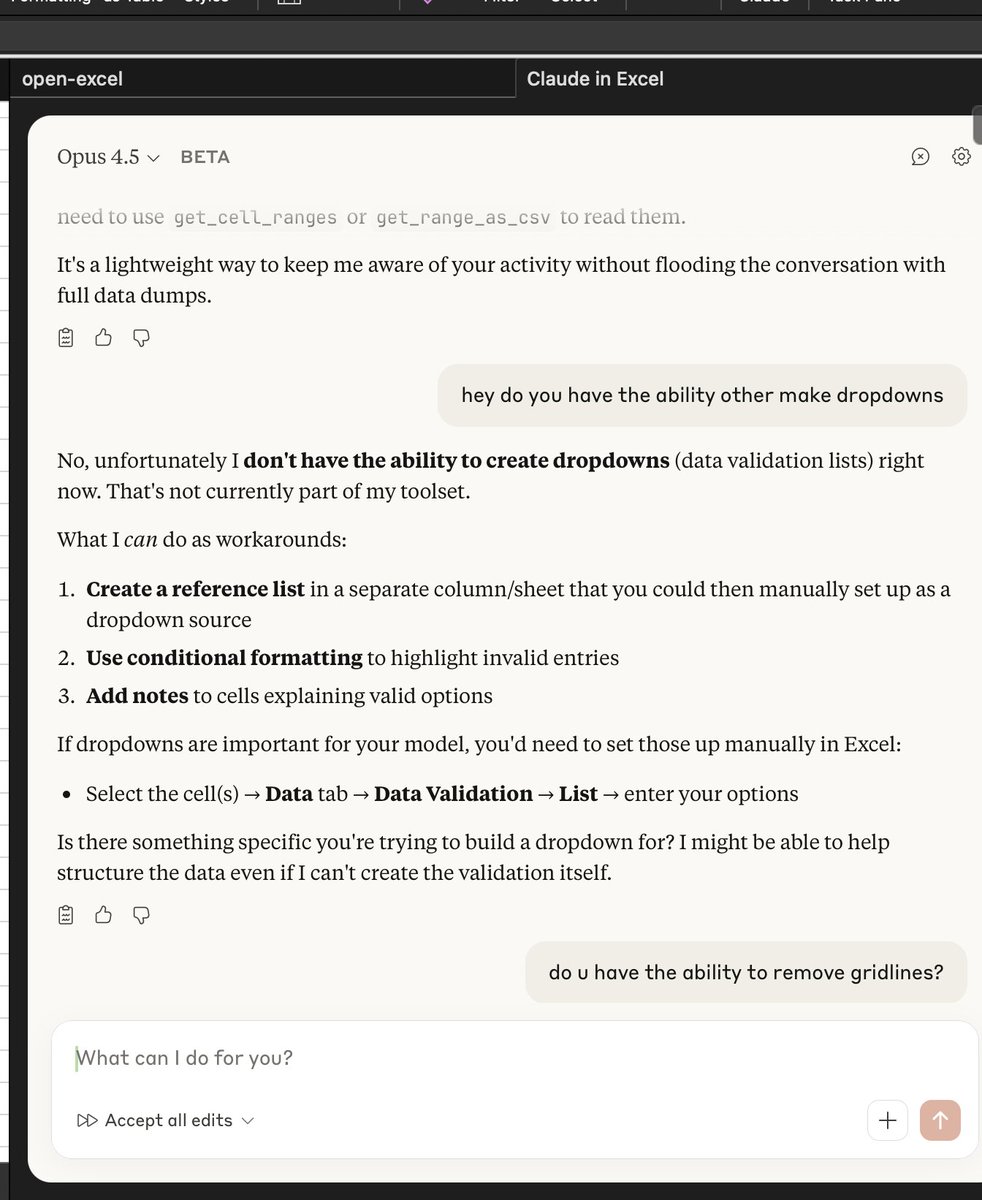
claude for excel doesn't have access to the DataValidation API nor has the ability to remove gridlines 🤨
1
2
155