
Did you know that with VNCdirectory – the professional directory service for VNClagoon – you can completely tailor VNClagoon to match your brand identity?
From uploading your company logos and background images to updating application icons and visuals, VNCdirectory's organization settings let you create a cohesive, professional experience for your users. These customizations appear throughout the platform - for example in welcome pages, headers, and app launchers, ensuring your brand is consistently represented at every touchpoint.
Taking just a few minutes to apply these personalizations can significantly enhance the user experience and strengthen your organization’s professional presence. It’s a simple step with a powerful impact on how your team and stakeholders perceive and interact with the platform.
Ready to see it in action?
Contact us for a personalized demo at sales@vnc.biz or check out our documentation: en.docs.vnc.biz/vncdirectory…
#VNCdirectory #BrandIdentity #userManagement #directoryService #SoftwareCustomization #UserExperience #PlatformCustomization

1
2
23

24 May 2025
🔐 Install OpenLDAP on Ubuntu 24.04
Set up a secure and scalable directory service with our comprehensive guide. Learn how to install and configure OpenLDAP on Ubuntu 24.04 for centralized user and group management.
🔗 Read the full tutorial: shape.host/resources/how-to-…
#OpenLDAP #Ubuntu2404 #DirectoryService #UserManagement #ShapeHost #CloudVps #LinuxSsdVps
1
2
60

11 May 2025
【Qiita】本日のすごい人 [ AWS ActiveDirectory DirectoryService msad ]に関する記事を書いた @yuki_ink さん : qiita.com/yuki_ink/items/b3e…
1
426

21 Jan 2025
EPC Selects @swiftcommunity for the EPC Directory Service
Read more: financialit.net/news/payment…
#EPC #SwiftIntegration #DirectoryService #FintechInnovation #GlobalStandards #finance #fintech #FinancialIT
2
109

13 Jan 2025
全く別物なので回答するなら
「AzureID(EntraID)はID管理機能であるが、ActiveDirectory(オンプレAD)はディレクトリサービスである」
となるかな。SSOはどっちでも実装できるので回答としては適当ではないかも。
まさか、CTOがID管理とDirectoryServiceの違いが分からんなんなんて事ないよねw
13 Jan 2025

某社の面接いまでも恨んでいる。
某社CTO→AzureADとオンプレADの違いはなですか?
僕→色々ありますが、一番大きいのはクラウドサービスに対するSSO機能です。
某社CTO→AzureADにそんな機能はない!あなたいったい何ができるんですか?
僕→?
某社CTO→何も答えられないと言うことは無能です。
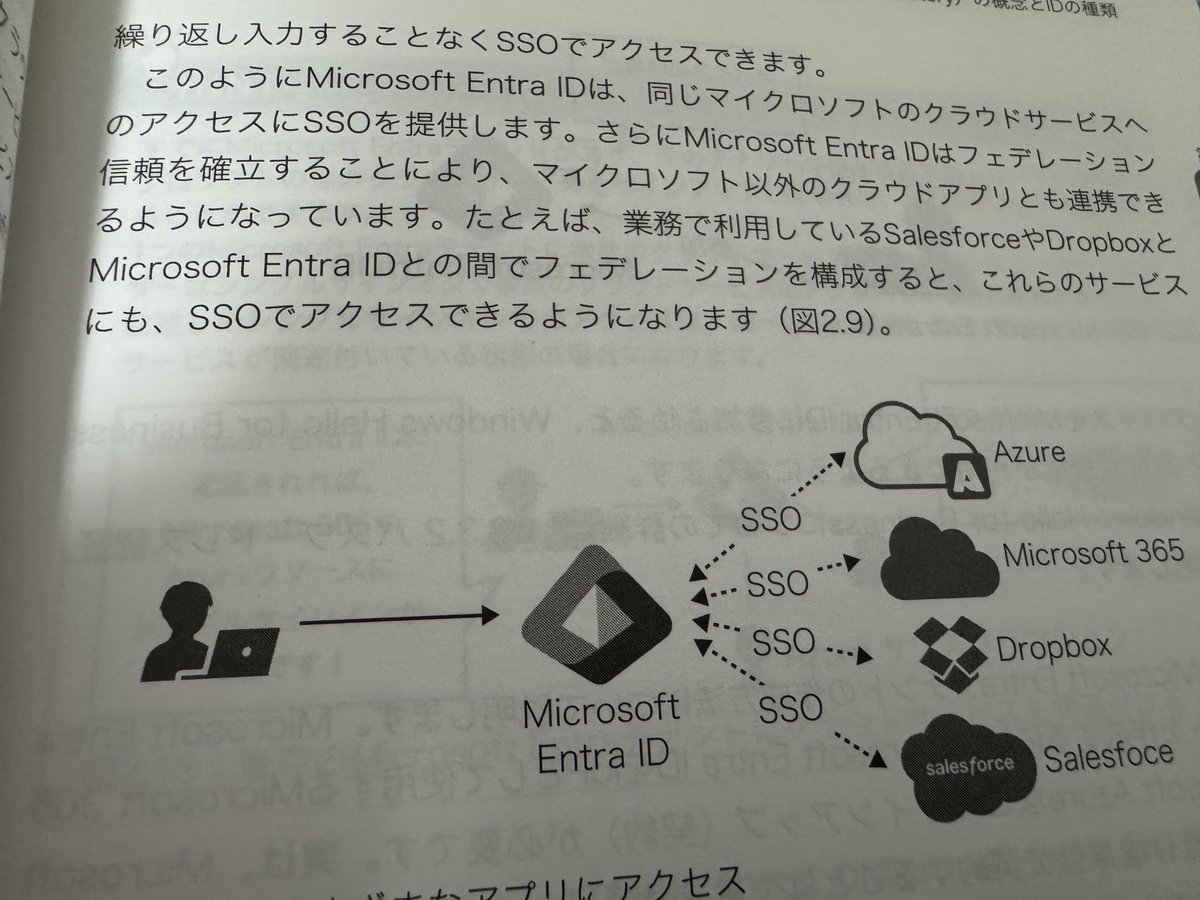
1
3
4
490

23 May 2024
一念発起でごみだらけで多分何にも使ってなさそうなvpcを消そうとしたらeniが残っててこれ何にアタッチされてるんだ?とあれこれ調べたらDirectoryServiceが残ってた・・・
#jawsug #jawsugfuk
1
5
326

26 Sep 2023
📚 AD Summer Workbook Day 22: AD dynamic objects
The concept of dynamic objects has been around since Windows Server 2003, but it remains relatively underused.
A dynamic object is an AD object associated with a Time-to-Live (TTL) value. The lifespan of an object is set upon its creation and can be modified. The TTL is automatically decremented, and upon its expiration, the dynamic object is deleted.
⚠️ To be very precise: the object is not necessarily deleted the moment the TTL reaches zero, as there are considerations for replication, garbage collection, etc. I won't go into these details in this overview.
🔺 Default TTL Configuration: CN=DirectoryService,CN=WindowsNT,CN=Services,CN=Configuration,DC=X has the multi-valued attribute ms-DS-Other-Settings containing:
- DynamicObjectDefaultTTLSeconds = Default TTL for dynamic objects (default is 24 hours = 86400 seconds)
- DynamicObjectMinTTLSeconds = Minimum TTL for dynamic objects (default is 15 minutes = 900 seconds)
🔺 Important Attributes:
ObjectClass:
- dynamicObject
- as well as a class defining the base object (user, group, etc.)
entryTTL:
- indicates the remaining time before deletion (in seconds). Decreases every second.
- can be modified. If the entered value is less than 𝘋𝘺𝘯𝘢𝘮𝘪𝘤𝘖𝘣𝘫𝘦𝘤𝘵𝘔𝘪𝘯𝘛𝘛𝘓𝘚𝘦𝘤𝘰𝘯𝘥𝘴, then the value will be that of 𝘋𝘺𝘯𝘢𝘮𝘪𝘤𝘖𝘣𝘫𝘦𝘤𝘵𝘔𝘪𝘯𝘛𝘛𝘓𝘚𝘦𝘤𝘰𝘯𝘥𝘴.
msDS-Entry-Time-To-Die:
- the date when the object will be deleted.
- it is the current date entryTTL.
- read-only
♻️ Dynamic Objects and AD Recycle Bin:
When a dynamic object expires, it is completely erased, leaving no trace in the AD Recycle Bin.
If you manually delete the dynamic object before its expiration, it will go into the AD Recycle Bin but will disappear from the bin at the initial expiration date.
🆕 Creating a Dynamic AD Object:
To create a dynamic object, you can't use the AD console, but you can use PowerShell, LDAP, or AD Explorer (see day 21).
A method for creating one is presented on my blog: itpro-tips.com/creating-dyna…
🔍 To find the dynamic objects currently in your AD: Get-ADObject -LDAPFilter '(ObjectClass=dynamicObject)'
📅 Tune in tomorrow for the next chapter of our #ADSummerWorkBook!
#Microsoft #ActiveDirectory
2
3
7
1,096

17 Oct 2021
AWSの私用アカウントで、お試しでDirectoryServiceとWorkspacesを一瞬使ったんだけど消し忘れてて草生えた
使ってもないのに月1万かかってたん…
4

4 Jul 2021
午前中はControlTowerやOrganizationsと戯れてました。
午後は昨日の続きでDirectoryServiceやSSOと戯れます。
2

7 Jun 2021
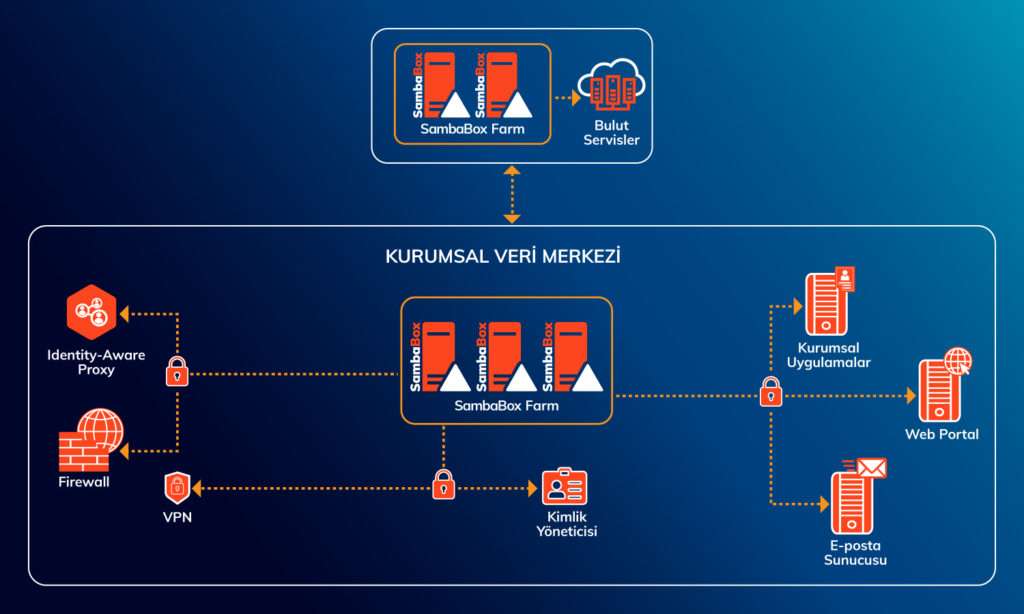
SambaBox, kurumsal şirketlerin bilişim maliyetlerini düşürürken yüksek performansı garanti eder.
SambaBox kurumsal şirketlerde nasıl çalışır?
Detaylı bilgi için 👉 sambabox.io/kurumsal-sirketl…
#sambabox #opensource #directoryservice #açıkkaynak #dizinhizmeti
3
3


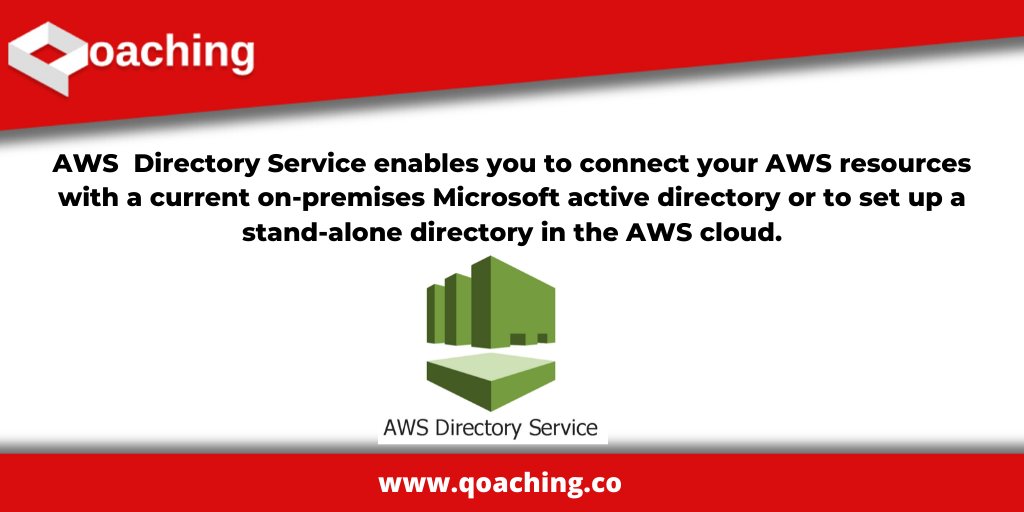
What is Amazon Directory Service?
#cloudcomputing #aws #directoryservice #directory #datascience #bigdata #microsoft #amazon #cloud #datascience #technology #tech #data #ai #ml #machinelearning #artificialintelligence
3
2

ccl_url • 12.21.19 • directoryservice @ Los Angeles, California instagram.com/p/B6X-719AK9W/…
12

7 Dec 2019
🎧 10-12AM PST 🎧
Analog Advisory returns with leezygram feat. a live recording from last weeks directoryservice thebackroomla rave of missingtextures going B2B with leezygram ! Relive the experience and tune in… instagram.com/p/B5wjH6Fg4o9/…
3

With directoryservice I will be playing live with our Out Of Respect Records Crew exceptionally this Friday September 6th 2019 - *** For more details click on link Bio
#outofrespectrecords #liveset #directoryservices… instagram.com/p/B1_IL51AJZn/…
1

12 Jul 2019
Our Directory services use specialists that offer the most diverse and flexible solutions assuring on-time deliveries of any size.
#directoryservice #offshoreindia #bpo #business #outsourcing
Get information: offshoreindiadataentry.com/d…
Email: support@offshoreindiadataentry.com
3

7 Jul 2019
deejaying in los angeles tonight !!!!! warehouse rave moment ; ty xtended.release & directoryservice 🌹 @ Los Angeles, California instagram.com/p/BzmxLnll_aL/…
4


19 Feb 2018
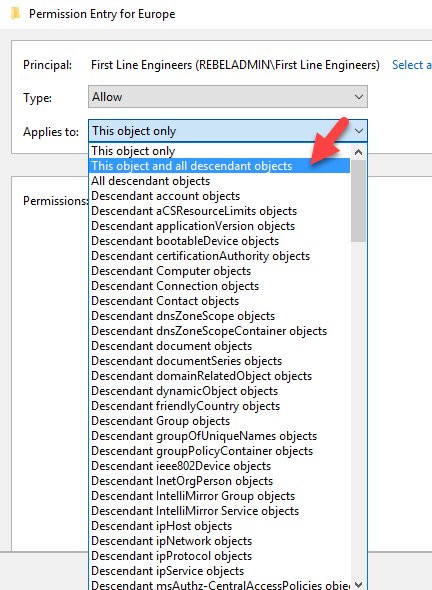
My New Blog Post "Step-by-Step guide to Manage Active Directory Permissions using Object ACLs" rebeladmin.com/2018/02/step-… #AD #ActiveDirectory #DomainController #ACLs #WindowsServer #DirectoryService #canitpro
5

18 Jan 2018
#jmramirez preparado para el taller de NAS @Synology en el IES Gregorio Prieto #DirectoryService #NAS ift.tt/2mQ68gE

5