🚨 New Writeup Alert! 🚨
"Active Directory Penetration Testing" by Andrey Pautov is now live on IW!
Check it out here: infosecwriteups.com/745cfb31…
#goad #activedirectory #cybersecurity #penetrationtesting #domaincontroller
2
10
961

Jan 14
🔎 𝗙𝗿𝗼𝗺 𝘁𝗵𝗲 𝗙𝗶𝗲𝗹𝗱 — Real-World Findings from Security Assessments
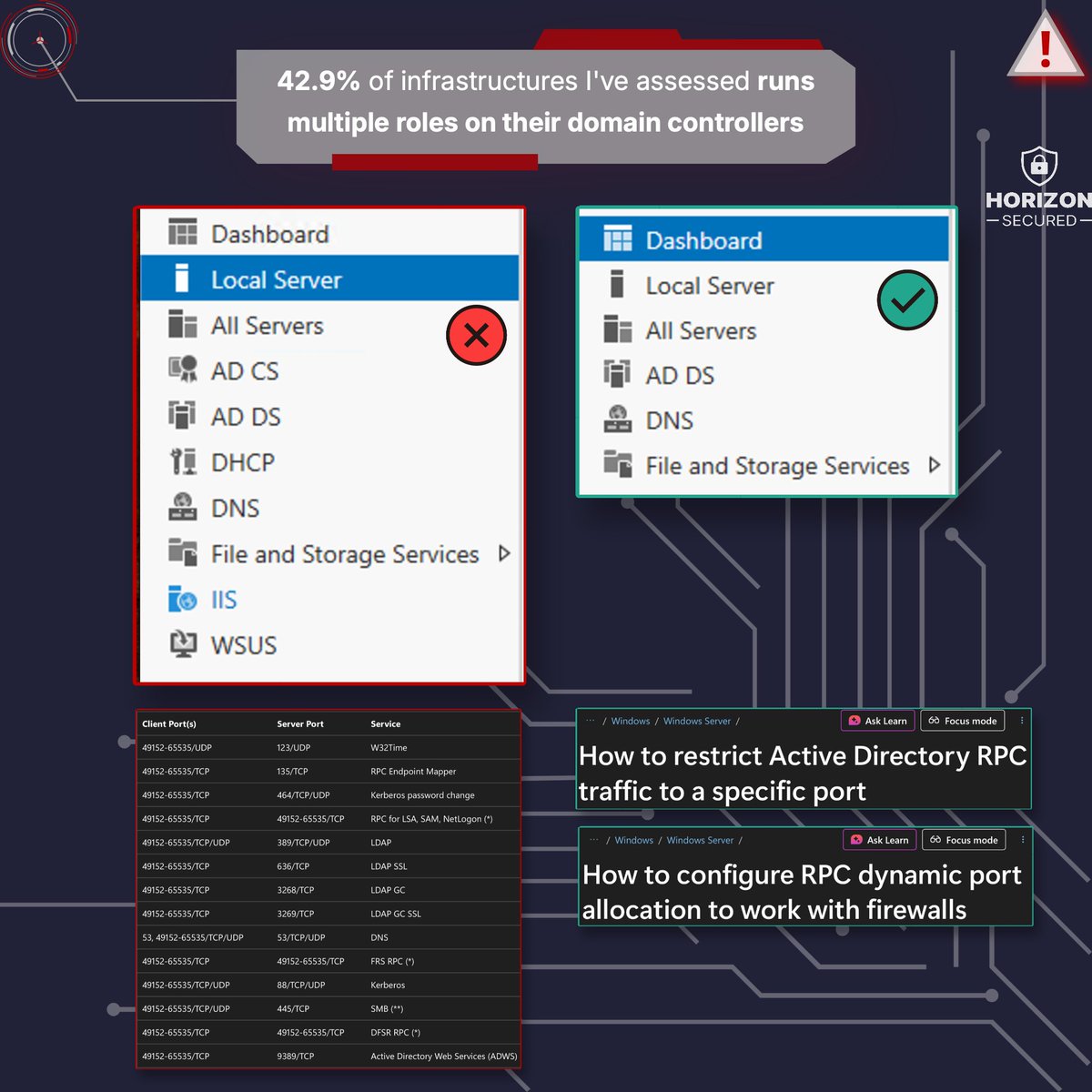
💥 𝟰𝟮.𝟵% of infrastructures I’ve assessed 𝗿𝘂𝗻𝘀 𝗺𝘂𝗹𝘁𝗶𝗽𝗹𝗲 𝗿𝗼𝗹𝗲𝘀/𝘀𝗲𝗿𝘃𝗶𝗰𝗲𝘀 𝗼𝗻 𝘁𝗵𝗲𝗶𝗿 𝗱𝗼𝗺𝗮𝗶𝗻 𝗰𝗼𝗻𝘁𝗿𝗼𝗹𝗹𝗲𝗿𝘀
🚫 𝗧𝗵𝗶𝘀 𝗶𝘀 𝗳𝗮𝗿 𝘁𝗼𝗼 𝗰𝗼𝗺𝗺𝗼𝗻 — especially in smaller environments — but it’s one of the fastest ways to weaken your security posture. Domain Controllers should normally host only two services:
✅ Active Directory Domain Services
✅ DNS
Nothing more.
𝗪𝗵𝘆?
Because every extra service:
▪️ adds ports
▪️ increases the attack surface
▪️ introduces more vulnerabilities
And it turns your DC into a much larger target than it already is (☢️). If you’ve ever had to configure firewall openings for domain controllers, you know the list is already long enough. If not, here’s a reference:
▪️ academy.horizon-secured.com/…
✅ 𝗕𝗼𝗻𝘂𝘀 𝘁𝗶𝗽: You can restrict many AD-related RPC services from the dynamic port range (yes — network admins will thank you). Microsoft provides guidance here:
▪️ learn.microsoft.com/en-us/tr…
▪️ learn.microsoft.com/en-us/tr…
𝗔𝗻𝗼𝘁𝗵𝗲𝗿 𝘃𝗲𝗿𝘆 𝗶𝗺𝗽𝗼𝗿𝘁𝗮𝗻𝘁 𝗿𝗲𝗮𝘀𝗼𝗻 to do so — Tiering Model. Have you ever tried to configure Tiering Model when you are hosting multiple services/roles on just few machines? 𝗧𝗵𝗮𝘁 𝗶𝘀 𝗮 𝗿𝗲𝗮𝗹 𝗽𝗶𝗰𝗸𝗹𝗲...
#ADDS #DomainController #CyberSecurity #Infrastructure #Hardening #BlueTeam #HorizonSecured #FromTheField @BlueTeamDave
3
23
1,145

27 Nov 2025
Still running your entire environment on one #DomainController?
It’s fine… until it isn’t. Learn how to add a new domain controller to an existing domain in #WindowsActiveDirectory to keep #AD high, resilient, and ready to scale.
blog.admindroid.com/how-to-i…
#SysAdmin #AdminDroid

3
102

22 Nov 2025
Rename a Domaincontroller the normal/classic/supported way: learn.microsoft.com/en-us/an…
1
4
206

8 Sep 2025
Weird that pingcastle works but Sharphound does not.
Are you using --ldapusername and --ldappassword and maybe domaincontroller? It’s often easier to use bloodhound-ce-python or rusthound from a non domain joined box 🫣
2
2
214

20 Aug 2025
Windows Server 2022: Domaincontroller reparieren
Im dreiteiligen Fachartikel erklären wir das Vorgehen bei Störfällen rund um diesen zentralen AD-Server.
it-administrator.de/Domainco…

2
98

Entre mayo y julio de 2025, Microsoft parchó varias vulnerabilidades críticas, incluyendo:
CVE-2025-26673: Consumo excesivo de recursos en LDAP.
CVE-2025-32724: Ataque DoS sobre LSASS.
CVE-2025-49716: Ataque DoS en Netlogon.
CVE-2025-49722: Ataque DoS en el spooler de impresión.
Es IMPORTANTE que apliquen estos parches porque se conoce de una nueva vulnerabilidad llamada "Win-DDoS".
La vulnerabilidad Win-DDoS fue descubierta en 2025 y afecta principalmente a controladores de dominio (Domain Controllers) en sistemas Windows. Un atacante puede transformar estos servidores en armas para desencadenar un ataque DDoS masivo, mediante técnicas que aprovechan fallos en protocolos nativos de Microsoft.
¿Qué hacer para estar protegido?
❗️ Actualiza tu sistema Windows con los parches liberados entre mayo y julio 2025.
❗️ Limita la exposición de controladores de dominio a Internet.
❗️ Monitoriza el tráfico de red y considera soluciones especializadas contra ataques DDoS.
#WindowsServer #Security #DomainController

1
24
110
5,132

10 Jul 2025
Microsoft supported backups of Active Directory are very important to have. For backing up Domain Controllers, this is typically a System State backup.
Why a Microsoft supported backup? If you are using a backup solution that isn't fully AD aware, performing a restore may involve getting Microsoft involved and that costs $$.
I know companies that have used ####### (redacted) to backup their AD and there was no System State and the backup wasn't a full AD aware backup so they ended up paying ###### $$$ and Microsoft $$$.
Just get a System State backup of the DCs that host your FSMO roles about every month and be prepared for a scenario where you may have to restore AD.
Determining if a recent supported backup has been performed is easy since these backups update a bit in each partition.
PowerShell code to check the current domain for the last Microsoft supported AD backup:
$ContextType = [System.DirectoryServices.ActiveDirectory.DirectoryContextType]::Domain
$Context = New-Object System.DirectoryServices.ActiveDirectory.DirectoryContext($ContextType,(Get-ADDomain).DNSRoot)
$DomainController = [System.DirectoryServices.ActiveDirectory.DomainController]::findOne($Context)
[string[]]$Partitions = (Get-ADRootDSE).namingContexts
foreach ($Partition in $Partitions)
{
$dsaSignature = $DomainController.GetReplicationMetadata($Partition).Item("dsaSignature")
Write-Host "$Partition was backed up $($dsaSignature.LastOriginatingChangeTime.DateTime)"
}
#ActiveDirectorySecurityTip

4
50
244
20,852

21 May 2025
Longer Read But In Depth on AD Attack Paths
This is a pretty cool scenario. I really like more unique paths, but I want to highlight that this is not what I would call a “common” path. Most networks are not mature enough to warrant such attack paths. In general, AD environments are plagued with decades of configuration debt. There are USUALLY tens if not hundreds of relatively simple ways to get DA that involve a mix of misconfigurations and built in Microsoft bad.
This is a longer read cause I like to explain, but through it all notice how getting DA is really six-seven commands and very simple.
Let’s dive into what I would call a common scenario for how you would breach AD following the path of least resistance. This will be a longer read, but a worthwhile one if you’re newer to AD.
As you read, try to identify the moment you spot the path to Domain Admin and at what stage it becomes clear.
The Scenario
For this scenario let’s assume you have a machine on their network. It’s a Linux device that is plugged into their corporate network. It’s layer two adjacent to a bunch of other normal corporate machines. You have assumed breach creds to their domain to use IF NEEDED but you are to see if you can gain initial access WITHOUT using them.
The Goal
Compromise multiple Active Directory domains. See if you can breach their CDE(Card Data environment) or the segmented portion of the network. They’ve also authorized full dumping of their NTDS.dit for credential analysis.
Initial Access
Most networks are still susceptible to layer-two coercion attacks, either via rogue DHCPv6 servers or standard broadcast-based tricks. You run responder and see you can get net-ntlmv2. You run mitm6 with some good configs and more come in.
You then run a bunch of enumeration.
1. You find the domain via your /etc/resolv.conf file along with some dns servers. You run DNS SRV record enumeration to find the systems where Kerberos, ldap and global catalog are running. Which shows you where the domain controllers for that domain are. (AD creates DNS SRV records for services like Kerberos.) Doing this you see the domain is corp.companynet.com. You then run another SRV enumeration against the parent domain of company.com and no dice. But now you have the locations of domain controllers.
2. You see reference to another domain in the srv enumeration, cde.companynet.com but are unable to reach its domain controllers. You see their hostnames and IPs though.
2. You scan the corp domain controllers and see one is running port 80. You then wget http:<domaincontroller>/certsrv/certfnsp.asp and see it responds with a “401 unauthorized”. It’s likely running a ADCS web enrollment endpoint so ESC8 is likely possible. You note it.
4. You port scan the environment for port 445 and identify hosts with SMB signing disabled. Most likely if you can admin access to any of these you can dump Sam and LSA secrets but lsass is unlikely without effort.
5. You attempt null smb sessions, and share enum just as a habit. Not much.
6. You find a list of MSSQL endpoints that you can relay the authentication to if nowhere else exists or as possible future opportunities for a more complex attack chain.
7. In your scanning of hosts with port 445 open, you find machines that are a part of tech.comp.int. You run srv enumeration and find their DCs.
8. In your scanning you take note of windows devices with SCCM in the hostname.
At this point, you’ve gathered enough intel to form a solid plan with a 95% chance of getting you Domain Admin on corp. Can you see it yet?
Taking the Path of Least Resistance
There are a lot of ways we could take this engagement. However, taking the path of least resistance saves time and lets you work backward to uncover deeper issues.
Continued in the comments/replies
21 May 2025

This is what a real-world path to Domain Admin looks like on an internal network (from a past internal pentest of mine)
*assume compromise*
1. Find a web config file with plaintext domain creds
2. That domain account is a local admin on a sql server
3. Pivot to the sql server using RDP (locked by mfa)
4. Pivot to the sql server using psremoting
5. Discover a scheduled task running (as a domain admin) a batch file from c:\scripts
6. Modify the batch file to add our initial account into the domain admins group
7. Psremoting to the dc for the screenshot
Notes for defenders:
1. Audit shares regularly for credential files
2. Ensure tasks run with least privilege (not DA accounts)
3. Ensure alerts are generated upon modification of tier 0 groups
4. Restrict access to servers from untrusted systems (like Suzie in accountings PC)
2
1
5
251

12 May 2025
Defending the Kingdom: Hardening Domain Controllers Against Modern Ransomware Campaigns (2025): bit.ly/4cApqhq
#ActiveDirectory #DomainController #ITDR

1
2
47
2,278


25 Apr 2025
#MSXFAQ SCEP, Intune und Strong Mapping msxfaq.de/windows/endpointse… - Mittlerweile sollten alle Domaincontroller die StrongNameChecks für Zertifikat erzwingen. Wenn Sie Computerzertifkate per Intune ausrollen, müssen Sie ggfls. nachjustieren.
3
533

22 Apr 2025
Microsoft's One-Line Security Fix: Lock Down Your Windows Server NOW!
#SecurityBaselines #MicrosoftSecurity #WindowsServer #DomainController #MemberServer #Workgroup #Cybersecurity #SystemSecurity #ITSecurity #SecurityTools
4
585

22 Apr 2025
Win2025でActiveDirectoryのインストール検証
新しいOSでドメインコントローラセットアップを試みるときに毎回、必ずdcpromoを実行してる
復活してほしいコマンドの一つ
#DomainController #WindowsServer
2
76

Active Directory mit Windows Server 2025 - Folge 22 - Installation vom Windows Admin Center
#Microsoft #ActiveDirectory #WindowsServer2025 #DomainController #Windows #Server #mvpbuzz #coolstuff @Windows @MVPAward @Microsoft
👇👇👇👇
youtu.be/QU2yPZ3bJrE
1
3
273
21 Apr 2025
Defending the Kingdom: Hardening Domain Controllers Against Modern Ransomware Campaigns (2025): bit.ly/4cApqhq
#ActiveDirectory #DomainController #ITDR

3
48
2,708
Active Directory mit Windows Server 2025 - Folge 20 - Sichern von Gruppenrichtlinienobjekten
#Microsoft #ActiveDirectory #WindowsServer2025 #DomainController #Windows #Server #mvpbuzz #coolstuff @MVPAward @Windows @windowsinsider @windowsserver
👇👇👇👇
youtu.be/tvnXecesL7A
2
231

24 Mar 2025
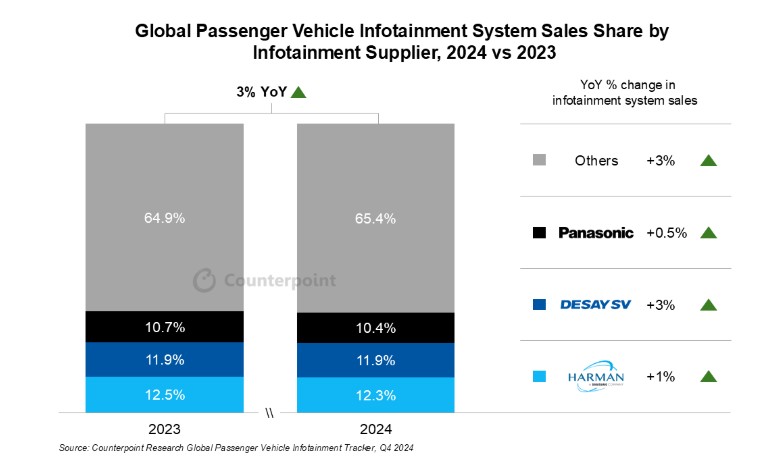
📈Global PV #infotainment system sales grew 3% YoY in 2024, aligning with overall PV market performance.
⚙️The industry is shifting from #ECU-based systems to #domaincontroller-based systems to #HPC-based systems.
Detailed insight here:
counterpointresearch.com/ins…
#digitalcockpit
4
3
303
Active Directory mit Windows Server 2025 - Folge 15 - Einführung in die Gruppenrichtlinien
#Microsoft #ActiveDirectory #WindowsServer2025 #DomainController #Windows #Server #mvpbuzz #coolstuff @MVPAward @Windows @Microsoft
👇👇👇👇
youtu.be/MYYBORL2H_A

2
2
177

28 Jan 2025
🚨 New Writeup Alert! 🚨
"Attacktive Directory — TryHackMe Writup" by вιѕнαℓυ is now live on IW!
Check it out here: infosecwriteups.com/7cd5fe60…
#activedirectory #attacktivedirectory #tryhackmewriteup #domaincontroller #ctfwriteup
1
4
720