
Jun 11
Namgay Tshering lists common Drupal tools for enterprise site building, including Views, Layout Builder, Media, CKEditor 5, Pathauto, Webform, Metatag, Redirect, Admin Toolbar, and Devel.
bit.ly/4veZEbd
#Drupal #DrupalModules #SiteBuilding #DrupalDev

15

Jun 8
Still scattering your Drupal Twig/CSS/JS across multiple folders? 🫠 Single Directory Components fix that — and our 2-week Professional Single Directory Components course shows you exactly how. Learn more 👉 buff.ly/fkzMXeU
#Drupal #SDC #DrupalDev

12
11 Dec 2025
🧠 Droptica’s @Droptica AGENTS.md helps AI tools like Copilot & Claude work better with Drupal projects. @grzegorzbartman
Generates tailored project docs using a smart template.
bit.ly/4iTyVeT
#AIinDev #DrupalDev #OpenSourceTools #DDEV

2
77
15 Jul 2025
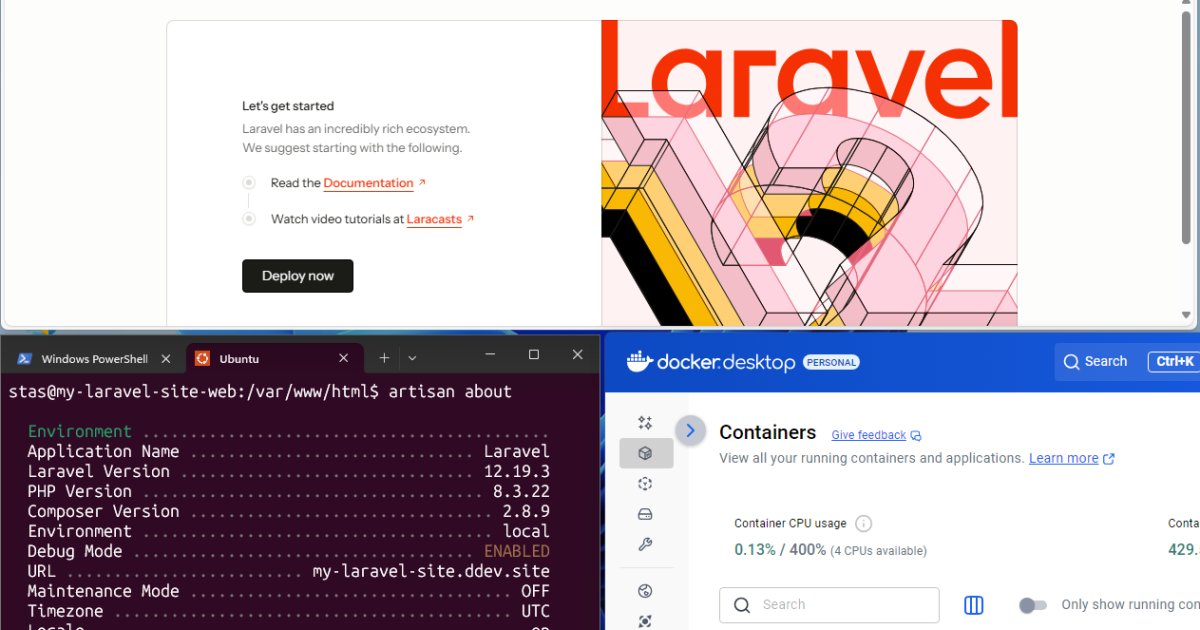
🖥️ Want to run #DDEV inside a VM?
Stas Zhuk shows how to set up nested virtualization with VMware Workstation Pro—now free for personal use! Covers Windows & Linux configs, VMX tweaks, and Docker DDEV setup.
🔗 bit.ly/4ePh1rR
#DrupalDev #Docker #VMware #WebDev
1
3
209
1 Jul 2025
🛠️ Can Claude Code streamline #Drupal module development? Find out July 4 in an online session with Alejandro Madrigal @alemadlei . He’ll demo real use cases with Mercury Editor, SDC, and selector hooks.
🔗 bit.ly/4kfnzBb
#DrupalDev #AItools #OpenSource #ClaudeCode

2
89
24 Apr 2025
🗺️ New Mapsemble module brings real-time, interactive maps to #Drupal—no custom code needed!
Render any Drupal entity on a map with full theming support.
Check it out: bit.ly/4iz5RHX
#DrupalDev #OpenSource via @nuez_io

1
2
83

10 Apr 2025
Just published a big article on Modern tools for Drupal development – PhpStorm, DDEV, PHPStan, etc.
Check it out: iamdroid.net/blog/dev-tools
If you're looking for a skilled Drupal dev to join your team, feel free to reach out!
#Drupal #DrupalDev #OpenToWork
1
2
107
11 Mar 2025
📢 February's top #Drupal blog posts are here! From Next-Drupal 2.0 to AI-assisted translation workflows, check out the latest insights shaping the Drupal ecosystem. 🚀
🔗 bit.ly/4kIdRsg #OpenSource #DrupalDev #WebDevelopment via @Tim_b6 @agiledrop

1
4
77
10 Mar 2025
🚀 Exciting sessions await at #Drupal Mountain Camp 2025! @mountaincampch @drupalch From Migrate API & Drupal Recipes to Next.js & modern frontend tooling—get ready to level up your #Drupal skills! 🔗 bit.ly/41FoseO #DrupalDev #DrupalFrontend #DrupalBackend

3
36
29 Jan 2025
🚀 Say goodbye to bulky distributions! #Drupal Recipes offer a modular way to apply pre-configured functionality to your site—no lingering dependencies. While still experimental, they promise a flexible future for site builders. 🍽️ #DrupalDev #CMS
bit.ly/3WCyAUb

8
48

5 Nov 2024
WebProfiler for Drupal profiles page performance and gives developers insights to identify and fix issues.
It adds a toolbar to every page and creates reports in a dashboard for quick access to site information.
Once installed, it collects performance data as you browse, which can be reviewed in the WebProfiler dashboard.
Accessing the WebProfiler Dashboard:
➡️ Navigate to Reports > Web Profiler in your Drupal admin menu
➡️ Click on any profile in the list to view detailed information
Key Features of the WebProfiler Dashboard:
➡️ Request Information: View details about the page request, including controller callbacks and access control checks
➡️ Database Queries: Analyze all database queries executed on the page, with the ability to view and test individual queries
➡️ Block Information: See which blocks are loaded and rendered on the page
➡️ Views and Forms: Get insights into Views usage and form implementations
Practical Applications:
➡️ Debug access issues by examining access control checks
➡️ Optimize database performance by identifying and addressing slow queries
➡️ Improve page load times by analyzing block rendering and Views usage
The WebProfiler dashboard offers an in-depth look at your Drupal site's performance, allowing you to make data-driven decisions for optimization.
Whether you're troubleshooting a specific issue or looking to improve overall site efficiency, WebProfiler provides the necessary insights.
NOTE: This video is a snippet from the "Getting Started with Drupal Development Tools" live stream.
The full video link is in the comments below.
#drupal #drupaldev #drupaldevel
1
1
7
263
17 Sep 2024
Drupal's service-oriented architecture can be complex.
Developers often struggle to discover available services in their Drupal projects.
Here are two tools I use to discover services in a Drupal site:
➜ 1️⃣ Drush (with Devel installed)
➜ 2️⃣ WebProfiler
Drush is a command-line tool for Drupal.
WebProfiler is a debugging toolbar that gets displayed at the bottom of the page.
Both can be used to see all the available services on a Drupal site.
Installing the Tools:
To install Drush, run: composer require drush/drush
Then to install Devel, run: composer require drupal/devel:^5.3
To install WebProfiler, run: composer require drupal/webprofiler:^11.0
Using Drush (with Devel installed):
1️⃣ Open your terminal
2️⃣ Go to your Drupal project folder
3️⃣ Type: "drush devel:services" to see all services
4️⃣ Filter down the search by adding keywords as options, i.e., "drush devel:services node"
Using WebProfiler:
1️⃣ Enable the WebProfiler module on your site
2️⃣ Find the WebProfiler toolbar at the bottom of your pages
3️⃣ Go to the WebProfiler config page and turn on "Services" from "Active toolbar items"
4️⃣ Click on the Services icon to view all available and initialized services
These tools help you understand your site's structure and available services.
This knowledge can improve your Drupal development process.
#drupal #drupaldev
~~~
If you found this post helpful.
♻️ Please repost and follow.
📧 Join our newsletter; link in the first comment.
1
2
4
195
19 Jun 2024
Need to organize your field widgets into tabs?
Look at using the Field Group module to manage content types with many fields.
1️⃣ Getting Started:
↳ Download Field Group and install it.
↳ Go to Structure, "Content types", then “Manage Form Display" on the content type you want to organize.
2️⃣ Create Tabs Group:
↳ Click on "Add field group" and select "Tabs" from "Add a new group".
↳ Add a label and click on "Save and continue".
You should see a "Tabs" group. This is the parent element that groups the individual tabs.
3️⃣ Create Single Tab:
↳ Click on "Add field group" again and select "Tab" from "Add a new group".
NOTE: Make sure you select "Tab" without a the "s".
Create a "Tab" group for each single tab you need.
4️⃣ Organize Tabs:
↳ Move field widgets under the "Tab" element, and the "Tab" element under the "Tabs" element.
↳ The structure should be Tabs -> Tab -> Widgets
↳ Once organized save the form.
Now you’ll have a cleaner form thanks to Field Group.
#drupal #drupaldev
~~~
If you found this post helpful.
♻️ Please repost and follow.
📧 Join our newsletter; link in the first comment.
1
3
83
14 Jun 2024
The Views module in Drupal makes it simple to manage pagination on your pages or blocks, allowing you to control how content is displayed and navigated.
Here are the four pager options available for a page display:
1️⃣ Display a specified number of items:
↳ This option shows a set number. It is ideal for displaying a limited number, such as 5 or 10 items, to keep the page concise.
2️⃣ Display all items:
↳ This option lists all the results. However, loading too many items simultaneously can slow down your site and affect performance.
3️⃣ Paged output, full pager:
↳ This option includes a full pager with page numbers, making it easy for users to navigate multiple content pages. You get a link to each page and a next and previous button.
4️⃣ Paged output, mini pager:
↳ This option provides a mini pager with only the next and previous buttons. It offers a simpler navigation method when you do not need to display page numbers but still want users to move through content easily.
As you can see, Views offer various options to control how users navigate through your content.
#drupal #views #drupaldev
~~~
If you found this post helpful.
♻️ Please repost and follow.
📧 Join our newsletter; link in the first comment.
1
2
78
4 Jun 2024
Join me tomorrow at 9pm (Australian Eastern Standard Time (AEST)) for a live stream to learn about Drupal debugging techniques. 🐞🔎
We'll cover:
1. How to display error messages
2. Printing variables in PHP and Twig using Devel
3. Using WebProfiler to debug
4. Using Xdebug in @phpstorm
This live stream is free. Learn some techniques when it comes to debugging issues on a Drupal site.
We'll stream directly here on @x and other platforms (⬇️ links below)
#drupal #drupaldev #debugging #php #xdebug #phpstorm

1
1
5
105
27 May 2024
You can control how exposed filters work in Views by using the "Exposed Form Style".
You can choose between "Basic" and "Input Required."
But what is the difference?
The "Basic" setting shows all content by default. You can filter by entering text and clicking on "Apply."
The "Input Required" setting forces visitors to select something in the exposed filter before seeing any results.
Here's how to switch to "Input Required":
↳ 1️⃣ Go to "Structure" and "Views."
↳ 2️⃣ Edit your view and click on "Advanced."
↳ 3️⃣. Scroll down and click on "Basic" next to "Exposed form style".
↳ 4️⃣ Switch to "Input required" and click on "Apply".
↳ 5️⃣ Click on "Apply" again and save your view.
Now, your view will require visitors to enter text to see content, and they will see "Select any filter to click on Apply to see results".
#drupal #drupalsitebuilding #drupaldev
~~~
If you found this post helpful.
♻️ Please repost and follow.
📧 Join our newsletter; link in the first comment.
1
2
73
20 May 2024
If you're a Drupal user, you know that content types can sometimes have a lot of fields.
This can make finding the fields you need difficult, especially if you're working on a complex content type.
Thankfully, there's a module that can help: Field Group.
This module lets you organize fields into groups. One common way to use Field Group is to move fields to the right-hand side of the form, making them easier to find and edit.
Here's how to do it:
1️⃣ Download and install the Field Group module.
2️⃣ Go to the "Manage form display" page for your content type.
3️⃣ Click on the "Add Field Group" button.
4️⃣ Select "Details Sidebar" from the list of options.
5️⃣ Add the fields that you want to move to the right-hand side.
6️⃣ Save your changes.
When you return to your content editing form, you will see the fields you added to the "Details Sidebar" group on the right-hand side. This makes it easier to find and edit your content.
#drupal #drupaldev #drupalsitebuilding
~~~
If you found this post helpful.
♻️ Please repost and follow.
📧 Join our newsletter; link in the first comment.
1
2
95
12 May 2024
Drupal Starshot is a new version of Drupal that was announced at DrupalCon Portland.
Starshot can be downloaded and installed locally using PHP and Composer, without setting up a separate database.
🎥 Watch the video below and follow the steps:
1. Make sure PHP and Composer are installed on your local machine.
2. Run the Composer create command to set up a new Drupal Starshot project. Get the latest command from the prototype GitHub repository. (⬇️ link in the comments)
3. Composer will download and install the site using SQLite instead of a separate database.
4. Log into the new site using either the one-time link or the generated username and password printed in the terminal.
Drupal Starshot uses a new Recipes system to handle the site's configuration. The recipe files can be viewed in the recipes folder.
After the initial setup, run "composer drupal:run-server" to restart the local server. This will run the site on localhost using a specified port.
NOTE: Drupal Starshot is still a prototype, so changes are expected. Follow the Starshot prototype repo (⬇️ link in the comments) to stay updated on the latest developments.
#drupal #drupalstarshot #drupaldev
1
2
5
276
3 May 2024
The WebProfiler module can help you identify performance issues. This handy tool provides a toolbar with detailed information about each page request, like the controller used, database queries, memory usage, and more.
Getting Started with WebProfiler
↳Install the module: You can find the WebProfiler module on Drupal. Remember, it requires the Devel module, which will be automatically downloaded during installation.
↳View the Toolbar: Once installed, navigate your site and see the toolbar at the bottom of the page. It displays performance information specific to each page request.
↳Analyze the Data: Explore the information displayed in the toolbar to pinpoint potential bottlenecks. You can see the controller being used, the number of database queries, memory usage, and other details about blocks, views, and forms.
Digging Deeper with WebProfiler
↳Access Detailed Reports: Clicking on the controller name in the toolbar takes you to a dashboard with in-depth reports. You can analyze database queries, including the variables passed to them, and identify any blocks, views, or forms that might impact performance.
↳Configure the Toolbar: For even more insights, customize the toolbar to show additional information. Hover over the Drupal icon and select "Configure". Enable options like events, routing, and services to see a comprehensive overview of your site's activity.
↳Review Performance Reports: The WebProfiler module also generates reports that are accessible through the Reports section. However, this feature should be used cautiously on production sites as it collects substantial data. It's best suited for local development or non-production environments.
By using the WebProfiler module, you can identify and address performance issues, ensuring your Drupal site runs smoothly and efficiently.
#drupal #drupaldev #webprofiler
~~~
If you found this post helpful.
♻️ Please repost and follow.
📧 Join our newsletter; link in the first comment.
1
1
73
12 Mar 2024
Securing your @drupal site with basic authentication is now easy with the Shield module.
This tool allows you to set up access credentials right from the Drupal backend, eliminating the need for any server configuration.
The Shield module is ideal for securing development or staging sites. Plus, it provides the option to secure specific parts of your site using just the URL.
Here's a simple guide to setting up Shield:
1. Download and install the Shield module using Composer with the command: "composer require drupal/shield".
2. Navigate to Configuration -> Shield and activate the module by checking "Enable shield".
3. Enter your chosen username and password in the Credentials section.
4. Optionally, secure specific pages by listing them in the Pages textarea found at the bottom of the Shield configuration page.
#drupal #webdeveloper #drupaldev
~~~
If you found this post helpful.
♻️ Please repost and follow.
📧 Join our newsletter; link below.
1
2
3
136