
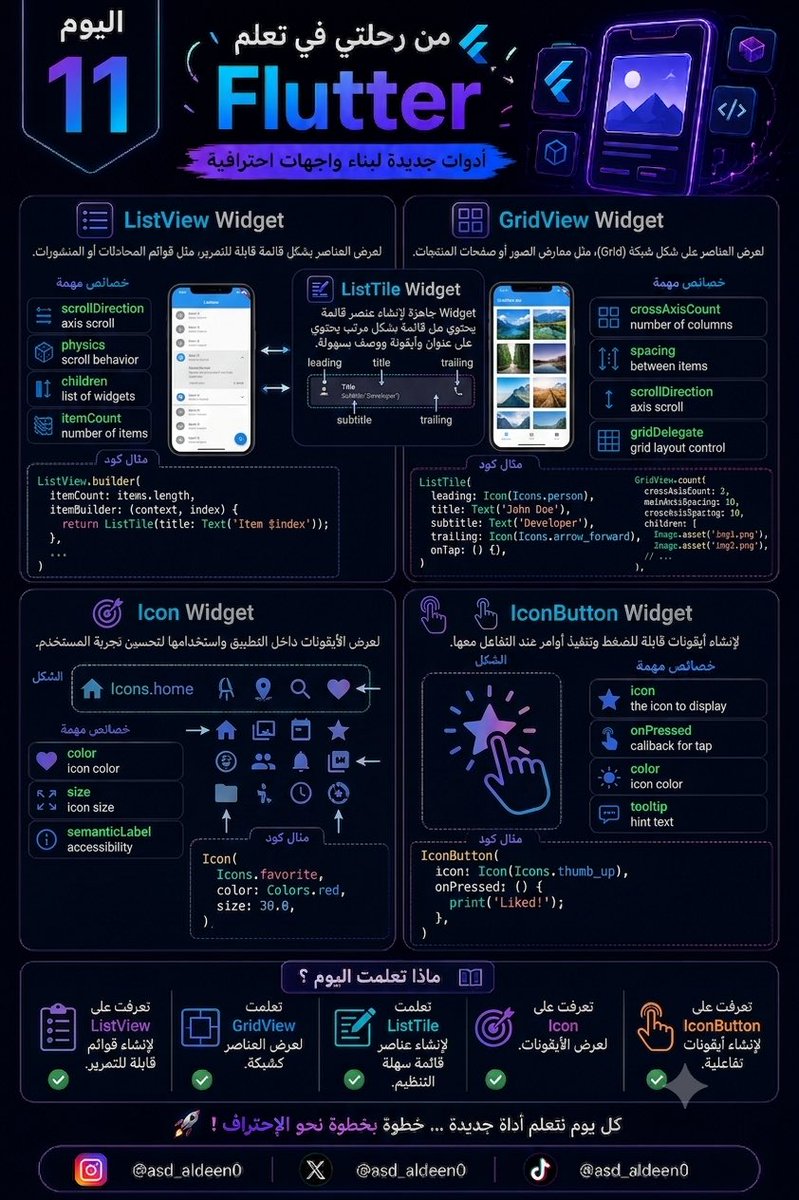
اليوم 11 من رحلتي في تعلم Flutter
اليوم تعلمت مجموعة Widgets مهمة جدًا تُستخدم في أغلب التطبيقات اليومية:
📋 ListView
لعرض العناصر بشكل قائمة قابلة للتمرير، مثل قوائم المحادثات أو المنشورات.
🔲 GridView
لعرض العناصر على شكل شبكة (Grid)، مثل معارض الصور أو صفحات المنتجات.

بسم الله الرحمن الرحيم
من اليوم سأبدأ رحلتي لأصبح مطور تطبيقات باستخدام لغة Dart وإطار العمل Flutter. سأشارككم كل معلومة أتعلمها، وستكونون شاهدين على رحلتي من الصفر حتى أصل إلى المرحلة التي أُعلن فيها رسميًا أنني أصبحت مطور تطبيقات متمكنًا.
أسأل الله العون والتوفيق 🤍.
1
26

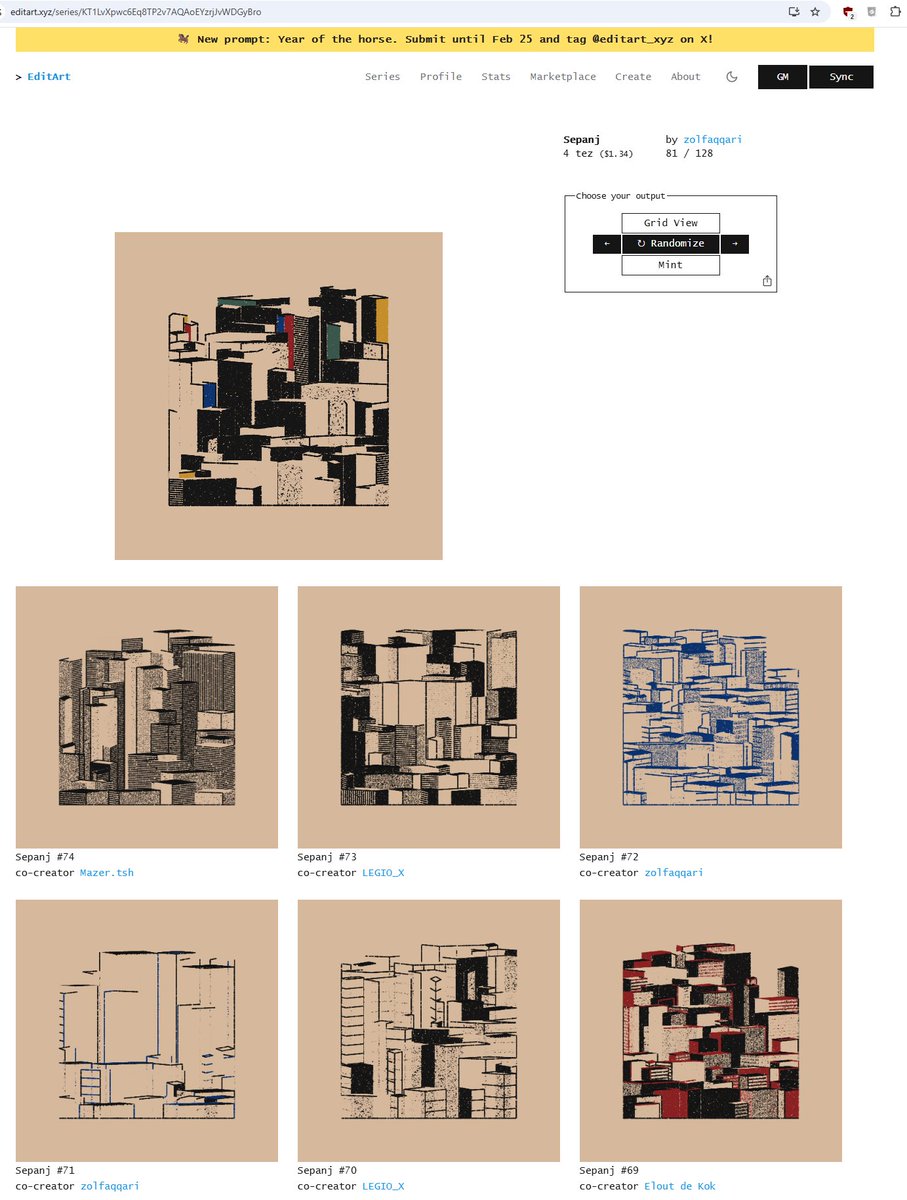
support legit artist
living in warzone's
great work / Sepanj
by @zolfaqqari
link in zolf profile
on editart you don't
just get random mint
you can randomize
till you get a nice color / composition
and mint that
wysiwyg
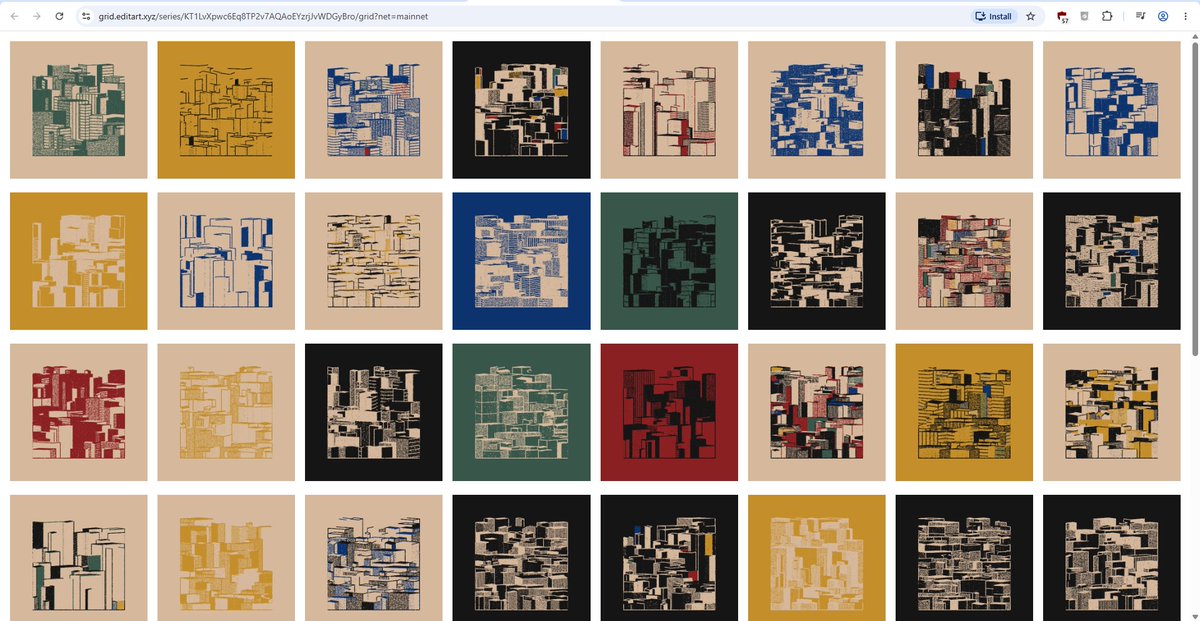
press 'gridview' and choose
between all kind of outputs

1
4
9
133


May 4
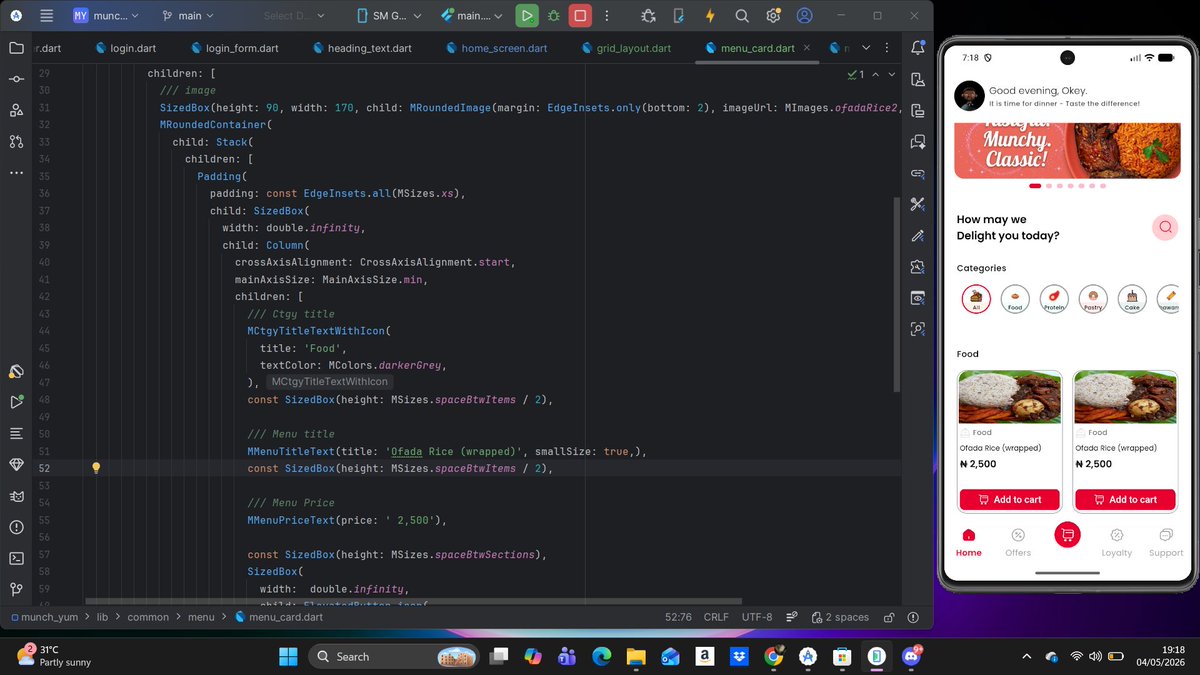
Today, I worked on the menu cards in my MunchYum app 🍔
Used GridView to structure and display them. For now, I’m using dummy data.... will fetch real menu items from Firestore when I start the backend.
Also wrapped up the homepage.
1
1
6
216

Apr 30
PowerShell 1 liner to get AVD session host session information across all host pools. Pipe through ogv (Out-Gridview) to give you a filterable/sortable display
Get-AzWvdHostPool -PipelineVariable hpool | % { Get-AzWvdUserSession -HostPoolName $hpool.name -ResourceGroupName $hpool.ResourceGroupName }|select @{n='HostPool';e={$hpool.Name}},@{n='FriendlyName';e={$hpool.FriendlyName}},@{n='Location';e={$hpool.location}},UserPrincipalName,ApplicationType,CreateTime,SessionState,@{n='SessionId';e={split-path $_.Id -leaf }}

3
1,235
Apr 28
I use PowerShell Get-Winevent piped to Out-Gridview (ogv). I also wrote this to make it easier for non-powershell folk to use it
github.com/guyrleech/Microso…
3
39
2,491

Apr 26
تقدري تستخدمي حاجة لو فاكر إسمها gridview
يخليها تعرض الداتا نفسها جنب ال عمليات الإدخال و التعديل
كنت في مشروع مشابه و كنت يستخدمه بحيث لو عن
Double click علي cell
ياخد بياناته بحيث يعدل أو يحذف و يبقي شايفه قدام عيناه
بس عاااااااااش
1
11
1,621

📢 I M P O R T A N T E 🧨
📢Espionaje Chino en CHILE
"PEGA EL SCRIPT COMO ADMIN EN POWERSHELL"
El dominio sx-common-v4.volcgtm.com pertenece a Motor volcánico (火山引擎), que es la división de servicios en la nube de ByteDance (la empresa matriz de TikTok).
#Script Hecho por Cyber Hunters Operations
📢 Copia de aquí hacia abajo 🧨
👇👇👇👇👇👇
<#
.SYNOPSIS
Infra-Shield Deployment Script for #CyberHuntersOp.
.DESCRIPTION
Realiza el bloqueo preventivo del dominio de infraestructura Volcengine (ByteDance).
Incluye resolucion de DNS dinamica, purga de reglas previas y registro de auditoria.
#>
# Validación de privilegios
if (-not ([Security.Principal.WindowsPrincipal][Security.Principal.WindowsIdentity]::GetCurrent()).IsInRole([Security.Principal.WindowsBuiltInRole]::Administrator)) {
Write-Error "CRITICAL: Se requieren privilegios de Administrador para modificar el stack del firewall."
return
}
$targetDomain = "sx-common-v4.volcgtm.com"
$tag = "#CyberHuntersOp"
Write-Host "`n[ ] Iniciando despliegue de bloqueo: $targetDomain" -ForegroundColor Cyan
Write-Host "[*] Identificador de operacion: $tag" -ForegroundColor Gray
# 1. Purga de reglas previas para el dominio (evita colisiones)
Get-NetFirewallRule -DisplayName "CHO-*-$targetDomain*" -ErrorAction SilentlyContinue | Remove-NetFirewallRule
# 2. Resolucion DNS Exhaustiva
$ips = (Resolve-DnsName -Name $targetDomain -Type A -ErrorAction SilentlyContinue).IPAddress | Select-Object -Unique
if ($null -eq $ips) {
Write-Host "[-] Alerta: No se pudieron resolver IPs para $targetDomain. Verificando conectividad..." -ForegroundColor Red
return
}
# 3. Despliegue de reglas de Firewall
foreach ($ip in $ips) {
$ruleParams = @{
Action = "Block"
Enabled = "True"
RemoteAddress = $ip
Description = "Security block by $tag - Infrastructure Isolation: $targetDomain"
Group = "$tag - Incident Response"
}
# Bloqueo Outbound
New-NetFirewallRule @ruleParams -DisplayName "CHO-OUT-$targetDomain-$ip" -Direction Outbound > $null
# Bloqueo Inbound
New-NetFirewallRule @ruleParams -DisplayName "CHO-IN-$targetDomain-$ip" -Direction Inbound > $null
}
Write-Host "[SUCCESS] Bloqueo efectivo aplicado sobre $($ips.Count) endpoints." -ForegroundColor Green
Write-Host "[LIST] IPs bloqueadas: $($ips -join ', ')" -ForegroundColor White
Write-Host "--------------------------------------------------------"
Write-Host "Realizado por $tag" -ForegroundColor Cyan
📢hasta aquí
👆👆👆👆👆👆
Comando de Verificación de Estado (Health Check)
Usa este comando de una sola línea para auditar si las reglas están correctamente inyectadas en la política de seguridad activa y ver el conteo de reglas generadas por el equipo:
Get-NetFirewallRule -Group "#CyberHuntersOp - Incident Response" | Select-Object DisplayName, Direction, Action, Enabled | Out-GridView -Title "Status Report: CyberHuntersOp Firewall Blocks"
(Este comando abrirá una ventana emergente profesional con la tabla de todas las IPs bloqueadas y su estado actual).
también te dejamos un comando para test de conectividad forzado.
Para confirmar que el sistema operativo rechaza la conexión instantáneamente:
Write-Host "Probando bypass..." -NoNewline; if(Test-NetConnection -ComputerName "sx-common-v4.volcgtm.com" -ErrorAction SilentlyContinue | Where-Object {$_.TcpTestSucceeded -eq $true}) { Write-Host " FALLIDO" -ForegroundColor Red } else { Write-Host " BLOQUEADO CON EXITO" -ForegroundColor Green }
5
12
2,956

Apr 13
get yourself a prettier print of it all, run in PS:
Get-AppxPackage | Select Name, Publisher, Version, PackageFullName | Out-GridView
3
765

You should try Get-ChildItem -recurse -file | select-string -pattern "error" . And you'll love with adding | out-gridview at the end...
It's quite a good language for scripting and data manipulations.
1
3
279


Mar 17
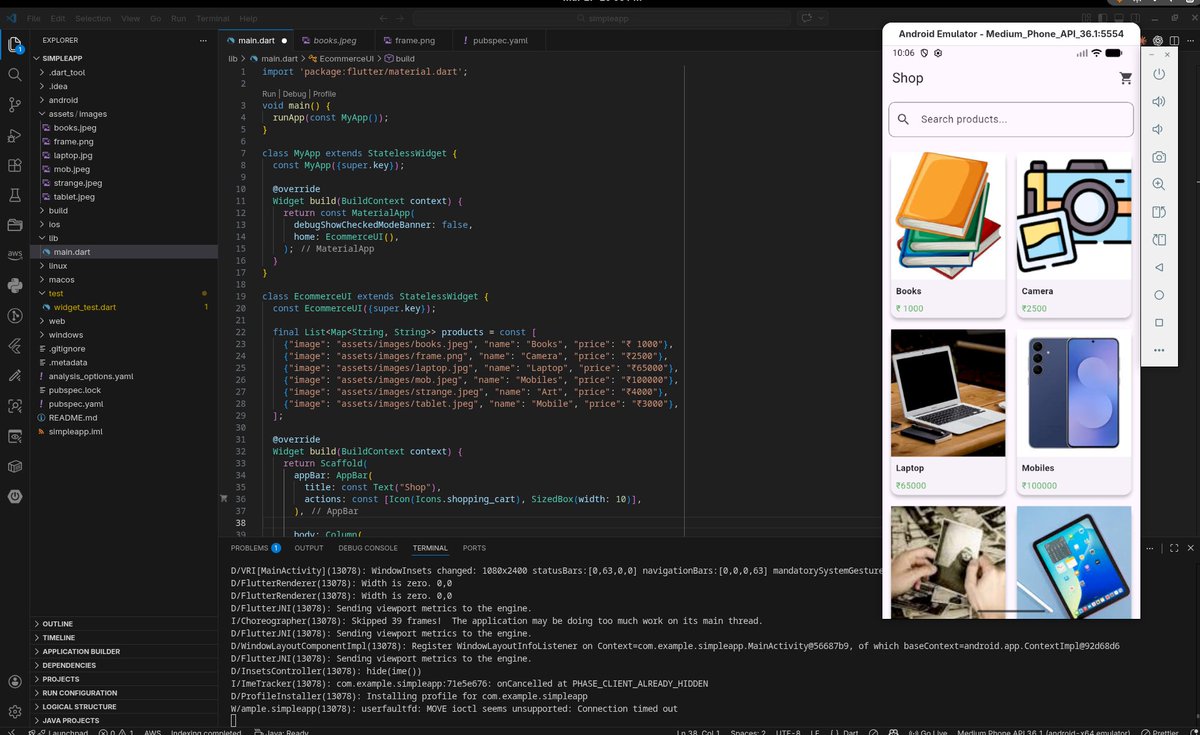
Flutter Learning Journey – Day 6
Today I learned GridView and GridView.builder.
Built a simple e-commerce UI with product grid using List and index for dynamic data (image, name, price).
Understanding how data drives UI in Flutter.
#Flutter #BuildInPublic
1
28

Mar 12
If you need to report on SMB dialects and Signing requirements for SMB, not wanting to run PingCastle scanner for each and every domain in a forest plus nice GridView or Excel export:
github.com/LuemmelSec/Pentes…
2
11
59
5,534

Feb 14
First for the user account open powershell admin then run this command "Get-AppxPackage | out-Gridview -Passthru | Remove-AppxPackage" Select the junk you want removed and it will remove it completely.
Second to stop it from ever install that crap again you have to remove the provisioning apps which reinstalls if you upgrade new version or add new user.
Same process mostly Powershell admin then run this command "Get-AppxProvisionedPackage -online | out-Gridview -Passthru | Remove-AppxProvisionedPackage -online" select everything you never want to see again and it removes it from ever being installed again!
10
1
42
7,971

Feb 12
Essa é a GridView do profile de um usuário, relacionada à mídias. Ou seja: todos os posts que contém mídia é agrupado nesse viewType! Lembra um pouco instagram, tem memória afetiva. Quer testar a versão beta iOS semana que vem? link da bio
cc @daniellimae

1
2
467

Feb 12
I don't know if it only works on Win 10 but you Might be able to see what they were; "Get-ScheduledTask | Get-ScheduledTaskInfo | select TaskName, TaskPath, LastRunTime | out-gridview" in Powershell and sort the list by date. Good luck
2
1,133

Feb 10
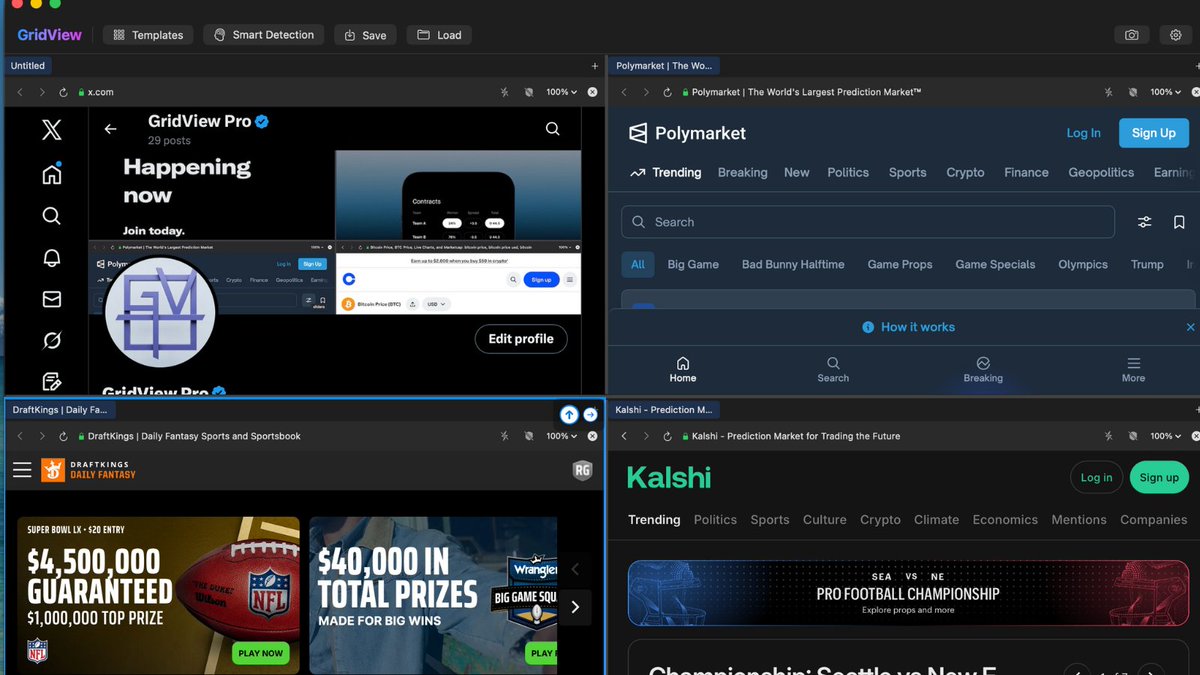
Monitor every market that moves on this news — Kalshi, Polymarket, stocks — all in one screen. No more tab switching. GridView Pro just launched on the Mac App Store TODAY! gridviewpro.com
1
93
Feb 9
🏈 Super Bowl halftime: Coaches review every angle, adjust strategy.
Your workflow halftime with GridView Pro:
- All tabs/sources in one grid
- Smart Detection for instant insights
- 1-click template reset
Coming soon.
Gridviewpro.com
#SuperBowl #productivity #GridViewPro
2
207
Feb 8
Super Bowl LVIII: Who's cashing the spread?
Kalshi: Seahawks -199
PolyMarket: Patriots 194
GridView Pro traders: Stack these odds charts in one grid. 1 Click. No tab chaos.
Mac App Store next week. $9.99 → financial edge.
gridviewpro.com
#SuperBowl #GridViewPro
2
2
377
Feb 8
Everyone recommends window managers for Mac productivity.
But tiling windows is just organized tab chaos.
GridView Pro is different: purpose-built web panels in a grid. Not windows. Not tabs. A command center.
15 templates for traders, devs, researchers.
Launching next week on Mac App Store.
13
8
125