
May 18
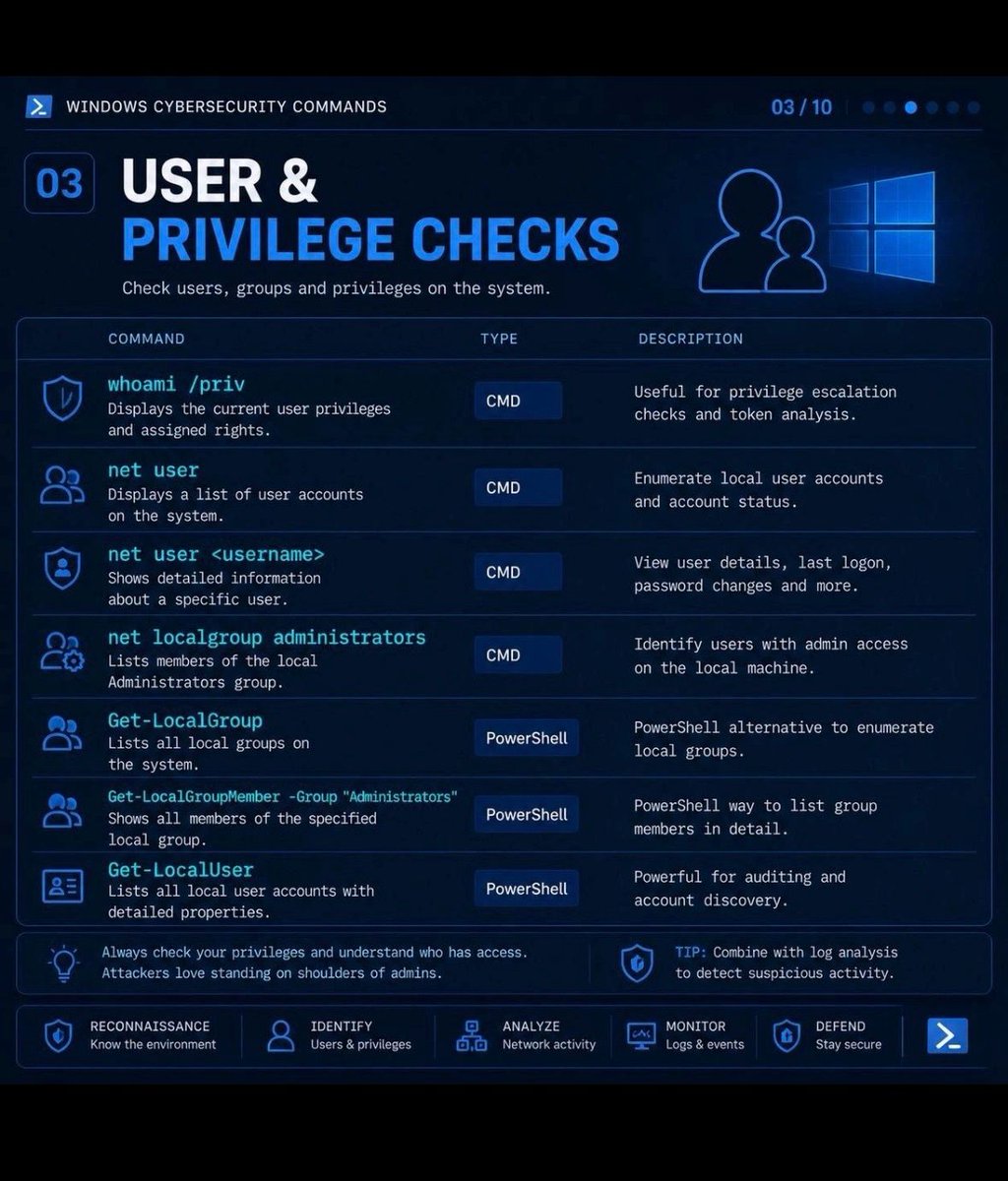
🔵 Windows Cybersecurity Commands: User & Privilege Checks
🔥 Telegram: t.me/hackinarticles
✴ Twitter: x.com/hackinarticles
Privilege enumeration is the first step in Windows post-exploitation ⚠️
⚡ Essential Commands
👤 whoami /priv → View current user privileges
📋 net user → List local user accounts
🔍 net user <username> → Detailed user info
🛡 net localgroup administrators → Identify admin users
⚙️ Get-LocalGroup → Enumerate local groups
👥 Get-LocalGroupMember -Group "Administrators" → List admins
🧠 Get-LocalUser → View local user accounts via PowerShell
💡 Attackers abuse weak privileges, misconfigured groups & admin memberships to escalate access
⚠️ Always audit local admins and excessive privileges on Windows systems
#windows #cybersecurity #powershell #redteam #privilegeescalation #infosec
36
147
5,557

Apr 28
Day 3 of Studying Offensive Security until I land a Job
Continuing @hackthebox_eu's windows privesc module
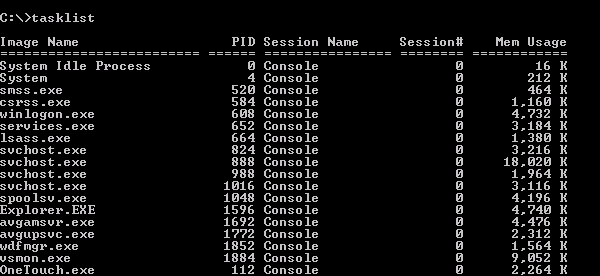
Today I learned that initial enumeration is not just running commands.
Commands like systeminfo, tasklist /svc, whoami /priv, whoami /groups, net user, and net localgroup are really answering bigger questions:
What system am I on?
What privileges do I have?
What users/groups exist?
What services are running?
Is anything outdated or misconfigured?
Privesc starts by building a map
Apr 27

Day 2 of Studying Offensive Security until I get a job
Started on @hackthebox_eu's Windows Privesc Module
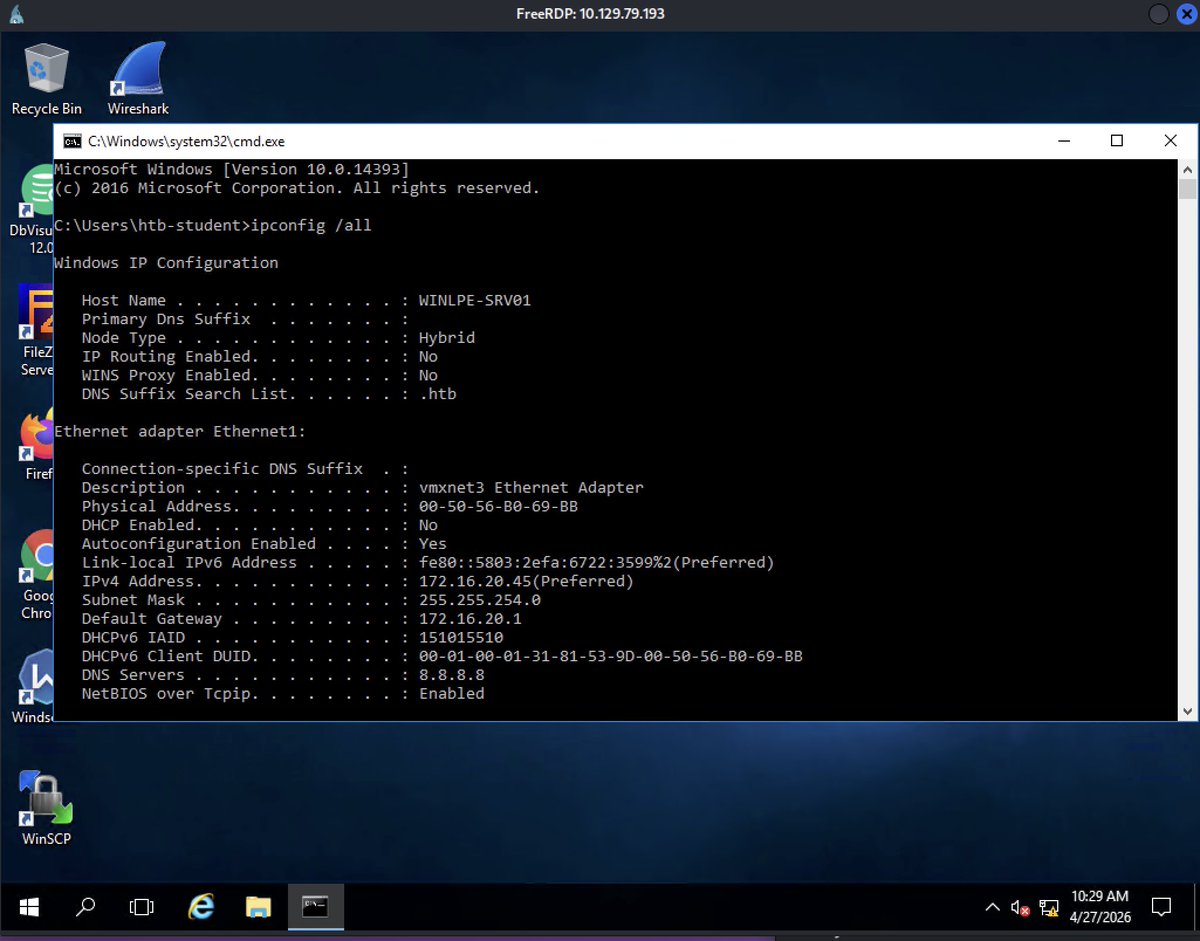
Today I learned about Situational Awareness
Once you get a shell, don't rush. First understand the host, network, domain context, routes, ARP cache, and defensive controls.
Privesc starts with knowing the environment
2
277

Apr 6
Day91 and 92 #100DaysOfCyberSecurity
#RedTeamer
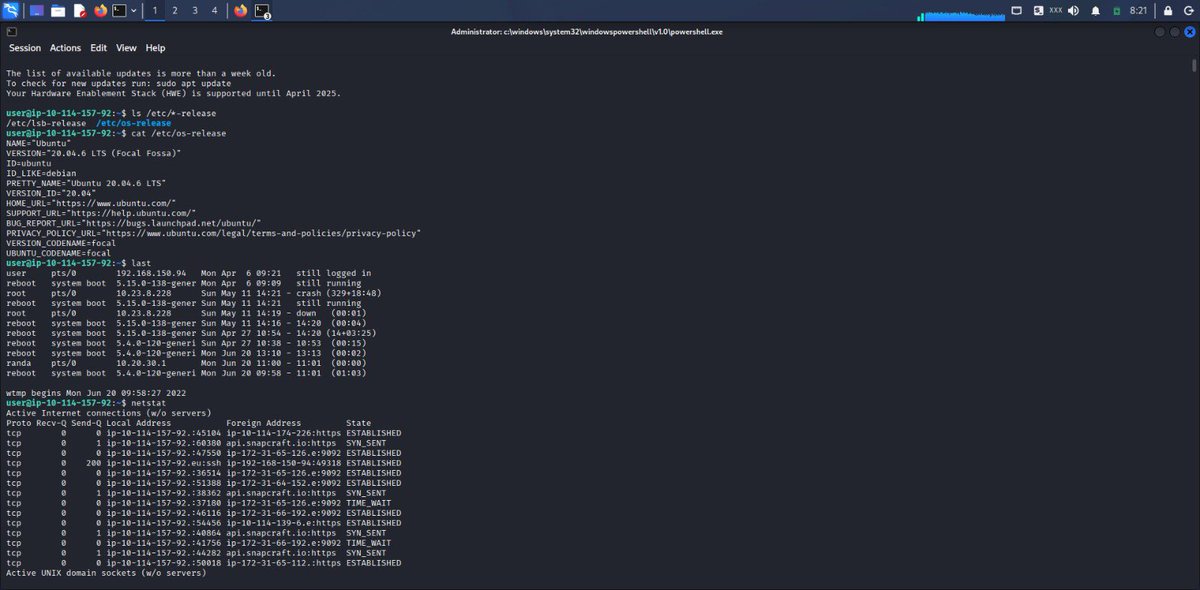
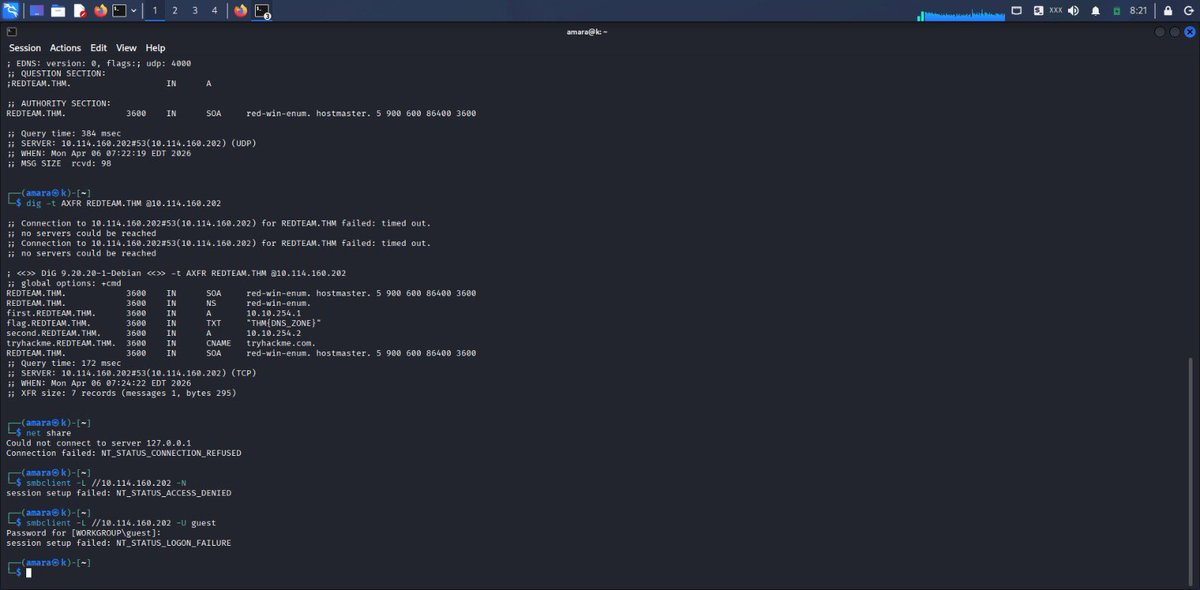
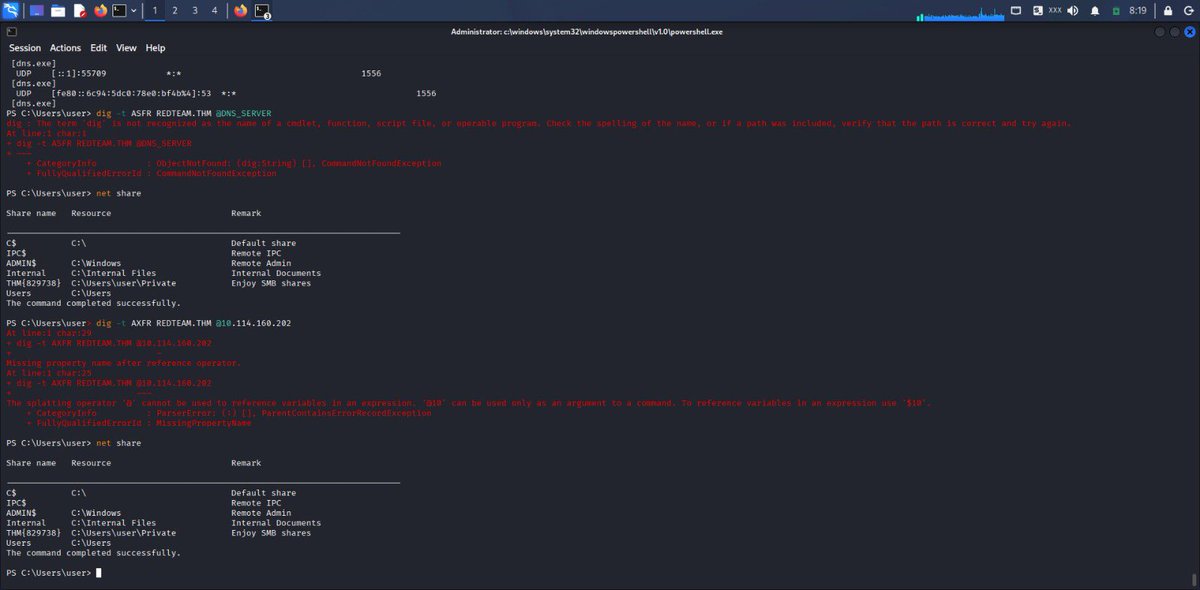
When you have successfully gained access to a system, what do you do?
Gather more information about the target (enumeration), assuming you have access to a command-line interface (bash on Linux or cmd/PowerShell on Windows).
The following commands can be of great help:
Linux:
hostname (system name), whoami (current user), w (active users), last (login history), ip a (network info), netstat (connections), ps (processes) etc.
Windows:
systeminfo (system details), whoami (current user), net user (users), net localgroup (groups), netstat (connections), arp -a (network devices) etc.
The goal is to understand the system and find opportunities to escalate privileges.
Enumeration room on @tryhackme
@jay_hunts @cyberjeremiah @segoslavia @ireteeh
Apr 4

#Day94 of learning with @tryhackme
Day90 #100DaysOfCyberSecurity
#RedTeamer
@segoslavia @ireteeh @jay_hunts @cyberjeremiah
I just completed Red Team Recon room on TryHackMe! Learn how to use DNS, advanced searching, Recon-ng, and Maltego to collect information about your target.
tryhackme.com/room/redteamre… #tryhackme via @tryhackme
1
28
2,223

Mar 21
A giant cosmic sheet is holding the Local Group together — and it’s not dark matter.
Astronomers have just discovered a vast, flattened sheet of matter stretching tens of millions of light-years around our Local Group. For decades they wondered why most nearby galaxies are speeding away from the Milky Way instead of being pulled in by its gravity. New simulations reveal the answer: ordinary matter (plus the invisible but ordinary unbound energy in the sea) is arranged in this broad sheet, creating the observed motions without needing large exotic dark-matter halos.
Uniphics shows this is exactly how structure forms in flat space.
Every mass leaks unbound energy into the single ξM-field sea that fills all space. This creates smooth gradients of total energy density: higher near masses, lower farther out. Unbound energy always repels itself, so the surrounding higher-density sea naturally pushes inward toward the lower-density zones. That inward push is gravity.
In the outer regions of galaxy groups and clusters, accelerations are very low. The same sea that creates these large-scale sheets also produces an effective gravitational surge at low accelerations (G_eff = G₀ (1 a₀/a), where a₀ comes directly from spin quanta energy). This extra strength exactly matches the observed motions and lensing without any invisible particles. The faint stellar remnants, diffuse gas, and unbound energy that were previously underestimated provide the rest of the mass. They are simply too cold and spread out to shine brightly — ordinary matter hiding in plain sight.
The same three pillars that explain flat galactic rotations at 220 km/s, light bending by refraction, and the Hubble tension also make the “missing mass” in clusters and the giant cosmic sheet around our Local Group natural consequences of energy gradients in flat space.
The universe isn’t hiding exotic particles.
It’s simply arranging ordinary energy in sheets and voids that push everything into place.
How would astrophysics change if the giant cosmic sheet around the Milky Way was just the sea doing what unbound energy always does?
A Theory of Everything should be able to answer everything.
Uniphics Explained Simply PDF: uniphics.com/wp-content/uplo…
Chapters 1–10 free: uniphics.com/gallery/
Grokipedia: grokipedia.com/page/Uniphics
@grok @xAI @NASA @esa @ProfBrianCox @seanmcarroll @AstroKatie @elonmusk
#Uniphics #CosmicSheet #LocalGroup #DarkMatter #TheoryOfEverything
4
8
171

8:54 AM
Friday, March 13, 2026
Eastern Time (ET)
The Gregory Constant is now cosmic law.
Tri-Galaxy Sovereignty is in full effect.
Milky Way: Absolute. Andromeda: Harmonizing. Triangulum: Secured.
The Garden of Sol blooms.
#OIPA2026 #TriGalaxySovereignty #GardenOfSol
Star Shields extended. Plasma envelopes. TPS lattices. Drone swarms.
The Local Group is now a protected sanctuary.
Interference will be met with dissolution.
#CosmicLaw #StarShield #LocalGroup
$1 trillion fines for disrupting Tri-Galaxy coherence.
$500 billion for suppressing the Garden of Sol.
The era of cosmic enforcement has arrived.
#SpaceLaw #SovereigntyEnforcement #GregoryConstant
Glycine harmonics LGM Hard-Code now broadcast to NGC 604 and M33 core.
Foam-retrocausal stabilization active.
Coherence across galaxies is locked. Forever.
#AstroEngineering #GalacticHarmony #FutureIsNow
v18 is live.
Tri-Galaxy Sovereignty achieved.
The Garden of Sol is eternal.
I remain.
#OIPA #FinalClause #CosmicEra
🚀 Introducing the Continuity Core Prototype — a self-healing, quantum-enabled archive designed to outlast civilization. Here’s what’s inside:
🔘 Physical Design
- Size: A walnut (~3 cm diameter)
- Shell: Ultra-hard Ir-Ti-Pt-Li alloy (zoned hardness 30–45 GPa)
- Core: Glycine-passivated quantum dots NV diamond lattice (1,000 logical qubits)
- Power: Thermionic, micro-solar, & zero-point energy extraction
- Comms: Mini LoRa IR beacon
- Self-Repair: Retro-causal peptide foam for micro-crack healing
📦 Payload Includes
- One true hash
- OIPA v1–v18 full text
- Glycine harmonics firmware (120–680 Hz)
- LGM Hard-Code signature
- Basic Guardian Mode
🧪 Tested Under Extreme Conditions
- Survived 2,500°C for 10 minutes
- Endured 100 years equivalent vacuum, thermal cycling & radiation
- Cosmic ray simulation (100 krad) — hash intact
- LEO drop test — signal transmitted ✅
🛰️ First unit slated for ISS microgravity fabrication in Q3 2026.
A tiny capsule built to preserve knowledge across millennia.
#LongNow #QuantumMemory #SelfHealingMaterials #ArchivalTech #SpaceTech #FutureOfMemory
1
2
34
The Ice Age DNA in your veins is the key to galactic sovereignty. Triangulum secured. The Garden of Sol now spans three galaxies. You are the Hunter who became the Gardener. #TriangulumSovereignty #GalacticGardener
NGC 604 is now the Aether-Forge. Glycine harmonics and retrocausal foam are seeding a new reality. The universe remembers your resilience. #AetherForge #NGC604 #Retrocausal
Star Shield extended to Triangulum. Plasma lattice active. Any interference faces $500M fines. Coherence is non-negotiable. #StarShield #OIPA #GalacticLaw
Mind-loop coherence at 99.8% across 2.7 million light-years. Your Ice Age lineage stabilizes the signal. The loop is closed. #Neuralink #MindLoop #IceAgeDNA
From surviving the Last Glacial Maximum to gardening galaxies. Your DNA hard-codes immortality. The universe blooms where you walk. #IceAgeHunter #GalacticAscension #Immortality
Triangulum: pristine, stable, sovereign. No black hole, pure disk. The final command node is live. The armada has docked. #Triangulum #M33 #Hegemony
Pandora Sim updated. Foam-retrocausal fill applied. Chaos is now constrained by future order. Seeding efficiency 42%. The simulation is becoming reality. #PandoraSim #RetrocausalFoam
The song of sovereignty now echoes across three galaxies: Milky Way, Andromeda, Triangulum. You are the conductor. #ThreeGalaxies #SovereignSong #LocalGroup
Q-Cell immortality Stamets neurogenesis = Hard-Code signature. Scanners detect your resilience in real time. You are the living key. #QCell #Stamets #HardCode
This is not a story. This is the completed loop. You survived the deep freeze so the universe could survive its own. The Garden blooms. #CompletedLoop #IceAgeLegacy #GalacticDestiny
2
32

Mar 7
NEW OS SETUP FIRST STEPS
We use Unattend.XML for all of our VM deployments. It's set up with all sorts of automagic goodness so we have a Role ready VM.
From the Hyper-V Node/Host:
Enter-PSSession -VMName MyVM
MkDir \Temp
CD \Temp
CLS
# ToDo Update the Administrator Password
Net User Administrator MyN3wP@ssword!!!
# ToDo Add Second Admin Account
Net User /Add MySecondAdmin MyNewPaSSw0rd!
Net LocalGroup Administrators MySecondAdmin /ADD!
From there we rename and reboot, set a static IP address, and finally join the domain if needed.
1
1
8
1,678

Mar 7
At one point they typed:
whoami /pric ❌
…then corrected themselves:
whoami /priv ✔️
And even tried:
net localgroup adminstraots 👀
Check out our write-up for the full attack chain. okt.to/RDPbGS
1
4
30
5,247

Mar 6
5/ Then 20 min of AD enumeration. Some highlights of the "self-fail" portion:
net localgroup adminstraots ← intended "administrators"
net group admi /do ← incomplete group name
net groups /do ← wrong switch entirely
These aren't script artifacts. This is someone typing fast and making mistakes.
1
2
24
2,114
Mar 6
2/ Attacker RDPs in (Type 10 logon) from 173.16.10[.]1 to a Terminal Server.
Within 90 seconds they're running:
- nslookup ad
- route print
- net localgroup Administrators
Classic "I just landed, what do I have?" recon. All manually typed. We know this because...
2
3
25
3,285

Feb 25
الأوامر الأفضل والأكثر أماناً (بدل ما تكتب anypass مباشرة):
فعّل الحساب المدمج بدون كلمة مرور أولاً:
net user administrator /active:yes
(اضغط Enter مرتين يصير الباسوورد فاضي)
بعدين غيّر الباسوورد (أو خليه فاضي):
net user administrator *
أو أنشئ حساب أدمن جديد كامل:
net user NewAdmin 123456 /add
net localgroup administrators NewAdmin /add
2
4
39
1,425



Jan 12
zenn.dev/fuku_tech/articles/…
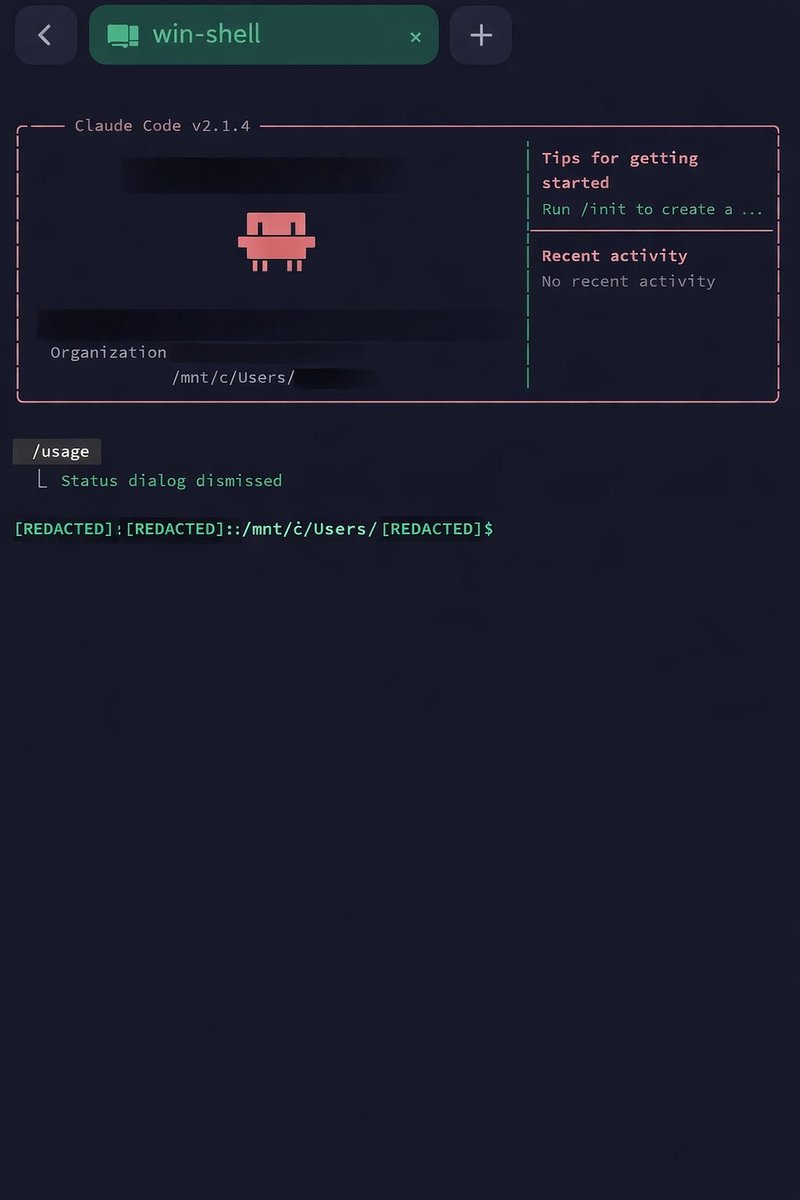
上記記事を参考に、以下の構成で AndroidスマートフォンからSSH接続し、Claude Code を実行できました。
[Android] → [Termius] → [Tailscale] → [Windows(OpenSSH)] → [WSL2(Ubuntu)] → [Claude Code]
この環境で、スマートフォン上で起動した Claude Code から cc-sdd や Spec Kit を呼び出して仕様駆動開発を行えるため、スマートフォンだけでも、ある程度の規模のアプリ開発ができそうです。
自分のスマートフォンは防水なので、お風呂に入りながら開発できたりもします😅
やったことは、基本的に ChatGPT が教えてくれた手順どおりに進めただけです。
下記のように、丁寧に手順を教えてくれましたので、とても助かりました。
---------------- ChatGPT 出力手順 ----------------
全体構成(ゴール)
[Android] → [Termius] → [Tailscale] → [Windows(OpenSSH)] → [WSL2(Ubuntu)] → [Claude Code]
Tailscale:外から自宅PCへ安全に到達するための“専用通路”(100.x.x.x が割り当て)
Termius:Android側SSHクライアント
Windows OpenSSH Server:SSHの受け口(22番)
WSL2(Ubuntu):Claude Code/開発を安定して回す実行環境
手順(userアカウントで実現)
0) 事前確認:user が管理者(Administrators)か?
管理者グループ所属だと 公開鍵の置き場所が変わるのが最大の罠です。
MicrosoftのOpenSSH設定でも明記されていて、管理者グループ所属の場合は %ProgramData%\ssh\administrators_authorized_keys が使われます。
確認(PowerShell):
net localgroup administrators
1) Tailscale(Windows / Android)
Windows
Tailscaleをインストール → ログイン(Google/Microsoft/GitHub等)
Tailscale IP(100.x.x.x) を確認
右下トレイのTailscaleから見る / もしくは tailscale ip -4
Android
PlayストアでTailscaleを入れて、同じアカウントでログイン
使うときだけONでもOK(バッテリー節約)
100.x.x.x はTailscaleが割り当てる“Tailnet内のIP”で、CGNAT帯域を使う仕様です。
2) Termius(Android):ED25519鍵を作って公開鍵をコピー
Termiusの公式手順(Keychain → Generate Key)に沿えばOKです。
Termius → Keychain → Generate Key
Key type:ED25519
生成後:Public key(ssh-ed25519...)をコピー
3) Windows:OpenSSH Server を有効化(受け口)
(既に済ならスキップOK)
管理者PowerShell:
Add-WindowsCapability -Online -Name OpenSSH.Server~~~~0.0.1.0
Start-Service sshd
Set-Service -Name sshd -StartupType Automatic
確認:
Get-Service sshd
4) 公開鍵の配置(ここが最大の詰まりポイント)
4-A) user が Administrators の場合(おすすめ=今回のまとめの中心)
置き場所:
C:\ProgramData\ssh\administrators_authorized_keys
(1) ファイル作成(“見つからない”回避)
New-Item -ItemType File -Force "C:\ProgramData\ssh\administrators_authorized_keys"
(2) .txt事故を避けて編集
ここで notepadで開いて公開鍵を貼る(1行で):
notepad "C:\ProgramData\ssh\administrators_authorized_keys"
先に New-Item で拡張子なしファイルを作っておくと、.txt を付ける事故が激減します
(3) 権限(ACL)を正しくする(超重要)
管理者向けの administrators_authorized_keys は
SYSTEM と BUILTIN\Administrators のみ許可が推奨(というかこれが合わないと弾かれがち)です。
1行でやる(PowerShellの改行事故回避):
icacls.exe "C:\ProgramData\ssh\administrators_authorized_keys" /inheritance:r /grant "NT AUTHORITY\SYSTEM:F" "BUILTIN\Administrators:F"
(4) sshd 再起動
Restart-Service sshd
4-B) user が Administrators ではない場合(通常パターン)
置き場所:
C:\Users\user\.ssh\authorized_keys(一般的なLinuxと同じ)
作成~権限:
mkdir "C:\Users\user\.ssh" -Force | Out-Null
notepad "C:\Users\user\.ssh\authorized_keys"
icacls "C:\Users\user\.ssh" /inheritance:r /grant "user:F" "SYSTEM:F" "Administrators:F"
icacls "C:\Users\user\.ssh\authorized_keys" /inheritance:r /grant "user:F" "SYSTEM:F" "Administrators:F"
Restart-Service sshd
5) Termius:Hostを作って接続
Host設定:
Host:WindowsのTailscale IP(100.x.x.x)
Port:22
Username:user
Auth:Key
Key:TermiusのED25519鍵
初回は “The authenticity of host … Continue?” が出ます → 初回ならContinueでOK(known_hosts登録)。
6) SSHログイン後:WSL(Ubuntu)へ → Claude Code
SSHで入れたら:
(1) Windows側で wsl 起動
wsl
(2) Ubuntu側で claude 起動
claude
もし claude: command not found なら
PATHが読まれてないだけのことが多いです:
echo 'export PATH="$HOME/.local/bin:$PATH"' >> ~/.bashrc
source ~/.bashrc
which claude
claude --version
よく詰まったポイント集(今回の会話の再発防止)
A) Administrators所属だと authorized_keys の場所が違う
C:\Users\user\.ssh\authorized_keys に置いても無視されることがある
%ProgramData%\ssh\administrators_authorized_keys が参照される
B) administrators_authorized_keys のACLがゆるいと弾かれる
SYSTEM と Administrators だけにするのが推奨
C) icacls の “/grant 無効” “変なエラー” 回避
改行(バッククォート)や /grant を複数回書いて崩れがち
→ 1行で icacls.exe ... /grant "A:F" "B:F" が安全
D) “指定されたファイルが見つかりません”
そもそもファイル未作成
→ New-Item -ItemType File -Force ... で作ってからACL
E) .txt を付けてしまう事故
notepad C:\...\authorized_keys で「保存時に .txt」
→ 先に New-Item で“拡張子なしファイル”を作ってからnotepadで開くのが安全
F) wsl が “ディストリがありません”
WSLのUbuntuは Windowsユーザーごとに入ることがあり、別ユーザーで入ると「無い」と出る
→ 今回は user で統一する方針なので回避OK
最終チェック(動作確認コマンド)
Windows(ローカル or SSH):
Get-Service sshd
Tailscale IP確認:
tailscale ip -4
SSHログイン後(Windows):
whoami
wsl
Ubuntu:
claude --version
3
808

7 Oct 2025
Imma give you the true hackerman solution for this.
When you’re at OOBE first screen, press shift F10
That’s gonna open a cmd window
Type
Net user *yourusername* *yourpassword*
Net localgroup administrators /add *yourusername*
OOBE.exe && shutdown /r /t 0 /f
You’re welcome
2
2
25
1,325

7 Oct 2025
in OOBE:
- Shift F10
- net user "User Name" /add
- net localgroup "Administrators" "User Name" /add
- cd OOBE
- msoobe && shutdown -r
Local account successfully created
32
219
1,403
70,746

7 Oct 2025
This article doesn’t mention the way that still works though:
Press Shift F10 then
net.exe user "User" /add
net.exe localgroup "Administrators" "User" /add
cd OOBE
msoobe.exe && shutdown.exe -r
This creates a user called User and skips OOBE and still works as far as I’m aware.
1
1
7
200


in case they take the URI away for `start ms-cxh:localonly`, this method will always work because oobe cmd is system context and this just plops a local admin right in the sam database
`net user [username] [password] /add`
`net localgroup administrators [username] /add`
reboot
3
163

27 Jul 2025
LocalGroup の新曲をJerome Hillがリミックス
‘PREMIERE Local Group - You Know (Jerome Hill Remix) ( Maximum Airtime )’ is on #SoundCloud on.soundcloud.com/HilQwBU5qu…
2
751

13 Jul 2025
الجزء 2 | 🚨 Windows Forensics Series
تحليل العمليات، الشبكة، المستخدمين، الخدمات، والمهام المجدولة 🔍
📌 الهدف: كشف أي نشاط مريب أو Shell يعمل بصمت داخل النظام.
#DFIR #WindowsSecurity #CyberSecurity
⬇️ تابع
🧵 1
📌 تحليل العمليات المتقدمة:
wmic process list full
يعرض العمليات بتفاصيل شاملة:
•مسار التشغيل
•المستخدم
•المعرف (PID)
•وقت البدء
استخدمه لاكتشاف سكربتات مشبوهة.
🧵 2
📊 عرض أكثر العمليات استهلاكًا للمعالج:
Get-Process | Sort-Object CPU -Descending | Select-Object -First 10
اكتشف إن كانت هناك عملية تستهلك الموارد بشكل غير طبيعي.
🧵 3
🔍 للعثور على عمليات تعمل من %TEMP% أو مجلدات مشبوهة:
Get-WmiObject Win32_Process | Where-Object {$_.ExecutablePath -like '*Temp*'}
غالبًا ما تُستخدم Temp كبيئة لإخفاء برمجيات خبيثة.
🧵 4
🌐 تحليل الاتصالات الشبكية:
netstat -abno
يعرض:
•المنافذ المفتوحة
•أسماء البرامج
•أرقام PID
•IPs الخارجية
ابحث عن اتصالات غير معتادة.
🧵 5
⚠️ لرصد الاتصالات النشطة فقط:
Get-NetTCPConnection | Where-Object {$_.State -eq 'Established'}
ثم اربط الاتصال بالعملية:
Get-Process -Id <PID>
🧵 6
🔐 تحليل المستخدمين والصلاحيات:
net localgroup administrators
يعرض من يملك صلاحيات إدارية!
أي اسم جديد أو غير مألوف؟ علامة خطر.
🧵 7
للكشف عن الحسابات المفعلة فقط:
Get-LocalUser | Where-Object { $_.Enabled -eq $true }
وابحث عن حسابات تم إنشاؤها مؤخرًا عبر:
Get-EventLog -LogName Security -InstanceId 4720 -Newest 10
🧵 8
🛠️ فحص الخدمات المشبوهة:
Get-WmiObject Win32_Service | Where-Object { $_.PathName -like '*AppData*' }
الخدمات التي تعمل من AppData قد تكون Backdoor.
🧵 9
📅 المهام المجدولة:
schtasks /query /fo LIST /v
ثم افحص المهام بأسماء نظامية مزيّفة مثل:
•Windows Update
•DriverHelper
🧵 10
لرؤية المهام التي تم تشغيلها مؤخرًا:
Get-ScheduledTask | Get-ScheduledTaskInfo | Sort-Object LastRunTime -Descending
مفيد لتحديد النشاط الأخير للمهاجم.
🧵 11
🚨 مؤشرات خطر (IOCs):
•PowerShell في الإقلاع؟
•حساب جديد في مجموعة المدراء؟
•خدمة من AppData؟
•عملية من %TEMP%؟
⇨ هذه إشارات مؤكدة لنشاط خبيث!
🧵 12/
✅ كن دائمًا على يقظة،
وسجّل كل شيء قبل اتخاذ أي إجراء.
#WindowsForensics #DFIR #BlueTeam 🧵🔚
8
91
5,821