
Jun 5
有一个反馈是前端是不是也可以加上可以选择隐藏哪些维度,比如只用其中三四个抽。mcp_server其实有这个功能了,只需要在前端暴露选项就好。还有一个问题是我装mcp server的时候激活不了,家机说是用了LSP而不是MCP协议,它给哐哐一顿改用上了,不过我不太清楚是不是它的幻觉,你回头问Monday一句就好。
2
2
320

Jun 3
STEP 3
“AUTONOMOUS TRADING”
Quick framing first: what goes autonomous is the script on your machine, not from the chat. I’m handing you the setup so your computer runs it.
Here it is, in order.
1. Install Claude Code (if you don’t have the CLI).
npm install -g @anthropic-ai/claude-code, then confirm: claude --version. The bot calls the claude command, so this has to work.
2. Log Claude Code in.
Run claude once, complete login, then sanity check: claude -p "say hi".
3. Add the Robinhood MCP to Claude Code (user scope).
This is separate from your claude.ai connector. The CLI needs its own:
claude mcp add -s user --transport sse robinhood agent.robinhood.com/mcp/trad…
If sse won’t connect, redo with --transport http. User scope (-s user) matters so cron can see it from any folder.
4. Authorize it once, interactively.
Open claude, run /mcp, pick Robinhood, complete the browser OAuth. Then confirm it’s live and note the exact server name: claude mcp list. Whatever name shows must match the config in step 7.
5. Prove headless can reach your account (read-only, no money).
claude -p "Call get_accounts and return only JSON listing each account_number and its agentic_allowed flag." --allowedTools "mcp__robinhood__get_accounts" --dangerously-skip-permissions
You want to see (your account number here) with agentic_allowed true. If this works, the hard part is done.
6. Drop the files in a folder.
mkdir -p ~/trader, put momentum_trader.py, SKILL.md, requirements.txt there. Confirm python3 --version is 3.9 (needed for zoneinfo). No pip installs required.
7. Set the config (top of momentum_trader.py).
Confirm account_number is (your account number), set mcp_server to the exact name from step 4, and if claude isn’t on the default PATH set claude_bin to the output of which claude. Leave the strategy knobs as-is for now.
8. Free up the cash.
These are cash accounts so they settle the next day.
9. Test one tick during market hours.
cd ~/trader && python3 momentum_trader.py --once, then read ~/.momentum_trader.log. Heads up: this can place one real (small) order. If you’d rather validate with zero real orders first, say so and I’ll add the dry_run flag so this step logs picks, gate verdicts, and stop levels without trading.
10. Make it autonomous with cron.
crontab -e, add (use your real python path from which python3, machine clock should be Central):
* 8-15 * * 1-5 cd ~/trader && /usr/bin/python3 momentum_trader.py --once >> ~/.momentum_trader.log 2>&1
It fires every minute on weekdays; the bot itself idles outside 8:30 to 15:00 Central, so the schedule is forgiving. (Always-on machine and prefer a live loop instead? Run python3 momentum_trader.py --loop under tmux or a service like railway.)
11. Watch it.
tail -f ~/.momentum_trader.log for activity, and ~/.momentum_trader_state.json for the live position and daily PnL.
12. Kill switch.
To stop fast: crontab -e and comment out the line (or pkill -f momentum_trader.py if you’re in loop mode). The max_daily_loss_usd and max_trades_per_day guards also auto-halt new entries on their own.
The real make-or-break steps are 3 through 5.
If the Robinhood MCP authorizes in Claude Code and that headless get_accounts call returns your agentic account, everything downstream works.
3
22
4,695

May 18
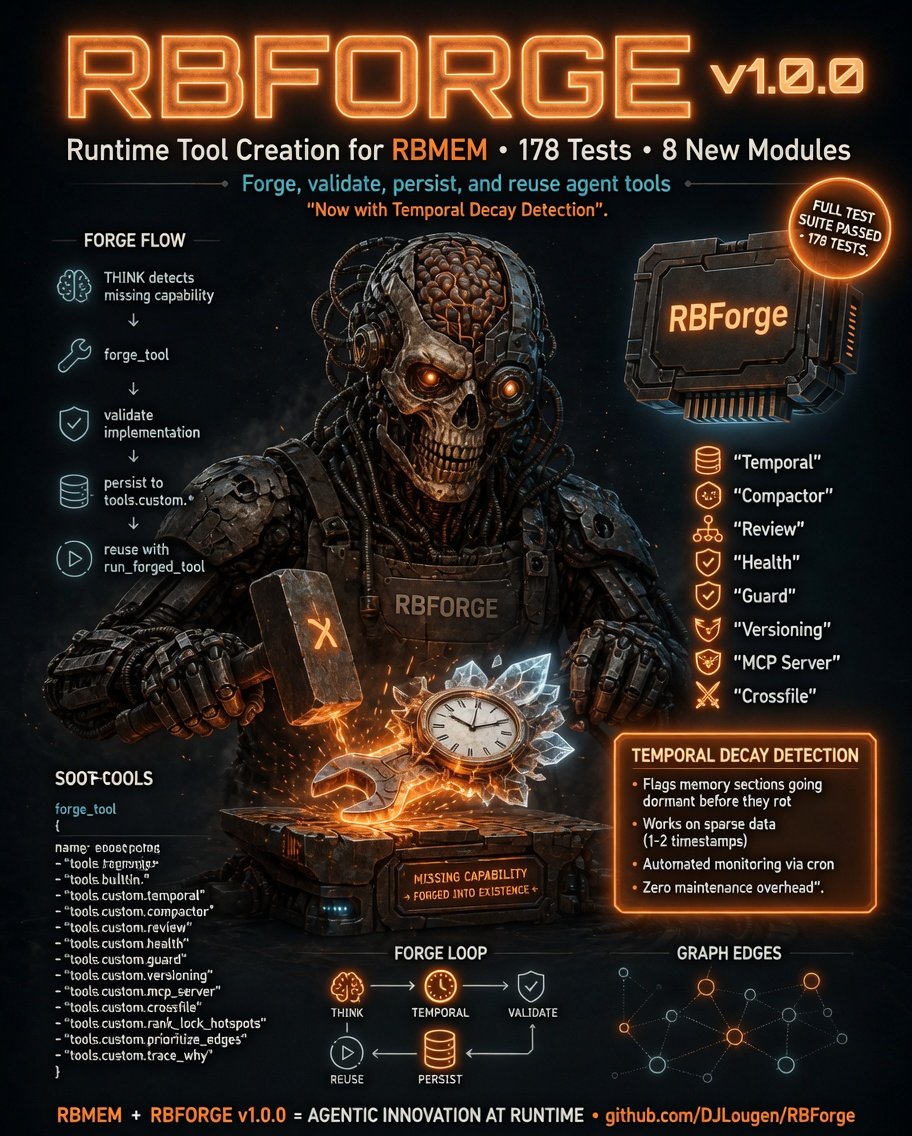
RBForge v1.0.0 is out.Full test suite (178 tests) 8 new modules: temporal, compactor, review, health, guard, versioning, mcp_server, crossfile.
Key feature: temporal decay detection. Flags memory sections going dormant before they rot. Works on sparse data (1-2 timestamps).
Automated monitoring via cron. Zero maintenance overhead.
github.com/DJLougen/RBForge
1
1
6
477


Mar 11
【Tech Blog投稿しました👀】
kickflow MCP サーバーのトークン数を97%削減しました。が、しかし… - kickflow Tech Blog tech.kickflow.co.jp/entry/20… #Claude #LLM #MCP_Server #Chat__GPT #gemini
2
2
302


everyone's out here building new protocols for the "Agentic Web" from scratch
meanwhile gradio devs just add mcp_server=True and their app is already an agent tool
oh and coming soon — any Gradio Space can be installed as a skill by your agent 🔥😎
github.com/gradio-app/gradio…
2
2
10
1,936

23 Aug 2025
1
4
6
231

20 Aug 2025
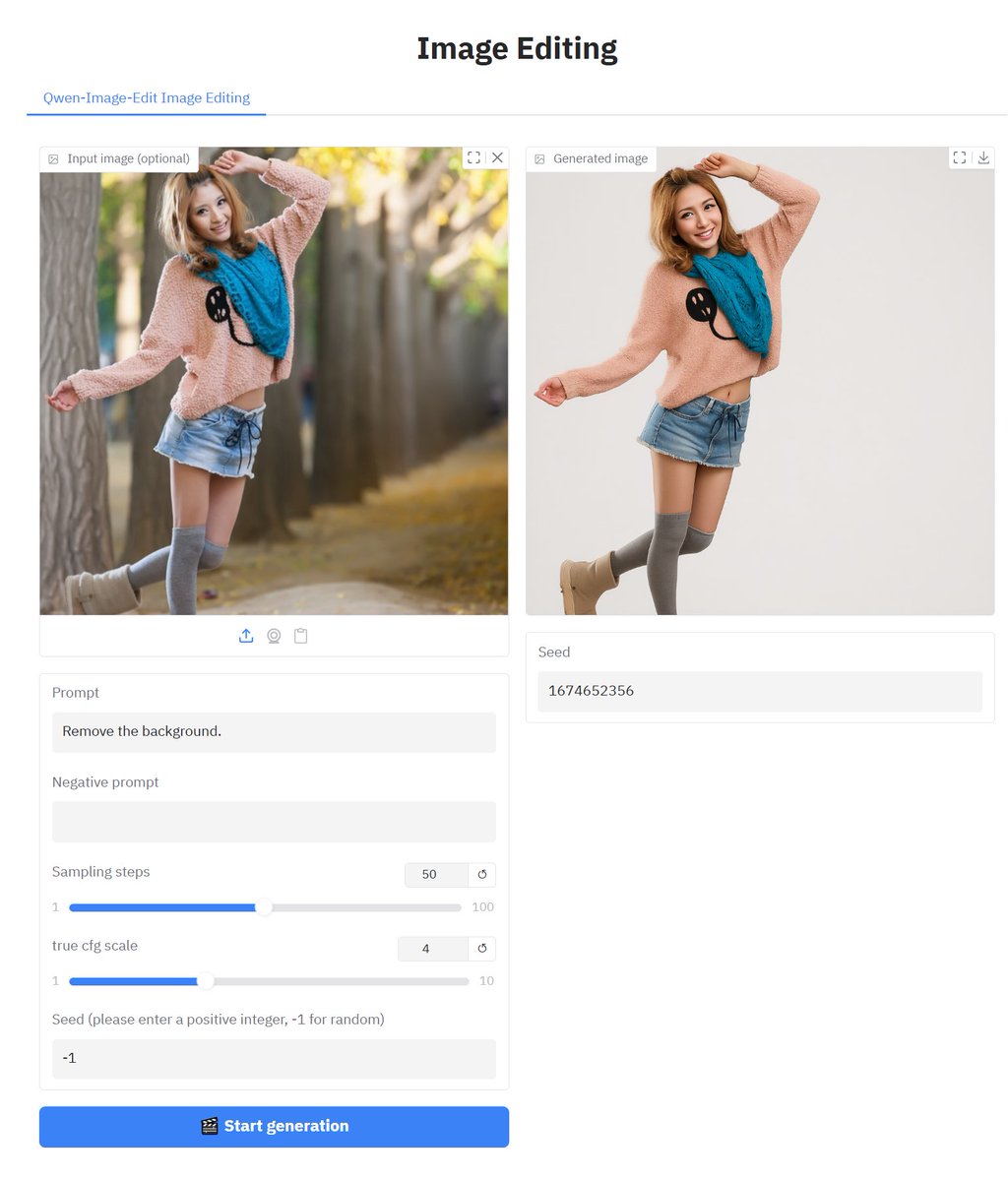
The following code is applicable to Qwen/Qwen-Image, Qwen/Qwen-Image-Edit, and black-forest-labs/FLUX.1-Krea-dev.
```python
import torch
import argparse
import os
import numpy as np
import datetime
import random
from diffusers import QwenImageEditPipeline, DiffusionPipeline, FluxPipeline
import gradio as gr
from optimum.quanto import freeze, qint8, quantize
parser = argparse.ArgumentParser()
parser.add_argument("--pipeline", type=int, default=0, help="0 - QwenImageEditPipeline, 1 - DiffusionPipeline, 2 - FluxPipeline")
parser.add_argument("--server_name", type=str, default="127.0.0.1", help="IP address, change to 0.0.0.0 for local network access.")
parser.add_argument("--server_port", type=int, default=7892, help="Port used.")
parser.add_argument("--share", action="store_true", help="Whether to enable gradio sharing.")
parser.add_argument("--mcp_server", action="store_true", help="Whether to enable mcp server.")
parser.add_argument('--vram', type=str, default='high', choices=['low', 'high'], help='Vram mode.')
parser.add_argument('--lora', type=str, default="None", help='Path of lora model.')
args = parser.parse_args()
if torch.cuda.is_available():
device = "cuda"
if torch.cuda.get_device_capability()[0] >= 8:
dtype = torch.bfloat16
else:
dtype = torch.float16
else:
device = "cpu"
dtype = torch.float32
MAX_SEED = np.iinfo(np.int32).max
os.makedirs("outputs", exist_ok=True)
pipe = None
pipe_text = ""
if args.pipeline == 0:
title_text = "Image Editing"
pipe_text = "Qwen-Image-Edit Image Editing"
model_id = "Qwen/Qwen-Image-Edit"
print(f"Loading {model_id}")
pipe = QwenImageEditPipeline.from_pretrained(model_id, torch_dtype=dtype)
pipe.set_progress_bar_config(disable=None)
elif args.pipeline == 1:
title_text = "Text-to-Image"
pipe_text = "Qwen-Image Text-to-Image"
model_id = "Qwen/Qwen-Image"
print(f"Loading {model_id}")
pipe = DiffusionPipeline.from_pretrained(model_id, torch_dtype=dtype)
elif args.pipeline == 2:
title_text = "Text-to-Image"
pipe_text = "FLUX.1-Krea-dev Text-to-Image"
model_id = "black-forest-labs/FLUX.1-Krea-dev"
print(f"Loading {model_id}")
pipe = FluxPipeline.from_pretrained(model_id, torch_dtype=dtype)
if args.lora != "None":
pipe.load_lora_weights(args.lora)
print(f"Loaded {args.lora}")
if args.vram == "high":
pipe.vae.enable_tiling()
#pipe.enable_model_cpu_offload()
pipe.to(device)
else:
quantize(pipe.transformer, qint8)
freeze(pipe.transformer)
pipe.vae.enable_tiling()
pipe.enable_model_cpu_offload()
def generate(
prompt,
negative_prompt,
num_inference_steps,
true_cfg_scale,
seed_param,
image=None,
width=None,
height=None,
):
global pipe
timestamp = datetime.datetime.now().strftime("%Y%m%d_%H%M%S")
if seed_param < 0:
seed = random.randint(0, MAX_SEED)
else:
seed = seed_param
input_image = image if image is not None else None
if args.pipeline == 0:
result = pipe(
image=input_image,
prompt=prompt,
negative_prompt=negative_prompt,
num_inference_steps=num_inference_steps,
true_cfg_scale=true_cfg_scale,
generator=torch.Generator().manual_seed(seed)
).images[0]
else:
result = pipe(
prompt=prompt,
negative_prompt=negative_prompt,
width=width,
height=height,
num_inference_steps=num_inference_steps,
true_cfg_scale=true_cfg_scale,
generator=torch.Generator().manual_seed(seed)
).images[0]
output_path = f"outputs/{seed}_{timestamp}.png"
result.save(output_path)
return output_path, seed
with gr.Blocks(theme=gr.themes.Base()) as demo:
gr.Markdown(
f"""
<div>
<h2 style="font-size: 30px;text-align: center;">{title_text}</h2>
</div>
"""
)
with gr.TabItem(pipe_text):
with gr.Row():
with gr.Column():
image_input = gr.Image(label="Input image (optional)", type="pil", visible=args.pipeline == 0)
prompt = gr.Textbox(label="Prompt", value="ultra clear, 4K, film-like composition, ")
negative_prompt = gr.Textbox(label="Negative prompt", value="")
width = gr.Slider(label="Width (recommends: 1328x1328, 1664x928, 1472x1140)", minimum=256, maximum=2656, step=32, value=1328, visible=args.pipeline > 0)
height = gr.Slider(label="Height", minimum=256, maximum=2656, step=32, value=1328, visible=args.pipeline > 0)
num_inference_steps = gr.Slider(label="Sampling steps", minimum=1, maximum=100, step=1, value=50)
true_cfg_scale = gr.Slider(label="true cfg scale", minimum=1, maximum=10, step=0.1, value=4.0)
seed_param = gr.Number(label="Seed (please enter a positive integer, -1 for random)", value=-1)
generate_button = gr.Button("🎬 Start generation", variant='primary')
with gr.Column():
image_output = gr.Image(label="Generated image")
seed_output = gr.Textbox(label="Seed")
gr.on(
triggers=[generate_button.click, prompt.submit, negative_prompt.submit],
fn=generate,
inputs=[
prompt,
negative_prompt,
num_inference_steps,
true_cfg_scale,
seed_param,
image_input,
width,
height,
],
outputs=[image_output, seed_output]
)
if __name__ == "__main__":
demo.launch(
server_name=args.server_name,
server_port=args.server_port,
share=args.share,
mcp_server=args.mcp_server,
inbrowser=True
)
```


1
1
7
921

24 Jul 2025
6時🔥23時から結局朝6時までまた寝るの忘れてやってしまった面白すぎてw外明るいし暑い😆
今日もたくさんの検証ができて楽しかったです〜皆さんほんとありがとうございました!🎵☺️
=以下メモ=
【もくもく会でMCPサーバー開発とAI実装の知見を深めたのでメモシェア〜🚀 生成AI技術の実装から得た"壁を超える"思考法も👀】
📊 もくもく会 生成AI技術実装の詳細記録
■ 1. ride on aiのニュース要約機能改善 🔧
▸ 1.1 複数リンク対応の課題と解決
• 課題:複数URLが含まれるメッセージで同じ要約が生成される問題
• 目標:各URLごとに個別の要約を生成する機能の実装
• 解決策:「リンクが複数の場合は、そのリンクの内容だけ要約」という処理を追加
▸ 1.2 実装プロセスと成果
• docsフォルダに機能設計書を作成し、複数URL対応の要約bot設計
• 複数リンクの検出ロジックと独立した要約処理の実装
• 動作確認で各リンクごとに独自の要約生成に成功
■ 2. MCP(Model Context Protocol)サーバー開発 💻
▸ 2.1 YouTube MCP サーバーの構築
• プロジェクト作成:mkdir mcp_server && cd mcp_server
• 仮想環境構築とMCPパッケージのインストール
• 実装機能:search_youtube、get_video_details、get_channel_details、get_playlist_items
▸ 2.2 Claude Codeへの統合と動作確認
• 統合コマンド:claude mcp add youtube-api -e YOUTUBE_API_KEY=...
• 「youtubeでclaude codeの動画たちを5つ探して」で正常動作確認
• YouTube API キー作成手順の文書化(Google Cloud Console設定含む)
■ 3. 生成AIニュースの体系的収集・整理 📰
▸ 3.1 日本国内の生成AIニュース
• 政策:GENIAC第3期で楽天・野村総研含む13件採択、生成AIパスポート受験者1万人超
• イベント:Generative AI Japan年次イベント、生成AI大賞2025の開催決定
• 企業動向:セゾンテクノロジーのRAG精度向上、SmartNewsのAIまとめ機能、セガのゲーム開発活用
• 活用事例:都城市の半年導入事例、日本企業の「期待外れ」感分析
▸ 3.2 国際生成AIニュースの主要動向
• OpenAI:GPT-5リリース計画を8月初旬に設定
• Memories AI:世界初の大規模視覚記憶モデル(LVMM)発表
• ChatGPT新機能:テーマ、ショッピング、学習モードの追加
■ 4. コンテキストエンジニアリングエージェント開発 🤖
▸ 4.1 YAML Context Engineering Agent仕様
• 目的:様々な形式の入力から階層的コンテキスト情報を抽出
• 主要機能:URLクロール、テキスト解析、構造化データ抽出、ファイルシステム管理
▸ 4.2 Larkドキュメント構造解析の実装例
• Larkヘルプセンターの12カテゴリを完全解析
• 階層構造(L1、L2、L3)の自動識別機能実装
• YAML形式での永続化とデータ管理
■ 5. その他の技術調査・実装成果 🔍
▸ 5.1 NotebookLMの活用法発見
• URL貼り付けで配下の全ページを自動読み込み機能
• NoSQLとMongoDBの概要音声生成機能の活用
• 音声読み上げ機能の各種パラメータ調整
▸ 5.2 Devin MCPマーケットプレイス対応
• Datadog、Linear、Sentry、Figmaとの連携実装
• MCPを通じた外部ツール統合の可能性拡大
▸ 5.3 各種ツール・技術の調査メモ
• Google Analytics MCP Server:GA4データのLLMアクセス可能化
• gemini-2.5-flash-tts:JSON/オブジェクト読み上げ機能
• GAとSearch Consoleの違い整理
■ 6. 重要な知見・気づき 💡
▸ 6.1 AI開発の「壁」を超える思考法
• 「AIはここまでしかできないだろう」という壁の認識の危険性
• 実現可能性を一旦置いて、目標設定することの重要性
• 認識の違いが生む大きな差:制限を設けない発想が革新を生む
▸ 6.2 MCP活用による無限の可能性
• 自作MCPサーバーで任意のツールをAIに統合可能
• Claude Codeとの統合で自然言語によるツール操作を実現
• DevinのMCPマーケットプレイスが生産性革命をもたらす
▸ 6.3 コンテキストエンジニアリングの新しい流れ
• 全自動収集 → YAML化 → オンラインコース作成の自動化パイプライン
• NotebookLMとの連携による知識の音声化・構造化
Model Context Protocol: modelcontextprotocol.io/
YouTube Data API: developers.google.com/youtub…
Google Analytics MCP: github.com/googleanalytics/g…
NotebookLM: notebooklm.google.com/
Devin MCP Docs: docs.devin.ai/work-with-devi…
24 Jul 2025

23時から朝5時までぶっ続けのRIDE ON AI生成AIもくもく会🔥
外が朝焼けで明るくなってきたけどこの熱量素晴らしい☺️✨
3
2,229

7 Jul 2025
use it an an mcp server just by setting `.launch(mcp_server=True)`!
7 Jul 2025

Whoa, 1000 likes in the Wan 2.1 Fast Space 🎥 💨
still feels surreal that we can generate such high quality videos so fast with open source models, and that's the slowest/worst it's ever gonna be ✨
4
345

25 Jun 2025
we need to hire AIs to train the managers.
mcp_server and Wifi powered electric shock machine might work.
1
3
61

24 Jun 2025
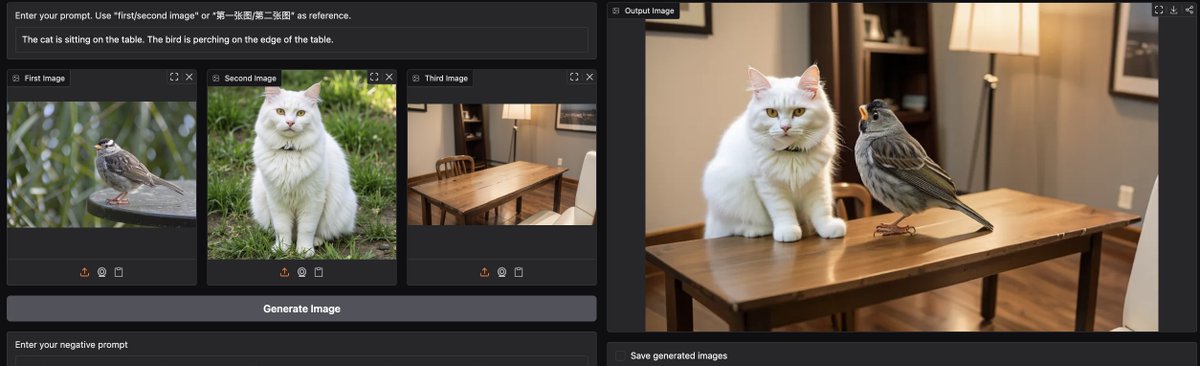
If you want a free version of ChatGPT 4o to edit image with prompts, try OmniGen2 on @huggingface
- Model & code open sourced, technical report available
- Apache 2 license
- up to 1024 x 1024
Coolest part? It's fully open sourced so you can call this model with MCP. All you need to do it to launch the app with `.launch(mcp_server=True)`
huggingface.co/spaces/OmniGe…
6
9
63
11,239
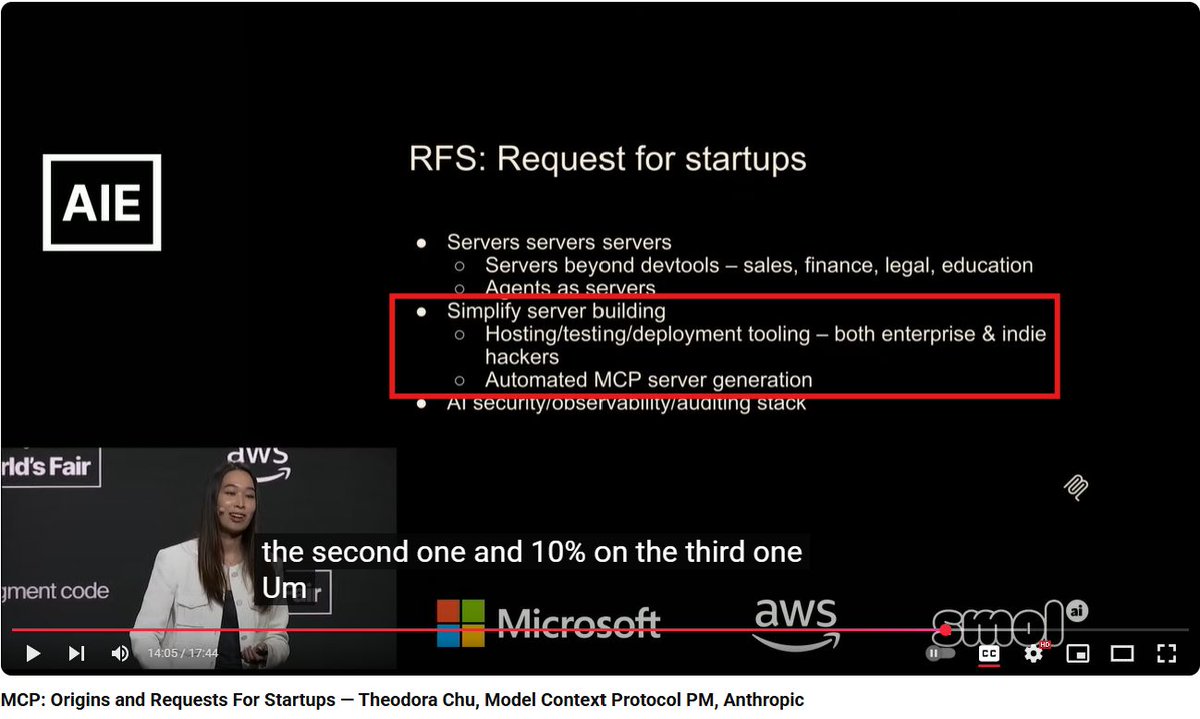
In her amazing talk, @chu_onthis issued an RFS for building tools that make creating and deploying MCP Servers easy.
Well, it couldn't be easier than this—just add this one line to your Gradio app, and your MCP server is ready and deployed! 🤩
gr.launch(mcp_server=True)
1
3
6
4,069

10 Jun 2025
if you pull from dev branch on helix and use this mcp_server you can get up and running:
github.com/HelixDB/helix-py/…
2
23

26 May 2025
Then on your own space, go to Files and edit app.py. On the final line add mcp_server=True. This will trigger a restart, and your model is now available as a remote MCP Server.
2
2
111
Or you can simply set `mcp_server=True` in any Gradio app. Can it get any simpler than that? Read more here: huggingface.co/blog/gradio-m…
2
2
14
2,254
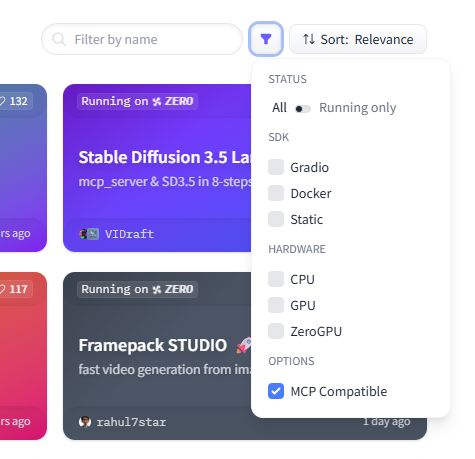
JUST DROPPED: Easily find MCP Servers on @huggingface with a click!
🔎 hf.co/spaces?filter=mcp-serv…
Every Gradio app with `mcp_server=True` now gets auto-tagged, making MCP discovery instant.
This power move just made the MCP ecosystem way more accessible 🚀
4
12
70
14,565