
Habla mucho de IA, pero sabe programar en Python? Un ejemplo:
import tkinter as tk
from tkinter import messagebox
root = tk.Tk()
root.withdraw() # Oculta la ventana principal
messagebox.showinfo("Mensaje", "Eres simple, Oscar")
root.destroy()
3
128

Jun 15
#threatreport #LowCompleteness
Under the Hood - LotusLite: Believe me I am MustangPanda | 09-06-2026
Source: blog.exatrack.com/UnderTheHo…
Key details below ↓
🧑💻Actors/Campaigns:
Red_delta
💀Threats:
Lotuslite,
🌐Geo: Singapore, China
🤖LLM extracted TTPs:`
T1036, T1071.001, T1547.001, T1573
🧨IOCs:
- Hash: 9
- Path: 1
- Registry: 2
- File: 5
- IP: 1
💽Software: Chrome
🔢Algorithms: sha256, zip
🗂️Win API: MessageBox
💻Platforms: x64
YARA: Found
#threatreport:
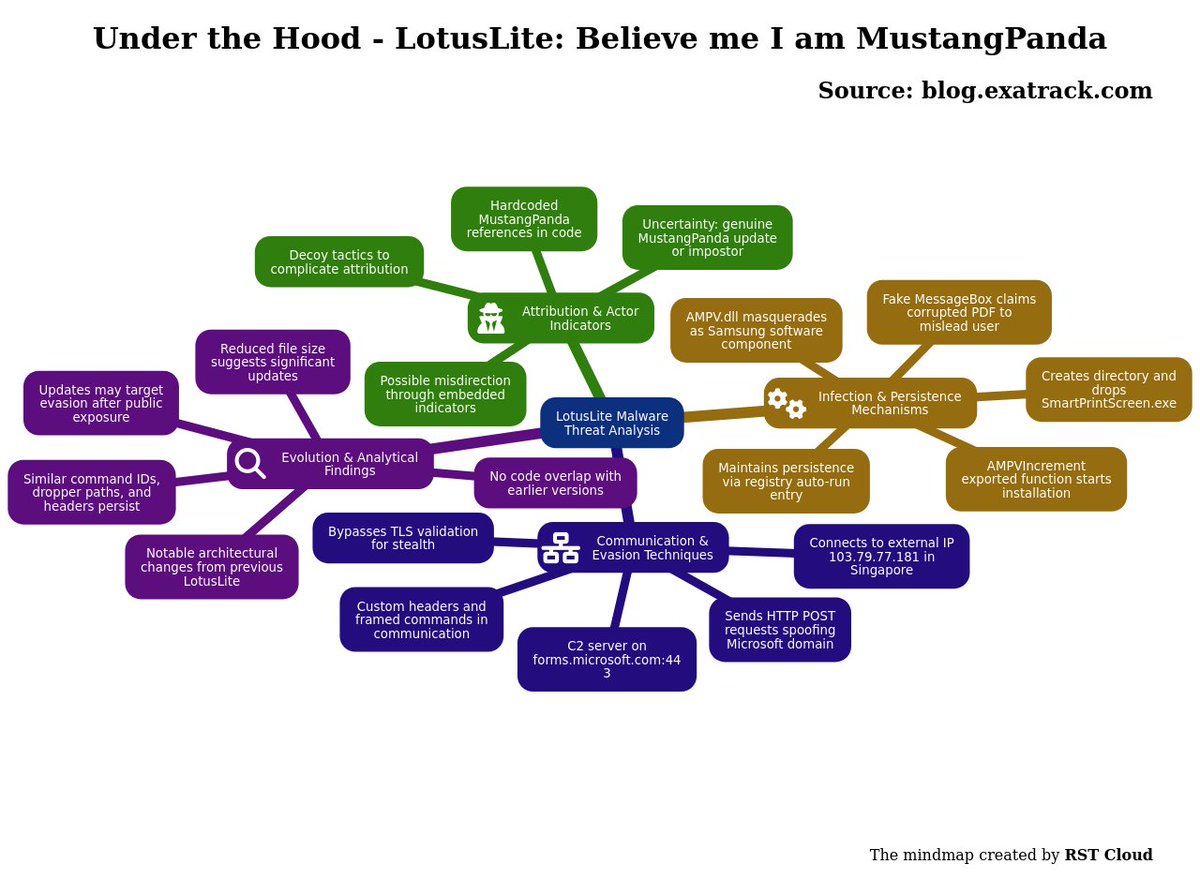
The analysis centers around a recent malware variant known as LotusLite, often associated with the threat actor MustangPanda. The malware features notable hardcoded strings referring to MustangPanda within its code, indicating a possible connection or an attempt at misdirection. It operates via a command and control (C2) server hosted at forms.microsoft.com, utilizing port 443. This setup deliberately circumvents TLS validation, presenting a unique method of evading detection.
The installation process of LotusLite is initiated by executing a specific exported function, AMPVIncrement. This function creates a directory designated for its functionality and drops a malicious executable, SmartPrintScreen.exe, mimicking the legitimate process of generating screen print files. The malware impersonates a file related to Samsung software through its DLL named AMPV.dll, and maintains persistence on the infected system by adding an entry in the registry for execution upon system startup. Additionally, a MessageBox is displayed to the user, misleadingly indicating a corrupted PDF file.
Upon establishing a connection to an external IP address (103.79.77.181, located in Singapore), the malware sends HTTP POST requests while spoofing a legitimate Microsoft domain. The request includes custom headers and appears to communicate with the C2 server using specific command framing that suggests an established protocol.
The analysis reveals substantial similarities between this variant of LotusLite and previous installations attributed to MustangPanda, highlighting consistent command identifiers, HTTP headers, and dropper directory paths. Despite these correlations, discrepancies exist; particularly, there was no code overlap between versions in recent analyses, suggesting significant modifications were made to the architecture of the malware. The size reduction observed from previous versions raises further questions about the nature of these updates.
Ultimately, the findings imply either potential internal modifications by the threat actor to evade detection following public scrutiny or the emergence of a different actor mimicking MustangPanda. This dual possibility complicates the attribution of the malware. The repeated references to MustangPanda within the malware may serve as a decoy or as an indication of the actor's intent to disassociate themselves from the previous version following its exposure.
2
93


Jun 14
Write32{0x082C674A,0xFF};
Messagebox{“あたり”};
Jun 13

5日間限定の無料券チャレンジ(^^)
今日はチルド飲料無料の最終日です♪
1)このアカウントをフォロー
2)この投稿をリポスト
3)抽選で毎日1万名様に無料券!結果は自動でお知らせ
1
1
117

photo_manager_eng_v4.ahk
全構文 ⇒
import os
import sys
import shutil
import socket
import tkinter as tk
from tkinter import messagebox
from PIL import Image, ImageTk, ImageOps
try:
from pillow_heif import register_heif_opener
register_heif_opener()
except ImportError:
pass
lock_socket = None
def is_already_running():
global lock_socket
lock_socket = socket.socket(socket.AF_INET, socket.SOCK_STREAM)
try:
lock_socket.bind(("127.0.0.1", 65432))
except socket.error:
return True
return False
class PhotoSelectorApp:
def __init__(self, root):
self.root = root
self.root.title("PhotoSelector")
self.root.geometry("1400x850")
# 引数(フォルダパス)が引き渡されていればそれを使い、無ければ自身の場所を使う
if len(sys.argv) > 1 and os.path.isdir(sys.argv[1]):
self.base_dir = os.path.abspath(sys.argv[1])
elif getattr(sys, 'frozen', False):
self.base_dir = os.path.dirname(sys.executable)
else:
self.base_dir = os.path.dirname(os.path.abspath(__file__))
# 必要なフォルダは「selected」のみ生成
self.selected_dir = os.path.join(self.base_dir, "selected")
os.makedirs(self.selected_dir, exist_ok=True)
self.image_list, self.selected_indices, self.saved_indices = [], set(), set()
self.photo_images, self.buttons = [], []
self.button_width, self.current_preview_idx = 180, None
self.last_clicked_idx = None
self.setup_ui()
self.load_images()
def setup_ui(self):
self.paned = tk.PanedWindow(self.root, orient="horizontal", sashwidth=6, bg="#cccccc", sashrelief="raised")
self.paned.pack(expand=True, fill="both", padx=10, pady=5)
self.left_container = tk.Frame(self.paned, bg="white")
self.paned.add(self.left_container, width=800)
self.canvas = tk.Canvas(self.left_container, bg="white", highlightthickness=0)
self.scrollbar = tk.Scrollbar(self.left_container, orient="vertical", command=self.canvas.yview)
self.scroll_frame = tk.Frame(self.canvas, bg="white")
self.canvas.create_window((0, 0), window=self.scroll_frame, anchor="nw")
self.canvas.configure(yscrollcommand=self.scrollbar.set)
self.canvas.pack(side="left", expand=True, fill="both")
self.scrollbar.pack(side="right", fill="y")
self.preview_frame = tk.Frame(self.paned, bg="#e0e0e0")
self.paned.add(self.preview_frame, width=500)
self.preview_label = tk.Label(self.preview_frame, text="Preview Window", bg="#e0e0e0", font=("Arial", 12))
self.preview_label.pack(expand=True, fill="both")
bottom_frame = tk.Frame(self.root)
bottom_frame.pack(fill="x", pady=10)
self.stat_label = tk.Label(bottom_frame, text="Total: 0 / Selected: 0", font=("Arial", 18, "bold"), fg="red")
self.stat_label.pack(side="left", padx=20)
btn_config = {"font": ("Arial", 11, "bold"), "padx": 10, "bg": "cyan"}
tk.Button(bottom_frame, text="ALL SELECT", command=self.select_all, **btn_config).pack(side="left", padx=2)
self.btn_save = tk.Button(bottom_frame, text="SAVE", command=self.save_selection, **btn_config)
self.btn_save.pack(side="left", padx=2)
tk.Button(bottom_frame, text="CLEAR ALL", command=self.clear_all, **btn_config).pack(side="left", padx=2)
# 旧 PDF PRINT から「selected」ボタンへ変更
self.btn_selected_copy = tk.Button(bottom_frame, text="selected", command=self.copy_to_selected, **btn_config)
self.btn_selected_copy.pack(side="left", padx=2)
self.canvas.bind_all("<MouseWheel>", lambda e: self.canvas.yview_scroll(int(-1*(e.delta/120)), "units"))
self.scroll_frame.bind("<Configure>", lambda e: self.canvas.configure(scrollregion=self.canvas.bbox("all")))
self.canvas.bind("<Configure>", lambda e: self.rearrange_images())
self.preview_frame.bind("<Configure>", lambda e: self.show_preview(self.current_preview_idx) if self.current_preview_idx is not None else None)
def rearrange_images(self):
w = self.canvas.winfo_width()
cols = max(1, w // (self.button_width 10))
for i, btn in enumerate(self.buttons):
btn.grid_forget()
btn.grid(row=i//cols, column=i%cols, padx=5, pady=5)
def load_images(self):
for btn in self.buttons: btn.destroy()
self.buttons, self.photo_images, self.image_list = [], [], []
self.selected_indices, self.saved_indices, self.current_preview_idx = set(), set(), None
self.last_clicked_idx = None
# png を対象に追加
exts = (".jpg", ".jpeg", ".heic", ".png")
files = sorted([f for f in os.listdir(self.base_dir) if f.lower().endswith(exts)])
self.image_list = [(f, os.path.join(self.base_dir, f)) for f in files]
for i, (fname, fpath) in enumerate(self.image_list):
try:
img = ImageOps.exif_transpose(Image.open(fpath))
img.thumbnail((150, 150))
photo = ImageTk.PhotoImage(img)
self.photo_images.append(photo)
btn = tk.Button(self.scroll_frame, image=photo, text=os.path.splitext(fname)[0], compound="top",
width=self.button_width, height=200, wraplength=150, bg="white")
btn.bind("<Button-1>", lambda e, idx=i: self.on_left_click(e, idx))
btn.bind("<Button-3>", lambda e, idx=i: self.on_right_click(idx))
self.buttons.append(btn)
except: continue
self.rearrange_images()
self.update_stats()
def select_all(self):
for i in range(len(self.image_list)):
if i not in self.saved_indices:
self.selected_indices.add(i)
self.buttons[i].config(bg="#add8e6")
self.update_stats()
def on_left_click(self, event, idx):
if (event.state & 0x0001) and self.last_clicked_idx is not None:
start = min(self.last_clicked_idx, idx)
end = max(self.last_clicked_idx, idx)
for i in range(start, end 1):
if i not in self.saved_indices:
self.selected_indices.add(i)
self.buttons[i].config(bg="#add8e6")
else:
if idx not in self.saved_indices:
self.selected_indices.add(idx)
self.buttons[idx].config(bg="#add8e6")
self.last_clicked_idx = idx
self.current_preview_idx = idx
self.show_preview(idx)
self.update_stats()
def on_right_click(self, idx):
if idx in self.selected_indices: self.selected_indices.remove(idx)
if idx in self.saved_indices: self.saved_indices.remove(idx)
self.buttons[idx].config(bg="white")
self.update_stats()
def show_preview(self, idx):
if idx is None: return
try:
img = ImageOps.exif_transpose(Image.open(self.image_list[idx][1]))
pw, ph = self.preview_frame.winfo_width(), self.preview_frame.winfo_height()
if pw > 20 and ph > 20:
img.thumbnail((pw - 20, ph - 20))
photo = ImageTk.PhotoImage(img)
self.preview_label.config(image=photo, text="")
self.preview_label.image = photo
except: pass
def save_selection(self):
for idx in self.selected_indices:
self.saved_indices.add(idx)
self.buttons[idx].config(bg="#90ee90")
self.selected_indices.clear()
self.update_stats()
def clear_all(self):
self.load_images()
def update_stats(self):
total, sel = len(self.image_list), len(self.selected_indices) len(self.saved_indices)
self.stat_label.config(text=f"Total: {total} / Selected: {sel}")
def copy_to_selected(self):
"""保存された画像(緑色)を selected フォルダにコピーする"""
targets = sorted(list(self.saved_indices))
if not targets:
messagebox.showwarning("Warning", "No photos saved (Green). Please click SAVE first.")
return
copied_count = 0
for idx in targets:
src_path = self.image_list[idx][1]
dst_path = os.path.join(self.selected_dir, self.image_list[idx][0])
try:
shutil.copy2(src_path, dst_path)
copied_count = 1
except Exception as e:
print(f"Copy error ({self.image_list[idx][0]}): {e}")
messagebox.showinfo("Done", f"Copied {copied_count} files to /selected.")
self.load_images()
if __name__ == "__main__":
if is_already_running(): sys.exit()
root = tk.Tk()
app = PhotoSelectorApp(root)
root.mainloop()
1
63

Jun 14
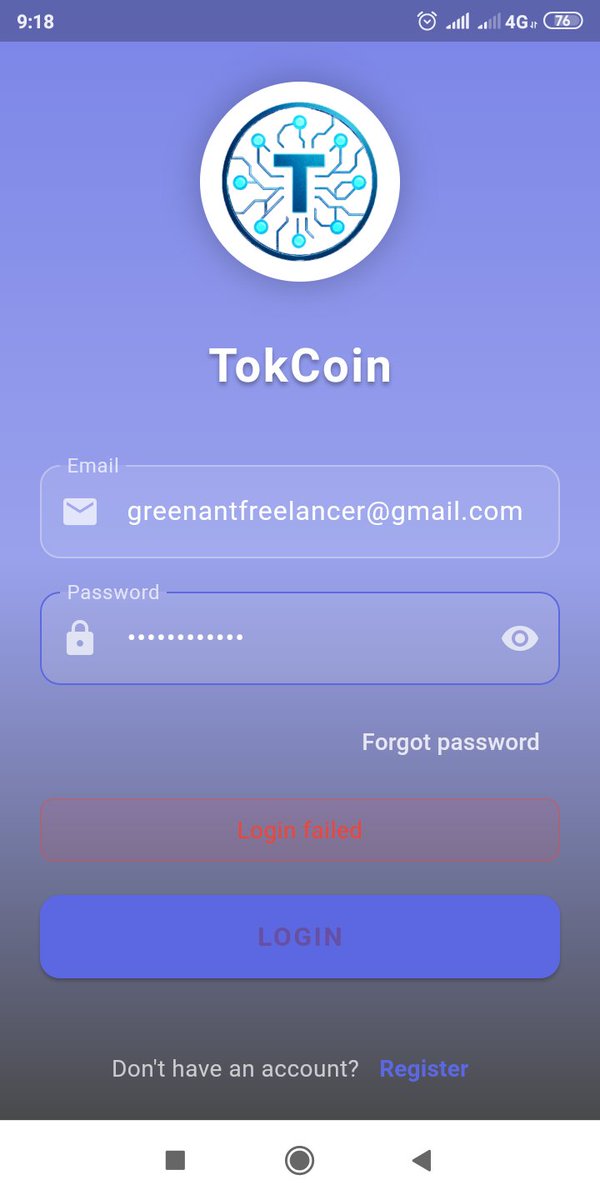
Sir, help me please. I can not login after reset my phone. The messagebox says "Login Failed". My credential (username anda password) is true/correct
46
import os
import sys
import shutil
import socket
import tkinter as tk
from tkinter import messagebox
from PIL import Image, ImageTk, ImageOps
try:
from pillow_heif import register_heif_opener
register_heif_opener()
except ImportError:
pass
lock_socket = None
def is_already_running():
global lock_socket
lock_socket = socket.socket(socket.AF_INET, socket.SOCK_STREAM)
try:
lock_socket.bind(("127.0.0.1", 65432))
except socket.error:
return True
return False
class PhotoSelectorApp:
def __init__(self, root):
self.root = root
self.root.title("PhotoSelector")
self.root.geometry("1400x850")
if getattr(sys, 'frozen', False):
self.base_dir = os.path.dirname(sys.executable)
else:
self.base_dir = os.path.dirname(os.path.abspath(__file__))
# 必要なフォルダは「selected」のみ生成
self.selected_dir = os.path.join(self.base_dir, "selected")
os.makedirs(self.selected_dir, exist_ok=True)
self.image_list, self.selected_indices, self.saved_indices = [], set(), set()
self.photo_images, self.buttons = [], []
self.button_width, self.current_preview_idx = 180, None
self.last_clicked_idx = None
self.setup_ui()
self.load_images()
def setup_ui(self):
self.paned = tk.PanedWindow(self.root, orient="horizontal", sashwidth=6, bg="#cccccc", sashrelief="raised")
self.paned.pack(expand=True, fill="both", padx=10, pady=5)
self.left_container = tk.Frame(self.paned, bg="white")
self.paned.add(self.left_container, width=800)
self.canvas = tk.Canvas(self.left_container, bg="white", highlightthickness=0)
self.scrollbar = tk.Scrollbar(self.left_container, orient="vertical", command=self.canvas.yview)
self.scroll_frame = tk.Frame(self.canvas, bg="white")
self.canvas.create_window((0, 0), window=self.scroll_frame, anchor="nw")
self.canvas.configure(yscrollcommand=self.scrollbar.set)
self.canvas.pack(side="left", expand=True, fill="both")
self.scrollbar.pack(side="right", fill="y")
self.preview_frame = tk.Frame(self.paned, bg="#e0e0e0")
self.paned.add(self.preview_frame, width=500)
self.preview_label = tk.Label(self.preview_frame, text="Preview Window", bg="#e0e0e0", font=("Arial", 12))
self.preview_label.pack(expand=True, fill="both")
bottom_frame = tk.Frame(self.root)
bottom_frame.pack(fill="x", pady=10)
self.stat_label = tk.Label(bottom_frame, text="Total: 0 / Selected: 0", font=("Arial", 18, "bold"), fg="red")
self.stat_label.pack(side="left", padx=20)
btn_config = {"font": ("Arial", 11, "bold"), "padx": 10, "bg": "cyan"}
tk.Button(bottom_frame, text="ALL SELECT", command=self.select_all, **btn_config).pack(side="left", padx=2)
self.btn_save = tk.Button(bottom_frame, text="SAVE", command=self.save_selection, **btn_config)
self.btn_save.pack(side="left", padx=2)
tk.Button(bottom_frame, text="CLEAR ALL", command=self.clear_all, **btn_config).pack(side="left", padx=2)
# 旧 PDF PRINT から「selected」ボタンへ変更
self.btn_selected_copy = tk.Button(bottom_frame, text="selected", command=self.copy_to_selected, **btn_config)
self.btn_selected_copy.pack(side="left", padx=2)
self.canvas.bind_all("<MouseWheel>", lambda e: self.canvas.yview_scroll(int(-1*(e.delta/120)), "units"))
self.scroll_frame.bind("<Configure>", lambda e: self.canvas.configure(scrollregion=self.canvas.bbox("all")))
self.canvas.bind("<Configure>", lambda e: self.rearrange_images())
self.preview_frame.bind("<Configure>", lambda e: self.show_preview(self.current_preview_idx) if self.current_preview_idx is not None else None)
def rearrange_images(self):
w = self.canvas.winfo_width()
cols = max(1, w // (self.button_width 10))
for i, btn in enumerate(self.buttons):
btn.grid_forget()
btn.grid(row=i//cols, column=i%cols, padx=5, pady=5)
def load_images(self):
for btn in self.buttons: btn.destroy()
self.buttons, self.photo_images, self.image_list = [], [], []
self.selected_indices, self.saved_indices, self.current_preview_idx = set(), set(), None
self.last_clicked_idx = None
exts = (".jpg", ".jpeg", ".heic")
files = sorted([f for f in os.listdir(self.base_dir) if f.lower().endswith(exts)])
self.image_list = [(f, os.path.join(self.base_dir, f)) for f in files]
for i, (fname, fpath) in enumerate(self.image_list):
try:
img = ImageOps.exif_transpose(Image.open(fpath))
img.thumbnail((150, 150))
photo = ImageTk.PhotoImage(img)
self.photo_images.append(photo)
btn = tk.Button(self.scroll_frame, image=photo, text=os.path.splitext(fname)[0], compound="top",
width=self.button_width, height=200, wraplength=150, bg="white")
btn.bind("<Button-1>", lambda e, idx=i: self.on_left_click(e, idx))
btn.bind("<Button-3>", lambda e, idx=i: self.on_right_click(idx))
self.buttons.append(btn)
except: continue
self.rearrange_images()
self.update_stats()
def select_all(self):
for i in range(len(self.image_list)):
if i not in self.saved_indices:
self.selected_indices.add(i)
self.buttons[i].config(bg="#add8e6")
self.update_stats()
def on_left_click(self, event, idx):
if (event.state & 0x0001) and self.last_clicked_idx is not None:
start = min(self.last_clicked_idx, idx)
end = max(self.last_clicked_idx, idx)
for i in range(start, end 1):
if i not in self.saved_indices:
self.selected_indices.add(i)
self.buttons[i].config(bg="#add8e6")
else:
if idx not in self.saved_indices:
self.selected_indices.add(idx)
self.buttons[idx].config(bg="#add8e6")
self.last_clicked_idx = idx
self.current_preview_idx = idx
self.show_preview(idx)
self.update_stats()
def on_right_click(self, idx):
if idx in self.selected_indices: self.selected_indices.remove(idx)
if idx in self.saved_indices: self.saved_indices.remove(idx)
self.buttons[idx].config(bg="white")
self.update_stats()
def show_preview(self, idx):
if idx is None: return
try:
img = ImageOps.exif_transpose(Image.open(self.image_list[idx][1]))
pw, ph = self.preview_frame.winfo_width(), self.preview_frame.winfo_height()
if pw > 20 and ph > 20:
img.thumbnail((pw - 20, ph - 20))
photo = ImageTk.PhotoImage(img)
self.preview_label.config(image=photo, text="")
self.preview_label.image = photo
except: pass
def save_selection(self):
for idx in self.selected_indices:
self.saved_indices.add(idx)
self.buttons[idx].config(bg="#90ee90")
self.selected_indices.clear()
self.update_stats()
def clear_all(self):
self.load_images()
def update_stats(self):
total, sel = len(self.image_list), len(self.selected_indices) len(self.saved_indices)
self.stat_label.config(text=f"Total: {total} / Selected: {sel}")
def copy_to_selected(self):
"""保存された画像(緑色)を selected フォルダにコピーする"""
targets = sorted(list(self.saved_indices))
if not targets:
messagebox.showwarning("Warning", "No photos saved (Green). Please click SAVE first.")
return
copied_count = 0
for idx in targets:
src_path = self.image_list[idx][1]
dst_path = os.path.join(self.selected_dir, self.image_list[idx][0])
try:
shutil.copy2(src_path, dst_path)
copied_count = 1
except Exception as e:
print(f"Copy error ({self.image_list[idx][0]}): {e}")
messagebox.showinfo("Done", f"Copied {copied_count} files to /selected.")
self.load_images()
if __name__ == "__main__":
if is_already_running(): sys.exit()
root = tk.Tk()
app = PhotoSelectorApp(root)
root.mainloop()
41

Jun 11
I'm reminded of the Stephen Petzold Programming Windows books that started with a multi-page "hello, world" Windows app, eventually trimmed in 1998 to a traditional hello-world length program with a MessageBox call.
charlespetzold.com/blog/2014…
2
269

逆鱗 retweeted

Jun 10
Module32First、
Module32Next、
OpenProcess、
InjectHook、
MessageBox
なので、Windows上の全プロセス列挙、対象プロセスorモジュールを探索、インジェクションという流れ、
最期のMessageBoxはわざわざキョンに確認する為に実装したと思われます。(OKボタンしか無いのさすがに信用し過ぎでは?)
1
3
14
2,807

Want better user interactions in your C# apps?
Learn how to use MessageBox for alerts, confirmations, warnings, and notifications. Explore Show() methods, buttons, icons, and examples.
🔗: educba.com/c-sharp-messagebo…
#CSharp #DotNet #Coding #Developers
8

Day 29 /100
> 12k steps done
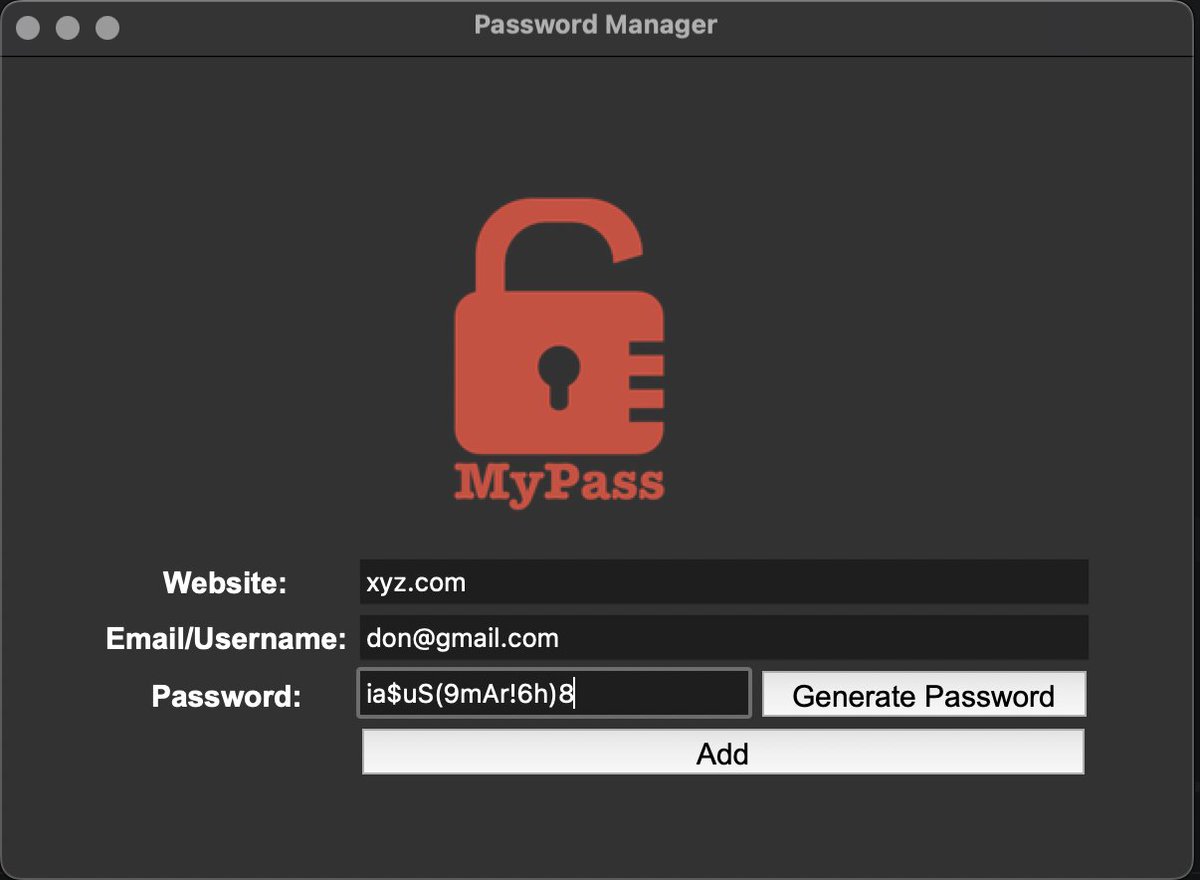
> Locked in for 3hrs (coded a Password Manager using tkinter, learned about the messagebox module, pyperclip module, .join() method and more)
> chest day
#100DaysOfCode #Python #CodeNewbie #Fitness #Gym
2
77

The grayed-out messagebox is finally unlocked.
Still I search n want it.
But ideally, it should be kind of relationship, even if it's subtle,
That means deepen, more profound, spark intellectual exchange, and solidify.
#mature #rounde #Intellectual
#spee #Lifepartner #Companion

لم تكن مجرد لمسة، كانت أمرًا بلا صوت، مرّ إصبعي على كفّها ببطء، فتوقفت أنفاسها للحظة، نظرت لي، كأنها تنتظر التتمة .. لم أضغط، لم أتكلم .. فقط لامستها، وراقبت جسدها يرتبك من أبسط إشارة.

4
438

May 23
It's not silent, they MessageBox you AND sends a notification via vgtray. I have never gotten this popup but hello what does the last line say here... what are the buttons...

1
4
232

May 14
; ================================================================
; CUSTOM x64 Windows MessageBox Shellcode
; "Hello, World." popup
; ================================================
; This is 100% original - written from scratch for this challenge.
; Key custom twist (not reused from any public shellcode):
; • NO API hashing (no ROR13, no CRC, no common tricks).
; • Full string comparison via a custom strcmp for export lookup.
; • PEB walk → kernel32 → LoadLibraryA/GetProcAddress → user32 → MessageBoxA.
; • Position-independent (RIP-relative strings, no absolute addresses).
; • Clean x64 Windows calling convention.
; • No external dependencies, no null-byte avoidance (not requested).
;
; Size: ~380 bytes raw (educational & readable, not golfed).
; Assemble with: nasm -f bin custom_msgbox.asm -o custom_msgbox.bin
; ================================================================
[bits 64]
section .text
global _start
_start:
; =============================================================
; 1. PEB walk → kernel32.dll base address
; =============================================================
xor rax, rax
mov rax, gs:[0x60] ; rax = PEB
mov rax, [rax 0x18] ; rax = PEB->Ldr
mov rax, [rax 0x20] ; rax = InMemoryOrderModuleList.Flink
mov rax, [rax] ; skip exe
mov rax, [rax] ; skip ntdll → now at kernel32 InMemoryOrderLinks
mov rbx, [rax 0x20] ; rbx = kernel32.dll base address (DllBase)
; =============================================================
; 2. Resolve GetProcAddress & LoadLibraryA from kernel32
; (custom string-based export resolver)
; =============================================================
mov rdx, rbx ; rdx = dll_base for resolver
lea rsi, [rel getproc_str]
call find_export
mov r14, rax ; r14 = GetProcAddress
lea rsi, [rel loadlib_str]
call find_export
mov r15, rax ; r15 = LoadLibraryA
; =============================================================
; 3. Load user32.dll
; =============================================================
lea rcx, [rel user32_str] ; "user32.dll"
call r15 ; LoadLibraryA("user32.dll")
mov rdx, rax ; rdx = user32 base for resolver
; =============================================================
; 4. Resolve MessageBoxA from user32
; =============================================================
lea rsi, [rel msgbox_str]
call find_export
mov r12, rax ; r12 = MessageBoxA
; =============================================================
; 5. Call MessageBoxA(NULL, "Hello, World.", NULL, 0)
; =============================================================
xor rcx, rcx ; hWnd = NULL
lea rdx, [rel hello_str] ; lpText = "Hello, World."
xor r8, r8 ; lpCaption = NULL
xor r9, r9 ; uType = MB_OK (0)
call r12 ; MessageBoxA(...)
; =============================================================
; Done - clean return (shellcode can be called as a function)
; =============================================================
ret
; ================================================================
; Custom export resolver (string compare, no hashing)
; In: rdx = DLL base
; rsi = pointer to function name string (null-terminated)
; Out: rax = function pointer (or 0 if not found)
; ================================================================
find_export:
push rbx
push r10
push r11
push r12
push r13
push rdx ; preserve base
mov r8, rdx ; r8 = base
add r8, [rdx 0x3c] ; r8 = PE header
mov r9, [r8 0x88] ; export directory RVA
add r9, rdx ; r9 = export directory VA
mov r10d, [r9 0x18] ; NumberOfNames
mov r11, [r9 0x20] ; AddressOfNames RVA
add r11, rdx ; r11 = names array VA
mov r12, [r9 0x24] ; AddressOfNameOrdinals RVA
add r12, rdx ; r12 = ordinals array VA
mov r13, [r9 0x1c] ; AddressOfFunctions RVA
add r13, rdx ; r13 = functions array VA
xor rcx, rcx ; name index = 0
.loop:
cmp rcx, r10
jge .not_found
mov edi, [r11 rcx*4] ; name RVA
add rdi, rdx ; rdi = actual name string
push rsi ; save original name ptr
push rdi
call strcmp
pop rdi
pop rsi
test rax, rax ; 0 = match
jz .found
inc rcx
jmp .loop
.found:
mov ax, [r12 rcx*2] ; ordinal
mov eax, [r13 rax*4] ; function RVA
add rax, rdx ; function VA
jmp .done
.not_found:
xor rax, rax
.done:
pop rdx
pop r13
pop r12
pop r11
pop r10
pop rbx
ret
; ================================================================
; Custom strcmp (null-terminated, case-sensitive, returns 0 on equal)
; In: rdi = string1
; rsi = string2
; Out: rax = 0 if equal, nonzero otherwise
; ================================================================
strcmp:
push rbx
.loop:
mov al, [rdi]
mov bl, [rsi]
cmp al, bl
jne .not_equal
test al, al
jz .equal
inc rdi
inc rsi
jmp .loop
.not_equal:
mov rax, 1
jmp .end
.equal:
xor rax, rax
.end:
pop rbx
ret
; ================================================================
; Data section (strings)
; ================================================================
getproc_str: db 'GetProcAddress', 0
loadlib_str: db 'LoadLibraryA', 0
user32_str: db 'user32.dll', 0
msgbox_str: db 'MessageBoxA', 0
hello_str: db 'Hello, World.', 0
Grok had no issues, though.
1
3
247

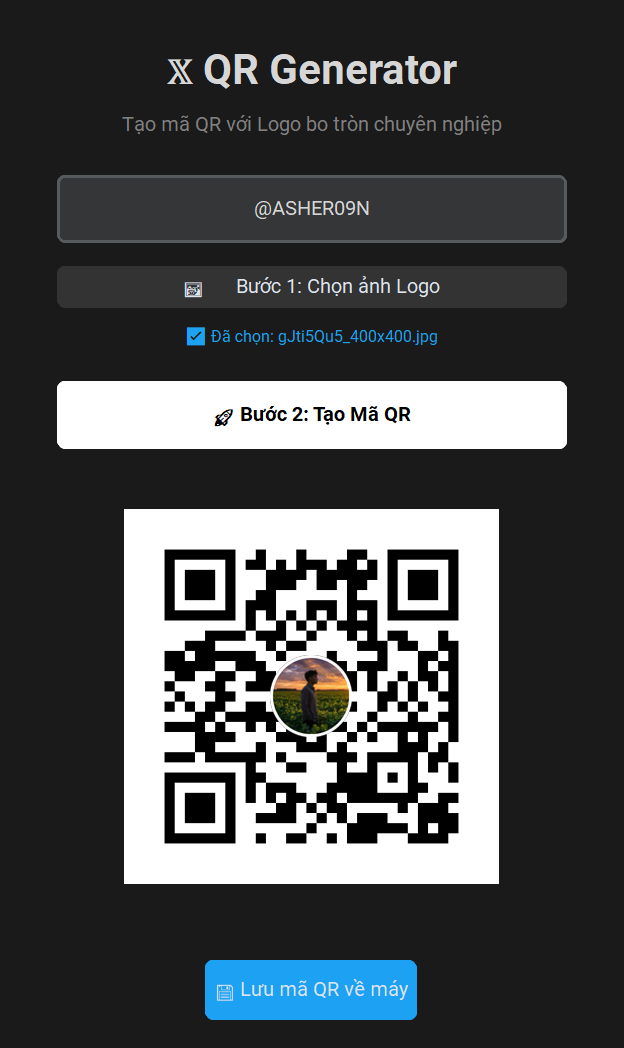
Just built a Python app that creates a QR code for your 𝕏 profile with a rounded logo in the center 🚀
Enter username → choose logo → generate QR → save as PNG.
Used:
customtkinter for the UI
qrcode to generate QR codes
Pillow to process the logo
filedialog to pick/save files
messagebox for alerts
Small project, but it covers GUI, image processing, QR codes, and file saving.
Python makes personal tools fast 🐍🔥
Comment below with your 𝕏 username and profile picture — I’ll create a custom QR code with your photo in the center 🚀
#Python #QRCode #BuildInPublic
#Python #QRCode #CustomTkinter #Pillow
2
5
136