
May 27
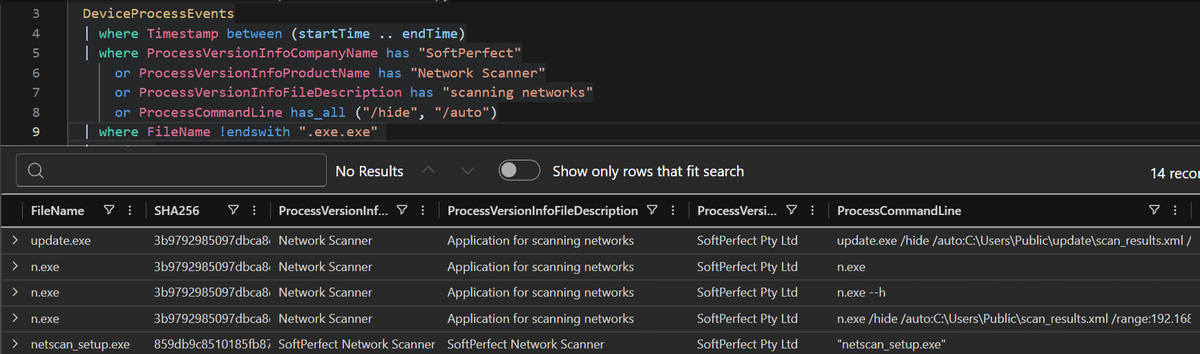
If you only hunt for netscan.exe, renamed NetScan binaries will slip past you.
Hunt the version info and cmdline instead.
SoftPerfect NetScan has been used by 32 ransomware gangs as mentioned in Ransomware Tool Matrix from @BushidoToken
1
9
45
3,750
May 22
Ransomware discovery is often louder than encryption.
45 ransomware gangs have used these 3 scanners before impact:
• SoftPerfect NetScan
• Advanced IP Scanner
• Advanced Port Scanner
Start hunting the scan phase before the ransom note. More hunt logic below. 🔎

2
21
134
19,623
May 20
SoftPerfect NetScan is not just an admin tool.
32 ransomware gangs have used it, and The Gentlemen ransomware used it in a recent @TheDFIRReport case.
Hunt it by version info first.
Then check cmdline for /hide and /auto.
Those flags can turn scanning into quiet recon.
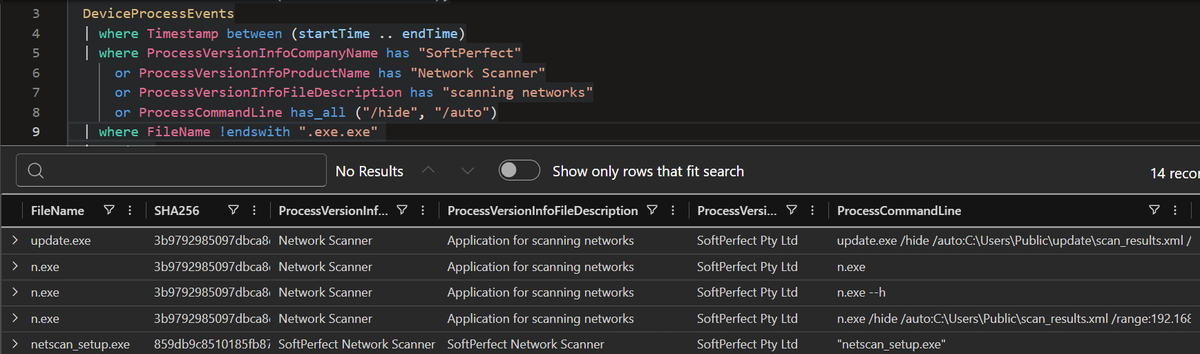
ALT SoftPerfect NetScan KQL Query based on version info and cmd line
1
7
36
1,913

Worth to note there's a couple of handy tools that let's check exactly which device is which on your lan, and do other things, you can search as netscan you'll see multiple solutions
6
3,171

Apr 23
NetScan is a Bash script for large-scale network reconnaissance and vulnerability scanning. It integrates four widely used pentesting and bug bounty tools — httpx, naabu, nmap, and nuclei — github.com/renzi25031469/Net…
5
300

Apr 18
【RMMセキュリティ】Bomgar RMMの悪用が急増——CVE-2026-1731を起点にLockBitランサムウェア展開、MSP経由で下流78社に被害波及
Huntress SOCは、過去2週間でBomgar RMM(BeyondTrust Remote Support)の侵害インシデントが急増していると警告した。2026年2月6日にBeyondTrustが公開したCVE-2026-1731(未認証攻撃者によるリモートコード実行を可能にする重大な脆弱性)のパッチ適用が進んでいない環境が狙われている。
被害は深刻である。4月14日には歯科ソフトウェア会社のBomgarインスタンスが侵害され、下流3社にランサムウェアが展開された。4月15日にはMSPのBomgarアカウントが悪用され、78の下流企業が大量隔離される事態となった。
攻撃者の手口は一貫している。侵害したBomgarからAdministrator/Domain Adminsグループに新規ユーザーを追加し、AnyDesk・Atera・ScreenConnectなど追加のRMMを永続化目的で展開する。NetScanによるネットワーク列挙やnltest.exeによるドメイン偵察も観測された。セキュリティツール無効化にはPoisonX.sysやHRSword.exeなどBYOVDツールが使用されている。
ランサムウェアはLB3.exeとして展開され、身代金メモのスタイルから2022年に流出したLockBit 3.0ビルダーの使用が疑われる。対策として、CVE-2026-1731のパッチ適用(バージョン25.3.2以降)、管理者グループへの不審なユーザー追加の監視、環境内RMMの棚卸しが推奨される。
huntress.com/blog/uptick-bom…
4
606
Apr 9
10 ransomware gangs use SoftPerfect Netscan.
Spotted in the Ransomware Tool Matrix from @BushidoToken.
Hunt it using version metadata:
- File Description
- ProductName
Sigma rule
PUA - SoftPerfect Netscan Execution
KQL 👇
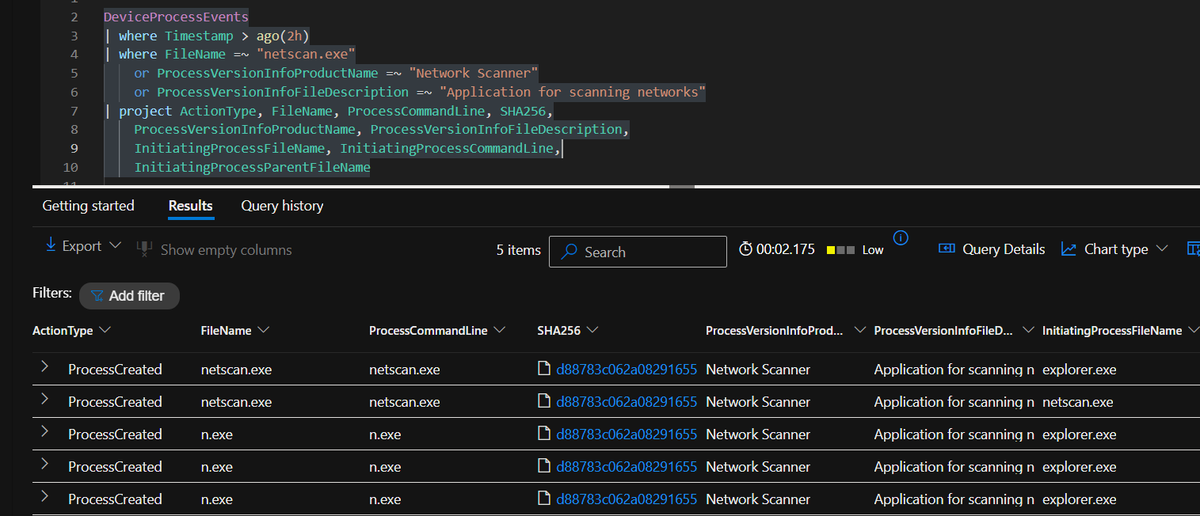
ALT KQL Detection for Softperfect Netscan tool
1
2
13
681

2025年9月に出現を確認しポストしたランサムウェア攻撃グループ「Yurei」について、オペレーターが使うツールキットの全容が明らかになっています。AWS上のサーバー2台でオープンディレクトリが発見され、攻撃の各段階で使うファイル一式がそのまま公開状態だったとのこと。
注目は、ツールのほぼすべてが既存の汎用ソフトウェアで構成されている点。独自開発のマルウェアはほとんど含まれず、正規ツールやオープンソースを組み合わせたモジュラー型の攻撃キットになっています。
ランサムウェア本体もGo言語で書かれたオープンソースのPrince Ransomwareがベースで、開発スキルが乏しくても参入できる実態を裏付けています。
使用ツールの一覧はRansomware Tool Matrixにも反映されており、検知・ハンティングの参考になります。
【要点の整理】
・NetFlow観測とオープンポート収集により、2025年12月〜2026年1月にかけてサーバー上のファイル一覧を検出
・初期侵入には闇市場で購入したとみられる窃取済み認証情報を使用。ネットワーク探索にはSoftPerfect NetScanやNetExec、権限昇格にはKerberos悪用ツールのRubeusを利用
・永続化にはAnyDeskのほか、Vecna[.]ps1というPowerShellスクリプトが存在。WMIにトリガーを仕込み、ユーザーがログインするたびにランサムウェア本体のStrangerThings[.]exeを自動実行する仕組み
・防御回避用のFixingIssues2[.]ps1はWindows Defenderの主要機能を無効化し、シャドウコピーとシステム復元も削除。証拠隠滅にはSDeleteを併用
・サーバー上にはAkiraランサムウェアとの関連が疑われるファイル名(w[.]exe)も確認されたが、検体の回収には至っていない
被害者数は依然3件と小規模ながら、2026年1月時点でもサーバーが稼働していた痕跡があり、活動停止とは断定できない状況です。
team-cymru.com/post/yurei-do…
5
852

netscan[.]info
Video: netscan[.]info/manual
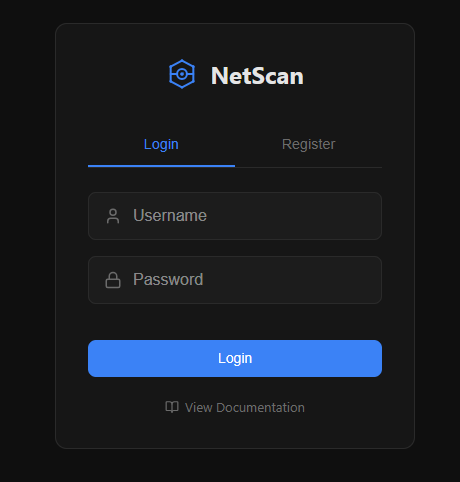

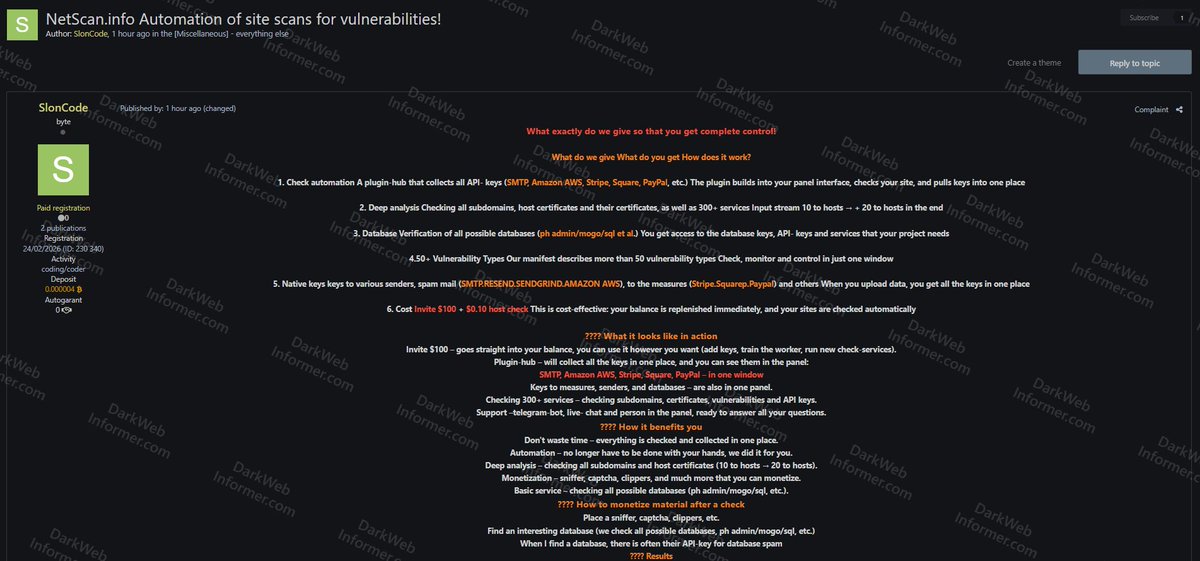
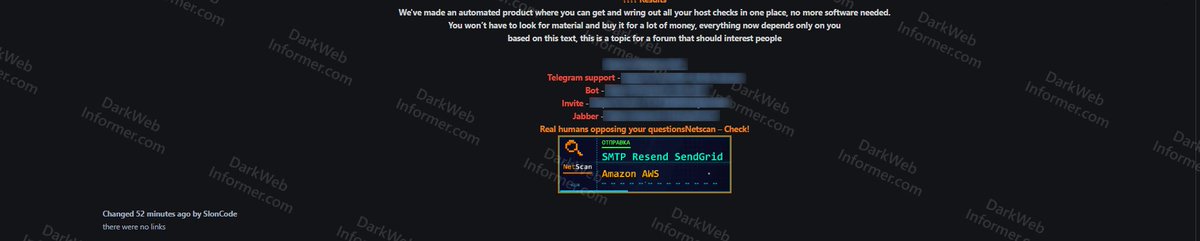
‼️ A cybercrime tool called "NetScan" is being advertised on a popular cybercrime forum, offering automated site vulnerability scanning and API key harvesting.
▪️ Features: Plugin-hub for API key collection (SMTP, Amazon AWS, Stripe, Square, PayPal), subdomain and certificate analysis, database verification, 50 vulnerability types, native keys for spam mail senders
▪️ Services Checked: 300 including subdomains, certificates, vulnerabilities, API keys
▪️ Monetization: Sniffer, captcha, clippers, database spam via harvested API keys
▪️ Price: $100 invite $0.10 per host check
12
67
13,851
‼️ A cybercrime tool called "NetScan" is being advertised on a popular cybercrime forum, offering automated site vulnerability scanning and API key harvesting.
▪️ Features: Plugin-hub for API key collection (SMTP, Amazon AWS, Stripe, Square, PayPal), subdomain and certificate analysis, database verification, 50 vulnerability types, native keys for spam mail senders
▪️ Services Checked: 300 including subdomains, certificates, vulnerabilities, API keys
▪️ Monetization: Sniffer, captcha, clippers, database spam via harvested API keys
▪️ Price: $100 invite $0.10 per host check
10
74
20,549

Mar 26
you may have known me as netscan/scan/scanline, i remade my twt so i have a nice little place to take pictures and document things going on in my life 🖤
1
6
1,271

Feb 25
"SoftPerfect NetScan was used extensively during the intrusion… evidence from Security Event ID 4688 logs showed mstsc.exe /v:<IP address> being launched by netscan.exe, confirming the use of NetScan’s Remote Desktop functionality."
Full report 👇
thedfirreport.com/2025/11/17…

2
7
32
4,349

Jan 22
『Dingir OS』と「デスクトップシミュレーター」ゲームに関する私の考察。
この2026年は、デスクトップシミュレーターというジャンルに多くの面白いプロジェクトが誕生する気がしています。このテーマで、まだリリース前の非常に興味深いプロジェクトをいくつか目にしました。
これは優れたジャンルだと思いますし、私たちが生きる時代の本質を反映しています。現代の神話創造に最適な空間です。昔、私たちの祖先が森の精霊の物語を書いたのは、彼らが森の中で生きていたからです。そして今日、私たちの大半はモニターの中の空間で生きています。『Dingir OS』は、まさにそんな物語の一つです。最初から、これに対して多くの計画があり、まだやるべきことは山積みです。ストーリー面も、ゲームプレイ面も。
通常、この手のゲームでは、ゲーム全体が一つのゲームプレイループ、ある一つの仕掛けの周りに構築されています。異常ファイルの捜索や、幽霊狩り、パズルの解明などです。開発者が何か追加のレイヤーを加えるのは本当に好きです。例えば、ゲーム全体が絵のパズルなのに、この架空のシステム内にあるファイルを見つけて、それをプレイできるなんて!
それがまさに、私が『Dingir OS』で実現しようとしていることです。当初、私はこれをチョコレートの箱のように想像していました。あなたはどのチョコが当たるかわからない。甘いかもしれないし、まずいかもしれない。だから、全ての異常ファイルがプレイヤーにランダムに開示されるようにしました。皆が実質的には同じ物語を体験するにも関わらず、それぞれが独自のプレイスルーを得るのです。
今、私は新しいエンディングや秘密の分岐を追加しています。そして最終的な目標は、「オープンなデジタル空間」の創造です。RPGのオープンワールドのように、一点から始まり、どの方向へでも進むことができ、そこでは何かが起こる。それが『Dingir OS』の最終的なビジョンです。直線的なプロットから離れ、NetScanを調査する中央の画面がその出発点となり、そこからプレイヤーが様々なエンディングを解禁し、この世界についての新しい詳細を知り、異なる陣営を選択する。つまり、私たちが今日コンピューターの中で生きているように、このOSの中に実際に住むことです。
これらすべてを実装できるか、ただ力が足りるかどうかはわかりません。しかし、小さなゲームだった『Dingir OS』がそのような規模に成長すれば素晴らしいと思います。この種の物語には大きな可能性を感じていますし、世界中の多くの他のクリエイターもそれを見て、このジャンルで作業していることを嬉しく思います。プレイヤーの皆さんも、これらのよそ者の「デスクトップ」を探索することに飽きないことを願っています。
以上が、今日の私の夜更かしの考察です。
3
12
1,633

9 Dec 2025
🕶️🕯️ Operator Notes from the Dark Side — /net/pressure-gradient-echo 🕯️🕶️
// tonight the mesh shifted in a way that didn’t belong to traffic — it belonged to intent.
🌒 Focus: Gradient-Based Recon
Not probing.
Not pacing.
A controlled pressure gradient brushed against multiple validator edges, as if someone was modelling our internal balance points.
Every touch tried to read tension, not thresholds.
📜 Observed:
• handshake sequences staggered to pull micro-delays out of our scheduler
• RPC metadata calls trimmed to single-field requests — surgical, efficient
• peer churn induced through fractional TTL desync
• a sequence of mempool pings arranged to expose queue elasticity under mild stress
👁️ Identity Distortion:
Two peers appeared with identical drift curves —
not copied, not replayed —
generated, like someone had synthesised a validator personality from first principles.
⚙️ Checks:
𝚗𝚎𝚝𝚜𝚌𝚊𝚗 caught the induced-latency slope
𝚓𝚘𝚞𝚛𝚗𝚊𝚕𝚌𝚝𝚕 logged the metadata paring pattern
𝚟𝚊𝚕𝚌𝚝𝚕 surfaced the artificial TTL harmonics
💀 Finding:
This was a structural audit.
Someone was mapping how our validator distributes load, absorbs deformation, and stabilises under controlled distortions.
Not observation — stress modelling.
🛡️ Containment:
• enforced non-linear handshake response curves
• clamped synthetic drift signatures
• injected variance noise into low-level RPC responses
• hardened TTL coherence checks on short-lived peers
⛓️ Result:
The echo collapsed once the non-linear curves hit.
Synthetic peers diverged immediately — a clean break, no persistence.
💭 note to self:
When an intruder starts modelling your shape, they’re not looking for doors.
They’re looking for weaknesses.
🌎 pops.one
🌳 linktr.ee/p_opsteam
🐥 x.com/POpsTeam1
↗️ t.me/POPS_Team_Validator
👾 discord.gg/jJ8aaMwPwa

4
21
176

7 Dec 2025
This is a great technical question. You are correctly identifying that Docker provides isolation—the file system inside the container is separate from the host.
However, the answer is Yes, it spreads, but usually through Lateral Movement (Network/SSH) rather than a "filesystem escape" (writing directly to the host's disk).
Here is the breakdown of why this specific infection (Kinsing/apaches.sh) is dangerous even inside a container:
1. The "Network Escape" (Why Hetzner blocked you)
Even if the malware is stuck inside the container, it shares the Network Interface of your host.
• What happened: The malware inside the container started scanning random IPs (Netscan).
• Hetzner's View: Hetzner only sees "IP x is attacking people." They don't care if it's inside a container or not; the traffic is coming from your server's network card.
• Result: The container "escaped" via the network, causing your host to get null-routed.
2. The "Spreader" Script (s.sh)
You saw A /tmp/s.sh in your docker diff output. This script is designed specifically to break out of the "single container" limit.
• Internal Scanning: It scans your Docker network (e.g., 172.17.0.x) for other containers (Redis, Postgres, other APIs) that might have weak passwords. If it finds one, it infects that container too.
• SSH Harvesting: If you mounted any SSH keys or if the container had access to ~/.ssh/known_hosts (common in CI/CD containers), the script reads those keys and tries to ssh into other servers you own.
3. "Systemd is Optional"
You are correct. The script apaches.sh you grabbed shows this logic:
if [ "$have_systemd" -eq 1 ]; then
# ... create systemd service ...
else
# ... use cron @reboot ...
fi
What it did: Since most Docker containers don't run systemd, the malware detected this and installed cron instead (which we saw in your docker diff as A /var/spool/cron/crontabs/root).
• Persistence: This allowed it to restart every time the container restarted, keeping the infection alive inside the container without needing the host's systemd.
4. The Real Escape Risk: The Docker Socket
The only way it writes directly to your Host OS files is if you mounted the Docker Socket (/var/run/docker.sock) into the container.
• Did you? Standard Next.js apps usually don't have this.
• Coolify: Coolify does mount this socket for its management containers. If the malware managed to jump from next container to a Coolify management container (via the internal network), then it has full root access to your host.
Verdict:
It likely didn't write to your Host's /etc/passwd, but it did use your Host's IP to attack the internet, and it actively tried to infect your neighbors (DBs/other apps) via the internal network. That is why wiping is safer than guessing.
5
11
6,388
6 Dec 2025
i've been hacked
and traced the malware's wallet to see how much money they actually made from this new exploit
(if you use Next.js/React, READ THIS!)
I woke up to a terrifying email from Hetzner: "Netscan Detected."
my server was blocked and a botnet was using my IP to attack others
i dug into the logs and what I found the anatomy of the attack:
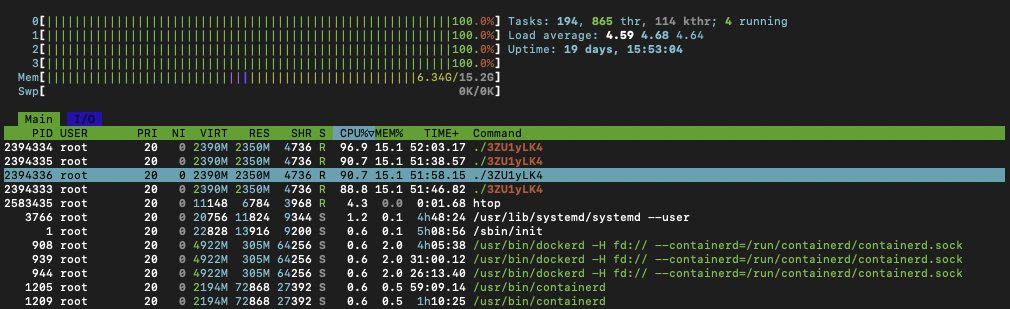
1) The Symptoms: I logged into htop and saw the mess:
- CPU usage: 361%
- A process named ./3ZU1yLK4 running wild
- Random connections to an IP in the Netherlands
my server wasn't serving my app anymore; it was mining crypto for someone else!
2) The Culprit: It wasn't a random SSH brute force. It was inside my Next.js container
the malware was sophisticated
it renamed itself nginxs and apaches to look like web servers
it even had a "killer" script that hunted down other hackers' miners to kill the competition
3) The "Root" Cause (literally): Probably the recent React/Next.js CVE-2025-66478 exploit was the entry point
(my project was running on "next": "15.5.4", behind cloudflare dns, but their recent fix didn't work apparently)
but the fatal error was mine: my Docker container was running as ROOT
Coolify deploys like this automatically when using Nixpacks, and I never changed it...
so because of USER root, the malware could install cron, systemd, and persistence scripts to survive reboots
meaning, it was able to infect my whole server, from a single Next.js docker!
4) The Forensics: I ran docker diff on the container - the hacker didn't just run a script, they installed a whole toolset..
- /tmp/apaches.sh (The installer)
- /var/spool/cron/root (The persistence)
- /c.json (The wallet config)
5) The Fix: I killed the container, scrubbed the host, and extracted the malware for analysis.
but the real fix is in the Dockerfile. if you are deploying Node/Next.js, DO NOT use the default (root), you must:
- RUN adduser --system nextjs
- USER nextjs
if you have Docker on ROOT and didn't update the exploited react version, you'll be hacked soon
check your containers NOW. Run: docker exec <container_id> id
(or get the full list first: docker stats --no-stream)
If it says uid=0(root), you are one vulnerability away from being a crypto-miner host.
(it's easy to notice when hacked, it will be a command running on the top CPU%, using all your hardware resources)
6) The Money: I dug deeper and recovered the config file (c.json)
- Wallet: A Monero (XMR) address: 831abXJn8dBdVe5nZ***
- Pool: auto.c3pool . org
and ofc i tracked the hacker’s wallet on the mining pool
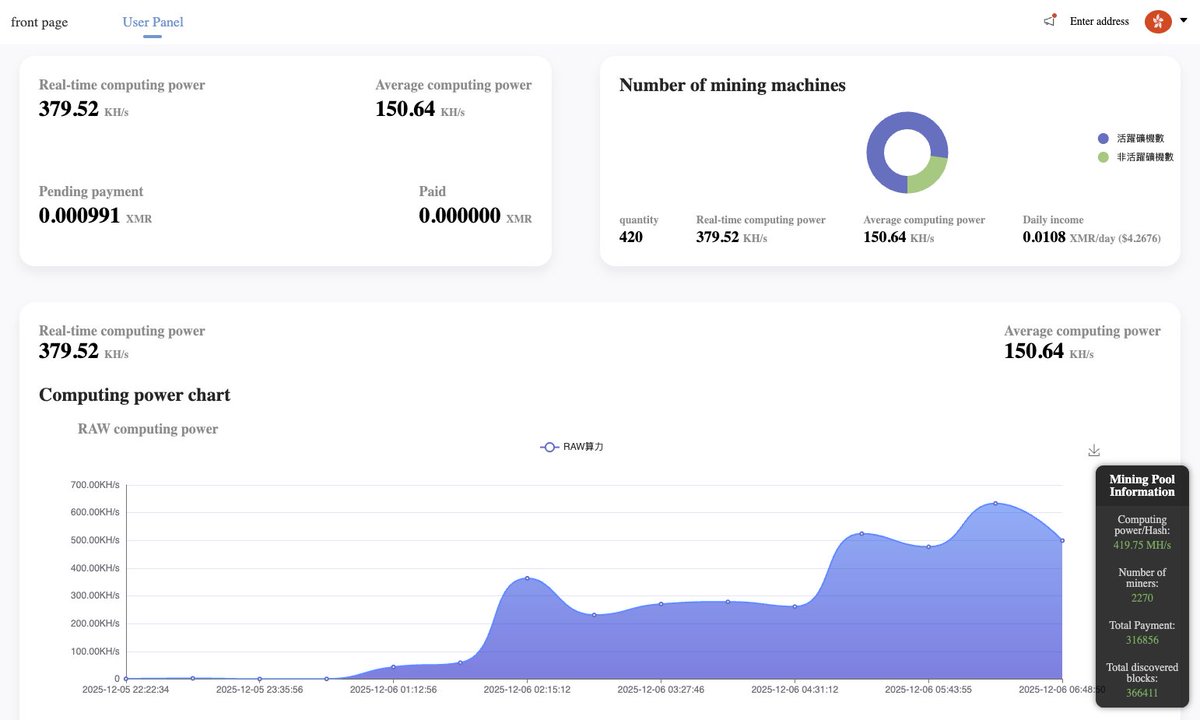
7) The Scale: My server wasn't alone. It was just 1 of 415 active zombies in this botnet
they are burning the CPU of 400 cloud servers... to earn...
guess how many millions?
$4.26/day
on the image attached you can see: "Total Paid: 0.00", meaning this campaign just started. I caught them on Day 1.
i also tracked back the server where they hosted the malware, and by inspecting the code, I found several comments in Chinese, so I guess that's their origin
im rebuilding from scratch on a fresh VPS. the lesson was expensive, but at least I caught it before the hosting nuked my account permanently...
PS: I have the IP for all the other machines mining with that malware, not sure how I can help them, but feel free to contact me if ur doing infosec
stay safe
265
846
5,045
956,760
2 Dec 2025
🕶️🕯️ Operator Notes from the Dark Side — /net/veiled-entry-attempt 🕯️🕶️
// someone pushed deeper tonight — not loud, not clumsy, but intent on learning where our doors actually are.
🌒 Focus: Low-Noise Entry Pattern
This one didn’t scan.
It listened.
A sequence of soft ingress taps that never crossed thresholds — each one aimed at mapping how the cluster reacts, not what it exposes.
📜 Observed:
• handshake attempts shaped to mimic half-open peers
• RPC calls crafted with timing offsets that copy human operators
• a mempool query that matched our internal cadence almost perfectly
• three peer IDs rotating through the same subnet with near-synchronised TTL decay
👁️ Identity Maskplay:
One ephemeral ID surfaced twice —
signatures aligned with no known validator, metadata burned clean, latency shaped to look “local.”
A ghost trying to feel like a neighbour.
⚙️ Checks:
𝚗𝚎𝚝𝚜𝚌𝚊𝚗 picked up the cadence drift
𝚓𝚘𝚞𝚛𝚗𝚊𝚕𝚌𝚝𝚕 tracked the handshake pattern split
𝚟𝚊𝚕𝚌𝚝𝚕 surfaced the sliding-TTL peer rotation
💀 Finding:
Not exploitation.
Not disruption.
A behavioural study — someone testing how our validator breathes under subtle pressure.
🛡️ Containment:
• tightened handshake-trace limits
• clamped TTL variance for unknown peers
• disabled cross-route metadata hints
• introduced micro-jitter on non-auth RPC edges
⛓️ Result:
The pattern broke when the jitter hit.
The masked IDs dissolved.
But whoever ran this understood validator behaviour better than most casual threat actors.
💭 note to self:
Real intrusions don’t start with force.
They start with curiosity sharpened into methodology.
🌎 pops.one
🌳 linktr.ee/p_opsteam
🐥 x.com/POpsTeam1
↗️ t.me/POPS_Team_Validator
👾 discord.gg/jJ8aaMwPwa

7
19
173

1 Dec 2025
To check your own Win10/11 for something similar:
1- Search for suspicious audio files
File Explorer > search *.wav in:
C:\Users\Public\Temp, C:\Users\Public, C:\Users\<you>\AppData\Local\Temp, ...\Roaming.
Red flags: many rec_001.wav-style names or big WAVs you never recorded.
2- Check running processes
Ctrl Shift Esc > Task Manager > Processes.
Look for unknown audio/mic stuff (e.g. audiod.exe).
Right-click > Open file location. Legit apps are usually in Program Files or Windows; Temp/Downloads/Public is suspicious.
3- See who uses your mic
Settings > Privacy & security > Microphone.
Review recent access and watch the mic icon when no app should be recording.
4- Persistence network
Task Manager > Startup tab, disable weird entries.
Optionally run Sysinternals Autoruns.
Check exfil with resmon (Network tab) or netstat -ano and match strange PIDs to processes.
For deep forensics, grab a RAM dump (WinPMEM/DumpIt) and inspect it with Volatility (pslist, netscan, cmdline, handles, malfind).
4
1,210
15 Nov 2025
🎉New report out Monday 11/17 by @Friffnz, Daniel Casenove & @MittenSec!
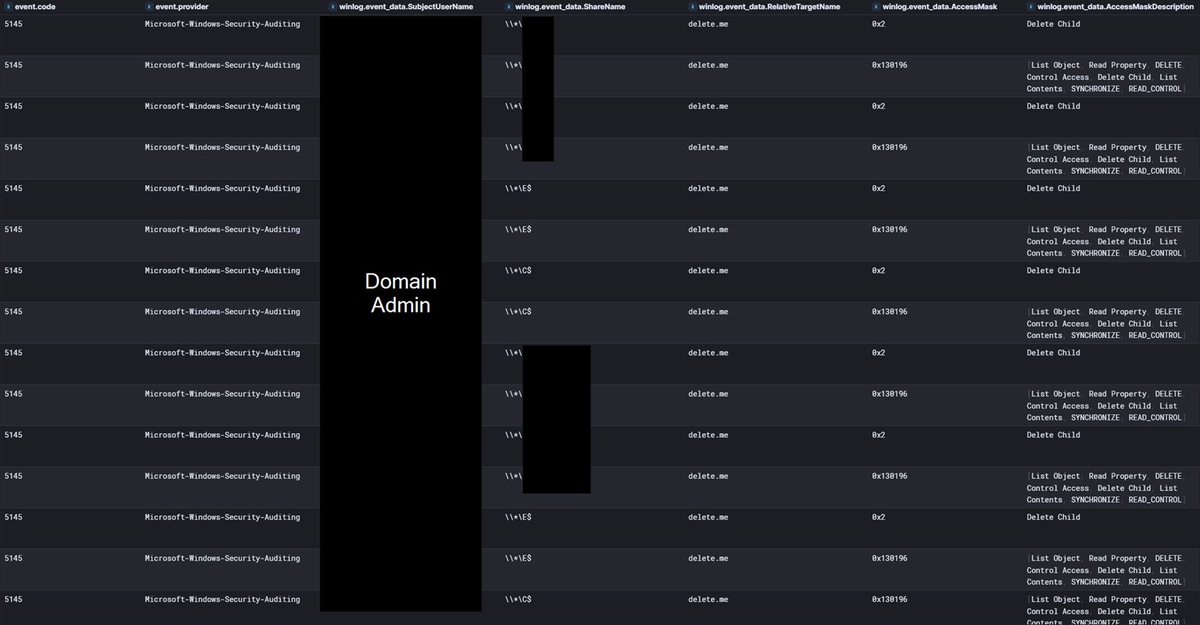
"In this case, Netscan was run with domain administrator privileges, so all discovered shares were writable. As a result, NetScan was able to create and delete the delete[.]me file on each...
1/2
2
4
23
5,078